
 Member
 foursixnine
Merge two git repositories
I just followed this medium post, but long story short:
Check out the origin/master branch and make sure my local master, is equal to origin, then push it to my fork (I seldomly do git pull on master).
 git fetch origin
 git checkout master
 git reset --hard origin/master
 git push foursixnine
I needed to add the remote that belongs to a complete different repository:
 git remote add acarvajal gitlab@myhost:acarvajal/openqa-monitoring.git
 git fetch acarvajal
 git checkout -b merge-monitoring
 git merge acarvajal/master --allow-unrelated-histories
Tadam! my changes are there!
Since I want everything inside a specific directory:
 mkdir openqa/monitoring
 git mv ${allmyfiles} openqa/monitoring/
Since the unrelated repository had a README.md file, I need to make sure that both of them make it into the cut, the one from my original repo, and the other from the new unrelated repo:
Following command means: checkout README.md from acarvajal/master.
 git checkout acarvajal/master --  README.md
 git mv README.md openqa/monitoring/
Following command means: checkout README.md from origin/master.
git checkout origin/master -- README.md
Commit changes, push to my fork and open pull request :)
 git commit
 git push foursixnine

Mapping Open Source Governance Models
The project is up on GitHub right now. For each project there is a YAML file collecting data such as project name, founding date, links to web sites, governance documents, statistics, or maintainer lists. It's interesting to look into the different implementations of governance there. There is a lot of good material, especially if you look at the mature and well-established foundations such as The Apache Foundation or the Eclipse Foundation. I'm also looking into syncing with some other sources which have similar data such as Choose A Foundation or Wikidata.
The web site is minimalistic now. We'll have to see for what proves to be useful and adapt it to serve these needs. Having access to the data of different projects is useful but maybe it also would be useful to have a list of code of conducts, a comparison of organisation types, or other overview pages.

If you would like to contribute some data about the governance on an open source project which is not listed there or you have more details about one which is already listed please don't hesitate to contribute. Create a pull request or an open an issue and I'll get the information added.
This is a nice small fun project. SUSE Hack Week gives me a bit of time to work on it. If you would like to join, please get in touch.
Problemas con Firefox y la swap
Durante semanas noté que el equipo se ralentizaba mucho al momento de que usaba Firefox en sitios como Facebook o TweetDeck. Aunque de entrada sé que esas páginas consumen mucho CPU, lo que más me extrañaba era el considerable lentitud por uso de SWAP (algo que no me pasa en MacOS porque: SSD  ).
).
Buscando alguna explicación en los foros, me topé con dos soluciones que me parecieron muy buenas:
1.- Mandar el caché de Firefox a la RAM. Esto hace que Firefox use la memoria principal para alojar el caché, lo que ahorra llamados al disco duro (uso un «viejito» SATA).
2.- Indicarle a Linux que use preferentemente la memoria principal y no el intercambio. Si tienes más de 8GB de RAM, pues ¡aprovéchalos completamente! Así evitamos que se use ese espacio de disco duro destinado a la SWAP.
Desde que apliqué estos cambios he notado que el rendimiento del equipo ha mejorado y no he notado periodos de cuelgue al usar el navegador… aunque lo siguiente que tengo en mente será comprar un SSD para Linux .
Port Forwarding with systemd
Using Port Forwarding with xinetd has served me well at many occasions. As time proceeds, new technologies show up that allow for similar functionality and others are deprecated. When reading about the obsoletion of xinetd in SLES15, I wondered if you could do the port forwarding also with systemd instead of xinetd.
To accomplish the same port forwarding like in Port Forwarding with xinetd you can proceed as follows.
With systemd, the procedure is twofold. First you have to create a socket that listens on a stream. The second part is to start a proxy service that connects to a remote port. Both are connected by means of their respective name
/etc/systemd/system/http-switch.socket
/etc/systemd/system/http-switch.service
Just sticking with the previous example, let me use the following:
- the private has the IP address range 192.168.10.0/24
- the switch is configured with 192.168.10.254 and its management port is 80
- the jump host with access to both networks has the external address 10.10.10.1
- use port 81 to access the switch over the jump host
The first thing we need is a .socket file:
# cat /etc/systemd/system/http-switch.socket
[Socket]
ListenStream=10.10.10.1:81

[Install]
WantedBy=sockets.target
This socket must be connected to a proxy by means of the service name:
# cat /etc/systemd/system/http-switch.service
[Unit]
Description=Remote Switch redirect
Requires=network.target
After=network.target

[Service]
ExecStart=/usr/lib/systemd/systemd-socket-proxyd 192.168.10.254:80

[Install]
WantedBy=multi-user.target
After adding these files, the service can be enabled and started with the following commands:
systemctl enable http-switch.socket
systemctl enable http-switch.service
systemctl start http-switch.socket
systemctl start http-switch.service
The previous example is just a very basic one. Especially with the socket file, there is lots and lots of parameters and options available. For more information, see
man 5 systemd.socket
man 5 systemd.service
Dual head? Dual seat! Two users at one computer at the same time!
Dual Head, Multi-monitor
If you have two monitors attached to your computer then the setup is called dual head, the generic term for any number of monitors is multi-monitor.
This setup useful if a single monitor is not enough to show all needed windows at one. I use this setup for development where on the primary screen I have an editor or IDE running and on the second I have IRC chat, documentation, running virtual machines, etc… so I do not need to switch windows to see them.
But in this setup both monitors can used only one person at the same time.
Dual Seat or Multi Seat
If you have two monitors what about attaching one more keyboard and mouse and “split” the computer in half and have independent sessions for each user? That setup is called dual seat or multi seat in general.
Linux is a multi user systems from the very beginning. But normally these users either work remotely or they simply share one seat and need to cooperate who will use the computer when.
Hardware
For this multi seat solution you need a separate graphics adapter for each seat. Fortunately to to save some money you can combine discrete graphics cards with an integrated one. In my case I used an integrated Intel graphics adapter and a discrete AMD Radeon card.
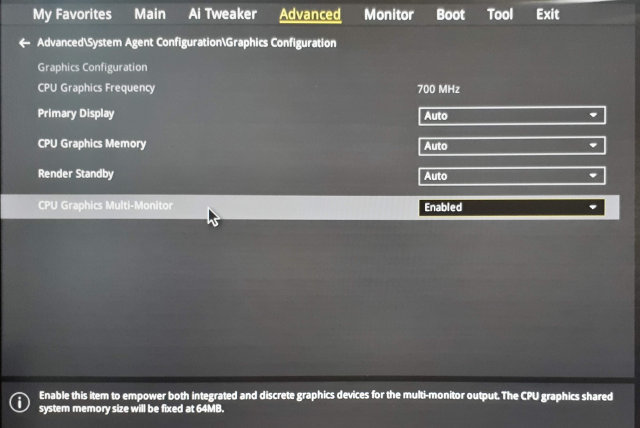
If you use an integrated card you might need to enable the multi graphics support in BIOS because usually when a discrete graphics card is found the integrated one is disabled. In my case I had to enable the Multi-Monitor option in the BIOS:
Linux
I wanted to configure a multi seat already in the past, but it was really complicated. I would have to tweak the X.org config manually and there were lots of hacks.
But actually it turned out that using a modern Linux distribution like openSUSE Leap 15.0 makes this very easy!
Using the loginctl Tool
As in almost all modern Linux distributions also in the openSUSE Leap 15.0 the console is managed by the systemd login manager. To interact with it from the command line you can use a tool called loginctl.
It can handle the sessions, seats and users. Let’s see which seats are defined by default:
# loginctl list-seats
SEAT
seat0

1 seats listed.
Now we can list all hardware devices assigned to that seat:
# loginctl seat-status seat0
seat0
        Sessions: *5
         Devices:
                  ├─/sys/devices/LNXSYSTM:00/LNXPWRBN:00/input/input1
                  │ input:input1 "Power Button"
                  ├─/sys/devices/LNXSYSTM:00/LNXSYBUS:00/PNP0A08:00/LNXVIDEO:00/input/input2
                  │ input:input2 "Video Bus"
                  ├─/sys/devices/LNXSYSTM:00/LNXSYBUS:00/PNP0C0C:00/input/input0
                  │ input:input0 "Power Button"
                  ├─/sys/devices/pci0000:00/0000:00:01.0/0000:01:00.0/drm/card0
                  │ [MASTER] drm:card0
                  │ ├─/sys/devices/pci0000:00/0000:00:01.0/0000:01:00.0/drm/card0/card0-DP-1
                  │ │ [MASTER] drm:card0-DP-1
                  │ ├─/sys/devices/pci0000:00/0000:00:01.0/0000:01:00.0/drm/card0/card0-DVI-D-1
                  │ │ [MASTER] drm:card0-DVI-D-1
                  │ └─/sys/devices/pci0000:00/0000:00:01.0/0000:01:00.0/drm/card0/card0-HDMI-A-3
                  │   [MASTER] drm:card0-HDMI-A-3
                  ├─/sys/devices/pci0000:00/0000:00:01.0/0000:01:00.0/drm/renderD128
                  │ drm:renderD128
                  ├─/sys/devices/pci0000:00/0000:00:01.0/0000:01:00.0/graphics/fb0
                  │ [MASTER] graphics:fb0 "amdgpudrmfb"
...
Obviously all are devices are assigned to the only seat defined in the system.
Creating a New Seat
Persistence
The configuration is persistent, the attached devices are remembered and automatically set after reboot. You do not need to assign the devices after each reboot.
Drawback
There is one drawback of enabling the multi seat feature - the multi head setup does not work anymore. :worried:
To make it work back you would have to reconnect the monitors back to the same card and move the assigned devices back to the original seat. That’s quite annoying but you could possibly automate the monitor connection by and automatic HDMI switch if you use HDMI (or DVI) for connecting the monitors.
The Use Case: Minecraft! :smiley:
To avoid arguing who will play Minecraft right now you can simply enable running two Minecrafts in separate sessions!
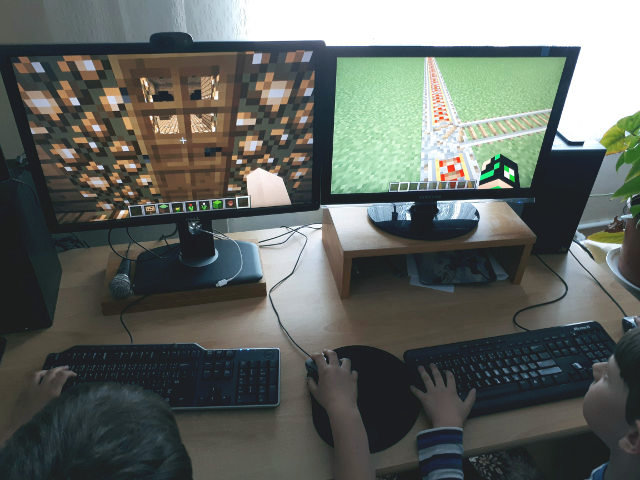
It’s not obvious from the picture, but there is only one computer below the table!
openSUSE Asia Summit 2018, hmm Bismillah !

Sumber : https://www.facebook.com/opensuse.indonesia/?ref=br_rs
Awal Cerita
jadi ceritanya dulu itu saya masih anak bawang banget, lulus sekolah di Manaratul Islam dan pondok pesantren di Miftahul Ulum. coba keberuntungan saya SNMPTN dan Alhamdulillah Allah mengizinkan saya untuk kuliah di salah satu kampus di Surakarta yaitu Universitas Sebelas Maret dengan Jurusan Pendidikan Teknik Informatika dan Komputer di FKIP. Setelah masuk kampus saya yang anak aliyah ini gak ngerti apa – apa, beneran dah wkwkkw, ilmu ala kadarnya, pokoknya semuanya dibawah rata -rata yang lain. Kemudian setelah saya masih sedikit belajar di Solo saya mulai mengenal banyak sistem operasi, salah satu yang menjadi pusat perhatian saya ialah Linux.
Waktu itu sekitar tahun 2016, saya liat postingan teman saya, dia lagi ikut acara openSUSE Asia Summit 2016 di jogja, saya pikir “anjir keren dh”, saya mau ikut tapi ternyata tiket udah abis dan saya juga lagi kere. Disitulah saya berkenalan dengan distro linux yang berlogo bunglon ini, dan anehnya saya tertarik karena logo si bunglon ini wkwkwkw.
Memberanikan diri
Nah disini, saya yang gak kenal siapa – siapa sama sekali dan gak tau apa – apa, mulai coba memberanikan diri saya dengan mencoba “sok kenal”. Saya kadang punya prinsip “Kalo lu mau jadi orang besar ya jadi orang kecil dulu, semua butuh proses”. Singkat cerita saya mencoba iseng membeli buku fundamental linux berbasis openSUSE dari PT Excellent yang ditulis sama Bang Nugi, saya sempet chat si pelapak yaitu pak Bos Vavai, dan saya belum tau ternyata pak Vavai adalah pemilik dari PT Excellent itu sendiri, berhubung di kuliah saya akan ada mata kuliah Praktek Industri saya coba tanya ke Pak Vavai, apakah nerima mahasiswa magang disana. Terus saya coba beli majalah sama Pak Kukuh dan saya ambil langsung di menara Jamsostek dan disana saya ketemu sama Pak Edwin. Terus ikut acara openSUSE Indonesia jalan – jalan ke Bursa Efek Indonesia, ikut menjadi penjaga stand LibreOffice Indonesia di acara LibreOffice Conference Indonesia sama Pak Sokibi dan juga menjadi translator si bunglon ini pun saya hanya memberanikan diri.
Saya memberikan apresiasi yang sangat besar pada Pak Edwin, Pak Kukuh dan Pak Estu yang selalu memberikan semangat untuk anak muda di Indonesia supaya ikut event internasional dan kita dituntut jangan takut akan kegagalan kalau belum dicoba.
Singkat cerita ketika saya magang di Excellent saya sungguh senang liat teman saya, Dhenandi diterima sebagai pembicara di acara openSUSE Asia Summit 2017 di Jepang. WOW! saya pun iri wkwkwkw, secara saya seumuran sama dia, masa saya kalah. Setelah saya mendengar kabar bahwa openSUSE Asia Summit selanjutnya akan diadakan di Taiwan, saya pun bergegas membuat Paper! dengan judul “Build your cloud file hosting using Nextcluod on openSUSE Leap 15.0” dan Alhamdulillah paper saya diterimaa !!!
Permasalahan yang saya hadapi berikutnya adalah
- Paspor
- Visa
- Bahasa
tapi saya sadar semua itu bisa saya lewati dengan usaha dan kerja keras ! intinya coba dulu sebelum ngomong, jangan ngomong doang tapi gak ada bukti ! :p

Browsing with HTTP Referer and Data Protection
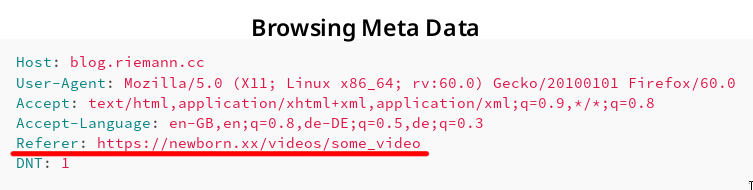
Screenshot showing HTTP referer.
Consider a web page with URL α on web server A containing a link to a web page with URL β on web server B. If a web page visitor clicks on the link to β, many browsers send along with the request to server B for the web page β the referring webpage α. This information is sent in form of a HTTP request header.
Example Request with Referer Header
To illustrate this behaviour, let us assume you browse e.g. an adult-content web page β called https://newborn.xx/videos/some_video and click on a link to α that is https://blog.riemann.cc/digitalisation/2018/06/27/http-referer-and-data-protection/. Then, the HTTP request generated by your browser to download and display the webpage may contain the following fields:
Host: blog.riemann.cc
User-Agent: Mozilla/5.0 (X11; Linux x86_64; rv:60.0) Gecko/20100101 Firefox/60.0
Accept: text/html,application/xhtml+xml,application/xml;q=0.9,*/*;q=0.8
Accept-Language: en-GB,en;q=0.8,de-DE;q=0.5,de;q=0.3
Referer: https://newborn.xx/videos/some_video
DNT: 1
- Host
- A web server may serve more than one website. Hence, a host must be given to specify the requested webpage β.
- User-Agent
- The request contains information on the employed browser. Some servers may respond with a different, simplified webpage for e.g. outdated browsers.
- Accept
- The request contains information on response formats the browser could understand and display.
- Accept-Language
- The request contains information on the preferred languages of the response. This setting reflects the language setting of the browser or operating system.
- Referer [sic]
- It is actually a spelling mistake of the word referrer. The referring web page containing the link is provided.
- DNT (do not track)
- Modern browsers notify the web servers if the visitor wishes to not be tracked.
Impact on Privacy
If the request for β to the web server B contains the Referer field, then B learns which web page the visitor has visited before, i.e. https://newborn.xx/videos/some_video in the example above. Furthermore, B learns that this referring web page contains the link to β.
The impact on the visitor privacy is mentioned in the standard RFC 7231 Section 5.5.2:
The Referer field has the potential to reveal information about the request context or browsing history of the user, which is a privacy concern if the referring resource’s identifier reveals personal information (such as an account name) or a resource that is supposed to be confidential (such as behind a firewall or internal to a secured service). Most general-purpose user agents do not send the Referer header field when the referring resource is a local “file” or “data” URI. A user agent MUST NOT send a Referer header field in an unsecured HTTP request if the referring page was received with a secure protocol.
Also the documentation portal of Firefox has a notice on its web page to the Referer field.
The Referer header has the potential to reveal information about the browsing history of the user, which is a privacy concern.
According to the recommendation of the RFC standard, Firefox does not send a Referer field when:
- the referring resource is a local “file” or “data” URI,
- an unsecured HTTP request is used and the referring page was received with a secure protocol (HTTPS).
That means, if e.g. https://newborn.xx/videos/some_video contains a link to another HTTPS web page, the Referer field is sent.
Good Data Protection Practice
Not all, if not most, visitors do not understand that their browser sends a Referer field revealing a small part of their browsing history. In consequence, those visitors cannot give an informed consent. I remember how I installed my browser to identify a potential contractual legal basis.
My Linux operating system comes with Firefox pre-installed. During the installation of Linux, I confirm varying free software licenses that are all somewhat compatible to each other in one go (one click).
Firefox is provided under the terms of the Mozilla Public License. It contains an explicit Disclaimer of Warranty.
Covered Software is provided under this License on an “as is” basis, without warranty of any kind, either expressed, implied, or statutory, including, without limitation, warranties that the Covered Software is free of defects, merchantable, fit for a particular purpose or non-infringing. The entire risk as to the quality and performance of the Covered Software is with You. Should any Covered Software prove defective in any respect, You (not any Contributor) assume the cost of any necessary servicing, repair, or correction. […]
It is yet to be answered if a) the referer information constitutes personal data and b) the sharing of it (potentially among different parties on different continents) is covered on the basis of the browser license.
Independently of the answer, I think a much better practice would be to allow visitors to switch this sharing by their browser on and off. From a data minimisation point of view, no sharing should occur by default.
Interestingly, a bug has been filed in 2013 already:
(Regression) Data leak: HTTP-Referer sent when it should not be sent
This bug makes though a different assumption on when a Referer field should be sent. Consequently, I created a new bug report:
Data leak: HTTP-Referer sent without consent
Let us see what happens. :blush:
Update (2018-06-28)
While we wait for a comfortable user interface to disable the referer field, one can change the configuration of Firefox manually. I found the solution at a Mozilla Support page.
- In a new tab, type or paste
about:configin the address bar and press Enter/Return. Click the button promising to be careful. - In the search box above the list, type or paste
refererand pause while the list is filtered - Double-click the
network.http.referer.XOriginPolicypreference and enter the desired value:
| Value | Policy |
|---|---|
| 0 | no restrictions (default) |
| 1 | base domain must match (send from a.example.com to b.example.com) |
| 2 | full host name must match (only b.example.com to b.example.com) |
Seven Lessons of Open Source Governance
Be conscious about governance, not formal
Governance is important. Your project does have a governance model even if you don't think about it or if you don't write down the rules. It governs how your project will work and how people will be able to collaborate. It will also define a big part of your culture. You don't want to leave these things to chance. So be conscious about governance.That doesn't mean that you have to write rules and policies for everything. Often a healthy culture where people learn by following the example of the leaders and other members of the community works well. It might be tempting to create a formal structure to cover all kind of possible scenarios. But creating and maintaining policies is an expensive process. Don't be formal where you are not sure it's needed.
Spell out the fundamentals
There are some non-negotiables which have to be spelled out and written down. The license is the most important one for an open source project. You also might want to spell out some other aspects which define your culture such as values of your community or a code of conduct.Learn from others
There is a huge number of open source projects out there. They cover many different use cases, types of technology, and flavors of community. Learn from them. Most things have already been invented.Don't create foundations
You will know when to ignore this advice but generally don't create foundations. It's a lot of effort and needs ongoing work to keep up with the responsibilities and obligations you create by that.There is a number of umbrella organizations your project can join. This gives most of the benefits of having an own organization such as being able to handle money but with much less work.
Beware of growth
Different stages of an open source project need different types of governance. Growth will change the dynamics of your project. Be conscious and watch out for changes in the project which require changes in the governance.Also think about if you want to have growth at all and what kind of growth. Having many users is great but it also comes with responsibilities and expectations.
Keep your sanity
Your are working in the open. A lot of what you do is public. People will contact you and will want things from you. This can be overwhelming, especially if your project is successful. Find ways how you keep your sanity, how to avoid being stressed out by your open source work, how to keep a healthy balance between your open source work and the other parts of your life.Be kind
That might be the most important advice. Be kind. Be respectful. Be aware of cultural differences. Make sure that people feel well and are happy in your community.It's software development. It's all about people after all.

Working at Nextcloud

Working at Nextcloud is special. For one, we're a distributed company. Is it hard? Well, yes and no. Working from home is great with such a motivated team with very little management overhead and good communication. Our company is entirely built on it, that is why it works.
As an example, while our head of sales lives in Hannover, the rest of the sales people is spread over Berlin, Switzerland, Stuttgart... Engineers can be found in Germany, Netherlands, Spain, even Croatia and as far as Cape Verde. I'm sure I forgot some countries. Our biggest office in Stuttgart has less people than we have in Berlin!
But we connect in person: roughly every second month, at a company-wide meeting in a single place, usually Stuttgart, for a full week of coding and having a great time. And once a year we go to Berlin for our conference, happening the last week of August! All those meetings are open, with often lots of community members participating in the whole process of designing and deciding around our software.
And yes, the sales people join there, too. I have NEVER worked in a company where the sales people, the marketing team and the engineers were so good with each other. Respect between these three departments is extremely rare, as I'm sure every one of my readers knows from experience.

Me handing the mic to the guys that started it all back in 2010
What else is crazy about Nextcloud? Here's another one: where lots of companies struggle to find good engineers, that is literally the LEAST of our problems. We drown in amazingly good CV's and have a big pool of enthusiastic, qualified engineers who contribute to Nextcloud and already know the code. I wish we could hire them all but growing more than 50-80% per year isn't really health for a company culture...
Also special: other companies struggle to get sales leads and pay lots of (advertising) money for them. We, we drown in leads... Even without marketing automation. Our biggest challenge, instead, is answering all the requests from companies that want to buy our product - we need more sales people!
Yes, we're a pretty unique company in how we approach open source business and we're successfully taking on much bigger companies. Yes, it works! Just check how we're doing on Google Trends. Love that!
If you want to work for us, especially in sales, or know somebody who should, tell me ;-)
Or first learn about us by meeting us - you're welcome at our conference! Or at one of our meetups, there's a monthly one in Berlin for example.
Berlin #nextcloud meetup had to spread out as we didn't fit at one table... https://t.co/hx9h1OMGKd pic.twitter.com/4TXoS89a87
— Jos Poortvliet (@jospoortvliet) June 20, 2018
Establecer latitud y longitud en Firefox
Como he andado trabajando con un poco de georeferenciación en el navegador Web, me hice la pregunta sobre si podría hacer que Firefox me pudiera dar coordenadas diferentes a las que me resuelve vía IP. Y pues la respuesta es: sí.
Con este complemento, podemos proporcionarle «coordenadas falsas» a Firefox para que el API de geolocalización trabaje con ellas. Esto lo podemos realizar mediante el apartado de configuración que tiene el complemento.

Quizás el único problema que le veo, es que no guarde las diferentes coordenadas que se le suministren.
En fin, espero que les sirva este tip.