
 Member
 baltolkien
Abierto el registro para Akademy-es 2025 de Málaga OpenSouthCode Editon II #akademyes
Estamos cerca ya de un nuevo evento organizado por la Asociación KDE España y prueba de ello es que ha sido abierto el registro para Akademy-es 2025 de Málaga, una edición que se celebra junto a la Opensouthcode el 20 y 21 de junio. No te lo pienses y ven con nosotros.
Abierto el registro para Akademy-es 2025 de Málaga OpenSouthCode Editon II #akademyes
Hace unos meses compartí con vosotros que este año Akademy-es 2025 se va a realizar de forma conjunta con la Opensouthcode en Málaga, el 20 y 21 de junio, en una edición muy especial ya que volveremos a encontrarnos de forma física pero que seguirá siendo accesible para todo el mundo utilizando tecnologías de telecomunicación libres.
En esta ocasión, continuamos con la metodología del año pasado de València, y las charlas serán el viernes y el sábado lo dedicaremos a eventos sociales, a atender mejor el stand y a disfrutar del evento madre.
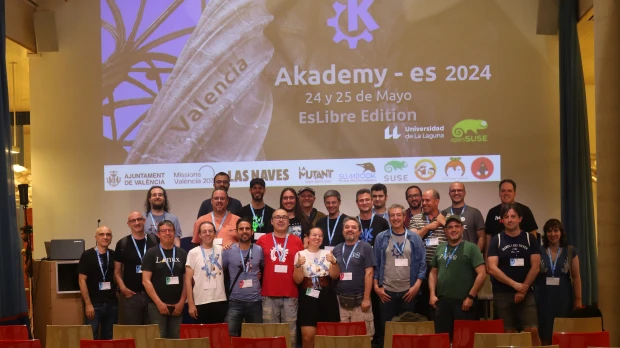
En otras palabras, el evento se acerca y es por ello que ya se ha abierto el registro para Akademy-es 2025 de Málaga, un registro que se realiza para tener un poco de control sobre el número de asistente y así poder tener una previsión de aforo y de otros detalles como refrescos, café o algo de comida para las pausas para el café.
Este año registrarse es algo diferente, simplemente debéis indicar cuando realicéis el registro a la Opensouthcode que vuestro tema de interés es Akademy-es… aunque evidentemente el registro es válido para los dos eventos.

Más información y registro: Opensouthcode
¿Qué es Akademy-es?
Akademy-es (#akademyes, que es la etiqueta para las redes sociales) es evento más importante para los desarrolladores y simpatizantes de KDE, que se ha ido celebrando desde el 2006 con éxito creciente.
En general, las Akademy-es son el lugar adecuado para conocer a los desarrolladores, diseñadores, traductores, usuarios y empresas que mueven este gran proyecto.
En ellas se realizan ponencias, se presentan programas, se hace un poco de caja para los proyectos libres (camisetas, chapas, etc) pero sobre todo se conoce a gente muy interesante y se cargan baterías para el futuro.
Podéis repasar las anteriores ediciones en estas entradas del blog:
- Camino Akademy-es 2013: Las anteriores ediciones (I): 2006 – 2008
- Camino Akademy-es 2013: Las anteriores ediciones (II): 2009-2010
- Camino Akademy-es 2013: Las anteriores ediciones (III): 2011-2012
- Anteriores ediciones de Akademy-es (IV): 2013 y 2014
La entrada Abierto el registro para Akademy-es 2025 de Málaga OpenSouthCode Editon II #akademyes se publicó primero en KDE Blog.


Log Detective: Google Summer of Code 2025
I'm glad to say that I'll participate again in the GSoC, as mentor. This year we will try to improve the RPM packaging workflow using AI, as part of the openSUSE project.
So this summer I'll be mentoring an intern that will research how to integrate Log Detective with openSUSE tooling to improve the packager workflow to maintain rpm packages.

Log Detective
Log Detective is an initiative created by the Fedora project, with the goal of
"Train an AI model to understand RPM build logs and explain the failure in simple words, with recommendations how to fix it. You won't need to open the logs at all."
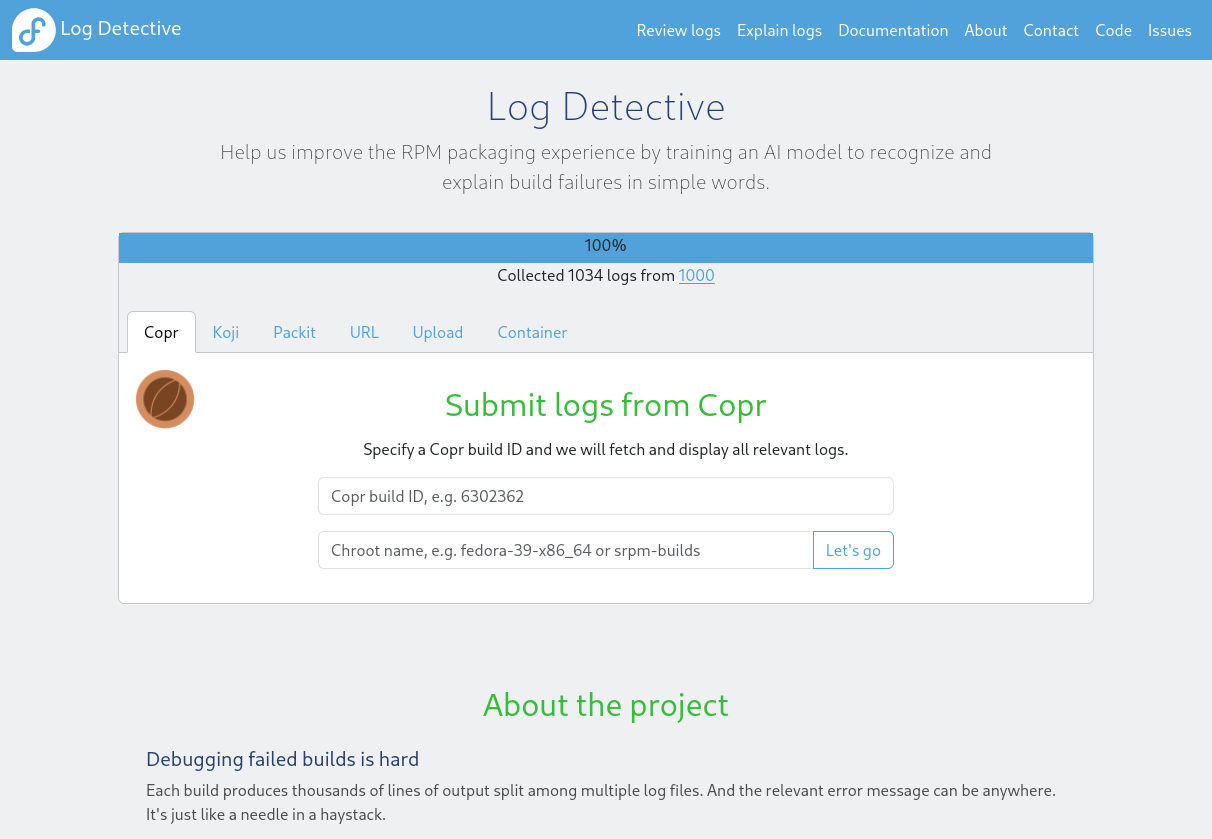
As a project that was promoted by Fedora, it's highly integrated with the build tools around this distribution and RPM packages. But RPM packages are used in a lot of different distributions, so this "expert" LLM will be helpful for everyone doing RPM, and everyone doing RPM, should contribute to it.
This is open source, so if, at openSUSE, we want to have something similar to improve the OBS, we don't need to reimplement it, we can collaborate. And that's the idea of this GSoC project.
We want to use Log Detective, but also collaborate with failures from openSUSE to improve the training and the AI, and this should benefit openSUSE but also will benefit Fedora and all other RPM based distributions.
The intern
The selected intern is Aazam Thakur. He studies at University of Mumbai, India. He has experience in using SUSE as he has previously worked on SLES 15.6 during his previous summer mentorship at OpenMainFrame Project for RPM packaging.
I'm sure that he will be able to achieve great things during these three months. The project looks very promising and it's one of the things where AI and LLM will shine, because digging into logs is always something difficult and if we train a LLM with a lot of data it can be really useful to categorize failures and give a short description of what's happening.
Charla online: Introducción a KDENLIVE en el XX Festivalito La Palma
En mi opinión, debemos salir un poco de nuestra zona de confort de difusión del Software Libre y divulgarlo en otros espacios como asociaciones de todo tipo, centros educativos e, incluso, en Festivales de Cine, como es el caso que nos ocupa hoy. Y es que me complace compartir con todos vosotros la «Charla online: Introducción a KDENLIVE» que se realizará el próximo 12 de junio dentro del Festival internacional de creación cinematográfica de la Palma, es decir, en el XX Festivalito de La Palma, en las Islas Canarias.
Charla online: Introducción a KDENLIVE en el XX Festivalito La Palma
Como podemos ver en el programa el próximo 12 de junio, a las 10:00 UTC/GMT +1 (hora insular, es decir, 11:00 UTC/GMT +2 en la península) vamos a poder disfrutar de una nueva charla donde iniciarse en el uso de una aplicación que poco a poco se ha convertido en una de las indispensables para los editores de contenido linuxeros y no linuxeros, ya que se ha hecho hueco incluso para sistemas operativos Windows.

En palabras de los organizadores d la Charla online: “Introducción a KDENLIVE”
Aprende a editar con Kdenlive, el software libre te permite editar en una multipista con una línea de tiempo y una cantidad ilimitada de pistas de audio y vídeo. Además es muy fácil crear, mover, recortar vídeo, audio, texto e imágenes.
Enlace de entrada a la charla: https://meet.kde.org/b/pau-oqm-gp5-r7f
Más información: Festivalito | Programa del Festival
¿Qué es Kdenlive?

Kdenlive (acrónimo del inglés: KDE Non-Linear Video Editor) (?ke?d?n?la?v) es un editor de video no lineal para KDE que soporta todos los formatos de vídeos de codificador FFmpeg (DV, HDV, mpeg, avi, mp4, mov, flv, ogg, wav, mp3, vorbis, …) y los formatos de imágenes clásicas (gif, png, jpeg, xcf, exr, tiff, svg, …)
Kdenlive se cimenta sobre Qt y la infraestructura (framework) de librerías KDE. Gran parte de los procesamientos de video son efectuados a través de MLT Framework, que se basan a su vez en otros proyectos Open Source tales como FFmpeg, freOr, movit, padspa, sox, etc.
Kdenlive ha sido concebido para responder a las más diversas exigencias de montaje y edición, desde nivel básico hasta los más elaborados niveles de edición profesional. No obstante, está desarrollado por un pequeño grupo de personas y la incorporación de nuevos miembros al equipo será siempre muy bienvenida e invaluablemente apreciada.
Además, tiene las siguientes características:
- Dispone de linea de tiempo con función búsqueda.
- Copiado y pegado de clips.
- Función deshacer completa.
- Captura de por Firewire: DV y HDV
- Captura por Video4Linux
- Exporta en diferentes formatos: mpeg, avi, dv, flash, mov, …
- Múltiples efectos como: Automask, Box Blur, Charcoal, etc.
Más información: Kdenlive
La entrada Charla online: Introducción a KDENLIVE en el XX Festivalito La Palma se publicó primero en KDE Blog.
Libro «El teorema» de Adam Fawer
Apuestas, probabilidad, filosofía determinista, mecánica cuántica, ciencia ficción, acción, mafias extranjeras, matones y científicos locos sin escrúpulos.

Si lo tuyo son los cálculos probabilísticos, estás en un tugurio de póker ilegal, tienes unas gran cartas, una mano con una gran probabilidad de ganar, una en la que calculas rápidamente y compruebas que las opciones de tus rivales son muy pequeñas ¿apostarías todo lo que tienes?
David Caine, el protagonista del libro lo hizo, y a partir de ahí empieza la trama del libro. Que algo tenga muy baja probabilidad no quiere decir que no pueda suceder.
La trama involucra a su hermano gemelo, a científicos y hackers con oscuros intereses, una heroina entrenada para todo y un puñado de mafias persiguiendo a los protagonistas por distintos motivos.
Sin saber qué me iba a encontrar en el libro, me sumergí en la historia que poco a poco se va volviendo trepidante y me gustó cómo todo se va desarrollando, tirando de ciencia ficción, de acción e incluso de filosofía determinista y mecánica cuántica.
Las posibilidades de elegir una u otra opción tienen ramificaciones que se extienden hasta el infinito con las distintas opciones que surgen de cada acción que tomamos con consecuencias para nosotros y terceras personas. Poder conocerlas todas y saber escoger qué opción es la más probable para conseguir lo que queremos sería una gran ventaja.
Disfruté mucho de la historia «endemoniada» y me dejé llevar por la acción sin límites de la heroina que ayuda al protagonista hasta el objetivo final. A veces podía ver la acción en mi cabeza como si fuera una película, con explosiones impresionantes y peleas sangrientas.
Pero no todo es trepidante, hay momentos para reposada calama que hace que el ambiente se vaya tensando hasta que de una manera u otra se resuelve. Está bien de vez en cuando leer algo de acción.
Me gustó el libro, que en inglés se titula «Improbable» y en español lo han traducido por «El teorema». ¿Teniendo la traducción tan sencilla ¿por qué huir de lo obvio e inventar algo nuevo? Yo hubiera apostado por mantener el título Improbable también en español.
Enlaces de interés
- https://en.wikipedia.org/wiki/Adam_Fawer
- https://en.wikipedia.org/wiki/Improbable_(novel)
- https://es.wikipedia.org/wiki/Demonio_de_Laplace

Plasma 6.4 está cerca – Esta semana en Plasma
Es increíble el trabajo de promoción que está realizando Nate en su blog, dese hace más del tiempo que puedo recordar. Cada semana hace un resumen de las novedades más destacadas, pero no en forma de telegrama, sino de artículo completo. Su cita semanal no falla y voy a intentar hacer algo que es simple pero requiere constancia. Traducir sus artículos al castellano utilizando los magníficos traductores lo cual hará que: la gente que no domine el inglés esté al día y que yo me entere bien de todo. Bienvenidos pues al primero de la serie «Esta semana en Plasma» que lleva por título «Plasma 6.4 está cerca». Espero que os guste y, sobre todo, que pueda mantener el ritmo de publicación de Nate Graham.
Plasma 6.4 está cerca – Esta semana en Plasma
Nota: artículo original en Blogs KDE. Traducción realizada utilizando deepl.com. Esta entrada está llena de novedades para Plasma 6.4. Mis comentarios están entre corchetes.
¡Bienvenido a un nuevo número de «Esta semana en Plasma»! Cada semana cubrimos lo más destacado de lo que está sucediendo en el mundo de KDE Plasma y sus aplicaciones asociadas como Discover, System Monitor, y más.
Esta semana hemos seguido centrándonos en corregir errores y pulir la interfaz de usuario de Plasma 6.4, que se publicará el próximo jueves. Como resultado, se han fusionado muchos cambios importantes. Echa un vistazo:
Mejoras notables en la interfaz de usuario
Plasma 6.4
En la página Wi-Fi e Internet de la Configuración del Sistema, la lista de redes es ahora completamente navegable mediante el teclado, y utiliza el estilo estándar de KDE para los elementos de la lista. (Christoph Wolk, enlace) [La navagación con teclado cada día me gusta más].
La lista de favoritos del widget Kicker Application Menu es ahora totalmente accesible desde el teclado. (Christoph Wolk, enlace) [Más de lo mismo. La sinergía es intensa en KDE.].
Desactivada la posibilidad de arrastrar pantallas sobre otras pantallas en la página Pantalla y monitor de la Configuración del sistema, ya que esto produciría una disposición de pantallas que no es compatible y provocaría muchos errores muy extraños en todo el sistema. (David Redondo, enlace)
Despertar un ordenador dormido pulsando el botón de encendido ya no provoca que se muestre la pantalla de cierre de sesión después de que el sistema se haya despertado y lo desbloquees. (Niccolò Venerandi, enlace)
Se ha pulido la interfaz de usuario de la ventana de configuración del widget Reloj digital, lo que ha mejorado la alineación en general. (Christoph Wolk, enlace) [Detalles para los puntillosos, entre los que me encuentro.

Cuando se tiene una disposición de paneles compleja con paneles de longitud variable en bordes de pantalla adyacentes, ahora los paneles horizontales siempre tienen prioridad para rellenar el espacio vacío, de modo que nunca se produce una situación en la que varios paneles luchan por el mismo espacio y a veces se solapan. (Marco Martin, enlace)
Aumentada la visibilidad de los gráficos de líneas de CPU por proceso del Monitor del Sistema para los elementos seleccionados de la lista. (Arjen Hiemstra, enlace)
Plasma 6.5
Al cambiar el intervalo de tiempo en la página Energía del Centro de Información, la vista del gráfico se anima ahora suavemente para mostrar el nuevo intervalo de tiempo. (Ismael Asensio, enlace)
La página de Fuentes de la Configuración del Sistema ahora evita que rompas tu sistema por completo si configuras las fuentes por debajo de 4pt. Además, si establece un tamaño de fuente entre 5 y 6 pt, ahora también le advierte que Plasma no fue realmente diseñado para manejar esto, y que el escalado de pantalla puede ser un mejor enfoque. (Nate Graham, enlace)
Ha hecho que el texto de la notificación «Su disco tiene problemas» quepa en la cabecera. (Harald Sitter, enlace)
Corrección de errores importantes
Plasma 6.3.6
System Monitor vuelve a permitir ver las columnas actuales de la tabla mientras está abierto el diálogo de configuración de columnas de la tabla. (Nate Graham, enlace)
Plasma 6.4.0
Poner un widget de nota adhesiva en un panel muy grueso ya no puede hacer que Plasma se congele; ¡ahora puedes usar un panel grueso con una nota adhesiva en él como una especie de barra lateral de notas! (Christoph Wolk, enlace)
Corregido el fallo más común del Monitor de Sistema. (Arjen Hiemstra, enlace)
Arreglado otro fallo en el Monitor del Sistema, esta vez una división por cero. (Arjen Hiemstra, enlace)
Se ha corregido un caso en el que xdg-desktop-portal-kde podía bloquearse después de elegir una fuente de vídeo para iniciar la transmisión. (David Redondo, enlace)
Se ha corregido un error por el que Discover se bloqueaba si se cerraba inmediatamente después de iniciarse. (Wendi Gan, enlace)
Se han corregido varios errores sutiles en el widget del selector de pantalla y en el menú OSD que hacían que no funcionara correctamente en pantallas giradas o al reflejar pantallas. (David Redondo, enlace)
Se ha corregido un error que provocaba que el campo de búsqueda de Ajustes del sistema no se enfocara correctamente al pulsar Ctrl+F mientras cualquier elemento de la interfaz de usuario en una página de ajustes ya tenía el foco. (Marco Martín, enlace)
Se ha corregido la causa principal de varios problemas relacionados con la desaparición de ventanas al desconectar la pantalla en la que se encontraban. (Xaver Hugl, enlace)
Hacer clic en un botón de un widget de escritorio que abre un menú ya no hace que el widget entre en el modo de edición de widgets. (Christoph Wolk, enlace)
Los archivos con un carácter # o ? en su nombre o ruta completa ya no desaparecen inesperadamente de las listas del historial en los lanzadores Kicker/Kickoff/etc. (Christoph Wolk, enlace 1 y enlace 2)
Se ha corregido un error que provocaba que la ventana del selector de pantalla a veces no apareciera como se esperaba cuando se iniciaba OBS. (David Redondo, enlace)
Se ha corregido un error que provocaba que las ventanas en mosaico en una configuración multipantalla perdieran su configuración de mosaico cuando el sistema entraba en reposo y volvía a despertar. (Xaver Hugl, enlace)
La función «Mover ventana a [actividad]» ahora funciona correctamente cuando se invoca desde el widget del Administrador de tareas. (Christoph Wolk, enlace)
Se ha corregido un error en el menú de la aplicación Kicker que provocaba que la navegación con el teclado no funcionara si la ventana emergente se abría con un elemento bajo el puntero. (Christoph Wolk, enlace)
En la vista en cuadrícula del efecto Vista general, al arrastrar ventanas colocadas en mosaico en un escritorio virtual a otro escritorio virtual, ahora se mantienen en mosaico como se esperaba. (Vlad Zahorodnii, enlace)
Plasma 6.5
Se ha corregido un error que hacía que el widget Redes a veces pensara incorrectamente que tenías un hotspot activado después de desconectarte de la red Wi-Fi activa. (Niccolò Venerandi, enlace)
Frameworks 6.15
Se ha corregido un error que provocaba que ciertos elementos de la lista en Plasma y aplicaciones KDE con botones en línea a veces mal posicionar sus botones. (Efe Çiftci, enlace)
Otra información de errores destacables:
- 3 bug Plasma de muy alta prioridad (igual que la semana pasada). Lista actual de errores
- 21 fallos de Plasma de 15 minutos (cuatro menos que la semana pasada). Lista actual de fallos
Novedades técnicas y de rendimiento
Plasma 6.4
Mejora de la suavidad del cursor y reducción del parpadeo asociados al uso de la función de frecuencia de actualización variable. (Xaver Hugl, enlace)
Se ha reducido aún más el uso innecesario de la CPU en la página Procesos del Monitor del Sistema. (David Edmundson, enlace 1 y enlace 2)
Se ha evitado que aparezcan en el registro del diario un montón de advertencias ignorables pero aterradoras del tipo «¡Falló el salto de página!» (Xaver Hugl, enlace)
Plasma 6.5
Si modifica la distribución del teclado mediante la herramienta de línea de comandos kwriteconfig, los cambios surtirán efecto inmediatamente. (Bojidar Marinov, enlace)
Cómo puedes ayudar
KDE se ha convertido en algo importante en el mundo, y tu tiempo y contribuciones nos han ayudado a conseguirlo. A medida que crecemos, necesitamos su apoyo para mantener KDE sostenible.
Puedes ayudar a KDE convirtiéndote en un miembro activo de la comunidad e involucrándote de alguna manera. Cada colaborador marca una gran diferencia en KDE – ¡no eres un número o un engranaje en una máquina!
Tampoco tienes que ser programador. Existen muchas otras oportunidades:
- Clasificar y confirmar informes de errores, tal vez incluso identificar su causa raíz.
- Contribuir al diseño de fondos de pantalla, iconos e interfaces de aplicaciones.
- Diseñar y mantener sitios web
- Traducir elementos de texto de la interfaz de usuario a su propio idioma.
- Promover KDE en su comunidad local
- …¡Y un montón de cosas más!
¡También puedes ayudarnos haciendo una donación! Cualquier contribución monetaria – por pequeña que sea – nos ayudará a cubrir los costes operativos, salarios, gastos de viaje de los colaboradores, y en general a mantener KDE llevando el Software Libre al mundo.
Para obtener una nueva característica de Plasma o una corrección de errores mencionada aquí, siéntase libre de enviar un commit a la solicitud de fusión correspondiente en invent.kde.org.
La entrada Plasma 6.4 está cerca – Esta semana en Plasma se publicó primero en KDE Blog.
Techpaladin se convierte en patrocinador de KDE
Como buen blog sobre KDE me tengo que hacer eco de esta noticia que es importante para conocer un poco mejor como funciona la fundación KDE y cómo seguir constatando que poco a poco más y más empresas creen que la colaboración con el Software Libre. Este aspecto es algo que beneficia a todos y todas. Así que me congratula comentar que Techpaladin se convierte en patrocinador de KDE, en otras palabras, una nueva voz con voto en el desarrollo del proyecto KDE.
Techpaladin se convierte en patrocinador de KDE
El pasado 30 de mayo se anunció que KDE tiene un nuevo patrocinador. A los recientes Kubuntu Focus y g10 Code, se le une Techpaladin una empresa joven fundada por experimentados y destacados colaboradores de KDE que desarrollan software basado en KDE para empresas de tan alto perfil como Valve y Qt Group.

En palabras Nate Graham (os suena de algo) CEO de Techpaladin:
«KDE es el gigante sobre cuyos hombros se asienta Techpaladin, así que estamos muy contentos de apoyar la misión y la fundación que la impulsa. KDE e.V. ayuda a que lo que hacemos sea posible, por lo que convertirnos en mecenas es el siguiente paso lógico»
Por otra parte Aleix Pol, Presidente de KDE e.V., comenta:
«Estamos encantados de dar la bienvenida a Techpaladin como nuestro patrocinador. Aunque es una organización joven, estamos muy familiarizados con gran parte del equipo y sabemos que comparten muchos de los mismos valores que KDE. Estoy deseando hacer crecer KDE y sus productos junto a ellos, y ¿qué mejor manera de hacerlo que como patrocinador?»
De esta forma, Kubuntu Focus se une a otras compañías en su alianza con KDE: The Qt Company, SUSE, Google, Blue Systems, Canonical, Private Internet Access, enioka Haute Couture, Slimbook , Pine64, Kubuntu Focus o G10 Code para continuar apoyando el Software Libre y el desarrollo de los proyectos KDE a través de KDE e.V.
Más información: KDE e.V.
La entrada Techpaladin se convierte en patrocinador de KDE se publicó primero en KDE Blog.
Publicado el programa de Opensouthcode 2025
Hace unos días que o spresenté las charlas de Akademy-es 2025 es el momento de comentar que también ha sido publicado el programa de Opensouthcode 2025, un evento multisala lleno de grandes ponencias que se convertirá en un problema si queremos aprovechar al máximo este evento.
Publicado el programa de Opensouthcode 2025

El próximo 20 y 21 junio , en la activa ciudad de Málaga, se celebra la Opensouthcode 2025 un evento para promocionar y dar a conocer las tecnologías abiertas: software/hardware libre y opensource.
El evento se celebra en La Térmica (Avda. Los Guindos, ) y su programa puede tener muchos adjetivos menos el de discreto ya que nos esperan 6 salas con unas 10 charlas o talleres en cada una, desde las 10 de la mañana hasta las 20 horas, y eso solo para el viernes ya que el sábado tendremos otra jornada igual de intensa.
Es imposible comentar en esta entrada todas las charlas que nos esperan pero por dar una pincelada yo destaco charlas como:
- Desarrollar videojuegos en .NET nunca fue tan… ¿fácil? por Ricardo Guzmán Velasco
- Java 30: Meetup especial de MálagaJUG para celebrar el 30 aniversario de Java por Jorge Hidalgo
- Crea tus apps, con Flutter (Una introducción al framework y los primeros pasos para aprender) por Elena G Blanco
- Robótica e Inteligencia Artificial con HuskyLens y micro:bit por Manuel Valencia
- Tech for kids – Despertando la curiosidad de mis hijos por la tecnología por Raúl Jiménez Ortega
- Model Context Protocol: el nuevo chico guapo del barrio de la IA y la relevancia de los protocolos abiertos por Estefanía Ríos y Patri
- Taller de creación del videojuego oficial del OpenSouthCode por Victor Suarez
- Astro, un soplo de aire fresco por Braulio
Y eso sin contar, que en la sala Benamocarra tendrás toda la programación de Akademy-es.

Más información: Opensouthcode 2025 de Málaga
La entrada Publicado el programa de Opensouthcode 2025 se publicó primero en KDE Blog.
SELinux: finding an elegant solution for emulated Windows gaming on Tumbleweed
Table of Contents
- 1) Overview
- 2) Introduction to SELinux
- 3) The problem with emulating Windows games
- 4) Finding an elegant solution
- 5) Closing Remarks
- 6) References
1) Overview
OpenSUSE Tumbleweed recently switched to using SELinux by default. While generally well received, this change caused problems in particular when playing Windows games through Proton or Wine. This post will provide context and introduce the solution the openSUSE SELinux team came up with.
Section 2 gives an overview of SELinux and introduces the primitives necessary to understand the issue and solution. Section 3 takes a closer look at the root cause of the problem and the manual steps needed to work around the issue in the past. Section 4 discusses the requirements for a better solution and how it was implemented in the end. Section 5 closes with information on how to report SELinux bugs and how to reach the openSUSE SELinux team.
2) Introduction to SELinux
OpenSUSE Tumbleweed switched to SELinux as the default Mandatory Access Control mechanism for new installations in February 2025.
The central reason for the change was that we consider SELinux the more encompassing solution: security problems with a program do not pose a threat to the whole system, rather a system compromise can be confined to the affected program or daemon.
SELinux provides a powerful and detailed language to describe expected application behaviour. Allowing to confine a process, referred to as a SELinux domain, by limiting access to required system resources and describing the interaction with other domains. A large catalog of domains is already available via the upstream SELinux policy.
SELinux booleans
Common behaviour of a piece of software might be allowed by default for the domain, but very specific scenarios might be prohibited, especially when negatively impacting security. SELinux booleans provide a way for the user to enable such optional functionality in the SELinux policy.
To give an example: the Apache HTTP daemon is used to serve web pages. In
certain situations it might be needed that these webpages are stored in the user’s
home directory, but as a default it is not advisable that a network facing daemon
has access to the home directories. To address these different usage scenarios
a boolean called httpd_enable_homedirs exists. The user can turn on the boolean
if the HTTP daemon needs to access the home directories of users to serve web pages.
3) The problem with emulating Windows games
Playing Windows games on Linux with SELinux enabled did not work without manual intervention by the user.
This is related to the way Windows libraries have been developed and are used by emulation software.
To allow the software for emulating Windows games to work, for example Steam with Proton or
Lutris with Wine, a boolean called selinuxuser_execmod needs to be enabled:
sudo setsebool -P selinuxuser_execmod 1
But enabling this boolean has consequences for the general security of the system.
The user_selinux manpage states for selinuxuser_execmod:
If you want to allow all unconfined executables to use libraries requiring text relocation that are not labeled textrel_shlib_t, you must turn on the selinuxuser_execmod boolean.
But why exactly is the boolean problematic and required a manual change before? Executable stack is used by hackers as a building block in their exploitation techniques. A lot of research went into finding mitigation strategies to make it harder for malicious actors to run successful exploits. One central measure was Executable-space protection, and Text relocation touches a part of that mitigation. If the boolean is enabled it allows modification of the executable code portions of the affected libraries, and could result in successful exploitation of the processes using these libraries.
4) Finding an elegant solution
OpenSUSE Tumbleweed is a general-purpose Linux distribution, targeting a multitude of use cases, be it as a server, running on embedded devices, as container host or as a desktop system. Some Tumbleweed users require their desktop system to run emulations software for Windows games.
In general we try to take a Secure by Default approach when we take decisions affecting
security. For openSUSE Tumbleweed we decided to disable selinuxuser_execmod
by default, because we think it provides a risk to the security of the system if all
unconfined executables can use libraries with text relocation.
In software security we usually want to make it as hard as possible for malicious actors to exploit a target. Accomplishing this feat is not easy, because some attack scenarios rely on normal system behavior that can be used or exploited by attackers. An approach to mitigate this in defensive software security is a concept known as Defense in Depth, where different protective mechanisms are used to provide a layered defense, making a successful exploit as hard as possible.
A central requirement for a solution was not to cause a negative impact on the security of
other use cases, which do not require emulation of Windows games. Enabling selinuxuser_execmod
by default for all Tumbleweed installations was no option. It would take away a protection mechanism
and therefor weaken the Defense in Depth approach.
Manually setting the boolean was needed to get the emulation layer
for Windows to function properly. To arrive at that solution the user needed a
certain level of familiarity with the administration of SELinux. A transparent, but selective solution,
that would need no intervention from the user would be ideal to implement.
Implementation
We decided to introduce a new dependency to packaged gaming software in openSUSE Tumbleweed.
If a user installs the RPM version of Lutris or Steam, then the RPM selinux-policy-targeted-gaming
will now be installed as well, enabling the boolean on the user system automatically.
This solution improves usability for the users who install gaming software
and does not compromise the security of other use cases of the distribution.
A user preferring the Flatpak versions of Steam or Lutris can manually install the new package:
sudo zypper in selinux-policy-targeted-gaming
As we do not control the Flatpak applications, we can not add any dependencies to them. As an alternative the user can also still set the boolean manually.
5) Closing Remarks
The openSUSE SELinux team is committed to keeping openSUSE users safe with SELinux, and to fixing problems that SELinux may cause to the community. To facilitate changes with SELinux we rely on users to work with us and provide feedback, so that we understand what the current problematic areas are. If you encounter problems with SELinux feel free to open a bug or reach out over the mailing list.
6) References
Segunda actualización de KDE ⚙️ Gear 25.04
La Comunidad KDE es una comunidad responsable y no solo se preocupa en lanzar novedades sino que también en mejorarlas. Me complace presentar la segunda actualización de KDE Gear 25.04 que apareció hace casi dos meses. Más estabilidad, mejores traducciones y pequeñas mejoras para las aplicaciones de nuestro entornos de trabajo.
Segunda actualización de KDE Gear 25.04
A pesar de lo que puedan pensar muchas personas, las aplicaciones no son perfectas. Entre las líneas de código se pueden colar errores de tipografía o que el usuario realice alguna opción que en un principio no estaba prevista por los desarrollador, por poner solo un par de ejemplos de imperfecciones.
Este no es un problema del Software Libre ya que el Software actual funciona de esta manera ya que no se piensa en él como un producto final que se encierra en una caja y se olvida. En la actualidad se sabe que el Software está vivo y sería estúpido ir guardando las mejoras sin dejarlas a disposición del gran público.
Con esto se gana en rapidez y evolución pero puede aumentar el número de errores (por norma general) leves, los cuales son subsanables con pequeñas actualizaciones.
La Comunidad KDE lo tiene claro: grandes lanzamientos cada cuatro meses y actualizaciones mensuales para subsanar errores.

Por ello me congratula compartir con vosotros la segunda actualización de KDE ⚙️ Gear 25.04 que nos ofrece más de 180 errores resueltos entre aplicaciones, librerías y widgets, algo que mejora el rendimiento del sistema.
Aquí podéis encontrar la lista completa de cambios de KDE Gear 25.04.2, pero por poner unos cuantos ejemplos de los errores que sea han resuelto tenemos:
- kdenlive: Corregidos los efectos de clip de papelera que desaparecen tras desactivar un clip de la línea de tiempo (Confirmado, corrige error nº 439194)
- knights: Al guardar la partida, usar la extensión adecuada «pgn» en caso de que no se proporcionara ninguna extensión (Commit, corrige bug #502963)
- kreversi: Corregir la disponibilidad inconsistente de deshacer tras finalizar la partida (Commit, corrige bug #351812)
Más información: KDE Gear 25.04.02
La entrada Segunda actualización de KDE ⚙️ Gear 25.04 se publicó primero en KDE Blog.

Tackling performance issues caused by load from bots
In recent months, I observed an increase in performance issues with partial short outages, particularly of web applications performing expensive operations such as database or shell queries. The origin was always easy to map to an amount of requests larger than what some backend applications are able to handle. Whilst part of the requests do originate from legitimate users, a large amount is found to originate from obscure sources - particularly AI related crawlers seem to dominate. Whereas traditional search engine crawlers, which we do encourage to scan our websites to allow for more users to find them, scan with few requests spread over a long time frame, these new crawlers tend to issue thousands of requests, sometimes in less than a day. With multiple companies pursuing the same practices, this quickly adds up to requests and subsequently load which is not sensible to scale for, particularly given the lack of obvious benefit for the general public.
Over time I implemented various measures to reduce the amount of undesired requests based on the observed patterns, whilst aiming to maintain a stable experience for legitimate requests. These measures include rate limiting (with more fine grained limits for particularly "expensive" sites and paths), wide blocking of source networks from cloud providers and AI related companies, blocking of user agent patterns and blocking of "dumb" requests (for example, we stopped routing requests targeting various script file types to backends which do not speak the matching language). Monitoring did show these measures to help with reducing the immediate request load, however new patterns quickly emerged. A new phenomena are large amounts of requests spread over a large amount of different source networks. Especially with source networks identifying as serving residential traffic, blocking is not possible without risking the lockout of legitimate users. A new method needed to be found.
Of course, we are not the only organization affected by this. The recent influx of AI related crawlers impacting web services caused various operators to implement additional protections, and the most visible one to users are challenge websites, making the user land on an intermediate page before being redirected to the desired location. Whilst these come in various forms, I mostly observe ones asking for a captcha and ones computing a proof-of-work task in the client. The latter came particular popular with the release of Anubis [0], an open source software making it easy for operators to equip their website with a proof-of-work challenge protection. Anubis reached a certain level of fame by big websites deploying it and tech related news outlets talking about it. Most naturally, I looked into Anubis as a solution for our situation as well. The proof-of-work concept was particularly interesting, as automated challenges are less annoying to users and have less accessibility concerns than manual captcha based ones.
As for Anbuis, it acts as a reverse proxy and serves a pre-defined challenge website. It also ships with excludes for known-good search engine crawlers.
In our setup, which consists of internet-facing HAProxy servers routing traffic to backend application/web servers, this would introduce another proxy traffic would flow through. Upon discussion with @darix, we figured it would be beneficial to instead utilize SPOE, the HAProxy Stream Process Ofloading Engine, to "ask" Anubis to challenge problematic clients, but then to pass the result back to HAProxy to directly route the traffic as before. Following the upstream discussion we initiated, I prepared a patch for this [1] - as I was idling for a while before opening a PR, someone else picked up the work and improved upon it, bringing the implementation to a usable shape [2] - however, it has not yet been completed and merged by the time of writing. More importantly, also as part of the upstream discussion, a user suggested to swap out the Go library I used for the SPOP implementation in Anubis with a more performant one [3] - haproxy-go [4]. The same comment [3] lead me to discover the same user having developed a software similar to Anubis, which already implements the suggested library and specifically targets HAProxy native deployments: Berghain [5]. Whilst the user experience is similar to Anubis - one gets served a challenge website to complete an automated proof-of-work computation before being redirected to the desired location, the background implementation is different. It operates tightly integrated with HAProxy by utilizing the SPOE - first to construct a challenge for clients (that is, if a client is intended to be challenged, which is decided using standard HAProxy ACLs), then to verify the challenge response, which is stored in a cookie on the client. The challenge page (which is a combination of HTML, CSS, JS) itself is served directly by HAProxy from memory.
This seemed like what we were looking for:
- no additional reverse proxy, preservance of existing HAProxy based routing
- decision which clients to challenge using HAProxy ACLs, which we already use in our setup and can easily extend upon
- can be configured to not impact web service availability if the challenge service is offline
- easy branding using HTML + SCSS (Anubis in its default build does not allow for any branding - however they seem to have a version for paying customers and open source projects which allows to swap the imagery)
The project seemed to be in an early stage, with not much activity as compared to Anubis, however initial testing seemed promising. After opening an issue with a minor flaw, the upstream maintainer messaged me - as it turns out, they have similar ideas and are very nice to chat with. Over the last days, various improvements landed in Berghain - I contributed some patches [6], which were pleasantly reviewed and integrated, and the upstream maintainer helped as well, with answering questions in chat and solving bugs [7].
For branding, I made a fork [8] in which the sources of the web page are modified. An upstream discussion to decouple this, allowing theming to reside separately, was started [9], but ideas on achieving this are still pending. As the web sources are deemed to not change as often, the maintenance effort should not be too bad for the time being - I rebase our branch with the upstream one when there are changes, and add the customizations as a patch in our package [10].
With this, all seems to be set for deployment. However, there were some challenges (pun intended) which had to be considered:
- users should not be unnecessarily "annoyed"
=> cover websites and paths only selectively when there is need for additional protection due to excess application load - the challenge requires JavaScript, don't unnecessarily harm users which do not have JavaScript enabled, and, most importantly, don't break legitimate command line tooling and scripts
=> cover only websites and paths which would require JavaScript anyways (i.e. no API paths) - if the configured validity period expires while the user is filling out a form, accidental form resubmission might be triggered
=> cover only GET requests - legitimate search engine crawlers should not be inhibited
=> adapt lists of user agent + source network combinations from Anubis
These points were easily solved using HAProxy ACLs. Of course, the exemptions also leave more room for malicious actors to work around the protection. Whilst this is a concern, most bots are found to be "dumb", hence the enablement can be expected to significantly help with the current situation even with the constraints at hand. Over time, solutions allowing for tighter limitations might be investigated and developed. Particularly interesting was a discussion with the maintainer of Berghain which brought up some ideas to challenge clients without JavaScript, however there is no concrete plan for this yet.
With all that being said, the protection has now been deployed and enabled for two services [11] - including progress.opensuse.org, where you are reading this article right now. Enablement for more services will follow over time as needed, when needed.
With all the considerations which went into this implementation, I hope for the impact on legitimate users to be minimal. If you notice any undesired breakage as a result of this nonetheless, please do open an issue in our tracker [12] explaining the circumstances, and I will try to work out a solution.
[0] https://anubis.techaro.lol
[1] https://github.com/TecharoHQ/anubis/issues/236#issuecomment-2784919382
[2] https://github.com/TecharoHQ/anubis/pull/460
[3] https://github.com/TecharoHQ/anubis/issues/236#issuecomment-2801861198
[4] https://github.com/DropMorePackets/haproxy-go
[5] https://github.com/DropMorePackets/berghain
[6] https://github.com/DropMorePackets/berghain/issues?q=author%3Atacerus
[7] https://github.com/DropMorePackets/berghain/commit/6080b227008a759c267a973202cf2b4edff38e31, https://github.com/DropMorePackets/haproxy-go/commit/c1707895ddabaa9c11d4e0b99e2cba040a0a3330
[8] https://github.com/openSUSE/berghain
[9] https://github.com/DropMorePackets/berghain/issues/26
[10] https://build.opensuse.org/package/show/openSUSE:infrastructure/berghain
[11] https://progress.opensuse.org/projects/opensuse-admin/repository/salt/revisions/3257c222f1c92c96c1d3caaeb7c14604fefad54a
[12] https://progress.opensuse.org/projects/opensuse-admin/issues (in case of issues with using the tracker directly, create a ticket via admin@o.o)
Edit after 1 day:
it was suggested to attach some graphs showing how the load went down after this deployment - here are the graphs behind progress.o.o as an example (times in the graphs are in CEST):

