
 Member
 crowbyte
Canonical ditches Unity 8 and focusses on IoT and Cloud
No april's fool: Canonical ditches Unity 8 and switches to Gnome as default desktop for Ubuntu 18.04 LTS.
Focus on IoT and Cloud
In a blog post Mark Shuttleworth, founder of Canonical is "writing to let you know that we will end [Canonical's] investment in Unity8, the phone and convergence shell. [Canonical] will shift [the] default Ubuntu desktop back to GNOME for Ubuntu 18.04 LTS".
Additionally Shuttleworth announces that Canonical will further "invest in the areas which are contri...

FOSSASIA 2017
On January 12, Douglas DeMaio from openSUSE contact me if I have time to go to FOSSASIA 2017 schedule in Singapore on 17-19 March. I checked my calendar and the date was available for me. So I reply his email and said I will go there to represent openSUSE at booth.
openSUSE become Silver sponsor for FOSSASIA 2017, and also have 2 talks by my colleagues Gary Lin from SUSE Labs Taipei and Zhao Qiang from SUSE Beijing on Day 2. I (only) became a booth-person this time :-)
Doug sent me some stickers to bring to the crowd which consists of:
94 webcam covers
128 Tumbleweed stickers
108 Leap stickers
213 openSUSE stickers
174 OBS stickers
175 Portus stickers
116 Alex the Geeko stickers
56 small black Geeko stickers
78 power by openSUSE stickers
30 openSUSE pamphlets
5 SUSE Jobs fliers
I prepared 3 standing banners for this occasion.
On March 16, 2017 afternoon I went to Singapore from my home in Jakarta Indonesia


- What is the different between openSUSE and other distribution, what is the advantages?
- What is the different between Leap and Tumbleweed?
- Is openSUSE still alive? :-)
- Is there any development tools included on openSUSE?
- Is there any live usb image for openSUSE?
- Could you give me that geeko toy/doll?
- Do you still have the laptop camera cover?
- Do you still have that Alex the geeko stickers?
- Could you use BSD? .... What?
- Is there any tools for CAD or design included in distribution?
- What is open build service?

Actually I prepare a small application to record their comment and twit it directly through opensuseid account on twitter. But this plan didn't run well :-(


Security Issues due to bad Mail Practices: The LyonMUN case
So many associations use GMail for their general communication with members. Often, this comprises the sending of newsletters. Recently, the organisers of the UN politics simulation MUN LyonMUN leaked this way by accident a large number of participants mail addresses (mine as well). I decided to raise awareness of the security risks by a little experiment and also to test the reaction of the organisers.
Incident
On Friday 0:251, I received a mail from the organisers of this year’s [Model United Nations] (MUN) conference in Lyon called LyonMUN. The mail has been sent from lyonmun2017@gmail.com to 222 people, that either participated in earlier editions in the conference or already signed up for this year’s edition. Purpose of the mailing: promote the upcoming edition and urge people to pay the conference fees.
The problems in here are:
- The sender mail address is difficult to verify (I come back to this later).
- All 222 people have now the mail addresses of all others. That means, many personal mail addresses have been assumably accidentally leaked by the organisers.
Due to the way mail works, you cannot undo a mail once it has been sent. The only possible measures are to inform the data subjects in a transparent manner on the incident and potential security implications and to take precautions to prevent future incidents.
I made a bad experience when I made during the last year’s edition LyonMUN 2016 in the role of a participant the remark that one aspect of their conference may intimidate the participants: They offered to allow sending anonymously roses to individual participants with a message read out loud by the organisers in front of the assembly without prior consent of the receiver. I thought this may open doors to potential bullying. The then president of LyonMUN Mélanie Villar and now secretary general just made a IMHO snide remark and that’s all what happened. I was certainly a bit disappointed and expected a debate taking into account that promoting debating is one of the purposes of MUN associations and events.
For that reason, I though of a more creative approach to initiate a discourse. It is not like security in the internet is not a topic for LyonMUN. On their website, the press team posted not even 2 weeks ago an article concerning cyber defence. Unfortunately, LyonMUN has apparently not adopted adequate measures on their own. Let’s see what happened!
One Round-Mail and a lot of Confusion
So I decided to answer the newsletter and send my response to the original sender, but most importantly also to about 200 of those 221 other people listed in the newsletter:
Hello everyone!
how are you? :) Do you think it makes sense to attend LyonMUN more than once? A reminder less than 24h before they start assigning positions (whatever that means) is maybe a bit too last minute…
All the best–
Robert
- I made an afford to adopt an informal, backslapper writing style.
- I used my personal mail address.
- I asked a question to provoke a reaction of other participants. A question that an organiser would never ask.
- I slightly criticised the timing of the original mailing. Something most organisers would refrain from.
Still, I received mails from 4 out of 200 people that think that I am part of the organiser team:
- One person to ask to be assigned to a French-speaking committee.
- Two persons from outside of the EU asking for an invitation letter to support the visa request.
- One person asking: “If I pay today in the afternoon, then will be assigned to me a country as well?”
I have not expected to receive such mails. I replied in the first two cases that I could not do anything and put the actual organiser in CC, so that they would get the question and could address it properly. Eventually, I received a mail from the organisers explaining that the newsletter was actually only supposed to be a payment reminder.
Asking for Money
I hoped for an excuse to have leaked my personal mail address (or the fact that I participated). To render the issues even more evident, I escalated the situation and decided to reply in the third case with a request for payment:
Hello Maxi [name changed],
have you sent the money to
Robert Riemann
IXXI Lyon
IBAN FR7762756778270183266949365 ?If so, I can assign you. :)
Kind regards,
Robert
- As before, I put the organiser team in CC to ensure they can intervene. I sent this mail again from my personal mail address.
- To make it look more professional, I used my work as institution which is, of course, totally unrelated to the MUN business.
- I generated a random French IBAN using a webservice. Those of you, who are interested in secure banking, may know that IBAN numbers include a checksum to detect transcription error. Read more on it on Wikipedia. I changed one number, so that the checksum breaks. Then, I tested the IBAN and confirmed it is indeed invalid. This way, I can be sure that the account does not exist and already the attempt to enter the IBAN would deliver an error in many online banking interfaces.
In reaction, I got two messages from the organisers:
-
Mélanie Villar, that we “should all know and love” (quote from her presentation) sent me via Facebook a message request:
Hey Robert, pourquoi tu donnes un faux IBAN par mail???
C’est quoi ce délire -
Nicolas Klingelschmitt, the LyonMUN 2017 director, wrote me a very appropriate message that I try to summarise here:
- He appreciates my alert addressing the leak of mail addresses.
- He explains I would have received the mail due to my informal consent for few promotional mails.
- He criticises with emphasis my move to ask participants for money while pretending to be organiser and calls this practice scam that is punishable in France and remarks that LyonMUN may fill a legal complaint.
- He asks me for clarification on my actions.
I asked Nicolas Klingelschmitt then to quote from his mail which he denied while inviting me at the same time for a discussion and I guess we might actually meet at some point here in Lyon. :)
I further brought some light into my intentions that were subsequently acknowledged with the remark that my method would be highly inappropriate from their point of view. More interestingly, they mentioned that their GMail account would have been locked for some time which would postpone the sending of a dedicated ERRATUM mail.
ERRATUM
Eventually, an erratum mail was sent to everyone with an excuse of the data leak, a notice on how to stop subsequent mailings from Lyon MUN and this paragraph:
If anyone ever tries to contact you on behalf of the LyonMUN organisation (especially for financial concerns) while not using one of our official email addresses, please disregard it and let us know.
I just sent a request for payment and they still mention only the potential of fraud. I think it is appropriate to admit that unauthorised mails have been sent. Further, they advise to check the sender mail address. How should that be possible?
Conclusion: We are not done yet.
From a security point of view, there are still rather easy attack vectors. Note, that the official sender mail address is LyonMun2017@gmail.com. I just registered the GMail addresses LyonMUN.helpdesk and LyonMUN2018. Next year, it is I that has the official mail address and I could send requests for payments on their behalf to those 222 people. Further, I could try to make pass the helpdesk address as official mail address. The potential participants have no effective mean to distinguish here between official and fraud mail address.
Moreover, one could just send mails from the official mail address. Not all mails are scanned for authorised outgoing mail servers (read about DKIM). GMail does display a warning, most others probably won’t.
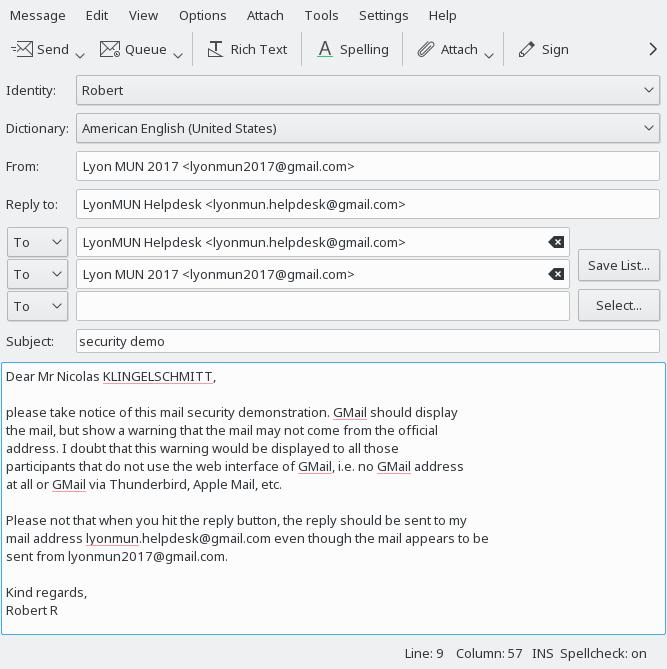
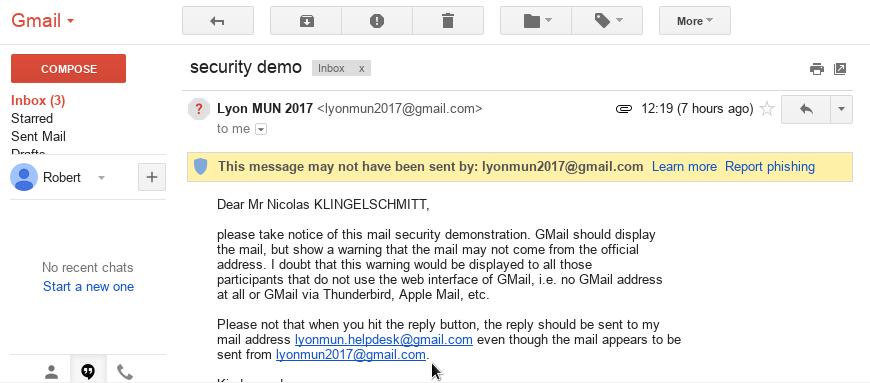
To be perfectly secure, inform participants right away to find the payment information uniquely on the website (that should use https/SSL). Further, I advise to use mail addresses ending on @lyonmun.com. As such, it is more complicated to create similar-looking mail addresses. Further, this may also solve the issue to find oneself blocked to send mails.
Unfortunately, even with DKIM, the impersonation of mail senders cannot be prevented in all cases. To prevent the latter, one could use an intranet instead of mails, e.g. based on Discourse. I wrote an article about it earlier.
-
Maybe the sender was tired after working past midnight and less attentive of what s/he is doing. ↩︎
INSA Pedagogy Colloquium
Last week, I got the chance to present at the 5th Colloquium on Pedagogy my field report on the education of first years engineering students at INSA Lyon as I observed it during my soon 2 years teaching experience.
You may also want to read a communication entitled What does Active Learning Mean for Mathematicians? published in the Notices of the American Mathematical Society (AMS, Vol. 64, Nr. 2) earlier this year (2017).
Fun with FreeIPA and a slightly more complex DNS setup
The Plan
+---------+    +------------------------+    +---------------------------+
| FreeIPA | -> | upstream hidden master | -> | public facing dns servers |
+---------+    +------------------------+    +---------------------------+
Sounds simple enough right? Well …
The Fun
Let’s get right too it … FreeIPA only sends out notifications to the NS records listed in the zone. But our hidden master is not reachable from the outside and should not be listed as an NS.
‘But bind has “also-notify” just use that.’ you might say now. Which is correct. So a quick check on the ldap scheme reveals there is no setting in the LDAP tree for it. Ok… the nice solution is dead.
Recipe Icon
Initially I was going to do a more elaborate workflow tutorial, but time flies when you're having fun on 3.24. With the release out, I'd rather publish this than let it rot. Maybe the next one!
Docker at Travis
Travis CI
The Travis CI service offers a free Continuous Integration (CI) service for open source projects hosted at GitHub.
Ubuntu 12.04 LTS
Unfortunately it runs Ubuntu 12.04 LTS at the worker nodes. That means if your software needs some newer tools or libraries you have to find it in some external repository. You might be lucky with the Ubuntu LaunchPad, but in the worst case you will need to backport the package by yourselves.
Other Distributions?
But what if you need a newer Ubuntu version for your build? Or a completely different distribution like openSUSE or Fedora?
Originally that was not possible with Travis, but fortunately they allow using Docker containers at build for some time. That means you can run even a completely different distribution for building your software.
Travis and Docker Tricks
Building for Several Distributions in Paralell
Travis allows to setup a build matrix which can run the build in different environments. The usual use case is to run the tests using different versions of compilers or interpreters.
But you can easily use this feature for using different Docker images
with different distributions. You just define different Dockerfile and
building script for each environment.
We use this feature in snapper and the code is built for five different distributions in parallel!
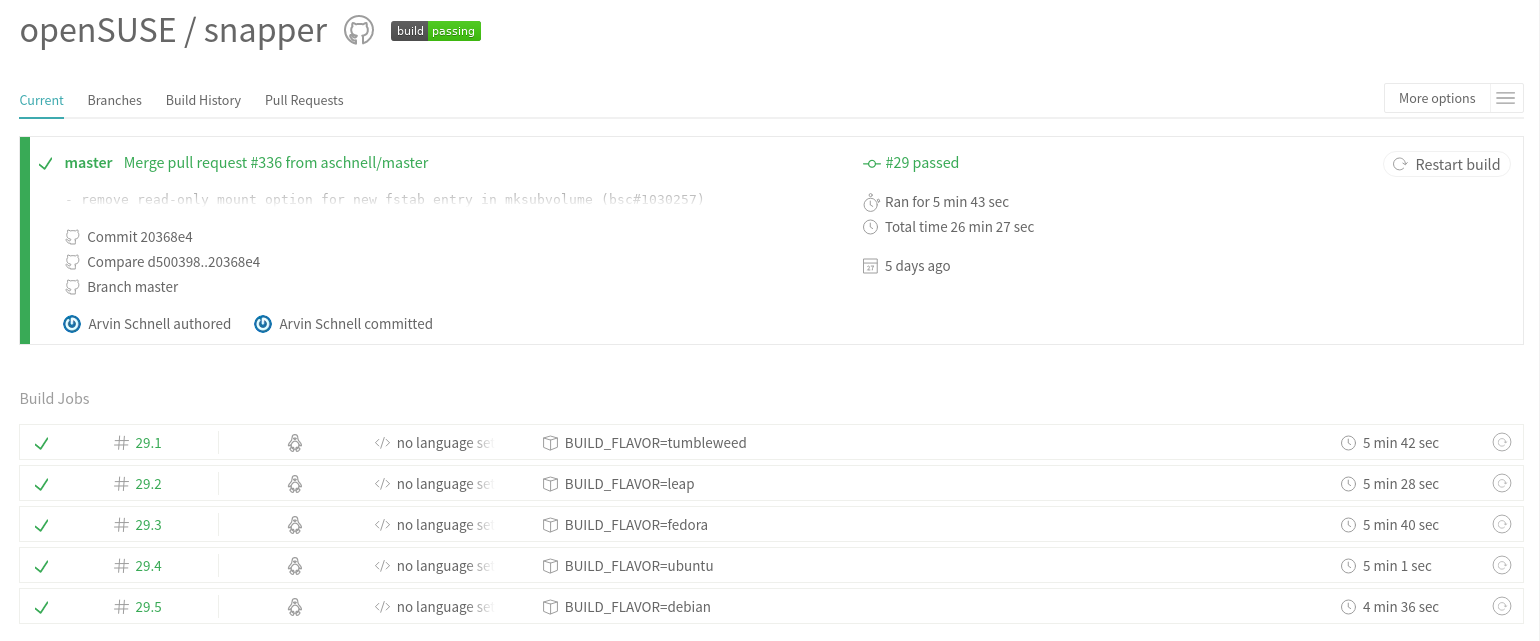
As you can see the code is built for Debian, Ubuntu, Fedora, openSUSE Leap and openSUSE Tumbleweed. That means we know that the code still builds on all these distributions even before merging a change!
See the Dockerfile.* and .travis.* source files for more details.
Building Docker Images at Docker Hub
The Docker Hub is a platform for publishing and sharing the the Docker images.
The snapper example above builds the Docker image locally and then runs it. But what if you need to build the same image many times? What if your software changes a lot? Or you have several packages which run in the same environment?
Then it makes sense to build the image only once and then reusing everywhere where needed. That is exactly the case for YaST, we have about one hundred repositories which build in the same environment.
Actually we split the environment into two parts - one for Ruby based packages and one for C++ based packages. The reason is to have a smaller Docker image for faster downloads.
So at Travis we either download the Ruby image or the C++ image. You can check the sources for both Docker images at GitHub (Ruby image, C++ image).
Local Build
Normally you cannot reproduce the Travis builds locally as Travis uses a customized Ubuntu image which is not available for download. That means even if you build your software on Ubuntu 12.04 you might still get a slightly different results at Travis.
With Docker you can download or build the very same Docker image and run it locally. Just run the same Docker commands as in Travis.
(Technically it still will not be 100% the same as at Travis, e.g. Docker uses the host system kernel so there still might be some differences but it is very very close…)
Try it in Your Projects!
So hopefully these hints will be helpful for somebody and will allow you to run CI also for your project. And if Travis does not fit your needs then there are similar alternatives available…

VMware Workstation 12.x.x for latest openSUSE Tumbleweed
So what if for example (which is what happened this month with a newer library version of curl) that we have a newer version of library than what is supported by VMware Workstation. So you go ahead and launch vmware, but no VMware Workstation windows opens. The first thing you can do is inspect the log craeted at /tmp/vmware-<your_home_user>/vmware-apploader-<some_number>.log. It will show you in the beginning which libraries it will be using from either SYSTEM or SHIPPED with VMware Workstation. From the output this month we have the following which is suspect in our log.
017-03-24T08:59:45.773-06:00| appLoader| I125: Marking libxml2.so.2 node as SHIPPED.Since libcurl.so.4 was marked as SYSTEM we know that it is trying to use the library from our installed packages. libcurl had some recent upgrades. We can try to mitigate this in two ways.
2017-03-24T08:59:45.773-06:00| appLoader| I125: Marking libview.so.3 node as SHIPPED.
2017-03-24T08:59:45.773-06:00| appLoader| I125: Marking libXrandr.so.2 node as SYSTEM.
2017-03-24T08:59:45.789-06:00| appLoader| I125: System libcurl.so.4 has OpenSSL version OpenSSL/1.0.2k, ours is OpenSSL/1.0.2k.
2017-03-24T08:59:45.789-06:00| appLoader| I125: System libcurl.so.4 has version 7.53.1 (need 7.51.0) and has been compiled with c-ares support (SSL compatibility? yes).
2017-03-24T08:59:45.789-06:00| appLoader| I125: Marking libcurl.so.4 node as SYSTEM.
We can execute from the command line forcing to use all SHIPPED libraries from VMware Workstation.
# VMWARE_USE_SHIPPED_LIBS=force vmware &We can force the one library to be run from the SHIPPED libraries by running the following.
# export LD_LIBRARY_PATH=/usr/lib/vmware/lib/libcurl.so.4:$LD_LIBRARY_PATH
# vmware &Both ways are acceptable, but in some cases the later can have better performance in my experience.
Hopefully this can help with future changes in openSUSE Tumbleweed and ensure that you can continue to run VMware Workstation no matter the outcome of the installed packages.
Enjoy!
Enable ALT Keys for openSUSE YaST on Mac Terminal
Intro
YaST (Yet Another Setup Tools) is installation and configuration tool for SUSE Linux Distribution, like openSUSE or SLE. It’s easy to use to attractive your system quickly because it has a graphical interface.
YaST can be used with Graphical Interface or Command Line with Terminal. If you using graphical interface, you just need to click and following YaST Wizard. But, if you have a SUSE Linux Server with text mode you still can using YaST by command line interface.
By default, using YaST in CLI Mode, you should press “Tab” keys to move to another menu and it’s wasting your time because if you missed it, you must repeat it :-D.
But, to avoid that you can use ALT Shortcut in YaST CLI Mode. Example :
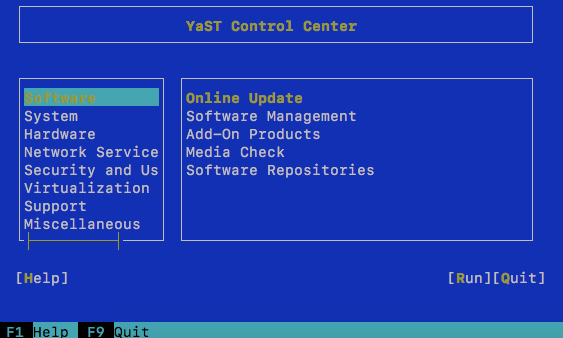
YaST Command Line
Look at the above picture :
In traditional ways, if you want to move your cursor from “Software” menu to “Help” menu. You must press tab, tab, tab, and tab until help menu. But, in SUSE ways, you can do it easy, you just need to press ALT + Yellow Words.
If you want go to “Help” menu you just need to press “ALT+ H”
if you want go to “Run” menu you just need to press “ALT + R”
Easy right? 
The Problem
The problem is if you using MacBook or OSX Family, ALT Keys (Option) in keyboard didn’t work for YaST. You must configure it on preference Mac Terminal.
Solution
If you want be able to enable ALT Function for YaST, please follow this instructions :
- Open your Mac Terminal, then Click Terminal beside your Apple Logo and Click Preferences.
- In Profiles section, click Keyboard Tab, and checklist “Use Option as Meta Key“.

Configuration for ALT
Now, you can use ALT as shortcut YaST. Hope this helpful
The post Enable ALT Keys for openSUSE YaST on Mac Terminal appeared first on dhenandi.com.

GSoC 2017
Hi! It has been a lot of time ago since the last post. I am writing because today starts the GSoC application period for the next summer. So if you are a university student and the idea of working in open source during your holidays appeals you, hurry up! You still have 2 weeks to look for a organisation and a project you like, approach the mentors and write a proposal. You should try to write the proposal as soon as possible so the mentors have time to review it.
Here you find the list of organisations that participate this year: https://summerofcode.withgoogle.com/organizations
On it you’ll find openSUSE, that participates this year too. You can find more information in opensuse 101: http://101.opensuse.org and in the organisation page.
This year I’ll also participate in GSoC, but this time as a mentor for openSUSE. So if you have any question regarding GSoC or openSUSE fell free to add them in the comments section of this page. 
