
 Member
 mvidner
Getting Started in Android Development: Part 2: Publishing the First App
Here I simply describe what it takes to publish an Android application that I described in the previous part, Building the First App.
Thanks to SUSE, my employer, for sponsoring a company-wide Hack Week which this project was a part of!
I will only deal with free apps: no cost for the user and no advertisements. I guess it would be easy to slap an advertisement module on it or put a minimal price tag on the app. But then it would be morally wrong for me to keep the profits without giving SUSE a cut, and the organizational and accounting process would quickly turn this into a lawyer's Hack Week. Scratch that.
Registering a Publisher Account: $25
I started with the instructions at Get Started with Publishing.
I could have reused my existing Google account but decided to create a new one. The next step may put you off: a 25 USD registration fee is needed.
Then a fair amount of legalese, which I did skim through, and I was rewarded by the knowledge that Google apparently does not like developers to publish web browsers or search engines.
Publishing the App
When I thought my application was good enough to be published I went to the Developer Console to make a Store Listing.
Entered the app name, summary, long description; no surprise there, I had expected that from openSUSE RPM packaging. Then came the innovation: screenshots are required! In fact,
- Two screenshots
- a high-resolution icon (512x512 pixels)
- a feature graphic (1024x500 px) which appears as the heading of the app listing page
Reportedly the new standard way to take a screenshot is Power + Volume Down. But that did not work for my Xperia phone. I had to enable the following setting, after which a Screenshot option appeared in the menu that appears after holding Power.
- Settings, then
- Device / Buttons, then
- Power button / Power menu, there
- enable Screenshot ☑.
For a moment I feared I would need to hire a designer for the icon, but then I told LibreOffice to write a 6 in a 360pt big font and used that. whew!
More form items to fill: App type: Applications (not Games); Category: Entertainment (I guess); Pricing and distribution: Free, All countries, No ads.
We do not process any user data so we check a box that we're Not submitting a privacy policy.
Now we are at a point in the form where it says that we need to submit a content rating, but it won't let us do it. I think it only allows to rate after the app has been uploaded.
Are we ready to upload the app code? Upload APK... bzzzt, wrong! must not upload a debug build. Did not find a way to make a production build in the GUI so used the CLI for a change: ./gradlew assemble... bzzzt, wrong! must not upload an unsigned build.
Signing software makes sense. Except the signing mechanism is unfamiliar to me, something involving a Java KeyStore. So I followed the manual: Sign Your App. Ended up with a file in my home directory and needing to enter two passwords each time I build a signed APK. At least no certification authority needed to be involved.
Content Rating: Category: Utility, No violence, No sexuality, No offensive language, No controlled substances (illegal drugs), No communication with other users, No sharing of personal information, No sharing of location, No digital goods purchasing, No Nazi symbolism, Not a browser or search engine.
Finally all information was there, I hit Publish, and I wondered how long the review process would take. It took about 3 hours on a European Tuesday noon.
You can try out Just Roll One Die on Google Play. The source code for Just Roll One Die is on GitHub under a MIT license.
Next
In the next part we will deal with software bloat. Because an app that can roll a 6 is justified in taking up 6MB on your kid's tablet, right? Right??

Hackweek projet: Let's Encrypt DNS-01 validation for acme.sh with Gandi LiveDNS
Let's Encrypt is a project aimed at providing SSL certificates for free, in an automated way.
I wanted to get a SSL certificate for my Synology NAS. Synology now supports natively Let's Encrypt but only if the NAS accepts incoming HTTP / HTTPS connections (which is not always what you want).
Fortunately, the protocol used by Let's Encrypt to validate a hostname (and generate a certificate), Automatic Certificate Management Environment (ACME) has a alternative validation path, DNS-01, based on DNS.
DNS-01 requires access to your DNS server, so you can add a validation token used by Let's Encrypt server, to ensure you own the domain name you are requesting a certificate for.
There is a lot of ACME implementations, but very few supports DNS-01 validation with my DNS provider (gandi.net).
I ended-up using acme.sh, fully written in shell script and tried to plug Gandi DNS support in it.
After some tests, I discovered Gandi current DNS service is not allowing fast changing DNS zone informations (which is somehow a requirement for DNS-01 validation). Fortunately, Gandi is now providing a new LiveDNS server, available in beta, with a RESTful HTTP API.
I was able to get it working quite rapidly with curl, and once the prototype was working, I've cleaned everything and created a pull request for integrating the support in acme.sh.
Now, my NAS has its own Let's Encrypt certificate and will update it every 90 days automatically. Getting and installing a certificate for another server (running openSUSE Leap) only took me 5 minutes.
This was a pretty productive hackweek !
Getting Started in Android Development: Part 1: Building the First App
Getting Started in Android Development: Part 1: Building the First App
Do you know programming and want to start with the Android platform? Just like me! Read on.
Thanks to SUSE, my employer, for sponsoring a company-wide Hack Week which this project was a part of!
In case you wonder why Android: it is a good balance of work and play. Android is not the coolest toy to play with at the moment, but it is the most versatile device that people are likely to have at hand, especially when traveling. And Android already outnumbers openSUSE and all other OSs in my household.
This is a three part series: 1) building an app, 2) publishing it on Google Play, 3) trimming it down. In this part, we'll set up the development environment, follow the official tutorial to build a trivial app, then build a trivial yet useful app of our own.
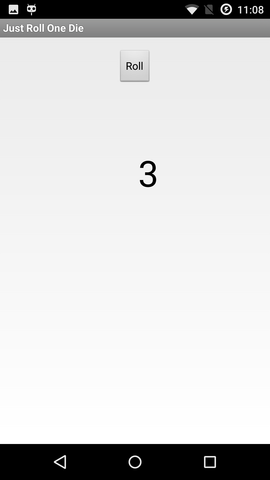
a screenshot of my first app
Installing the SDK
I am using openSUSE Leap 42.1 (x86_64). You will notice that I keep tallying the disk space taken. This is because I am a bit short of space on one of my machines, and need to have an idea how much cleanup is needed.
Went to https://developer.android.com/.
Downloaded Android Studio (2.2.3 for Linux, 438 MiB, unpacks to 785 MiB), followed the instructions, unpacking to /opt (getting /opt/android-studio).
Ran /opt/android-studio/bin/studio.sh. Was greeted by an "Android Studio Setup Wizard": chose a Standard setup. Additional download of 890MB (1412MB unpacked) to ~/Android/Sdk.
Got a slightly confusing notice about KVM emulator acceleration. It seems that if you have used KVM before on your machine, the SDK will use it out of the box. But even with acceleration, don't expect the emulator to be fast. If you have a real device, use that.
"Building Your First App"
For the most part I simply followed the tutorial for building, installing, and running a trivial app that asks for a message and then displays it. The documentation feels excellent!
The one non-obvious part was choosing which Android version, in other words, which API level, to target. in the Target Android Devices dialog, the preselected option is API 15: Android 4.0.3 (IceCreamSandwich). That is presumably based on the current active device statistics which result in the app being compatible with 97% of devices. The oldest one is API 9: Android 2.3 (Gingerbread), which was a bit disappointing since my older phone from 2010 runs API 8, 2.2 (Froyo). (Don't worry, I eventually solved that in part 3.) Fortunately my newer phone has API 22: Android 5.1.1. Installed the API 22 platform too, to match the phone, about 100MB.
Connected my phone with a USB cable, pressed Run, and there it was! Don't worry, a buggy app will just crash and not affect the rest of your phone.
Just Roll One Die
Now it looked like I knew enough to make a useful app, so I did: Once my family was on a train with a board game table but we had no dice. So my first actual app is Just Roll One Die. A totally simple application that can just roll one ordinary six-faced die. Six faces ought to be enough for anybody. No pictures, just digits.
The source code for Just Roll One Die is on GitHub under a MIT license. You can try out Just Roll One Die on Google Play. (The details of how to get an app there are described in Part 2: Publishing the First App.)
How about you?
I was amazed how easy it was and I can't believe that it took me so long to try this. Wy don't you too give it a try and let me know how you are doing.

Using Linux notebook as an alarm clock
New and improved Inqlude web site

All libraries have additional meta data now to group them by a number of curated topics. You can see the topics in the navigation bar on the left and use them to navigate Inqlude by categories. The listing shows more information on first view, such as the supported platforms, to make it easier to find libraries according to your criteria without having to navigate between different pages. The presentation in general is cleaner now, and some usability testing has shown that the page works better now than before. In addition to the visible changes, Nanduni has also done quite a bit of improvements under the hood, including better automated testing. I'm proud of what we have achieved there.
It always has been a privilege for me to act as mentor as part of Google's Summer of Code or other programs. This is one of the most rewarding parts of working in free software communities, to see how new people learn and grow, especially if they decide to stay involved after the program has ended and become valuable members of the community for the long term. Being able to help with that I feel is one of the most satisfying investments of your time in the community.

OpenStack Summit Boston 2017 Presentation Votes (ends Feb.
OpenStack Summit Boston 2017 Presentation Votes (ends Feb. 21st, 2017 at 11:59pm PST)
I have submitted a handful of sessions which I hope will be voted for. Below are some short summary's and links to their voting pages.
Avoid the storm! Tips on deploying the Enterprise Cloud
The primary driver for enterprise organizations choosing to deploy a private cloud is to enable on-demand access to the resources that the business needs to respond to market opportunities. But business agility requires availability...
https://www.openstack.org/summit/austin-2016/vote-for-speakers/#/18317
Data center modernization and consolidation is the continuous optimization and enhancement of existing data center infrastructure, enabling better support for mission-critical and Mode 1 applications. The companion Key Initiative, "Infrastructure Agility" focuses on Mode 2...
https://www.openstack.org/summit/austin-2016/vote-for-speakers/#/18403
It doesn't matter where your at with your implementation of Microservices, but you do need to understand some key fundamentals when it comes to designing and properly deploying on OpenStack. If your just starting out then you will need to learn some key things such as the common characteristics, monolithic vs microservice, componetization, decentralized governance, to name a few. In this session you'll learn some of these basics and where to start...
https://www.openstack.org/summit/austin-2016/vote-for-speakers/#/18336Thanks for your support.
-CS
X220 to play with
I tried 4.10 there, and got two nasty messages during bootup. Am I the last one running 32 bit kernels?
I was hoping to get three-monitor configuration on my desk, but apparently X220 can not do that. xrandr reports 8 outputs (!), but it physically only has 3: LVDS, displayport and VGA. Unfortunately, it seems to only have 2 CRTCs, so only 2 outputs can be active at a time. Is there a way around that?
Downtime explanation and how to get up and running again
Back to business... with a short explanation of the downtime and how the problems have been fixed.
Hello everybody!
This is my first post in 2017 and therefore let's begin with a much delayed 'Happy new year, everybody!' and all the best wishes for you in 2017!
But let's get back to business directly:
Downtime
Some of you might have recognized that we had a downtime of the crowbyte blog and website. First of all I am sorry for any inconvenience you might have had through the downtime....
Downtime Erklärung und wie man das Problem löst
Back to business... mit einer kurzen Erklärung der Downtime und wie die Probleme gelöst wurden.
Hallo, liebe Leser!
Dies ist mein erster Post 2017 und daher lasst uns mit einem sehr verspäteten 'Frohes neues Jahr!' und den besten Wünschen für 2017 beginnen
Aber kommen wir direkt zum Geschäft zurück:
Downtime
Einigen wird es nicht entgangen sein, dass der Blog und die Webseite von crowbyte eine weile offline war. Zunächst einmal entschuldige ich mich für alle eventuell aufgetretenen Un...
OpenStack Summit Boston: Vote for Presentations
 The next OpenStack Summit takes place in Boston, MA (USA) in May (8.-11.05.2017). The "Vote for Presentations" period started already. All proposals are now again up for community votes. The period will end February 21th at 11:59pm PST (February 22th at 8:59am CEST).
- Next Generation Hardware for Software Defined Storage - Software Defined Storage like Ceph has changed the storage market dramatically in the last few years. While software has changed, storage hardware stayed basically the same: commodity servers connected to JBODs utilizing SAS/SATA devices. The next step must be a revolution in the hardware too. At the Austin summit the Ceph community presented a 4 PB Ceph cluster comprised of WDLabs Converged Microservers. Each Microserver is built by starting with an HGST HE8 HDD platform and adding an ARM and DDR running Linux on the drives itself. WDLabs provided access to early production devices for key customers such as Deutsche Telekom for adoption and feedback. This talk will provide insight into our findings running a Ceph cluster on this platform as a storage provider to OpenStack.