
 Member
 jospoortvliet
Latest attacks on privacy...
Privacy
It is the usual story: we should disallow companies from using perfect end to end encryption and force them to insert backdoors against terrorists.Not that it would help - that's been discussed extensively already but in short:
- If you have nothing to hide, you'll use a backdoored app and you're vulnerable to foreign (and your own) governments, terrorists (!), criminals and others who can abuse your data in more ways than you can imagine.
- If you have something to hide, you can use 1000 different tools to do so and there is nothing government can do about that so you won't use a backdoored app.
- And note that government has failed to even use fully unencrypted information to stop terrorist attacks so perhaps we should first see if they can actually get their act together there.
Nor will you catch corrupt politicians or big companies doing nasty stuff, though I am quite certain the laws will be written in such a way that you can use them to go after people who actually try to expose such politicians or companies.
And I'm also quite certain companies will use this as an excuse to not implement proper protection in their products so you can continue to stop pacemakers remotely or disable the brakes in cars over the internet.
Generally, laws targeting encryption and terrorism do more to harm whistleblowing than terrorism and are thus promoting corruption and bad, unsecure products.
These laws will literally cost lives. Not save any.
And it is exactly why Frank started ownCloud and why we continue to develop that vision at Nextcloud. And keep developing new features, like the File Access Control app which can provide an extra protective layer around your data. I for one certainly can use that app and exactly in the way described in that blog! So much for 'enterprise only features'.

Get it and migrate today. You and your data deserve it!


GSoC comes to an end :(
GSoC comes to an end, so it is time to write a last post about it.
The project
Let’s summarize what I did. You can also see it on Github: https://github.com/openSUSE/osem/commits?author=Ana06
I explained in my last post about the project that I had already changed completely the public schedule of OSEM. Since then I have mainly focused on the admin schedule, the place where the schedule is created. Now it is also possible to have several schedules in the backend before deciding which of them to use. So there is a list of schedules and a switch in every schedule to set that schedule as the selected one. I’ve also changed the appearance and functionality of the admin schedule. This is how it used to look like:
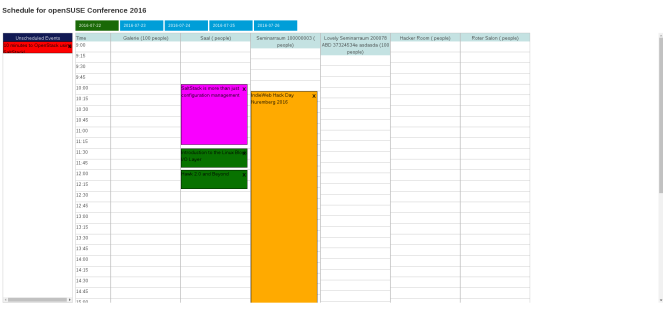
And this is how it looks like now:

As you can see I have integrated it in the admin interface. I’ve used bootstrap while doing so and I have also changed the way events are loaded and scheduled.
I’ve also introduced a Save button, as previously the schedule was saved instantly when dropping and event in a new cell. After clicking Save the page is reload and it is rendered a message to inform that the schedule was correctly saved or the reasons why it was not correctly saved. Another problem I’ve solved is that it was possible to schedule an event at the same time than other event, so things like that could happen:

I’ve also made the schedule times changeable. Previously the schedule started at 9:00 and ended at 20:00 and it was impossible to schedule an event outside this hours range.
Apart from the admin schedule I also add the feature to allow users to have their own schedule by having favourite events:


Nishanth GSoC project interfered few times with mine. It was something great as he pointed out some bugs in my project and I also helped him with the tags in the schedule:


There are some of the things I mentioned that hadn’t been merged yet as they are still being reviewed.
Challenges
I found a little bit tiresome understanding the javascript code previously used for the admin schedule and then changing it almost completely several times. But every time I changed that code I liked it more so it was worthwhile.
Displaying the tags in the schedule properly was not as easy as it seemed at the beginning: osem#1082 and osem#1125. Founding a way to make links inside other link work and to do it with ctrl+click was another little challenge as you can see here: osem#1132 and osem#1134.
Overall experience
Working in an Open Source Project has been much better than I expected (and I had very high expectations  ). During the last three months I’ve learnt many things, had really fun and made friends. I would like to thank this amazing summer to all mentors (specially my mentors Christian and Henne) and to the openSUSE community. I also want to thank the TSP program for giving me the chance to attend openSUSE Conference, which was an incredible experience.
I will continue working on Open Source projects and of course I will continue working on OSEM. I also encourage all students reading to apply to GSoC next year and to do it at openSUSE. 
GSoC Welcome Package
It is a little bit late to post pictures of the GSoC welcome package, but I have just found the pictures I took when I received it 3 months ago and I thought that maybe someone likes to see them.


FrOSCon and the future of private clouds

Frank won't make it, sadly, as he's in Denmark speaking at another event. Or somewhere else, his travel is a bit crazy lately ;-)
Future of private clouds
Frank blogged last week about a vision for Nextcloud and we've been thinking and discussing this at our hackweek with about 30 community members as well. It was quite amazing to bring so many people together and discuss these things!Afterwards we've brought most of the topics to our forums or github, including our ambitious Nextcloud 11 roadmap. I'll certainly talk about some of those things this weekend at FrOSCon:
- Communication integration
- New app store
- New updater
- Federation
If you like to get involved in the 'future', join us at our conference!

Live USB improvements
Tools to create multi distribution bootable USB stick got couple of new improvements and features.
live-usb-gui now offers choice of scripts to use, depending in your need you can either use live-fat-stick with vfat partitioned stick or live-grub-stick script which works with any partition format supported by grub2 including vfat, must be used if you have iso bigger than 4G.
live-grub-stick can now create bootable USB from openSUSE installation media isos (standard DVD or NET), difference from --isohybrid option is that the data already on the stick is not touched, the whole iso is available on the stick so you can use the stick to copy it around apart from being able to install from it.
Two new options --suse-persistent(for openSUSE live ISOs) and --ubuntu-persistent(for Ubuntu and clones) are now available, using these options allows live sessions to be persistent over multiple boots, even when used on vfat partition. Again the way it is used does not need change in partition format of the stick, existing data on the stick remains untouched.
Feel free to fork https://github.com/cyberorg/live-fat-stick if you want some more enhancements.

Traffic shaping with virtual pfsense and SLES 12 KVM Host

I built my own pfsense from a Dell OptiPlex 990 SFF PC with an Intel Core i5-2400 3.1GHz. I have installed an Intel PRO/1000 VT Quad Port Server Adapter LP PCI-E for more networks and vlans on my network. Traffic shaping was a breeze with pfsense. I of course run pfsense virtualized as the OS itself doesn't work on the hardware physically. BSD seems to have a limited hardware support than Linux these days. It was really the fact that BSD kernel didn't have the right support for this chip and kept hard locking with a kernel error that made no sense. So I have installed SUSE Linux Enterprise Server 12 SP1 as the HOST OS which is humming along with no kernel errors and pfsense is running as a KVM virtual machine. I have bridged all the network interfaces for the virtual machine and it works great. Its been running for 3 months now with no troubles.
Now to try out Sophos UTM. Looks like a fun alternative to pfsense and its Linux based. :-)
What is PAM?
This post has been migrated to my new blog that you can find here:
https://pureooze.com/blog/posts/2016-08-07-what-is-pam/
The last post I did was the start of the Comprehensive Guide To AppArmor which took a look at the basics an administrator or developer needs to know to start creating and deploying AppArmor profiles for a program. In the post I also left a question for the reader regarding AppArmor being used to replace the traditional DAC permissions (but never should!) and how you could use it to remove access to a file from a specific user (rather than a program). However this requires usage of the pam_apparmor module for PAM and due to this, before going into depth with using pam_apparmor, you should make sure you have a grasp of the basics of PAM and its configuration files.
Seriously What Is PAM?
PAM stands for Pluggable Authentication Modules and is used to perform various types of tasks involving authenticaction, authorization and some modification (for example password change). It allows the system administrator to separate the details of authentication tasks from the applications themselves. This allows the policy to not only be generic, it means that the programs do not need to be modified in order to update the policy! An example of PAM usage is controlling login attempts to a shell/GUI interface so that only successful authentication and authorized events are allowed. You could also use PAM to control who can use the su binary to switch identities or control who can use the passwd utility to change passwords.
Overview
When a developer wishes to interact with PAM to let it handle events, they must include libpam which allows communication via the API provided by the library. When PAM sees a new event that it must process, it will look at the relevant configuration files found in /etc/pam.d and determine which modules must be used at certain stages.

PAM is capable of using context to determine what it needs to do, for example the pam_unix.so module has capabilities for the auth and account stack. In the auth stack it checks a username and password combo while in the account stack it will check a users aging and expiration info. This versatility is one of the reasons PAM has been so popular in the UNIX world, it allows for solutions that can be combined to create a generic library to deal with certain type of request.
How Do I Tell A Program Supports PAM?
This is usually pretty easy, you can use ldd to check if libpam is in use:
comp:/home # ldd /usr/sbin/sshd | grep pam
   libpam.so.0 => /lib64/libpam.so.0 (0x02209ddace0105400)
comp:/home # ldd /bin/su | grep pam
   libpam.so.0 => /lib64/libpam.so.0 (0x02999ddace0105400)
   libpam_misc.so.0 => /lib64/libpam_misc.so.0 (0x12211ddace1105400)
To read the rest of this post it can be found on my new blog here:
https://pureooze.com/blog/posts/2016-08-07-what-is-pam/
What is PAM? was originally published in Information & Technology on Medium, where people are continuing the conversation by highlighting and responding to this story.

ownCloud is hiring!
[caption id=“attachment_10199” align=“alignright” width=“300”] Come join us![/caption]After the recent news, we are now back on stage and with this blog we want to point you to our open positions. Yes, we are hiring people to work on ownCloud. ownCloud is an open source project, yes, but ownCloud GmbH, the company behind the project, provides significant people’s power to expand the project to serve the needs for both the community and ownCloud GmbH’s customers. So if you ever dreamed of getting paid for work on open source, read on.
What we do - what you will work on
The call is for people who understand the vision of bringing the idea ownCloud to an enterprise ready level: ownCloud is not only running on individual open source enthusiasts hardware, but also on sites with huge amounts of data like CERN or the Sciebo project, and at large companies who want to work with their data in a secure way.
To provide the best solution for all of them we are looking for:
A System Administrator
In this role, you make sure that the infrastructure that we use in ownCloud is up and running. That involves troubleshooting and streamlining existing infrastructure, but also designing new services. If you love virtualization of all kinds and have an eye for security, this position is for you. Of course all this does not only happen behind closed doors, but you will be in contact with the open source community around ownCloud.
The Application Security Engineer
For security professionals who would like to take on a high profile open source project. As security is one of the core values of ownCloud, we are looking for somebody who constantly monitors the code flowing in for security problems, is able to find glitches in existing code and handle the bug bounty program. That and more is the task of this high profile position.
A Software Engineer PHP
For engineers with a passion for good software design and a love for writing code without being code monkeys: In this role you iron the server part of our platform, build new features, work on fixing bugs with the support colleagues and bother the architect with new ideas how to make the thing even better. For this you need to urge to get down and dirty with code, feel yourself comfortable in a team of high profile developers who can teach you things and learn from you.
PHP or what?
Yes, ownCloud is written in PHP, and PHP is the most important, but by far not the only language that we use for the ownCloud platform.
Before you turn your back because of PHP, please think twice. There are a lot of good reasons why we are going with PHP, some of them are named in this blog, but there is more: For example PHP7: With PHP 7 (which can be used with ownCloud) the language has caught up with many criticism it faced before and has done a big leap.
And anyway, the language of a system is not the only thing that is important in a developers life. It is rather how many people use, love and recommend the project and the development processes the team lives. And in all that points, ownCloud is already awesome, and will become even more with your help.
Send your resume in to work@owncloud.com so we can get talking!

Virtual Machine from a Hard Disk Image with virt-install --import
NAME=sles12sp2b4
IMG=https://example.com/images/SLE_12_SP2_Beta4-x86_64-default.qcow2
wget -O /var/lib/libvirt/images/$NAME $IMG
virt-install --name $NAME \
       --ram 2048 --graphics type=vnc \
       --network bridge=br0 \
       --import \
       --disk bus=virtio,path=/var/lib/libvirt/images/$NAME
For
IMG I used a SUSE-internal server with SLEnkins images.The tricky part is knowing the right value for the
--disk bus setting. At first I used the default but the machine wouldn't boot because it would see /dev/sda instead of /dev/vda it was expecting.

Create two, three, many openSUSE Guides
I’m often approached by people who wish to translate opensuse-guide.org to their respective languages, which is awesome, but managing translations would be too much work for me. So instead I encourage people to create a derivative work of the guide in their own language – it’s licensed under the GNU Free Documentation License with no invariant sections.
Recently derivatives have been created for Arabic and Spanish by Sadig Osman and victorhck respectively.
Moved to GitHub
I have now made it a whole lot easier for people to fork opensuse-guide.org by putting the guide on github. This also makes it much easier for maintainers of derivative works to keep track of the on-going changes and updates I make to the guide.
The HTML isn’t particularly pretty, and I probably still have some Danish language comments here and there. But please go ahead and fork me.