
 Member
 jospoortvliet
You are Nextcloud, too - what we will do for contributors
 |
| Cool stuff we want to do more with! |
Based on feedback collected from many contributor members we've defined some plans and already made changes to how Nextcloud will be developed. Improved transparency and governance, focus on stability and architectural improvements and other improvements are covered in this blog. Much more is coming, you can join the conversation right now on our forums!
Community Input
January 2015, I ran a contributor survey to see what the ownCloud community thought about the processes, development focus and our work at the company. I shared the results by the end of April and pushed internally for the feedback to be taken serious. Some of the changes were implemented but many others were left for a future project to push forward. And Nextcloud will.feedback and changes
Nextcloud aims to build a sustainable business, not limited by short-term, next-quarter thinking. The relationship with our community of contributors and users is central to our plans.To quote Frank on this:
The company shouldn't be involving the community more in decision making; that's the wrong way of looking at it. There shouldn't be a fundamental separation to begin with!And that's what we want. Saying "we're more open" just means being a more friendly ruler - Nextcloud aims to be a participant, not a king, benevolent or not! That is not to say that there should not be any direction but it shouldn't be dictated by a company anymore. Of course, people can decide what they work on, and the company gets to decide what it pays its employees to do. Now there are changes in how we manage our employees too, with far less micromanagement and more freedom. But that's for another blog.
Let's go over the specific pieces of feedback mentioned in the email and received from contributors in other ways and note how Nextcloud intends to address them.
Development
ownCloud is fun and relatively easy to contribute to, with a mostly well running review process and release cycle. There were some practical requests and suggestions as well as concerns about the strain the growth of our project has put on the core developers.Dealing with Pull Requests
A major issue as detailed in many comments was that it often takes too long for pull requests to be merged. That is, contributions are not handled fast or at all. The result is that, with Core moving fast, contributions get out of sync, no longer apply and are effectively lost. As the graphs below show, the number of pull requests taking longer than 6 months to be merged is rising rapidly while the company is contributing less to development relative to volunteers. Don't get me wrong, it's great to have a growing community! But the support for development from the company needs to keep up with the pace.

Respecting contributions by being responsive and getting them merged will be our number one development priority at Nextcloud. As research by Mozilla has shown, reacting swiftly to contributions is crucial for growing community and we intend to grow and nurture our contributor base, recognizing outside input as a key driver of growth and success.
More stability
A general point made was that it'd be good to focus more on stability and performance. Some of that has been implemented with the 8.x series and automated testing improvements done over the last year. An especially sore point in terms of stability is the upgrade process, as was very visible with the 9.0 release that is still not available for users of the built in updater app. We will soon blog about the Nextcloud plans with regard to the updater.Architectural improvements
It was mentioned that some parts of ownCloud are in need of serious architectural love and refactoring. ownCloud has been traditionally rather restrained in this regard and people worried that this "impairs competent developers". While being conservative is important with regards to building a platform (stability and compatibility!) many improvements made their way into the 8 and 9 releases. To preserve a healthy balance, we want to introduce an Architecture team to make decisions that have a big impact on the code base. More details will follow.Another area of improvement would be to communicate more about architectural changes. Frank has already done a series of blogs about Federation in the past and more will follow.
Apps: support for Calendar, Contacts and Spreed
Many pointed out that apps are extremely important for ownCloud and we should work more on that. Frank has always emphasized the importance of building a platform and for Nextcloud this will be a central goal.Nextcloud will officially support the Calendar and Contacts apps and supercharge their development. The Spreed.ME app will bring fully supported audio and video chat to ownCloud. We'll also invest in growing and improving our API for these and other applications.
Process
Some smallish process improvements were requested. More logical labels and tags, for example, which have been pretty much cleaned up since then. Another thing was that big pull requests are often a pain in the ass to get merged and we should tell contributors to cut their work in smaller pieces. This was added to the documentation.Decision making
Most people were positive about the technical direction of ownCloud - test-driven, stability, architectural work, those were great improvements. Decision making processes in the technical area were not considered very transparent. Comments were even more harsh about the project-wide decision making process.People feel decisions are often done behind closeddoors. Nextcloud will address this, in part by a new architecture team and in another part by getting rid of most 'hidden' communication channels like internal IRC and mailing lists. We also plan on talking more about our goals and plans in blogs and such.
Longer term planning is a major sticking point: there is little of it public. We need to discuss, together, how to do longer term planning. This doesn't fit too well with github. Thoughts welcome!
Communication channels
Several people have noted that we've got too many, confusing and overlapping communication channels. We've already eliminated one: mailing lists. We still have a newsletter for those who want to follow us and the blog roll on nextcloud.com/news. For technical discussions we keep using github (which now links commits to pull requests so you can find the discussion behind code) and we'll discuss more general subjects on the forum. Speaking of which, it's now on discourse - a massive improvement I'd say. And email fans can use email to communicate with people on the forum!Governance
It was already mentioned here and there but there are two other big changes. First, we want the Nextcloud trademarks to be owned by the community, like the ownCloud one should have been. So we will set up a foundation soon which will control the trademark (not have it sub-licensed!) and more in the future.Second, we will get rid of the Contributor License Agreement. You don't need to sign anything to contribute to Nextcloud.
Users
There will be improvements for users, too. Already mentioned were our plans to support the Calendar and Contacts apps, Mail too, perhaps more. And of course with Spreed.ME we will integrate open source, WebRTC based video conferencing. There is more coming - for a future blog!That's all? Nope.
Now I know this is a long blog with lots of details. No surprise, it is based on things we've wanted to improve for many years but could not. Now we can and we will. This is not the end of it, other suggestions and thoughts are more than welcome. Get involved!
Nextcloud is the future of open source file sync and share
'why' is the question everybody has and I hope you understand I don't want to talk too much about that. Instead, let me talk about what we are going to do.
A healthy Nextcloud
Open source projects work best when they have a company behind them which aims to build a sustainable business around a symbiotic relationship with the community they are a part off. Make no mistake, I think it's great if people (investors, founders) can cash out big. They take a risk, put in blood, sweat and tears. But venture capital often leads to short term thinking and chasing of quarterly numbers resulting in bad decisions. Money, time and effort is wasted and growth isn't what it could be - and that's pretty much a best case scenario.The good news is that we're starting a new company, Nextcloud, which will do things right: build a sustainable, durable business. We've got support from Niels Mache, long time open source entrepreneur and owner of the spreed video conferencing business. Nextcloud will integrate with spreed's successor, the open source, webRTC based spreed.me video conferencing software, kickstarting as a healthy, growing business with loads of customers while the integration provides a real valuable new feature to users.
What we will offer
This reboot of ownCloud is meant to be good for users, customers and contributors alike. So we'll be providing a drop-in replacement for users next month, which will bring them the stability and security updates they need as well as full spreed.ME video conferencing integration.For customers, the drop-in replacement will be accompanied with a Enterprise Subscription which gives them all the support and features they are used to. Better, even: we will honor all contracts so nobody has to pay twice or get in trouble. On top of that we plan to support some of the most popular apps like Calendar and Contacts both for home users and enterprises. Our goal here is to ensure nobody is left without the support they need to be happy, successful own/Nextcloud users.
We're setting up infrastructure now for the wider contributor community to join us. We've got some improvements in store, including new forums (discourse based), no more Contributor License Agreement and a foundation that will hold trademarks (not have them sub-licensed; nor be under company control!). January last year we did a survey of what community contributors would like to see improved and, finally, we can implement many of those requests. I will blog more about that later today!
Future
I know that this is a surprise to everybody and it isn't that you should be joining RIGHT NOW or I'll hate you forever, on the contrary. ownCloud is a very important project and a rash decision makes no sense. We are in it for the long haul, our goal is a smooth transition and that means we will take some time to prepare things on our end. We've always been in close contact with our contributors and this new thing can only be open and public from now on so let's take our time to do this right. Over the coming days we'll blog about our plans and you can provide input and help us make the right decisions!This endeavor will take some time and effort, but successful examples like LibreOffice and MariaDB have shown that, in the end, the community will find a way to get it right. I'm confident that we will be able to deliver even better solutions for our users and customers thanks to a redefined, more open community and company relationship!
Check out our announcement blog, our website and ping me or ask your questions in our Live Nextcloud Q&A Hangout with Frank and myself, moderated by Bryan Lunduke, today at 19:00 PM Berlin/Amsterdam/Paris time, 10:00 AM Pacific time.
And yes, if you want to join us, send an email, we're hiring!

Free Software is funded by Free People
More and more security incidents in Free Software projects get publicized in a way that anyone & their grandma understand the impact. Some of these carefuly crafted "campaigns" even make it to the main stream media. This trend, among other things, has sparked a discussion about funding Free Software to sustain the infrastructure everyone is building upon. A discussion which, in our venture capital driven tech world, mostly evolves around financing as a means for getting resources. Who can/should pay whom, to develop Free Software and how. I would like to add another view at funding, one that in my opinion has way more to do with Free Software ecosystem than cold, hard cash: collaboration of free people.
Freedom and what you make of it
The ability to run, copy, distribute, study, change and improve software. This is the essence of it, without these fundamental rights, software is not Free Software. And these fundamentals imply a purpose: Freedom, the ability to do as one wills. To do to software as one wills.
As always, what people make of their freedom is up to them. Some go an preach about it, most ignore it, some use it for their personal gain. However, it's undeniable that the Free Software movement has entailed a community of systematic world wide collaboration. In software development, and I would argue in many other aspects of todays life. We all know the examples of hundreds of developers hacking together on Linux, thousands of authors on Wikipedia per month, millions of pictures in the creative commons and so on. Obviously, if you give people the freedom to do as they want, many of them are inspired to work together for the common benefit. And because Free Software entails collaboration and collaboration is about individuals, making projects sustainable has many dimensions. Money is one.
Challenges and what you do about them
Of course there are many things going wrong today with making Free Software projects sustainable. For instance a growing imbalance between developers and users (Noah Kantrowitz), that developers think they are not getting fairly compensated (Ryan Bigg) or that everybody is waiting for someone else to do something (Marijn Haverbeke). Contributor burn-out. There are many, many more.
The solutions to these shortcomings, discussed in the past months, most exclusively focus on monetizing work. Be it through business models, crowd funding, grants and other forms of injecting money into the equasion. In a recent piece, Nadia Eghbal even argues that somehow venture capital must flow back because all of the VC funded software companies somehow base their work on Free Software. Steve Klabnik thinks this is already happening. Here is the thing: Money will buy you people who contribute, sure thing. But is it money for contributions that made the present? For sure not. Collaborative contributions are the currency of Free Software.

openSUSE Community by Henne Vogelsang licensed CC BY 4.0
People and how you treat them
People have made Free Software as big as it is. Active contributor communities. Humans from all over the world, with different talents, levels of expertise and cultural backgrounds collaborating. All with their own motivations. Some want to learn from others, some scratch their itch, some want to train their skills, some want to boost their resume, some contribute on behalf of a company, some just try to avoid being bored on a Saturday afternoon. If your project does not actively channel all of these ambitions into contributions, if it does not organize the collaboration, if it is not offering shared responsibility and if it does not attract new contributors it's doing something wrong.
An individual/company slapping a license onto code, uploading it to github, merging pull-requests and answering issues is not making a sustainable Free Software project. Yet this is what many do today.
If you look at the most prominent examples of the software people worry about, openssl or NTP, they are failed communities. They disintegrated to a point where collaboration ceased to exist, the remainaing people were not able to do anything to change this (I'm sure they tried hard) and in the end something bad happened, and now they are clearly not sustained. Now we all can throw some bucks together to keep developers developing but that wont make those projects sustainable Free Software communities. In my opinion paying for contributions is to capitulate in the face of to the task of building a sustainable community. There are other things which are more important.
Fund Free Software without money
I guess the most obvious way to fund Free Software projects without money is to contribute in any way possible for you, duuhh. But apart from that I think there are more things we as the Free Software community at large can do better.
In my opinion it's time we help each other to organize collaboration. We need to share best pratices about creating sustainable contributor communities that attract new people.
We also should be more upfront with each other when we notice communities failing. I have contributed code to NTP a couple of years ago and didn't care that it was such a bleak place. Someone merged my patches, I was off again. In retrospecitve this feels like not telling someone their flap is open.
I also think that we need to do better with copyleft project resources. We have the choice between 27 different C++ compilers but if you're looking for marketing materials, web site themes or templates of contributor guidelines you will draw mostly blanks. Convincing prospective users and contributors that our Free Software does something significantly better than the competition is very important, yet we leave each other hanging with this.
Now go do something
Luckily somewhere Free Software people already have started with all of this. There is the community leadership forum where you can talk about all the aspects of your community. opensource.com curates a blog of best practices. Designers started to rally around opensourcedesign.net. People all over start to address the obvious diversity problem our community has. Next month (July 2016) there is a conference to talk with other Free Software people about Open Source & Feelings and I'm sure there is more going on out there.
What do you think about financing Free Software projects? Are you going to do something about making Free Software sustainable?
Yours truly, Henne 💚

I have a problem...
Every day, a sizable number of people posts problems on the KDE Community Forums and the ever-helpful staff does their best to solve whatever issues they’re facing. But what exactly does one do when this happens? This post provides more insights on the process.
NOTE: The following applies to my workflow for the Kontact & PIM subforum.
Step 1: Someone posts a problem
The questions posted are various, and range from simple tasks (“how I do XXX”) to very specific workflows. It covers a large spectrum.
The first thing I do when reading a post, is to go through a “mental checklist”:
- Is this known already?
- Are there enough information?
- What distro is this user on?
Answering point 1 means I have to keep up with development of KDE software, or if I don’t know, check the mailing lists and blog posts to see if other people have raised the issue (checking Bugzilla is a last resort, due to the very large number of bugs posted there). It also helps running the latest KDE software.
If point 2 isn’t satisfied, I ask a few more questions following the General Troubleshooting guidelines. These include conditions for reproduction of the issue, if it still occurs with a new user account, and so on.
Point 3 is related to point 2: not all distros are equal, so knowing on which distro the user in may reveal distribution-specific issues that need to be addressed directly downstream.
Step 2: Going deeper
If the issue isn’t solved even like this, “we need to go deeper”. Usually, time permitting, I try to reproduce the issue myself if it is within my reach (for example, if it doesn’t involve company secrets on an internal server ;).
If I can reproduce it, I tell the user to file a bug, or workarounds, if I found any. If I can’t, I ask a few more details. Usually this can lead to the issue being solved, or to a bug report being filed.
Step 3: Communicating
Sometimes the issue is unclear, or it is behavior where the line between feature and bug is very blurred. In this case, I need to get information straight from the horse’s mouth. I hop on IRC, and I address the developers directly, usually pointing at the forum thread, and asking for details.
Sometimes they follow up directly, sometimes they report me useful information, and sometimes they tell me its’ a feature or a bug. In either case, I report the information to the thread starter. In rare cases, the issue is simple enough that it gets fixed shortly afterwards.
Stem 4: Following up
Unfortunately not all bugs can be addressed straight away, so sometimes issues stay lingering for a long period of time. However, sometimes a commit or two may fix it, with or without a bug being filed. If I notice this (I do read kde-commits from time to time ;) I follow up on the thread writing about it being fixed, workarounded, or whatever.
What’s the point of this post, anyway?
Good question. ;) I mean this to show how much work can go into a “simple” user support request post on the KDE Community Forums. This is even more important to point out since apparently, frustration can make people tell that others’ work is worthless.
So, if you ever bump in any of the forum staff, be sure to offer them a beverage of their choice. ;)

Ruby Call Graph
I made it to help me orient myself in unfamiliar legacy code and to help identify cohesive parts that could be split out.
Yes, it is quick and dirty.
Example
One file in YaST has around 2700 lines and 73 methods. The call graph below was made with$ ./call-graph ../yast/packager/src/modules/Packages.rb
$ dot -Tpng -oPackages.png ../yast/packager/src/modules/Packages.dot$ convert Packages.png -resize 1200 Packages-small.png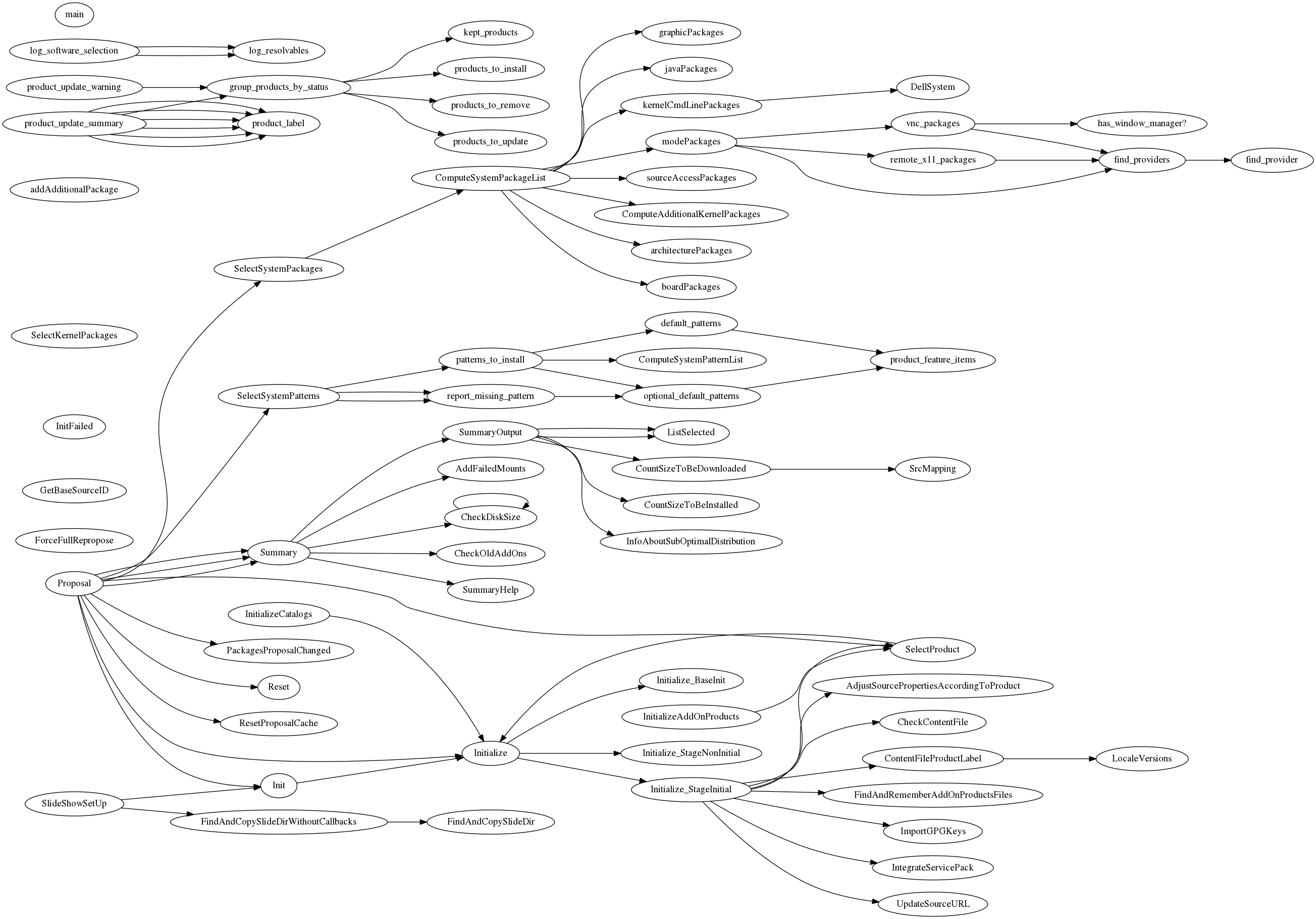
Requirements
- Ruby
- parser gem
- Graphviz
License
MIT
openSUSE Leap 42.2 Alpha 1
La premier version de développement de la prochaine openSUSE Leap est sortie, la 42.2 Alpha 1 !
Elle est téléchargeable ici : http://download.opensuse.org/distribution/leap/42.2/
C’est pour l’instant une version simplement basée sur la 42.1 avec quelques mises à jour qui servira de plateforme pour les développements à venir. Elle contient tout de même Qt 5.6 et le noyau 4.4 issus de SLE12SP2.

La sortie finale est prévue pour la première semaine de Novembre et une version de développement par mois devrait sortir d’ici là.
- Juin 2016: Alpha 2
- Juillet 2016: Alpha 3
- Aout 2016: Beta 1
- Septembre 2016: Beta 2
- Octobre 2016: RC1, RC2
- Première semaine de Novembre 2016: Sortie stable
Pour rappel c’est vraiment une toute première version plutôt instable, ne l’installez que pour effectuer des tests.
Annonce dans la mailing list [en] : https://lists.opensuse.org/opensuse-factory/2016-05/msg00372.html
—
Syvolc
YodaQA’s abilities are enlarged by traffic domain
Guest post by Petr Marek (source)

Everybody driving a car needs the navigation to get to the destination fast and avoid traffic jam. One of the biggest problems is how to enter fast the destination and how to find where are the congestions, what is the traffic situation. YodaQA Traffic is a project attempting to answer the traffic related questions quickly and efficiently. Drivers may ask questions in natural language like: “What is the traffic situation in the Evropská street?” or “What is the fastest route from Opletalova street to Kafkova street?” You can try out the prototype (demo available only for limited time) – try to ask for example “traffic situation in the Wilsonova street” .
YodaQA Traffic still has some limitations. Currently we only have a browser version not suitable for smart phones. It is answering traffic questions for Prague’s streets only.
But as usual, this whole technology demo is open source – you can find it in the branch f/traffic-flow of our Hub project.
How does it work and where we get the data from?
All YodaQA are first analyzed to recognize and select traffic questions. We do it in two steps. The first step is to recognize the question topic. We use six topics like traffic situation, traffic incident or fastest route. The topic is determined by comparing semantic similarity of the user’s question with a set of reference questions. We estimate the similarity with our Dataset-STS Scoring API. Each reference question is labeled by a “topic”. The Sentence Pair Similarity algorithm selects the reference question “topic” with the highest similarity to the question.
Next we need to recognize the location, i.e. to recognize the street name. This is handled by another tool called the Label-lookup which we normally use for entity linking in YodaQA. It compares questions words with a list of all street names in the Prague. We exported the list of streets names in Prague from OpenStreetMap. We do not do exact match, we try to select the closest street name from the list.
The last step is to decide whether the question is really the traffic question, because the Dataset-STS API and Label-lookup can find topic and street name even in a pure movie question like “When was the Nightmare on Elm Street released?”. The Dataset-STS and Label-lookup return not only topic or street name but also the score, fortunately. We created dataset of over 70 traffic questions and over 300 movies questions and founded the minimal score thresholds, with which the recognition makes the lowest classification error on this dataset.
Once we know the type of question and the location we start a small script accessing the traffic situation data from HERE Maps. The only complication is that the the API doesn’t return traffic situation for particular street, but bounding box only. To overcome this problem we have to find a bounding box for a desired location, using an algorithm we developed for this purpose. Then we call the traffic flow API to acquire the information for all streets in the bounding box. Finally, we filter out the traffic situation for the desired street.
It was great fun to work on this application, it is not perfect but it shows how to create intelligent assistants helping people solving various everyday situations. We are also excited to see, how the users will use the new functionality of YodaQA and how it will help them.
YodaQA’s abilities are enlarged by traffic domain
Guest post by Petr Marek (source)
Everybody driving a car needs the navigation to get to the destination fast and avoid traffic jam. One of the biggest problems is how to enter fast the destination and how to find where are the congestions, what is the traffic situation. YodaQA Traffic is a project attempting to answer the traffic related questions quickly and efficiently. Drivers may ask questions in natural language like: “What is the traffic situation in the Evropská street?†or “What is the fastest route from Opletalova street to Kafkova street?†You can try out the prototype (demo available only for limited time) – try to ask for example “traffic situation in the Wilsonova street†.
YodaQA Traffic still has some limitations. Currently we only have a browser version not suitable for smart phones. It is answering traffic questions for Pragueâ€ s streets only.
But as usual, this whole technology demo is open source – you can find it in the branch f/traffic-flow of our Hub project.
How does it work and where we get the data from?
All YodaQA are first analyzed to recognize and select traffic questions. We do it in two steps. The first step is to recognize the question topic. We use six topics like traffic situation, traffic incident or fastest route. The topic is determined by comparing semantic similarity of the userâ€s question with a set of reference questions. We estimate the similarity with our Dataset-STS Scoring API. Each reference question is labeled by a “topicâ€. The Sentence Pair Similarity algorithm selects the reference question “topic†with the highest similarity to the question.
Next we need to recognize the location, i.e. to recognize the street name. This is handled by another tool called the Label-lookup which we normally use for entity linking in YodaQA. It compares questions words with a list of all street names in the Prague. We exported the list of streets names in Prague from OpenStreetMap. We do not do exact match, we try to select the closest street name from the list.
The last step is to decide whether the question is really the traffic question, because the Dataset-STS API and Label-lookup can find topic and street name even in a pure movie question like “When was the Nightmare on Elm Street released?â€. The Dataset-STS and Label-lookup return not only topic or street name but also the score, fortunately. We created dataset of over 70 traffic questions and over 300 movies questions and founded the minimal score thresholds, with which the recognition makes the lowest classification error on this dataset.
Once we know the type of question and the location we start a small script accessing the traffic situation data from HERE Maps. The only complication is that the the API doesnâ€t return traffic situation for particular street, but bounding box only. To overcome this problem we have to find a bounding box for a desired location, using an algorithm we developed for this purpose. Then we call the traffic flow API to acquire the information for all streets in the bounding box. Finally, we filter out the traffic situation for the desired street.
It was great fun to work on this application, it is not perfect but it shows how to create intelligent assistants helping people solving various everyday situations. We are also excited to see, how the users will use the new functionality of YodaQA and how it will help them.
Create a Live USB stick using Windows — вариант перевода
Содержание
[убрать]
С помощью ImageUSB
Загрузите ImageUSB и следуйте инструкциям на их странице.
С помощью SUSE Studio ImageWriter
Ранее использовался SUSE Studio ImageWriter компилированный для windows, но он не поддерживается в настоящее время. Вы можете беспрепятственно fork it и создать свою собственную версию для windows.
С помощью GRUB4DOS

GRUB4DOS может быть установлен, используя RMPrepUSB
Этот метод позволяет сохранить все данные на вашем USB-устройстве. Демонстрация предоставляется на this video. Note: Эти инструкции не подходят, если ваш компьютер загружается UEFI (большинство компьютеров, созданных в промежутке ~2011-2016 все компьютеры с предустановленной Windows 8/8.1/10); сначала Вы должны запустить BIOS, сделать доступной Legacy-загрузку (т.е. сделать недоступными опции загрузки UEFI/secure)!
- Скопируйте ISO-образ в папку «boot» на Вашем USB-flash.
- Извлеките файлы «initrd» and «linux» в папку «boot» на USB-устройстве. Эти файлы размещены в каталогах boot\i386\loader или boot\x86_64\loader ISO-образа. Для монтирования ISO Вы можете использовать, например, Pismo File Mount Audit Package.
- Установка GRUB4DOS в MBR или на USB-flash:
- download RMPrepUSB and install it;
- запустите RMPrepUSB;
- выберите Ваш носитель;
- нажмите «Install GRUB4DOS»;
- подтвердите GRUB installation to MBR;
- подтвердите установку GRUB на выбранный носитель;
- подтвердите копирование GRLDR на выбранный носитель.
- Создайте файл «menu.lst» в корневой папке на USB key. Содержимое «menu.lst» должно быть таким (замените в двух местах – в строке 2 and в строке 5 openSUSE.iso на имя файла образа вашей устанавливаемой системы):
timeout 10

title openSUSE.iso
uuid () > nul
set UUID=%?%
set ISO=openSUSE.iso
kernel /boot/linux isofrom=/dev/disk/by-uuid/%UUID%:/boot/%ISO% isofrom_device=/dev/disk/by-uuid/%UUID% isofrom_system=/boot/%ISO% loader=syslinux splash=silent quiet
initrd /boot/initrd
Загрузите компьютер с вашей USB.
Решение проблем
Если у вас существуют проблемы с записью на USB-флеш, вы можете отформатировать устройство в Windows для подготовки записи образа.

Ms Windows Partitioning Tool
Подобная ситуация случается очень редоко, но если ваш компьютер не загружается с LiveUSB/DVD после проделанных описанных выше шагов, вы можете попробовать следующую процедуру.
C:\> diskpart
DISKPART> list disk           «--- напечатать список дисков
DISKPART> select disk 0       «--- выбрать номер диска
DISKPART> list partition      «--- напечатать список разделов
DISKPART> select partition 1  «--- выбрать первый раздел
DISKPART> active              «--- сделать активным диск/раздел (bootable)
DISKPART> exit                «--- выход
В отличие от fdisk-а, diskpart применит изменения сразу же после того, как вы их внесете, следовательно, не нужны команды на запись.

DIY motorized blinds for $40
I have some 2” wooden blinds in my house that I’ve been wanting to motorize. Why? I’m lazy and I thought it would be cool to have.
The best commercial solution for retrofitting existing blinds seems to be Somfy. They have wireless battery-powered systems and fancy-looking remotes. For new motorized blinds, Bali seems to be popular, and they use Somfy for the motorization. There are also some kickstarter things (MOVE, MySmartBlinds), but the last time I looked those didn’t really do what I want. Somfy likely has a good product, but it’s very expensive. It looks like it would cost about $150 per blind, which is just way too much for me. They want $30 just for the plastic wand that holds the batteries (8 x AA). We’re talking about a motor and a wireless controller to tell it what to do. It’s not rocket surgery, so why should it cost $150?
My requirements are:
- Ability to tilt the blinds to one of three positions (up, middle, down) remotely via some wireless interface. I don’t care about raising or lowering the entire blind.
- There must be some API for the wireless interface such that I can automate them myself (close at night, open in morning)
- Tilt multiple blinds at the same time so they look coordinated.
- Be power efficient – one set of batteries should last more than a year.
Somfy satisfies this if I also buy their “Universal RTS Interface” for $233, but that only makes their solution even more expensive. For the 6 blinds I wanted to motorize, it would cost about $1200. No way.
I’ve been meaning to get into microcontrollers for a while now, and I thought this would be the perfect project for me to start. About a year ago I bought a RedBear BLE Nano to play with some Bluetooth stuff, so I started with that. I got a hobby servo and a bunch of other junk (resistors, capacitors, etc) from Sparkfun and began flailing around while I had some time off around Christmas. The Arduino environment on the BLE Nano is a little weird, but I got things cobbled together relatively quickly. The servo was very noisy, and it’s difficult to control the speed, but it worked. Because I wanted to control multiple devices at once, BLE was not a really great option (since AFAIK there is no way to ‘broadcast’ stuff in a way that is power-efficient for the listeners), and I started looking at other options. Eventually I ran across the Moteino.
The Moteino is an Arduino clone paired with a RFM69W wireless radio, operating at either 915Mhz or 433Mhz. It also has a very efficient voltage regulator, making it suitable for battery powered applications. The creator of the board (Felix Rusu) has put in a lot of work to create libraries for the Moteino to make it useful in exactly my type of application, so I gave it a try. The RFM69 library is lovely to work with, and I was sending messages between my two Moteinos in no time. The idea is to have one Moteino connected via USB to a Linux box (I already have a BeagleBone Black) as a base station which will relay commands to the remote devices. I got my servo working again with the Moteino quickly, as most of the code Just Worked.
I started out with a hobby servo because I knew it would be easy to control, but the noise and lack of speed control really bothered me. I needed to try something else. I considered higher quality servos, a gear motor with encoder or limit switches, stepper motors, worm gear motors, etc. I was going to end up building 6 of these things to start with, so cost was definitely a big factor. I ended up settling on the 28BYJ-48 stepper motor because it is extremely cheap (about $2), relatively quiet, and let me control the speed of rotation very precisely. There is a great Arduino library for stepper motors, AccelStepper, which lets you configure acceleration/deceleration, maximum speed, etc. It also has an easy-to-use API for positioning the motor. I found a 5mm x 8mm aluminum motor coupling to connect the motor to the blinds shaft. I then used a zip tie and a piece of rubber to secure the motor to the blinds rail. This doesn’t look very professional, but it’s not something you really see (my blinds have a valance that covers the rail). A better solution involving some kind of bracket would be great, but would increase the cost and require a lot more time. Using the stepper, I was able to smoothly, quietly, and cost-effectively control the blinds.
I then started to look into power consumption. If you don’t do put anything to sleep, the power usage is pretty high. The LowPower library from Felix makes it easy to put the CPU to sleep, which helps a lot. When sleeping, the CPU uses very little power (about 3µA I think), and the radio will wake you up via interrupt if a message arrives. The radio uses roughly 17mA in receive mode, however, so that means we’d only get about a week of battery life if we used a set of high-quality AAs (3000mAh / 17mA = 176h). We need to do a lot better.
The RFM69 has a useful feature called Listen Mode that some folks on the LowPowerLabs forums have figured out how to use. In this mode, you can configure the radio to cycle between sleeping and receiving in order to reduce power consumption. There are a lot of options here, but it was discovered that you only need to be in the RX phase for 256µS in order for a message to be detected. When the radio is asleep it uses about 4µA. So if you sleep for 1s and receive for 256µS, that means your average power consumption for the radio is about 12µA. This is a dramatic improvement, and it means that the device can still respond in roughly one second, which is certainly adequate for my application. Of course, you can always trade even more responsiveness for power efficiency, and people using this method on coin cell batteries certainly do that. There is one user on the forums who has an application with an expected battery life of over 100 years on a single coin cell! I have an extension of the RFM69 library, RFM69_WL, which collected some of the other listen mode code that was floating around and extends it so you can set your own sleep/RX durations.
I’ve measured/calculated my average power consumption to be about 46µA if I run the motor for 12s per day. That comes out to over 7 years of life on a set of 4 AA batteries (Energizer Ultimate Lithium), which is an almost unbelievable number. There are several factors I am not really considering, however, such as RF noise (which wakes the radio causing increased power consumption), so the real life performance might not be very close to this. Still, if I can get 2 years on a set of 4 AAs I’ll be pretty happy.
Usually when you buy a 28BYJ-48 it will include a driver board that has a ULN2003A, some connectors, and a set of LEDs for showing which phase of the stepper is active. This is fine for testing and development, but it was going to be pretty clunky to use this in a final solution. It was time to design my first PCB!
I found out early on that it was pretty difficult to talk to other people about problems with your project without having a schematic, so I made one of those. I started with Fritzing, but moved to EAGLE when it was time to do the PCB. It seemed to be the standard thing to use, and it was free. EAGLE has a pretty steep learning curve, but some tutorials from Sparkfun helped a lot. I also got some help from the folks on the LowPowerLabs forums (TomWS, perky), who I suspect do this kind of thing for a living. You can get the EAGLE schematic and board design here.
View post on imgur.com
View post on imgur.com
I ordered my first batch of boards from Seeed Studio, as well as a bunch of supporting components from Digikey. The PCB orders typically take a little over two weeks, which is quite a bit more waiting than I’m accustomed to. I was pretty excited when they arrived, and started checking things out. I soon realized I had made a mistake. The component I had in my design for the motor connector (which is a JST-XH 5-pin) was the wrong pitch and size, so the socket I had didn’t fit. Whoops. The hardware world does not play well with my “just try some stuff” mentality from working with software. I found an EAGLE library for the JST-XH connectors, used the correct part, and ordered another batch of PCBs. This time I actually printed out my board on paper to make sure everything matched up. I had run across PCBShopper while waiting for my first batch of boards, so I decided to use a different fabricator this time. I chose Maker Studio for the second order, since I could pay about the same amount and get red boards instead of green. Another two weeks went by, and finally last week I received the boards. I assembled one last weekend using my fancy (and cheap!) new soldering station. It didn’t work! Shit! The Moteino was working fine, but the motor wasn’t moving. Something with the motor driver or connection was hosed. After probing around for a pretty long time, I finally figured out that the socket was installed backwards. It seems the pins in the EAGLE part I found were reversed. Ugh. With a lot of hassle, I was able to unsolder the connector from the board and reverse it. The silkscreen outline doesn’t match up, but whatever. It works now, which was a big relief.
View post on imgur.com
I thought about putting the board in some kind of plastic enclosure, but it was hard to find anything small enough to fit inside the rail while also being tall enough to accomodate the Moteino on headers. I’m planning to just use some extra-wide heat shrink to protect the whole thing instead, but haven’t done that yet.
Below are some photos and videos, as well as the entire list of parts I’ve used and their prices. Each device costs about $40, which is a pretty big improvement over the commercial options (except maybe the kickstarter stuff). Also important is that there are no wires or electronics visible, which was critical for the Wife Acceptance Factor (and my own, honestly).
I’m sure a real EE will look at this and think “pfft, amateur!”. And that’s fine. My goals were to learn and have fun, and they were definitely accomplished. If I also produced something usable, that’s a bonus.
View post on imgur.com
View post on imgur.com
View post on imgur.com
Bill of Materials
| 28BYJ-48-12V | $2.08 |
| DIP socket | $0.19 |
| Motor Coupling, 5mm x 8mm | $1.26 |
| Electrolytic Capacitor, 100µF | $0.30 |
| Ceramic Capacitor, 0.1µF (2) | $0.24 |
| DC Barrel Jack, PJ-002B | $0.93 |
| DC Barrel Jack Plug, PP3-002B | $1.36 |
| 2M Resistor | $0.04 |
| 2.7M Resistor | $0.06 |
| Motor Plug Socket | $0.21 |
| Tactile Button | $0.10 |
| PCB | $0.99 |
| Moteino | $22.95 |
| AA Holder | $1.24 |
| Energizer Ultimate AA (4) | $6.00 |
| Total | $37.95 |
In order to talk to the devices from a host computer, you’ll also need a Moteino USB ($27). To program the non-USB Moteinos you’ll need a FTDI adapter. LowPowerLabs sells one of those for $15, but you may be able to find a better deal elsewhere.