
 azouhr
Path Aware High Availability (PAHA)
During my works on Kubernetes on Linux on Z and the creation of https://github.com/azouhr/pgtwin, I came across the same issue that most admins have to solve in two-node clusters. How can I get quorum, and what node is to be the primary.
While using additional techniques like providing a second corosync ring for HA, and even a third ring for an IPMI device, the elegance of having a three node quorum could not easily be implemented in my desired environment.
When trying to solve the correct placement of the primary PostgreSQL database in the two-Node Cluster, it came to me, that there is an external dependency that could be used as arbitrator. It does not really help an application if a resource is available, but it cannot be reached.
The main insight here was:
**Availability without accessibility is useless**
This pattern shifts HA from “server-centric” (is it running?) to “use-case-centric” (can it be used for its intended purpose?). I did some research, however I could not find anyone describing this key principle as a method to determine placement of resources.
We did define a new term to make this handy:
Definition of “Critical Path”:
A critical path is any dependency required for the service to fulfill its designed use case.
Definition of “Path-Aware High Availability (PAHA)”
Path-Aware High Availability is a general clustering pattern where resource promotion decisions explicitly validate critical paths required for service delivery before allowing promotion. Unlike traditional HA which only checks if a service *process* is running, PAHA ensures the service is running on a node where clients can actually use it.
This turned out to be a really interesting thought. Besides network paths, this can also be applied to other paths, totally unrelated to the original use case:
| Use Case | Service | Critical Path | Validation Method |
|---|---|---|---|
| Database clustering | PostgreSQL | Gateway reachability | Ping gateway from node |
| Storage HA | iSCSI target | Multipath to storage |
multipath -ll shows paths |
| FibreChannel SAN | SAN LUN | FC fabric connectivity |
fcinfo shows active paths |
| RoCE storage | NVMe-oF target | DCB lossless Ethernet |
dcbtool shows PFC enabled |
| API gateway | Kong/Nginx | Upstream service reachable | Health check endpoint |
| Load balancer | HAProxy | Backend pool reachable | TCP connect to backends |
| DNS server | BIND | Root server reachability | Query root servers |
| NFS server | NFS daemon | Export filesystem mounted |
mount shows filesystem |
| Container orchestrator | Kubernetes | CNI network functional | Pod-to-pod connectivity |
This can even be used to mitigate sick-but-not-dead conditions. For example in a multipath environment, you might want to disable a path that sometimes shows crc errors. Even from the storage side, you would know if there are sufficient paths available, and can disable the sick path.
Now to the fun part. It tells about pacemaker, that such functionality can be implemented by simple configuration means, at least for networks. For pgtwin, the question was, what happens if ring0 (with the PostgreSQL resource) is partially broken. The other ring would keep the cluster running, but the placement of the primary with read-write capability would have to go to the node with service access.
What we had to do, was merely create a ping resource, setup a clone with it, and create a location rule that tells pacemaker where to place the primary resource. In case of pgtwin, we additionally prevent the unpromoted resource from running on a node without ping connectivity, because it likely will not be able to sync with the primary. The configuration looks like this:
primitive ping-gateway ocf:pacemaker:ping \
    params \
        host_list="192.168.1.1" \
        multiplier="100" \
        attempts="3" \
        timeout="2" \
    op monitor interval="10s" timeout="20s"
clone ping-clone ping-gateway \
    meta clone-max="2" clone-node-max="1"
location prefer-connected-promoted postgres-clone role=Promoted \
    rule 200: pingd gt 0
location require-connectivity-unpromoted postgres-clone role=Unpromoted \
    rule -inf: pingd eq 0
Now, in the assumed case of a Dual Datacenter setup, what happens if the gateway vanishes on one side is:
- The cluster makes sure that the primary is on the side with the ping availability.
- The secondary is located on the other side.
- The secondary may not run there without the ping resource and is stopped.
- The primary is notified about the secondary being gone, and switches to async replication mode.
This means, that we lost high availability of the PostgreSQL database, but it still serves the applications as usual. When the gateway comes back, the following happens:
- The cluster starts pgtwin on the secondary
- pgtwin initiates a rollback of the database to get the timelines in sync
- If the rollback is unsuccessful, pgtwin initiates a basebackup from the primary
- After the nodes are consistent, the database is started as secondary, and the replication is switched to sync again.
- The primary node is not moved back, because we set a resource stickiness by default.
All of this happens without admin intervention. This procedure greatly improves availability of the PostgreSQL database for the intended use.

 Member
Seamless Windows Apps on openSUSE with WinBoat
KDE Blog solicita colaboración de la comunidad
Como comenté hace poco, KDE blog ahora es administrado íntegramente por mi. Es otras palabras, ahora no solo me dedico a realizar un artículo al día, sino que me corresponde a mi administrar las cuestiones técnicas, administrativas y económicas del blog. Es por ello que KDE Blog solicita colaboración de la Comunidad y por ello no solo voy a necesitar ayuda en temas de código y procesos, también voy a probar si la Comunidad puede financiar económicamente este sitio iniciando una campaña de financiación que busca cubrir gastos.
KDE Blog solicita colaboración de la comunidad
En 2018 nació KDE Blog, siendo mi papel únicamente escribir artículos llevando la parte técnica Ebooz. Como dije el 15 de diciembre, a inicios de mes se produjo un cambio y ahora funciona alojado en los de Neodigit, una empresa de Tecnocrática.

Este no fue solamente un cambio de servidores, ya que ahora seré yo quien lleve el blog en todas sus dimensiones, lo cual me lleva a un nuevo reto tanto de a nivel de conocimientos de tiempo y, por supuesto, económico.
En primer lugar, no soy una persona que tenga estudios informáticos, todo lo que he aprendido ha sido de forma autodidacta y, por ello, tengo cientos de lagunas en muchos aspectos. De esta forma os comento que igual el blog tiene problemas técnicos que se intentarán resolver lo antes posible.
He pensado pedir colaboración vuestra mediante dos vías principales: la sección de bugs, errores y soporte del grupo de Telegram de Cañas y Bravas y el canal de Telegram de KDE Blog.
Por otra parte, aunque su existencia no esté vinculado a una posible desaparición del proyecto,KDE Blog solicita vuestra colaboración global en forma de donación para cubrir los gastos, que aproximadamente están estimados en 130 € por año (alojamiento y dominio). Así que en la cabecera y en la columna de la derecha de las entradas aparecerá la campaña de financiación y agradezco de antemano cualquier colaboración, por pequeña que sea.
La entrada KDE Blog solicita colaboración de la comunidad se publicó primero en KDE Blog.

Linux kernel security work
Lots of the CVE world seems to focus on “security bugs” but I’ve found that it is not all that well known exactly how the Linux kernel security process works. I gave a talk about this back in 2023 and at other conferences since then, attempting to explain how it works, but I also thought it would be good to explain this all in writing as it is required to know this when trying to understand how the Linux kernel CNA issues CVEs.
Veni, vidi… sudo — El poder prestado en GNU/Linux en Compilando Podcast
Hoy me complace compartir con vosotros un nuevo episodio de Compilando Podcast, que ha vuelto con fuerza en forma de episodios tipo píldora muy instructivos. En esta ocasión se trata de un nuevo episodio que lleva por título «Veni, vidi… sudo — El poder prestado en GNU/Linux» donde Paco nos habla de esta potente y característica función de los sistemas libres.
2025: Año GNU/Linux en Compilando Podcast

En palabras del gran Paco Estrada, extraídas de la nueva web de Compilando Podcast y que sirven de introducción de este nuevo episodio:
s u d oes uno de los comandos más utilizados en GNU/Linux y Unix, pero también uno de los menos reflexionados.En este episodio de Compilando Podcast inauguramos la miniserie Palabras de GNU/Linux con un recorrido histórico y divulgativo por
sudo: su origen en Unix, su llegada a GNU/Linux y su papel clave en la administración de sistemas, la seguridad y la delegación de privilegios.Hablamos de:
- Historia de
sudoen Unix y GNU/Linux- Administración de sistemas antes de
sudoroot, permisos y control de privilegios- Seguridad, trazabilidad y responsabilidad
- Filosofía Unix aplicada a la línea de comandos
Un episodio para usuarios de Linux, administradores de sistemas, profesionales de ciberseguridad y cualquier persona interesada en la cultura y la historia del software libre.
Pregunta para la comunidad
¿Usamos
sudoen GNU/Linux con la responsabilidad que implica
o lo hemos convertido en un simple hábito automático?Música: https://incompetech.filmmusic.io/ by Kevin McLeod y musopen.org
Licencia : Creative Commons (CC BY-NC-SA)
Más información: Compilando Podcast
¿Qué es Compilando Podcast?
Dentro del mundo de los audios de Software Libre, que los hay muchos y de calidad, destaca uno por la profesionalidad de la voz que lo lleva, el gran Paco Estrada, y por el mimo con el que está hecho. No es por nada que ganó el Open Awards’18 al mejor medio, un reconocimiento al trabajo realizado por la promoción .
A modo de resumen, Compilando Podcast es un proyecto personal de su locutor Paco Estrada que aúna sus pasiones y que además, nos ofrece una voz prodigiosa y una dicción perfecta.
La entrada Veni, vidi… sudo — El poder prestado en GNU/Linux en Compilando Podcast se publicó primero en KDE Blog.
2025: Año GNU/Linux en Compilando Podcast
Hoy me complace compartir con vosotros un nuevo episodio de Compilando Podcast, que ha vuelto con fuerza en forma de episodios tipo píldora muy instructivos. En esta ocasión se trata del nuevo episodio que lleva por título «2025: Año GNU/Linux» donde Paco nos hace un resumen de este importante año para GNU/Linux.
2025: Año GNU/Linux en Compilando Podcast
En palabras del gran Paco Estrada, extraídas de la nueva web de Compilando Podcast y que sirven de introducción del nuevo episodio:
Puede que no haya habido un lanzamiento revolucionario ni sea el «Año de Linux en el escritorio”, pero 2025 se ha convertido, probablemente, en uno de los años más importantes para GNU/Linux en las últimas dos décadas.
En este episodio reflexionamos sobre cómo Linux ha consolidado este año su papel como pilar estructural del mundo digital, desde servidores, cloud e inteligencia artificial, supercomputación y desarrollo moderno. Además del salto en Gaming.
Repasamos:
- El escritorio GNU/Linux en 2025, un entorno maduro donde Wayland se consolida y GNOME y KDE alcanzan niveles históricos de estabilidad y usabilidad.
- La hegemonía absoluta de Linux en servidores, cloud e inteligencia artificial, sin alternativa real en infraestructuras críticas.
- El gran salto del gaming, con Steam como embajador y Proton como tecnología clave para ejecutar miles de juegos AAA en Linux.
- La presencia masiva (y a menudo invisible) de Linux en Android, WSL y contenedores.
- Los desafíos que aún persisten: fragmentación, escasa visibilidad para el gran público y un relato cultural que no acaba de cuajar, a pesar de haber ganado la batalla tecnológica. 2025 no ha sido el año de Linux en el escritorio.Pero sí ha sido el año en el que GNU/Linux dejó de ser “la alternativa” y se confirmó como la base indispensable del mundo digital moderno.
Un episodio editorial y reflexivo a punto de cerrar el año tecnológico y para abrir conversación con la comunidad.
Tu punto de vista importa y mucho:
¿Cómo has vivido tú el año 2025 en GNU/Linux?
¿Coincides con este análisis? ¿Discrepas? ¿Ha sido para ti también un año de consolidación?Música: https://incompetech.filmmusic.io/ by Kevin McLeod y musopen.org
Licencia : Creative Commons (CC BY-NC-SA)
Más información: Compilando Podcast
¿Qué es Compilando Podcast?
Dentro del mundo de los audios de Software Libre, que los hay muchos y de calidad, destaca uno por la profesionalidad de la voz que lo lleva, el gran Paco Estrada, y por el mimo con el que está hecho. No es por nada que ganó el Open Awards’18 al mejor medio, un reconocimiento al trabajo realizado por la promoción .
A modo de resumen, Compilando Podcast es un proyecto personal de su locutor Paco Estrada que aúna sus pasiones y que además, nos ofrece una voz prodigiosa y una dicción perfecta.
La entrada 2025: Año GNU/Linux en Compilando Podcast se publicó primero en KDE Blog.


librePods: liberte seu AirPods em 2026.

Relembrando os tempos dourados, deixo aqui no Viva O Linux, Um artigo onde veremos como libertar o seu AirPods para utilizá-lo na plataforma Linux com todos os recursos diferenciados deste hardware.
Quando você conecta um AirPods a um desktop Linux, normalmente ele funciona como “um fone Bluetooth qualquer”: áudio ok, mas boa parte dos recursos premium (ANC/Transparency, detecção de ouvido, bateria confiável, ajustes finos, etc.) fica presa ao ecossistema Apple. O LibrePods nasceu justamente para “libertar” esses recursos.
O que é o LibrePods
LibrePods é um projeto open source que desbloqueia recursos avançados dos AirPods em dispositivos não-Apple, trazendo de volta modos de ruído, transparência/adaptive, detecção de ouvido, status de bateria, modo “hearing aid”, personalizações e mais recursos que a Apple costuma expor só quando o fone “acha” que está conectado a iOS/macOS.
Para que serve (no Linux)
Na prática, no Linux ele serve como um painel/controle para o seu AirPods, com um app nativo (GUI) que expõe funções que normalmente não aparecem no stack Bluetooth padrão. O repositório mantém um app Linux dedicado e releases específicos.
Como ele funciona (visão técnica, sem magia)
O “pulo do gato” do LibrePods é que ele implementa (via engenharia reversa) partes do protocolo proprietário usado pelos AirPods para negociar recursos com dispositivos Apple. Em várias funções, a liberação depende de identificação do dispositivo host (ex.: fabricante/vendor), então o projeto também documenta mecanismos para o host “se apresentar” de forma compatível e o AirPods liberar telemetria e controles avançados. The Verge+1
Em outras palavras: não é “tweak de UI”; é protocolo + controle de estados (e, em alguns cenários, identificação do host) para acessar recursos que já existem no hardware do AirPods.
Vantagens para usuárias Linux
- Você usa o que pagou: ANC/Transparency/Adaptive e outros controles deixam de ficar “reféns” do iPhone/iPad/Mac.
- Status de bateria mais útil (incluindo case/earbuds, dependendo do modelo/estado do suporte).
- Experiência mais integrada: o projeto menciona melhorias de integração (ex.: expor bateria e atalhos de controle), e existe um app Linux com funcionalidades centrais.
- FOSS e auditável: por ser open source, dá para inspecionar/acompanhar evolução e limitar “apps caixa-preta” que só fazem polling genérico.
Observação importante de maturidade: o README do projeto sinaliza que o app Linux tem/teve uma fase “versão antiga” e que há trabalho em uma nova versão, então espere evolução rápida e possíveis arestas dependendo do seu modelo de AirPods e distro.
Requisitos no Linux
1) Hardware/stack Bluetooth
- Adaptador Bluetooth funcional no PC (interno ou dongle).
- BlueZ e serviços de Bluetooth ativos (padrão na maioria das distros desktop).
2) AirPods compatíveis
O projeto lista compatibilidades por modelo (alguns com suporte completo, outros parcial). Em geral, modelos mais recentes tendem a receber o “suporte cheio” primeiro.
| Status | Device | Features |
|---|---|---|
 |
AirPods Pro (2nd Gen) | Fully supported and tested |
|
AirPods Pro (3rd Gen) | Fully supported (except heartrate monitoring) |
|
AirPods Max | Fully supported (client shows unsupported features) |
 |
Other AirPods models | Basic features (battery status, ear detection) should work |
Dependências
Devemos garantir que o sistema de gerenciamento de audio e bluethooth esteja funcionando corretamento.
Qt6 packages
# For Arch Linux / EndeavourOS
sudo pacman -S qt6-base qt6-connectivity qt6-multimedia-ffmpeg qt6-multimedia

# For Debian
sudo apt-get install qt6-base-dev qt6-declarative-dev qt6-connectivity-dev qt6-multimedia-dev \
     qml6-module-qtquick-controls qml6-module-qtqml-workerscript qml6-module-qtquick-templates \
     qml6-module-qtquick-window qml6-module-qtquick-layouts

 # For Fedora
 sudo dnf install qt6-qtbase-devel qt6-qtconnectivity-devel \
     qt6-qtmultimedia-devel qt6-qtdeclarative-devel

 # For openSUSE
 sudo zypper install patterns-kde-devel_qt6
openSSL
# On Arch Linux / EndevaourOS, these are included in the OpenSSL package, so you might already have them installed.
sudo pacman -S openssl

# For Debian / Ubuntu
sudo apt-get install libssl-dev

# For Fedora
sudo dnf install openssl-devel

# For openSUSE
sudo zypper install openssl-devel
Libpulse e cmake
# On Arch Linux / EndevaourOS, these are included in the libpulse package, so you might already have them installed.
sudo pacman -S libpulse

# For Debian / Ubuntu
sudo apt-get install libpulse-dev

# For Fedora
sudo dnf install pulseaudio-libs-devel

# For openSUSE
sudo zypper install pulseaudio-qt-devel cmake libpulse-devel
Download, compilação e instalação.
Agora com todos requisitos instalado e cofigurado, efetue do download dos fontes com o comando git clone.
git clone https://github.com/kavishdevar/librepods
Após o download entra na pasta linux dentro da pasta librepods recém criada.
cd librepods/linux
Ao entrar na pasta, devemos criar a pasta build e os comandos cmake e make para efetuas a compilação.
mkdir build
cd build
cmake ..
make -j $(nproc)
Se tudo funcionou corretamente, teremos o binario librepods na pasta pronto para ser executado. Então basta digitar ./librepods e teremos uma tela como na figura a baixo e pronto! Boa liberdade.
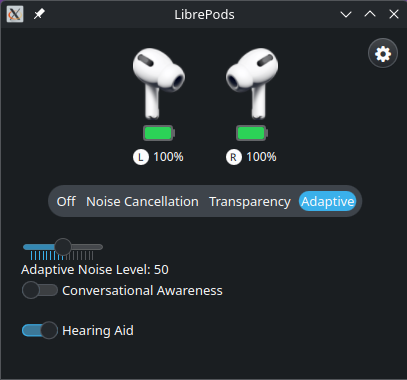
Mais informações na página oficial do projeto. https://github.com/kavishdevar/librepods/
Episodio 62 de KDE Express: esLibre 2026 con Jorge Lama
Me congratula presentaros el episodio 62 de KDE Express, titulado «esLibre 2026 con Jorge Lama» donde David Marzal habla de forma distendida con Jorge Lama, productor de un buen número de podcast libres, que nos informan sobre la próxima edición de este evento comunitario.
Episodio 62 de KDE Express: esLibre 2026 con Jorge Lama
Comenté hace ya bastante tiempo que había nacido KDE Express, un audio con noticias y la actualidad de la Comunidad KDE y del Software Libre con un formato breve (menos de 30 minutos) que complementan los que ya generaba la Comunidad de KDE España, aunque ahora estamos tomándonos un tiempo de respiro por diversos motivos, con sus ya veteranos Vídeo-Podcast que todavía podéis encontrar en Archive.org, Youtube, Ivoox, Spotify y Apple Podcast.
De esta forma, a lo largo de estos 62 episodios, promovidos principalmente por David Marzal, nos han contado un poco de todo: noticias, proyectos, eventos, etc., convirtiéndose (al menos para mi) uno de los podcast favoritos que me suelo encontrar en mi reproductor audio.
En palabras de David:

Ahora si que casi entrando en periodo festivo, tenemos el honor de contar con el hombre detrás del audio de este podcast, nuestro querido Jorge Lama, que hoy salta delante del micrófono para informarnos sobre el evento de software libre más importante de España, esLibre.
- Web principal: https://eslib.re/2026/es/
- Voluntariado y necesidades especiales de dieta: https://eslib.re/2026/es/voluntariado/
- Servicio de cuidado infantil (solo si hay nº mínimo de peticiones): https://eslib.re/2026/es/cuidado-infantil/
- Propuestas: https://gitlab.com/eslibre/propuestas/-/merge_requests
¡Estaís a tiempo de reservar hotel, o enviar propuesta de charla/taller/sala/mesa!

Por cierto, también podéis encontrarlos en Telegram: https://t.me/KDEexpress
La entrada Episodio 62 de KDE Express: esLibre 2026 con Jorge Lama se publicó primero en KDE Blog.
pgtwin — HA PostgreSQL: Configuration
in the previous blog pgtwin — HA PostgreSQL: VM Preparation we setup two VMs with KVM to prepare for a HA PostgreSQL setup. Now, we will configure the Corosync cluster engine, prepare PostgreSQL for synchronous streaming replication and finally configure Pacemaker to provide high availability.
Configure Corosync
Corosync has its main configuration file located at ‘/etc/corosync/corosync.conf’. Edit this file with the following content, change the IP Adresses according to your setup:
totem {
    version: 2
    cluster_name: pgtwin-devel
    transport: knet
    crypto_cipher: aes256
    crypto_hash: sha256
    token: 5000
    join: 60
    max_messages: 20
    token_retransmits_before_loss_const: 10

    # Dual ring configuration
    interface {
        ringnumber: 0
        mcastport: 5405
    }

    interface {
        ringnumber: 1
        mcastport: 5407
    }
}

nodelist {
    node {
        ring0_addr: 192.168.60.13
        ring1_addr: 192.168.61.233
        name: pgtwin1
        nodeid: 1
    }

    node {
        ring0_addr: 192.168.60.83
        ring1_addr: 192.168.61.253
        name: pgtwin2
        nodeid: 2
    }

}

quorum {
    provider: corosync_votequorum
    two_node: 1
    wait_for_all: 1
}

logging {
    to_logfile: yes
    logfile: /var/log/cluster/corosync.log
    to_syslog: yes
    timestamp: on
}
Next step is to create an authentication key for the cluster. Create the key on the first node, and then copy it to the other node:
corosync-keygen -l
scp /etc/corosync/authkey pgtwin2:/etc/corosync/authkey
Note, that by default you will not be allowed to access the remote node as root with ssh. This is a good standard for production sites. If you find that inconvenient, you can change the setting by adding a file to /etc/ssh/sshd_config.d. Don’t do this for production environments or externally reachable VMs though:
# cat /etc/ssh/sshd_config.d/10-permit-root.conf
PermitRootLogin=yes
On both nodes, make sure that the ownership and access rights are correct:
chmod 400 /etc/corosync/authkey
chown root:root /etc/corosync/authkey
Enable and start Corosync and Pacemaker:
systemctl enable corosync
systemctl start corosync

# Wait 10 seconds for Corosync to stabilize
sleep 10

# Check Corosync status
sudo corosync-cfgtool -s

# Enable and start Pacemaker
sudo systemctl enable pacemaker
sudo systemctl start pacemaker
Verify that the cluster is working with ‘crm status’
Configure PostgreSQL
PostgreSQL will only be configured on the first node. The second node will only need the data directory as well as the password file ‘.pgpass’ prepared, the pgtwin ocf agent itself will then perform the initial mirroring and final replication configuration of the database. Find the mentioned postgresql.custom.conf file at https://github.com/azouhr/pgtwin/blob/main/postgresql.custom.conf. This file holds the default configuration for use with pgtwin. You want to tweak the parameters according to your usage. Also make sure to use a password that is suitable for your environment.
# Initialize database
sudo -u postgres initdb -D /var/lib/pgsql/data

# Copy the provided PostgreSQL HA configuration
sudo cp /path/to/pgtwin/github/postgresql.custom.conf /var/lib/pgsql/data/postgresql.custom.conf
sudo chown postgres:postgres /var/lib/pgsql/data/postgresql.custom.conf

# Include custom config in main postgresql.conf
sudo -u postgres bash -c "echo \"include = 'postgresql.custom.conf'\" >> /var/lib/pgsql/data/postgresql.conf"

# Configure pg_hba.conf for replication
sudo -u postgres tee -a /var/lib/pgsql/data/pg_hba.conf <<EOF

# Replication connections
host    replication     replicator      192.168.60.0/24       scram-sha-256
host    postgres        replicator      192.168.60.0/24       scram-sha-256
EOF

# Start PostgreSQL manually (temporary)
sudo -u postgres pg_ctl -D /var/lib/pgsql/data start

# Create replication user
sudo -u postgres psql <<EOF
CREATE ROLE replicator WITH REPLICATION LOGIN PASSWORD 'SecurePassword123';
GRANT pg_read_all_data TO replicator;
GRANT EXECUTE ON FUNCTION pg_ls_dir(text, boolean, boolean) TO replicator;
GRANT EXECUTE ON FUNCTION pg_stat_file(text, boolean) TO replicator;
GRANT EXECUTE ON FUNCTION pg_read_binary_file(text) TO replicator;
GRANT EXECUTE ON FUNCTION pg_read_binary_file(text, bigint, bigint, boolean) TO replicator;
EOF

# Stop PostgreSQL (cluster will manage it)
sudo -u postgres pg_ctl -D /var/lib/pgsql/data stop
Also add the connection definition for your application connections to the pg_hba.conf file.
The PostgreSQL configuration only needs to prepare the password file now. This needs to be added to both nodes:
# cat /var/lib/pgsql/.pgpass
# Replication database entries (for streaming replication)
pgtwin1:5432:replication:replicator:SecurePassword123
pgtwin2:5432:replication:replicator:SecurePassword123
192.168.60.13:5432:replication:replicator:SecurePassword123
192.168.60.83:5432:replication:replicator:SecurePassword123

# Postgres database entries (required for pg_rewind and admin operations)
pgtwin1:5432:postgres:replicator:SecurePassword123
pgtwin2:5432:postgres:replicator:SecurePassword123
192.168.60.13:5432:postgres:replicator:SecurePassword123
192.168.60.83:5432:postgres:replicator:SecurePassword123
Also set correct permissions for this file, else PostgreSQL will refrain from using it:
chmod 600 /var/lib/pgsql/.pgpass
chown postgres:postgres /var/lib/pgsql/.pgpass
After adding .pgpass to the second node, you will only need an empty data directory on that node prepared:
mkdir -p /var/lib/pgsql/data
chown postgres:postgres /var/lib/pgsql/data
chmod 700 /var/lib/pgsql/data
Configure Pacemaker
The final step before starting the HA PostgreSQL for the first time is to configure pacemaker. For first time users of pacemaker, this is a daunting configuration, and it needs a lot of considerations. For now, retrieve the already prepared file https://github.com/azouhr/pgtwin/blob/main/pgsql-resource-config.crm and adopt it to your environment.
The values that you have to edit are:
- VIP address (virtual IP, that is migrated between the cluster nodes and serves as access address for all applications)
- Ping-Gateway address, that allows the cluster to prefer a node with access to the network
- Node Names in several resources, the defaults psql1 and psql2 will be come pgtwin1 and pgtwin2 respectively
After editing the file, load it into the cluster with the ‘crm’ command. The configuration can be done on any node, and will be available immediately from any node:
crm configure < pgsql-resource-config.crmThats it. The cluster will now try to bring up the PostgreSQL Database on both nodes in a HA configuration. You can monitor the process with the command ‘crm_mon’. Note, that in the beginning, the secondary node will have failed resources. This is due to the fact, that pgtwin has to perform an initial basebackup on that node. After a while, the output should look similar to this:
Cluster Summary:
  * Stack: corosync (Pacemaker is running)
  * Current DC: pgtwin1 (version 3.0.1+20250807.16e74fc4da-1.2-3.0.1+20250807.16e74fc4da) - partition WITHOUT quorum
  * Last updated: Tue Dec 30 12:55:12 2025 on pgtwin1
  * Last change:  Tue Dec 30 12:55:07 2025 by hacluster via hacluster on pgtwin2
  * 2 nodes configured
  * 5 resource instances configured

Node List:
  * Online: [ pgtwin1 pgtwin2 ]

Active Resources:
  * postgres-vip        (ocf:heartbeat:IPaddr2):         Started pgtwin1
  * Clone Set: postgres-clone [postgres-db] (promotable):
    * Promoted: [ pgtwin1 ]
    * Unpromoted: [ pgtwin2 ]
  * Clone Set: ping-clone [ping-gateway]:
    * Started: [ pgtwin1 pgtwin2 ]
After the cluster stabilized, you can perform a number of tests to check the state:
On pgtwin1 (primary):
# Check replication status
sudo -u postgres psql -x -c "SELECT * FROM pg_stat_replication;"

# Expected: One row showing pgtwin2 connected
On pgtwin2 (standby):
# Check if in recovery mode
sudo -u postgres psql -c "SELECT pg_is_in_recovery();"

# Expected: t (true)
Congratulations, you got a HA PostgreSQL Database running. To access the database on the primary, just use the command:
sudo -u postgres psqlSince this has direct socket access, you will have full access to the database without password that way. For further tests and more information, have a look at https://github.com/azouhr/pgtwin/blob/main/QUICKSTART_DUAL_RING_HA.md.