
 Member
 analyser
Instalando somente os updates de segurança no openSUSE 12.3
Quando a gente vai ficando grandinho, só quer que o computador funcione. Especialmente naqueles dias nós precisamos entregar/apresentar um trabalho importante. Portanto, fazer um upgrade do sistema nem sempre é uma boa ideia perto dessas datas.

Uma boa saída no openSUSE é aplicar somente as correções de segurança da base do sistema, deixando para uma época mais tranquila, o update dos demais aplicativos.
Pensando nisso, listei abaixo, fuçado de [1] e [2], os comandos para identificar todos os patches e instalar somente aqueles que são realmente cruciais para o sistema:
Listar todos os patches:
zypper list-patches
Listar somente os patches de segurança:
zypper list-patches –category security
Instalar todos os patches:
zypper patch
Instalar somente os patches de segurança:
zypper patch –category security
Fonte:
[1] – http://forums.opensuse.org/showthread.php/495293-Install-only-the-security-updates
[2] – Manpages do zypper

Some news from the trenches
As you might know, we are focusing our development efforts in two fronts, namely openQA and staging projects. As we just started we don’t have fireworks for you (yet) but we did some solid ground work that we are going to build upon.
Working on openQA
We are organizing our daily job in openQA into highly focused sprints of two weeks. The focus of the first sprint was clear: cleanup the current codebase to empower future development and lower the entry barrier for casual contributors, which can be translated as “cleaning our own mess”. We created some tasks in progress, grouped in a version with a surprising and catchy name: Sprint 01.
Got my mojo workin’
Up to now, openQA web interface was written using just a bunch of custom CGI scripts and some configuration directives in Apache. We missed a convenient way to access to all the bell and whistles of modern web development and some tools to make the code more readable, reliable and easier to extend and test. In short, we missed a proper web development framework. We evaluated the most popular Perl-based alternatives and we finally decided to go for Mojolicious for several reasons:
- It provides all the functionality we demand from a web framework while being lightweight and unbloated.
- It’s stated as a “real time framework” which, buzzwords apart, means that is designed from the ground to fully support Comet (long-polling), EventSource and WebSockets. Very handy technologies for implementing some features in openQA.
- It really “feels” very close to Sinatra, which makes Ruby on Rails developers feel like at home. And we have quite some Rails developers hanging around, don’t we? Just think about OBS, software.o.o, WebYast, progress.o.o, OSEM, the TSP app…
- Mojolicious motto is “web development can be fun again”. Who could resist to that?
We’ve now reached the end of the sprint and we already have something that looks exactly the same than what we had before, but using Mojolicious internally. We are very happy with the framework and we are pretty confident that future development of openQA will be easier and faster than ever. OpenQA has mojo!
The database layer in openQA
Another part that we worked on during first sprint was the database layer. The user interface part of openQA use a SQLite database to store the jobs and workers registered in the system. The connection between the code and the database was expressed directly in SQL using a simple API.
We have replaced this layer with another equivalent that uses an ORM (Object-relational mapping) in Perl (DBIx::Class). Every data model in openQA is now a true object that can be created, copied and moved between the different layers of the application. Quite handy.
To make sure we don’t forget anything, we created a bunch of tests covering the whole functionality of the original code, running this test suite after each step of the migration. In this way we have achieved two goals: we now have a simple way to share and update information through the whole system and we can migrate very easily to a different database engine (something that we plan to do in the future).
What to do with staging
Over the time, coolo had accumulated quite some scripts that helped him with Factory. Most of them are actually related to something we are doing right now: the staging projects. So in the end we basically migrated all relevant ones to github and one by one we are merging their functionality to staging plugin. We also experimented with test frameworks that we could use to test the plugin itself, selected few and we even have a first test! The final plan is to have the whole plugin functionality covered with a proper test suite, so we will know when something breaks. Currently, there is a lot of mess in our repo and the plugin itself need big cleanup, but we are working on it.
Contributions are welcome
If you want to help but wonder where to start, we identified tasks that are good to dive into the topic and named them “easy hacks”: mostly self contained tasks we expect to have little effort but we lack the time to do right now. Just jump over the list for openQA or staging projects.
For grabbing the code related to staging project, you only need to clone the already mentioned repository. The openQA code is spread in several repositories (one, two, three and four), but setting up your own instance to play and hack is a piece of cake using the packages available in OBS (built automatically for every git push).
If you simply want to see what we are doing in more detail, take a look at progress.o.o, we have both openQA and Staging projects there.
We are having a lot of fun, and we encourage you to join us!
2013 and rubygems: 3 times more security issues, 6 times more security tools
Today I discovered hakiri.io , a web service that scans gems and code, and I have updated the presentation on security and ruby gems with this information as well as added a summary table.
https://drive.google.com/file/d/0B7IDcViGrJDOSElEekhoRHVldDA/edit?usp=sharing
In this presentation I state that 2013 had 3 times more security issues (regarding ruby gems) than 2012 and that 6 times more security tools appeared in 2013 than in 2012.
FOSDEM, and the SuSE bus.
After the massive and rather counterproductive layoffs after FOSDEM 2009, SuSE tended to organize a bus for its own employees. And from what i heard, it was a pretty good solution. Imagine a load of happy geeks, from a place in the world with the best beers, stuck on a bus. It made the whole event seem like a school trip, but one where some beers were actually allowed. And, since there usually was tons of extra space on the bus, a load of ex-SuSE guys got to hitch a ride as well. The result was that a lot of SuSE employees visited FOSDEM, and got to catch up on things with some ex-SuSE guys and generally start doing what conferences are for from the second the bus left Nuremberg. Since busses are cheap, this really was a perfect solution, and everyone was happy.
I never took the bus. For FOSDEM, I want to arrive in brussels around suppertime on friday, and leave monday around midday (when the alcohol of the previous night has worn off a bit). The bus tended to arrive around suppertime as well, but would leave again around 19:00 on sunday. Also, i tend to run a devroom and have at least one talk. I need those 5 hours of peace on the train to prepare my talk. But I heard good things about the bus, and that it all was great fun and a bit of a community event before (and after) the big community event.
This year, however, things were different. For a long time, apparently, nobody from the OpenSuSE team was really bothered with FOSDEM. This i find truly amazing, and a really bad sign with respect of where SuSE and openSuSE is apparently heading. From what i have heard, there was always a bit of a plan to get a bus, but it was unclear where the budget would come from, and no-one took any action. I also heard that two weeks before the event, SuSE employees were asked whether they wanted to go to FOSDEM. Now if you do this 2 weeks before the event, with people who often have a wife and kids these days, most will already have made other plans. Then, if you also state that those people who might be interested, also need to have some travel budget left over, and need to get approval in a few days time, you of course only get a handful of people who end up going to the biggest open source event of the planet. I heard the number 8.
8 people from SuSE went to FOSDEM. An absolute disgrace for what once was the leading european linux distribution.
Here is an idea: why not make the bus a community service from the start? Why doesn't OpenSuSE sponsor a bus, one which starts at nuremberg, and perhaps stops in Frankfurt-Flughafen (so some people can grab a smoke and empty their beer-filled bladders), and then continues on to Brussels? Give the SuSE employees 4 weeks early notice to get their seats reserved (which gives them an incentive to think about FOSDEM early on), and then make seat reservation open to anyone who wants to go visit FOSDEM and lives near Nuremberg or Frankfurt? You can even hand the community members a bag of SuSE swag and a frankonian beer.
SuSE would not only do something good for their own employees and makes it easier on them to visit FOSDEM. They would actually sponsor FOSDEM and help boost their openSuSE community.
I am actually surprised that this has to be said, and that idea hasn't been spawned from within the OpenSuSE team itself. But here you go. Now make it happen for next year.
FOSDEM, the best conference... In the world.
We had a really nice devroom and pretty good crowds, but the most amazing thing was the recordings and the livestream. The FOSDEM organizers really outdid themselves there.
After the initial announcement of the graphics devroom went out, Martin Peres contacted me and we talked about getting proper recordings from the DevRoom, and briefly looked into what this would end up costing if we were to buy the equipment for it. Our words were barely cold when the FOSDEM organizers announced what can only be seen as absolutely insane: they would try to provide for full recording of everything.
In the end, FOSDEM provided recording in 22 rooms. They had to get 22 mixing desks, 22 sets of microphones, 22 cameras, 44 laptops... This was apparently mostly rented, and apparently, surprise, surprise, there aren't many rental companies which have such an insane amount of kit available.
Apart from some minor issues (like a broken firewire cable in the wine devroom) things worked out amazingly. Only the FOSDEM guys could pull something this insane off. We had all our talks in the Graphics DevRoom streamed out live, with no issues at all.
I would like to thank all the speakers in the graphics devroom, but i particularly would like to thank Martin Peres, who took full control and responsibility of the video equipment. Then there's Marcus Meissner and Thiery Redding who willingly sat in the back of the devroom and handled the recordings themselves, directing the streams, for only meagre rations of water and cookies. Without people stepping up and doing their bit, a devroom like this would not be possible. And the same goes for the whole of FOSDEM.
At the end of the final talk, after i had talked about sunxi_kms, i tried to thank the FOSDEM organizers, and get the remaining audience to clap for them. But i mostly stood there and babbled, at a loss for words, because what the FOSDEM organizers had achieved with this insane goal is simply amazing. And thinking about it now still, i still get quite emotional...
How on earth did they manage to pull this off, on top of organizing the rest of FOSDEM, a FOSDEM which caters for something like 8000 people as it is... It's just not possible!
It's not as if these guys get paid for what they are doing, FOSDEM is a low budget organization, purely based on volunteers. The absolute core of the organization is just a handful of people who have very busy jobs. And yet, they have succeeded where any other organization would have failed. There's no politics or powerplay, there is no money or commerce. There is just the absolute drive to make FOSDEM the best event on the planet, by making small changes every year...
This was my 7th DevRoom this year, and if i can help it there will be another one next year. I am really proud that i am allowed to do my, comparatively little, part as well. Every sunday evening after FOSDEM, after we sit down in the restaurant with the remainders of the graphics devroom, i am physically broken, but i am also one of the happiest people on the planet...
Each year, no matter what happened in the year before, no matter what nasty open source politics or corporate nonsense took place over that year... Each year, the FOSDEM organizers prove that something amazing can happen if only people do their bit, if only people work towards the same selfless goal. Each year, FOSDEM reminds me of why i do what i do, and why i need to keep on doing it.
Thank you.
FOSDEM: How the Text in Writer Gets on the Screen
 |
| Click to see the entire presentation |

Introducing MailKit, a cross-platform .NET mail-client library
Let's just say,
Challenge... ACCEPTED!
I started off back in early December writing an SmtpClient so that developers using MimeKit wouldn't have to convert a MimeMessage to a System.Net.Mail.MailMessage in order to send it using System.Net.Mail.SmtpClient. This went pretty quickly because I've implemented several SMTP clients in the past. Implementing the various SASL authentication mechanisms probably took as much or more time than implementing the SMTP protocol.
The following weekend, I ended up implementing a Pop3Client. Originally, I had planned on more-or-less cloning the API we had used in Evolution, but I decided that I would take a different approach. I designed a simple IMessageSpool interface which more closely follows the limited functionality of POP3 and mbox spools instead of trying to map the Pop3Client to a Store/Folder paradigm like JavaMail and Evolution do (Evolution's mail library was loosely based on JavaMail). Mapping mbox and POP3 spools to Stores and Folders in Evolution was, to my recollection, rather awkward and I wanted to avoid that with MailKit.
At first I was loathe to do it, but over the past 2 weeks I ended up writing an ImapClient as well. I'm sure Philip van Hoof will be pleased to note that I have a very nice BODYSTRUCTURE parser, although that API is not publicly exported.
Unlike the SmtpClient and Pop3Client, the ImapClient does not have all of its functionality on a single public class. Instead, ImapClient implements an IMessageStore which has a limited API, mostly meant for getting IFolders. I imagine that those who are familiar with the JavaMail and/or Evolution (Camel) APIs will recognize this design.
The IFolder interface isn't designed to be exactly like the JavaMail Folder API, though. I've been designing the interface incrementally as I implement the various IMAP extensions (I've found at least 37 of them at the time of this blog post, although I don't think I'll bother with ACL, MAILBOX-REFERRAL, or LOGIN-REFERRAL), so the API may continue to evolve as I go, but I think what I've got now will likely remain - I'll probably just be including additional APIs for the new stuff.
So far, I've implemented the following IMAP extensions: LITERAL+, NAMESPACE, CHILDREN, LOGIN-DISABLED, STARTTLS, MULTIAPPEND, UNSELECT, UIDPLUS, CONDSTORE, ESEARCH, SASL-IR, SORT, THREAD, SPECIAL-USE, MOVE, XLIST, and X-GM-EXT1. Phew, that was exhausting listing all of those!
Also news-worthy is that MimeKit is now equally as fast as GMime, which is pretty impressive considering that it is fully managed C# code.
Download MailKit 0.2 now and let the hacking begin!
Story of the New Start Center in LibreOffice 4.2
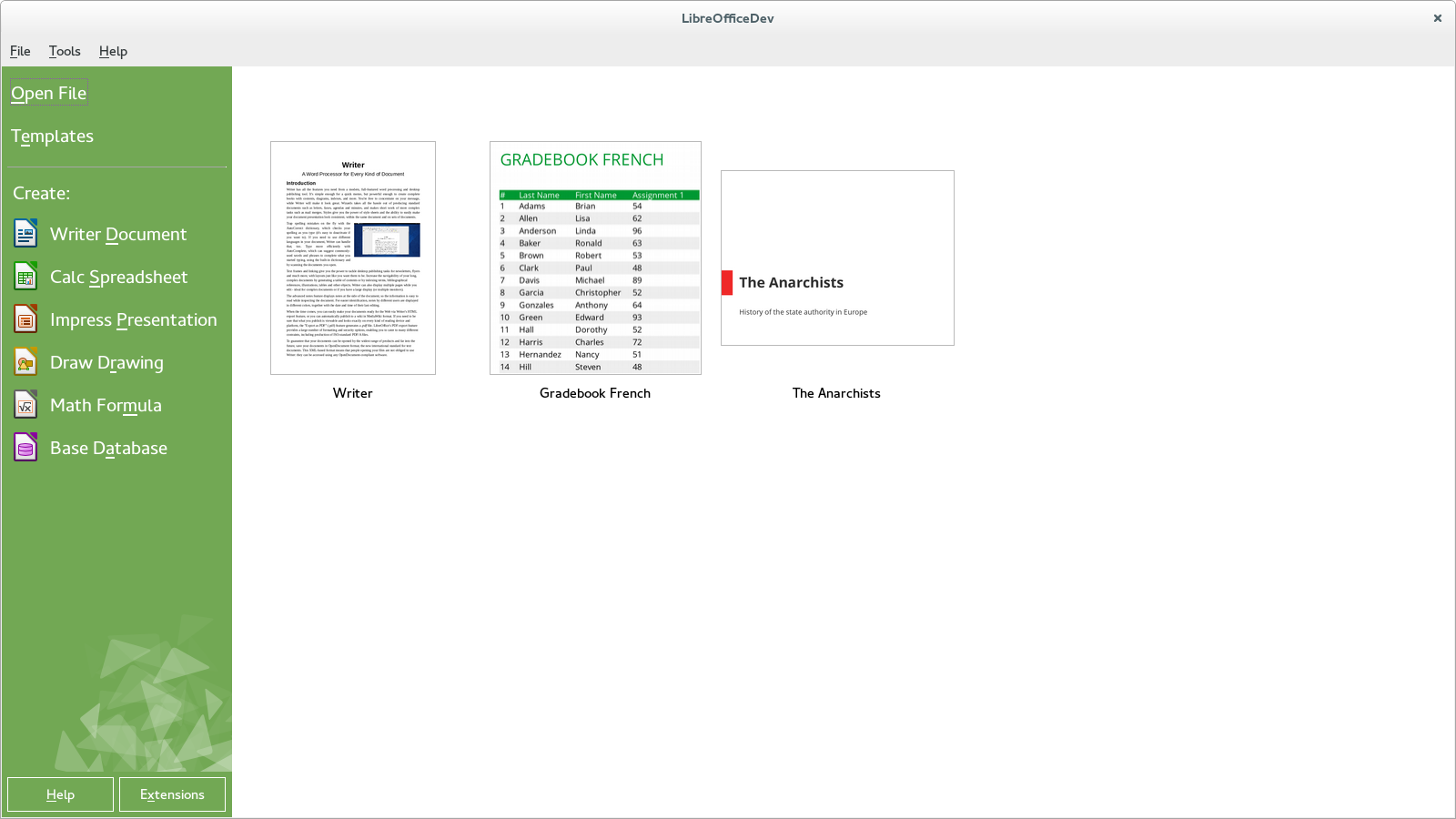
Original idea
It all started as a Google Summer of Code idea that I have filed, and later mentored. Basically, I wanted a student to reuse the Caolan McNamara's awesome dynamic dialogs to provide modern and easy way to create a beautiful dialog, and GSoC 2012 project that introduced a new template manager in LibreOffice 4.0 - done by Rafael Dominguez and Cédric Bosdonnat.The work itself
The main part of the work was done by Krisztian Pinter, who was working on it as a GSoC project too. His first task was to convert the old start center to the dynamic layout, so that the start center could much more easily adapt when the user resizes the screen.But that was not all - his next task was to plug the template manager code in, and extend it so that it was able to show recent files instead of the templates. He made the needed changes, adapted the look to the preliminary design made by the LibreOffice Design / UX team, and the GSoC period was over :-)
We have integrated it into the LibreOffice master, and I was patiently waiting when we get the final look blueprint from the design guys.
The final look
And it came! The code was in the master and in the daily builds, so everyone could play with it. For some time, nobody reacted on my call for the final look, but finally, Mateusz Zasuwik sent a design proposal of Krzysztof Ponikiewski to the LibreOffice Design mailing list which lead to discussion, and in the end to the start center we have now in 4.2.The the ultimate version of the design was done mostly by Stefan Knorr, and Mirek Mazel, but others contributed to that too. I've adapted the code accordingly, Rodolfo Ribeiro Gomes helped me with some changes, and Tamas Zolnai fixed many bugs to give it the final, polished look & feel.
Thank you!
As you can see, the new start center couldn't have happened without shared work of many people - I want to thank you all. And of course, thank you Google for the Google for Summer of Code, I hope we will be able to participate as an organization this year again.At the very moment, the LibreOffice UX Hackfest is taking place in Brussels, and I am working on few more improvements in the start center - like previews of even other filetypes than just ODF. But that will be for LibreOffice 4.3...
Trying to add some light
Lately there was some confusion regarding our communication. We, at the openSUSE Team@SUSE are deeply aware that our communication needs to be improved. So in the hope to make everything clear again, here is the summary to clear up what is really going on and what was not happening.
Long story short:
- There WILL be openSUSE 13.2 in November 2014
- 13.2 WILL have security and maintenance support provided by SUSE
- We WILL have coolo as release manager for 13.2
- SUSE is NOT decreasing manpower put into openSUSE
- Everybody from the community is welcome and encouraged to be involved with, and if they want to, take over some parts of the release process and we will support you the best we can in doing that
Now for the long story.
Our team and only our team – openSUSE@SUSE – is going to work on improving ‘tooling’ side of the openSUSE project until August. These changes will benefit openSUSE by making it easier to produce better releases in the future.
Nothing changes for the rest of SUSE. SUSE is not abandoning openSUSE. The rest of SUSE will still do the same things they were doing until now and continue to keep openSUSE awesome. This includes Maintenance, Security, Infrastructure, and many other teams besides the openSUSE Team at SUSE who actively support the openSUSE project.
What is our plan?
Our plan is to make sure that future openSUSE releases are easier for everyone to produce. As we grow we could keep putting in more and more full-time release managers (if we find them somewhere), but this approach is probably unsustainable and, more importantly, goes against our desire to empower the community to do more as part of openSUSE.
Therefore, we decided to improve our tools to ensure that making a release is much more straightforward and reliable and we can reduce and distribute the workload needed for integration and release. To make this happen we need time and everyone from the team to work on adapting the tooling side. We also would welcome volunteers to help us with tools and with the following release(s).
With the release date now set in November (mirroring roadmap for 13.1), first milestone should be released in May. That is a perfect oportunity to go to openSUSE Conference in Croatia where we can meet up, gather volunteers to help and discuss how to work. Remember that openSUSE Travel Support is in place to sponsor everyone who needs financial help to get to the event.
Hopefully now we cleared things up a little and we are really sorry again for our poor communication – We’re going to work on it.
Your truely confused openSUSE Team
openSUSE – proprietären Grafik-Treiber AMD Catalyst 14.1 Beta V1.3 als RPM installieren
AMD Catalyst 14.1 Beta V1.3 (fglrx 13.35.1005) wurde veröffentlicht und unterstützt Grafikkarten ab Radeon HD 5000 und höher. Das Skript makerpm-amd-14.1-betav1.3.sh steht ab sofort zum Download zur Verfügung und unterstützt openSUSE 11.4, 12.1, 12.2, 12.3, 13.1 sowie bis Kernel 3.13.
Nachfolgende Release Notes von AMD zum AMD Catalyst 14.1 Beta V1.3:
Folgende Produkte werden zusätzlich unterstützt:
- AMD A10-7850K
- AMD A10-7700K
Neue Features:
- RHEL 6.5 production support
- openSUSE 13.1 production support
- Ubuntu 13.10 production support
- Xserver 1.15 support
- Kernel 3.13 support
Folgende Probleme sind im Treiber behoben worden:
- [386897] : System hang on resume from S4 with OpenGL screen saver running
- [387678] : Backtrace occurs when kill X
- [387664] : Failed to start X without kernel module loaded
- [378620] : OpenCL test failure in CrossFire Mode
- [386945] : piglit test „spec/ARB_copy_buffer/overlap“ failed
- [386710] : piglit test „spec/ARB_draw_buffers_blend“ failed
- [386818] : piglit test „spec/OpenGL 2.0/depth-tex-modes-glsl“ failed
- [386941] : piglit test „spec/ARB_blend_func_extended“ failed
- [386903] : piglit test „spec/OpenGL 3.0/gl-3.0-required-sized-texture-formats“ failed
- [386840] : Viewport goes blank when mouse cursor leaves when run Houdini on Ubuntu
- [387596] : piglit test „spec/ARB_framebuffer_object (fbo-scissor-blit)“ failed
- [389174] : Failed to get fan speed on Bonaire card
- [388110] : Intermittent flashing problem when running at 2560×1600
- [372656] : Crash when resizing Konsole
- [388325] : Brightness cannot be adjusted on Ubuntu 12.04 LTS
- [388330] : piglit test „spec/ARB_framebuffer_object (fbo-blit-stretch)“ failed
- [385457] : Blue/white screen after using Google-chrome to run fishietank
- [388500] : piglit test „spec/EXT_texture_integer“ failed
- [388802] : piglit test „spec/ARB_map_buffer_alignment“ failed
- [386396] : piglit test „spec/ARB_depth_buffer_float/fbo-depthstencil-drawpixels“ failed
- [389431] : Screens are distorted when connecting an external monitor on some Haswell platforms
- [389530] : Blank screen/crash observed while running unigine heaven benchmark in windowed mode
- [387124] : OpenCL performance drop observed on Hawaii compared to Tahiti XT
- [386940] : piglit test „spec/EXT_texture_sRGB“ failed
- [392137] : [SteamOS] Failed to return to desktop from steam.
- [392015] : [SteamOS] Screen is locked when changing user.
- [392014] : [SteamOS] Failed to login Steam sometimes
- [391231] : Blank screen observed while running steam games with Big picture
Offene Probleme:
- [390964] : Stuttering and poor performance after playing an OpenGL game for a several minutes on Ubuntu
- [393377] : Terminal panel stops refreshing until there is movement from mouse cursor
- [392546] : System hang observed while hotpluging the stereo display
- [388835] : Corruption and system hang observed while running Sanctuary BM with TFD enable
- [392552] : Enabling Overlay: StartX , the screen shows corruption
Link: AMD Catalyst 14.1 LINUX Beta Driver Release Notes
Rezension zum AMD Catalyst 14.1:
AMD hat in ihrer Release Notes angemerkt, dass auch openSUSE 13.1 ab sofort unterstützt wird. Das hört sich erstmal erfreulich an. Nur leider hat das AMD Installer Team das falsche Packaging Skript von mir in dem Installer gepackt. Es war eines, welches 6 Monate alt war und noch aus der Zeit von AMD Catalyst 13.9 stammte. Damit sind auch andere Distributionen betroffen. Auf diesen Fehler habe ich direkt bei AMD hingewiesen. Für die Leute von AMD war es peinlich und für mich eher ein Fall von „Kopf_meets_Tischplatte“. Auch beim kürzlich veröffentlichten geschlossene Beta-Treiber hat man den gleichen Fehler gemacht. Da hat jemand vom Team keine Ahnung von der Handhabung des GIT-Repository gehabt und auch nicht überprüft, ob das richtige Packaging Skript enthalten ist. Und was noch komischer ist, dass es keinem von AMD aufgefallen ist. 
Folgende Steam-Spiele habe ich getestet und arbeiten mit diesem Treiber einwandfrei zusammen:
- Amnesia: The Dark Descent
- Cities in Motion 2
- Crusader Kings II
- Duke Nukem 3D: Megaton Edition
- Euro Trucker Simulator
- Europa Universalis IV
- Half-Life 2: Deathmatch
- Half-Life 2: Lost Coast
- Hotel Miami
- Shadow Warrior Classic Redux
- Strike Suit Zero
- Survivor Squad
Leider gibt es mit der CAD-Software EAGLE 6.5.0 noch grafische Darstellungsprobleme. Hier hilft es vorübergehend auf ein anderes Grafiksystem umzuschalten:
./eagle -graphicssystem native
Eine kleine Bitte habe ich: Wenn irgendwelche Probleme mit dem Treiber auftauchen, scheut euch nicht mir zu berichten (Ich nehme deutsche und englische Bugreports gerne entgegen).  Ich werde versuchen, soweit es mir möglich ist, den gemeldeten Fehler zu reproduzieren. Zusammen mit den nötigen System-Informationen werde ich mich direkt an die richtige Stelle bei AMD wenden, um den Bug in der nächsten Treiber-Version beheben zu lassen. Danke schön.
Für Benutzer älterer AMD Grafikkarten (Radeon HD Serie 2000 – 4000) wird dringend die Installation dieses Treibers abgeraten. AMD hat einen Legacy-Treiber zur Verfügung gestellt. Achtung: openSUSE 12.3 und 13.1 wird nicht unterstützt. Mehr Informationen zum Legacy Treiber: http://www.sebastian-siebert.de/2013/01/25/opensuse-amd-catalyst-13-1-legacy-treiber-als-rpm-installieren/
Downloads:
Installationsanleitung:
http://de.opensuse.org/SDB:AMD/ATI-Grafiktreiber#Installation_via_makerpm-amd-Skript
Über das makerpm-amd-Skript
Das Skript makerpm-amd-14.1-betav1.3.sh ist sehr mächtig, robust und läuft vollautomatisch. Der AMD-Installer wird automatisch heruntergeladen, falls er nicht schon im Verzeichnis liegt. Zudem wird geprüft, ob die Grafikkarte vom Treiber unterstützt wird. Auf Wunsch wird nach dem Bau des RPM-Packages der fglrx-Treiber installiert.
Folgende Argumente können dem Skript übergeben werden:
| -b | Nur das RPM-Package bauen (Standard) |
| -c <type> | Nur X-Server konfigurieren. Monitor-Typ: single = 1 Monitor, dual = 2 Monitore (Wichtig: Nur ausführen, wenn es Probleme mit der Standardkonfiguration des X-Servers auftreten) |
| -d | Nur den AMD-Installer downloaden |
| -i | Das RPM-Package bauen und installieren bzw. updaten |
| -kms <yes|no> | Kernel-Mode-Setting (KMS) aktivieren oder deaktivieren |
| -nohw | Hardware-Erkennung explizit ausschalten. (z.B. beim Bau in einer VM) |
| -old2ddriver <yes|no> | den alten 2D-Treiber aktivieren oder deaktivieren |
| -r|–report | erstellt ein Report und speichert diese in eine Datei namens amd-report.txt |
| -u|–uninstall | entfernt AMD Catalyst restlos vom System. Zuerst wird das fglrx-Package (falls vorhanden) vom System deinstalliert. Danach werden vorhandene AMD-Dateien und -Verzeichnisse entfernt. Hinweis: Falls das Rebuild-Skript installiert wurde, wird es ebenfalls entfernt und das Initskript /etc/init.d/xdm wiederhergestellt. |
| -ur|–uploadreport | wie Option –report nur zusätzlich wird der Report auf einem NoPaste-Service sprunge.us hochgeladen und gibt bei Erfolg den Link zurück. |
| -h | Die Hilfe anzeigen lassen |
| -V | Version des Skript anzeigen |
Hilfe, es funktioniert nicht!
Bitte haltet folgende Regel ein:
- Bei der Eingabe der Befehle auf mögliche Tippfehler überprüfen.
- Möglicherweise ist die Lösung für das Problem im Wiki vorhanden.
- In Kommentaren lesen, ob eine Lösung zu einem Problem bereits existiert.
Wenn keines der o.g. Regel greift, dann könnt ihr mit eurem Anliegen an mich wenden. Damit ich euch helfen kann, müsst ihr erst vorarbeiten. Bitte ladet euch das Skript makerpm-amd-14.1-betav1.3.sh herunter und erstellt einen Report von eurem System in der Konsole:
su -c 'sh makerpm-amd-14.1-betav1.3.sh -ur'
Das Skript lädt das Report auf sprunge.us hoch und gibt anschließend einen Link aus. Diesen Link postet ihr in eurem Kommentar zusammen mit einer Beschreibung zu eurem Problem an mich. Ich werde mir euren Report anschauen und Hilfestellung geben, wo evtl. das Problem liegen könnte.
Feedbacks sind wie immer willkommen. 