
 Member
 swyear
openSUSE 13.1 輸入法問題合輯
1. 關於 gnome 的設定
之前的文章仍有部份有用,但是關於 gnome-settings-daemon 重設 QT_IMMODULE 和 XMODIFIERS 環境變數的問題,
openSUSE 團隊已經用修改 /etc/X11/xim 的方法來迴避此問題,
詳情請參閱 https://bugzilla.novell.com/show_bug.cgi?id=853063
使用者可以依照 bugzilla 中提供的檔案修改 /etc/X11/xim,
或經由 X11:Utilities 套件庫更新 x11-tools
2. gcin 需要更新才能正常使用
如果您需要某些 Ctrl + * 的快速鍵被吃掉了,請到 gcin-tools 設定(在內定輸入法 ...那頁)
將 Ctrl 輸入標點符號取消
如果您發現 gcin-tools 的 「求助」 無法使用,你又很介意這件事的話,
請安裝 M17N 套件庫的 gcin
3. ibus 需要更新才能正常使用
主要是在 Libreoffice 中 on_the_spot 以及和 libreoffice-kde 衝突的問題。
ibus-table-* 無法使用:如果您要使用 ibus-table-* 的相關輸入法,
卻發現到在輸入法設定選項中沒有這些輸入法,
請參考 https://forum.suse.org.cn/viewtopic.php?f=16&t=1848
可能是在某些系統中未在安裝 ibus ibus-table 套件前安裝 python-curses 套件,
這個套件在執行 /usr/lib/ibus/ibus-engine-table 時所需要的
在我的電腦上安裝 python-curses 後,執行
# /usr/lib/ibus/ibus-engine-table -x
然後重新安裝 ibus 和 ibus-table
(這個步驟只是純粹試誤得到的結果,原因不明),
打算先在 ibus-table 中先加上 python-curses 的相依,看是否會改善
可惜仍未能解決苦主的問題...
4. fcitx 的圖示有點大
參考 https://forum.suse.org.cn/viewtopic.php?f=16&t=1587
和 https://bugzilla.novell.com/show_bug.cgi?id=851983
Marguerite Su 說她要修了,所以你可以等更新
fcitx 在 gnome-terminal 無法輸入的問題,
是因為輸入法環境變數必須在 dbus 啟動前先宣告,
才能影響 gnome-terminal server,你才能在 gnome-terminal client 使用中文輸入
你可以手動修改 /etc/X11/xim.d/fcitx ,
把 export .... 這些環境變數移到 if test -z "$DBUS_SESSION_BUS_ADDRESS" ; then ... 之前,
像這樣這樣:
if ! type -p fcitx > /dev/null 2>&1 ; then


   echo "fcitx is not installed. please run `sudo zypper in fcitx`."

   return 1

fi


export LC_CTYPE=$LANG

export XMODIFIERS="@im=fcitx"

export GTK_IM_MODULE=fcitx

export GTK3_IM_MODULE=fcitx

export QT_IM_SWITCHER=imsw-multi

export QT_IM_MODULE=fcitx


# Avoid relying on autolaunch to improvise D-Bus sessions for each process

if test -z "$DBUS_SESSION_BUS_ADDRESS" ; then

   eval `dbus-launch --sh-syntax --exit-with-session`

fi


fcitx -d


# success:

return 0
或者您也可以從 M17N 更新 fcitx
fcitx 桌面整合
fcitx 在 gnome 和 kde 都有 kimpanel extension (plasmoid)
和桌面環境整合得不錯,建議使用

GNOME.Asia 2014 to be held in Beijing


ownCloud 6 Releaseparty in Nuremberg

The ownCloud community released ownCloud 6 a couple of days ago. That was another big release and we want to celebrate!
Please, everybody who is interested in ownCloud, like to learn more, give feedback or just want to meet other people from the community, you are invited to show up at Coworking Space in Nuremberg, Josephsplatz 8, on december 18th, 6pm.
We will have a relaxed evening with a little discussion, maybe short demos, cakes and stuff, and fun. No heavy talks and serious faces!
We are looking forward to meeting you.

Flash on Android 4.4 KitKat
There has been some some talk recently about the Flash situation on Android 4.4. While it’s no secret that Adobe discontinued support for Flash on Android a while back, there are still a lot of folks using it on a daily basis. The Firefox for Android team consistently gets feedback about it, so it didn’t take long to find out that things were amiss on KitKat.
I looked into the problem a few weeks ago in bug 935676, and found that some reserved functions were made virtual, breaking binary compatibility. I initially wanted to find a workaround that involved injecting the missing symbols, but that seems to be a bit of a dead end. I ended up making things work by unpacking the Flash APK with apktool, and modifying libflashplayer.so with a hex editor to replace the references to the missing symbols with something else. The functions in question aren’t actually being called, so changing them to anything that exists works (I think I used pipe). It was necessary to pad each field with null characters to keep the size of the symbol table unchanged. After that I just repacked with apktool, installed, and everything seemed to work.
There is apparently an APK floating around that makes Flash work in other browsers on KitKat, but not Firefox. The above solution should allow someone to make an APK that works everywhere, so give it a shot if you are so inclined. I am not going to publish my own APK because of reasons.

Discussing about the future of openSUSE
This week, the openSUSE team blog is written by Agustin, talking about the proposals the team has done for openSUSE development.
A few months ago the openSUSE Team started a journey that achieved an important milestone last Tuesday, Nov 26th 2013. We have worked on creating a picture of relevant areas of the project in 2016 together with some of the actions we think should be taken during the following months to achieve it. To stop working and raise your head once in a while to analyze what is around you and setting a direction is a very good exercise.
The process we followed
The first step was working on data mining. After many hours of analysis, we identified some clear trends that helped us to establish a solid starting point to begin to work with. Once that phase was over (this is an ongoing process, in fact), we worked for a few weeks/months in trying to define that future picture interviewing several dozens of people. We refined that first attempt through several iterations, including many of those who participated in the original round and others who didn’t. Susanne Oberhauser-Hirschoff was the person who drove that process with Agustin.
We soon realized that discussing high level ideas in a community used to “Get shit done” was going to be easier if we complement them with some more down to earth proposals, specially in technical aspects. We cannot forget that, after all, openSUSE is a technical (and very pragmatic) focused community.
So, in parallel with the already mentioned refinement of the big picture, we started discussing within the team the actions needed to take to make the big picture a reality, the openSUSE development version a.k.a Enhanced/New Factory. After many hours of (sometimes never ending) discussions, we agreed on the ideas we are currently being published, together with the motivations behind them.
Another aspect we tried to bring to the discussion has been a strong dose of realism, trying to ensure that whatever we came up to was compatible with the nature of the project. We have also put focus on making sure that the initial proposal is achievable. So as part of community, we understand very well we cannot succeed alone. We need to work with you. So we just opened with the community a process analogous to what we went through within the team. It might be different in form but similar in principles and goals.
What are we going through these days?
These days the proposals are being discussed in different mailing lists. We are collecting feedback, discussing it, summarizing it, adapting the proposal to it … trying to reach agreements before defining what to do next.
What the proposal looks like?
We divided the proposal in a series of smaller proposals we are publishing in the project mailing list, where the general community topics in openSUSE are discussed, and/or factory ML, where the more technical discussions take place.
-
openSUSE 2016: taking a picture of openSUSE today
This mail summarizes the analysis phase we went through. We have tried to provide a simple picture of openSUSE today so the following articles can be justified to some extend. -
openSUSE 2016 picture
This text summarizes the proposed picture for the end of 2016 (in three years). The goal is to set a direction for openSUSE -
O Factory – Where art Thou?
Stephan Kulow summarizes the Action Plan for the first aspect pointed in the previous picture: the new Development process (Factory).
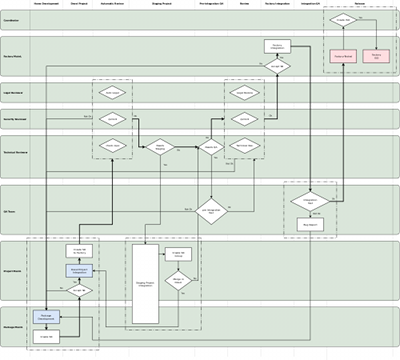
openSUSE Development Workflow
The following articles describe in more detail some relevant (also new) elements pointed in the previous article, since they are new or modify the current process significantly. Some of the articles are in the queue to be published.
-
One of the options for staging projects
In this mail Michal Hrusecky provides some details and examples on how the new staging projects might work in the future. -
openQA in the new proposal
This text, written by Ludwig Nussel, explains the principles that should drive the inclusion of openQA in the Factory development process, according with the proposed workflow. -
Karma for all
This mail, written by Ancor González, summarizes our ideas to include a social feature in the process to help achieving Factory goals. -
Policies, or why it’s good to know how to change things
The new process needs to be adaptive. Antonio Larrosa proposed a way, taking what other projects do in this regard as reference.
There might be an eighth article describing some smaller, still relevant, ideas. After publishing the “content”, we will release one last article providing a information about how to achieve these ideas, describing also our compromise in terms of effort and pointing out the challenges we perceive in the plan from the execution point of view.
We would like to invite you to the debate if you haven’t raised your opinions yet.
Fridrich Štrba, candidate for TDF Board of Directors
The time has come when The Document Foundation will elect a new Board of Directors. As you might already know, there are many good candidates. And since I clearly think I am the best of them, I am writing this to ask you to vote for me. Some of you might know me a bit already, but it is never bad to present myself.
My name is Fridrich Štrba, national of Switzerland and Slovakia, happily married with Susan since more then 12 years and father of 3 wonderful children: Patrick (9), Miriam (6) and Nathanael (3).
My story with LibreOffice started around 2004, with its predecessor, OpenOffice.org. I was just trying to contribute to libwpd which is the horse-power of our WordPerfect import and the OpenOffice.org integration was an interesting thing to contribute to. And since then, my love story with our project went through different stages, but we are still together and sometimes even happy.
I have been mentoring Google Summer of Code students since 2006 and recently I was co-responsible for several import filters for reverse-engineered formats (i.e. Visio, CorelDraw, MS Publisher). I can frankly say that my development and marketing work around the filters are a huge part of the reason why LibreOffice is called the "Swiss army knife of file-formats". We managed quite recently to bootstrap a vibrant community of filter-writers and the the amount of supported file-formats will only grow.
Between 2007 and 2013, I was highly blessed to be working on LO as my day-job, employed by Novell, then SUSE. Since September 2013, I am again a volunteer as many of you. This new-acquired independence is an advantage. I have no monetary interests of any kind in LibreOffice and, if elected, I will take decisions only and only considering the good of the project as such.
The advantage of my election would be that I am part of various native language communities. I speak several languages and can understand the aspirations of the corresponding communities. Besides that, I was part of the Membership Committee from 2010 and the last year, I was its Chairman. In this quality, I was able to push forward my vision of diverse and open and inclusive community that goes beyond personal sympathies or aversions. And this is the vision I desire to pursue if you give me your trust.
And since it is written "You don't have because you don't ask", with this message I ask you to cast your vote for me.
Fridrich Štrba, candidate for TDF Board of Directors
The time has come when The Document Foundation will elect a new Board of Directors. As you might already know, there are many good candidates. And since I clearly think I am the best of them, I am writing this to ask you to vote for me. Some of you might know me a bit already, but it is never bad to present myself.
My name is Fridrich Štrba, national of Switzerland and Slovakia, happily married with Susan since more then 12 years and father of 3 wonderful children: Patrick (9), Miriam (6) and Nathanael (3).
My story with LibreOffice started around 2004, with its predecessor, OpenOffice.org. I was just trying to contribute to libwpd which is the horse-power of our WordPerfect import and the OpenOffice.org integration was an interesting thing to contribute to. And since then, my love story with our project went through different stages, but we are still together and sometimes even happy.
I have been mentoring Google Summer of Code students since 2006 and recently I was co-responsible for several import filters for reverse-engineered formats (i.e. Visio, CorelDraw, MS Publisher). I can frankly say that my development and marketing work around the filters are a huge part of the reason why LibreOffice is called the "Swiss army knife of file-formats". We managed quite recently to bootstrap a vibrant community of filter-writers and the the amount of supported file-formats will only grow.
Between 2007 and 2013, I was highly blessed to be working on LO as my day-job, employed by Novell, then SUSE. Since September 2013, I am again a volunteer as many of you. This new-acquired independence is an advantage. I have no monetary interests of any kind in LibreOffice and, if elected, I will take decisions only and only considering the good of the project as such.
The advantage of my election would be that I am part of various native language communities. I speak several languages and can understand the aspirations of the corresponding communities. Besides that, I was part of the Membership Committee from 2010 and the last year, I was its Chairman. In this quality, I was able to push forward my vision of diverse and open and inclusive community that goes beyond personal sympathies or aversions. And this is the vision I desire to pursue if you give me your trust.
And since it is written "You don't have because you don't ask", with this message I ask you to cast your vote for me.

openSUSE 12.3 Steam and Dota 2 !
Το Steam έχει βγει στο Linux εδώ και πολύ καιρό. Ένα από τα παιχνίδια που αναπτύσσει η Valve είναι το Dota 2 το οποίο μαζί με πολλούς άλλους τίτλους έγινε σχεδόν αμέσως διαθέσιμο για Linux. Όσοι το δοκίμασαν ίσως ν’ αντιμετώπισαν προβλήματα όπως να μην τους εμφανίζονται οι ήρωες, τα δέντρα στο χάρτη και άλλα. Παρακάτω υπάρχει ένας οδηγός ο οποίος θα σας βοηθήσει να λύσετε τα προβλήματα αυτά.
Τα ίδια βήματα δουλεύουν και σε openSUSE 13.1 που είναι η πιο πρόσφατη έκδοση online!
– Εγκαταστήστε το Steam από το Yast
– Εγκαταστήστε το Dota 2 από το Steam
– Τρέξτε το Dota 2 και θα σας βγάλει S3TC error
– Εγκαταστήστε το libtxc_dxtn από το Yast, όπως σας λέει και το error
Καθώς παίζετε Dota 2, εάν δεν εμφανίζονται οι ήρωες ή τα δέντρα:
– Εγκαταστήστε το mesa 9.2.2 από εδώ.
– Στην διαχείριση πακέτων και προγραμμάτων στο Yast, ψάξτε την λέξη mesa και αναβαθμίστε όλα τ’ αποτελέσματα στην έκδοση 9.2.2
– Επανεκκινήστε τον υπολογιστή σας και το παιχνίδι θα παίζει κανονικά!

openSUSE to Develop
Have you ever wondered why openSUSE is the platform for development? Because it offers all that is needed for professional development, also if development goes beyond the basics.
A nice proof that openSUSE has more than others was posted here by our friend Thomas, a convinced Debian user. He writes about setting up openSUSE in vagrant to be easily able to build (master build) the ownCloud Client for Win32 in it. Very easy and cool stuff. But that can be even easier without vagrant through this link ;-).
Btw, there is an appliance in SUSE Studio to ease experiments with vagrant with openSUSE as base. I haven’t tested yet, experiences?
GNOME3: 選擇您的輸入法(openSUSE 13.1)
1. (GNOME way)
GNOME 3 自 3.6 版開始就整合了 ibus 成為預設的輸入法平台。
而 openSUSE 13.1 開始所搭載的 GNOME 3.10 就包含了 ibus 整合。
2. (openSUSE way)
openSUSE 有一套自有的啟動輸入法流程,
並根據社群的意見針對不同的語系預設不同的輸入法平台。
預設是根據 /etc/X11/xim.d/{您的語系}/數字-{輸入法}
數字愈小優先等級愈高。
也可以使用環境變數 INPUT_METHOD 來自訂所需的輸入法
(是的,目前沒有圖形使用者介面)
例如 zh_TW (繁體中文)使用 gcin, 而 zh_CN (簡體中文)使用 fcitx。
3. (Don't Conflict)
這兩種方法要使他們不衝突才能正常使用輸入法。
4. 檢查 (openSUSE way) 為您啟動了什麼輸入法?
檢查 ~/.xsession-errors 或 .xsession-errors-\:0 之類的檔案
找到
/etc/X11/xim.d/zh_TW/30-gcin started sucessfully
再這個例子中,啟動的就是 gcin
5. 你想用什麼輸入法?
決定您要用的輸入法框架: ibus ? gcin ? fcitx ? scim ?
6. 若您要使用 ibus
(1) 檢查 ~/.xsession-errors 確定 ibus 已成功啟動,
如果不是啟動 ibus ,請在 ~/.profile 加上
export INPUT_METHOD=ibus
(2) 到設定值--地區和語言--輸入來源--加入英文和中文輸入法
 |
| 寄件者 openSUSE 13.1 |
(3) 使用 Super+space 切換中英文輸入
 |
| 寄件者 openSUSE 13.1 |
(4) ibus 的優點:與gnome整合,工具列上有圖示顯示輸入狀態,佈景主題搭配
 |
| 寄件者 openSUSE 13.1 |
(5) ibus 的缺點:中英文切換反應慢,可能導致漏字
(6) ibus 的設定:要更改快速鍵,必須由設定值--鍵盤--快捷鍵--輸入 更改
(在 ibus 偏好中的設定仍會影響其他桌面環境)
7. 若您要使用 gcin (或 fcitx 或 scim)
(1) 檢查 檢查 ~/.xsession-errors 確定 gcin 或其他您選擇的輸入法已成功啟動,
如果不是啟動 gcin ,請在 ~/.profile 加上
export INPUT_METHOD=gcin
(2)如果您的 設定值--地區和語言--輸入來源 未做任何變動(尚未選擇輸入來源)
 |
| 寄件者 openSUSE 13.1 |
這時您已經可以使用您選用的輸入法輸入了
如果您已驚動到了該設定, ibus-daemon 會啟動,和您已經啟動的輸入法衝突
導致無法使用任何輸入法。
請執行以下命令來回復預設值
gsettings set org.gnome.desktop.input-sources sources "[]"
(3)用 Ctrl+space 切換即可在 gtk2 和 gtk3 應用程式中輸入(?)
因為 gnome-settings-daemon 重新設定了 QT_IM_MODULE 和 XMODIFIERS 環境變數
導致無法在非 gtk 的程式中輸入
請參考:https://bugzilla.novell.com/show_bug.cgi?id=853063
(4)要解決 (3)的問題,有個簡單的方法:移除 ibus
(5)但如果你的電腦是多人使用,可能有人比較喜歡 ibus
困難的方法:你必須駭一下 gnome-settings-daemon ...
我不會寫程式,我只是刪除了我認為不需要在 openSUSE 系統做的那兩句,
如果您也不會寫程式,膽子和我一樣大,
你可以到 http://download.opensuse.org/repositories/home:/swyear/openSUSE_13.1/
(在 i586 或 x86_64 目錄中,視您的系統決定)找到修改過後的 gnome-settings-daemon。
警告:請不要加此套件庫,裏面都是一些測試,不保證任何品質。
下載後直接用 rpm 升級安裝
# rpm -Uvh gnome-settings-daemon-3.10.2-3.1.i586.rpm
警告:gnome-settings-daemon-3.10.2-3.1.i586.rpm: 表頭 V3 DSA/SHA1 Signature, key ID 86d89a42: NOKEY
正在準備…                       ################################# [100%]
Updating / installing...
   1:gnome-settings-daemon-3.10.2-3.1 ################################# [ 50%]
Cleaning up / removing...
   2:gnome-settings-daemon-3.10.1-1.1 ################################# [100%]
重新登入後,就可以在 非 gtk 程式中輸入了
再次警告:任何後果自行負責
(6) gcin 的優點:符合台灣人的使用習慣,作者是台灣人,可以用中文要求功能與回報錯誤。
目前沒有發現無法輸入的情況。
 |
| 寄件者 openSUSE 13.1 |
(7) gcin 的缺點:在 gnome 桌面搜尋無法跳出選字視窗,沒有預設系統匣圖示顯示(但你可以裝 TopIcons ,但有時圖示無法正常顯示),在某些情況下有時跳出選字框會有殘像,有時會有選字視窗遮住輸入區的情形。
(8) fcitx 的優點:可自由迅速切換佈景主題(皮膚),支援新酷音,反應迅速,在簡體中文輸入法中評價最高。
 |
| 寄件者 openSUSE 13.1 |
(9) fcitx 的缺點:和 gcin 一樣,
Edit:感謝 csslayer 大大在留言中的指導,fcitx 裝上 kimpanel 擴充套件,可以完全融入 GNOME 3 的佈景主題中,太酷了!
 |
| 寄件者 openSUSE 13.1 |