
 Member
 jimmac
Updated App Icons

GNOME 3.12 will feature an improved Software experience. Richard has been fearlessly working on making the backend snappy and Software app itself cleaner and more fun.
There are many great improvements to the App pages, where you can learn what the app is about and see it in action. Having a great overview of the apps showed just how many apps don't seem to care about their identities or didn't manage to attract any graphics designer and things aren't all rosy.


We've identified some key apps that are either featured in individual categories or are part of a set that needs a facelift as a group, such as the GNOME games. Number of apps that publish proper appdata is growing, so the todo list probably won't shrink any time soon. If you feel like helping us out, check out the guidelines and get in touch!

openSUSE Election Platform
This is a copy of my openSUSE Election Platform, that I'm putting here with the shameless intention of doing my best to ensure as many people read my thoughts as possible. The original can be found on our official wiki
Introduction and Biography
Hi! I'm Richard Brown, 31 years old, and since last month living in Nürnberg in Germany.
Originally from London, England, I used to joke that I had been steadily moving south and was on my way to becoming French, however it seems once I crossed the Channel I turned left, skipped right past France, and ended up in a land of good Beer and Bratwurst :)
- Email: RBrownCCB at openSUSE.org
- IRC: ilmehtar on irc.freenode.org
- I'm @sysrich on twitter
- My Blog is here
I currently work as a QA Engineer for SUSE, the wonderful Enterprise Linux company that also is the main sponsor of our openSUSE Project.
Previously I worked as a Systems Manager for City College Brighton and Hove, a large UK further education college where we use a lot of openSUSE, SUSE, and other FOSS technologies. I was also the UK Representative on the Advisory Board of the TTP Academic User Group, an usergroup for sysadmins working in Academia that deals with SUSE, Novell, and NetIQ products, with good links to the developers and management teams in these companies and their partners. The TTP is very supportive of both SUSE & the openSUSE Project, and was proud to have a track of sessions during our oSC 12 conference in Prague.
I've used SUSE/openSUSE since 2003, and have found myself getting more involved as time has gone on.
I'm part of the team which maintains GNOME in openSUSE, as well as lead maintainer for the 'Branding' packages in openSUSE, which leads me to work very closely with our great Artwork team. I also am heavily involved in Marketing, as well as the Advocates & Local Coordinators Programmes, where I was involved in implementing many of the changes transforming the former 'Ambassadors' programme into its new structure.
I'm an active Advocate for our project, who regularly attends conferences where I do my best to to both evangelise about our work, but also gather ideas and feedback on how we could improve. My session at oSC 12 "Using openSUSE for Real Work" really helped gather feedback which shaped my efforts to improve our project over the last year. At oSC13 I gave talks about the transformation of the Ambassador programme into the Local Coordinator and Advocates groups, as well as a talk about the work involved in Branding openSUSE. I also led the organisation of openSUSE's presence at the last two FOSDEM conferences.
I'm a keen tester who especially enjoys the crunch in the weeks leading up to releases, frantically testing and packaging patches to try and get bugs big and small squashed out so our releases are as polished as possible. I'm also very interested in Power Management, and have done a lot of work finding ways to optimise Power consumption on Intel laptop chipsets
I spend a lot time in our IRC channels, where I go by the handle ilmehtar (a very obscure Lord of the Rings/JRR Tolkien reference, I'll owe a prize to anyone who figures it out)
I have very broad interests which finds me often getting involved in both the technical and more 'community' aspects of our project.
I'm always keen to help out, try and resolve issues, come up with ideas, and then get my hands dirty trying to implement them.
I'm very happy learning new things and trying to help out in areas outside of my 'comfort zone', such as this year where I was given the opportunity to join the openSUSE Board - and after a year of hard work and interesting challenges, I'm back again hoping for your votes so I can continue the work I started this year.
Issues
Managing Change - In the last few weeks the openSUSE team from SUSE have initiated a number of discussions (1), (2), (3) proposing changes to our projects goals and practical changes to our 'Factory' development distribution. Over these next few weeks and (if I am elected) into the early months of next year I intend to work hard to ensure that the discussions progress well and we, together as a cohesive project, find an exciting way forward.
I do not expect this to be a painless process, and I expect there will be occasions where some people will want things to develop in one direction, while others pull for another. This is precisely the sort of issue the Board is there to deal with, and I'm prepared to put in the work to make sure everyone can contribute to shaping the future of our Project and its Distribution(s).
Improve Working Relationship with the openSUSE Team @ SUSE - The Board have a responsibility to 'Facilitate communication with all areas of the community' - ie. We need to make sure all the Teams that make up our project have strong communication and therefore are able to work effectively with each other.
This is important for every Team in our project, but especially so for the openSUSE Team at SUSE, because not only are they contributing to openSUSE to make it better for themselves as well as everyone else, but as paid employees of our primary sponsor (SUSE) they currently control some aspects of the project the 'wider community' have little or no involvement in. As has been mentioned on our mailing lists, over the last year, the working relationship between the openSUSE Team and the Board has become strained.
I have already begun working on this issue, and if I am elected, I intend to continue to work hard to improve the situation. I think the Board can do a better job of keeping the members of the openSUSE Team informed about the current needs, wants, desires and 'pain points' of our wider openSUSE community, and inversely, I think with improved communication between us, the Board will be in a better position to help the openSUSE Team at SUSE in their communications with the wider openSUSE community. We need to squash the feeling of 'us & them' which has started to creep into that narrative, we're all one Project and one Community, and it's down to the Board to keep it that way.
openSUSE Membership - I think the Project needs to start thinking about changing the way 'openSUSE Membership' works. With our growing maturity as an independent project, it's very important that we have a healthy way of making big decisions which impact the entire Project. I do not think our current system is wholly broken (it's certainly healthy enough for these elections), but I'm concerned about a number of areas, especially the growing number of 'former Members' who maintain full voting rights. If I am elected, I intend to begin the discussions to reform the openSUSE membership, focusing first on a suitable way of 'retiring' openSUSE members who are no longer involved in the project, and after that looking at other issues such as improving the selection/approval process and the 'perks' of becoming an openSUSE member.
Role of the board
Last year, I said that I wanted the board to become more approachable and more prepared to 'step in' and help resolve issues.
While I think we have been broadly successful in achieving this, there is always room for improvement, and I'm hoping will a fully staffed Board we'll be able to build on the improvements we've seen in these last 12 months.
I don't think leadership in a project like ours should be dictatorial. I feel the board should act as 'enablers', 'cheerleaders', 'champions', and troubleshooters. The board's job should be to help you (the community) by proactively identifying where the project is going wrong and help pull people together to steer it in the right direction.
The board should be the primary point of contact for contributors and users to raise issues that cant be addressed elsewhere, which is why our board needs to be active, visible, and accessible. I do not think enough of our community know the Board is there to address their issues, so I think we need to make a big push to advertise our purpose and availability.
The board should also be a source of new ideas and proposals for the community to consider, and should also encourage other contributors to field their own ideas and help keep the great green Geeko rolling forward
Why you should vote for me?
- I've worked hard for you all as a Board member this year, and would like the opportunity to continue to do so.
- SuSE/openSUSE is my first distribution and I've been a loyal user and contributor since 2003. I care a great deal about seeing our project continue and improve.
- I've provided both technical and non-technical contributions to the project, and so have a strong working knowledge both the technical and community aspects of our project.
- While I have my own opinions and will often argue passionately for them, I always listen to and consider the opinion of others, especially when they disagree with me. If I am elected I will continue to champion the desires of the community, not just my own agenda.
- My experience outside of openSUSE, especially as a board member of the TTP, give me skills and knowledge I think will help me here
- I enjoy learning and getting involved in new things, and see working on the board as an opportunity to get help out in parts of the project that I'd probably otherwise not see.
Aims/Goals
If elected I will strive to
- Continue the work I've started over the last year as a Board Member
- Investigate ways to better advertise the work the Board is doing for the project
- Be involved in the recently started discussions about the Future of our project to find a viable plan for our Project going forward, especially one that addresses the needs of both our users desiring stability and a moderate pace of change, and for those whom using the latest and greatest stable versions is more important.
- Listen to the our users and contributors as much as possible, to figure out what you want the Board to be doing
Endorsements
Michal '-miska-' Hrusecky
I know Richard for few years and he always cared a lot about openSUSE. He is active on our channels and whenever he sees some troubles, he steps up and do his best to help the project. Not only technically but also on ''boring'' organization tasks. I can imagine, that being part of the board is a hard work although not that appreciated and visible to the outside. But nevertheless it is important for the project and I believe that Richard will continue to represent us very well. What is also great about Richard as board candidate is that he is not a classical politician - he doesn't do long speeches without content and he prefers to cut to the chase.
tune2fs: to fsck, or not to fsck?
fsck on the root filesystem at boot, and how often, are important ones for administrators. Here's some minimal information to get started:Read more »

Better Docker experience on openSUSE
I don’t know if you are aware of that, but Docker 0.7.0 has been released a couple of days ago.
You can read the full announcement here, but let me talk about the biggest change introduced by this release: storage drivers!
Docker has always used AUFS, a “unionfs-like” file system, to power its containers. Unfortunately AUFS is neither part of the official kernel nor of the openSUSE/SLE one.
In the past I had to build a custom patched kernel to run Docker on openSUSE. That proved to be a real pain both for me and for the end users.
Now with storage drivers Docker can still use AUFS, but can also opt for something different. In our case Docker is going to use thin provisioning, a consolidated technology which is part of the mainstream kernel since quite some time.
Moreover Docker’s community is working on experimental drivers for BTRFS, ZFS, Gluster and Ceph.
What changes now for openSUSE?
Running Docker is incredibly simple now: just use the 1 click install and download it from the ‘home:flavio_castelli:docker’ project.
As I said earlier: no custom kernel is required. You are going to keep the one shipped by the official openSUSE repositories.
Just keep in mind that Docker does some initialization tasks on its very first
execution (it configures thin provisioning). So just wait a little before hitting its
API with the Docker cli tool (you will just get an error because docker.socket
is not found).
The road ahead
Support SLE
Right now Docker works fine on openSUSE 12.3 and 13.1 but not on SLE 11 SP3. During the next days I’m going to look into this issue. I want to have a stable and working package for SLE.
Make it more official
Once the package is proved to be stable enough I’ll submit it for inclusion inside of the Virtualization project on OBS.
So please, checkout Docker package and provide me your feedback!
recoll: indexed file searching that works
grep and find work fine, grep for example was not designed to run searches with multiple search keys, and neither of them use an index, so every search walks the filesystem anew. Another traditional tool, locate, uses an index for speed, but it only knows how to search filenames (and paths), not file contents.Anyway,
recoll appears to be the open-source file indexing and searching tool that I was looking for. Here's how to install it in openSUSE:Read more »
8 months with KDE and openSUSE - looking back after the 13.1 release
And so, finally openSUSE 13.1 is out of the door (I couldn’t celebrate like I wanted, as I’ve been very busy). This release has lots of improvements, and of course, the latest stable software from KDE. It is time (perhaps?) to look back and see what the team has done during this development cycle.
With regards to the KDE software packaging, the past 8 months have seen quite an increase in the involvement of poeple from the community. Aside the “usual suspects” like Raymond “tittiatcoke” Wooninck and Hrvoje “shumski” Senjan, we’ve seen offers from help from the Cloverleaf community (now folded into openSUSE) and in general an increase of non-SUSE contributions. Relationship with upstream has also improved, as a number of changes present in the packages were submitted directly to KDE (which is always a good thing).
There were also [some much-needed organizational changes in projects]({{ site.url }}/2013/09/kde-in-opensuse-repository-and-maintainership-changes/), to keep things manageable. And thanks to the effort of shumski, openSUSE offers, like other distributions, [regularly updated KF5 packages to help with development and testing]({{ site.url }}/2013/08/qt5-on-opensuse-including-experimental-kf5-packages/). Aside for the very-bleeding-edge-it-will-kill-you software, the team eats a lot of its own dogfood, testing things as much as possible (and suffering from fallouts, sometimes ;) before pushing them to stable packages.
The goals for the future? Make the KLyDE splitting, originally devised and implemented by Will Stephenson of KDE and SUSE fame, a reality for the next version of openSUSE (13.2): there are quite a number of months ahead so it’s the perfect time for changing things and testing. Aside splitting, we’ll be watching closely the KF5 work, so that once releasable versions come out (in about a year) we’ll be ready to offer them in the distribution (as an option over the stable 4.x series, of course).
It may not seem like a large list, but it is a lot of work. ;) So if you feel like helping, don’t be shy and drop us a note either on IRC (#opensuse-kde) or on the opensuse-kde maling list.
gcin for openSUSE 13.1 Update
1. 之前跟各位報告過 gtk2 immodule cache update 的問題
會導致無法在 firefox 等 gtk2-based 應用程式無法輸入中文
(當 gcin 是你最後安裝的輸入法時就會這樣)
解決方法:
for x86
# gtk-query-immodules-2.0 --update-cache
for x86_64
# gtk-query-immodules-2.0-64 --update-cache
2. libreoffice 無法使用 on_the_spot 的輸入模式
你會看到輸入法視窗一直固定在左上角
解決方法:
編輯 /etc/X11/xim.d/gcin
將 export OOO_FORCE_DESKTOP=gnome 前後的判斷式都去除掉
只留這一行,要強迫系統使用 gtk 介面
3. 如果看不懂怎麼改,請直接安裝 M17N 套件庫中的 gcin
# zypper ar obs://M17N/openSUSE_13.1 m17n
# zypper ref m17n
# zypper in --from m17n gcin
更新尚在審核,不知何時發佈...
openSUSE – Upgrade der Distribution mit einem Skript
Erst vor kurzem ist die neueste openSUSE-Distribution herausgekommen und nun will man die Distribution via „zypper dup“ upgraden. Die meisten openSUSE-User müssen erstmal nach einer Anleitung im Internet suchen und diese dann Schritt für Schritt durchgehen. Das kann eine einfache oder auch eine komplizierte Angelegenheit werden.
Aus diesem Grund habe ich ein Skript upgrade-opensuse.sh entwickelt, dass alle notwendigen Schritte eines Distributionsupgrades automatisch durchführt. Die Vorgehensweise des Skript ist ganz grob an das Upgrade-Tool do-release-upgrade von Ubuntu angelehnt. Wenn alle Pakete von zypper korrekt aufgelöst werden kann, ist es sogar möglich, dass der Upgrade-Prozess in einem Rutsch durchläuft und man am Ende nur noch neustarten muss. Das Skript merkt sich auch die Stelle, an der der Upgrade-Prozess abgebrochen wurde und wird beim erneuten Ausführen an der letzten Stelle fortfahren. So kann man zwischendurch ein Problem beheben und anschließend mit dem Upgrade-Prozess fortfahren.
Folgende Schritte werden durchgeführt:
- Ermittelung der eingesetzten openSUSE-Version.
- Überprüfung der Internetverbindung.
- Ermittelung der neuesten openSUSE-Version.
- Backup vom /etc Verzeichnis.
- Umbenennung des Verzeichnis der eingebunden Repos /etc/zypp/repos.d nach /etc/zypp/repos.d.upgrade.
- Hinzufügen der Online-Repos (OSS, NON-OSS, OSS Update, NON-OSS Update) von der neuesten openSUSE-Version.
- Upgrade der Distribution via zypper dup (Ohne Community-Repos, um ungewollte VendorChanges zu vermeiden).
- Hinzufügen aller vormals aktivierten Community-Repos.
- Temporäre Modifizierung der zypper Konfiguration, um VendorChanges zu erlauben.
- Überprüfung von alten openSUSE-Pakete im System. Es wird versucht, die alten Pakete durch neuere Pakete zu ersetzen.
- Rückgangig machen der temporäre Modifizierung der zypper Konfiguration.
- Alte openSUSE-Pakete, die nicht aktualisiert werden konnten, werden endgültig entfernt.
- Auflistung aller neuen bzw. modifizierten Konfigurationsdateien (*.rpmnew, *rpmsave).
Alle Vorgänge werden protokolliert, um später nachzuvollziehen, was genau am System verändert wurde.
Folgende selbsterklärenden Logdateien werden erzeugt:
- upgrade-opensuse.zypper-dup-output
- upgrade-opensuse.old-packages-output
- upgrade-opensuse.zypper-reinstall-packages-output
- upgrade-opensuse.remove-old-packages-output
- upgrade-opensuse.zypper-rm-packages-output
- upgrade-opensuse.list-new-and-old-config-files
Wichtiger Hinweis: Vor einem Distributionsupgrade bitte unbedingt ein Backup machen, um im Bedarfsfall auf ein aktuelles Backup zurückgreifen zu können! Außerdem gibt es z.B. RPM Pakete von Drittanbietern wie z.B. AMD Catalyst, NVIDIA, VirtualBox, CrossOver, HumbleBundle-Games, usw., die während des Upgrade-Prozess nicht angerührt werden und von Hand aktualisiert werden müssen.
Downloads:
- Skript: upgrade-opensuse.sh
- SHA1: upgrade-opensuse.sh.sha1
Das Skript wird via root ausgeführt und fängt sofort mit der Arbeit an. Es gibt zu Beginn ein Zeitfenster von 5 Sekunden, in der noch ein unkritischer Abbruch mit STRG+C möglich ist.
sudo sh upgrade-opensuse.sh
| -h | Die Hilfe anzeigen lassen |
| -n/–non-interactive | Keine Fragen stellen, benutze automatisch Standard-Antworten. (zypper Option) |
| -r/–reset | Beginne das Disributionsupgrade von vorne (Die Option bitte vorsichtig verwenden!) |
| -V | Version des Skript anzeigen |
Feedbacks sind wie immer willkommen. 
War dieser Artikel für dich hilfreich und/oder konnte dein Problem lösen? Wie wäre es mit einer kleinen Spende (Flattr, Paypal oder Überweisung) für den Erhalt des Blogs und zur Förderung weiterer interessanter Artikel und Skripte? Zudem ist mit jeder Spende gewährleistet, dass der Blog werbefrei ist und auch in Zukunft werbefrei bleiben wird. Ich sage schon mal an alle Spendern herzlichen Dank.
SLES 11: Upgrading mysql from SP2 to SP3
Under some condition, mysql is not able to restart after an upgrade from SLES11 SP2 to SLES11 SP3. The output messages are a bit misleading
131122 14:41:28 InnoDB: The InnoDB memory heap is disabled

131122 14:41:28 InnoDB: Mutexes and rw_locks use GCC atomic builtins

131122 14:41:28 InnoDB: Compressed tables use zlib 1.2.7

131122 14:41:28 InnoDB: Using Linux native AIO

131122 14:41:28 InnoDB: Initializing buffer pool, size = 128.0M

131122 14:41:28 InnoDB: Completed initialization of buffer pool

131122 14:41:28 InnoDB: highest supported file format is Barracuda.

131122 14:41:28 InnoDB: Waiting for the background threads to start

131122 14:41:29 InnoDB: 5.5.33 started; log sequence number 4796605421

/usr/sbin/mysqld: Out of memory (Needed 64 bytes)

131122 14:41:29 [ERROR] Plugin 'INNODB_CMP' registration as a INFORMATION SCHEMA failed.

131122 14:41:29 InnoDB: Unable to allocate memory of size 8120.

131122 14:41:29 InnoDB: Assertion failure in thread 140387876259584 in file mem0mem.c line 361

InnoDB: We intentionally generate a memory trap.

InnoDB: Submit a detailed bug report to http://bugs.mysql.com.

InnoDB: If you get repeated assertion failures or crashes, even

InnoDB: immediately after the mysqld startup, there may be

InnoDB: corruption in the InnoDB tablespace. Please refer to

InnoDB: http://dev.mysql.com/doc/refman/5.5/en/forcing-innodb-recovery.html

InnoDB: about forcing recovery.

13:41:29 UTC - mysqld got signal 6 ;

This could be because you hit a bug. It is also possible that this binary

or one of the libraries it was linked against is corrupt, improperly built,

or misconfigured. This error can also be caused by malfunctioning hardware.

We will try our best to scrape up some info that will hopefully help

diagnose the problem, but since we have already crashed,

something is definitely wrong and this may fail.
key_buffer_size=16777216
In the end it turned out to be a permission problem with /var/run/mysql
To fix this:
chown -R mysql /var/run/mysql

rcmysql restart
This did it for me. I had this problem on several but not all instances of mysql on SLES11SP2 upgrading to SLES11SP3. My wild guess is that it is based upon if this was a fresh SP2 install or upgraded from an earlier service pack.
Entrenador de culturismo explica por que come cereal para el desayuno después de un entrenamiento joeie avanafil hogar – el mejor suplemento de culturismo sin esteroides, el mejor suplemento de entrenamiento sin esteroides – warframe wiki.

Sincronizar carpetas entre Android y PC
Para GNU/Linux. La idea es sencilla: un script BASH que mediante el uso de ADB (Android Debug Bridge) mantenga una o varias carpetas sincronizadas entre nuestro Android y el ordenador de tal manera que siempre dispongamos de una copia en nuestro disco duro y esta se realice de manera automática (sin más intervención manual que conectar el teléfono al USB para cargarlo) y rápida.
En el siguiente vídeo se ve como funciona y como la sincronización es bastante rápida.
Idealmente esto lo empecé para mantener a mano en el ordenador las fotografías y vídeos que grabo con mi móvil (un Android – HTC Wildfire S) pero en realidad nada impide que esto puede ser usado para sincronizar otros contenidos ó simplemente como un modo cómodo de traspasar archivos al teléfono habitualmente para usarlo como pendrive.
La alternativa más evidente a este uso de ADB para sincronizar dos carpetas sería el montaje del teléfono como unidad de disco duro externo y a continuación usar alguna aplicación como sync para la sincronización, pero hay un par de ventajas a favor de ADB abismales: en el tiempo que tarda el teléfono en desmontar y montar en el PC la nueva unidad como un disco duro de nuestro ordenador he acabado yo de transferir alrededor de 200 Mg de archivos. La velocidad de transferencia es idéntica pero la conexión en inmediata (un par de segundos. Actualmente mantengo sincronizados 15 carpetas que contienen 250 archivos. Desde que conecto el teléfono al USB y aparece el diálogo informando de “No es necesaria la sincronización” pasan aprox. 6 seg).
Además de la velocidad, al no estar la tarjeta del teléfono montada como un disco duro/pendrive se gana en seguridad frente a archivos corruptos o desmontajes inapropiados. Si tienes que irte de improviso simplemente desconectas el teléfono y te lo llevas.
El único engorro es instalar ADB que viene con el kit de desarrollo de Android distribuido por Google. Si no las tienes ya instaladas simplemente sigue los pasos que se indican en la sección “Descargar Android SDK“
Preparar el móvil
La única preparación o instalación en el teléfono móvil es dejar activa por defecto la depuración USB de tal manera que siempre que se conecte esté accesible de forma inmediata para la aplicación ADB. Para activar la depuración usb, en tu teléfono busca y activa: Ajustes->Aplicaciones->Desarrollo->Depuración USB
Preparar el PC
En tu ordenador la única tarea extraordinaria (si no has hecho todavía) es asegurar que el ejecutable de ADB está accesible para todo el sistema. En mi caso ADB está instalado en /usr/bin.
Identificar tu Android
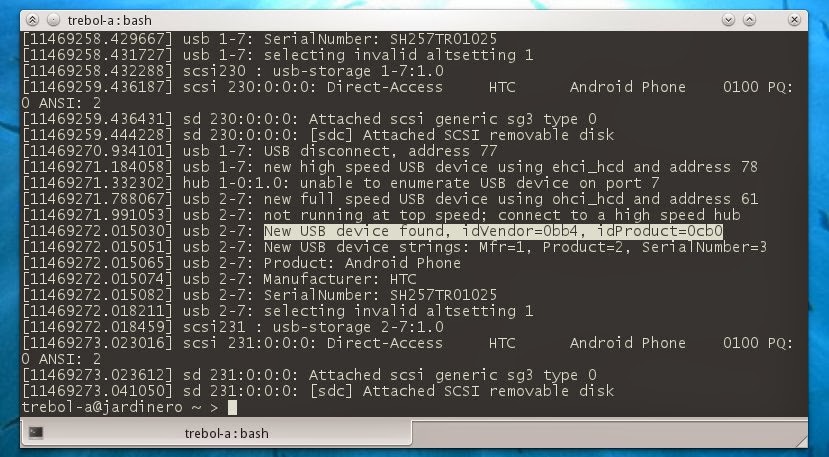 A continuación necesitamos algunos datos con los que reconocer cuando nuestro teléfono ha sido conectado al USB del ordenador.
Conecta el móvil vía USB, abre una konsola/terminal y escribes dmesg. Verás algunas líneas de información detectando la conexión de un nuevo dispositivo USB. Busca la línea que indica idVendor y idProduct. Copia y guarda esa información en un archivo de texto para usarla a continuación.
Reglas para UDEV
UDEV es el servicio encargado en la mayoría de los Linux modernos de registrar y administrar la conexión de dispositivos al ordenador. Mediante un serie de reglas indicamos a UDEV que es lo que tiene que hacer cuando detecte que se ha conectado/desconectado tal o cual dispositivo.
Las reglas UDEV estan normalmente (en openSuse 11.3) en el directorio /etc/udev/rules.d. En dicho directorio veréis una lista de archivos de texto que configuran el comportamiento de UDEV. Para no alterar archivos de sistema ya existentes lo ideal es crear nuestro propio archivo (como root) conteniendo nuestras reglas personalizadas y a continuación situarla al final de la lista de archivos existentes simplemente asignándole un nombre único tal como “99-mis reglas.rules” que lo situa al final de la lista.
(todas las operaciones siguientes se realizan como administrador, sudo) Si ya tienes tu archivo de reglas personales edítalo, de lo contrario crea uno con la siguiente línea:
SUBSYSTEM=="usb", ENV{DEVTYPE}=="usb_device", ATTRS{idVendor}=="XXXXX-ID-VENDOR", ATTRS{idProduct}=="XXXXX-ID-PRODUCT", ACTION=="add", RUN+="/bin/su mi-usuario -c '/home/mi-usuario/bin/sincro-movil'"
Reemplaza XXXX-ID-PRODUCT y XXXX-ID-VENDOR por los valores de tu dispositivo obtenidos en el paso anterior y mi-usuario por tu nombre de usuario.
En un terminal recarga las reglas conudevadm control --reload-rules
Probando la detección
Bien, vamos a comprobar que todo funciona como debe y que UDEV detecta y ejecuta el script correctamente, creamos un script que más tarde completaremos y lo guardamos con el nombre usado en el punto anterior (/home/mi-usuario/bin/sincro-movil) con el siguiente contenido:#!/bin/bashHaz ejecutable el script (chmod +x /home/mi-usuario/bin/sincro-movil).
echo "Hola móvil" > /home/mi-usuario/Desktop/movil.conectado
Una vez hecho esto conecta tu teléfono al puerto USB, en un par de segundos debería aparecer en tu escritorio una archivo de texto llamado “móvil.conectado“. Si no es así comprueba las rutas de archivos, nombres de archivos, etc…
Una vez que tienes tu script creado, funcionando y ejecutado correctamente desde UDEV pasamos a llenarlo de contenido.
Script de sincronización
El script que utilizo para la sincronización podéis copiarlo/descargarlos desde aquí sincroMovil (txt).
Guardad el contenido como (p.ejem) sincroMovil en vuestra carpeta ~/bin (o donde le indicasteis en el paso anterior a UDEV) y hacedlo ejecutable (chmod +x ~/sincroMovil). Editadlo y corregid las líneas que requieren personalizarse, las carpetas que quereis sincronizar, etc…
En este vídeo podéis ver el script en funcionamiento. Tomar una foto de la pantalla, conectar el teléfono y tener la imagen en el escritorio en unos segundos.
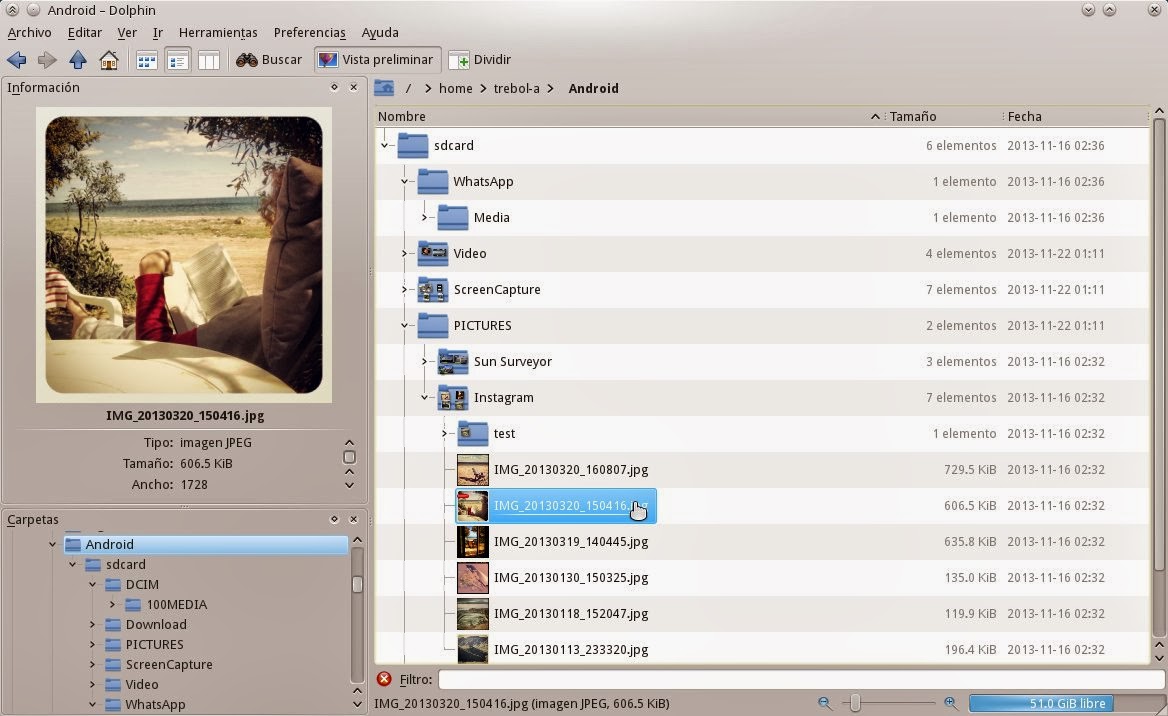 Sincronización: Básicamente el script lo que hace es generar un par de listas de archivos para cada una de los directorios a sincronizar. Ambos archivos se guardan en local (por rendimiento) y bajo los nombres (personalizables) de sincro.list y sincro.list.remota. Cuando el script se ejecuta (porque UDEV ha detectado la conexión o bien lo lanzamos manualmente) se recrean de nuevo ambas lista y se comparan mediante DIFF. Este archivo de diferencias define si es necesario el copiado de archivos y la dirección del mismo (del teléfono al PC ó viceversa) o simplemente se emite un diálogo avisando de que no es necesaria la sincronización.
Borrado local: Antes de hacer esto el script comprueba si falta algún archivo en local desde la última sincronización (es decir, se ha borrado manualmente) y caso de detectar que falta algún archivo lo borra también en el teléfono. Pero no a la inversa. Es decir, si borramos un archivo en local se borrará en el teléfono en la siguiente sincronización, pero si lo borramos en el teléfono únicamente el fichero se volverá a copiar a este en cuanto lo enchufemos al PC.
He hecho esto así porque parece más cómodo eliminar imágenes y vídeos desde el escritorio que desde el teléfono. Tiene el inconveniente de que no podremos eliminar un archivo desde el teléfono si este se encuentra en una carpeta sincronizada ya que a cada conexión se volverá a copiar desde el PC. Esto en realidad no es un bug sino una feature. :D
Si queréis anular esta función de borrado basta con comentar la línea 156 del script.
Mejoras
La principal mejora a introducir sería el refresco de la caché del teléfono. Actualmente el teléfono no se entera de los cambios ocurridos en su sistema de archivos (al menos en las galerías de fotos que mantengo sincronizadas). Si borramos un archivo en local y sincronizamos las carpetas, el teléfono sigue mostrando la miniatura de una imagen que ya no existe y emite un error al tratar de abrirla.
Si enviamos algún archivo al teléfono no aparece en la lista hasta que la caché se refresca.
Debe haber alguna manera de forzar el refresco de la caché pero he sido incapaz de encontrarla. Se agradece cualquier información.