
 saurabhsood91
Installing Realtek 8273AE driver on openSUSE 12.3
This was a problem I didnt think I would face while getting a new laptop. I got the Toshiba C580 laptop, which has quite decent specifications. It is a nifty machine, and openSUSE works more or less flawlessly. The only issue I faced was with the Wireless card. It is a Realtek device, which is usually well supported, but this particular model, the 8273AE is yet to be fully supported by the kernel. I had to dig around a lot to get this to work, but received a lot of help from the openSUSE forums, and managed to get it to work. Thanks to lwfinger for writing the patch to get it to work properly.
1.) Use YaST to install the Kernel Development, C/C++ development and Base Development patterns
2.) Download the compat-wireless package from
http://linuxwireless.org/download/compat-wireless-2.6/compat-wireless-2012-10-03.tar.bz2
3.) Download the patch from
http://www.lwfinger.com/realtek_drivers/rtl8723ae_master_patch
4.) Run the following commands
tar jxvf compat-wireless-2012-10-03.tar.bz2

cd compat-wireless-2012-10-03/

patch -p1 < ../rtl8723ae_master_patch

make

sudo make install
5.) Check if the driver is working with
sudo modprobe -v rtl8723ae
This should get the driver working properly
 Member
Organizing oSC13 - 38 days before(a conference without history is a tree without roots)


Then we finally got the oSC13 to Greece. Not many things stayed as originally planned but this is only a good thing. We are prepairing a conference that for the first time is organized exclusively by the community and it is planned to be friendly to everybody and to produce a lot of work for the project. If you have any hessitations on comming to the conference because you don't know people or you fear that you will be a stranger among strangers forget it. Just track someone you really like from irc or from wherever and go say a hello, there is a big posbility a long time friendship to start with that hello. Any problem you might have will be solved. Ask anyone that ever joined an oSC. Come to share thoughts and learn from people. Come as you are and don't hessitate to deploy your personallity. There is enough place for everyone here.
Hope to see you all there.
openSUSE 12.3: Grata surpresa.

Mês passado, dia 9/05/11, a Canonical encerrou o suporte ao Ubuntu 11.10, tentei fazer o upgrade-release para a versão 12.04 e não fui bem sucedido. Fiz uma instalação limpa do 13.04 e alguns bugs me pegaram. Apesar de gostar muito do Ubuntu, estou um pouco cansado, e o Unity está numa derivada muito lenta. Resolvi testar o openSUSE 12.3, como já havia mencionado no twitter.
Já havia testado openSUSE há alguns anos e gostei muito na época. E dessa vez não foi diferente. Essa distro se mostrou muito bem polida e rápida. Há anos não testava também o KDE, que nessa versão 4 está muito bonito e utilizável. Depois de algum tempo trabalhando com o Unity, tinha até esquecido como um desktop pode ser configurável. Wow! Zilhões de opções de customização.
Mas nem tudo são flores. O openSUSE se mostrou um ótimo sistema para quem já tem um certo conhecimento do Linux e quer abreviar algumas configurações. Entretanto, diversos tweaks fizeram-se necessários para que o sistema ficasse devidamente utilizável nos meus padrões e me ajudasse a cumprir minhas tarefas diárias.
Como o meu intuito nesse post não é descrever todos os tweaks que fiz de maneira detalhada, vou listar todos os links que me informaram em como fazer o que eu queria/necessitava e alguns macetes para quem vem do Debian e seus derivados. Vou atualizar essa lista a medida em que for encontrando novas informações interessantes.
-> Tweaks/Macetes/Documentações:
openSUSE 10.3 survival guide or what a Debian hacker should know when using openSUSE
Unofficial Guide to openSUSE 12.3
build-essentials do debian/ubuntu e o pattern do openSUSE
Outra tabela de conversão de comandos entre os gerenciadores de pacotes (praticamente todos)
Instalar versões mais novas do kernel
Chapter 12. Installing Multiple Kernel Versions
Para usuários com teclado com mapa US Internacional e querem os acentos também no console, executem como root:
# cd /usr/share/kbd/keymaps/i386/qwerty/
# gzip –decompress br-latin1-us.map.gz
# loadkeys br-latin1-us.map
# echo “loadkeys /usr/share/kbd/keymaps/i386/qwerty/br-latin1-us.map” >> /etc/init.d/boot.local
Instalar o skype no openSUSE 12.3
Instalação do Bumbleblee (Suporte não oficial ao optimus da NVIDIA) – Testado e aprovado! -> Com a placa de vídeo NVIDIA desabilitada, o notebook passou a operar uns 10 graus celsius mais frio.
ActiveDoc is a collection of books, articles, howtos, and FAQs around SUSE products. – Excelente fonte de documentação do openSUSE!
KDE Platform Workspace, and Applications 4.10.4 for openSUSE
These posts kind of sound like a broken record, right? ;) Anyway, since KDE has released new versions of Platform, Workspaces and Applications as part of the stable release cycle, thanks to the OBS we have packages available for openSUSE 12.2 and 12.3. The 4.10.4 update will also be released as an official update for 12.3 in due time.
Where you can get the packages? Two places, as usual:
- KDE:Distro:Factory in case you are interested in contributing to packaging for the next openSUSE release;
- KDE:Release:410 (openSUSE 12.3 or openSUSE 12.2) in case you just want to upgrade to the latest and greatest version
What to look forward to in this release? More than 50 bugs being fixed, including:
- CSS compliance fixes in KHTML
- Bug fixes in Gwenview (display after image rotation, duplicate entries in recent folders)
- Assorted fixes in KMail: polishing of external editor support, CalDAV fixes, UI adjustments…
For more you can always turn to the [full list of fixed bugs](https://bugs.kde.org/buglist.cgi?query_format=advanced&bug_status=RESOLVED&bug_status=VERIFIED&bug_status=CLOSED&bugidtype=include&chfieldfrom=2013-01-01&chfieldto=Now&chfield=cf_versionfixedin&chfieldvalue=4.10.4&order=Bug Number&list_id=675254).
As with any good broken record, some more repetition: report bugs in packaging to Novell’s Bugzilla, and bugs in the software directly to KDE.
Have fun with 4.10.4!
YaST is being rewritten in Ruby; Geeko gets a nosejob
Old and new limare code, and management overhead...
In almost 160 patches, loads of things change:
- clean FOSDEM code supporting Q3A timedemo on a limare ioquake3.
- support for r3p2 kernel and binary userspace as found on the odroid-x series.
- multiple PP support, allowing for the full power of the mali 400MP4 to be used.
- fully threaded job handling, so new frames can be set up while the first is getting rendered.
- multiple textures, in rgb888, rgba8888 and rgb565, with mipmapping.
- multiple programs.
- attribute and elements buffer support.
- loads of gl state is now also handled limare style.
- memory access optimized scan pattern (hilbert) for PP (fragment shader).
- direct MBS (mali binary shader) loading for pre-compiled shaders (and OGT shaders!!!).
- support for UMP (arm's in kernel external memory handler).
- Properly centered companion cube (now it is finally spinning in place :))
- X11 egl support for tests.
- ...
As for performance, this is no better or worse than the FOSDEM code. 47fps on timedemo on the Allwinner A10 at 1024x600. But now on the Exynos 4, there are some new numbers... With the CPU clocked to 2GHz and the Mali clocked to 800MHz (!!!) we hit 145fps at 720p and 127fps at 1080p. But more on that a bit further in this post.
Upcoming: Userspace memory management.
Shortly after FOSDEM, i blogged about the 2% performance advantage over the binary driver when running Q3A.
As you might remember, we are using ARMs kernel driver, and despite all the pain that this is causing us due to shifting IOCTL numbers (whoever at ARM decided that IOCTL numbers should be defined as enums should be laid off immediately) I still think that this is a useful strategy. This allows us to immediately throw in the binary driver, and immediately compare Lima to the binary, and either help hard reverse engineering, or just make performance comparisons. Rewriting this kernel driver, or turning this into a fully fledged DRM driver is currently more than just a waste of time, it is actually counterproductive right now.
But now, while bringing up a basic mesa driver, it became clear that I needed to work on some form of memory management. Usually, you have the DRM driver handling all of that, (even for small allocations i think - not that i have checked). We do not have a DRM driver, and I do not intend to write one in the very near future either, and all I have is the big block mapping that the mali kernel driver offers (which is not bad in itself).
So in the train on the way back from linuxtag this year, I wrote up a small binary allocator to divide up the 2GB of address space that the Mali MMU gives us. On top of that, I now have 2 types of memory, sequential and persistent (next to UMP and external, for mapping the destination buffer into Mali memory), and limare can now allocate and map blocks of either at will.
The sequential memory is meant for per-frame data, holding things like draws and varyings and such, stuff that gets thrown away after the frame has been rendered. This simply tracks the amount of memory used, adds the newly requested memory at the end, and returns an address and a pointer. No tracking whatsoever. Very lightweight.
The persistent memory is the standard linked list type, with the overhead that that incurs. But this is ok, as this memory is meant for shaders, textures and attribute and element buffers. You do not create these _every_ draw, and you tend to reuse them, so it's acceptable if their management is a bit less optimized.
Normally, more management makes things worse, but this memory tracking allowed me to sanitize away some frame specific state tracking. Suddenly, Q3A at 720p which originally ran at 145fps on the exynos, ran at 176fps. A full 21% faster. Quite some difference.
I now have a board with a Samsung Exynos 4412 prime. This device has the quad A9s clocked at 1.7GHz, 2GB LP-DDR2 memory at 880MHz, and a quad PP Mali-400MP4 at 440MHz. This is quite the powerhouse compared to the 1GHz single A8 and single PP Mali-400 at 320MHz. Then, this Exynos chip I got actually clocks the A9s to 2GHz and the mali to a whopping 800MHz (81% faster than the base clock). Simply insane.
The trouble with the exynos device, though, is that there are only X11 binaries. This involves a copy of the rendered buffer to the framebuffer which totally kills performance. I cannot properly compare these X11 binaries with my limare code. So I did take my new memory management code to the A10 again, and at 1024x600 it ran the timedemo at 49.5fps. About a 6% margin over the binary framebuffer driver, or tripling my 2% lead at FOSDEM. Not too bad for increased management, right?
Anyway, with the overclocking headroom of the exynos, it was time for a proper round of benchmarking with limare on exynos.
Benchmark, with a pretty picture!
The above picture, which I quickly threw together manually, maps it out nicely.
Remember, this is an Exynos 4412 prime, with 4 A9s clocked from 1.7-2.0GHz, 2GB LP-DDR2 at 880MHz, and a Mali-400MP4 which clocks from 440MHz to an insane 800MHz. The test is the quake 3 arena timedemo, running on top of limare. Quake 3 Arena is single threaded, so apart from the limare job handling, the other 3 A9 cores simply sit idle. It's sadly the only good test I have, if someone wants to finish the work to port Doom3 to gles, I am sure that many people will really appreciate it.
At 720p, we are fully CPU limited. At some points in the timedemo (as not all scenes put the same load on cpu and/or gpu), the difference in mali clock makes us slightly faster if the cpu can keep up, but this levels out slightly above 533MHz. Everything else is simply scaling linearly with the cpu clock. Every change in cpu clock is a 80% change in framerate. We end up hitting 176.4fps.
At 1080p, it is a different story. 1080p is 2.25 times the amount of screen real estate of 720p (if that number rings a bell, 2.25MB equals two banks of Tseng ET6x00 MDRAM :p). 2.25 times the amount of pixels that need to pushed out. Here clearly the CPU is not the limiting factor. Scaling linearly from the original 91fps at 440MHz is a bit pointless, as the Q3A benchmark is not always stressing CPU and GPU equally over the whole run. I've drawn the continuation of the 440-533MHz increase, and that would lead to 150fps, but instead we run into 135.1fps. I think that we might be stressing the memory subsystem too much. At 135fps, we are pushing over 1GBps out to the framebuffer, this while the display is refreshing at 60fps, so reading in half a gigabyte. And all of this before doing a single texture lookup (of which we have loads).
It is interesting to see the CPU become measurably relevant towards 800MHz. There must be a few frames where the GPU load is such that the faster CPU is making a distinguishable difference. Maybe there is more going on than just memory overload... Maybe in future i will get bored enough to properly implement the mali profiling support of the kernel, so that we can get some actual GP and PP usage information, and not just the time we spent waiting for the kernel job to return.
ARM Management and the Lima driver
I have recently learned, from a very reliable source, that ARM management seriously dislikes the Lima driver project.
To put it nicely, they see no advantage in an open source driver for the Mali, and believe that the Lima driver is already revealing way too much of the internals of the Mali hardware. Plus, their stance is that if they really wanted an open source driver, they could simply open up their own codebase, and be done.
Really?
We can debate endlessly about not seeing an advantage to an open source driver for the Mali. In the end ARMs direct customers will decide on that one. I believe that there is already 'a slight bit of' traction for the general concept of open source software, I actually think that a large part of ARMs high margin products depend on that concept right now, and this situation is not going to get any better with ARMv8. Silicon vendors and device makers are also becoming more and more aware of the pain of having to deal with badly integrated code and binary blobs. As Lima becomes more complete, ARMs customers will more and more demand support for the Lima driver from ARM, and ARM gets to repeat that mantra: "We simply do not see the advantage"...
About revealing the internals of the Mali, why would this be an issue? Or, let me rephrase that, what is ARM afraid of?
If they are afraid of IP issues, then the damage was done the second the Mali was poured into silicon and sold. Then the simple fact that ARM is that apprehensive should get IP trolls' mouths watering. Hey IP Trolls! ARM management believes that there are IP issues with the Mali! Here is the rainbow! Start searching for your pot of gold now!
Maybe they are afraid that what is being revealed by the Lima driver is going to help the competition. If that is the case, then it shows that ARM today has very little confidence in the strength of their Mali product or in their own market position. And even if Nvidia or Qualcomm could learn something today, they will only be able to make use of that two years or even further down the line. How exactly is that going to hurt the Mali in the market it is in, where 2 years is an eternity?
If ARM really believes in their Mali product, both in the Mali's competitivity and in the originality of its implementation, then they have no tangible reason to be afraid of revealing anything about its internals.
Then there is the view that ARM could just open source their own driver. Perhaps they could, it really could be that they have had very strict agreements with their partners, and that ARM is free to do what they want with the current Mali codebases. I personally think it is rather unlikely that everything is as watertight as ARM management imagines. And even then, given that they are afraid of IP issues... How certain are ARMs lawyers that nothing contentious slipped into the code over the years? How long will it take ARMs legal department to fully review this code and assess that risk?
The only really feasible solution tends to be a freshly written driver, with a full development history available publically. And if ARM wants to occupy their legal department, then they could try to match intel (AMD started so well, but ATI threw in the towel so quickly, but luckily the AMD GPGPU guys continued part of it), and provide the Technical Reference Manual and other documents to the Mali. That would be much more productive, especially as that will already be more legal overhead than ARM management would be willing to spare, when they do finally end up seeing the light.
So. ARM management hates us. But guess what. Apart from telling us to change our name (there was apparently the "fear" of a trademark issue with us using Remali, so we ended up calling it Lima instead), there was nothing that they could do to stop us a year and a half ago. And there is even less that ARM can do to stop us today :)
A full 6.0%...
LinuxTag

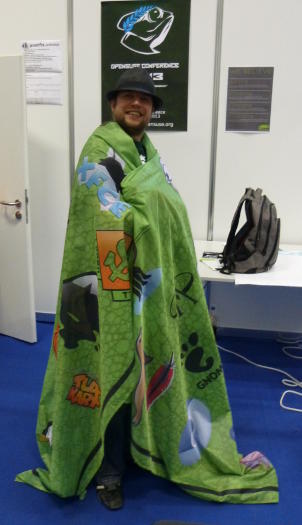
Vor gut einer Woche ging der LinuxTag zu Ende. Zeit, kurz darüber zu schreiben ;-)
Ich war drei Tage in Berlin. Neben einigen interessanten Vorträgen war ich oft am openSUSE-Stand, um die Fragen der Besucher zu beantworten und habe mit 3 Runden openSUSE Jeopardy dafür gesorgt, das openSUSE-Motto "have a lot of fun" umzusetzen.
Außerdem hatte ich mich mit PostfixAdmin am Stand "einquartiert". Das erwies sich als Vorteil, weil deutlich mehr PostfixAdmin-Benutzer und -Interessenten zu mir kamen als letztes Jahr am Project Meeting Point.
An dieser Stelle vielen Dank an Bernhard, Jos und Sascha, die mit mir den openSUSE-Stand betreut haben, und ans Travel Support Programm für die Unterstützung bei den Reisekosten.
LinuxTag ended about a week ago. Time to write about it ;-)
I was in Berlin for three days. Besides listening to several interesting talks, I often was at the openSUSE booth, answered the visitor's questions and did 3 rounds of openSUSE Jeopardy to put the openSUSE motto "have a lot of fun" into practise.
Besides that, I "accomodated" myself with PostfixAdmin at the openSUSE booth. This turned out to be an advantage because many more PostfixAdmin users and might-become-users came to me (compared to the Project Meeting Point last year).
Thanks a lot to Bernhard, Jos and Sascha who manned the openSUSE booth together with me, and the travel support program for supporting me.
You can't win an argument against conspiracy theorists

Insides about the new openSUSE Team at SUSE blog
[1] Link to the blog: https://lizards.opensuse.org/author/calumma/
Versión beta de qRAE disponible
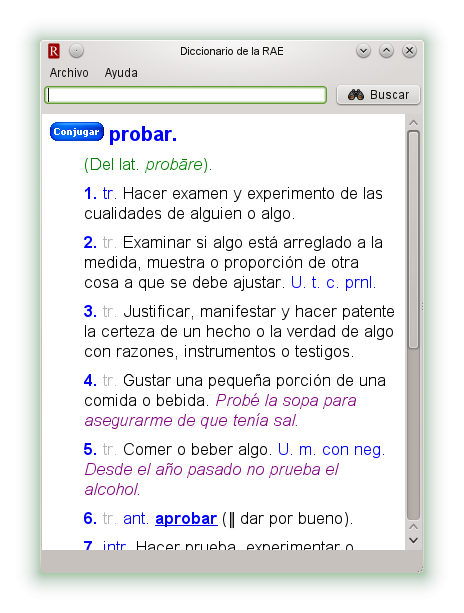 No hace mucho tiempo que decidí crear una versión de escritorio del «Diccionario de la RAE«. Bueno, pues ya está disponible la primera beta de qRAE, un cliente del diccionario castellano de la RAE basado en Qt. No es gran cosa, pero puede ser útil para aquellos que consultamos la RAE a menudo. En teoría se puede compilar en cualquier plataforma, pero de momento sólo he creado un paquete RPM.