
 Member
 saschpe
Official Last.fm scrobbler for openSUSE
Good news, the official Last.fm audio scrobbler is now available for openSUSE through the Packman package repositories. Why do I care, you might question yourselves and you're partly right, openSUSE already ships a big bunch of multimedia apps (like Amarok, Clementine and Banshee) that all have Last.fm support built-in. However, for all of those you … Continue reading Official Last.fm scrobbler for openSUSE

Установка opensuse 12.1 с флешки для пользователей Windows
Так получилось, что в ходе экспериментов весь мой зоопарк операционных систем рухнул, и пришлось (о стыд!) переустанавливать систему (главную, из под которой загружается все остальное) из-под Виндовс. И тут всплыли несколько особенностей, о которых знает мало кто из пользователей моей любимой операционной ситемы — потому что они не пользуются надстройкой над dos другими системами или очень редко (как и я, впрочем).
Главное, чего не написано в описании процесса создания установочной флешки — программа требует образ в формате raw, вернее, файл с таким расширением. И в прошлый раз (при попытке установить любимую систему другу-виндузятнегу) на этом у меня получилась большая заминка, а точнее — установку не получилось сделать. В этот раз, так как деваться было некуда, интуиция подсказала мне просто переименовать гибридный образ (который был сделать точно по описанию из документации, смотрите на портале opensuse) — было изменено расширение с iso на raw. И все прошло успешно, система установлена.
Небольшое добавление к предыдущей статье — перед созданием флешки через imagewriter образ (установочный) был переделан в гибридный, и поэтому все прошло нормально. Перед этим были попытки записать обычный скачанный образ на флешку, но умная программа отказывалась это делать. Теперь все в порядке
Puppet Ruby DSL using Gloves Library on openSUSE 12.1

Motivation
I've published two articles recently: How to use Gloves on Ubuntu and How to use Puppet on openSUSE 12.1. I wanted to connect these two into Using Gloves (formerly YaST++) on openSUSE via Puppet. And because Gloves library is written in Ruby, it could also use Ruby DSL.This example will show how to download Gloves from GitHub, install it to the system and use it to open a special port in SuSEfirewall2.
What You Might Need
- One server with openSUSE 12.1 (could be virtual), AKA server.example.com hostname in this example
- One or more clients with openSUSE 12.1 (could be virtual), using client.example.com hostname
Configuring a Puppet Server
Let's assume you already have a Puppet server installed and configured. If you don't, follow section Configuring a Puppet Server in this blog.- Now we'll create the recipe in Ruby: touch /etc/puppet/manifests/site.rb
- And use it from Puppet by adding manifest = /etc/puppet/manifests/site.rb into your /etc/puppet/puppet.conf
- Restart the Puppet server: rcpuppetmasterd restart
 Recipe Written in Ruby DSL
# Installs requred packages
package :ntp, :ensure => :installed
package :'rubygem-rake', :ensure => :installed
package :'rubygem-packaging_rake_tasks', :ensure => :installed
package :git, :ensure => :installed
# Fetch from git
create_resource :exec,
'sources_from_git',
:require => 'Package[git]',
:cwd => '/tmp',
:command => '/usr/bin/git clone git://github.com/yast/yast--.git'
# Install from git
create_resource :exec,
'install_from_sources',
:require => 'Exec[sources_from_git]',
:cwd => '/tmp/yast--',
:command => '/usr/bin/rake install'
# Removest the git repository
create_resource :exec,
'remove_sources',
:require => 'Exec[install_from_sources]',
:cwd => '/tmp/',
:command => '/bin/rm -rf yast--'
# Creates file with configuration commands (Ruby)
# Later a command-line interface would be better
# Yes, I know there's a security risk, don't use this in production!
file '/tmp/open_port_in_firewall',
:require => 'Exec[sources_from_git]',
:content => "
require 'y_lib/susefirewall2'
YLib::Susefirewall2::add({},
{'kind' => 'open_port', 'port' => 'port_opened_by_Gloves',
'zone' => 'EXT'})\n"
# Calls the file with commands (Ruby)
create_resource :exec,
'open_port_in_firewall',
:require => 'File[/tmp/open_port_in_firewall]',
:command => '/usr/bin/ruby /tmp/open_port_in_firewall',
:path => ['/usr/bin'],
:notify => 'Service[SuSEfirewall2_setup]'
# Adjusts the SuSEfirewall2 service
service :SuSEfirewall2_setup,
:start => '/sbin/rcSuSEfirewall2 start',
:restart => '/sbin/rcSuSEfirewall2 restart',
:ensure => :running,
:enable => :true,
:hasrestart => :true
end
node 'client.example.com' do
create_resource :class, :SuSEfirewall2
end
Recipe Explanation
- hostclass defines a resource similar to class in Puppet DSL - usually used to describe one service to setup
- node definition says which hostclasses are used for which clients - change client.example.com into your client hostname
- The first part just installs some required packages
- Type :exec calls an external command, sources_from_git clones the Gloves repository hosted at GitHub
- Parameter :require => 'Package[git]' adds new dependency on package git - this means that cloning the repository will not start before git is installed
- Parameter :cwd defines the working directory
- Another :exec install_from_sources will install Gloves library from sources to the system, in fact, also rubygem-packaging_rake_tasks package is required for this operation
- Another :exec remove_sources removes the cloned repository
- The the tricky part starts here :) Puppet will create file /tmp/open_port_in_firewall containing a short script written in Ruby using the Gloves library:
require 'y_lib/susefirewall2'
YLib::Susefirewall2::add({},
{'kind' => 'open_port', 'port' => 'port_opened_by_Gloves', 'zone' => 'EXT'})
This script will open port port_opened_by_Gloves in SuSEfirewall2. See documentation generated from YLib::Susefirewall2 sources. In fact, this port name actually doesn't exist in /etc/services but that's fine for our example. Frankly this is rather a hack than a solution - I'd like to have Gloves CLI soon. - And then we'll call the script with another :exec command open_port_in_firewall.
- This definition also show another type of dependency :notify => 'Service[SuSEfirewall2_setup]' - after port is opened, service SuSEfirewall2_setup is notified to re/start.
Applying the Recipe on Your Client
- Run: zypper ar --refresh http://download.opensuse.org/repositories/devel:languages:ruby:extensions/openSUSE_12.1 devel:languages:ruby:extensions_12.1 to add repository containing required Ruby libraries into your system
- Run: zypper in rubygem-ruby-dbus rubygem-open4 rubygem-ruby-augeas rubygem-packaging_rake_tasks rubygem-rake to install all the required Rubygems
Where to Go Next?
LibreOffice CorelDraw Import filter - the best file-format coverage in the FOSS world
I just realized that has been a long long time since I last blogged about libcdr and the CorelDraw import filter in LibreOffice. Those that know me well can imagine that it is much more fun to write code then to write blogs. Nonetheless, one serious breakthrough happened this weekend and I cannot prevent myself from climbing on the roofs and shout.
On 20th of March 2012, Corel released a new version of CorelDraw Graphics Suite X6. We got the information from this Wikipedia page and downloaded the evaluation version on Friday. Although it was usual to see the file-format mutate a bit with every released version, this release changed the file-format substantially in what concerns the RIFF chunks. To cut the long story short, we managed to get the last pieces reverse-engineered today and we released libcdr-0.0.6 with support of all 32-bit CorelDraw formats, from version 6 to 16.
The new release tarball was integrated in LibreOffice which became the first and only FOSS application that supports versions 6, 15 and 16 of the CorelDraw file-format. This goodness will be part of our 3.6 release later this year. For those that do not know fear, the feature can be tested in daily builds that will start to appear tomorrow morning here.
I know that the distinguished readership prefers pictures to words. Here is this simple document in CorelDraw X6 format:
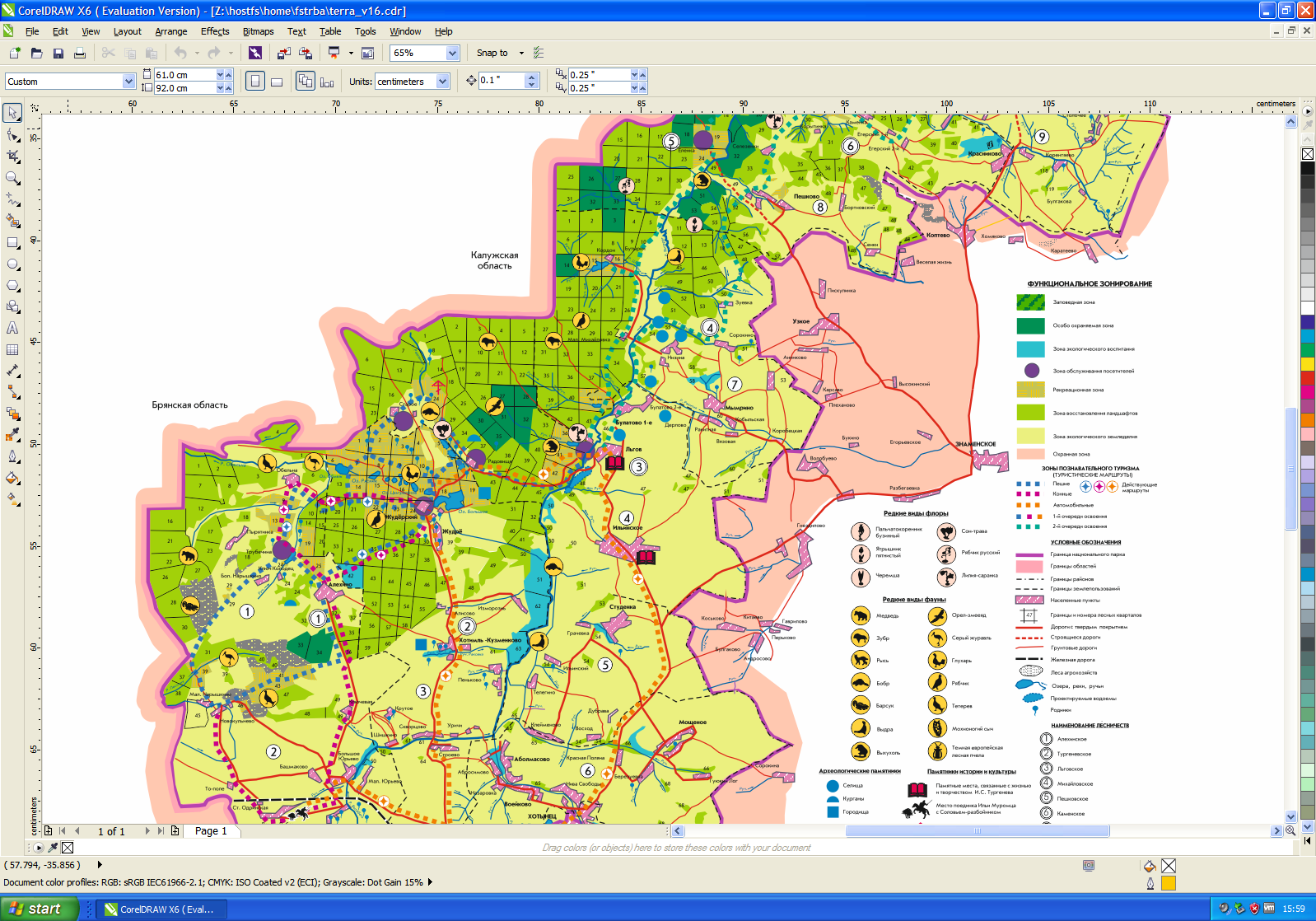
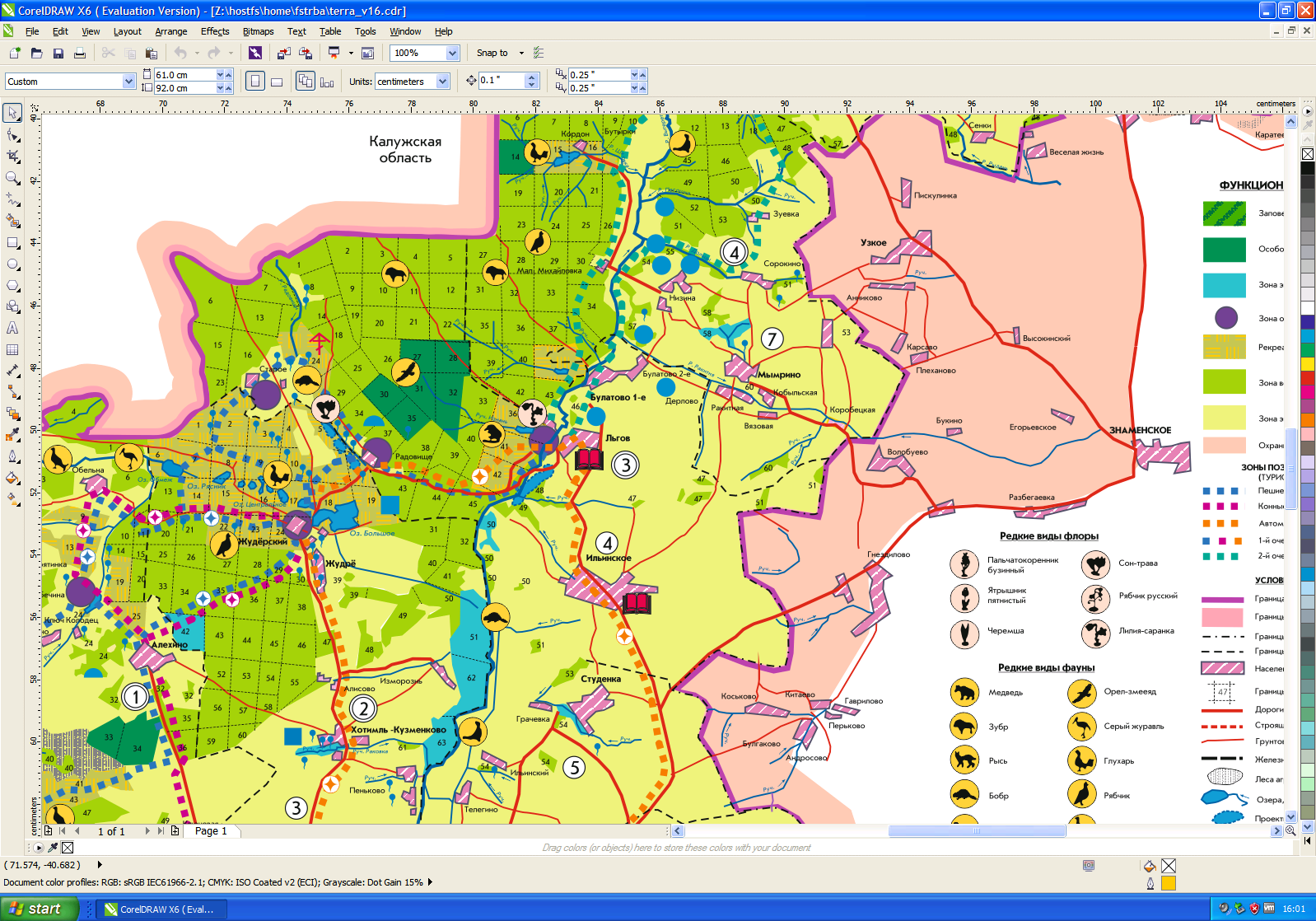
Here is the same document opened by LibreOffice Draw:
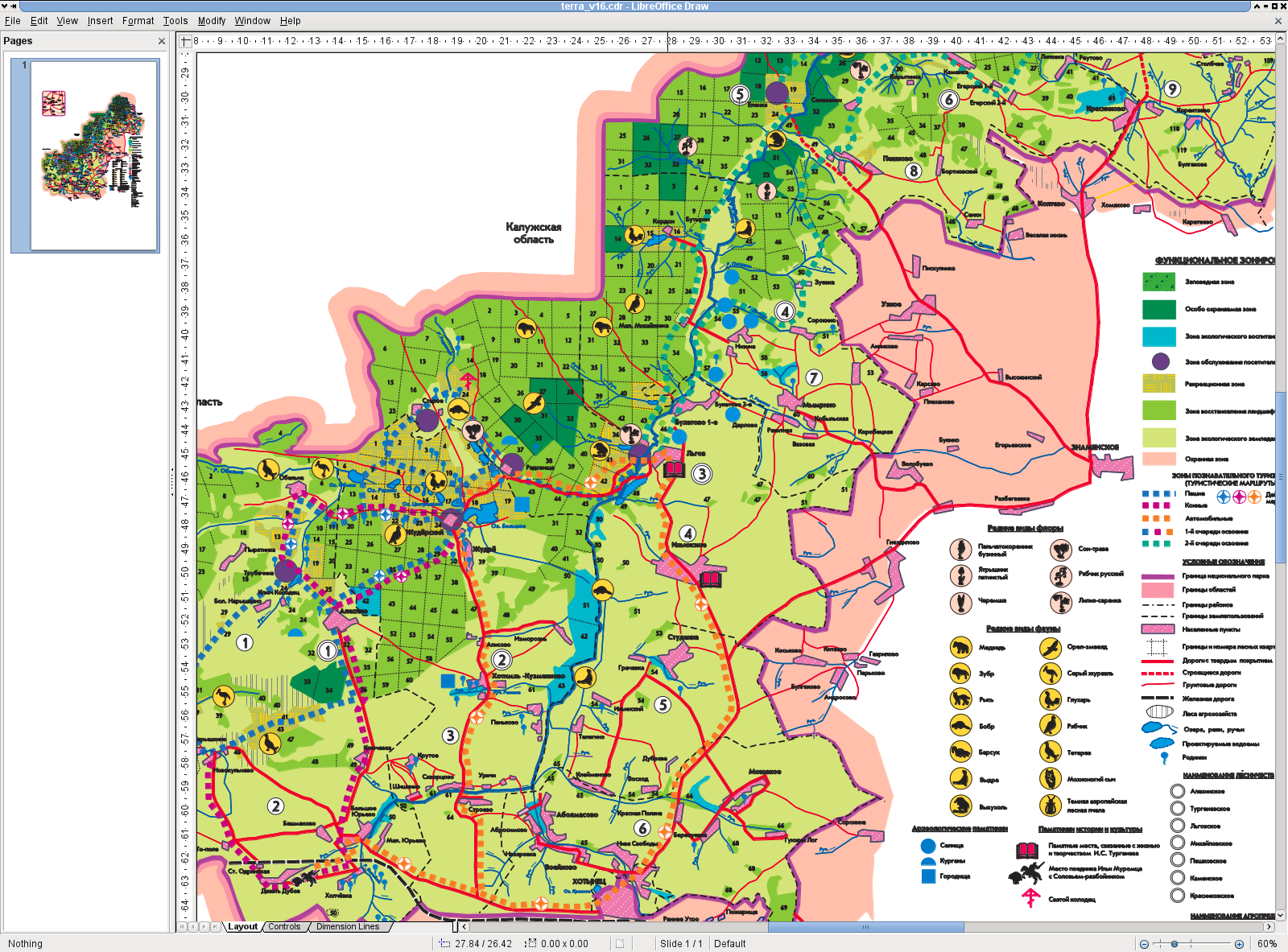
And here is the libcdr-generated SVG opened in Inkscape:
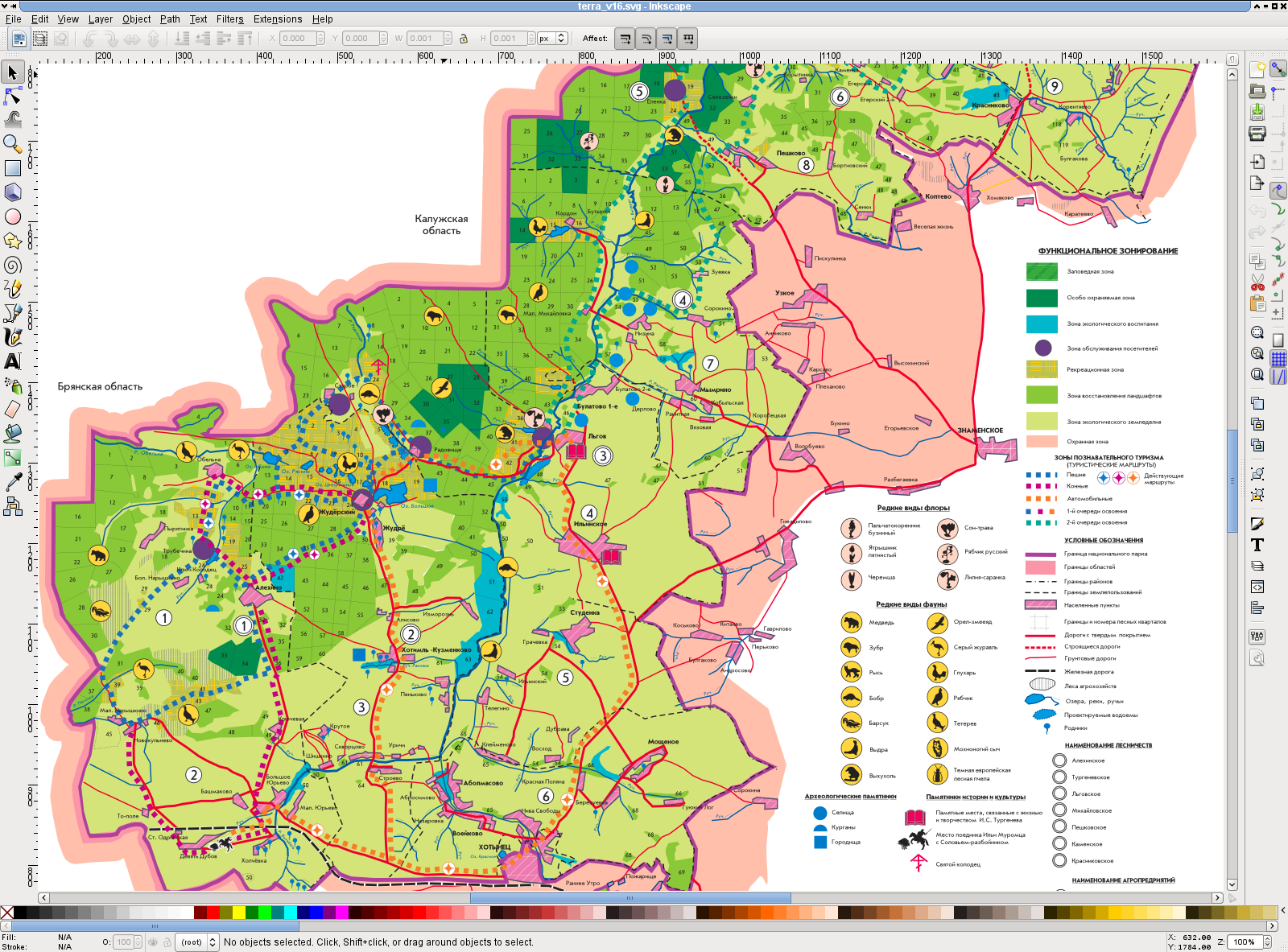
If you are tempted and think that it might be fun to participate in a reverse-engineering endavour, we have with Valek two project proposals for Google Summer of Code 2012. The first is the implementation of MS Publisher import filter for LibreOffice and the second is to help to improve and extend the Corel Draw import filter I am currently blogging about. Try to apply with LibreOffice and your life will never be the same again.

Be aware though that the application deadline is the 6th of April and you will need to accomplish a simple programing task in order to be eligible. More details in this blog.

openSUSE Summit
So far, the openSUSE Facebook page reports only a handful of attendants. Hopefully as the time nears, more and more people sign up for this summit.
There is always a good thing to note about online communities and software efforts like the ones we are part of. Most of the times we are far apart from each other and our only methods of communication are email and IRC. Our gatherings are on the net and rarely do we get to see everyone that is a participant in this project in person. Surely a lot of misunderstanding would be done away with if somehow we were to see each other face to face. There is always a sense of empathy that rises above the online encounters that we have as we try to work on a new release of openSUSE.
A new sense of friendship and collaboration is something we always strive for. This is something that makes me think that it is always a great idea to get together and work on the projects we love. Also, the location is wonderful. Orlando is a very fun city with a lot of things to do. Surely our weekend there will not be wasted. I am actually planning to have my vacation time while I am there!
The idea is simple, tell your friends about this meeting. Even if they are not part of the community, they can still come and see what this is all about. After all, it is the first time that people from these latitudes get to be together. Most of the times, the community has to travel far into Europe to gather as a team. Now we are promoting a time for people who can't travel overseas and can make it to Florida.
Good luck, and the best wishes for an awesome conference.

XDC2012 - Nuernberg (Germany) September 19 thru 21.
 libv has been talking about it for ages already, but yesterday I now made the official announcement: XDC2012 - read the X.Org developers conference 2012 - will take place in Nuernberg (Germany) from September 19 through 21 and will be hosted at the company headquarters of SUSE at Maxfeldstrasse 5.
 Please also check out the official announcement.
XDC takes place once a year, traditionally altering between locations in North America and Europe. It's a technical conference where people involved in technologies around the graphics stack on Open Source operating systems (like Mesa3D, Wayland, DRM, the X Window System ...) meet and discuss future plans and directions.
As a note on the side: When there were still two events each year, to distinguish both events the one taking place in North America was named XDC while the one held in Europe was called XDS. Those names stuck even when X.Org switched to one event per year. Now we decided to drop this distinction and named the European event XDC.
The X.Org Foundation Board decided for Nuernberg last December already, it took a while until we found a date where both a suitable venue and accommodations are available (Nuernberg hosts quite a few major trade fairs, and right after the vacation season it's quite busy there).
SUSE is sponsoring the conference by providing its main meeting room including infrastructure to us free of charge. This venue is just a few minutes away from the city center, hotels are in walking distance - the preferred conference hotel which will give us a special rate (which is still under negotiation) is just 5 minutes away from the venue.
Nuernberg is one of a few towns whose medieval city walls have not been destroyed in the 19th century and thus are still almost fully in place. Its castle and its historic inner city is just a few minutes away from the venue and definitely worth a visit. The city center offers many opportunities for after conference activities: you will also find quite many places (restaurants, pubs, bars) to gather and have conversations with others. Thus everything should be in place for a great conference.
This year marks a special occasion as on September 15th we will be celebrating the 25th anniversary of version 11 of the X Window System. (if you are wondering now how long X has been around if version 11 has now existed for 25 years now - the first 10 versions were released between May 1984 and December 1986 - you may want to check out the excellent history on Wikipedia.
To celebrate this we will organize a beer hiking trip thru the scenic "Fränkische Schweiz" the Franconian countryside on the day after the conference where we will stop at several local brewery beer gardens. People will have the opportunity to sample a wide selection of good Franconian beers there.
Thus if you'd like to come, or even have something to present, please register! You will find details on the announcement page.
Mass Management Configuration Tool Puppet on openSUSE 12.1

What is "Puppet"?
Puppet is one of the open-source solutions for mass-management configuration with centralized storage of recipes. Recipes describe the resulting state of a specific system including how to get to that state, e.g., by installing packages, running scripts, enabling services, uploading whole files with configuration, etc.This Example
I'll describe a simple example how adjust an NTP client to use pool.ntp.org for time synchronization including the Puppet server configuration.Ingredients
- One system acting as a server with openSUSE 12.1 (can be virtual), e.g., server.example.com
- One or more systems acting as clients with openSUSE 12.1 (can be virtual), e.g., client.example.com
- Text-file editor
- Package zypper installed on server and client(s) - it's usually installed by default anyway
- Patience :) The actual amount depends on the current level of sunspots visible
Preparation time: depends on how much you want to play with a recipe.
Cook time: several seconds
Important: before configuring both server and client, make sure that they have approximately the same date and time set (commands: date, date -s YYYY-MM-DD; date -s HH:MM:SS) otherwise you might hit some certificate issues
Configuring a Puppet Server
In this section, we'll install the needed server software, configure firewall, configure and start Puppet server.Log into the server and do these changes:
- Run: zypper in puppet-server yast2-firewall # to install all required packages
- Run: yast2 firewall services add service=service:puppetmasterd zone=EXT # to open needed port in firewall
- Run: mkdir -pv /var/lock/subsys/ # to workaround a bug in Puppet package
- Add client.example.com or even *.example.com to /etc/puppet/autosign.conf # to workaround a bug in Puppet
- Start Puppet server: rcpuppetmasterd start
- Enable Puppet server during boot process: insserv puppetmasterd
Client Configuration
Now, we'll configure a client machine to have all the required packages installed and to use the correct Puppet server.- Run: zypper patch # to install the latest updates - especially patch for systemd package
- Run: zypper in puppet rubygems # to install all required packages
- Add server=server.example.com into the [main] section in /etc/puppet/puppet.conf if your server name is not puppet.example.com - then it would work without entering this line
- Run: mkdir -pv /var/lock/subsys/ # to workaround a bug in Puppet
- Start Puppet client service: rcpuppet start
- Enable Puppet client during boot process: insserv puppet
Creating a Recipe on the Server
Create a recipe on the server for your client.example.com in /etc/puppet/manifests/site.pp containing:class ntp {
package { 'ntp': ensure => installed }
package { 'grep': ensure => installed }
package { 'coreutils': ensure => installed }
exec { 'add_ntp_server':
subscribe => Package['ntp'],
command => 'echo "server pool.ntp.org" >> /etc/ntp.conf',
path => '/sbin:/usr/bin:/bin:/usr/sbin',
logoutput => 'on_failure',
unless => 'grep --quiet "^server pool.ntp.org$" /etc/ntp.conf',
}
service { 'ntp':
subscribe => Exec['add_ntp_server'],
ensure => running,
enable => true,
hasrestart => true,
}
}
node 'client.example.com' {
include ntp
}
All the sections are quite self-descriptive, anyway...
- ntp class is a simple service definition that describes required packages, service configuration and service handling
- package type makes sure the required package gets installed - some packages might be required by exec later
- exec runs a script under some specific conditions (onlyif, unless), here it would maybe make sense to use augeas instead
- node defines which classes should be applied to a particular system
Applying a Recipe on the Client
Simply run puppetd --test to apply the configuration. You should get something similar to this:info: Caching catalog for client.example.com
info: Applying configuration version '1333044101'
notice: /Stage[main]/Ntp/Package[ntp]/ensure: created
info: /Stage[main]/Ntp/Package[ntp]: Scheduling refresh of Exec[add_ntp_server]
notice: /Stage[main]/Ntp/Exec[add_ntp_server]/returns: executed successfully
info: /Stage[main]/Ntp/Exec[add_ntp_server]: Scheduling refresh of Service[ntp]
notice: /Stage[main]/Ntp/Exec[add_ntp_server]: Triggered 'refresh' from 1 events
info: /Stage[main]/Ntp/Exec[add_ntp_server]: Scheduling refresh of Service[ntp]
notice: /Stage[main]/Ntp/Service[ntp]/ensure: ensure changed 'stopped' to 'running'
notice: /Stage[main]/Ntp/Service[ntp]: Triggered 'refresh' from 2 events
notice: Finished catalog run in 8.43 seconds
Otherwise Puppet should give you enough information on what went wrong. Checking /var/log/messages on the client and /var/log/puppet/puppet.log sounds like a good idea.
Conclusion
Puppet is a powerful tool for managing large computer networks, including clouds, but there are still some glitches (at least in openSUSE packages) that need to be fixed.
How-to Install Eclipse 3.7 (Indigo SR1) in openSUSE 12.1 (GNOME 3) only within 9 Steps
This is my blog post for “How-to Install Eclipse 3.7 (Indigo SR1) in openSUSE 12.1 (GNOME 3) only within 9 Steps ”
In my case i installed Eclipse 3.7 (Indigo SR1) due to i have to use the Eclipse Marketplace. Eclipse Marketplace offers a thousand of plug-ins and extra features available for Eclipse platform. It is a truth that i searched a lot in order to find a package or a “one-click install” file but the result was an installation of 3.6.2 version. As we all know in FLOSS always there is a way to overcome problems and also fix them. Furthermore as a developer i have to use the “Eclipse IDE for Java EE Developers“. Here are the instructions on how-to install (via terminal) this edition of Eclipse. (Some images are in greek language , due to the fact that i use the greek language as System language)
1st Step : You have to dowload the version you wish to install from Eclipse Official Website. In our case we choose Linux 32-bit.
2st Step : We download the .tar.gz file and i suggest saving it at /home/your-user-name/Downloads.
3st Step : We open the terminal and then type
cd ~/Downloads/
tar -xvf eclipse-jee-indigo-SR1-linux-gtk.tar.gz
In order to un-compress the file which have been downloaded.
4st Step : We search the “Alacarte”
5st Step : We click on it , so as to open the application.
6th Step : After the 5st Step we click at right so as to add a new ” Application launcher” .
7th Step : We fill the fields and add the Eclipse image (we have to search in ~/Downloads/eclipse/icon.xpm by using the “Browse” button). Here is shown the “result of this process “ .
8th Step : Then we click on “Activities -> Applications” , and we see the “Eclipse” so as to access it.
9th Step : Just enjoy Eclipse!
This How-to is formed by 9 steps , 1 less than the KDE’s how to :).
Gloves (Systems Management Library AKA YaST++) Running on Ubuntu
About
You might have seen Jiri's blog post YaST++: next step in system management already. This article describes new systems management library that could be used by YaST and WebYast in the future or by any other application that can connect to its Ruby API.Although this project is still in a research phase, we'd like to have support for other Linux distributions as well. This blog describes how to start with Gloves on Ubuntu.
Installing the System
If you already have Ubuntu installed, you can skip this part.- Download Ubuntu Desktop 11.10 for instance from here
- Install it
- Log into the system as user
- Install additional updates if available
Preparing the System for Gloves
Gloves is a library written in Ruby, that uses Augeas for parsing configuration files and D-Bus for authorization if called by a non-root user. That's why Gloves need some additional libraries to be installed.
- Open xterm or any other shell and continue there...
- Run: sudo apt-get install git rake libaugeas0 libaugeas-dev rubygems libopen4-ruby libaugeas-ruby
- Download the latest .gem file from package rubygem-packaging_rake_tasks in openSUSE build service
- Rename the downloaded gem: mv packaging_rake_tasks*.gem* packaging_rake_tasks.gem
- Install the downloaded .gem using: sudo gem install packaging_rake_tasks.gem
Gloves from the Sources
- Download the sources
Read-only: git clone https://github.com/yast/yast--.git
Or read/write: git clone git@github.com:yast/yast--.git - Install the sources
cd yast--
sudo rake install
Running an Example
I've tried the root access only, omitting D-Bus for now. I'd be glad if somebody tried that and written another blog post describing the required steps to make it work.
- sudo su
- cd yast--
- cd yast++lib-users/examples
- ./users_read
This should print a Ruby map containing all system users depending on your configuration. So, for instance something similar to this:
{...,
"root"=>{"name"=>"root", "gid"=>"0", "uid"=>"0",
"shell"=>"/bin/bash", "home"=>"/root", "password"=>"x"},
...,
"george"=>{"name"=>"George,,,", "gid"=>"1000",
"uid"=>"1000", "shell"=>"/bin/bash",
"home"=>"/home/george", "password"=>"x"},
...}
Where to go next? Explore the Gloves source code. Check out the documentation. Read more about the library architecture. Have more fun with the openSUSE tutorial. Give us your feedback at yast-devel@opensuse.org mailing-list.
Heads up: OBS SLES 11 PHP stuff migrates to SP2! – server:php:applications/SLE11 repository
Companies maintaining production servers often have a desire for stable, long-living Operating System and Software distributions. The idea is that once set up, things should not break and major upgrades should only be needed in long intervals and at points in time which best suit business operation. In the SUSE family of operating systems, openSUSE is the young and adventurous (fast-paced, community driven) branch while the SUSE Linux Enterprise (SLE Server and SLE Desktop) crowd is a stable, paid-for building block you can depend your mission critical data on. Enterprise platforms have a certain drawback: To maintain stability, they don’t ship the latest-greatest software packages and they try to stick to a certain set of core options and extensions.
For PHP Software, the Open Buildservice server:php:applications repository is one of the primary sources for up to date versions of software like PHPUnit, phpmyadmin, Horde Groupware or wordpress. While it is acceptable and desirable to have a stable and well-maintained (though old) version of apache or mysql, you don’t want to sit on an aged version of web applications or libraries and frameworks for developers.
Today, this repository switched to build against the new SLE11 SP2 code base. SLE11 comes with two PHP options: The php5-* packages which ship PHP 5.2 and the php53-* packages which ship PHP 5.3
Currently, some packages will not build as they require „php-{something}“ which is provided by multiple packages. We are working on resolving this.
The switch was needed because more and more packages rely on a more recent version of PEAR or PHP 5.3 features which simply cannot be provided in Service Pack 1 installations without adding extra repositories like server:php and server:php:extensions (unsupported, recent PHP 5.3 built against SLE11).
Please keep in mind that software from OBS is generally not supported by your SLE license.