a silhouette of a person's head and shoulders, used as a default avatar

Learning about Connect openSUSE

It seems that not many people are aware of Connect openSUSE service, that was created by Boosters team while ago, and consequently they don't know what they miss.

In the wiki page about it there is more about technical details then about social aspects, which is not surprising:

  • Guys that created it are technicians, software developers, that know how to handle code and have a lot to say about it, but they seldom have great popularization skills, like marketing guys. I like this way, as being popular in the software world doesn't relate always to a good code, 
  • Wiki article was written when Connect was in initial stages without many add on features (plugins) it has now, so it is time to take a new look at it. 
For instance, until today I didn't know that I can fix my dashboard page layout the way I want, and it is just "Edit page" button away, which is at the bottom right. The page is available to logged in users as Dashboard link in the top right corner, right before the log in name. 

It would be awesome if more people will go there, try it and:
  • Comment on existing layout and features. 
  • Propose new ones, specially if you, or someone that you know, can code and come up with working solution, or at least something that is easy to adjust to Connect.
Social aspects of Connect are great when you consider how hard is to find similar souls and start something in project as large as openSUSE, and Connect offers easy search for them, located on the top right, the same spot on the every server in openSUSE domain. Type in term, like "wiki" you you are very close to wiki related stuff, including my favorite Wiki maintainers group :) 

the avatar of Joe Shaw

Terrible Vagrant/Virtualbox performance on Mac OS X

Update March 2016: There’s a much easier way to enable the host IO cache from the command-line, but it only works for existing VMs. See the update below.

I recently started using Vagrant to test our auto-provisioning of servers with Puppet. Having a simple-yet-configurable system for starting up and accessing headless virtual machines really makes this a much simpler solution than VMware Fusion. (Although I wish Vagrant had a way to take and rollback VM snapshots.)

Unfortunately, as soon as I tried to really do anything in the VM my Mac would completely bog down. Eventually the entire UI would stop updating. In Activity Monitor, the dreaded kernel_task was taking 100% of one CPU, and VBoxHeadless taking most of another. Things would eventually free up whenever the task in the VM (usually apt-get install or puppet apply) would crash with a segmentation fault.

Digging into this, I found an ominous message in the VirtualBox logs:

AIOMgr: Host limits number of active IO requests to 16. Expect a performance impact.

Yeah, no kidding. I tracked this message down to the “Use host I/O cache” setting being off on the SATA Controller in the box. (This is a per-VM setting, and I am using the stock Vagrant “lucid64” box, so the exact setting may be somewhere else for you. It’s probably a good idea to turn this setting on for all storage controllers.)

When it comes to Vagrant VMs, this setting in the VirtualBox UI is not very helpful, though, because Vagrant brings up new VMs automatically and without any UI. To get this to work with the Vagrant workflow, you have to do the following hacky steps:

  1. Turn off any IO-heavy provisioning in your Vagrantfile
  2. vagrant up a new VM
  3. vagrant halt the VM
  4. Open the VM in the VirtualBox UI and change the setting
  5. Re-enable the provisioning in your Vagrantfile
  6. vagrant up again

This is not going to work if you have to bring up new VMs often.

Fortunately this setting is easy to tweak in the base box. Open up ~/.vagrant.d/boxes/base/box.ovf and find the StorageController node. You’ll see an attribute HostIOCache="false". Change that value to true.

Lastly, you’ll have to update the SHA1 hash of the .ovf file in ~/.vagrant.d/boxes/base/box.mf. Get the new hash by running openssl dgst -sha1 ~/.vagrant.d/boxes/base/box.ovf and replace the old value in box.mf with it.

That’s it. All subsequent VMs you create with vagrant up will now have the right setting.

Update

Thanks to this comment on a Vagrant bug report you can enable the host cache more simply from the command-line for an existing VM:

VBoxManage storagectl <vm> --name <controllername> --hostiocache on

Where <vm> is your vagrant VM name, which you can get from:

VBoxManage list vms

and <controllername> is probably "SATA Controller".

The VM must be halted for this to work.

You can add a section to your Vagrantfile to do this when new VMs are created:

config.vm.provider "virtualbox" do |v|
    v.customize [
        "storagectl", :id,
        "--name", "SATA Controller",
        "--hostiocache", "on"
    ]
end

And for further reading, here is the relevant section in the Virtualbox manual that goes into more detail about the pros and cons of host IO caching.

the avatar of Andrew Wafaa

Target ARM Hardware

I just sent this into the -arm mailing list. This is a hot topic, and one that seems to generate the most noise. I’ve had a discussion with several people about target hardware, and I’ve also looked at what our peers are doing and saying. At the same time I’ve been trying to see what options we have for getting some sponsorship for hardware. There were three devices in the running, all are classed as development boards – so no case or external prettyness (beauty comes from within anyway):

a silhouette of a person's head and shoulders, used as a default avatar

Знакомьтесь, YaST... WebYaST!

Доброго времени суток!

Что-то подзабросил я свой блог, ну да ничего...
За прошедшее время произошло много всего, но одно событие более других должно повлиять на состояние сего блога - я обзавелся домашним сервером. Это обстоятельство позволяет теперь экспериментировать с разными интересными решениями и технологиями. Одним таким экспериментом стала установка WebYaST, о котором и хочу рассказать...

Наверное, все те, кто знаком с миром Linux, знают или хотя бы краем уха слышали про менеджер настроек в операционных системах openSUSE, SLED и SLES, гордо называемый YaST. Эдакая «Панель управления» для Linux-систем.

Но немногие в курсе, что год назад на конференции OSC 2010 (openSUSE Conference) был представлен проект WebYaST, переносящий функционал YaST на просторы интернета. Над проектом велась и ведется активная работа, и впервые он стал доступен вместе с операционной системой openSUSE 11.4.

Что же предоставляет WebYaST:
  • Удаленное управление системой, используя только браузер
  • Отсутствие необходимости экспертных знаний по настройке системы
  • Широкие возможности по настройке системы
  • Возможность легкой интеграции сторонних модулей
  • Широкие возможности по брендированию
  • REST-интерфейс

Кого заинтересовало — прошу под кат.
Постараюсь подробнее рассмотреть возможности системы, рассказать о внутреннем устройстве и привести пример установки.


Возможности WebYaST

Итак, на текущий момент доступны следующие возможности:

Конфигурация системы:
  • Базовые настройки сети
  • Базовое управление пользователями
  • Установка и изменение пароля для root-а
  • Настройка уведомлений администратора, включая SMTP
  • Запуск / остановка служб и сервисов
  • Настройки часового пояса, даты и времени

Управление системой:
  • Обзор статуса системы (используемая / свободная память, использование диска, сетевой монитор и пр.)
  • Просмотр основных Логов
  • Установка обновлений и патчей
  • Удаленная перезагрузка системы

Архитектура проекта

Проект написан на Ruby on Rails и представляет из себя две отдельные системы, Back-end и Front-end, каждый компонент работает отдельно, в качестве веб-сервера используется Nginx.

YaST Webclient

Веб-приложение, отвечающее за пользовательский интерфейс WebYaST, использует собственный веб-сервер и не имеет системных привилегий. Может находится не на администрируемой машине.

YaST Webservice

Это Back-end для WebYaST, он также использует собственную конфигурацию веб-сервера, имеет доступ к системе с особыми правами (но не root-доступ).

Более наглядно архитектура представлена на следующей схеме:


Установка

Приведу пример установки, в которой back-end и front-end установлены на одной машине.
Для установки необходимо подключить следующий репозиторий: 


zypper ar -r http://download.opensuse.org/repositories/YaST:/Web/openSUSE_11.4/YaST:Web.repo

Далее устанавливаем пакеты с ядром системы:

zypper in webyast-base-ws webyast-base-ui

Теперь можно запустить Back-end:

rcyastws start

По адресу

http://localhost:4984/

должна отобразиться пустая страница, так происходит потому, что мы ещё не установили никаких модулей.
Строго говоря, наборы модулей back-end-а и front-end-а могут отличаться, в зависимости от требуемого функционала. Для обзора предлагаю установить все, что есть:

zypper in webyast-*-ws webyast-*-ui

После завершения установки перезапустим службы:

rcyastws restart
rcyastwc restart

Теперь на странице back-end-а можно увидеть список доступных служб, а сама панель доступна по адресу:

https://localhost:54984/

По-умолчанию вход возможен только под пользователем root администрируемой системы, однако после авторизации, используя компонент Роли, можно предоставить доступ различным пользователям к различным модулям системы.
Переназначить порты, настроить алиасы и прочее можно в соответствующих конфигах Nginx-а.

Веб-интерфейс

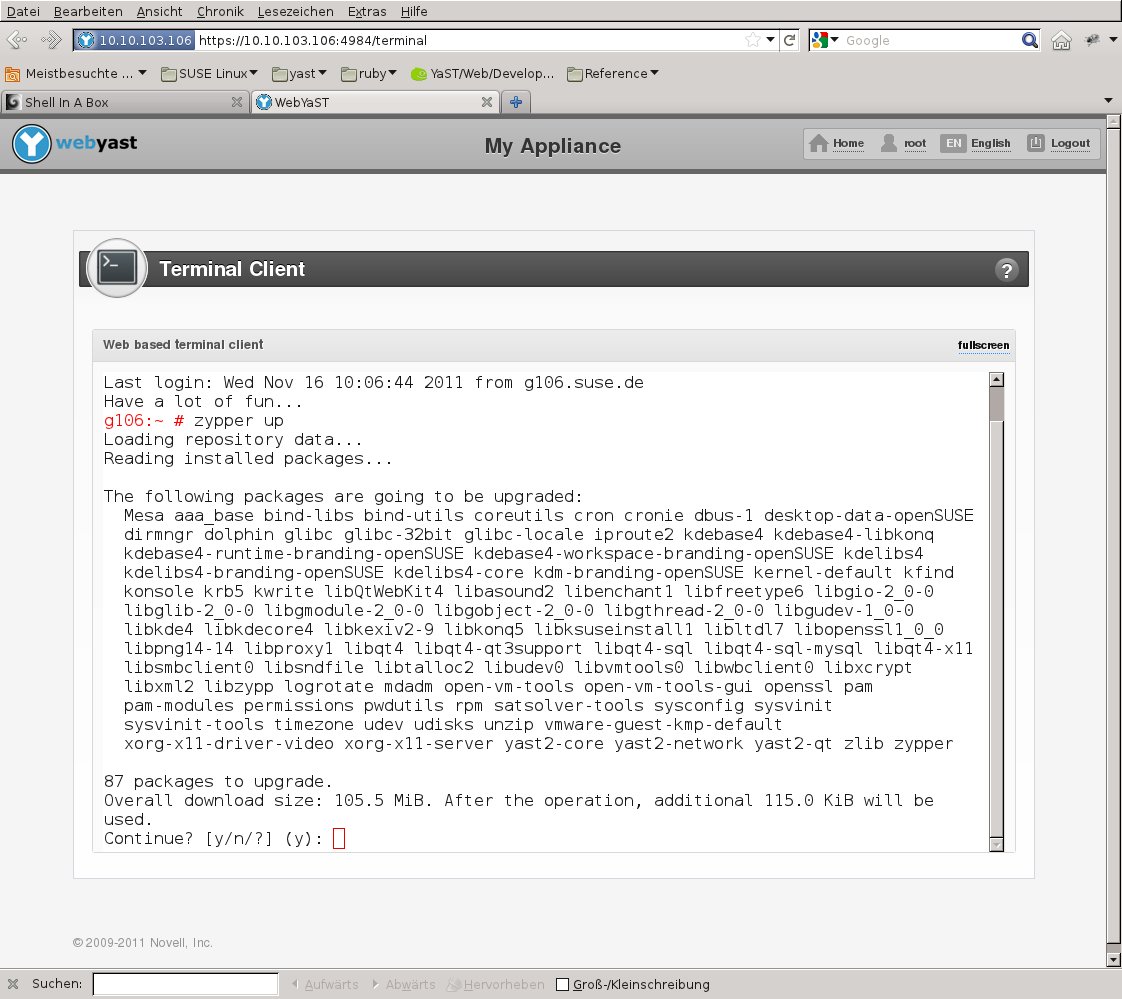
Теперь можно посмотреть, как это все выглядит и работает:

Страница входа в панель.


Главный экран.


Управление службами.


Все модули.


Настройки Firewall.


Установка обновлений.


Локализация неполная из-за того, что сейчас ведется очень активная разработка, и даже английский вариант постоянно меняется.

Альтернативные интерфейсы

Наличие отдельного back-end-а позволяет использовать не только предлагаемый веб-интерфейс, но и собственные решения.
В качестве примера доступно приложение-клиент для платформы Android: YaSTroid

Разработка

На текущий момент WebYaST доступен для следующих систем: openSUSE 11.3, openSUSE 11.4, SLE* 11, SLE* 11 SP1. В будущем планируется отвязать проект от платформы SUSE и сделать его кроссдистрибутивным.
Исходный код проекта открыт и доступен на GitHub: https://github.com/webyast
Подробнее о разработке можно прочитать здесь.

Сейчас проект очень активно развивается, и было бы интересно увидеть, что же получится в итоге.

a silhouette of a person's head and shoulders, used as a default avatar
the avatar of Pascal Bleser

a silhouette of a person's head and shoulders, used as a default avatar

Discovering Connect openSUSE

Today I created a group for wiki maintainers on openSUSE Connect web page that I like to call Connect openSUSE.

 Connect openSUSE is a hub helping people with different interests within openSUSE to find each other and connect in interest groups. There is relatively old wiki article about Connect that was created in very early stages, and talks more about technical aspects and some plans then social benefits that we can have from place like Connect.

Group is meant as a place where we can publish events and group contact information in one place. It will make easy for new openSUSE users that look for some activity,  or want to give idea how to improve wiki, to find and contact us by simply typing "wiki" in the Connect search. 

It is idea that is just started so we will for sure try to improve on it.
Here is announcement to opensuse-wiki mail list.


the avatar of Raymond Wooninck

Chromium browser got accepted into openSUSE:Factory

After maintaining the Chromium browser in the openSUSE Contrib repositories, the last few weeks things got accelerated and as of this moment the Chromium browser has become officially part of openSUSE:Factory (the future 12.1). 

The first step wa taken about 3 – 4 weeks ago when a separate development project was created (network:chromium). From there onwards it was just a matter of getting the package in the right shape for Factory and making sure that all legal and security conditions were met. Those who are tracking the updates of Chromium in this devel repo, might have noticed that a number of rebuilds were triggered for the 16.0.880 version of Chromium. This all had to do to get a single spec-file that would satisfy both Factory requirements but also would be able to build for the older distributions. At this moment this special repository offers builds for 11.3, 11.4, Factory and also for Tumbleweed. 
I am quite proud on this fact and I hope that the openSUSE Chromium users will be happy with this fact. 
At the moment I am preparing an update to the 16.0.891 version and hopefully sometime beginning of next week the new snapshot will become available.

the avatar of Greek openSUSE Ambassadors

Greek openSUSE community, Translation of openSUSE Weekly news in Greek (issue 193)


Hello everyone!

I am very pleased to announce the new issue (193) of openSUSE Weekly News in Greek.
In this issue you will read about:

* JosPoortvlieet: openSUSE Conference Fun!
* Andreas Jaeger: openSUSE Conference 2011 is over – Photos uploaded
* Nelson Marques: GNOME:Ayatana – Looking for contributor…
* Petr Mladek: LibreOffice 3.4 available for openSUSE
* Linux Journal/Joey Bernard: Parallel Programming Crash Course

As well as many interesting news about openSUSE and useful advice, which can make our lives easier.

Enough said though... Read more at: http://own.opensuse.gr, http://el.opensuse.org/Weekly_news or www.os-el.gr

We are always looking forward to receiving your comments as well as suggestions regarding things you would like to read about in our next issue.

The openSUSE Weekly News is being translated in the Greek language from issue #150. You can read older translated issues here: http://el.opensuse.org/Κατηγορία:Weekly_news_issues

Enjoy it!
Efstathios Agrapidis (efagra)

a silhouette of a person's head and shoulders, used as a default avatar

“Happy Pony” openSUSE?

At the openSUSE conference last week, Lydia Pintscher from the KDE Community Working Group led a BoF on “women in openSUSE”. This is what we (Stella, Bruno, Lydia, Pascal, Susanne, Greg) worked out:

There are very few women in openSUSE for a variety of reasons. In our perceiption, despite the good efforts of moderators on IRC, forums and mailing-lists, some attitudes there still persist, and we believe these are a key issue that keeps women away. To further address this as a small group, we decided to start at just one place, opensuse-project@. Here’s why and how:

There is quite some research on why there is so few “women in FLOSS” in general. One of the recurring topics there, and one that we also quickly came to in the BoF, was the ‘flaming’, or more generally, the negative possibilities of the direct, unfiltered yet anonymous communication on IRC, forums and mail.

We all value the speed and positive directness of those forms of communication — however it’s cutting off facial expression and physical reaction. So it’s very easy to miss the tone, without even noticing. To more sensitive souls, this is creating a barrier of entry that especially women do not want to cross, or if it hits you unprepared, will reject you, often with no return. Nota bene: this effect is not limited to women! It just happens to reject women more than men.

What’s going on there? On one side there is newcomers wanting to learn, and with a great potential to contribute, however with a “thin skin”, an expectation of being treated with respect and politeness, whatever that means. On the other side, there are knowledgeable people, often young, sometimes unpatient, maybe tired, frustrated themselves. Now the former ask naive questions while the latter “shoot out” a quick response without any visual feedback on what happens right after they hit the “send” button. Kazoom! And the frustration results into discussions that quickly are far beyond the original topic, frustrating, unproductive and the opposite of what we want: respect and getting things done.

openSUSE, like many other open source projects, has set the direction for mutual respect by working out Guiding Principles, and making members accept these. The openSUSE project Board is forming a body of volunteers who “enforce” these rules, something like the Community Working Group in the KDE project. The objective is to focus the speed and directness of the communication on productivity: turn the flaming energy of frustrations into creative energy that makes openSUSE a place to enjoy and to contribute to!

We, the BoF participants, want to simply support that effort, by working on just one list (opensuse-project@), and by providing additional material that complements the very high level goals set forth in the guiding principles.

Stay tuned 🙂