
Leap 15.5 Reaches Beta Phase
The release manager for openSUSE Leap Luboš Kocman is expected to announce the Beta release phase of Leap 15.5 soon. The first Beta release is syncing on mirrors globally for people to download it and test it out.
Users can begin testing the beta versions to find bugs before the general release, which is scheduled for official release at the beginning of June, according to the roadmap.
The version will offer some newer software versions, but the release is not a feature release. Packages like a newer Mesa and having the OpenH264 repository enabled by default for all new Leap 15.5 installations is planned. Another new element for Leap 15.5 is a migration option. A new single-click migration streamlines a migration process that took three steps in previous openSUSE Leap releases. The users that want to migrate from previous releases or 15.5 Alpha can install openSUSE-repos-Leap, which comes with the repo definition and it utilizes zypp services for repo management; although this feature is not enabled by default. However, a zypper-migration-plugin implementation as the main request on the Graphical User Interface has been fulfilled into a separate element related to SUSE Linux Enterprise 15 Service Pack 5.
Python 3.10 with its relevant modules will be made available to users in a later part of the Beta phase, which will provide users a fully capable alternative to the default system of Python 3.6. A utility for managing Linux software RAID arrays was taken care of with an mdadm 4.2 upgrade. An update for KDE users will happen with the Desktop Environment for Leap 15.5 set to have Plasma 5.27, Plasma 5.27 is a Long Term Support version until the next LTS rolls around in 2024. It provides excellent stability along with bug fixes. A known issue for Leap 15.5 is the installation of util-linux-lang on ppc64le fails and is recorded with boo #1208196.
Linux Kernel 5.14.21 version will remain the same as that of Leap 15.4. Despite identical base kernel version number, the kernel adds number of latest upstream backports which amount to some individual 19,000 patches. The biggest changes are in the area of GPU drivers, networking drivers and storage drivers. The last extends to device mapper and io_uring updates. This continues with updated drivers: bluetooth, ACPI, Intel QAT and xHCI. A large effort also went to updating BPF code to recent upstream.
The wallpaper is expected to change as seen in the image above, but there is an option for designing a new wallpaper for anyone interested in providing a design contribution. There are some guidelines to help those willing to contribute.
The 15.5 version is expected to be the last of the Leap 15 series releases, which was first released in May of 2018.
Architectures available for testing include x86_64, aarch64, PowerPC and s390x.
Testers are encouraged to try out Leap 15.5 on multiple laptops, workstations and other hardware devices. People testing it are encouraged to record their Leap Beta testing efforts on this spreadsheet. Those interested in beta testing images for openSUSE Leap 15.5 Windows Subsystem for Linux can contact Kocman or the factory mailing list.
Bugs should be reported on openSUSE’s bugzilla. Bugs for packages inherited from SUSE Linux Enterprise should be reported against PUBLIC SUSE Linux Enterprise SP5, server and High Availability. The policy for setting priorities on these public products listed above have been updated. A list of the Most Annoying Bugs for the Leap 15.5 beta will be posted on the wiki.
The roadmap shows openSUSE Leap 15.5 will reach its Release Candidate phase in late April and the Gold Master is expected toward the end of May, which will then transition the release to a maintenance phase. The documentation and translations deadline is scheduled for May 14.
To celebrate, have an install party and test the openSUSE Leap 15.5 Beta. A new openSUSE user may show up! If you are unsure of how to do it, read this. You can even drop in the openSUSE Bar to discuss the beta.
Download the Beta…
The Leap 15.5 Beta is available on get.opensuse.org. Pick an image fitting your purposes. Install it on a VM like virtualbox, GNOME Boxes or install it on your own hardware.

 Member
 Futureboy
Sonic the Hedgehog on TheC64 with SNES Style Gamepad

Update on the SCM/CI Integration - Performance and Documentation Improvements
Linux Saloon | Open Mic Night | Wayland, VanillaOS, Twitter 2FA

About
Greg is a Fellow at the Linux Foundation and is responsible for the Linux kernel stable releases. He is also the maintainer of a variety of different kernel subsystems (USB, char/misc, tty/serial, driver core, staging, etc.) and has written a few books and articles about Linux kernel development.

openSUSE Tumbleweed – Review of the week 2023/07
Dear Tumbleweed users and hackers,
Week 7 of the year – 7 days have passed since the last review, BUT we only released 6 snapshots since then. The reason is only timing though: the 7th snapshot is still in QA and, looking at the current results, is likely to be published later today. So no need to be worried. This review will cover snapshots 0210…0215.
The most exciting changes delivered during this week were:
- Mesa 22.3.5
- PostgreSQL 15.2
- XFCE 4.18.2
- Node.JS 19.6.0
- KDE Frameworks 5.103.0
- KDE P,lasma 5.27.0
- NetworkManager 1.42.0
- gnome-shell & mutter 43.3
- Rust 1.67.1
Most of the stagings we currently have are longer-living and seem to take some more effort. Everybody is invited to help push them forward. The most relevant changes that are currently staged include:
- openSSL 3.0.8 in Staging:A (regression detected)
- Binutils 2.40 in Staging:B – causes a few builds to fail
- Switch to Ruby 3.2 in Staging:H – YaST as the main consumer is almost ready. Almost!
- Python 3.11 module enablement in Staging:M – Builds look good so far, 1 build cycle introduced
- Gcc 13 as distro compiler in Staging:Gcc7
- In Staging:L we just collect random things breaking other stuff, like e.g:
- gpg2 2.4.0 – breaks gpgme:qt
- Podman 4.4.1: fails the openQA tests
- Samba 4.17.5
- cURL 7.88.0
As a reminder for the curious ones: the Staging dashboard can be found at https://build.opensuse.org/staging_workflows/openSUSE:Factory (requires login to the open build service)
Mesa, Disk Encryption, Xfce Packages Update in Tumbleweed
This week has provided many openSUSE Tumbleweed snapshots focusing on hardware, graphics, desktop environment and more.
From Mesa to the disk encryption package cryptsetup and Xfce software to GraphicsMagick, the snapshots are rolling with new software updates.
The GraphicsMagick 1.3.40 package arrived in the most recent snapshot, 20230215. The ImageMagick fork that focuses on programming Application Programming Interfaces and command-line options fixed a 20-year old bug in the WordPerfect Graphics header reading. The package also provided some new features and has PCX and DCX file support for writing an uncompressed format. An update of gnome-shell 43.3 plugged a leak, fixed a crash and cleaned up some code. A major version update of text shaping engine harfbuzz arrived in the snapshot; moving from the 6.0 version to the 7.0 version, the package brought experimental support to cubic curves in the glyf data table, and it has a new command line utility, hb-info, for querying various font information. A few other updates were made in the snapshot.
Snapshot 20230214 delivered the disk encryption package with the cryptsetup 2.6.1 update. The version fixed a possible iteration overflow in the OpenSSL2 PBKDF2 cryptography backend. The package also fixes a possible hash offset setting overflow, and it does not initiate a re-encryption command when the header and data devices are the same. The changelog states that if data device reduction is not requested, it leads to data corruption since the Linux Unified Key Setup metadata would be written over the data device. An update of NetworkManager 1.42.0 adds support for source load balancing for ethernet bonds and adds support of IPv4 for the Equal-Cost Multi-Path routes. The ECMP routes will be merged. A Common Vulnerability and Exposure patch was dropped in the guestfs-tools 1.50.0 package. CVE-2022-2211 is a flaw that leads to a denial of service either by mistake or by a malicious actor, but it is considered to have a low impact for the package that is used for accessing and modifying virtual machine disk images. The updated package also has a new ‘virt-drivers’ tool; the tool can be pointed at a disk image that lacks metadata and, in some circumstances, can determine useful information about it such as what bootloader it contains and what device emulation it needs to boot. The update of kernel-firmware 20230210 adds missing tuning files for HP Laptops using Cirrus Amplifiers and adds firmware for Cirrus CS35L41 on an ASUS laptops. Some other packages to update in the snapshot were gnome-control-center 43.4.1, libzypp 17.31.8, yast2 4.5.24, vim 9.0.1307 and more.
The 20230212 snapshot focused mostly on updates for Xfce users. The xfce4-power-manager 4.18.1 version updated translations, fixed the management of source identification and implemented a fall back on the lock command with the screensaver should the D-Bus call fail. Some memory leaks were fixed with the xfce4-session 4.18.1 update. Several blurry icons were made more sharp with the update of xfce4-settings 4.18.2, and a duplicated configuration line was removed. The update of patterns-xfce 20230212 replaced gnome-calculator with galculator since it better integrates with the Xfce look and feel. A few changes were also made to the yast2-iscsi-client 4.5.7 version.
An update of nodejs19 19.6.0 in the 20230211 snapshot upgraded the npm dependency to version 9.4.0, and it removed an s390 patch after the fix upstream was accepted. An update of gnome-software 43.4 had some AppStream changes, and gnome-contacts 43.1 fixed several bugs when updating or editing a contact. The GTK+ bluetooth manager, blueman, updated to version 2.3.5 and enabled a plugin that was providing connection errors to devices as well as fixing a right click with a wrong pointer. The update of the dbus-1 1.14.6 version fixed a crash with some glibc versions when non-auditable SELinux events are logged. The updated version also fixed some documentation. GNOME’s personal management application evolution was updated to version 3.46.4, and converts the mail signature into markdown language, which was co-developed by Aaron Swartz.
The 20230210 snapshot from last Friday brought Mesa and Mesa-drivers 22.3.5, which had no new features, but it did fix null descriptors and had a fix for RB+ for sRGB formats. Xfce’s text editor mousepad had some code refactoring and code cleanup in the 0.6.0 version. The 15.2 postgresql15 release took care of CVE-2022-41862, which a server could report an error message containing uninitialized bytes and could make a message accessible to an attacker. A few other packages were updated in the snapshot.
Easy CPU Benchmarking on Linux
Releasing version 0.7
Although we have been actively working on YaST and D-Installer, we have been silent since the beginning of December. We are sorry for that! Today we are resuming our blogging activity announcing the availability of D-Installer 0.7. Let's look at what it is new and what you can expect from the upcoming releases.
You can download the latest ISO from the openSUSE Build Service if you want to give it a try.
Iterating towards a better user interface
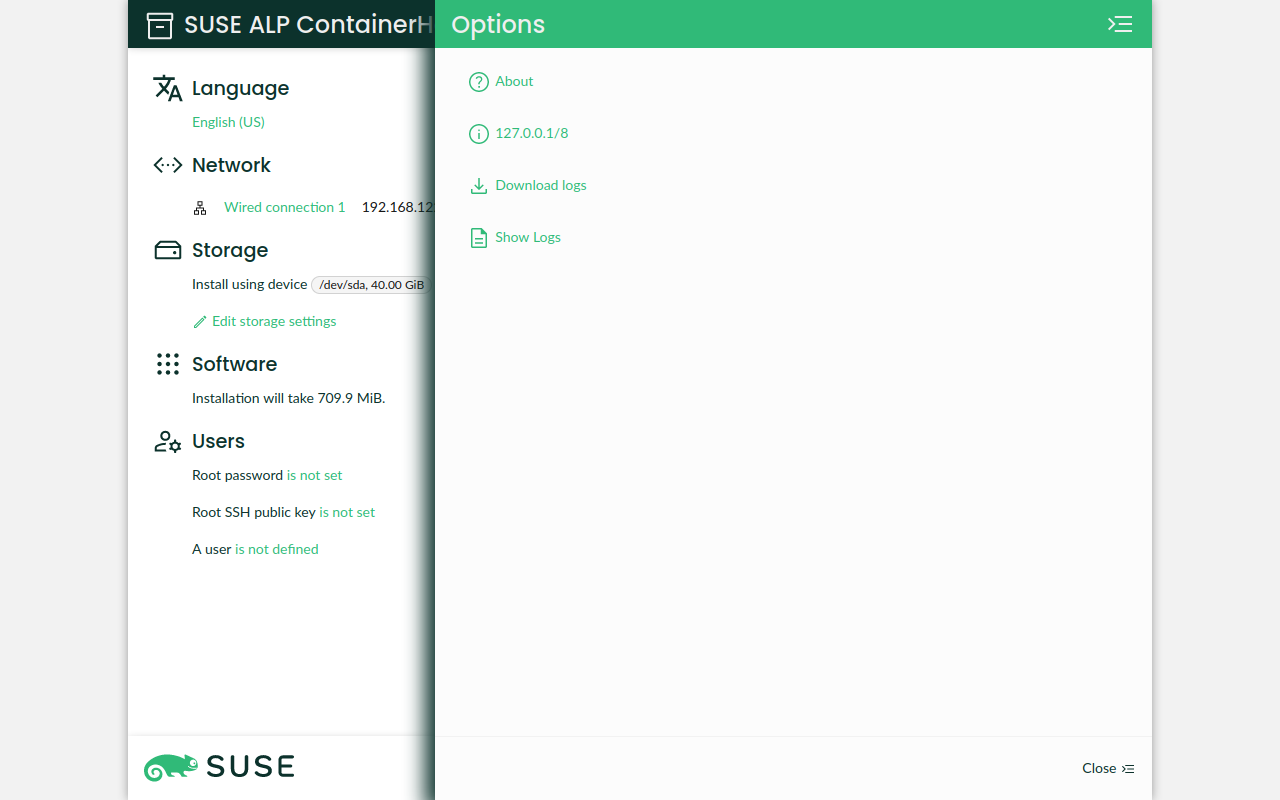
In every release, apart from adding features and fixing bugs, we put some effort into improving the user interface. If you check the latest version, one of the most relevant changes is the introduction of the much-awaited hamburger menu. Although quite some work remains to be done, several actions found a new home in this menu (gh#yast/d-installer#379).
Another significant change, especially from the developer's point of view, is the rework of the UI to use plain CSS as much as possible for building the layout instead of relying on lots of wrapper components (gh#yast/d-installer#391).
But that's not all! We also did a bunch of minor fixes worth mentioning, like correcting some miss-alignments, adding an icon for the software section, fixing the fonts loading, and so on (gh#yast/d-installer#401).
Software proposal validation
Software management is one of the areas that took more attention for this release. Relying on the validation mechanism (a.k.a. pre-installation checks) we introduced in version 0.6, we added support to report problems like unreachable repositories or missing patterns and packages (gh#yast/d-installer#381 and gh#yast/d-installer#414)
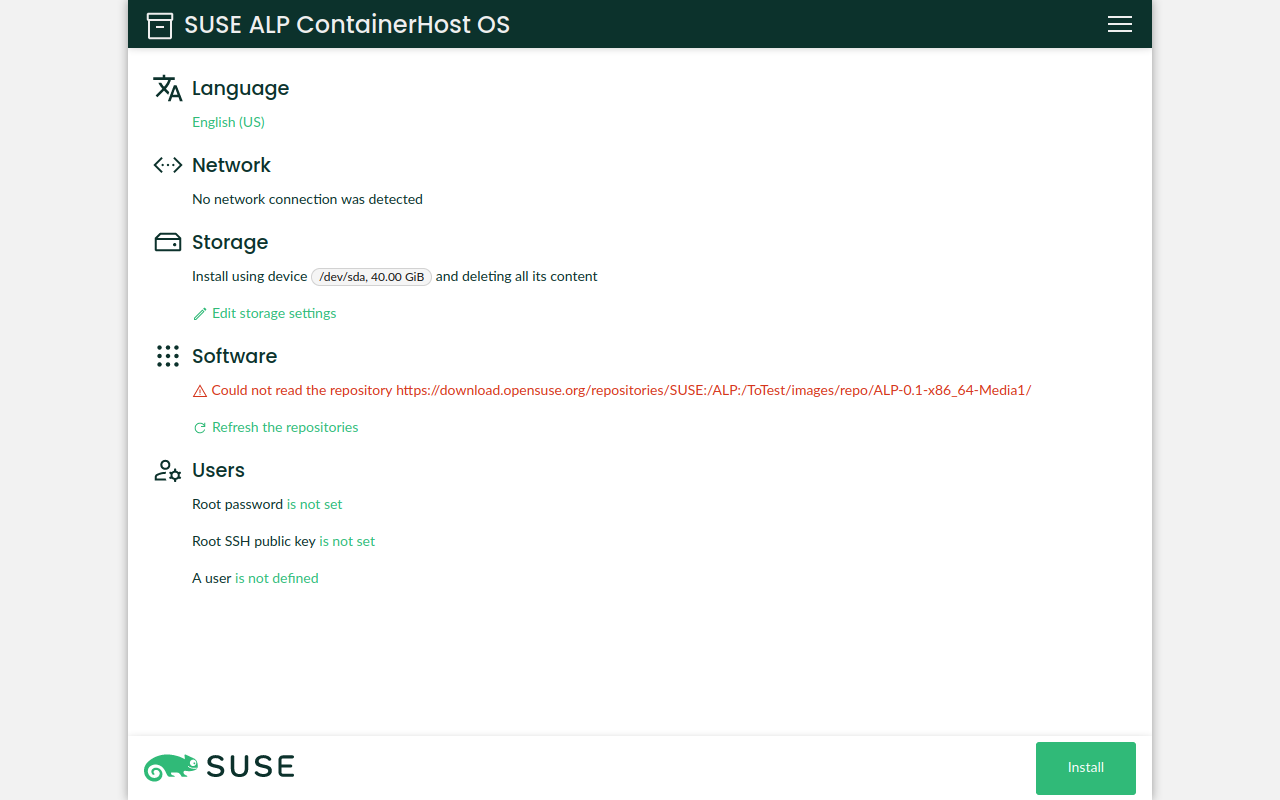
Additionally, D-Installer gracefully handles the case where you do not have a working network connection (e.g., on a wireless setup). Once the connection is ready, it refreshes the repositories information without user intervention.
Browsing and downloading the YaST logs
Making it easy for our users to report bugs is becoming critical for the D-Installer development.
Although it was already possible to use the save_y2logs script to gather the logs, we have decided
to add Download logs action to our new and shiny hamburger menu
(gh#yast/d-installer#379).
Alternatively, you can inspect them in the browser just by using the Show logs option. We plan to improve this feature by adding search capabilites, filters, etc. (gh#yast/d-installer#407).
Using a dedicated D-Bus server
This change is not visible to our users, but it is interesting if you want to know about the internals. D-Installer components use D-Bus for communication. Until now, we were using the system bus and everything was fine. However, as we advanced into proper support for Iguana, we noticed that we needed our own bus, in addition to the system one (gh#yast/d-installer#384).
But that's not all...
As usual, there are many other changes that we did not mention. However, we would like to give you some pointers to them just in case you are interested:
-
Bug fixes:
- Fix the storage section crashing when the proposal is not ready (gh#yast/d-installer/418).
- Check for installed packages in the target system instead of the installation medium (gh#yast/d-installer/393).
- Do not use a proxy to get the error lists (gh#yast/d-installer/424).
- Add the missing favicon (gh#yast/d-installer/387).
-
Improvements:
- Simplify the network configuration to copy the NetworkManager connections and enable the service (gh#yast/d-installer/397).
- Update the list of patterns to install for Leap Micro 5.3 (gh#yast/d-installer/427).
-
Development:
- Add a live reloading feature to ease the front-end development process (gh#yast/d-installer/419).
- Update aliases for using "~/" instead of "@" (gh#yast/d-installer/400).
- Testing: use a mocking function to make mocked components consistent across the test suite (gh#yast/d-installer/392).
- Use the upstream version of D-Bus ObjectManager from Ruby D-Bus (gh#yast/d-installer/245).
What's next
Apart from the changes we have presented, we are working in many other areas. So let's check what you can expect from the upcoming releases.
- iSCSI support. We are almost there: the D-Bus API is finished and we are working in the web user interface. We expect it to be ready for the next release.
- Automated installation. We are in the early stages (choosing a file format, thinking about backward compatibility, etc.). However, due to the architecture of D-Installer, we are rather optimistic and the first bits could be included in the next release too.
- S/390 architecture support. It is under heavy development. It might take a bit of time, but we are collaborating with other teams within SUSE to make it possible ASAP.
- Enable integration testing. This one is becoming a hot topic for us. We are in close contact with our QA experts to enable proper integration testing.
- Rework the overview page. Last but not least, we are working on a rework of the overview page. We want to offer a more coherent user experience. Of course, it should be ready for the time of the next release.
Conclusions
The development of D-Installer continues at good pace. If you are interested, please, do not
hesitate to give it a try and report any bug you might find. You can contact us through the GitHub
project's page or, as usual, in our #yast channel at
Libera.chat or the YaST Development mailing
list.

Announcing D-Installer 0.7
Although we have been actively working on YaST and D-Installer, we have been silent since the beginning of December. We are sorry for that! Today we are resuming our blogging activity announcing the availability of D-Installer 0.7. Let’s look at what it is new and what you can expect from the upcoming releases.
You can download the latest ISO from the openSUSE Build Service if you want to give it a try.
Iterating towards a better user interface
In every release, apart from adding features and fixing bugs, we put some effort into improving the user interface. If you check the latest version, one of the most relevant changes is the introduction of the much-awaited hamburger menu. Although quite some work remains to be done, several actions found a new home in this menu (gh#yast/d-installer#379).

Another significant change, especially from the developer’s point of view, is the rework of the UI to use plain CSS as much as possible for building the layout instead of relying on lots of wrapper components (gh#yast/d-installer#391).
But that’s not all! We also did a bunch of minor fixes worth mentioning, like correcting some miss-alignments, adding an icon for the software section, fixing the fonts loading, and so on (gh#yast/d-installer#401).
Software proposal validation
Software management is one of the areas that took more attention for this release. Relying on the validation mechanism (a.k.a. pre-installation checks) we introduced in version 0.6, we added support to report problems like unreachable repositories or missing patterns and packages (gh#yast/d-installer#381 and gh#yast/d-installer#414)

Additionally, D-Installer gracefully handles the case where you do not have a working network connection (e.g., on a wireless setup). Once the connection is ready, it refreshes the repositories information without user intervention.
Browsing and downloading the YaST logs
Making it easy for our users to report bugs is becoming critical for the D-Installer development.
Although it was already possible to use the save_y2logs script to gather the logs, we have decided
to add Download logs action to our new and shiny hamburger menu
(gh#yast/d-installer#379).
Alternatively, you can inspect them in the browser just by using the Show logs option. We plan to improve this feature by adding search capabilites, filters, etc. (gh#yast/d-installer#407).
Using a dedicated D-Bus server
This change is not visible to our users, but it is interesting if you want to know about the internals. D-Installer components use D-Bus for communication. Until now, we were using the system bus and everything was fine. However, as we advanced into proper support for Iguana, we noticed that we needed our own bus, in addition to the system one (gh#yast/d-installer#384).
But that’s not all…
As usual, there are many other changes that we did not mention. However, we would like to give you some pointers to them just in case you are interested:
- Bug fixes:
- Fix the storage section crashing when the proposal is not ready (gh#yast/d-installer/418).
- Check for installed packages in the target system instead of the installation medium (gh#yast/d-installer/393).
- Do not use a proxy to get the error lists (gh#yast/d-installer/424).
- Add the missing favicon (gh#yast/d-installer/387).
- Improvements:
- Simplify the network configuration to copy the NetworkManager connections and enable the service (gh#yast/d-installer/397).
- Update the list of patterns to install for Leap Micro 5.3 (gh#yast/d-installer/427).
- Development:
- Add a live reloading feature to ease the front-end development process (gh#yast/d-installer/419).
- Update aliases for using “~/” instead of “@” (gh#yast/d-installer/400).
- Testing: use a mocking function to make mocked components consistent across the test suite (gh#yast/d-installer/392).
- Use the upstream version of D-Bus ObjectManager from Ruby D-Bus (gh#yast/d-installer/245).
What’s next
Apart from the changes we have presented, we are working in many other areas. So let’s check what you can expect from the upcoming releases.
- iSCSI support. We are almost there: the D-Bus API is finished and we are working in the web user interface. We expect it to be ready for the next release.
- Automated installation. We are in the early stages (choosing a file format, thinking about backward compatibility, etc.). However, due to the architecture of D-Installer, we are rather optimistic and the first bits could be included in the next release too.
- S/390 architecture support. It is under heavy development. It might take a bit of time, but we are collaborating with other teams within SUSE to make it possible ASAP.
- Enable integration testing. This one is becoming a hot topic for us. We are in close contact with our QA experts to enable proper integration testing.
- Rework the overview page. Last but not least, we are working on a rework of the overview page. We want to offer a more coherent user experience. Of course, it should be ready for the time of the next release.
Conclusions
The development of D-Installer continues at good pace. If you are interested, please, do not
hesitate to give it a try and report any bug you might find. You can contact us through the GitHub
project’s page or, as usual, in our #yast channel at
Libera.chat or the YaST Development mailing
list.