
 Member
 jimmac
Colorful HIG
The refresh of the Human Interface Guidelines in both the content and presentation is something to be proud of, but there were a couple of areas that weren’t great. Where we don’t quite shine in the area of blueprint illustration style is the contrast for the dark mode. While in many cases a single graphic can work in the two contexts just fine, in other it struggles. And while we tried to address it in the HIG, it became clear we do need to do better.

Inline SVG Stylesheet
there’s a little trick I learned from razze while working Flathub — a single favicon working in both dark and light mode can be achieved using a single SVG. The SVG doesn’t have inline defined fills, but instead has a simple embedded <style> that defines the g,path,rect,circle and whatnot element styles and sets the fill there. For the dark mode it gets overriden with the @media (prefers-color-scheme: dark){} rule. While generally favicons are a single color stencil, it can work for fullcolor graphics (and more complex rules):
<style>
  rect.fg { fill: #5e5c64; }
  path.bg { fill: #fff; }
  @media (prefers-color-scheme: dark) {
    rect.fg { fill: #fff; }
    path.bg { fill: #5e5c64; }
  }
</style>
This made me think of a similar approach working for inline images as well. Sadly there’s two obstacles. While the support for inline stylesheets in SVGs seems to be quite wide among browsers, Epiphany only seems to respect prefers-color-scheme when using the image directly (or the favicon case), but didn’t seem to work when emebded inside and html page as <img>.
The more severe issue is that producing such SVGs is a little cumbersome as you have to clean up the document generated by Inkscape, which likes to use fill attribute or inline css in style. While it generally doesn’t remove markup, it will reformat your markup and you will be fighting with it every time you need to edit the SVG visually rather than inside a text editor.
HTML5 Picture
For inline images, the approach that seems more straight forward and I’ve taken on many occasions is using the HTML5 <picture> element. It works great for providing dark mode variants using source with a media attribute as well as a neat accessibility feature of showing non-animated image variant for people who opt out:
<picture>
    <source srcset="static.png"
        media="(prefers-reduced-motion: reduce)" />
    <img src="animated.gif" />
</picture>

Sphinx/RST
GNOME Human Interface Guidelines are written in restructured text/Sphinx, however. Escaping to html for images/pictures would be quite cumbersome, but luckily dark mode is supported in the furo theme (and derivates) using the only-light and only-dark classes. The markup gets a little chatty, but still quite legible. There’s some iterations to be made, but in terms of legibility it’s finally a bit more accessible.


Best wget options to fully mirror a site
Lately I needed to mirror a website as fully as possible, and ended up researching a bit more than my previous times I’ve done so. Here I’m just dropping a note that I ended up doing the following:
wget -mkxp --adjust-extension -e robots=off https://myurl.com/
Here -m is:
-r -N -l inf --no-remove-listing
or in long form:
--recursive --timestamping --level inf --no-remove-listing
and the rest ie -kxp are, in the same order
--convert-links --force-directories --page-requisites
Releasing version 5
We are aware that the time between Agama releases is usually too long. Recently, we committed to increase the frequency, although it means having smaller releases. You know, "release early, release often".
Agama 5 includes some changes we have been working on for some time, like a translated web interface or a software patterns selector. Additionally, it introduces a change in the storage area to not reuse pre-existing swap partitions. And last but not least, now you can boot Agama Live via PXE.
Translated web interface
Until now, Agama web interface was only available in English. However, this new release allows you to select a different language and it is now available in another four languages: Dutch, Japanese, Spanish and Swedish. Kudos to Natasha Ament, Yasuhiko Kamata, Victor hck and Luna Jernberg for this first round of translations. Much appreciated!
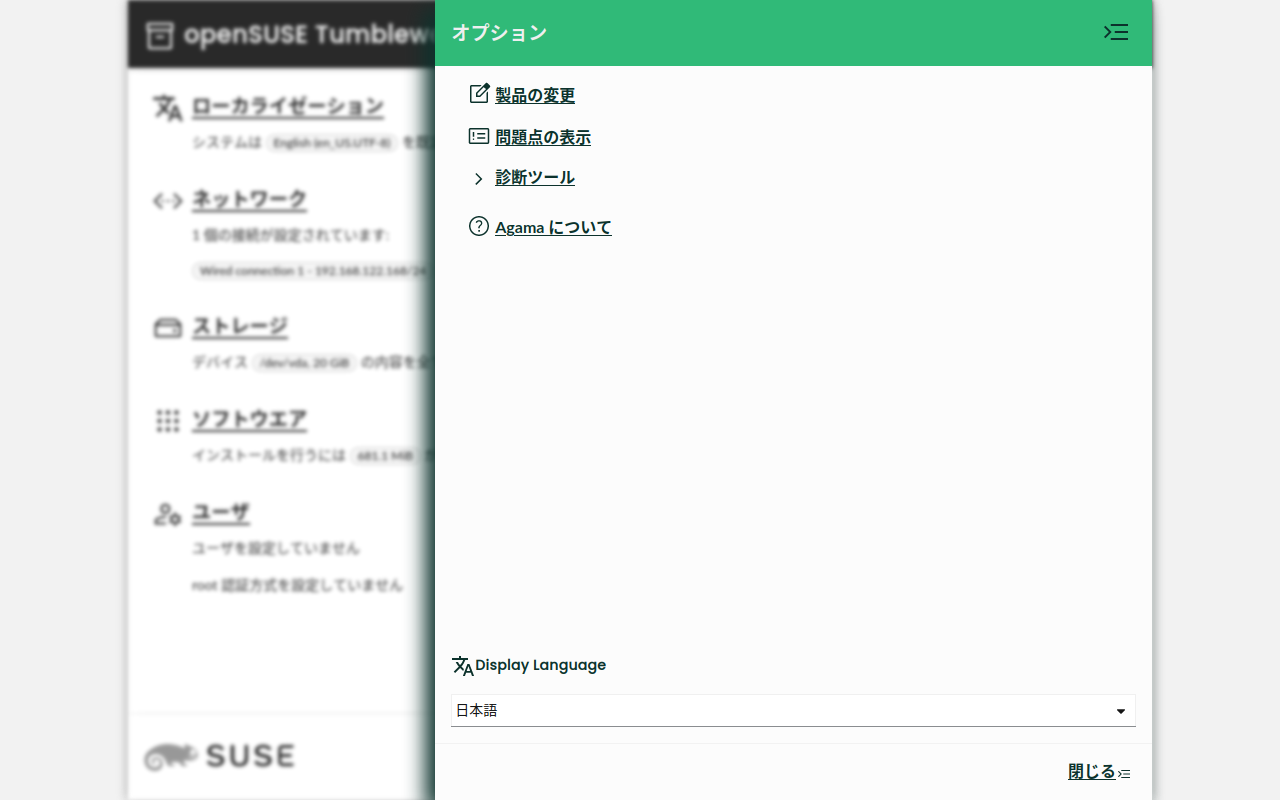
If you are interested, please, consider helping with the translations. The openSUSE localization guide might be a good starting point. 😉
You can check the pull request #796 if you are interested in the technical details.
Bear in mind that selecting a different language does not affect the system you are installing. For that matter, we have started to work on a better "Localization" page that will allow selecting a language, a keyboard layout and a timezone for the system to install.
Patterns selection
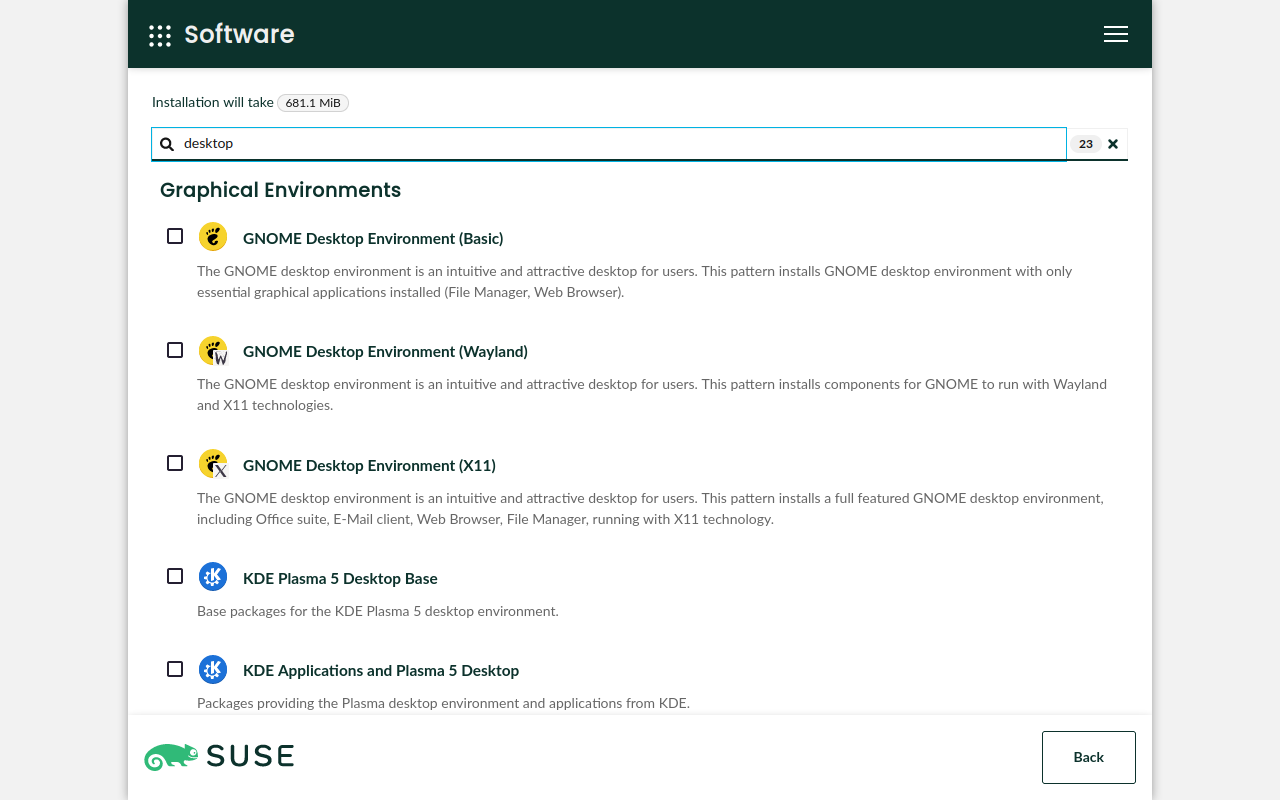
An important feature that we have been postponing for some time is customizing the software selection. We do not want to bring back complex and specific concepts, like system roles, so we decided to start with a prototype that shows the list of available software patterns.
Agama 5 ships a new software patterns selector, as shown in the screenshot below, although it is still a work in progress. However, it is even more important the discussion we have opened about this topic in the openSUSE Factory mailing list. Please do not hesitate to join if you have anything to say.
Technical details? You can find them in #792, #762, #770 and #772.
Do not reuse pre-existing swap partitions
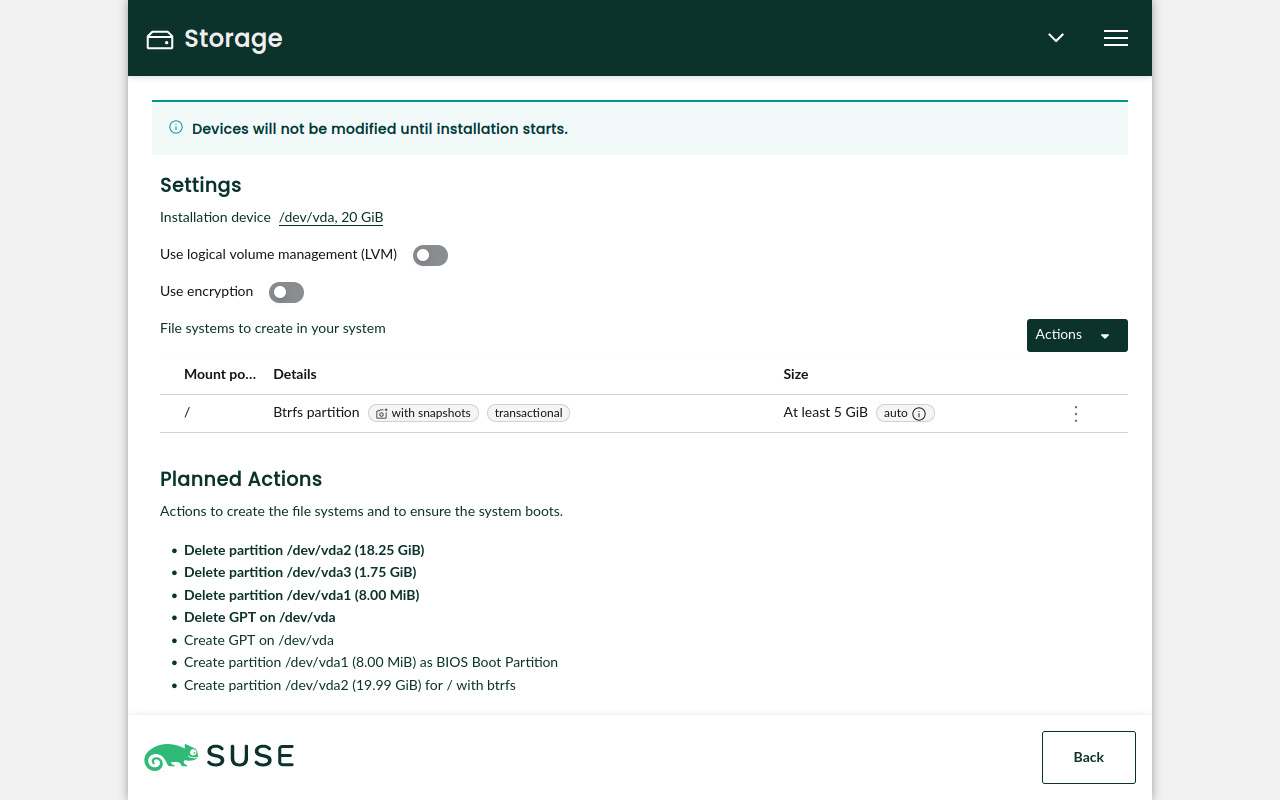
When proposing a storage layout, Agama reuses pre-existing swap partitions. This behavior was introduced in YaST just for backward compatibility with old versions and was inherited by Agama. However, we decided that Agama should stop doing this because it is confusing. Now, pre-existing swap partitions are not reused.
Check #806 for further details and screenshots.
Booting via PXE
Since the earlier releases of Agama Live, it became clear that we needed a way to boot the installer
using PXE. Recently, we started to build the images you need for that. The agama-live package
contains
some notes
about how to grab them from openSUSE Build Service.
This feature relies on Kiwi, so it can be used by anyone who commits to create a real installation media based on Agama in the future. After all, Agama Live was built for demonstration purposes.
Other changes
- Add a label in the storage section to indicate whether a Btrfs system will be transactional (#789).
- Set more restrictive permissions to the archive generated by the
agama logs storecommand (#812). - Update to Patternfly 5.1 (#800).
Trying Agama 5
The best way to try Agama is to download one of the two variants (ALP or openSUSE) of the Agama Live devel ISO. This image is built in the systemsmanagement:Agama:Devel OBS project and is updated each time we release a new version.
Are you interested in the bleeding edge? The ISO in the systemsmanagement:Agama:Staging OBS project is for you because it is built automatically from the code on Agama's Git repository.
What's next
Agama 6 is already under development and we expect to have another version ready by the end of November. For that release, we expect more changes in the internationalization area, support for the SUSE Customer Center and the possibility of selecting how to make space for your new system. Additionally, we are working on making it easier to tweak Agama's configuration.
We appreciate opinions and feedback. Feel free to contact the YaST team at the
YaST Development mailing list,
our #yast channel at Libera.chat or even the
Agama project at GitHub.
Stay tunned!

Announcing Agama 5
We are aware that the time between Agama releases is usually too long. Recently, we committed to increase the frequency, although it means having smaller releases. You know, “release early, release often”.
Agama 5 includes some changes we have been working on for some time, like a translated web interface or a software patterns selector. Additionally, it introduces a change in the storage area to not reuse pre-existing swap partitions. And last but not least, now you can boot Agama Live via PXE.
Translated web interface
Until now, Agama web interface was only available in English. However, this new release allows you to select a different language and it is now available in another four languages: Dutch, Japanese, Spanish and Swedish. Kudos to Natasha Ament, Yasuhiko Kamata, Victor hck and Luna Jernberg for this first round of translations. Much appreciated!

If you are interested, please, consider helping with the translations. The openSUSE localization guide might be a good starting point. :wink:
You can check the pull request #796 if you are interested in the technical details.
Bear in mind that selecting a different language does not affect the system you are installing. For that matter, we have started to work on a better “Localization” page that will allow selecting a language, a keyboard layout and a timezone for the system to install.
Patterns selection
An important feature that we have been postponing for some time is customizing the software selection. We do not want to bring back complex and specific concepts, like system roles, so we decided to start with a prototype that shows the list of available software patterns.
Agama 5 ships a new software patterns selector, as shown in the screenshot below, although it is still a work in progress. However, it is even more important the discussion we have opened about this topic in the openSUSE Factory mailing list. Please do not hesitate to join if you have anything to say.

Technical details? You can find them in #792, #762, #770 and #772.
Do not reuse pre-existing swap partitions
When proposing a storage layout, Agama reuses pre-existing swap partitions. This behavior was introduced in YaST just for backward compatibility with old versions and was inherited by Agama. However, we decided that Agama should stop doing this because it is confusing. Now, pre-existing swap partitions are not reused.
Check #806 for further details and screenshots.
Booting via PXE
Since the earlier releases of Agama Live, it became clear that we needed a way to boot the installer
using PXE. Recently, we started to build the images you need for that. The agama-live package
contains some
notes
about how to grab them from openSUSE Build Service.
This feature relies on Kiwi, so it can be used by anyone who commits to create a real installation media based on Agama in the future. After all, Agama Live was built for demonstration purposes.
Other changes
- Add a label in the storage section to indicate whether a Btrfs system will be transactional (#789).
- Set more restrictive permissions to the archive generated by the
agama logs storecommand (#812). - Update to Patternfly 5.1 (#800).

Trying Agama 5
The best way to try Agama is to download one of the two variants (ALP or openSUSE) of the Agama Live devel ISO. This image is built in the systemsmanagement:Agama:Devel OBS project and is updated each time we release a new version.
Are you interested in the bleeding edge? The ISO in the systemsmanagement:Agama:Staging OBS project is for you because it is built automatically from the code on Agama’s Git repository.
What’s next
Agama 6 is already under development and we expect to have another version ready by the end of November. For that release, we expect more changes in the internationalization area, support for the SUSE Customer Center and the possibility of selecting how to make space for your new system. Additionally, we are working on making it easier to tweak Agama’s configuration.
We appreciate opinions and feedback. Feel free to contact the YaST team at the YaST Development
mailing list, our #yast
channel at Libera.chat or even the Agama project at
GitHub.
Stay tunned!

openSUSE to have Logos Competition
The openSUSE Community is pleased to announce a logo competition for a new openSUSE logo as well as four openSUSE distributions; Tumbleweed, Leap, Slowroll and Kalpa.
You read that correctly; the openSUSE Community is considering a new, distinct openSUSE logo to represent the project; essentially, a new chameleon-inspired design. This new logo should complement the brand identity of the openSUSE Project with its distributions. The color green (#73ba25) is reserved as the primary logo color for the project, but color suggestions for distribution logos are welcome.
There have been discussions of a new openSUSE logo over the years, but the timing to transition to a new logo wasn’t ideal, until now. As openSUSE’s logo is similar to SUSE’s old logo and the project is experiencing a transitional period, now seems like a logical time to have the competition along with the four distribution logos. This should provide an opportunity to strengthen the visual identity of the openSUSE brand and make it discernible and cohesive with its other logos.
The current Tumbleweed logo’s wide shape and thin lines have caused visibility and recognition issues, which we aim to avoid with a new Tumbleweed logo. The Leap logo doesn’t have the same issues, but members of the community felt the option should be available to submit a new logo for Leap.
The intent of the competition is to have the logo designs visualize a unified brand. Newly added openSUSE Distribution logos are designed with simple shapes and lines for uniqueness and interest, typically as empty outlines, although the possibility of using fill is not excluded. The logos use a 16u square canvas with a 1u stroke width, maintaining a relatively square aspect ratio.
openSUSE is a community-driven Linux project that develops, builds and maintains many software packages, tools and infrastructure for its distributions.
Tumbleweed is a pure rolling-release Linux distribution with tested versions of the newest stable software.
Leap is a reliable open-source Linux distribution with a focus on stability for desktops and servers.
Slowroll is an experimental distribution based on Tumbleweed, but has a slower release pace. Big updates come every one or two months, and continous bug fixes and security fixes gradually come in moving toward the big updates. The Slowroll logo should not directly mimic the Tumbleweed logo to maintain differentiation among the distributions from the same source.
Kalpa is the KDE Plasma MicroOS Desktop distribution that is gradually advancing from its Alpha state, and receives updates as a subset of Tumbleweed. While Kalpa has a close relationship with Aeon, their logos should be distinct. Gears and the letter K motifs are acceptable for Kalpa, but it cannot directly use KDE trademarks.
An element of the competition, as stated above, is the desire for submitted logo designs to be similar and integrate well with the newer project logos like Aeon (a GNOME MicroOS Desktop distribution), MicroOS and Leap Micro. There is a desire for all the logos together to show a cohesive brand identity for openSUSE and its distributions.
The logos will be selected for the marketing material at events, on its websites as well as on clothing. All the logos submitted will be voted on using survey.opensuse.org.
To establish the official logo for the Project and distribution going forward, current logos of openSUSE, Tumbleweed, and Leap, must be submitted just like the others. The rules of the contest can be found at https://en.opensuse.org/Logocontest.
The competition starts on Nov. 1.
The winners will receive a “Geeko Mystery Box” as a reward for their creative designs.
The deadline is Nov. 22.
The Rules of the Contest are as follows:
- The logo should be licensed under CC-BY-SA 4.0 and allow everyone to use the logo without attribution (BY) if your work is used as a logo for the openSUSE Project. Note that the attribution is going to be shown on the project’s websites.
- Design must be original and should not include any third party materials.
- Both monochromes and color formats are essential for submission.
- Submissions must be in SVG format.
- Design should reflect the openSUSE communities.
-
The logo should avoid the following things:
-
Brand names or trademarks of any kind.
-
Illustrations that may consider inappropriate, offensive, hateful, tortuous, defamatory, slanderous or libelous.
-
Sexually explicit or provocative images.
-
Violence or weapons.
-
Alcohol, tobacco, or drug use imagery.
-
Discrimination based on race, gender, religion, nationality, disability, sexual orientation or age.
-
Bigotry, racism, hatred or harm against groups or individuals.
-
Religious, political, or nationalist imagery.
-
- The branding guidelines will be helpful to design your logo (optional) https://opensuse.github.io/branding-guidelines/
Please submit your design by doing the following:
- Email: ddemaio@opensuse.org
- Subject: openSUSE/Tumbleweed/Leap/Kalpa/Slowroll – [your name]
- Your name and mail address to contact
- Vector file of the design with SVG format ONLY.
- Post a PNG of the design under the openSUSE, Tumbleweed, Leap Slowroll, or Kalpa headings on https://en.opensuse.org/Logocontest
- File size less than 512 KB.
- Text about philosophy of the design
The designs that are submitted will be added to a survey where the community can vote on the submitted logo designs. The final decision will be made at an openSUSE Community meeting and it may not be the highest scored design.
We recommend the artist to use Inkscape, a powerful, free and open source vector graphics tool for all kinds of design.
Join others on openSUSE’s Marketing Telegram Channel if you want to chat with people about the designs.

Ender3 Stuck at Heating Extruder
Prospect Mail | Best Microsoft Outlook Experience on openSUSE
openSUSE Tumbleweed Endures 18 Month Update Gap
openSUSE Tumbleweed – Review of the week 2023/42
Dear Tumbleweed users and hackers,
Week 42 has been a busy one for Tumbleweed. A total of 6 snapshots have been released (1012, 1013, 1015, 1016, 1017, and 1018). Quite a few interesting discussions are also happening on the factory mailing list (e.g. Agama as the future installer, how to interact with patterns, and such).
But let’s look first at the updates you received during the last week:
- KDE Gear 23.08.2
- cURL 8.4.0
- Zypper 1.14.66
- Freetpe 2.13.2
- Pipewire 0.3.81
- Qt 6.6.0
- Samba 4.19.1
- Node.JS 20.8.1
Looking into the future, we know of these things being worked on at the moment (mainly due to pending submit requests that we have in staging right now):
- KDE Frameworks 5.111.0
- Samba 4.19.2
- Linux kernel 6.5.8
- Binutils 2.41
- moving to dbus-broker
- Removal of /run/utmp and /var/log/wtmp (See mailing list thread)
All Things Open 2023
All Things Open (ATO) is one of my favorite conferences. This week I had the privilege to be in Raleigh, NC for the third time, and give a talk at the conference for the fourth time. I participated not just ATO, but the Community Leadership Summit. Both events were fantastic. I learned a lot, and also realized that many others have the very same problems as I have. I also had a slight overdose of AI :-)
Why I like ATO?
Normally I prefer small events, like Pass the Salt. Small events are more comfortable, have more discussions, more interactions between participants. Large events are noisy, and if you are an introvert (like me), then it’s hard to engage in meaningful interactions with others.
Why do I like to attend ATO then? Obviously, there is noise, lots of it. But no matter how shy I am, I have tons of good discussions both with sudo/syslog-ng users and with completely random participants.
How is it possible? I guess it can be attributed to many things. First and foremost, Todd Lewis, who founded this event 11 years ago, and has kept running it ever since. He keeps saying “Thank you” to everyone, and he means it. Last time we met was four years ago. When we ran into each other on the corridors, he remembered my name, where I am coming from, which events I participate and about my talk too. And he thanked me for being here at ATO.
The name of the conference includes the word “open”. It does not only refer to open source, but also to being open minded. I talked to dozens of people during ATO, and everyone was fully open minded. I cannot find the website boasting it anymore, but once I read that the Research Triangle is the highest average IQ area of the whole US. I do not know how much of it is true, but I met a lot of bright people here. Everyone I talked to was open to new ideas, and no discussions were side tracked by endless ranting about software licenses, closed source software, or other creations of the devil…
Community Leadership Summit
On the first day I participated a co-located event, the Community Leadership Summit. After the opening thoughts of Jono Bacon, the conference had a rather unconventional format, discussion groups. These sessions are lead by volunteers, who introduce their topic, and also make sure that the discussion is kept on track.
To me the main message was that around the world many community leaders have the very same problems as I experience. And I learned about problems I definitely want to avoid. Just to name a few:
- If you invest time and energy into an open source community, it will usally have positive effects after 3-5 years.
- Building up trust, and the community based on this trust, is a lenghty process. Destroying this trust is a rapid process…
- If you abandon investing in your community, it still might go on for a few years, even grow for a while, but you lose trust and users over time, and it will be difficult to win them back.
- There are no metrics to demonstrate, how your open-source software improves the sales of your commercial offering. Even if there are direct connections, sales often tries to hide the evidence.
- There are software to measure the health of open source communities by measuring developer activity, support forum activity, etc., but they answer only part of the questions, and any measurement can easily lead to false results (daily user activity jumping 100x could easily mean a technical problem in a new release).
AI, OpenTelemetry and other topics
One of the returning topics at the conference was AI and LLM. It is a huge and contradictory topic, and it was also reflected in the talks. There were many opposing opinions:
- AI is not evil, but of course it can be misused.
- AI is evil, doomed to fail, but open source AI might be good.
- AI is good for math and coding, but not for generic questions.
- AI might be good for generic questions, but proven to fail with basic math on the eight largest AI services.
My personal view is a mixture of these: AI might be useful in some cases, but gives useless answers in many cases. It is far from perfect, but getting better. There is a strong need for open source: not just AI software, but also training data. So, all pieces are out in the open to experiment with.
The talk by Frank Karlitschek of NextCloud provided probably the most balanced view: https://2023.allthingsopen.org/sessions/what-does-the-ai-revolution-mean-for-open-source-open-tech-and-open-societies/ The recording of this talk should be available soon.
Another topic, which came up both in a dedicated talk, and as part of other topics: OpenTelemetry. When it comes to Kubernetes, but even without it (FreeBSD users were asking for OpenTelemetry support), OpenTelemetry is an emerging new standard embraced by many large and smaller organizations for collecting logs, metrics and traces. Support for OpenTelmetry was added to syslog-ng by Axoflow. It has some rough edges, like difficulty to compile, OS support is really limited, however it is definitely a step into the right direction.
The conference had several social events to help networking. I had many good discussions. Of course my favorite was about syslog-ng. Recently I have seen a lot of activity around syslog-ng in the OpenNMS. I put it on my To-do list to take a closer look. As it turned out, my discussion partner worked on OpenNMS for over eight years!
Unfortunately some of the best talks were not recorded: communication skills for developers and developer advocates, monetizing open source, and talking about open source with your managers. As I have lived and breathed open source for almost 30 years now, much of these were nothing new for me. However, these were very well written talks, and would be fantastic if they could reach a lot larger audience.
My talk
This year I talked about sudo at ATO: https://2023.allthingsopen.org/sessions/sudo-giving-access-while-staying-in-control/ It went pretty well, even with jet lag. I received many good questions about sudo functionality during and after my talk. English is not my native language, so I was especially happy that the audience was laughing when I improvised a few jokes on stage :-)
My talk was not recorded, however not everything is lost. All topics I talked about at the conference are covered in the sudo blogs at https://www.sudo.ws/posts/

Sudo logo
Thank you!
Finally, I want to say “Thank you!” to many people. To Todd Lewis for organizing this event, to the volunteers and sponsors, who made it happen. And of course to all people who came to my talk. I hope you did not just learn something new about sudo, but that you will also implement these in your own environment.
I hope to see you again next year! :-)