
 Member
 CzP
CzPRunning sudo without updating cached credentials
One of the recurring questions at conferences was whether there is a way to check cached sudo credentials without updating them. Version 1.9.12 of sudo introduces the -N option which makes this possible, and also allows running any commands without updating the cached credentials.
You can learn more about the new -N option in my latest sudo blog at https://www.sudo.ws/posts/2022/10/running-sudo-without-updating-cached-credentials/

Sudo logo

Call for Testing Next Generation Installer
Members of the openSUSE Project’s release team are asking community to help the YaST team with early testing of the installer images.
The installer is progressing its way to openSUSE Factory and will arrive in an Adaptable Linux Platform prototype at a later date.
The installer, which is reffered to as the D-Installer by the YaST team, has installer images for testing and is seeking input/feedback through a feedback guide.
There are several sets of instructions in the guide that is meant to elicit feedback on the next generation installer.
The team is also looking to rename the D-Installer to another name and an openSUSE Tweet asks people to suggest a new name. The D-Installer visually checks the installation settings at a glance and is one of the key areas that the release team would like the community to focus on during the next weeks.
An installer workshop is scheduled during a community meeting on Nov. 8. People can use this feedback guide to test items for the next installer and provide feedback in the document or during the workshop.
The github page for the installer has a few listed issues and people can also contribute and provide feedback there.
The current ALP prototype only has x86-64.

Request Page Redesign - Build results and superseded conversations
openSUSE Tumbleweed – Review of the week 2022/42
Dear Tumbleweed users and hackers,
To me, this week felt somewhat unspectacular. Staging projects are moving along, snapshots are coming out and no drama happened. That’s a good week, right? For Tumbleweed, this seems to be any regular week with 7 published snapshots (1014…1020).
The most interesting changes delivered this week include the following:
- Linux kernel 6.0.1 & 6.0.2
- KDE Gear 22.08.2
- Libzypp 17.31.3: Implement GeoIP feature for zypp
- libxml 2.10.3
- Node.JS 18.11.0
- KDE Plasma 5.26.1
- Virtualbox 6.1.40
- Meson 0.63.3
The staging projects are almost all empty – almost. Still, a few things are being build-tested and QA:
- Systemd 251.6
- Mesa 22.2.2
- fwupd 1.8.6
- Mozilla Thunderbird 102.4.0
- Mozilla Firefox 106.0
- Samba 4.17.1
- Swig 4.1.0 (beta 1)
- gpgme 1.18.0: breaks LibreOffice
- python Sphinx 5.3.0: breaks python doc builds
- suse-module-tools 16.0.24: breaks dpdk and Virtualbox
Audacity, Gear, GPG update in Tumbleweed
Snapshots of openSUSE Tumbleweed rolled out consistently this week.
The rolling release put out a snapshot everyday since Oct. 12 and this week brought a few major version updates as well as an update of KDE’s Gear.
The latest snapshot 20221019 came out a few hours ago and updated the Common Internet File System and user-space tool cifs-utils 7.0. The update fixed some warnings that included a compiler warning as well as the package fixing some memory allocation. The Netscape Portable Runtime package mozilla-nspr updated to version 4.35, and it had fixes for building with clang compiler. The package also uses a number of online processors on certain platforms. Mozilla’s mozilla-nss updated to version 3.83. The Network Security Services package removed older unix support, added two DigitalSign root certificates and changed configuration settings behavior to skip configs with unsupported mandatory extensions instead of these failing; this was focused on Encrypted Client Hello extensions. A few other packages updated in the snapshot.
GNOME’s encryption interface Seahorse updated to major version 43 in snapshot 20221018. This package joined the several other GNOME 43 Guadalajara packages that are already in the rolling release. The package fixed warnings related to authorized keys, and it disabled key sharing over DNS Service Discovery by default. An update of gpg2 2.3.8 fixed a problem with Yubikey 5.4 firmware and fixed a regression in READKEY --format=ssh. An update of libsoup 3.2.1 fixed a minor memory leak and libxml2 2.10.3 fixed an integer overflow, which addressed CVE-2022-40303; this had no effect on OpenStack Cloud’s 8 and 9. And cfg80211, which is configuration Application Programming Interfaces for 802.11 devices in Linux, had some changes with the 6.0.2 kernel-source update. It fixed a Block Starting Symbol refcounting bug and avoids a non-transmitted BSS list corruption. A change was made with the nodejs18 18.11.0 update; it added an experimental watch mode. Running in watch mode using node, watch restarts the process when an imported file is changed. Several other packages updated including libzypp 17.31.4, libgcrypt 4.4.28, yast2-network 4.5.9 and more.
Two packages updated in snapshot 20221017. Podcasters using Tumbleweed will see the latest audio editing package update for audacity. The 3.2.1 countdown version fixes some bugs and has minor improvements. One of those fixed the crashing of the startup on some systems and a freeze when very quickly starting and stopping playback. The C Library for manipulating module metadata files, libmodulemd, updated to version 2.14.0 and it has new functions for stripping XMD from an index.
KDE users had their second consecutive update of Gear 22.08.2 in snapshot 20221016. Gear 22.08.2 updated several packages. File archiver Ark stopped killing extraction/compression jobs when dolphin quits. The itinerary package updated the current reservation identification of the event page when changing tickets and explicitly positioned the event ticket header fields. Multiple updates were made with Gear’s new kalendar version, like fixing the double-click to edit in the tasks view and implementing the use of standard keys for viewing navigation actions. Gear’s video editor Kdenlive made several changes including the timecode display, so it listens to the profile change and automatically adjusts frames per second. The package also fixed the pasting effect with keyframes that were partially broken. The lightweight C library for storing RDF data in memory, sord 0.16.14, fixed an issue that accidentally exposed internal zix symbols. The first stable release arrived with the gcr 4.0.0 major version update; not much info was provided in the changelog. Other updates in the snapshot were made to perl-HTML-Parser 3.79, perl-HTTP-Message 6.41, perl-JSON 4.10 and more.
Most of the KDE Gear 22.08.2 packages arrived in snapshot 20221015 and just a few other packages updated in the snapshot. The 4.5.46 version of libstorage-ng merged a change that allows it to work with other linux flavors. There were also updates to libzypp 17.31.3, yast2 4.5.17 and more.
Both 20221014 and 20221013 snapshots had multiple package updates. The update of ethtool 6.0, which is a utility for controlling network drivers and hardware, fixed advertisement modes autoselection. The 3D graphics package Mesa 22.2.1 implemented the Vulkan 1.3 API and fixed regressions with the open-source Sony PlayStation 3 emulator RPCS3 where nothing was being rendered. An update of yast2-bootloader 4.5.7 prevents the leak of grub2 password to the logs. The 7.1.0.50 update of ImageMagick added a private API to go through a linked list without using semaphores, and it has the latest automake configuration.

YaST Development Report - Chapter 10 of 2022
Almost one month after our latest update, here it comes a bunch of news from the YaST Team trenches. And, as usual, we fire in many directions including:
- Several news about D-Installer
- An update about the new Security Policies in the YaST installer
- An effort to streamline a bit the YaST container
- Some polishing of Podman checkpoints
So let’s go into the details.
Fueling the D-Installer Project
Some months ago we presented our proof of concept for a future Linux installer codenamed D-Installer. Since then, we have scattered news about it on our blog posts. Now we decided it’s the right time to invest a bit more in the project in order to move it forward.
As a first step, we improved the README file that serves as landing page for the project. Now it includes more information about the motivation and general structure of the project, as well as some screenshots of the web interface.
We also designed the D-Bus and web interfaces for defining the storage setup. That is, the set of partitions, LVM logical volumes and related data structures that should be created to install the system on. We published a document describing how it could work and we are already implementing that behavior. So if you have questions or suggestions, please speak up the sooner the better.
We are also making good progress in the configuration of the network, but since the feature is not complete yet we will save those news for upcoming blog posts. ;-)
On a more technical level, we introduced type checking in the JavaScript part of D-Installer by relying on TypeScript support for JSDoc annotations. If you don’t care about software internals, the previous sentence is just gibberish you can happily ignore. But if you are a JavaScript developer working on a project that is growing a bit too much, you may be interested in checking our approach in order to take advantage of the most important feature of TypeScript without actually changing the implementation language of the project.
Security Policies in the YaST Installer
Although we envision D-Installer as the future of (open)SUSE installation, we never forget YaST is still the present and will remain so for some years. Therefore we keep enhancing it and adapting it to new use cases. Lately we invested some time polishing the feature about security policies we originally presented some posts ago, based on the feedback we keep receiving about it.
As you can see in the screenshot below, now the initial scan performed in the first boot after installation is configurable and can even be skipped in order to be run manually afterwards. Additionally we changed the way the failing rules are presented and the way to acknowledge the situation in order to continue with the installation anyway. Moreover we extended the help texts to better explain the rationale and implications of each option.

You can check up-to-date information about the feature and several current screenshots (bear in mind they are collapsed by default) at this pull request.
A More Container-friendly iSCSI Client
The containerized version of YaST includes several modules that are known to work correctly when
executed from a container. But “correctly” does not always imply “optimally”. For example, the
module for configuring iSCSI clients required some iSCSI tools to be installed both in the system to
be managed (as expected) and in the container itself. That impacted the size of the YaST container,
even for those who were not interested in executing yast2-iscsi-client. Moreover, while
investigating that circumstance, we found the dependencies of the package were not aligned with YaST
best practices. All that is fixed now and we
have a more maintainable and standardized YaST iSCSI Client and a smaller YaST container.
Helping to Fix Problems with Cockpit and Podman Checkpoints
Talking about system management tools, you already know our team is lately looking beyond YaST and
trying to help with the maintenance and integration of Cockpit. As a consequence of that continuous
effort, we realized the functionality for creating checkpoints for Podman containers was not working
as expected neither in openSUSE Tumbleweed nor in the ALP prototypes due to some problem in the package
criu. Fortunately we are surrounded by people smarter than us, so we contacted Takashi Iwai and
helped him to diagnose the problem. As a result, criu and Podman checkpoints are now working again
in both Tumbleweed and the ALP prototypes. But don’t ask us for technical details, it’s all
Takashi’s merit.
More to Come
We keep working in all the areas related to system installation and configuration, so we hope to be back soon with more news about D-Installer, Cockpit and, of course, YaST. Meanwhile do as chameleons do and have a lot of fun!


Packages needed for Vulkan development on openSUSE
Recently I had a first look into Vulkan development. So I started by reading
a Vulkan Tutorial. It’s rather detailed and actually it takes a
long time before you see your first shaded triangle (about 900 lines of
code!). The Vulkan Tutorial has some software requirements on
Linux, which are explained in detail in the Development environment for
Linux. In order to make things easier for openSUSE users here
is the package list you need to have installed. Just install them via
zypper.
Since the tutorial is using C++ …
# if you don't have the C++ compiler installed yet
zypper in gcc-c++
Vulkan packages
zypper in vulkan-tools vulkan-devel vulkan-validationlayers libvulkan_intel libvulkan_radeonShader Compiler glsc for generating SPIR-V binaries
zypper in shadercGLM library needed for linear algebra operations (not included by Vulkan, but also popular on OpenGL)
zypper in glm-develGLFW library for window handling, etc. used by the Tutorial (Vulkan is platform-agnostic!)
zypper in libglfw-develOther needed packages since mentioned in the sample Makefile of the Tutorial
zypper in libXi-devel libXxf86vm-devel
And now have fun with the Vulkan Tutorial ! :-)
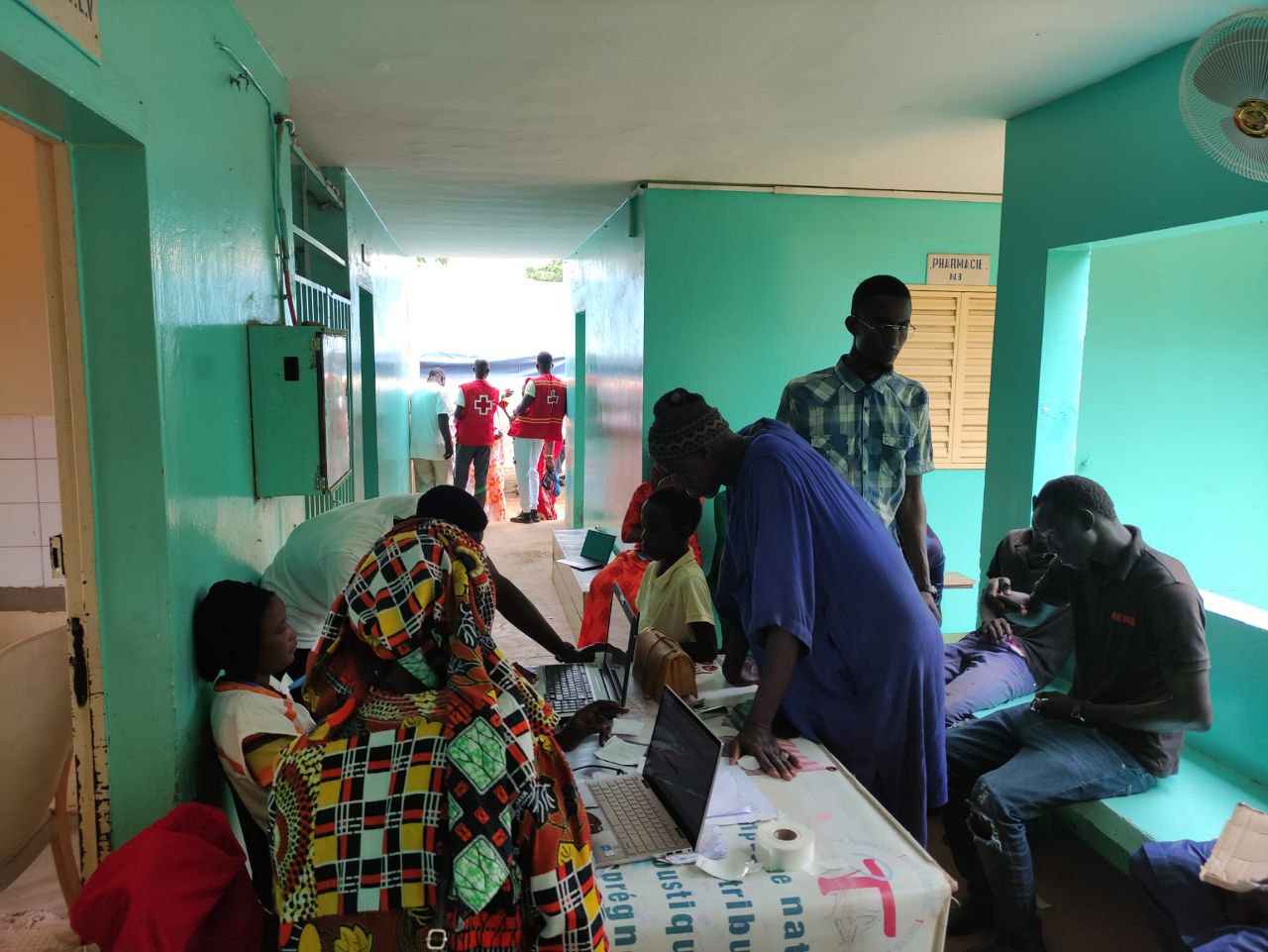
Medical Campaign uses GNU Health, openSUSE
NUREMBERG, Germany, Oct. 19, 2022 - A recent campaign of medical-surgical assistance in Senegal by a Non-Governmental Organization highlights the benefits of using open-source software.
A team from Cirugía Solidaria, which is an NGO that provides medical assistance in disadvantaged countries along with other health promotional activities, conducted a campaign from Sept. 23 to Oct. 3 with the Foundation Elizabeth Diouf.
The campaign involved several medical professionals carrying out medical assistance while using open-source technologies from GNU Health and the openSUSE Project.
The use of GNU Health, which is a Hospital Management Information System, allowed for the multidisciplinary team, which included nurses, surgeons, pediatricians, gynecologist and more, to organize and facilitate daily medical care during the medical assistance campaign. The technology on the team’s devices and the printer that were all running on a local server using openSUSE, and this gave the team maximal opportunity to organize, evaluate and treat patients.
The 10 uninterrupted days of operating simultaneously with four consultations, five surgical tables, a resuscitation room and about 40 hospital beds allowed the team to see 1,200 patients from different districts and regions of Senegal as well as perform about 370 surgeries, which included 77 for children; eight were urgent.
This is the second health program in Africa that has been highlighted using GNU Health and openSUSE software. Last year, thousands of patients in the coastal area of Kribi, Cameroon, at Ebomé Hospital used these open-source solutions to expand health-care delivery in West Africa.
Some of the team and members from GNU Health and openSUSE are expected to attend the GNU Health Conference next month.
Project Enters Election Phase 0
The openSUSE Project has begun its annual elections process that will fill three board seats to represent the project’s governance.
Phase 0, which is the announcement of the elections and the call for candidates/nominations, started Oct. 15. This phase aims to get people involved with the project to consider serving as a representative for fellow openSUSE community members.
“Fellow Geeko’s now is the time to put forward your candidacy for the three available seats on the board this year!” wrote the election committee to the project mailing list.
To stand for a position on the openSUSE board, people are asked to send an email to project@lists.opensuse.org and election-officials@lists.opensuse.org.
“Only openSUSE members are eligible to run for openSUSE Board openings,” according to the openSUSE wiki.
This phase will end at the end of the month, which will move the election process to Phase 1. Phase 1 publishes the candidate slate and the campaigning begins.
Board members help with the governance of the project and assist the community with a variety of topics and responsibilities.
For more information, visit the openSUSE wiki.
