
GCC, EFI Boot Manager Update in Tumbleweed
Rolling-release distribution openSUSE Tumbleweed had a large number of security patches, bug fixes, and new features in snapshots released this week.
Users who did a zypper dup had a full distribution rebuild with GNU Compiler Collection 13, which is the distro’s new default compiler.
This rebuild 20230319 snapshot provided a GCC 13.0.1+git update that rebased a patch and enables a mutual exclusion (mutex) link. An update of flatpak 1.14.4 updated translations and eliminated two Common Vulnerabilities and Exposures; CVE-2023-28101 and CVE-2023-28100, which was specific to virtual consoles and users were recommended to use a graphical user interface like GNOME Software rather than graphical terminal emulator such as xterm , gnome-terminal or Konsole. The C++ library for Single Instruction, Multiple Data highway 1.0.4 provides faster KV128 sorting. The package also updated RISC-V Vector Extension Intrinsics for the 1.0-draft. Other packages to update was libstorage-ng 4.5.86 along with several libqt5 packages.
The 20230318 snapshot updated just two packages. The fcitx5-gtk package updated to version 5.0.22. This gtk-im-module and glib-based dbus client library implements notify-focus-out signal and changes GtkIMContext.reset to always commit the preedit state. The other package to update was a Library for creating MusicBrainz DiscIDs, which is a fantastic open music encyclopedia that collects music metadata and makes it available to the public. The libdiscid 0.6.4 package fixes compiler errors and requires CMake 2.8.12 as a minimum version.
Snapshot 20230317 updates DNS protocol bind 9.18.13. The update provides several new features like increasing the responsiveness of named Response Policy Zone (RPZ) updates that are applied after an RPZ zone is successfully transferred. KDE enthusiasts can be happy with the bug fixes released in the Plasma 5.27.3 update. A few of the highlighted fixes were the addition of emoji picker to mappings, the remove of duplicate items when loading from history and PowerDevil sought to make some changes in order to not waste precious energy. An update of gtk4 4.10.1 brought a plethora of changes. Besides dropping a patch that was fixed upstream, the new version fixed a memory leak, some scrolling problems and improved search performance for the cross-platform widget toolkit. An update of systemd to version 253.1 added a few patches, which one is a [temporary workaround until LVM boot failure is fixed in dracut. Several other packages were update in the snapshot including pipewire 0.3.67, icewm 3.3.2, and many qt6 packages.
The Extensible Firmware Interface (EFI) Boot Manager had a major version update in snapshot 20230316, but it wasn’t the only one. There were two other major versions in the snapshot. The efibootmgr 18 restored an activation error message and fixed help messages. The package also added an option for insertion location of new entries and fixed the simple run example. Another major version update was for EFE variables in the efivar 38 update. This package fiedx parsing for nvme-subsystem devices, added some new tooling and properly checks mmap return errors. And yet there was one more major version update with the free BitTorrent client transmission updating for version 4.0.2. The new version takes care of some potential crashes and fixes the display of IPv6 tracker URLs. The Web client was rewritten and now supports mobile use. The Linux Kernel was the only update in the snapshot that wasn’t a major version update. The 6.2.6 kernel-source update partial reverted some wifi configurations and removed some Realtek wireless drivers.

 Member
Search for packages with the zypper-onlinesearch plugin

 CzP
CzPSyslog-ng 101, part 12: Elasticsearch (and Opensearch, Zinc, Humio, etc.)
One of the most popular destinations in syslog-ng is Elasticsearch (and OpenSearch, Zinc, Humio, etc.). The 12th part of my syslog-ng #tutorial shows you how to send log messages to Elasticsearch.
You can watch the video on YouTube:
and the complete playlist at https://www.youtube.com/playlist?list=PLoBNbOHNb0i5Pags2JY6-6wH2noLaSiTb
Or you can read the rest the tutorial as a blog at: https://www.syslog-ng.com/community/b/blog/posts/syslog-ng-101-part-12-elasticsearch-and-opensearch-zinc-humio-etc

syslog-ng logo

Continuing on API Endpoint Documentation for Package and File Sources
openSUSE Tumbleweed – Review of the week 2023/11
Dear Tumbleweed users and hackers,
This week, I had the sad duty to discard one snapshot due to a bug that snuck through staging and was only identified later in the full product test suite (systemd 253, restarting some services failed weirdly). But as we know from the past, users prefer no snapshot as opposed to one that breaks their system in weird ways. And despite that, 6 snapshots have been delivered during this week (0309 … 0313 & 0315)
The most relevant changes in these snapshots are:
- Linux kernel 6.2.2 (lockdown patches disabled) & 6.2.4
- NetworkManager 1.42.4
- Apache 2.4.56
- LibreOffice 7.5.1.2
- KDE Frameworks 5.104.0
- GStreamer 1.22.1
- Mesa: patch to address multiple crashes seen in gnome-shell since Mesa 23.0
- git 2.40.0
These updates are currently in the queue and are being tested for inclusion in the upcoming snapshots:
- Linux kernel 6.2.6
- systemd 253.1
- Transmission 4.0.2
- KDE Plasma 5.27.3
- GCC 13 as the default compiler
- openSSL 3.1.0

RAD Expansion Unit for the Commodore 64
Restoring SteamDeck Unresponsive Touchscreen
HPC and me
Recently I found that quite a few of my Twitter and Mastodon followers are working in high-performance computing (HPC). At first I was surprised because I’m not a HPC person, even if I love high performance computers. Then I realized that there are quite few overlaps, and one of my best friends is also deeply involved in HPC. My work, logging, is also a fundamental part of HPC environments.
Let’s start with a direct connection to HPC: one of my best friends, Gabor Samu, is working in HPC. He is one of the product managers for one of the leading commercial HPC workload managers: IBM Spectrum LSF Suites. I often interact with his posts both on Twitter and Mastodon.
I love high performance computers and non-x86 architectures. Of course, high performance computers aren’t the exclusive domain of HPC today. Just think of web and database servers, CAD and video editing workstations, AI, and so on. But there is definitely an overlap. Some of the fastest HPC systems are built around non-x86 architectures. You can find many of those on the top500 list. ARM and POWER systems made it even into the top10 list, and occupied the #1 position for years.
The European Union is developing its own CPUs for HPC as part of the European Processor Initiative. Their target is a low power consumption but high performance system. They are working on ARM and RISC-V systems.
It’s not just HPC where non-x86 architectures can show significant performance benefits. For many years, IBM’s POWER9 CPU was the fastest to run syslog-ng. Running syslog-ng on X86 was not even half as fast. Currently my fastest measurement was on an AMD system, but I would not be surprised if I could measure higher syslog-ng message rates on POWER10 or Ampere systems (if I had access).
Logging is a fundamental part of HPC environments. With the scale of HPC systems, and the price of down time, logging is required for being able to isolate / identity issues rapidly. These systems run around the clock and are used to solve grand scale challenges for humanity like vaccine development, weather modeling, or analyzing data from the LHC. Logging gives you here better visibility into the system and makes you able to identify problems very quickly.
One of the most active syslog-ng users, Faxm0dem, is running thousands of syslog-ng instances in France, at CC-IN2P3. If you take a look at the powered by syslog-ng page, you will see that they are not the only ones. I learned at various conferences that there are many more HPC labs where syslog-ng is in use, but unfortunately they are not sharing infrastructure details publicly, only in private discussions.
TL;DR: I’m not surprised any more, if I see new HPC focused followers :-)
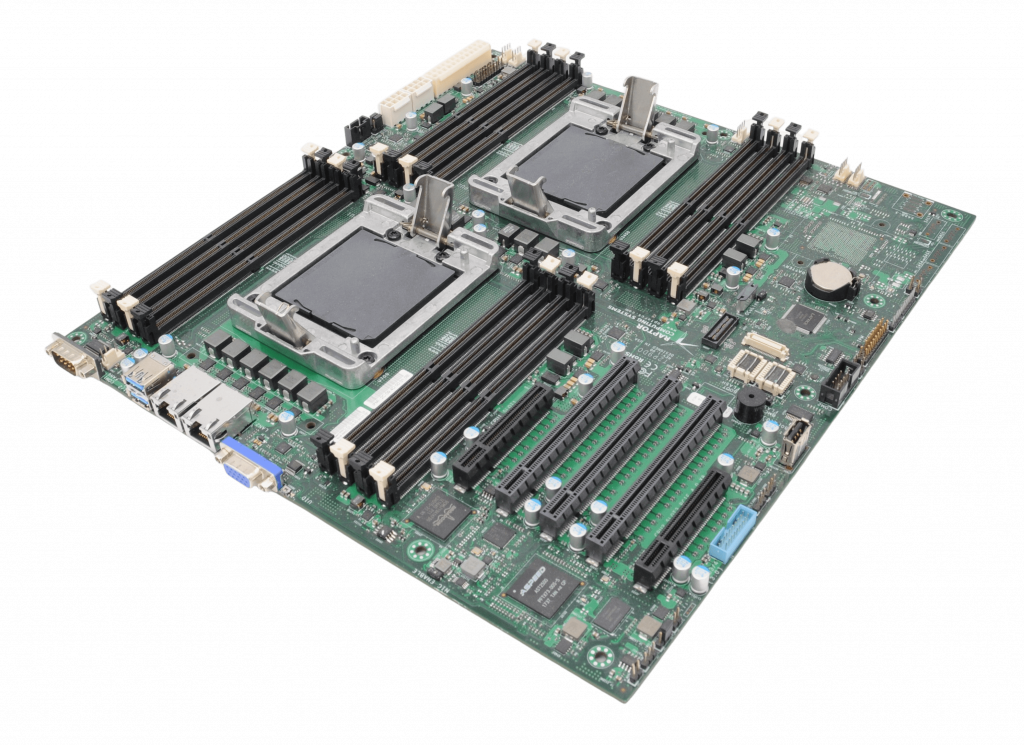
Talos II POWER9 mainboard
Syslog-ng 101, part 11: Enriching log messages
This is the eleventh part of my syslog-ng tutorial. Last time, we learned about message parsing using syslog-ng. Today, we learn about enriching log messages.
You can watch the video on YouTube:
and the complete playlist at https://www.youtube.com/playlist?list=PLoBNbOHNb0i5Pags2JY6-6wH2noLaSiTb
Or you can read the rest the tutorial as a blog at: https://www.syslog-ng.com/community/b/blog/posts/syslog-ng-101-part-11-enriching-log-messages
syslog-ng logo
Adding auto-installation support
AutoYaST is a crucial tool for our users, including customers and partners. So it was clear from the beginning that D-Installer should be able to install a system in an unattended manner.
This article describes the status of this feature and gives some hints about our plans. But we want to emphasize that nothing is set in stone (yet), so constructive comments and suggestions are more than welcome.
The architecture
When we started to build D-Installer, one of our design goals was to keep a clear separation of concerns between all the components. For that reason, the core of D-Installer is a D-Bus service that is not coupled to any user interface. The web UI connects to that interface to get/set the configuration settings.
In that regard, the system definition for auto-installation is another user interface. The D-Bus service behaves the same whether the configuration is coming from a web UI or an auto-installation profile. Let me repeat again: we want a clear separation of concerns.
Following this principle, the download, evaluation and validation of installation profiles are performed by our new command-line interface. Having an external tool to inject the profile can enable some interesting use cases, as you will discover if you keep reading.
Replacing XML with Jsonnet
Although you might have your own list, there are a few things we did not like about AutoYaST profiles:
- XML is an excellent language for many use cases. But, in 2023, there are more concise alternatives for an automated installation system.
- They are rather verbose, especially with all those type annotations and how collections are specified.
- Runtime validation, based on
libxml2, is rather poor. Andjingis not an option for the installation media.
For that reason, we had a look at the landscape of declarative languages and we decided to adopt Jsonnet, by Google. It is a superset of JSON, adding variables, functions, imports, etc. A minimal profile looks like this:
{


  "software": {


    "product": "ALP"


  },


  "user": {


    "fullName": "Jane Doe",


    "userName": "jane.doe",


    "password": "123456"


  }


}
But making use of Jsonnet features, we can also have dynamic profiles, replacing rules/classes or ERB with a single and better alternative for this purpose. Let's have a look to a complex profile:
local dinstaller = import 'hw.libsonnet';


local findBiggestDisk(disks) =


  local sizedDisks = std.filter(function(d) std.objectHas(d, 'size'), disks);


  local sorted = std.sort(sizedDisks, function(x) x.size);


  sorted[0].logicalname;


{


  software: {


    product: 'ALP',


  },


  user: {


    fullName: 'Jane Doe',


    userName: 'jane.doe',


    password: '123456',


  },


  // look ma, there are comments!


  localization: {


    language: 'en_US',


    keyboard: 'en_US',


  },


  storage: {


    devices: [


      {


        name: findBiggestDisk(dinstaller.disks),


      },


    ],


  },


  scripts: [


    {


      type: 'post',


      url: 'https: //myscript.org/test.sh',


    },


    {


      type: 'pre',


      source: |||


        #!/bin/bash


        echo hello


      |||,


    },


  ],


}
This Jsonnet file is evaluated and validated at installation time, generating a JSON profile where
the findBiggestDisk(dinstaller.disks) is replaced with the name of the biggest disk.
Beware that defining the format is still a work in progress, so those examples might change in the future.
Replacing the profile with an script
While working on the auto-installation support, we thought allowing our users to inject a script instead of a profile might be a good idea. That script could use the command-line interface to interact with D-Installer. Somehow, you would be able to set up your own auto-installation system.
#!/bin/bash


dinstaller config set software.product="Tumbleweed"


dinstaller config add storage.devices name=/dev/sda


dinstaller wait


dinstaller install
Please, bear in mind that it is just an idea, but we want to explore where it takes us.
Better integration with other tools
Integrating AutoYaST with other tools could be tricky because it does not provide a mechanism to report the installation progress. Again through our CLI, we plan to solve that problem by providing such a mechanism which, to be honest, is already available in many configuration systems.
What about backward compatibility?
In case you are wondering, we have plans to (partially) support good old AutoYaST profiles too. We know that many users have invested heavily in their profiles and we do not want all that work to be gone. However, not all the AutoYaST features will be present in D-Installer, so please expect some changes and limitations.
We now have a small tool that fetches, evaluates and validates an AutoYaST profile, generating a JSON-based one. It is far from finished, but it is a good starting point.
Current status
Now let's answer the obvious question: which is the current status? We expect to deliver the basic functionality in the following release of D-Installer, but with quite some limitations.
- The user interface is still needed to answer questions or watch the progress.
- Dynamic profiles are supported, but the hardware information injected in the profiles is incomplete.
- A mechanism for error reporting is missing.
- iSCSI and DASD are not supported in auto-installation yet.
Closing thoughts
We hope we have addressed your main concerns about the auto-installation support in D-Installer. As you may see, it is still a work in progress, but we expect to shape the implementation in the upcoming releases to have 1st class support for unattended installation sooner than later.
If you have any further questions, please, let us know.