
Token Party!

 Member
 DimStar
openSUSE Tumbleweed – Review of the week 2022/24
Dear Tumbleweed users and hackers,
Week 24 contained again some public holidays for my place, but as in the past, this has never stopped Tumbleweed from rolling. After all, it’s all our contributor’s work making it go as smoothly as it is. And their great work has paid off once again, as we could finally, after months and months of preparation, testing, fixing, and redo, make the switch of the default python interpreter to version 3.10. This resulted in a rather large rebuild of the distro, as all python3- symbols needed to move to the correct python subpackage again. As a positive side effect, the recently introduced SOURCE_FORTIFY=3 is now enabled on all binaries. With the rebuild taking a bit longer, we have still managed to publish 5 snapshots this week (0609, 0611, 0612, 0613, and 0614)
The main changes delivered this week include:
- GNOME 42.2 – the missing pieces are now finally also there
- GTK 4.7.0
- openssl 1.1.1o
- KDE Gear 22.04.2
- KDE Plasma 5.25.0
- python 3.10 as the default python3 interpreter; pymodules are still built for python 3.8, 3.9, and 3.10
The python 3.10 switch also took a bit of a toll on the stagings, as they all needed to be rebased on top of that change and all competed for build powers. That in turn means they are all filled with the new, good stuff:
- Linux kernel 5.18.4
- Mozilla Firefox 101.0.1
- KDE Frameworks 5.95
- Inkscape 1.2
- systemd 251.2
- SELinux 3.4
- krb5 1.20.0: breaks samba
- Sphinx 5: breaks qemu

Community work group update post oSC22
The community workgroup (CWG) for the Adaptable Linux Platform (ALP) would like to update you on what has happened since the openSUSE Conference 2022. Make sure to check the panel discussion with the ALP steering committee and other talks from oSC22 as they become public.
First, there is a new official communication channel! We’re using the “openSUSE ALP” matrix channel, bridged with https://discord.gg/opensuse and ircs://libera.chat/#opensuse-alp. We’ve got you covered! This is the best way how to consume updates.
We have revisited the way we would like to communicate updates on ALP. The idea is to switch away from a digest report for all workgroups to something a bit easier to follow and more exciting to read.
We’ve invited SUSE’s newly appointed Engineering Director Marco Varlese to the weekly ALP CWG meeting, and we have great news to share!
We’ve received confirmation about the upcoming Roadmap. A delivery of the Proof of Concept is expected in September, and the public availability of an ALP Based product is projected for September 2023.
Next Tuesday, June 21, Marco will work with Robert Sirchia from the SUSE’s Community team on a suse.com article about the strategy and vision for the Adaptable Linux Platform. We’d like to then interview individual work groups and share some updates in a story-telling way and communicate better how they fit into the bigger picture shared by Marco. Dan Čermák will put together a sorted list of WGs by the impact on the openSUSE community. This will make sure that the interviews are as relevant as possible.
We’ve had Quality Engineering over this week. For next Tuesday, we’ve invited Jiří Šrain and Frederic Crozat from the ALP steering committee, with whom we’d like to discuss building of the community part of ALP, essentially the Package Hub for ALP. The remaining items on our radar are a test instance of Fedocal and centralized documentation.
The community platform is being referred to as openSUSE ALP during its development cycle with SUSE to be concise with planning the next community edition.

BCI test tutorial
Base Container Images (BCI) are a SUSE offer for a variety of container images suitable for building custom applications atop of the SUSE Linux Enterprise (SLE). They are a suitable building platform for different container applications and are available for free without subscription. In this blog post I’m covering how we test BCI before they are released and how you can run individual tests on them.
An update from ALP Quality Engineering
Building our products in an open and transparent way allows us to rethink the way how we test.
Jose Lausuch from our ALP Quality Engineering was invited to the Community Workgroup weekly meeting to speak about current plans of Quality Engineering for ALP.
Jose mentioned that the QE Workgroup would like to start testing existing ALP images with the existing MicroOS test suite. The effort is coordinated in poo#112409.
Let’s start with what we already have and run it against ALP in openqa.opensuse.org (o3). We’d initially cover KVM and self-install images for x86_64 and aarch64. VMware and possibly others would come later.
Once we have a proof of concept, other QE experts will jump to cover specific testing areas (virtualization, containers, public cloud, yast) and contribute to ALP as well back to upstream, which is in this case MicroOS.
We hope that this new model will raise community interest in contributions to the Quality Engineering area, as this has been always a challenge.
Jose already submitted the initial ALP job group to o3 and started adding some code to the upstream test repository.
Community aims to grow communication, marketing team
The openSUSE community has been having community meetings on a regular basis for some time and attendees in the latest meeting have expressed a desire to grow the communications and marketing team.
The project has a Telegram marketing group and a #marketing channel on discord.
Gaining people interested in helping with marketing, communications and planning comes at a time where several Work Groups are focused on the formation of an Adaptable Linux Platform, which has yet to formalize (or change) the name for the community platform.
There are some immediate aspects that can be addressed by the team like a thorough review of the bare necessities of the communications and marketing effort plans from previous years and how these can be adjusted or improved.
The Thursday community meeting plans to have a regular marketing segment as part of the weekly update. People interested in joining the group should reach out to @profetik777 on the Telegram marketing group.
Installing syslog-ng on Microsoft Linux
Yes, Microsoft has its own Linux distribution, called CBL-Mariner. It is an internal Linux distribution by Microsoft used for cloud infrastructure and edge products and services. And even if it is not installed in the OS by default, CBL-Mariner also includes syslog-ng.
Read the rest of my blog at https://www.syslog-ng.com/community/b/blog/posts/installing-syslog-ng-on-microsoft-linux to learn how to install syslog-ng on it and what features are available.

syslog-ng logo

Audio controlled Shelly devices
The idea came from Tina Müller who was giving and awesome demo of the Vosk library. I quickly checked out the Alphacephei pages.
I fundamentally like when a cool library has Python APIs.
Vosk is an offline open source speech recognition toolkit. It enables speech recognition for lots of languages. The vosk models are small (50 Mb) but still provide continuous large vocabulary transcription, zero-latency response with streaming API.
Installing vosk library on my openSUSE Tumbleweed goes like

YaST in a YaST-less system
The fifth chapter for 2022 of the regular development reports from the YaST Team is on its way. We are just ironing up some details while we wait for the videos of the recent openSUSE Conference 2022 to be online. But fear not, we will not meanwhile abandon you into boredom. Quite the opposite, we have exciting news to share with you all!
Enjoy YaST Without Installing it
We all know how awesome YaST can be for administering your (open)SUSE system. From managing the
software repositories and the installed software to adjusting the systemd services and sockets. From
creating LVM logical volumes to configuring Kdump (or fadump). From inspecting the systemd journal
to fine-tuning the boot loader. From configuring network interfaces to adjusting the mitigations for
CPU vulnerabilities. From setting the firewall configuration to managing your subscriptions to the
different SUSE products… and so much more!
But all that comes with a pretty obvious price. You must install YaST and all its dependencies in
the system you want to manage. Those dependencies include the Ruby runtime, either ncurses or Qt
(depending if you want the text-based or the fully graphical interface) and some other packages or
libraries depending on what you want to achieve. For example, you need libzypp to install software
or to manage the repositories.
What if you don’t want to pay that price? Well, we have an special offer for you! Now you can use YaST to administer your system without installing YaST or any of its dependencies. Ideal for lovers of minimal systems like the MicroOS variants of SUSE and openSUSE. All you need is a container engine like Docker or Podman… and you are using one anyways if you are using MicroOS, isn’t it?
How does it Work?
Another great news is that there is no black magic involved, just a bit of shell scripting. You can
check the technical details at the yast-in-container
repository. That tool only depends on Podman (or
alternatively Docker) and offers a series of commands that are equivalent to the corresponding
yast and yast2 command. The main difference is that those new commands grab YaST and run it in a
container that will be transparently used to administer the host system. For example, the following
commands would open the corresponding YaST module to manage repositories. The first in text mode and
the second command with the full Qt graphical interface:
$ yast_container repositories
$ yast2_container repositories
As you would expect, if the commands are executed without specifying any argument they will open the corresponding version of the YaST control center, displaying only the modules that are currently expected to work in a container (more about that below).
Let’s imagine a pretty extreme example:
- You start with a minimal system with no YaST, no Ruby, no zypper or libzypp… not even with the
rpmcommand being available! All you have is Podman and internet access. - You can execute
yast_containerand it will download (if needed) and launch your containerized version of YaST, so you can enjoy all the usual YaST features to manage repositories and their GPG keys, to install and uninstall software, etc. - When you are done, you just quit the contanerized YaST and you are back to your minimal system without a trace of YaST or zypper, but with all software packages and repositories configured at your will.
Remote Access Through SSH, X11… or a Web Browser!
You can of course use this nice YaST-in-a-box to manage your local system. If you install
the yast-in-container package in a system with graphical interface you will even get a nice icon
to launch it.
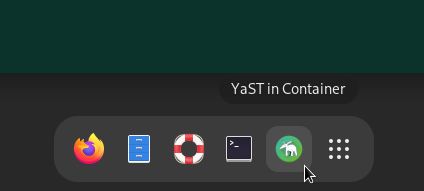
But what about remote administration? Of course, you can do it in the usual YaST way. That is, using the great text-based interface through SSH or even opening a remote graphical session with X11 or VNC. But those solutions require you to have some specific software installed in the device you are going to use for the remote access. But, if you don’t need to install YaST in the system to be managed, why would you need to install something on the other edge? The good news is that you don’t really need to - you only need a web browser!
Alongside the already mentioned commands to run YaST containerized on text and graphical modes, the
package also includes a third one called yast2_web_container that will run YaST in a web session
that you can later access by simply pointing your browser to the port 4984 of the system to be
managed.

Ok, is not a modern mobile-first web interface but rather the graphical version of YaST running inside a browser window. But that should be enough for many cases. Authentication and certificates can be easily configured to secure that YaST instance.
What can I do?
By now you may be wondering - can this containerized version of YaST do everything a regular
installed YaST can do? The answer is - not yet. As mentioned, the YaST control center in the
container displays only the supported modules. Alternatively you can run yast2_container -l to
list the supported modules.
The good news is that we plan to adapt more modules to be able to work in such an environment. And the even better news is that we expect most of them to be really easy to adapt. Basically all the YaST pieces that are used during a regular installation should be fairly easy to adapt. That includes the Partitioner, boot loader configuration, kdump, CPU mitigations and many more.
On the other hand, we don’t plan to adapt every single YaST module out there. For example, modules to administer services like Samba, an iSCSI target or the DHCP server will likely not be adapted unless we detect a real need for any of them.
Future plans
As mentioned, we are already adapting more YaST components to be able to run containerized. But that’s not the only plan we have to move this nice project forward. We also want to reduce the size of the images downloaded and used by the containers, improve how VNC is used internally to provide the web access, rely on SLE BCI to build the whole system… there is plenty of room to keep having fun!
In addition, we have mentioned the MicroOS variants as possible candidates to make use of a containerized version of YaST. But the transactional nature of such distributions may challenge how some YaST modules work, no matter whether they run containerized or directly in the system. For example, the way to install software packages is completely different. So, in addition to the mentioned improvements to our containerized YaST, we are considering to adapt some parts of YaST as a whole to better handle the administration of transactional systems.
And, of course, we will keep you updated on all the steps through our usual channels. So stay tuned!
Flatpak Brand Refresh

Flatpak has been at the center of the recent app renaissance, but its visual identity has remained fairly stale.
Without diverging too much from the main elements of its visual identity we've made it more contemporary. The logo in particular has been simplified to work in all of the size scenarios and visual complexity contexts.

There's definitely a few spots where the rebrand has yet to propagate to, so please refer to the guidelines if you spot and old coat of paint.
If you're giving a talk on Flatpak, feel free to make use of the LibreOffice Impress Template.