
Notify Me If You Need Me

 Member
 CzP
CzPRaptor CS: Fully Owner Controlled Computing using OpenPOWER
This week I am talking to Timothy Pearson of Raptor Engineering. He is behind the Talos II and Blackbird boards for IBM POWER9 CPUs. His major claim is creating the first fully owner controlled general purpose computer in a long while. My view of the Talos II and Blackbird systems is that these boards helped to revitalize the open source ecosystem around POWER more than any other efforts (See also: https://peter.czanik.hu/posts/cult-amiga-sgi-workstations-matter/). Most open source developers I talked to say that coding on a remote server is just work. Doing the same on your local workstation adds an important ingredient: passion. This is why the re-introduction of POWER workstations was a very important step: developers started to improve support for POWER also in their free time, not just in their regular working hours. I asked Tim how the idea of creating their POWER board was born, how Covid affected them and also a bit about their future plans.
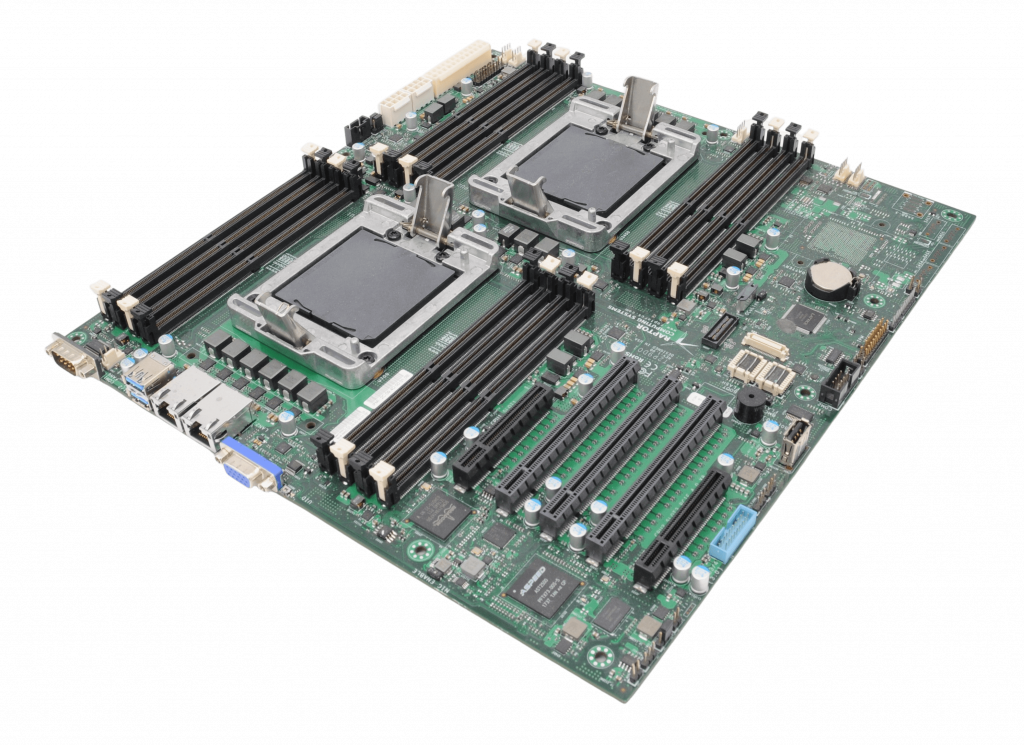
Talos II mainboard
Raptor Engineering seems to focus on machine vision. How can a company that’s focused on other activities start to develop a mainboard for POWER CPUs?
So to start with, Raptor Engineering’s public facing website was always more of a way to market technologies we’d already developed for internal purposes to the general public. Raptor Engineering is, and always has been, more of a FPGA HDL/firmware/OS level design company focused on providing those services to those that need them. Sometimes we do engage in internal development projects to showcase certain technology capabilities publicly, and one of those was the open source machine vision system you allude to earlier.
More relevant to the current technology offerings, we’ve always had some degree of focus on security and what we now tend to call “owner control”. This was borne out of several long-running research and development projects, where significant investment was made in technologies that could be years, if not decades, from practical application. As a result of this longer term focus, it was realized early on that two issues had to be addressed: something we call “continuance” (the ability to seamlessly move from one generation of technology to another as needed, with no loss of data) and also the data security / privacy aspects of keeping internal R&D results private and out of the hands of potential competition.
Around 2008-2009 we realized that a fully owner controlled system would meet all of these objectives, specifically a system over which we had full control of the firmware, OS, and application layer, a system where we could modify any aspect of its operation independently as required to support the overall objectives. There’s a true story I like to tell, which dates from the early days of the coreboot port efforts on our side to support the AMD K8 systems in use at the time: the proprietary BIOS would not, for some infurating reason, allow a boot without a CMOS battery and a keyboard connected! When spread across supercomputer racks, this was a perfect opportunity to highlight just what owner control actually meant in terms of benefit for maintainance and overall scalability – the rather obvious resulting boot problem could have been solved with a single line of code, if only there had been code available.
Once we had a completely free stack for K8/Family 10h, we continued on with AMD systems until around 2013/2014, when it became clear that AMD would force the Platform Security Processor (an unauditable low-level AMD-controlled black box that presents a severe security risk) on all CPUs going forward. This kicked off a multi-year evaluation of anything and everything that might be able to replace the x86 systems we had in terms of owner control, overall performance, and ease of administration (ecosystem compatibility). Over those years we evaluated everything from ARM to RISC-V to MIPS, and eventually settled on the then-new OpenPOWER systems as the only solution to actually check all of the boxes. The rest, as they say, is history – the nascent computer ODM arm of Raptor Engineering was spun off as Raptor Computing Systems to allow it to grown into the role demanded of it with the Talos II systems it was bringing to market.
Six years ago I first learned about the Talos plans from the Raptor Engineering website. Now all POWER-related activity is on the Raptor Computing website. How are the two related?
As of right now I am involved with both companies, my role at Raptor Computing Systems being that of CTO. Basically I help ensure RCS brings new owner-controlled, blob-free devices to market, and keep fairly close tabs on available silicon and its limitations (mostly centering around blobs) as a result. On the Raptor Engineering side I still provide specialized consulting services at a low level (typically HDL / firmware), as an example you’ll see my name here and there on projects like OpenBMC, LibreSoC, and more recently the Xen hypervisor port for POWER systems that is just spinning up now.
What do you mean by “fully owner controlled”?
An owner-controlled device is best defined as a tool that answers only to its physical owner, i.e. its owner (and only its owner) has full control over every aspect of its operation. If something is mutable on that device, the owner must be able to make those changes to alter its operation without vendor approval or indeed any vendor involvement at all. This is in stark contrast with the standard PC model, where e.g. Intel or AMD are allowed to make changes on the device but the owner is expressly forbidden to change the device’s operation through various means (legal restrictions, lack of source code, vendor-locked cryptographic signing keys, etc.). In our opinion, such devices never really left the control of the vendor, yet somehow the owner is still legally responsible for the data stored on them – to me, this seems like a rather strange arrangement on which to build an entire modern digital economy and infrastructure.
What are the main differences between the Talos II and Blackbird boards?
The Talos II is a high end full EATX server mainboard, dual socket, designed for 24/7 use in a datacenter or workstation type environment. Blackbird is a much smaller uATX single CPU system with more standard consumer-type interfaces (e.g. audio, HDMI, SATA, etc.) available directly on the mainboard.
You mention that Blackbird is consumer focused. It has three Ethernet ports, and support for remote management. Did you also have servers / appliances in mind?
Yes, there is the ability to use the Blackbird for a home NAS or similar appliance. The remote management sort of comes “for free” due to the POWER9 processor being paired with the AST2500 BMC ASIC and OpenBMC, it is more of a baseline POWER9 feature than anything else.
I know that quite a few Linux distribution maintainers now use Talos II workstations. Who else are your typical users?
In general we see the same overall subset of people that would use Linux on x86, with a strong skew toward those concerned about privacy and security and a notable (expected) cutout of the normal “content consumer” market (gamers, streaming service consumers, etc.). This holds true both for individuals and organizations, though the skew is much less notable among organizations simply because organizations are not generally purchasing desktop / server systems for gaming and media consumption!
For quite a few years POWER9 was the best CPU to run syslog-ng. What are the typical software your users are running on your POWER workstations and servers?
For the most part, the standard software you would see on comparable x86 boxes. That’s always been one of our requirements, that using the POWER system be as close to using a standard PC as possible, except the POWER system isn’t putting digital handcuffs on its owner and potentially exposing their data for monetization (or, for that matter, to more nefarious actors).
Covid affected most families and businesses around the world. How Raptor was / is affected?
We were hit hard by the shutdowns and subsequent inflation, in common with most manufacturers across the world. We did have to cancel some of the more ambitions POWER9 systems under development (Condor) as well as take on increased ecosystem maintainance load. Some of that, along with the continuous rise in cost of parts and rolling shortages of components, is reflected in the price increases and long lead times that have occured over the past couple of years.
Could you explain how Condor compares to Talos II and Blackbird?
Condor was a pre-COVID development project to try to create a high end standard ATX (vs. EATX) desktop board with OpenCAPI brought out to the appropriate connector. With COVID shutdowns, industry adoption of CXL, and more importantly POWER10 requiring closed source binaries, we didn’t see a path to actually bring the product to market post-COVID. The completed designs are sitting in our archives, but no hardware was manufactured.
The latest x86 CPUs now beat POWER9 in many use cases. Which is no wonder, these CPUs are four years old now. Is there something where POWER9 still has an advantage?
Absolutely! POWER9 still does what we originally intended it to do – it gives reasonable performance on a stable, standardized ecosystem, in a familiar PC-style form factor, using standard PC components, while providing full owner control. As a secure computing platform, both on server and desktop, it simply cannot be beat – there is literally nothing else on the market that is both 100% blob free and can be used as a daily driver for basically every task that a Linux x86 machine can be used for.
For example, I’m responding to this interview using a POWER9 workstation with hundreds of Chromium tabs open, media running, Libreoffice in the background, and am even compiling some software. If you didn’t tell me it was a POWER system, I wouldn’t be able to easily tell just from using it, yet at the same time it’s not restricting what I can do with it, attempting to monetize my data, or otherwise waiting for commands from a potentially hostile (at least to my interests) third party.
The other major selling point is that the ISA is both open and standardized. The standardization means that I could migrate this system as-is – no reinstallation – to anything that is POWER ISA 3.0 compliant, which is a huge advantage only available for the “big three” architectures (x86, SBSA ARM, and OpenPOWER). That said, being an open ISA, anyone is also free to create a new compliant CPU if they want to or need to. This neatly avoids the entire problem with x86 and ARM, where various technologies (ME, PSP, TrustZone w/ bootloader locking) could be (and eventually were) unilaterally forced onto all users regardless of the grave issues they introduce for specific use cases.
Also interesting is how the OpenPOWER ISA is governed – a neutral entity (the OpenPOWER Foundation) controls the standards documents that implementations must adhere to, and anyone is free to propose an extension to the ISA. If accepted, it becomes part of the ISA compliance requirements for a future version, and the requisite IP rights are transferred to the Foundation such that anyone is still free to implement that instruction per the specification without needing to go back and license with the entity that proposed the extension. This is a great model in my mind, it should allow the best of both worlds going forward. The standardization and compliance requirements mean we should see the same level of binary support normally expected on x86, while the extension proposal mechanism allows the ISA to morph and adapt in a backward-compatibile way in response to external needs.
The POWER 10 CPUs from IBM are manufactured with the latest technologies allowing higher performance with lower power consumption. Do you have any plans to have a new board with POWER 10 support?
At this time we do not have plans to create a POWER10 system. The reasoning behind this is that somehow, during the COVID19 shutdowns and subsequent Global Foundries issues, IBM ended up placing two binary blobs into the POWER10 system. One is loaded onto the Microsemi OMI to DDR4 memory bridge chip, and the other is loaded into what appears to be a Synopsis IP block located on the POWER10 die itself. Combined, they mean that all data flowing into and out of the POWER10 cores over any kind of high speed interface is subject to inspection and/or modfication by a binary firmware component that is completely unauditable – basically a worst-case scenario that is strangely reminiscent of the Intel Management Engine / AMD Platorm Security Processor (both have a similar level of access to all data on the system, and both are required to use the processor). Our general position is that if IBM considered these components potentially unstable enough to require future firmware updates, the firmware must be open source so that entities and owners outside of IBM can also modify those components to fit their specific needs.
Were IBM to either open source the firmware or produce a device that did not require / allow mutable firmware components in those locations, we would likely reconsider this decision. For now, we continue to work in the background on potential pathways off of POWER9 that retain full compatibility with the existing POWER9 software ecosystem, so stay tuned!
Does “potential pathways off of POWER9” have something to do with the LibreSoc project?
We’re going to remain a bit coy on this, but LibreSoC is definitely one project that would fit that requirement for at least low-end devices. In fact, you can see some of my fingerprints in the LibreSoC GIT history…
Photo credits:
Copyright: Vikings GmbH License: CC BY 4.0

YaST Development Report - Chapter 4 of 2022
As our usual readers know, the YaST team is lately involved in many projects not limited to YaST itself. So let’s take a look to some of the more interesting things that happened in those projects in the latest couple of weeks.
Improvements in YaST
As you can imagine, a significant part of our daily work is invested in polishing the versions of YaST that will be soon published as part of SUSE Linux Enterprise 15-SP4 and openSUSE Leap 15.4, whose first Release Candidate version is already available.
That includes, among many other things, improving the behavior of
yast2-kdump in systems with Firmware-Assisted Dump
(fadump) or adding a bit of extra information to
the installation progress screen that we recently simplified.
YaST in a Box
So the present of YaST is in good hands… but we also want to make sure YaST keeps being useful in the future. And the future of Linux seems to be containerized applications and workloads. So we decided to investigate a bit whether it would be possible to configure a system using YaST… but with YaST running in a container instead of directly on the system being configured.
And turns out it’s possible and we actually managed to run several YaST modules with different levels of success. Take a look to this repository at Github including not only useful scripts and Docker configurations, but also a nice report explaining what we have achieved so far and what steps could we take in the future if we want to go further into making YaST a containerizable tool.
Evolution of D-Installer
Running into containers may be the future for YaST as a configuration tool (or not!). But we are also curious about what the future will bring for YaST as an installer. In that regard, you know we have been toying with the idea of using the existing YaST components as back-end for a new installer based on D-Bus temporarily nicknamed D-Installer. And, as you would expect, we also have news to share about D-Installer.
On the one hand, we used the recently implemented infrastructure for bi-directional communication (which allows the back-end of the installer to ask questions to the user when some input is needed) to handle some situations that could happen while analyzing the existing storage setup of the system. On the other hand, we added the possibility of modifying the D-Installer configuration via boot arguments, with the option to get some parts of that configuration from a given URL.

See you Soon!
If you want to get more first-hand information about recent (Auto)YaST changes, about D-Installer development or any other of the topics we usually cover in this blog, bear in mind openSUSE Conference 2022 is just around the corner and a big part of the YaST Team will be there presenting these and other topics. We hope to see as many of you there in person. But don’t worry much if you cannot attend, we will keep blogging and will stay reachable at all the usual channels. So stay tuned for more news… and more fun!

openSUSE Leap 15.4 Enters Release Candidate Phase
The openSUSE Project has entered the Release Candidate phase for the next minor release version of the openSUSE Leap distribution.
The upcoming release of Leap 15.4 transitioned from its Beta phase to Release Candidate phase after Build 230.2 passed openQA quality assurance testing.
“Test results look pretty solid as you’d expect from RC,” wrote release manager Lubos Kocman in an email on the openSUSE Factory mailing list yesterday. “My original ETA was Wednesday, but we managed to get (the) build finished and tested sooner.”
The new phase also changes the new offering of Leap Micro, which is a modern lightweight operating system ideal for host-container and virtualized workloads, into its Release Candidate phase.
The RC signals the package freeze for software that will make it into the distribution, which is used on servers, workstations, desktops and for virtualization and container use.
The Leap 15.4 Gold Master (GM) build is currently scheduled for May 27, according to Kocman, which is expected to give time for SUSE Linux Enterprise changes and its Services Pack 4 GM acceptance; this will allow for the pulling in of any translation updates and finish pending tasks such as another security audit.
Kocman recommends Beta and RC testers use the “zypper dup” command in the terminal when upgrading to the General Availability (GA) once it’s released.
During the development stage of Leap versions, contributors, packagers and the release team use a rolling development method that are categorized into phases rather than a single milestone release; snapshots are released with minor version software updates once passing automated testing until the final release of the GM. At that point, the distribution shifts from a rolling development method into a supported release cycle where it receives updates until its End of Life (EOL). View the openSUSE Roadmap for more details on public availability of the release.
The community is supportive and engages with people who use older versions of Leap through community channels like the mailing lists, Matrix, Discord, Telegram, and Facebook. Visit the wiki to find out more about openSUSE community’s communication channels.
Friday the 13th: a lucky day :-)
I’m not superstitious, so I never really cared about black cats, Friday the 13th, and other signs of (imagined) trouble. Last Friday (which was the 13th) I had an article printed in a leading computer magazine in Hungary, and I gave my first IRL talk at a conference in well over two years. Best of all, I also met many people, some for the first time in real life.
Free Software Conference: sudo talk
Last Friday, I gave a talk at the Free Software Conference in Szeged. It was my first IRL conference talk in well over two years. I gave my previous non-virtual talk in Pasadena at SCALE; after that, I arrived Hungary only a day before flights between the EU and the US were shut down due to Covid.
I must admit that I could not finish presenting all my slides. I practiced my talk many times, so in the end, I could fit my talk into my time slot. However, I practiced the talk by talking to my screen. That gives no feedback, which is one of the reasons I hate virtual talks. At the event, I could see my audience and read from their faces when something was really interesting, or something was difficult to follow. In both cases, I improvised and added some more details. In the end, I had to skip three of my slides, including the summary. Luckily, all important slides were already shown. The talk was short, so the summary was probably not really missing. Once my talk was over, many people came to me for stickers, and to explain which of the features they learned about they plan to implement once they are back home.

Sudo logo
My talk was in Hungarian. Everything about sudo is in English in my head. I had to do some simultaneous interpreting from English to Hungarian, at least when I started practicing my talk. I gave an earlier version of this talk at FOSDEM in English. So, if you want to learn about some of the latest sudo features in English, you can watch it at the FOSDEM website at https://fosdem.org/2022/schedule/event/security_sudo/.
ComputerWorld: syslog-ng article
Once upon a time, I learned journalism in Hungarian. I even wrote a couple of articles in Hungarian half a decade ago. However, I’ve been writing only in English ever since. The syslog-ng blog, the sudo blog, and even my own personal blog where you read this, are all in English. Other than a few chats and e-mails, all my communication is in English.
Last week the Hungarian edition of ComputerWorld prepared with a few extra pages for the Free Software Conference. It also featured an article I wrote about some little known facts about syslog-ng. Writing in Hungarian was quite a challenge, just like talking in Hungarian. I tried to find a balance in the use of English words. Some people use English expressions for almost everything, so just a few words are actually in Hungarian. I hate the other extreme even more: when all words are in Hungarian, and I need to guess what the author is trying to say. I hope I found an enjoyable compromise.
I must admit, it was a great feeling to see my article printed. :-)
Meeting people: Turris, Fedora community
Last Friday I also met many people for the first time in person, or for the first time in person in a long while. I am a member of the Hungarian Fedora community. We met regularly earlier but not any more. I keep in touch with individual members over the Internet, but in Szeged, I could meet some of them in person and have some longer discussions.
If you checked the website of the conference, you could see that it was the first ever international version of the event. When I learned that the conference is not just for Hungarians but for the V4 countries as well, I reached out to the Turris guys. Their booth was super busy during the conference, but luckily, I had a chance to chat with them a bit. Two of their talks were at the same time as my talk, but I could listen to their third talk. It was really nice: I learned about the history of the project.
As you can see, my Friday the 13th was a fantastic day. I knock on wood hoping that Friday the 13th stays a lucky day. OK, just kidding :-)
Distrobox is Awesome
What is Distrobox?
Distrobox is a project that I learned about a few months ago from Fedora magazine.
Distrobox is a piece of software that will allow you to run containerized terminal and graphical-based applications from many Linux distributions on many other Linux distributions.
For example:
- You can run applications from Arch’s AUR on openSUSE.
- You can run applications from .deb files that are only available for Ubuntu on Fedora.
- You can run applications from an old version of Debian on a current Manjaro system without fighting with dependency hell.
- You can even run entire desktop environments on operating systems that never supported them.
Because the applications are running in containers, they do not interact with the base system’s package management system.
How have I been using Distrobox?
When I started using Distrobox, I started wondering what are the limits of what I could do with this system? I was able to install my favorite Usenet newsreader, Knode from Debian 8, and openSUSE on whatever system I wanted. It opened whole new doors for experimenting with software that may be long forgotten.
Could I run a simple windows manager like i3, Sway, or IceWM in Distrobox? It took some trial and error, but yes I could.
Now, with that said, we are working with containers. When you run an application in Distrobox, it mainly sees your actual home directory. Outside of your home directory, it sees the container’s filesystem. If you save something to your home directory, it gets saved to your real home directory and you can open it up like you could normally. If you save something to /usr/local/ or any other directory outside of your home directory, it will only be saved in the container and not to your actual base filesystem.
Let’s take that one step further. Let’s say I MATE as my base openSUSE desktop environment and I have 3 containers with other desktop environments. I have an Arch Distrobox container with i3, I have a Fedora Distrobox container with XFCE, and I have a Debian Distrobox container with IceWM. I can run applications from any of these containers on the base openSUSE MATE installation. However, I can’t run applications from Fedora on Debian or from Debian on Arch, etc. That’s the limitation with running these containers.
How do I run Windows Managers and Desktop Environments?
As I said earlier, this took a fair amount of trial and error to get this right, and I’m sure there are lots of things that could make this easier.
For instruction on actually installing Distrobox, check out the installation instruction page. This will vary depending on your Linux distro.
Let’s begin by installing the IceWM window manager in a Distrobox container. We’ll start with an Ubuntu container:
Create and enter the container:
distrobox-create ubuntu --image docker.io/library/ubuntudistrobox-enter ubuntu
Now that we’re in our new Ubuntu container, let’s install IceWM. This where things start getting difficult. Even if you’re a pro at installing packages in Ubuntu or Debian, it can be really difficult to understand what exactly you need to install. My suggestion is to start with the wiki for your distro of choice for the window manager to desktop environment that you’re trying to install.
According to the Ubuntu Wiki for IceWM, we need to install package for the base installation:
sudo apt-get install icewm
This will take some time to complete depending on your hardware.
Next, we need to see how to start IceWM. Part of the IceWM installation is the creation of /usr/share/xsessions/icewm-session.desktop. This is what tells your display manager how to start IceWM. Inside of this file is a line that says:
Exec=/usr/bin/icewm-session
This is the command that we will need to start IceWM. Let’s copy that file to our home directory and then use it again in a minute:
cp /usr/share/xsessions/icewm-session.desktop ~/
We can exit out of the container for now and work in the base OS:
exit
The way we run applications from inside of the container in our base OS is with the distrobox-enter command:
/usr/bin/distrobox-enter -T -n [container] -- "[app]"
This command would run the [app] application from the [container]. However, you can’t use this command in a desktop file like the icewm-session.desktop files that we saved earlier, so we need to make one more step to create a bash script to do this for is:
#!/bin/bash
xhost +SI:localuser:$USER
/usr/bin/distrobox-enter -T -n ubuntu -- "icewm-session"
xhost +SI:localuser:$USER will allow graphical applications to be run from containers only for the current user. Without this, the icewm-session application could not start.
Save that in /usr/local/bin or some other location in your path and make it executable with chmod.
sudo chmod +x /usr/local/bin/icewm
In the icewm-session.desktop file that we saved earlier, we can change Exec=/usr/bin/icewm-session to Exec=/usr/local/bin/icewm and then save it to the /usr/share/xsessions on our base OS:
sudo cp ~/icewm-session.desktop /usr/share/xsessions/icewm-session.desktop
Now when log out, you should see IceWM as an option in your display manager. When you log in with it, you will be in the Ubuntu container. Even if you are not running Ubuntu as your base OS, you will be like you did.

Summary
Distrobox is an amazing tool and I plan on using it as much as I can.
IceWM is probably not many people’s desktop of choice, but it is small, light on resources, and easy to get going. Take this as a sample of how you can use Distrobox to be so much more than just running applications. You can try our whole new Linux distros without fussing with VMs or changing your current distro.
openSUSE Tumbleweed – Review of the week 2022/19
Dear Tumbleweed users and hackers,
This week you ‘only’ had to update your machine 5 times – for the snapshots 0505, which was for some reason not announced, 0506, 0507, 0509, and 0510 (the last one fresh off the press). 0508 would have been ok, but QA was slightly slower than OBS and so the new snapshot moved to QA before the old one was completely tested. Oops. Anyway, nothing was lost, all good things from that snapshot are still shipped, just a day later.
So, what did those 5 snapshots bring you? The most interesting changes include:
- Mesa 22.0.3
- Mozilla Firefox 100.0
- KDE Plasma 5.24.5
- Meson 0.62
- gpg 2.3.6: Up to five times faster verification of detached signatures
- Linux kernel 5.17.5
- gnome-shell & mutter 42.1 (late arrivals to the GNOME 42.1 update)
- Poppler 22.05.0
- Virtualbox 6.1.34
- GCC 12.1 – with snapshot 0510, gcc12 has become the distro default compiler. All packages have been attempted to be rebuilt. This also means that the recently enabled FullRelRo support (-z now) is enabled across the board. There are currently about 370 build failures reported in openSUSE:Factory (non-ring packages)
- systemd 250.5
This makes for quite an impressive list in just one week. Granted, a few of those things had been in staging areas for a while (days to weeks).
And as you’re already used to, this is no reason to stop. Au contraire: the stagings are already filled again with the following presents:
- KDE Gear 22.04.1
- Attempting to build the distro using FORTIFY_SOURCE=3 instead of FORTIFY_SOURCE=2
- Linux kernel 5.17.7
- GStreamer 1.20.2
- Perl 5.34.1
- Python 3.10 as the default interpreter
GCC 12 Becoming Default Compiler in Tumbleweed
More than a month after preparing the default compiler for openSUSE Tumbleweed to be switched to GNU Compiler Collection 12, the latest snapshot passed openQA and is making GCC12 the default compiler for the rolling release.
A complete rebuild of snapshot 20220510 is syncing with the mirrors and should soon be a zypper dup away from users changing their rolling release’s default compiler. Being a complete rebuild, it might take some time to sync with the mirrors, but developers can soon have the newest GCC for their development.
“OpenQA did not notice anything weird in this snapshot, the reported errors are generally unchanged to 0509, which is a good sign,” wrote release manager Dominique Leuenberger on the factory mailing list. “Hope you will enjoy the snapshot - now built with GCC12”!
The snapshot the day prior, 20220509, updated git 2.36.1. The minor git update provided a few fixes to include a fix for the git submodule update. Text editor vim took care of a Common Vulnerability and Exposure in its 8.2.4877 version update; the fix of CVE-2022-1381 closes a vulnerability that could cause the crashing software, the modifying of memory and was capable of a possible remote execution. Virtual machine users had five CVE fixes with the virtualbox 6.1.34 update. VM host and guest fixes affected by the 5.14 Linux Kernel were also fixed with the update. However, Tumbleweed users received the update of the 5.17.5 Linux Kernel in the snapshot. The 22.05.0 update of the PDF rendering library poppler had code improvements and added the TSV mode, which is a mode to edit a table like a file. Encrypting and signing data and communications is up to five times faster with verification of detached signatures thanks to the gpg2 2.3.6 update and GnuPG doubled the detached signing speed and the AES256.OCB encryption speed. Other updates in the snapshot included gnome-shell 42.1, libstorage-ng 4.5.10, yast2 4.5.3, autoyast2 4.5.1, and z3 4.8.17.
The 100th version of Mozilla Firefox arrived in snapshot 20220506. The new version brings in Picture-in-Picture that supports video captions on websites that use WebVTT (Web Video Text Track) format. Firefox spell checking now checks spelling in multiple languages. An update of clamav 0.103.6 fixed a CVE for a possible infinite loop vulnerability in the TIFF file parser and another CVE of a possible memory leak in the HTML file parser. KDE users had an update of plasma 5.24.5 in the snapshot. The updated Plasma improved the stability of different source integration with the Discover Flatpak backend. The update also fixed the unlocking of Wayland sessions with KWin. An update of the 3D graphics driver Mesa fixed most of the major drivers in the 22.0.3 release and added the AArch64 architecture. An update of openconnect 8.20 added support for the Array Networks SSL VPN. The openexr package, which is a professional-grade image storage format for the motion picture industry, updated to version 3.1.5; it updated the Continuous Integration workflow matrix and fixed a build failure for one of the Linux distros. Other packages to update in the snapshot were font rendering library freetype2 2.12.1, LibreOffice 7.3.3.2, re2c 3.0 and caching DNS resolver unbound 1.15.0.
Maintaina Horde: Tumbleweed and PHP 8.1
PHP 8.1 is available off the shelf in openSUSE Tumbleweed. I will shortly prepare a PHP 8.1 / tumbleweed version of the maintaina Horde containers. These will initially be broken due to some outdated language constructs. As PHP 7.4 will EOL by the end of this year, I decided not to bother with PHP 8.0 and ensure compatibility with PHP 8.1 right away, while staying compatible with PHP 7.4 until end of year. This is not fun. PHP 8.x provides several features which allow for more concise code. I will not be able to use them.
This also means that for the time being I will produce code which you may find more verbose than necessary. While Constructor promotion is mostly about being less verbose, Readonly Properties and Enums kill some of the pro-method arguments in the eternal discussion if getter methods or public properties are more appropriate interfaces. Union Types and Intersection Types allow a flexibility of method interfaces which PHP 7.4 can only emulate. You can get far by type hints for static analysis combined with boilerplate guard code inside a method and dropping type hints all along or using insufficient surrogate interfaces. But it is really not shiny. Maintaining software which shows its age has its tradeoffs.
Improving Calc support for 16384 columns
So I enabled support for up to 16384 columns in Calc by default some time ago, but just getting it to work was not necessarily the end of the work. Making Calc have 16 times more columns means that any operation that works on entire columns is suddenly 16 times slower, or even worse. Similarly this could easily lead to 16x more memory used. So the support not only needs to work, but it also needs to be usable.
It theory adding a number of empty columns to the end of a spreadsheet should not make a difference, but in practice it does. With 1024 columns it is not as necessary to ignore those empty columns as it is with 16k, and a lot of the code dates back to the times when Calc supported even fewer colums (256?), where a being little inefficient here or there didn't show. But now it suddently did.
For example, if you protect or hide all unused columns until the end of the spreadsheet, then hitting the right arrow key on the last accessible cell makes Calc check all cells to the right for whether it's possible to go into them. And checking whether a column is hidden requires searching the list of column information, which is not trivial (it's compacted in order not to waste memory). The barely noticeable cost of this with 1024 columns got large enough to cause noticeable delays. Fortunately the ColHidden() function is smart enough to return the first and last column in the compacted range where the flag is equal, the code doing the cursor navigation just up until now didn't bother using that information, but now it needed to do so.
Another example, and that's quite a large topic, is allocating columns. If most of those new columns are not actually used, then it makes sense to allocate them only when needed, right? That will save memory, and it will make things faster too, because there is no need to check those empty columns. That idea got implemented back when this 16k work was started by others, adding e.g. function GetColumnsRange() that clamped the range to the allocated columns, but the problem is that in practice this is not as simple as that.

Except then, GetColumnsRange() clamping to allocated columns becomes incorrect, because now it's possible to have set data even beyond allocated columns, such as this bold flag. So I changed GetColumnsRange() to simply return the given range, without any adjustments, and then added the better-named GetAllocatedColumnsRange() for cases where the code knows it wants only the allocated range.
Somewhat similarly to the bold case, merely showing or going to an unallocated column should not allocate it. Otherwise hit e.g. Ctrl+Right one time too many and the cursor going to column XFD would make all columns get allocated. But that causes yet another complication - I am now at an unallocated column and all operations should either detect the column is not allocated and return, or allocate the column if needed. The initial 16k work added CreateColumnIfNotExists() exactly to protect such accesses and allocate the column if needed. It's just that this needed adding to quite many places, and some were still missing it, and others were calling it unnecessarily causing unnecessary column allocations. So I needed to work on these over time. I eventually went as far as change Calc to initially allocate just one column. Since before that Calc used to allocate 64 columns by default, a number of places missing such checks kept working because normally people didn't work with more than 64 columns (and so this 64 default was a reasonable choice at the time, as there was really a lot to check and fix). Now that I have changed this to just one column and fixed all tests, it looks like I've rooted them all out (at least I'm still getting only very few bugreports about something breaking :) ).
Drawing, somewhat unexpectedly, turned out to be a possible performance problem too. There are few ways in which cells to the left can affect drawing of cells to the right. If you enter a too-long text into a cell, it will overflow to the right, into the space of the next cell, or possibly even several cells. So when Calc is drawing let's say a couple of cells around the 10000th column, it actually needs to check also all the 10000 columns before. Somebody back in the day thought about optimizing it, and so before Calc draws cells, function FillInfo() first collects information about all the cells to draw and also all the cells to the left. What possibly(?) was an optimization with 256 or 1024 column is a problem with 16384 columns. Even allocating and clearing all the memory actually had a noticeable performance impact. Sadly, as sometimes happens to be the case with optimizations from the OpenOffice.org times, whoever wrote this made it slow. Function FillInfo() collects all data necessary for drawing a cell into struct CellInfo, and all that info is collected also for all the cells to the left, even though most of it is not used for them. So I had to find out what was necessary and split that out (and provide proper abstraction, because real programmers back in the day used direct data access, right).

Some of the problems can be even a bit funny. Have you created e.g. a named range called DAY1, NUM1, LOG10 or even DOG10? Well, now you can't, since now those are valid cell addresses, going up to XFD1. So Calc now needed special backwards compatibility code for this.
I expect the real test of this comes when it becomes part of the LibreOffice 7.4 release or Collabora Online. But so far it seems to work rather well.
This work is funded/sponsored by DEVxDAO as part of its mission to support open source and transparent research and development of emerging technologies and frameworks.