
 Member
 cb400f
SailfishOS adds support for Sony Xperia 10iii
As the title says, SailfishOS has just recently added official support for the Sony Xperia 10iii. This is great news to anyone in search of an alternative to Android or iPhone. You can read more on the Jolla blog.
You can buy the image for EUR 49,90 in the Jolla webshop and you can find installation instructions for Linux, MS Windows and Mac here.
In case you didn’t already know, SailfishOS is a proper GNU/Linux based mobile operating system developed by the company Jolla in Finland. It’s the continuation of Maemo/MeeGo developed by Nokia so to speak, and it even makes use of some openSUSE technologies such as zypper and Open Build Service. It includes an Android runtime that allows you to run most Android apps.
You can also install SailfishOS on older Sony Xperia models (10ii, 10, XA2, X). Personally I intend to stick with my XA2 Plus for now, even if the 10iii is very tempting.

Mesa, ImageMagick Packages Update in Tumbleweed
Snapshots for openSUSE Tumbleweed have been continuously released this month. This week we will look at packages released in four snapshots since Friday.
However, before venturing in to those snapshots, there is a change to NetworkManager expected to arrive in a soon-to-be-released snapshot; it will provide a fix for the wifi chunk changes made in a prior snapshot that caused some connectivity challenges for some users. The advantages of snapper with Btrfs can keep openSUSE’s rolling release users connected through a rollback; users can then update next week and not skip a beat.
The most recent snapshot, 20220523, provided three package updates. Among those were an update to secure communications library gnutls 3.7.5; the package was laying the ground for a future release by adding options to disable session ticket usage in TLS 1.2 because it does not provide forward confidentiality; TLS 1.2 has future backward incompatibility. The other two packages to update in the snapshot were libxkbcommon 1.4.1 and python-sympy 1.10.1, which removed the long deprecated densearith, densesolve, and densetools.
Mesa 22.1.0 arrived in snapshot 20220522. The 3D graphics library included some new features like support for Intel’s Alchemist DG2 platform, Vulkan 1.3 support to Lavapipe, and Kopper interface backports for the Zink. An update of aws-cli 1.24.4 added an optional DeploymentResult field in the responses of GetStageDeploymentIntegrationTests and ListStageDeploymentIntegrationTests Application Programming Interfaces. The release also added support for a human readable alert. An update was made to gtk3 3.24.34, which updated translations and fixed the build issues with GNU Compiler Collection 12. Photo manager shotwell 0.30.16 fixed an issue with dark mode wallpapers and an import and video from a Sony A7C camera. Other packages to update in the snapshot were iptables 1.8.8, yast2-network 4.5.2 and more.
The first minor update was made to Mozilla Firefox 100 in snapshot 20220521. The update took care of two Common Vulnerabilities and Exposures, which were CVE-2022-1802 and CVE-2022-1529, and the web browser also fixed an issue with subtitles in the Picture-in-Picture mode while using Netflix. The 5.17.9 Linux Kernel update fixed a potential theoretical leak in the open-source driver for Nvidia cards, Nouveau. There was also a fix for a potential memory leak with s390.
The update of ImageMagick 7.1.0.35 arrived in snapshot 20220520. The image editor removed some special dolor deduction and fixed a temporary file leak. Sandboxing tool bubblewrap 0.6.2 made changes to the installation directory and to allow compilation with an older glibc. GNOME’s character map gucharmap 14.0.3 improved Korean Hanja pronunciation properties and enabled alphabetical sorting of the Unicode blocks. Other packages to update in the snapshot were a few libraries, yast2-packager 4.5.4 and orca 42.1, which made some changes to the handling of WebKitGtk’s toolkit name casing, so older versions of orca continue to work with newer versions of the WebKit rendering engine.

Slurm Terraform
Terraform and kiwi
Setting up a slurm cluster for testing purpose is always time consuming and error prone. Especially if just some smaller changes in the configuration have to be tested.
In order to automate this, I have written a small test setup based on kiwi and terraform.
The kiwi part builds one image and bakes in the slurm.conf and a proper shared nfs /home. As all nodes boot from the same image the munge key, which is generated at install time, is the same.
So all configuration files are in the right place.
The network configuration is managed with the terraform configuration and with DHCLIENT_SET_HOSTNAME="yes" in the file /etc/sysconfig/network/dhcp the dhpd name is the FQDN.
Usage
The terraform providers have to be installed with
sudo terraform init
Now you can build a image with
./build-image.sh leap15.4
With the image the cluster can be started with
sudo terraform apply -var="image=/var/tmp/leap15.4-current/Leap-15.4_appliance.x86_64-1.15.3.qcow2"
Quiet easy?
Customization
The individual configurations for the images are in their directories. E.g. the configuration for the openSUSE Leap 15.4 image is the file leap15.4/config.xml.
The configuration of the services comes from the files in the assets/ directory, but as the distribution directory is copied over this directory during the image build process, e.g. a distribution specific slurm.conf would resided in tw/root/etc/slurm/slurm.conf.

Kraft Version 0.98
We are happy to announce the new Kraft version 0.98 that is available for download.
Kraft is software for the Linux desktop to handle quotes and invoices in the small business.
This is a version packed with bugfixes and also new features. The most important fixes were in the area of the catalog handling: Based on bug reports from the community the catalog window was completely reworked. Drag and drop of items in the catalog, the sorting and reordering of items are now working properly and as planned.
Another big addition is the support of  . XRechnung is an E-invoicing format more and more mandatory in the governmental area in Germany. We are very proud that Kraft is the first open source office tool that supports that standard in a user friendly way. All invoices can now also exported in the XRechnung-XML format.
Beside these two big improvements, there are lots of others. For example, the user manual was further improved and is available also in Dutch. A lot of other smaller but non the less important improvements and fixes make version 0.98 a valueable release.
We wish a lot of fun with this new improved version of Kraft!
openSUSE Tumbleweed – Review of the week 2022/20
Dear Tumbleweed users and hackers,
This week, we released 6 snapshots. One snapshot hit reached the (negative) record of most failed tests in one run. The issue was simply that YaST was unable to start, which for rather obvious reasons impacts almost all tests. This could swiftly be corrected and the following snapshot already worked again. The 6 published snapshots were 0512, 0513, 0515, 0516, 0517, and 0518.
The main changes included in those snapshots are:
- KDE Gear 22.04.1
- KDE Frameworks 5.94.0
- GStreamer 1.20.2
- Linux kernel 5.17.7
- PostgreSQL 14.3
- bind 9.18.2
- NetworkManager 1.38.0: NOTE: Users upgrading with –no-recommends or recommends disabled in the zypp config, might lose wifi connection. Install NetworkManager-wifi (that specific split is under review in Bugzilla)
The main changes being worked on in Stagings are currently:
- Setting build flags to FORTIFY_SOURCE=3 (starting from snapshot 0519). No full rebuild will be done for this, the packages will get that feature on their next natural rebuild
- Perl 5.34.1
- Linux kernel 5.17.9
- Mozilla Firefox 101
- Mesa 22.1.0
- Python 3.10 as the default interpreter

I will just quickly do a blog post...
I got ”inspired” by my writing of the previous blog post, and wrote in a channel about my experience some time ago. So why not also do a blog post about doing a blog post :)
So… I was planning to use GitLab’s Pages feature via my Hugo fork as usual to push it through. So like, concentrate on writing and do a publish, right, like in good old times? I did so, but all I got both locally and in remote pipeline was stuff like…
"ERROR render of "page" failed: execute of template failed: template: _default/single.html:3:5: executing "_default/single.html" at <partial "head.html" .>: error calling partial: "/git/themes/beautifulhugo/layouts/partials/head.html:33:38": execute of template failed: template: partials/head.html:33:38: executing "partials/head.html" at <.URL>: can't evaluate field URL in type *hugolib.pageState"
Quite helpful, right, and points to the right direction to quickly resolve the issue?
With some googling it turned out everything has changed and stuff is now broken, and meanwhile the approach was re-done (in that and following commits) making everyone’s forks incompatible.
Well, I merged back modifications from there, and noticed there’s another problem, documented as “Generics were introduced in Go 1.18, and they broke some features in the newer versions of Hugo. For now, if you use hugo or hugo_extended versions 0.92.2 or later, you might encounter problems building the website.”. So I went ahead and hard-coded to ages old hugo version, although it then later was revealed it seems to still work for me with newer one as well. The issue is though mentioned in README, and probably leads many to think that’s a cause for their whatever problem, and the issue is still open.
Eventually I got everything working and figured out the settings which naturally had changed. Then I wanted my RSS to be like it was before, non-cut since I knew the cut version worked poorly in Planet.o.o. Naturally this meant I needed to fork the whole theme, declare it as a module of my own to not clash over the upstream, and add the one custom XML file I had hacked together from various sources for the previous theme. This was actually a very pleasant surprise in the end – I randomly guessed I’d paste the file under layouts in my theme fork, and it simply worked the same way it worked in the previous theme!
So problem solved! I think?
Now my emotions regarding Modern Technology were affected by the following, last part too even though it’s not related to Hugo. So, in the end I had everything setup and working, but my post didn’t appear to Planet.o.o. Turns out Planet was also broken, ignoring last 15% of blogs, and I needed to Ruby my way to figure out the workaround 😁
All good in the end, but it turns out there’s no substitute for stable platforms, good documentation and solid user experience even in the days of possibilities of doing git forks, using great languages like Go, having container running pipelines for testing etc - the error messages might be just as unhelpful as ever.
Meanwhile… I updated an association’s 10 year old PHP based Wordpress site (that I got access rights from my fellows who are non-techies) containing the most horrible custom hacks I have seen and no idea who created the site back then – and that site simply upgraded to very latest security patched Wordpress version with zero problems.
Postscriptum: I was not able to publish this blog post, since… you know, stuff had broken again.
panic: languages not configured
goroutine 1 [running]:
github.com/gohugoio/hugo/commands.(*commandeer).loadConfig(0xc0003cc1e0)
	/root/project/hugo/commands/commandeer.go:374 +0xb3c
github.com/gohugoio/hugo/commands.newCommandeer(0x0, 0x0, 0x0, 0xc0003cc0f0, {0x28740a0?, 0xc000010d38}, 0x0, {0x0, 0x0, 0x0})
Helpful error messages to rescue again! After staring at awe at the above for some time… remember the warning about Go generics and Hugo versions? Looks like it came into “fruition”, so it was time to hard-code the Hugo version down now. And you are now enjoying the result!

seidl - display current SUSE publiccloud images in your terminal
seidl is a small pint query utility designed to easily list the current publiccloud images in the terminal. Pint (Public Cloud Information Tracker) is the SUSE service to provide data about the current state of publiccloud images across all supported public cloud service providers. The public-cloud-info-client is an already existing versitale client, however I find its usage a bit bulky if it comes to the task of displaying the current images. This is where seidl complements the existing client. See for yourself:

Post-Mortem: Events Table Overflow on May 18, 2022
Notify Me If You Need Me
Raptor CS: Fully Owner Controlled Computing using OpenPOWER
This week I am talking to Timothy Pearson of Raptor Engineering. He is behind the Talos II and Blackbird boards for IBM POWER9 CPUs. His major claim is creating the first fully owner controlled general purpose computer in a long while. My view of the Talos II and Blackbird systems is that these boards helped to revitalize the open source ecosystem around POWER more than any other efforts (See also: https://peter.czanik.hu/posts/cult-amiga-sgi-workstations-matter/). Most open source developers I talked to say that coding on a remote server is just work. Doing the same on your local workstation adds an important ingredient: passion. This is why the re-introduction of POWER workstations was a very important step: developers started to improve support for POWER also in their free time, not just in their regular working hours. I asked Tim how the idea of creating their POWER board was born, how Covid affected them and also a bit about their future plans.
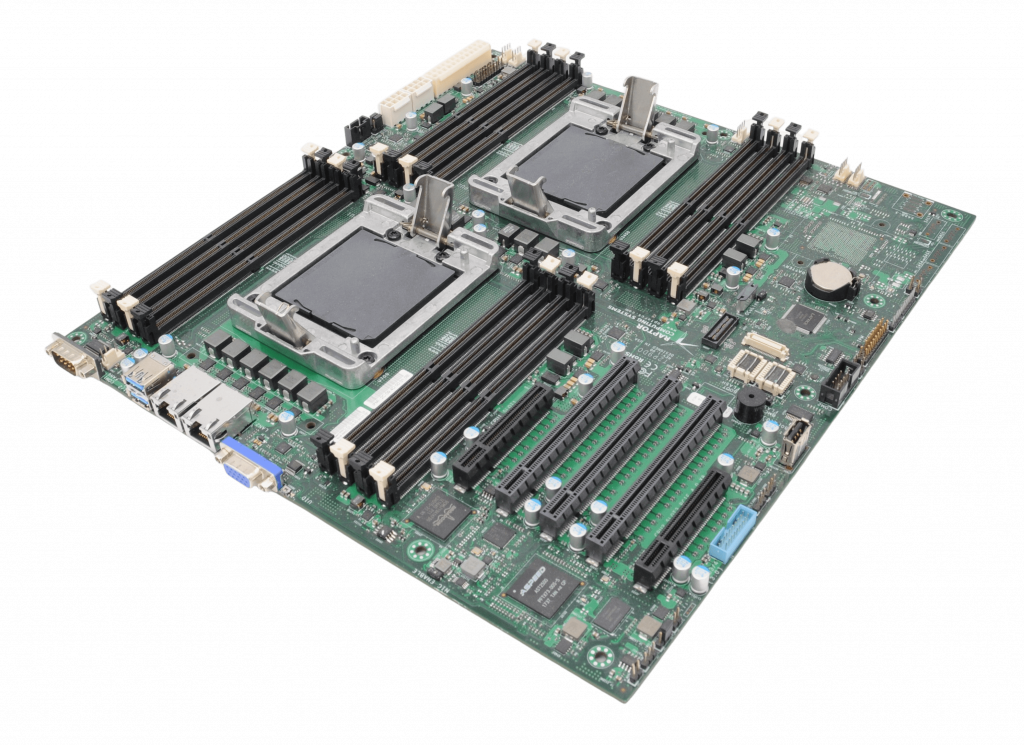
Talos II mainboard
Raptor Engineering seems to focus on machine vision. How can a company that’s focused on other activities start to develop a mainboard for POWER CPUs?
So to start with, Raptor Engineering’s public facing website was always more of a way to market technologies we’d already developed for internal purposes to the general public. Raptor Engineering is, and always has been, more of a FPGA HDL/firmware/OS level design company focused on providing those services to those that need them. Sometimes we do engage in internal development projects to showcase certain technology capabilities publicly, and one of those was the open source machine vision system you allude to earlier.
More relevant to the current technology offerings, we’ve always had some degree of focus on security and what we now tend to call “owner control”. This was borne out of several long-running research and development projects, where significant investment was made in technologies that could be years, if not decades, from practical application. As a result of this longer term focus, it was realized early on that two issues had to be addressed: something we call “continuance” (the ability to seamlessly move from one generation of technology to another as needed, with no loss of data) and also the data security / privacy aspects of keeping internal R&D results private and out of the hands of potential competition.
Around 2008-2009 we realized that a fully owner controlled system would meet all of these objectives, specifically a system over which we had full control of the firmware, OS, and application layer, a system where we could modify any aspect of its operation independently as required to support the overall objectives. There’s a true story I like to tell, which dates from the early days of the coreboot port efforts on our side to support the AMD K8 systems in use at the time: the proprietary BIOS would not, for some infurating reason, allow a boot without a CMOS battery and a keyboard connected! When spread across supercomputer racks, this was a perfect opportunity to highlight just what owner control actually meant in terms of benefit for maintainance and overall scalability – the rather obvious resulting boot problem could have been solved with a single line of code, if only there had been code available.
Once we had a completely free stack for K8/Family 10h, we continued on with AMD systems until around 2013/2014, when it became clear that AMD would force the Platform Security Processor (an unauditable low-level AMD-controlled black box that presents a severe security risk) on all CPUs going forward. This kicked off a multi-year evaluation of anything and everything that might be able to replace the x86 systems we had in terms of owner control, overall performance, and ease of administration (ecosystem compatibility). Over those years we evaluated everything from ARM to RISC-V to MIPS, and eventually settled on the then-new OpenPOWER systems as the only solution to actually check all of the boxes. The rest, as they say, is history – the nascent computer ODM arm of Raptor Engineering was spun off as Raptor Computing Systems to allow it to grown into the role demanded of it with the Talos II systems it was bringing to market.
Six years ago I first learned about the Talos plans from the Raptor Engineering website. Now all POWER-related activity is on the Raptor Computing website. How are the two related?
As of right now I am involved with both companies, my role at Raptor Computing Systems being that of CTO. Basically I help ensure RCS brings new owner-controlled, blob-free devices to market, and keep fairly close tabs on available silicon and its limitations (mostly centering around blobs) as a result. On the Raptor Engineering side I still provide specialized consulting services at a low level (typically HDL / firmware), as an example you’ll see my name here and there on projects like OpenBMC, LibreSoC, and more recently the Xen hypervisor port for POWER systems that is just spinning up now.
What do you mean by “fully owner controlled”?
An owner-controlled device is best defined as a tool that answers only to its physical owner, i.e. its owner (and only its owner) has full control over every aspect of its operation. If something is mutable on that device, the owner must be able to make those changes to alter its operation without vendor approval or indeed any vendor involvement at all. This is in stark contrast with the standard PC model, where e.g. Intel or AMD are allowed to make changes on the device but the owner is expressly forbidden to change the device’s operation through various means (legal restrictions, lack of source code, vendor-locked cryptographic signing keys, etc.). In our opinion, such devices never really left the control of the vendor, yet somehow the owner is still legally responsible for the data stored on them – to me, this seems like a rather strange arrangement on which to build an entire modern digital economy and infrastructure.
What are the main differences between the Talos II and Blackbird boards?
The Talos II is a high end full EATX server mainboard, dual socket, designed for 24/7 use in a datacenter or workstation type environment. Blackbird is a much smaller uATX single CPU system with more standard consumer-type interfaces (e.g. audio, HDMI, SATA, etc.) available directly on the mainboard.
You mention that Blackbird is consumer focused. It has three Ethernet ports, and support for remote management. Did you also have servers / appliances in mind?
Yes, there is the ability to use the Blackbird for a home NAS or similar appliance. The remote management sort of comes “for free” due to the POWER9 processor being paired with the AST2500 BMC ASIC and OpenBMC, it is more of a baseline POWER9 feature than anything else.
I know that quite a few Linux distribution maintainers now use Talos II workstations. Who else are your typical users?
In general we see the same overall subset of people that would use Linux on x86, with a strong skew toward those concerned about privacy and security and a notable (expected) cutout of the normal “content consumer” market (gamers, streaming service consumers, etc.). This holds true both for individuals and organizations, though the skew is much less notable among organizations simply because organizations are not generally purchasing desktop / server systems for gaming and media consumption!
For quite a few years POWER9 was the best CPU to run syslog-ng. What are the typical software your users are running on your POWER workstations and servers?
For the most part, the standard software you would see on comparable x86 boxes. That’s always been one of our requirements, that using the POWER system be as close to using a standard PC as possible, except the POWER system isn’t putting digital handcuffs on its owner and potentially exposing their data for monetization (or, for that matter, to more nefarious actors).
Covid affected most families and businesses around the world. How Raptor was / is affected?
We were hit hard by the shutdowns and subsequent inflation, in common with most manufacturers across the world. We did have to cancel some of the more ambitions POWER9 systems under development (Condor) as well as take on increased ecosystem maintainance load. Some of that, along with the continuous rise in cost of parts and rolling shortages of components, is reflected in the price increases and long lead times that have occured over the past couple of years.
Could you explain how Condor compares to Talos II and Blackbird?
Condor was a pre-COVID development project to try to create a high end standard ATX (vs. EATX) desktop board with OpenCAPI brought out to the appropriate connector. With COVID shutdowns, industry adoption of CXL, and more importantly POWER10 requiring closed source binaries, we didn’t see a path to actually bring the product to market post-COVID. The completed designs are sitting in our archives, but no hardware was manufactured.
The latest x86 CPUs now beat POWER9 in many use cases. Which is no wonder, these CPUs are four years old now. Is there something where POWER9 still has an advantage?
Absolutely! POWER9 still does what we originally intended it to do – it gives reasonable performance on a stable, standardized ecosystem, in a familiar PC-style form factor, using standard PC components, while providing full owner control. As a secure computing platform, both on server and desktop, it simply cannot be beat – there is literally nothing else on the market that is both 100% blob free and can be used as a daily driver for basically every task that a Linux x86 machine can be used for.
For example, I’m responding to this interview using a POWER9 workstation with hundreds of Chromium tabs open, media running, Libreoffice in the background, and am even compiling some software. If you didn’t tell me it was a POWER system, I wouldn’t be able to easily tell just from using it, yet at the same time it’s not restricting what I can do with it, attempting to monetize my data, or otherwise waiting for commands from a potentially hostile (at least to my interests) third party.
The other major selling point is that the ISA is both open and standardized. The standardization means that I could migrate this system as-is – no reinstallation – to anything that is POWER ISA 3.0 compliant, which is a huge advantage only available for the “big three” architectures (x86, SBSA ARM, and OpenPOWER). That said, being an open ISA, anyone is also free to create a new compliant CPU if they want to or need to. This neatly avoids the entire problem with x86 and ARM, where various technologies (ME, PSP, TrustZone w/ bootloader locking) could be (and eventually were) unilaterally forced onto all users regardless of the grave issues they introduce for specific use cases.
Also interesting is how the OpenPOWER ISA is governed – a neutral entity (the OpenPOWER Foundation) controls the standards documents that implementations must adhere to, and anyone is free to propose an extension to the ISA. If accepted, it becomes part of the ISA compliance requirements for a future version, and the requisite IP rights are transferred to the Foundation such that anyone is still free to implement that instruction per the specification without needing to go back and license with the entity that proposed the extension. This is a great model in my mind, it should allow the best of both worlds going forward. The standardization and compliance requirements mean we should see the same level of binary support normally expected on x86, while the extension proposal mechanism allows the ISA to morph and adapt in a backward-compatibile way in response to external needs.
The POWER 10 CPUs from IBM are manufactured with the latest technologies allowing higher performance with lower power consumption. Do you have any plans to have a new board with POWER 10 support?
At this time we do not have plans to create a POWER10 system. The reasoning behind this is that somehow, during the COVID19 shutdowns and subsequent Global Foundries issues, IBM ended up placing two binary blobs into the POWER10 system. One is loaded onto the Microsemi OMI to DDR4 memory bridge chip, and the other is loaded into what appears to be a Synopsis IP block located on the POWER10 die itself. Combined, they mean that all data flowing into and out of the POWER10 cores over any kind of high speed interface is subject to inspection and/or modfication by a binary firmware component that is completely unauditable – basically a worst-case scenario that is strangely reminiscent of the Intel Management Engine / AMD Platorm Security Processor (both have a similar level of access to all data on the system, and both are required to use the processor). Our general position is that if IBM considered these components potentially unstable enough to require future firmware updates, the firmware must be open source so that entities and owners outside of IBM can also modify those components to fit their specific needs.
Were IBM to either open source the firmware or produce a device that did not require / allow mutable firmware components in those locations, we would likely reconsider this decision. For now, we continue to work in the background on potential pathways off of POWER9 that retain full compatibility with the existing POWER9 software ecosystem, so stay tuned!
Does “potential pathways off of POWER9” have something to do with the LibreSoc project?
We’re going to remain a bit coy on this, but LibreSoC is definitely one project that would fit that requirement for at least low-end devices. In fact, you can see some of my fingerprints in the LibreSoC GIT history…
Photo credits:
Copyright: Vikings GmbH License: CC BY 4.0