
Post-Mortem: Conflict with ruby standard gems on May 10, 2022

 Member
 DimStar
openSUSE Tumbleweed – Review of the week 2022/18
Dear Tumbleweed users and hackers,
This week we ‘only’ managed to get out 5 snapshots. Over the weekend, we had a dracut submission in the mix that happened to break in a few scenarios, resulting in an incomplete initrd. Of course, we caught this in openQA and did not release those snapshots. In the end, we release snapshots 0428, 0501, 0502, 0503, and 0504.
the snapshots contained these major changes:
- Poppler 22.04.0
- cURL 7.83.0
- elfutils 0.187
- GNOME 42.1 (mutter and gnome-shell still pending)
- pipewire 0.3.51
- llvm 14.0.3
A little bit of movement in the staging areas, and an ‘old friend’ is back on the list. The current topics being worked on are:
- Mozilla Firefox 100
- Meson 0.62
- gpg 2.3.6
- Linux kernel 5.17.5
- GCC 12.1 as the default compiler
- some fdupes changes: aid with reproducible builds (order dups by name)
- Python 3.10 as default interpreter (Staging:A for the curious ones)

GNOME, curl, Fetchmail update in Tumbleweed, WSL Image Published
Snapshots of openSUSE Tumbleweed flowed out this week and the rolling release also gave Microsoft Windows users a newer Windows Subsystem for Linux image.
A newly published WSL image of Tumbleweed in the Windows Store arrived on April 25. Users of the WSL image are encouraged to leave a review on the website for the developer tool.
The latest snapshot, 20220504, included the second LLVM update this week. The updated 14.0.3 version includes Application Programming Interface and Application Binary Interface changes for the new major LLVM 14 version. An update of libpipeline 1.5.6 fixed the handling of leading whitespaces for the C library used for manipulating pipelines of subprocesses in a flexible and convenient way. An update of sqlite3 3.38.3 pushed a fix that had effected missing rows in the output due to overly aggressive optimizing the automatic-index and Bloom-filter construction that used an inappropriate ON clause term. An update of yast2-trans had multiple Japanese, Polish, Slovak, Catalan and Brazilian Portuguese translations. The GPS daemon and library that supports USB and serial GPS devices, gpsd, updated to version 3.24. The new version now works with the open-source implementation of Networked Transport of RTCM via Internet Protocol 2.0. Other packages to update in the snapshot were swtpm 0.7.3 and unixODBC 2.3.10.
The 20220502 snapshot featured changes to the English dictionary package words; it updated from version 2015.02.15 to 2020.12.07 and had various new words added from previous version updates included in the five year jump. Several RubyGems packages were updated in the snapshot. One of those was the update of rubygem-gyoku 1.4.0, which translates Ruby Hashes to XML; the update removed Rubinius support and added options to allow for prettified XML outputs. The dpdk update in the snapshot had a Peripheral Component Interconnect change that assigns a driver pointer before mapping. Other packages to update in the snapshot were fribidi 1.0.12, power-profiles-daemon 0.11 and libX11 1.8, which is supposed to resolve a number of long-standing bugs with the libxcb integration.
The 20220501 snapshot updated the rolling release with GNOME 42.1; the minor version provided translation updates, API changes and a fix for a build GTK4 option. Daniel Stenberg discussed several Common Vulnerability and Exposure fixes in the version video coveraging curl 7.83.0, which landed in the snapshot. One of those was CVE-2022-22576, which could allow for the reusing OAUTH2-authenticated connections without properly ensuring the connection was authenticated with the same credentials set for transfer. There was an update of pipewire 0.3.51 that provided improvements for codec switches when a device is disconnected and Advanced Linux Sound Architecture should now work again on 32-bits in the pipewire package; improving the handling of audio and video under Linux! GNOME’s virtual filesystem gvfs updated to version 1.50.1; it had some API changes that fixed a couple hangs and crashes. The gvfs package wasn’t the only filesystem update in the snapshot. An update of btrfsprogs 5.17 arrived in the snapshot and it had some cleanup and refactoring; the update also included improved build documentation for the rollback filesystem. A massive amount of RubyGems packages were updated in the snapshot and there were several libraries updated as well. Other notable packages to update in the snapshot were LLVM 14.0.1, nano 6.3, aws-cli 1.23.1, redis 6.2.7 and more.
People using fetchmail will have noted an update in snapshot 20220428. The update to version 6.4.30 provided security fixes, added a wolfSSL compatibility workaround and updated Serbian, Romanian, Vietnamese and Spanish translations. Package manager yarn 1.22.18 fixed some breakage in url.resolve that was introduced by Node.js 17.7.0, which caused network errors. The regressions were fixed on the 17.7.1 version of Node.js as well. Translations were made in the yast2-firstboot 4.5.2 update. The PDF rendering package poppler 22.04.0 fixed some content that, while written correctly, wasn’t displaying correctly with Adobe Reader. The package also had code improvements and fixed a few small memory leaks. OpenSSL3 gateway support was made in the update of freerdp 2.7.0. Other packages to update in the snapshot were SDL2 2.0.22, ell 0.50 and more.

Switching from wicked to NetworkManager
Intro
NetworkManager was used already a long time for the majority of openSUSE Tumbleweed installations, except for server, MicroOS and Kubic. But more and more users requested NetworkManager also for this flavours, since wicked is missing some functionality (like 5G modem support) or there are k8s network plugins, which only support NetworkManager. And since MicroOS Desktop was already using Networking, it was a logical choice to switch completly. So openSUSE MicroOS and openSUSE Kubic are now using NetworkManager as default instead of wicked since quite some time.
Configuration files
As of today there are no plans to automatically switch a system from wicked to NetworkManager. The reason is: depending on the configuration, it may be as easy as just replacing wicked with NetworkManager and everything will continue to work, or, in worst case, everything needs to be re-created from scratch for NetworkManager. There is no feature parity between this tools, so an automatic conversation may not work in all cases.
The /etc/sysconfig/network/ifcfg-* files should be compatible, but it’s not
clear if there are no corner cases where they are incompatible. A migratoin
should be pretty easy in this case. But if a native wicked xml configuration
is in use, a manual migration of the configuration has to be done.
Migration
If the network configuration got created during installation or if only
ifcfg-* files are used, the switch to NetworkManager should be very
simple. Just replace wicked with NetworkManager:
# transactional-update shell
-> zypper in --no-recommends NetworkManager
-> rpm -e wicked wicked-service
-> systemctl enable --now NetworkManager
-> exit
# reboot
Call for Volunteers to 2022 openSUSE Asia Summit
Call For Volunteers
The openSUSE.Asia Summit is an annual openSUSE Asian conference, attended by contributors and enthusiasts from all over Asia. The event focuses primarily on the openSUSE distribution and community, its applications for personal and enterprise use, and open source culture. Since 2014, openSUSE.Asia Summit events had been held offline and thus, a great opportunity for the community to meet.
However, due to COVID-19, the summit was canceled in 2020.In 2021,the online summit was organized by the team India.
What Will openSUSE.Asia Summit 2022 Be?
- openSUSE.Asia Summit 2022 is going to be a hybrid event.
- We will have centralized online summit.
- Each country/city could make different offline part.
Asian-wide part (online + offine satellite):
- Will be held around 4:00-6:00 UTC, easy to join from any Asian cities.
- keynote, invited talks etc.
Local part (online and/or offine):
- Each country/city could organize local offine event based on COVID-19 restrictions.
- Content is up to local; talks, workshops, meet up, etc.
Expectations From The Volunteers
We are looking forward to volunteers to make this event happen. Volunteers can be from anywhere this year.
The volunteers are expected to:
- Attend regular online meeting to prepare Asian-wide part. (currently Friday 13:00 UTC, with Slack chat)
- Organize local event, adjust schedule with Asian-wide part.
- Help on online conference, and coordinate the meeting schedule with other volunteers. host offine event by talking to Asian committee if you need any support.
If you are interested in volunteering, please send an email to opensuseasia-summit@googlegroups.com with your short introduction by Monday, May 30th, 2022.

A local mirror for openSUSE users in Mauritius 🥳
When I attended the openSUSE Asia Summit in 2019, I asked my friends in Indonesia about their experience in setting up the mirror for the Indonesian users.
Earlier this year, when Luboš Kocman visited Mauritius, we spoke about it again.
Then, a few weeks ago, I heard from cloud.mu, who were willing to sponsor a server for mirror purposes. That was just perfect timing. I had started discussions with an ISP but then cloud.mu was not just willing to provide the server & bandwidth resources but their speed to deploy and assist was even more commendable.
Once the server was ready, the next step was to contact openSUSE admins to update the DNS records for opensuse.mu. I sent my request to the openSUSE Board for the purchase of the domain a long time ago. Until now I used to run a small blog for openSUSE tips & tutorials on opensuse.mu. The domain is owned by SUSE and mananged by the openSUSE admins, i.e the Heroes team.
After a few trials to sync from rsync.opensuse.org and other mirrors closer to Mauritius, I contacted the Heroes to get access to stage.opensuse.org, the restricted rsync server of openSUSE. Then, it was a matter of a few days to sync all that content.
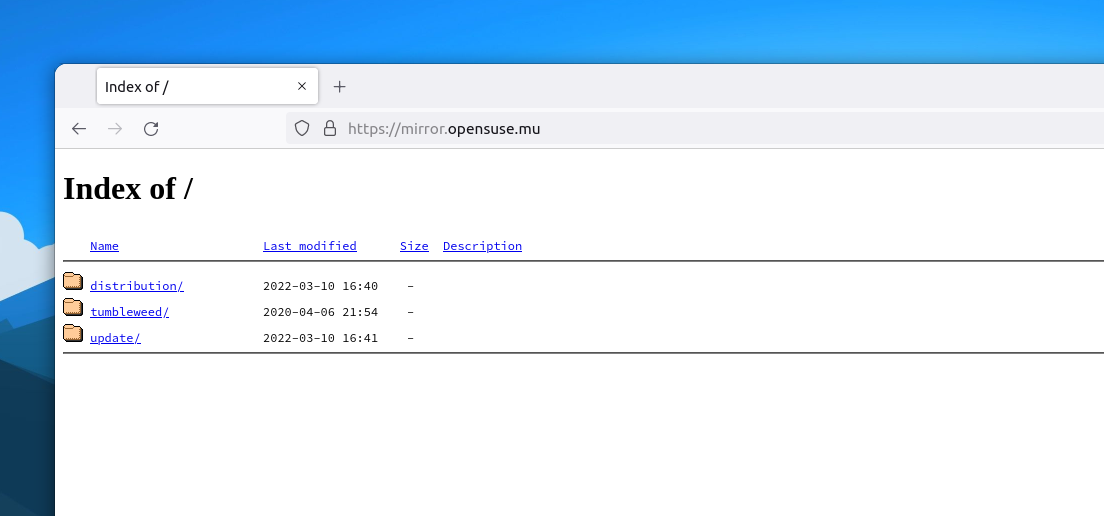
Finally, the openSUSE mirror for Mauritius was ready.
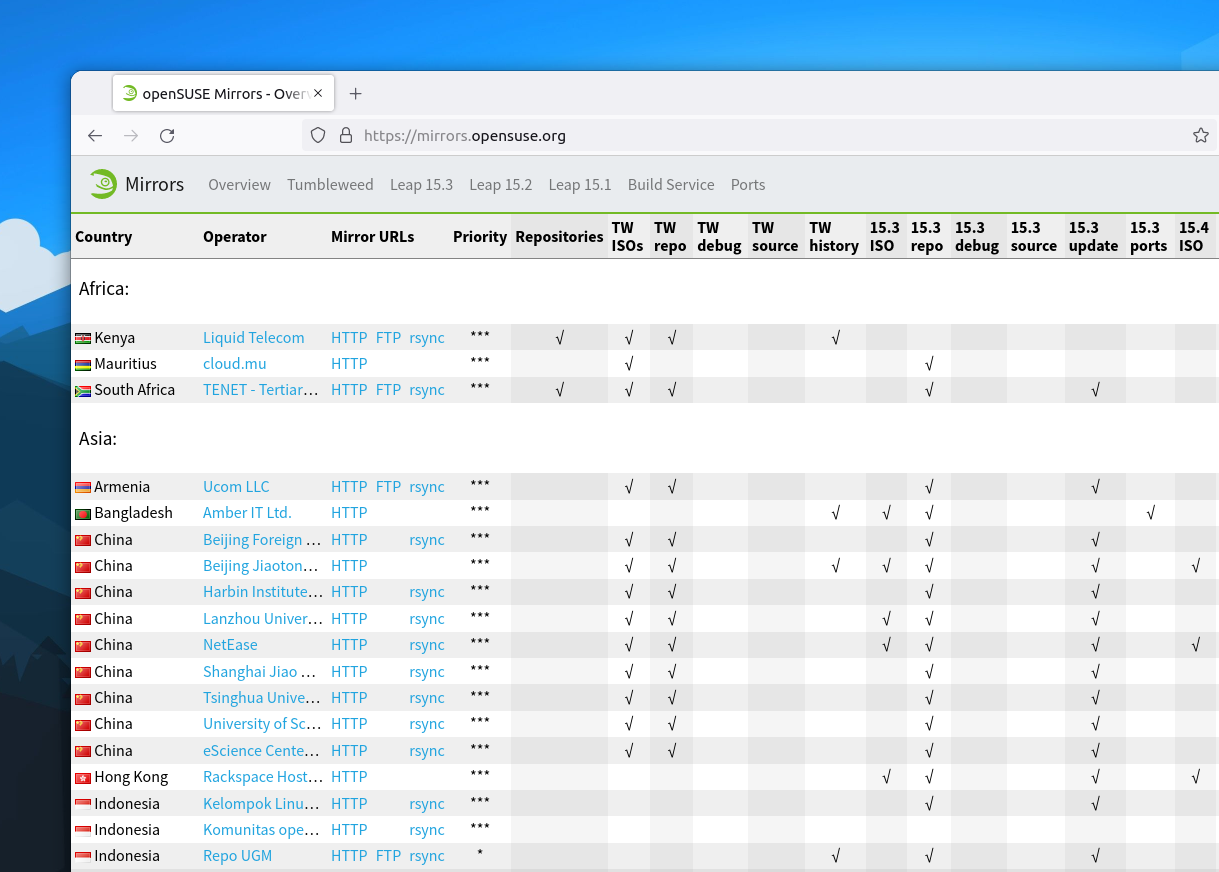
Compared to other regions, where there are several mirrors in the same country, the whole African continent had only two openSUSE mirrors until now. One managed by TENET (Tertiary Education and Research Network) in South Africa and the other one by Liquid Telecom in Kenya. Mauritius joins that list as the third mirror in the African region, thanks to cloud.mu.
How to switch to the openSUSE Mauritius mirror?
Switching to the Mauritian mirror is easy. First, remove the current repos that you have by either running zypper lr to identify them and zypper rr repo-name to remove the repos, or go to /etc/zypp/repos.d and remove the .repo files of the openSUSE repositories. If you have repos for other applications, e.g Google Chrome, VS Code etc, leave them.
Then, if you're using Leap, you can set up the Leap 15.3 OSS, Non-OSS and Update repositories.
sudo zypper ar https://mirror.opensuse.mu/distribution/leap/15.3/repo/oss openSUSE-Leap-OSS

sudo zypper ar https://mirror.opensuse.mu/distribution/leap/15.3/repo/non-oss openSUSE-Leap-Non-OSS

sudo zypper ar https://mirror.opensuse.mu/update/leap/15.3/oss openSUSE-Leap-Update-OSS

sudo zypper ar https://mirror.opensuse.mu/update/leap/15.3/non-oss openSUSE-Leap-Update-Non-OSS
If you're using Tumbleweed, add the following repositories.
sudo zypper ar https://mirror.opensuse.mu/tumbleweed/repo/oss openSUSE-Tumbleweed-OSS

sudo zypper ar https://mirror.opensuse.mu/tumbleweed/repo/non-oss openSUSE-Tumbleweed-Non-OSS

sudo zypper ar https://mirror.opensuse.mu/update/tumbleweed openSUSE-Tumbleweed-Update-OSS
The mirror contains files for the x86_64 architecture only. If there is a need for other architectures, I'll do the necessary. Ping me on social media or send a mail to ishwon@opensuse.org.
Analyzing Apache HTTPD logs in syslog-ng
Recently, I started my own blog, and as Google Analytics seems to miss a good part of visitors, I wanted to analyze my web server logs myself. I use syslog-ng to read Apache logs, process them, and store them to Elasticsearch. Along the way, I resolve the IP address using a Python parser, analyze the Agent field of the logs, and also use GeoIP to locate the user on the map.
From this blog, you can learn how I built my configuration. Note that once I was ready, I realized that my configuration is not GDPR compliant, so I also show you which parts to remove from the final configuration :-).
Read the rest of my blog at https://www.syslog-ng.com/community/b/blog/posts/analyzing-apache-httpd-logs-in-syslog-ng
Bazsi, founder of the syslog-ng project is looking for your feedback. He writes:
“In the past few weeks I performed a round of discussions/interviews with syslog-ng users. I also spent time looking at other products and analyst reports on the market. Based on all this information I’ve come up with a list of potential strategic directions for syslog-ng to tackle. Focusing on these and prioritizing features that fall into one of these directions ensures that syslog-ng indeed moves ahead.”
- The Edge
- Cloud Native
- Observability
- Application awareness
- User friendliness
You can read the rest if his blog and provide him (and the syslog-ng team) with feedback at https://syslog-ng-future.blog/syslog-ng-on-the-long-term-a-draft-on-strategic-directions/

syslog-ng logo
Sudo for blue teams: how to control and log better
Sudo had many features to help blue teams in their daily job even before 1.9 was released. Session recordings, plugins and others made sure that most administrative access could be controlled and problems easily detected. Version 1.9 introduced Python support, new APIs, centralized session recordings, however some blind spots still remained. Learn how some of the latest sudo features can help you to better control and log administrative access to your hosts. You will learn about JSON logging in sudo, chroot support, logging sub-commands, and how to work with these logs in syslog-ng.
You can read the rest of my blog at https://www.sudo.ws/posts/2022/05/sudo-for-blue-teams-how-to-control-and-log-better/

Sudo logo

YaST Development Report - Chapter 3 of 2022
These last few weeks have been very intensive days in the YaST team. Significant changes are coming to the SUSE and openSUSE worlds. Have you heard about SUSE ALP (Adaptable Linux Platform)? We are quite active in some discussions, research and workgroups about that topic. But, of course, we are continuing to work hard on YaST and on our D-Installer side project. So, let’s go with a summary of the most interesting features and fixes.
One-click Migration
Since openSUSE Leap 15.3, binary RPMs are shared between SUSE Linux Enterprise Server 15 and openSUSE Leap. Closing the gap between openSUSE and SUSE makes feasible the migration from openSUSE Leap to SLE without reinstalling the system completely. Migrating the system takes some steps, and sometimes manual intervention is required when the process goes wrong. Now, YaST offers a new client that simplifies the migration from openSUSE Leap to SLE, allowing to rollback the system in case that something fails.
Systemd and YaST Services
YaST provides three systemd services: YaST2-Firstboot.service, YaST2-Second-Stage.service and autoyast-initscripts.service. Some adjustments in the dependencies of those services were needed to make them to work correctly, see for example this and this. Adapting systemd dependencies is not a trivial task. There are always edge scenarios to consider, and we plan to continue working in this area.
Download and Installation Progress
While installing packages, YaST showed a dialog with quite some information about the steps being performed. For example, the dialog provided information about the downloading progress of each package, what package is being installed, etc. But the new version of libyzpp deployed in SLE 15 SP4 is able to perform operations in parallel such as downloading, installing or verifying packages. Keeping that rich progress dialog while performing operations in parallel was very challenging. After evaluating different options, finally it was decided to significantly simplify the progress dialog, making it compatible with parallel operations. Now, the dialog only contains a progress bar with the information about the total amount of packages pending to install and the download progress. The dialog also shows a secondary progress bar in a popup for some theoretically quick tasks taking longer than they should.
Other Interesting Improvements
-
Making AutoYaST more robust when setting the owner of files for the autoinst_files step.
-
Improvements in the way YaST imports users from other systems.
-
Packages yast2-nis-server and yast2-nis-clients were dropped from openSUSE Tumbleweed, although they are still maintained for openSUSE Leap and SUSE SLE.
-
YaST was adapted to call external commands in a more robust way. Research and more details can be found here.
-
AutoYaST does not export the resume kernel parameter anymore, and it only imports such a parameter if the indicated device exists. The AutoYaST documentation was extended to explain this new behavior.
-
Fixed missing help texts in the YaST Expert Partitioner.
-
Generating translations from XML files is correctly done now.
-
YaST does not fail anymore when using the installation media as part of the target system. This implies changes in different parts of YaST, like this, this or this.
-
The cockpit-wicked module was adapted to the latest changes in wicked for managing wireless network configurations.
D-Installer
Little by little we are able to invest more resources into our D-Installer side project. We are closer to finish the first iteration of our roadmap. Here is a summary of the main features developed since the first public release:
- Add reboot button.
- Ask for confirmation before installing.
- D-Bus API to ask questions to clients.
- Unmount target disk after installing.
- Fix language selector.
- Convert D-Installer into a real Cockpit module.
- Add support for yaml file configuration.
- Add support for remote installation.
Our beloved ruby-dbus gem also keeps evolving, supporting all the new features we demand for D-Installer. If you are interested in what is new in this great library, please have a look at its latest pull requests. And of course, we encourage you to give D-Installer a try. You can easily test it thanks to the D-Installer live image. We would like to know your opinion.
Please, remember that D-Installer is an experimental installer and it is still under development. We recommend to use a virtual machine to prevent any possible data loss.
Keep in Touch
As commented, we are very busy lately and our blogging cadence has been affected. We will do our best for blogging as frequently as possible with all the news from the YaST land. Meanwhile, do not hesitate to reach us in the usual channels: yast-devel and factory mailing lists at openSUSE, and at the #yast channel at libera IRC. Or even directly commenting on GitHub, whichever suits you better. See you soon and have a lot of fun!

Paying technical debt in our accessibility infrastructure
This is somewhat of an extended abstract for the talk I want to give at GUADEC.
Curently, very few people work on GNOME's accessibility infrastructure, which is basically what the free desktop ecosystem uses regardless of GUI toolkit. After Oracle acquired Sun Microsystems in 2010, paid work on accessibility virtually disappeared. There is little volunteer work on it, and the accessibility stack has been accumulating technical debt since then.
What is legacy code? What sort of technical debt is there in our accessibility stack?
-
It has few or no tests.
-
It does not have a reproducible environment for building and testing.
-
It has not kept up with the rest of the system's evolution.
-
Few people know how it works.
It's a vicious circle, and I'd like to help break the loop.
Quick reminder: What does the accessibility infrastructure do?
An able-bodied person with good eyesight uses a desktop computer by looking at the screen, and interacting with things via the keyboard and mouse. GUI toolkits rely very heavily on this assumption, and hardware does, too — think of all the work expended in real-time flicker-free graphics, GPUs, frame-by-frame profilers, etc.
People who can't see well, or at all, or who can't use a regular keyboard in the way applications require them to (only got one hand? try pressing a modifier and a key at the opposite ends of the keyboard!), or who can't use a mouse effectively (shaky hands? arthritis pain? can't double-click? can't do fine motor control to left-click vs. right-click?), they need different technologies.
Or an adapter that translates the assumptions of "regular" applications into an interaction model they can use.
The accessibility stack for each platform, including GNOME, is that kind of adapter.
In subsequent blog posts I'll describe our accessibility infrastructure in more detail.
Times change
I've been re-familiarizing myself with the accessibility code. The last time I looked at it was in the early 2000s, when Sun contracted with Ximian to fix "easy" things like adding missing accessible roles to widgets, or associating labels with their target widgets. Back then everything assumed X11, and gross hacks were used to snoop events from GTK and forward them to the accessibility infrastructure. The accessibility code still used CORBA for inter-process communication!
Nowadays, things are different. When GNOME dropped CORBA, the accessibility code was ported in emergency mode to DBus. GTK3 and then GTK4 happened, and Wayland too. The accessibility infrastructure didn't quite keep up, and now we have a particularly noticeable missing link between the toolkit and the accessibility stack: GTK removed the event snooping code that the accessibility code used to forward all events to itself, and so for example not all features of Orca (the screen reader) fully work with GTK4 apps.
Also, in Wayland application windows don't know their absolute position in the screen. The compositor may place them anywhere or transform their textures in arbitrary ways. In addition, Wayland wants to move away from the insecure X11 model where any rogue application can set itself up as an accessibility technology (AT) and sniff all the events in all applications.
Both our toolkit infrastructure and the world's security needs have changed.
What I have been doing
I've been re-familiarizing myself with how the accessibility stack works, and I hope to detail it in subsequent blog posts.
For now, I've done the following:
-
Add continuous integration to at-spi2-core. Three of the basic modules in the accessibility infrastructure — at-spi2-core, at-spi2-atk, pyatspi2 — didn't have any CI configured for them. Atk has CI, Orca doesn't, but I haven't explored the Orca code yet.
-
I intend to merge at-spi2-core/atk/at-spi2-atk/pyatspi2 into a single repository, since they are very tightly coupled with each other and it will be easier to do end-to-end tests if they are in the same repository. Currently those tests are spread out between at-spi2-atk and pyatspi2.
-
Made the README in at-spi2-core friendlier; turned it into Markdown and updated it for the current state of things.
-
Did a bit of refactoring in at-spi2-core after setting up static analysis in its CI.
-
Did a bit of exploratory refactoring there, but found out that I have no easy way to test it. Hence the desire to make it possible to test all the accessibility code together.
-
Fixed a crash in GTK when one uses gnome-text-editor with the screen reader on. (merge request awaiting review)
-
Currently trying to debug this missing annotation in gnome-shell.
A little call for help
Is anyone familiar with testing things in Gitlab that need to be launched by dbus-broker? I think this may require either running systemd in the CI container (a cumbersome proposition), or using a virtual machine with systemd instead of a container. Anyway — if you care about Fedora or dbus-broker, please help.