
 Member
 CzP
CzPsyslog-ng 4 theme: typing
As explained in my previous post, we do have some features already in mind for syslog-ng 4, even though the work on creating a long term set of objectives for the syslog-ng project is not finished yet. One of the themes that I have working code for already, is typing.
syslog-ng traditionally assumes that log data, even if it comes in a structured form (like RFC5424 structured data or JSON) is primarily textual in nature. For this reason, name-value pairs in syslog-ng are text values just as the log message as a whole. The need for typing however came up previously, most notably in cases where we sent data to a consumer that supported typing, such as:
- Elastic like other similar consumers use JSON, and attributes can have non-text types
- SQL columns have types
- Riemann metrics can have types
Read the rest of the blog at https://syslog-ng-future.blog/syslog-ng-4-theme-typing/

syslog-ng logo
Sudo 1.9.10: using regular expressions in the sudoers file
It has been possible to use wildcards in the sudoers file for many years. This can make configuration easier and more flexible, but it also introduces problems of its own. Regular expressions, introduced in in sudo 1.9.10, allow you to create more fine grained rules. From this blog you will learn about some of the problems when you use wildcards in your sudoers file, and how using regular expressions can resolve those problems.
Read the rest of my blog at https://www.sudo.ws/posts/2022/03/sudo-1.9.10-using-regular-expressions-in-the-sudoers-file/

Sudo logo
Syslog-ng 3.36 news: better TLS 1.3, basic MacOS support, and many more
Version 3.36 of syslog-ng brings us many interesting new features. There is now basic support for system() source on MacOS, TLS 1.3 ciphers can now be restricted, TLS keylog support was added, symlink creation to the latest file, and there are many new possibilities in syslog parsing.
From this blog, you can learn about some of the new 3.36 features, and we will test symlink creation, which is a community-contributed feature.
Development of syslog-ng 4.0 is already under way, and syslog-ng 3.36 already contains some under-the-hood changes for 4.0. You can learn more about this topic from Balázs Scheidler’s latest blog. Balázs is the original author and still an active developer of syslog-ng: https://syslog-ng-future.blog/syslog-ng-future-the-path-to-syslog-ng-4/
Read the rest of my blog at https://www.syslog-ng.com/community/b/blog/posts/syslog-ng-3-36-news-better-tls-1-3-basic-macos-support-and-many-more
syslog-ng logo
Enabling Calc support for 16384 columns by default
Last couple of weeks I have been working on the 16k columns support in Calc. There's been a lot of work on this already by Noel and others, but so far this has been hidden behind the experimental option, and normally documents open only with the "normal" 1024 columns support. The goal of this work is to finish the 16k support stable enough for it to be the default, so that people who need this many columns can finally get them without any complications.
As of now all Calc tests pass with the default switched to 16k, and I've also dealt with all the known problems from tdf#133764 (minus few rare corner cases that I can deal with later). But I'm pretty sure there are more hidden problems lurking, either crashes because of incorrect bounds checking, or performance problems when some code suddenly deals with 16x more columns. So the next step is to enable this by default in master and collect compl... feedback from guin... testers :).
I have the change already in Gerrit and expect to push it later today. If you'll be lucky unlucky noticing any problems, please report them in bugzilla and set your bugreport to block tdf#133764, and I'll sort it out. One of the things that remains to be decided is how to handle this from the users point of view. So far it seems to it'll be fine to just load everything in 16k without saying anything, but a part of collecting feedback is checking whether and how much backwards compatibility handling would be needed. If all goes well, and so far I don't see why it shouldn't, 7.4 will ship with 16k columns being the default.
Just to be clear, this is only about columns, not rows. The experimental option also changes rows from 1048576 to 16777216, but that's not focus of the work, so the default will stay at 1048576. First of all, Excel also only supports 1m rows, so there's not(?) such a demand for it, and it'll also require more work (16m rows is a lot of pixels, and it doesn't fit into 32bits).
This work is funded/sponsored by DEVxDAO as part of its mission to support open source and transparent research and development of emerging technologies and frameworks.
Fun meaningless fact: Column 16384 is called XFD.

Commodore 64 Impostor | My Retro Computer mini-ITX Computer

openSUSE Selected as Mentor Organization
The openSUSE Project has been selected as a Google Summer of Code 2022 mentor organization.
Being selected as one of the 203 open-source projects for GSoC gives openSUSE mentors an opportunity to guide aspiring student developers looking to gain experience with open-source projects.
openSUSE’s dedicated website 101.opensuse.org offers several projects for GSoC students. Projects available this year include quality assurance testing project openQA, input framework ibus, user-space implementation PRoot and configuration management project Uyuni.
Projects listed on the mentoring website include working with programming languages like Python, Perl and c/c++.
The list of those projects are:
- Dynamic detection of error conditions from openQA test results
- Container-based backend for openQA
- iBus customized theme enhancement
- A new Test Framework for Salt
- Build Uyuni Client Tools packages for Debian with debbuild
- Convert Systems list pages from JSP to ReactJS
- Implementing libseccomp in PRoot
- Root / CARE and Intel SGX
- Unprivileged containers with PRoot
As a mentoring organization, eligible students will have an opportunity between April 4 and April 19 to submit an application proposal to the GSoC program site. Students should interact with openSUSE mentors through github via comments on the projects. The program is open to university students aged 18 or over.
The annual international program focuses on bringing student developers into open source software development. Students work with open-source organizations on a 10-week programming project during the school break.
Interested students are asked to visit the mentoring website and Google Summer of Code website for more information about the projects and the application process.
The openSUSE Project has participated in several GSoC events since 2006.

What You Watch Is What You Get

openSUSE Leap 15.4 Beta testing
I tested the Leap 15.4 Beta GNOME Desktop today on a Lenovo ThinkPad X250. The installation went through without any hiccup and I documented every step of the installation in a Twitter thread.
One thing that I noticed was new in the installer is the icon to change the color theme during installation. This was not present when I tested the Leap 15.4 Alpha distribution.
On the top-right corner of the installer there is a moon icon which can be clicked to select a different theme for the installer. Five themes are available which contain three dark and two light variants.

The default theme is set to the installation.qss style sheet.
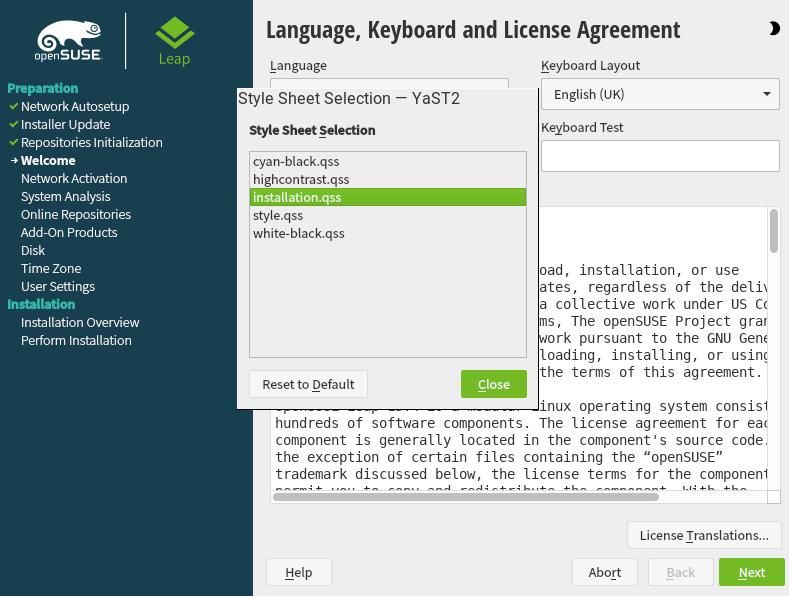
The cyan-black , highcontrast and white-black are dark themes while installation and style are light themes.
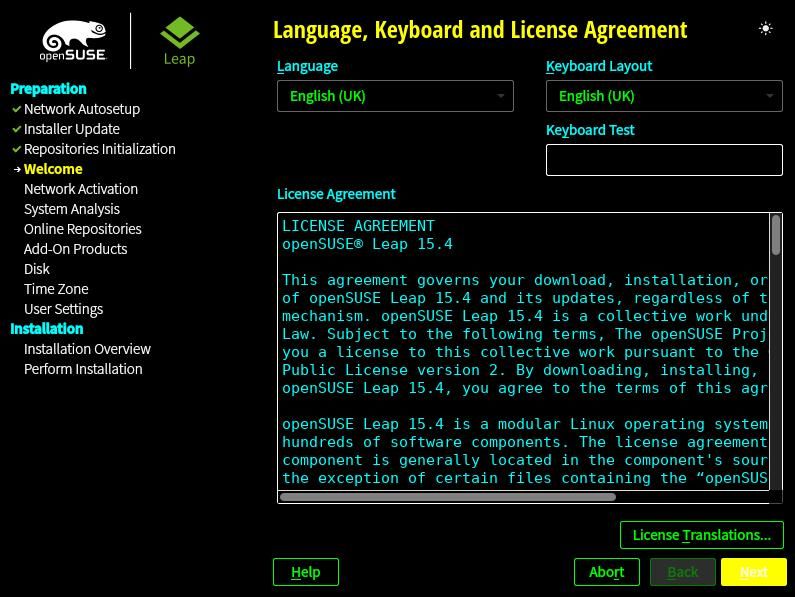
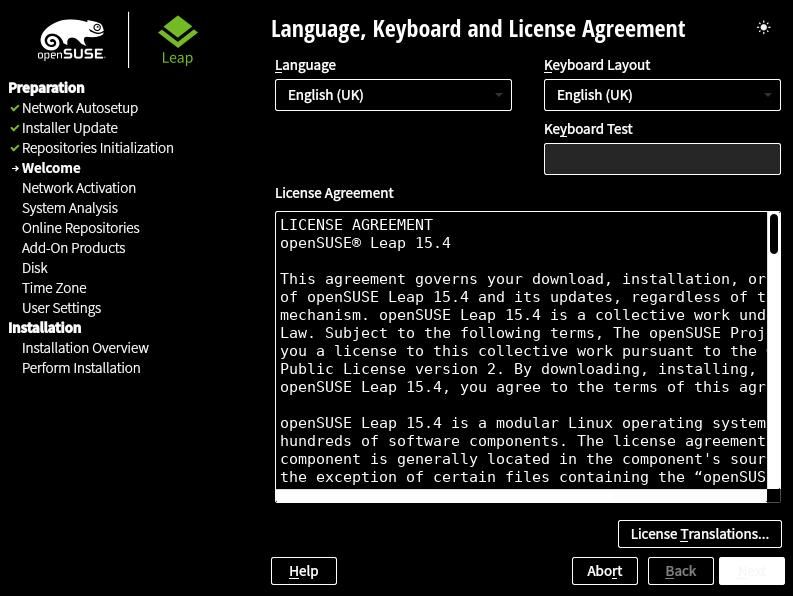
I took the above screenshots using the Leap 15.4 Beta image on VirtualBox to get clear images. In the Twitter thread I took pictures of the installation process and the theme selection on a laptop.
The installer light and dark themes. pic.twitter.com/uEI6OJ2sIz
— Ish Sookun (@IshSookun) March 5, 2022
In either installation I did not encounter any bug while setting up GNOME Desktop with defaults.
openSUSE Tumbleweed – Review of the week 2022/09
Dear Tumbleweed users and hackers,
Another week, filled with snapshots, is coming to an end. Tumbleweed has been rolling full speed ahead, bringing you 6 snapshots in 7 days (0225, 0226, 0227, 0228, 0301, and 0302).
The snapshots contained, amongst others, these changes:
- ModemManager 1.18.6
- Mesa 21.3.7
- freerdp 2.6.0
- Nodejs 17.5.0
- Linux kernel 5.16.11
- Python 3.6 interpreter has been removed for good now
- firewalld 1.1.0
- screen 4.9.0: CVE-2021-26937: possible denial of service via a crafted UTF
- NetworkManager 1.36.0
- pipewire 0.3.47
- Ruby 3.1.1
With all these changes done, the staging projects are almost empty now. OBS is getting bored. Keep your changes coming! Anyway, ‘almost’ empty is key here: we have these changes currently to be tested:
- KDE Gear 21.12.3
- Poppler 22.03.0: poppler being poppler, breaking left and right (Staging:M)
- Rust 1.59
- go 1.16.15 & 1.17.8
- Binutils 2.38 (Staging:A)
- GCC 12

Fix the "Wrong version of perltidy" issue in tools/tidy
A commen error when running tools/tidy in the openSUSE/SLES tests repository for openQA is the following error:
Wrong version of perltidy. Found '20211027', expected '20211029'.
This indicated a mismatch of the found vs. expected version of perltidy and the tidy script aborts to avoid inconsistent formatting between your PR and the CI pipeline. In Perl this is unfortunately necessary, as often a new version of perltidy formats the code differently.