
Meetup Will Discuss Survey Results, Project Improvements
The openSUSE Project welcomes our followers to participate in two planned meetups to discuss results from the End of the Year Community Survey on Jan. 23 and Jan. 30.
Both sessions will start at 13:00 UTC on openSUSE’s Jitsi instance and go for 1:30 hours.
Members of the “let’s improve the openSUSE learning experience” initiative will share results and analysis from the survey.
The meetup is designed to discuss ways the community can improve upon areas identified in the results as either a weakness or needing improvement.
Topics that will be discussed in the Jan. 23 session include:
- Address pain points
- Knowledge transfer
- Promotion (How are they learning about projects)
Topics to be discussed in the Jan. 30 session include:
- Tools driving switchers to openSUSE (Where are users coming from)
- Discuss flagship project/s
- Expanding global users
- Increasing diversity
- Increase usage with people under 34
The meetup will take place at https://meet.opensuse.org/EOY2020.
More details about the End of the Year Community Survey results can be found on the openSUSE Wiki.

 hpj
hpjChafa 1.6.0: Wider
Here's another one from the terminal graphics extravaganza dept: Chafa 1.6.0 brings fullwidth character support, so in addition to the usual block elements and ASCII art, you now get some mean CJK art too. Or grab as many fonts as you can and combine all of the Unicode into one big glorious mess. Chafa can efficiently distinguish between thousands of symbols, so it also runs fast enough for animations — up to a point.
Since some users want this in environments where it's not practical to build from source or even to have nice things like GLib, I've started adding statically linked builds. These are pretty bare-bones (fewer image loaders, no man page), so look to your steadfast distribution first.
Speaking of distributions, a big thank you to the packagers. Special thanks go to Florian Viehweger for getting in touch re. adding it to OpenBSD ports, and Mo Zhou (Debian), Michael Vetter (openSUSE), Herby Gillot (MacPorts), @chenrui and Carlo Cabrera (Homebrew) for getting 1.6 out there before I could even finish this post.
So what's it look like?
Obviously if you just want as faithful a reproduction as possible, stick with the default block elements or sixels. That said, fullwidth characters open up some new artistic possibilities.
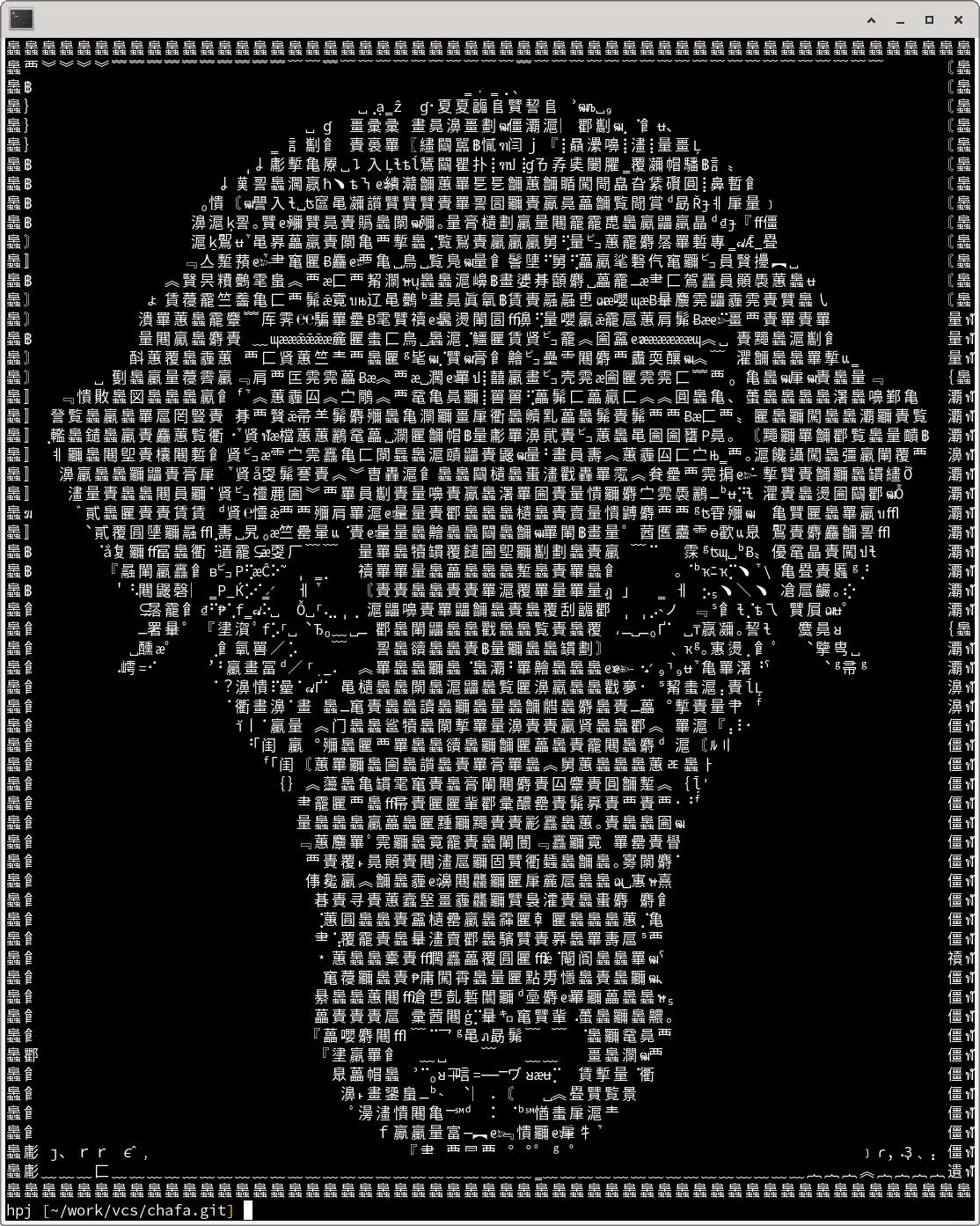
Above, a rendering of Dog's Head (1920) by Julie de Graag, digitally enhanced by Rawpixel. It was generated with the following command line:
chafa --glyph-file /usr/share/fonts/truetype/SourceHanSansCN-Normal.otf \
  --glyph-file /usr/share/fonts/truetype/SourceHanSansJP-Normal.otf \
  --glyph-file /usr/share/fonts/truetype/DroidSansThai.ttf \
  --glyph-file /usr/share/fonts/truetype/SourceCodePro-Regular.ttf \
  --symbols 0..fffff-block-border-stipple-dot-geometric \
  -c none -w 9 dog.png
Although I'd like to include a moderately large built-in selection of fullwidth symbols in a future release, for now you must load fonts with --glyph-file in order to achieve this effect. You also need to enable the Unicode ranges you want and curtail the use of block and border elements with --symbols. The latter is necessary because block elements produce more accurate results and will otherwise pretty much always come out on top during error minimization.
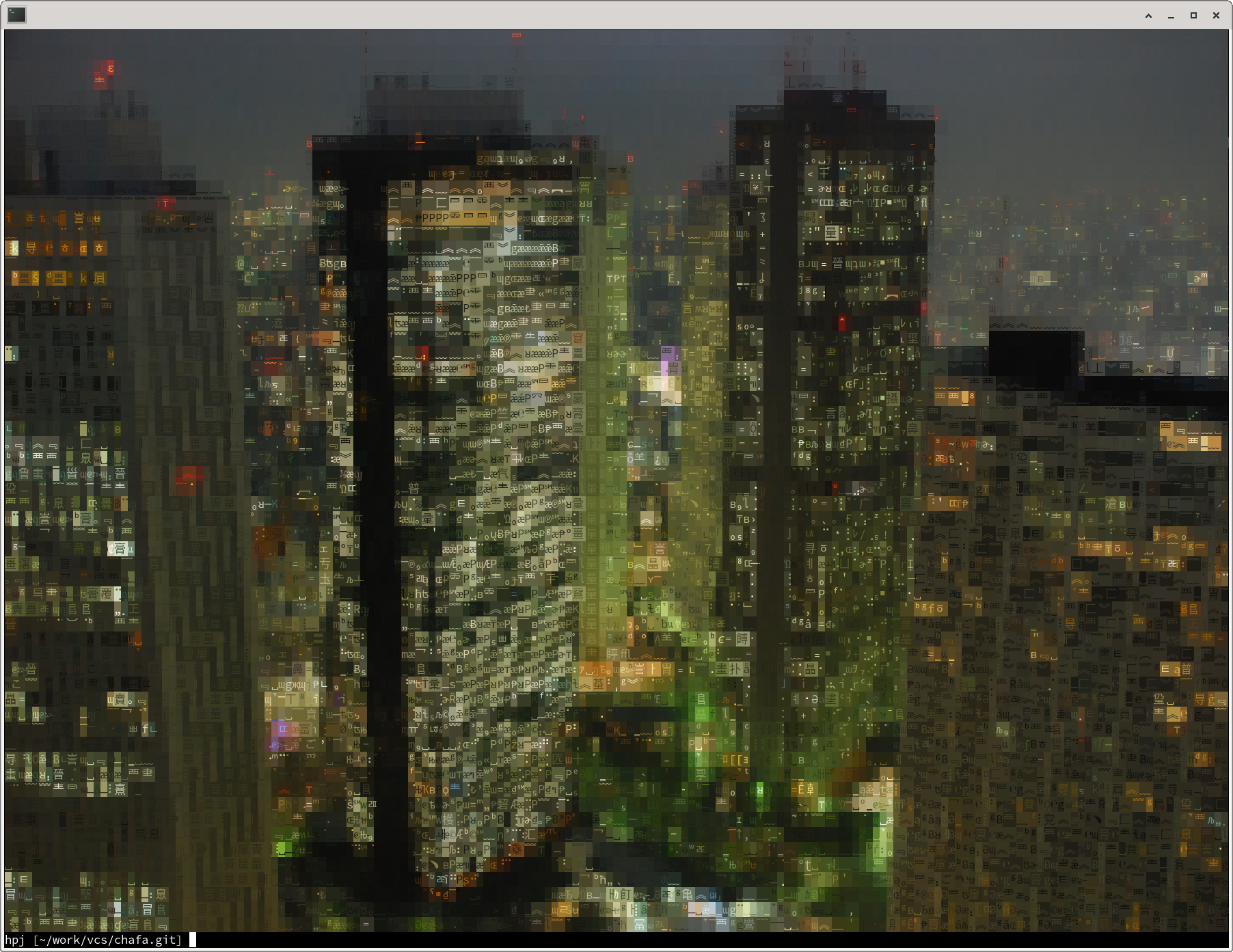
This is a rendering of Shinjuku Skyscrapers, CC-BY-SA Wilhelm Joys Andersen. I used the same set of options to produce it, but left out -c none, resulting in 24-bit color — the default under VTE.
A side effect of allowing lots of color variation is fewer wide characters. This makes sense considering that they force a pair of cells to have the same color, which is often less accurate than two narrow characters with different colors.
彡 (._.) ( l: ) (.-.) ( :l )
Like many subjects that look simple at first, terminal graphics makes for a surprisingly deep rabbit hole to be tumbling into. Chafa now spans the gamut from the most basic monochrome ASCII art to fullwidth Unicode, 24-bit color and sixels, and there's still a lot that can be done to improve it. I will be doing so… slowly.
If you want to help, feel free to send pull requests or file any issues you find. I think it's also at the point where you can achieve various surprising effects, so if you manage to get something particularly cool/sick/downright disgusting out of it, just lob it in my general direction and maybe I'll include it in a future gallery.

 Member
openSUSE Smiles

openSUSE Tumbleweed – Review of the week 2021/02
Dear Tumbleweed users and hackers,
Somewhere, I read, 2021 will be the year of the Linux desktop. Do you agree? Let’s make it the year of Tumbleweed on the desktop. In any case, Tumbleweed has been steadily rolling with 5 snapshots published during this week (0107, 0108, 0110, 0111, and 0113).
The major changes included:
- Plasma 5.20.5
- KDE Frameworks 5.78.0
- KDE Applications 20.12.1
- IceWM 2.0.0
- Xfce 4.16.0
- Mozilla Firefox 84.0.2
- Linux kernel 5.10.5
- RPM 4.16.0
- brp-check-suse: a bug fix in how it detected dangling symlinks; some packages might no fail to build, but they had dangling symlinks before which we just did not detect.
- permissions package: preparation for a full /usr merge
So, quite a list that accumulated, in just a week. The stagings are getting lighter, but are far from done. Currently, these are the major changes being prepared:
- Multiple versions of python 3 parallel installable. Adding to python 3.8, version 3.6 will be reintroduced. Python modules will be built for both versions – Should become part of Snapshot 0115
- Tcl/tk 8.6.11
- icu 68.1: breaks a few things like PostgreSQL. Staging:I
- Bash 5.1
- Rust 1.49: breaks librsvg
- Autoconf 2.70: breaks quite a few packages. The list of failures has been noted on the current SR; no active staging left for it (no progress in the last days/weeks on it)
- openssl 3: no progress, Staging:O still showing a lot of errors.
Xfce, KDE Packages Flood This Week’s Tumbleweed Snapshots
A large quantity of packages from both Xfce and KDE projects flowed into openSUSE Tumbleweed snapshots this week.
Hundreds of packages updated in the rolling release and KDE’s Frameworks, Applications and Plasma packages were the most prevalent of software package updated throughout the week.
KDE Frameworks 5.78.0 arrived in the latest 20210113 snapshot. Frameworks added a new compass action icon in the Breeze Icons and KConfig fixed windows being inappropriately maximized on launch. User Interface framework Kirigami fixed some visual bugs for avatar controls and KDE’s data accessing package KIO fixed a shortcut reset button and the middle-click handling with the url navigation menu. Frameworks packages weren’t the only packages to update in the snapshot; the update to the 1.12.3 version of ibus-table provides a new setup tool that allows keybindings to be configured with a GUI. Fingerprint reader package libfprint fixed issues that caused problem on non-x86 machines in its 1.90.6 version update. The last package to be included in the update was the parser library mxml 3.2, which fixed handling of elements that start with a Unicode character and fixed the handling of unquoted attribute values that start with Unicode.
The Xfce 4.16 desktop and many of its complementary packages arrived in snapshot 20210111 and people are excited about this release. There are new icons and color palettes for unifying a style and look that will make people ask what desktop environment is that. The panel received some updates with a new status tray plugin and the darkmode looks sleek. The thunar file manager can easily pause during a file transfer and the release looks topnotch. ImageMagick jumped some minor versions to 7.0.10.55 and reverted changes to the default max width/height of an image. Mozilla Firefox fixed a Common Vulnerabilities and Exposure involving a COOKIE-ECHO. The compiler plugin for clang to understand Qt semantics, clazy 1.9 is now back to being 4x faster. Flatpak 1.8.4 fixed support for PowerPC. Several other packages were updated in the snapshot to include openvpn 2.4.10, mugshot 0.4.3, qpdf 10.1.0 and Xfce’s mousepad 0.5.1.
KDE’s Applications 20.12.1 arrived in snapshots 20210110 and 20210108. The update fixed a crash when a device with a capacitybar is dragged in the file manager Dolphin. KDE’s CD and DVD application K3b fixed an infinite loop when clearing a DVD Video project. Video editor Kdenlive had multiple fixes to include some regressions in the keyframe move option while editing.
Snapshot snapshots 20210110 had an update of rpm 4.16.0, which provided multiple documentation updates and added new version parsing and comparison API in C and Python. With the update of smartmontools 7.2, smartd now resolves symlinks before device names are checked for duplicates. Chinese pinyin package libpinyin updated to version 2.6.0 and the low-level crypto library libnettle 3.7 added the password-hashing function bcrypt.
Besides the 20.12.1 Applications update in snapshot 20210108, there were several more packages to land in this snapshot. The new major version of icewm 2.0.0 fixed horizontal scrolling in the icehelp. The windows manager also removed an unwanted separator in the taskbar and added support for the Imlib2 image rendering engine as an alternative for the gdk-pixbuf-xlib rendering engine. Email client mutt 2.0.4 dropped a patch. Web server content retriever wget 1.21 fixed buffer overflows in the progress bar code in some locales. Scripting language php7 updated to version 7.4.14 and fixed one CVE; it also had a fix for dtrace scripts that caused php to crash. About 20 more packages were updated in the snapshot.
Snapshot 20210107 began the week and, with the exception of three Xfce plugin packages, the snapshot was all Plasma 5.20.5. Just two days after being released upstream, plasma-desktop fixed the order of the actions of the emojier and had adjustment fixes for the panel height on the top and left. The Bluetooth devices integrator for Plasma bluedevil5 now shows only paired devices in KConfig Modules (KCM) and applet. Plasma’s network manager paused the scanning of wifi when appropriate to avoid password entry jumping to different used networks.

SOGo calendar synchronization breaks due to emoji in the event title
An emoji can break a calendar. 😳
I am using the SOGo Groupware. I noticed that certain emojis in the event title would prevent calendar apps from synchronizing using the CalDAV protocol. I checked the logs but could not find much. I had my doubts about what could be causing it. Then, this bug report confirmed that I should investigate on the UTF-8 encoding support.
I checked the database character set.
MariaDB [sogo]> select @@character_set_database;
+--------------------------+
| @@character_set_database |
+--------------------------+
| utf8                     |
+--------------------------+
1 row in set (0.001 sec)
The database name is sogo and we are using MariaDB.
I found the character set to be utf8, to my surprise. I had to dig a little further to understand what was wrong with it.
It turned out that the MariaDB utf8 character set supports a maximum of three bytes per character. Therefore, emojis being four bytes long weren't being inserted into the database. Consequently, that breaks the calendar synchronization. The solution was to use the utf8mb4 character set which supports four bytes per multi-byte character.
I altered the database character set and collation.
MariaDB [sogo]> ALTER DATABASE sogo CHARACTER SET = utf8mb4 COLLATE = utf8mb4_unicode_ci;I also applied it to every table in the database, e.g:
MariaDB [sogo]> ALTER TABLE sogo_store CONVERT TO CHARACTER SET utf8mb4 COLLATE utf8mb4_unicode_ci;Afterwards, I could create events using an emoji in the title. The event would synchronize across my calendar apps but the emoji would not show. It would appear as four questions marks (????) instead.
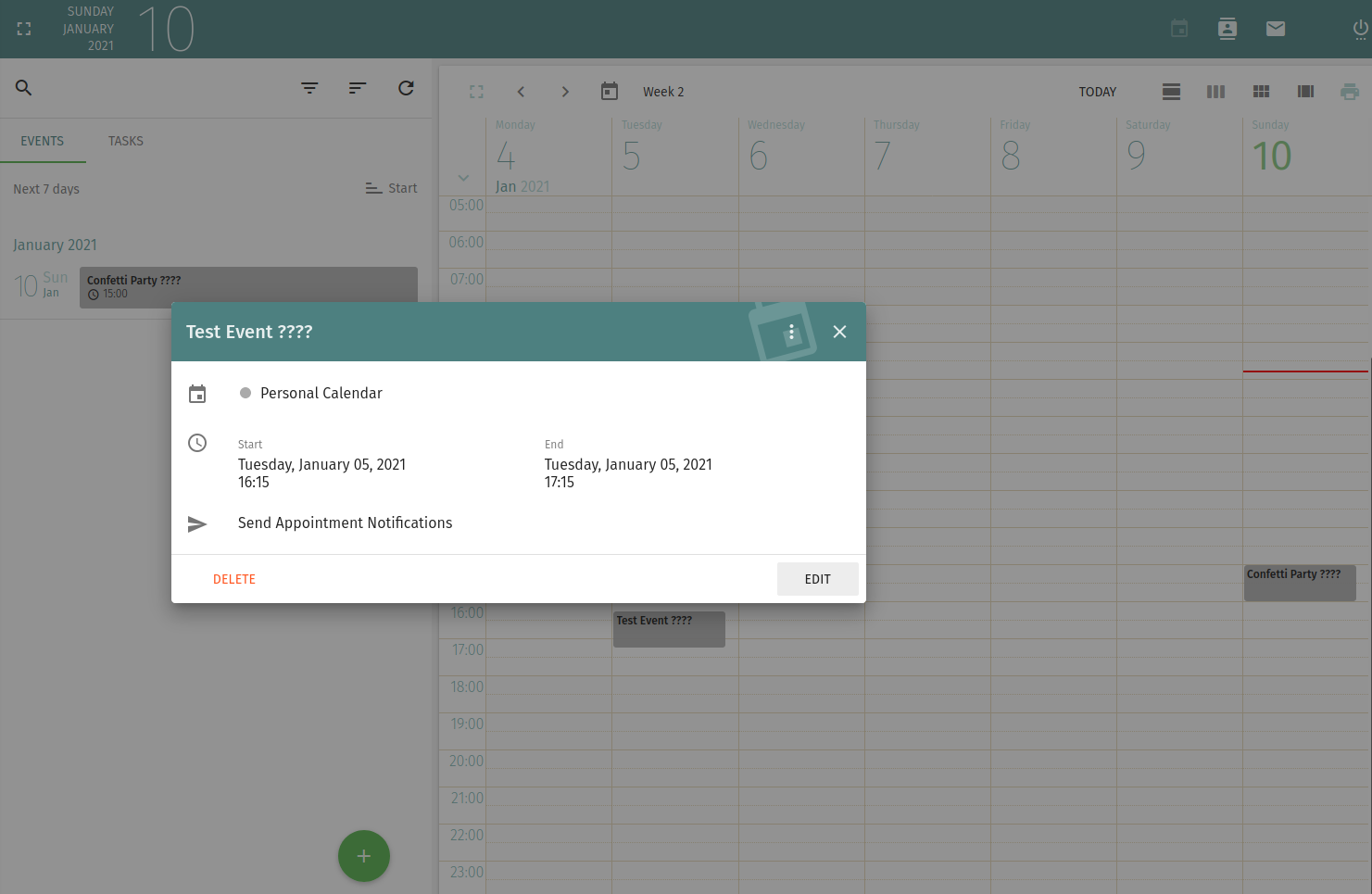
A little bit of further digging and I found that SOGo needs to be made aware of the full unicode support. It should be specified in the /etc/sogo/sogo.conf configuration file.
MySQL4Encoding = "utf8mb4";Restart the SOGo service. Emojis should be then accepted in the event titles.
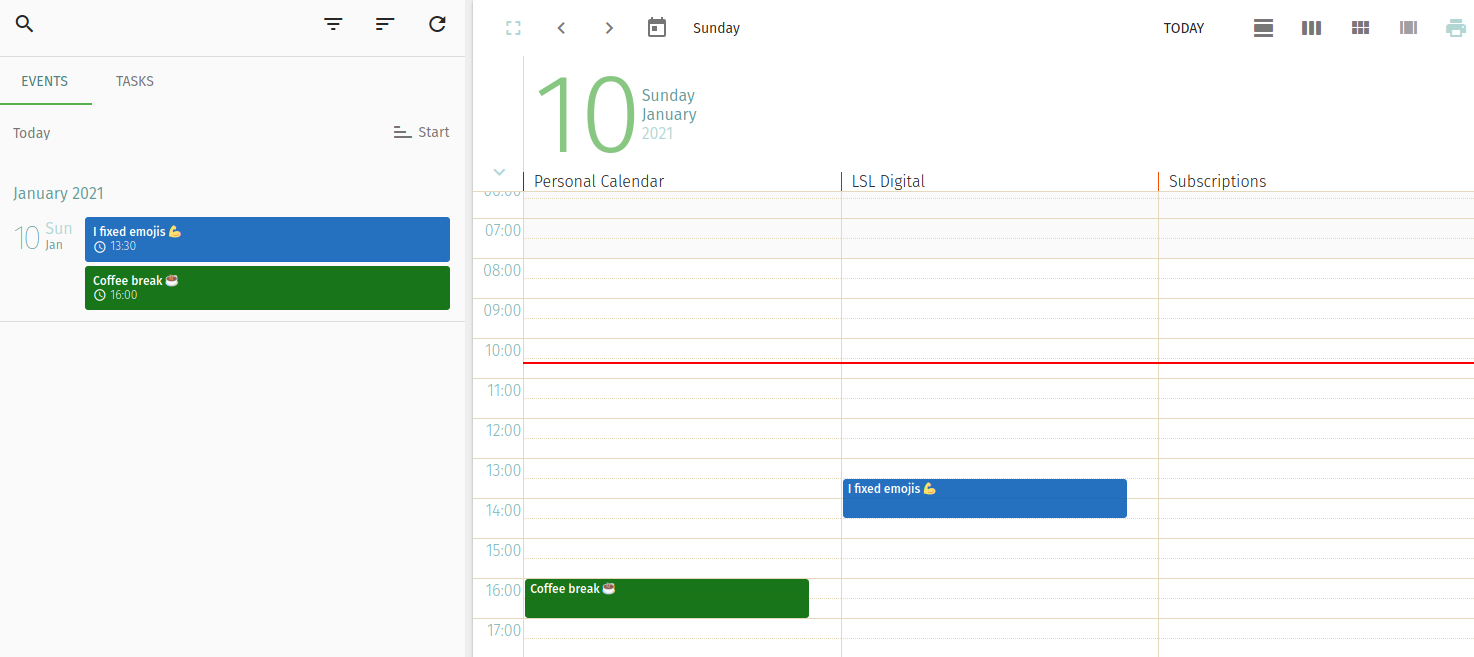
I can now put my recurrent coffee breaks in the calendar. ☕
openSUSE Tumbleweed – Review of the week 2021/01
Dear Tumbleweed users and hackers,
A new year is already upon us, the first week of it is already. We humans might have to get used to writing ‘2021’ instead of ‘2020’, for Tumbleweed, this seems not to matter at all. The week has kicked off strong with 6 snapshots (0101, 0102, 0103, 0104, 0105, and 0106). The number of incoming submissions is also increasing again, showing that contributors are returning from their well-deserved holiday.
The most interesting changes in snapshots published this week were:
- Linux kernel 5.10.4; this kernel does cause some issues on Intel hardware, make sure to see https://bugzilla.opensuse.org/show_bug.cgi?id=1180543 and the workaround documented in comment#3
- Mozilla Firefox 84.0.1
- Mesa 20.3.2
The staging projects mostly contain the same major changes in planning, but work to get them ready is in progress:
- Plasma 5.20.5
- KDE Applications 20.12.1
- Linux kernel 5.10.5
- Xfce 4.16.0
- icu 68.1: breaks a few things like postgresql. Staging:I
- Multiple versions of python 3 parallel installable. Adding to python 3.8, version 3.6 will be reintroduced. Python modules will be built for both versions.
- RPM 4.16: all build issues in Staging:A have been fixed, the earlier reported crash on upgrades is also fixed. Final QA run in progress
- brp-check-suse: a bug fix in how it detected dangling symlinks (it detected them, but did not fail as it was supposed to)
- permissions package: prepares for easier listing, while supporting a full /usr merge
- Autoconf 2.70: breaks quite a few packages, Staging:C. NOTE: in some cases, it now implicitly starts gtkdocize; but at least for distro bootstrap packages (ring0) we cannot BuildRequire gtk-doc. So we must trick autoreconf with GTKDOCIZE=true
- Rpmlint 2.0: experiments ongoing in Staging:M
- openssl 3: not much progress, Staging:O still showing a lot of errors.
Tumbleweed Rolls Into The New Year
The holidays might be over and the new year is here, but users of openSUSE Tumbleweed didn’t see any difference in the amount of snapshots released over the holiday season.
Tumbleweed snapshots have been rolling out daily before toasting to new beginnings last week.
Providing a fresh point of view for the new year, snapshot 20210106 brought an update to the 3D graphics package Mesa with version 20.3.2. The update brings in several new features upgrading from the 20.2.4 version with new Radeon Vulkan drivers and web rendering with EGL_KHR_swap_buffers_with_damage on X11. Two Common Vulnerabilities and Exposures exploits were fixed in an update of nodejs14 with version 14.15.4; CVE-2020-8265, which could corrupt memory leading to a Denial of Service exploit, and CVE-2020-8287, which had an HTTP Request Smuggling weakness, were both fixed. Xen had a patch update and removed some code. Other packages to update in the snapshot were busybox 1.32.1, libstorage-ng 4.3.78 and a few others.
Snapshot 20210105 updated a single package with the update of terminus-bitmap-fonts 4.49.1. The newer version added Open Type Bitmap support and altered ascii to be more useful with a back quote.
The Mozilla Firefox browser received its first minor version update of the year with 84.0.1 in the 20210104 snapshot. AV1 decoder dav1d 0.8.1 updated and fixed a regression caused by the picture buffer pool in its previous minor version release. Email retriever fetchmail 6.4.15 fix cross-compilation with OpenSSL. Ruby code style checkers (rubygem-rubocop](https://rubygems.org/gems/rubocop/versions/0.42.0) had a lengthy amount of style changes updating from version 1.4.2 to 1.7.0. Style/MethodDefParentheses ignores endless method definitions since parentheses are always required. Other packages updated in the snapshot were perl-Image-ExifTool 12.13, perl-Mojolicious 8.70, utf8proc 2.6.1 and more.
The updated of the Linux Kernel was one of two packages updated in snapshot 20210103. The 5.10.4 Linux Kernel had several arm64 fixes to include a fix of the GPIO memory size. The other package was a major version update to the utility for managing the LIBNVDIMM subsystem; the ndctl 71 package fixed documentation and now supports the new device-dax subdivision functionality added in the 5.10 kernel.
Two timezone packages were updated in the 20210102 snapshot. The third package to receive an update in the snapshot was the high-performance email content filter amavisd-new to version 2.12.1; the package’s specfile was cleaned a bit and changes were made to prevent re-encoding of the notification templates.
The New Year’s Day snapshot, 20210101, provided updates to CoreFreq, rubygem-grape 1.5.1, rubygem-net-ldap 0.17.0 and xapps 2.0.4.
openSUSE Community Publishes End of Year Survey Results
The openSUSE community has published the End of the Year Community Survey results.
The results provided some significant information about the project’s tools, its distributions, the demographics of the users as well as how the community is contributing to the project.
The highest percentage of users were between the ages of 35 and 49, according to the results. More than half the respondents were from Europe; the Americas made up roughly a quarter of the respondents and Asia 10 percent. Both Oceania and Africa respondents had similar percentages below 2 percent.
The respondents were predominantly males working in the IT industry with more than 10 years experience with a NIX system; almost half were college educated. A little less than 20 percent were pursuing an education and under the age of 25. Many identified themselves as tech hobbyists and used both openSUSE Leap and Tumbleweed equally. A majority of contributors to the project provided user support or did packaging and maintenance.
The majority of respondents used KDE’s Plasma for their desktop environment followed closely by GNOME and Xfce respectively; more than 92 percent were satisfied or very satisfied with the desktop environment. Use of Graphics Processing Units were pretty evenly split between Intel, Nvidia and AMD respectively.
Less than 900 respondents identified pain points, which were evenly spread around topics like finding software, installing software, installation, unsupported hardware and documentation. A large majority were unaware of openSUSE on mobile, but expressed interest in the comments section.
Many seemed to be motivated to try openSUSE from blogs, magazine articles or through podcasts, yet a large majority of respondents felt openSUSE was underrated/underrepresented by open source and Linux influencers.
More details about the End of the Year Community Survey results can be found on the openSUSE Wiki.
Providing KDE software updates from git for fun and profit in openSUSE
If I look back at the last post I made on ths blog… let’s say quite a lot of time has passed. The reason? Well, first of all, one would call it a lack of motivation1, and afterwards, the emergence of a small yet quite annoying pathogen which caused a bit of a stir worldwide. But today I’m not going to talk about viruses: perhaps some other time when you can avoid hear about it for breakfast, lunch, and dinner.
KDE software from git and the OBS
Yes, today I’m going to talk about the OBS, that is the Open Build Service, not to be confused with another highly successful open source project.
As you know, since ages, the openSUSE KDE team provides a series of repositories which track the latest state of the git repositories in KDE, be them either Frameworks, Plasma, or the applications part of the Release Service. This also allows to create Live CDs which can be useful for testing out the software.
But the question that I’ve seen every now and then is… how it is actually done? Is everything provided by the OBS, or does someone need to add some glue on top of that?
Using the OBS to provide updates to KDE packages from git
Source services
From the official documentation:
Source Services are tools to validate, generate or modify sources in a trustable way.
Ok, that doesn’t tell us much, does it? Luckily, the concept is simple. It is that, for packages built in the OBS, we can use tools (internal or external) to perform operations on the source(s) the packages are built from. These are done before any actual building starts.
The openSUSE wiki has some examples of what a source service can do, of which one immediately jumps to our eye:
Checkout service - checks out from SVC system (svn, git, …) and creates a tarball.
That means that we can, theoretically, ask the OBS to do a checkout from git, and automatically generate a tarball from there. In addition, a source service can add version information to the RPM spec file - the blueprint of an openSUSE package - including some data taken off git, for example the date and the revision hash of the checkout.
Source services are implemented as files named _service which live in the OBS for each package. Let’s take a look at the one for kcoreaddons in the KDE:Unstable::
<services>
  <service name="obs_scm">
    <param name="url">https://invent.kde.org/frameworks/kcoreaddons.git</param>
    <param name="scm">git</param>
    <param name="versionformat">VERSIONgit.%ci~%h</param>
  </service>
 <service name="set_version_kf5" mode="buildtime"/>
  <service mode="buildtime" name="tar" />
  <service mode="buildtime" name="recompress">
    <param name="file">*.tar</param>
    <param name="compression">xz</param>
  </service>
  <service mode="buildtime" name="set_version" />
</services>
obs_scm
The first line inside service tells us that we’re using the obs_scm service, which is a built-in service in openSUSE’s OBS instance to checkout the sources from the url, using git. The versionformat parameter sets the version to a literal VERSION (more on that later) and adds the git suffix, and then adds %ci, which is replaced by the checkout date (example: 20210102T122329) and %h, which puts the short git revision hash in the version (example: 5d069715).
The whole data is compressed in a cpio archive with the obscpio extension. At this point, we don’t have a tarball yet.
After the checkout
THe next services run when the package is actually built, as you can see by the mode="builtime" in their definitions. The first one (set_version_kf5) is actually a service made by Fabian Vogt (fellow member of the KDE team) which replaces VERSION by the current version present in the KDE git (done manually: it is read from the OBS project configuration, and bumped every time it happens upstream). The following lines set the version in the spec file, and compress the whole thing into a tarball.
At this point, the build system starts building the actual source and creating the package.
Manual labor
Just when are these kind of source services run? If left by themselves, never. You need to actually signal the OBS (trigger, in OBS-speak) to run the service. An example is with the osc command line utility:
osc service remoterun KDE:Unstable:Frameworks kcoreaddons
Or there’s a button in the OBS web interface which can allow you to do just that:

There’s just a little problem. When there are more than 200 packages to handle, updating in this way gets a complicated. Also, while the OBS is smart enough to avoid updating a package that has not changed, it has no way to tell you before the service is actually run.
Automation
Luckily, the OBS has features which, used with some external tools, can solve the problem in a hopefully effective way.
Since 2013 the OBS can use authentication tokens to run source services, and you can for example trigger updates with pushes to GitHub repositories. To perform this task for the KDE:Unstable repositories, I based upon these resources to build something to do mass updates in a reliable way.
First of all, I generated a token, and I wanted to make sure that it could only trigger updates. Nothing more, nothing less. This was fairly easy with osc:
osc token --create -o runservice
I did not specify a project, so the token works with all the repositories I have access to. This was a requirement, because the KDE Unstable repositories are actually three different OBS projects.
To trigger an update in the OBS, one needs to call the https://api.opensuse.org/trigger/runservice endpoint, doing a POST request and include the project name (project parameter) and the package name (package parameter). An example (I know, I didn’t encode the URL for simplicity, bear with me):
https://api.opensuse.org/trigger/runservice?project=KDE:Unstable:Frameworks&package=kcoreaddons
The token needs to be passed as an Authorization header, in the form Token <your token here>. You get a 200 response if the trigger is successful, and 404 in other cases (including an incorrect token).
Like this, I was able to find a way to reliably trigger the updates. In fact, it would be probably easy to conjure a script to do that. But I wanted to do something more.
A step further
I wanted to actually make sure to trigger the update only if there were any new commits. But at the same time I did not want to have a full checkout of the KDE git repositories: that would have been a massive waste of space.
Enter git ls-remote, which can give you the latest revision of a repository for all its branches (and tags), without having to clone it. For example:
git ls-remote --heads https://invent.kde.org/pim/kitinerary.git/
22175dc433dad1b1411224d80d77f0f655219122        refs/heads/Applications/18.08
5a0a80e42eee138bda5855606cbdd998fffce6c0        refs/heads/Applications/18.12
2ca039e6d4a35f3ab00af9518f489e00ffb09638        refs/heads/Applications/19.04
2f96d829f28e85f3abe486f601007faa2cb8cde5        refs/heads/Applications/19.08
f12f2cb73e3229a9a9dafb347a2f5fe9bd6c7975        refs/heads/master
18f675d888dd467ebaeaafc3f7d26b639a97d142        refs/heads/release/19.12
90ba79572e428dd150183ba1eea23d3f95040469        refs/heads/release/20.04
763832e4f1ae1a3162670a93973e58259362a7ba        refs/heads/release/20.08
c16930a0b70f5735899826a66ad6746ffb665bce        refs/heads/release/20.12
In this case I limited the list to branches to branches (--heads). As you can see, the latest revision in master for kitinerary at the time of writing is f12f2cb73e3229a9a9dafb347a2f5fe9bd6c7975. So, the idea I had in mind was:
- Get the state of the master branch in all repositories part of the KDE Unstable hierarchy;
- Save the latest revision on disk;
- On the following check (24 hours later) compare the revisions between what’s stored on disk and the remote;
- If the revisions differ, trigger an update;
- Save the new revision to disk;
This was slightly complicated by the fact that package names on the OBS and source repositories in KDE can differ (example: plasma-workspace is plasma5-workspace or akonadi is akonadi-server). My over-engineered idea was to create a JSON mapping of the whole thing (excerpt):
{
    "KDE:Unstable:Frameworks": [
        {
            "kde": "frameworks/attica",
            "obs": "attica-qt5",
            "branch": "master"
        },
        {
            "kde": "frameworks/kdav",
            "obs": "kdav",
            "branch": "master"
        }
    ]
}
(Full details on the actual repository)
It was painful to set up the first time, but it paid off afterwards. I just needed a few more adjustments:
- Check whether the remote repository actually existed: I used GitLab’s project API to obtain a yes/no answer for each repository, and skip them if they do not exist.
- Commit the changed files to git and push them to the remote repository holding the data.
As I am mostly a Python person, I just used Python to write a yet another over-engineered script to do all the steps outlined above.
Icing on the cake
Mmm… cake. Wait. We’re not talking about food here, just about how the whole idea was put into “production” (include several hundred of quotes around that word). I created a separate user on my server (the same which runs dennogumi.org) with minimal privileges, put the token into a file with 0600 permissions, and set up a cron job which runs the script every day at 20 UTC+1.
There was just one extra step. Historically (but this is not the case anymore nowadays) the OBS would fail to perform a git checkout. This would leave a package in the broken state, and the only way to recover would be to force an update again (if that did not fix it, it would be time to poke the friendly people in #opensuse-buildservice).
Inspired by what a former KDE team member (Raymond “tittiatcoke” Wooninck) did, I wrote a stupid script which checks the packages in broken state (at the moment just for one repository and one architecture: a broken clone would affect all of them equally) and forces an update. It needs to use tokens rather than osc, but I’ll get to that soon, hopefully.
Conclusion
There, you have it. This is how (at the moment) I can handle updating all KDE packages from git in the OBS with (now) minimal effort. Probably it is an imperfect solution, but it does the job well. Shout out to Fabian who mentioned tokens and prompted the idea.
-
Also called laziness. ↩︎