
 Member
 Futureboy
Cubicle Chat | 27 Mar 2021

Escape the Permission Trap with Healthy Habits
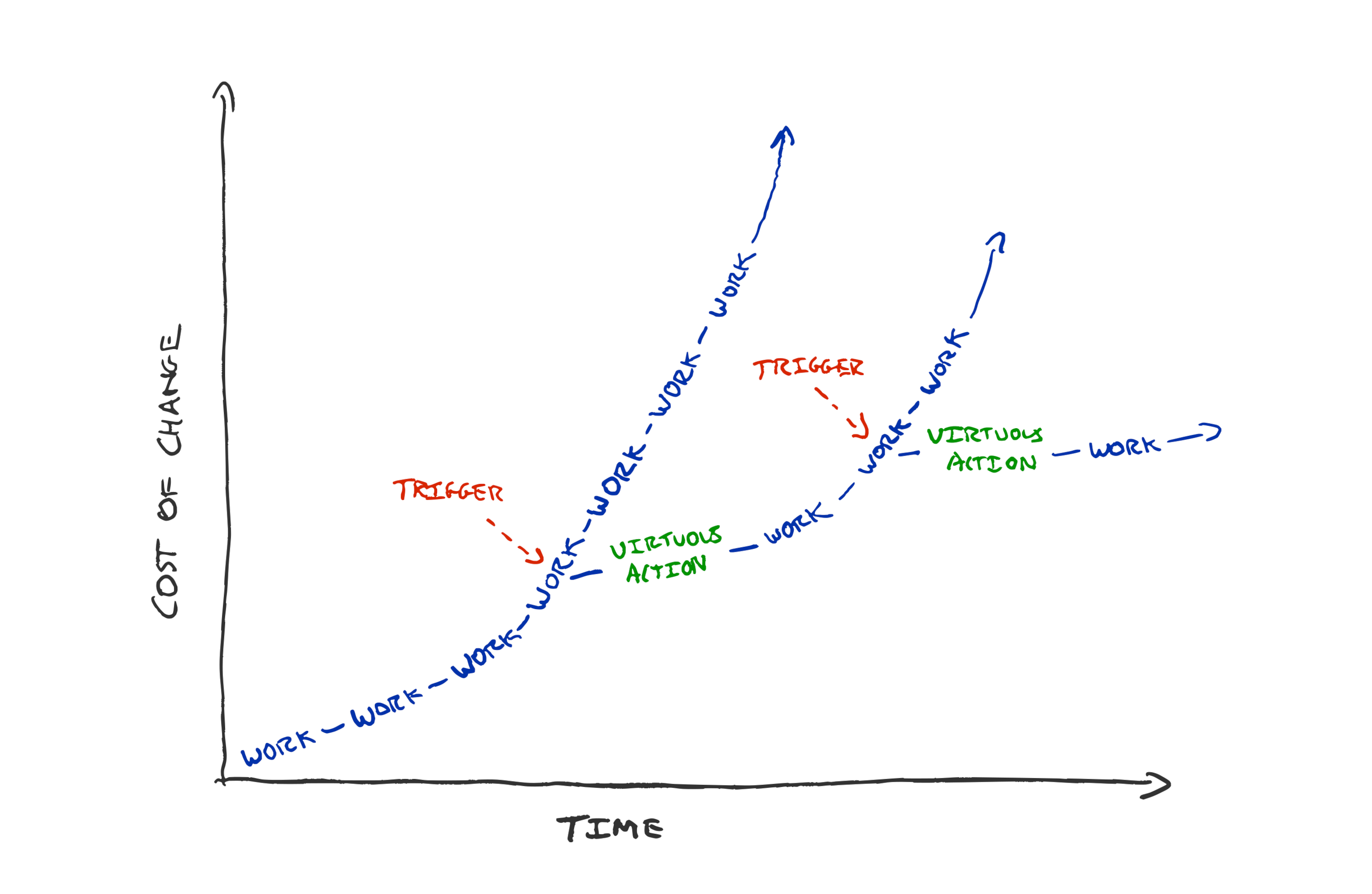
If you’re struggling with how to get to tidy code, fast feedback loops, joyful work. How to get permission, or buy-in. Try team habits.
Create working agreements of the form “When we see <observable trigger>, instead of <what we currently do> we will <virtuous action>”. This is a mechanism to pre-approve the desired action.
In last week’s “level up” newsletter Pat Kua likened developers asking product managers whether to do activities such as refactoring and testing, to a chef offering washing and cleaning to customers. i.e. it shouldn’t be a discussion.
I strongly agree, but I can see that some people might still be stuck with the how. Especially if you’re the only cook in the kitchen who seems to care that there is mess everywhere.
I recently suggested every team should be paying attention to the delays in their feedback loops. Keeping time to production under 5 minutes. Running all programmer tests in a matter of seconds.
Measuring what matters is a good step towards being able to improve it. But it’s not enough. Especially if your manager, product manager, or fellow developers seem unperturbed by the build time creeping up, the flaky tests in your build, or the accumulating complexity.
How we get stuck
Maybe you point to graphs and metrics and are met with “yes but we have a deadline next week” or “just do something else while you’re waiting for the slow build”. We easily get stuck at how to break out of seeking permission.
How can we become a team with code we’re proud of? How can we become a team that has fast effective feedback loops?
I’m a big fan of radiating intent rather than asking for forgiveness, but what if you’re the only person on your team that seems to care? Acting autonomously takes courage. It sends a positive signal to your coworkers, but it could easily be shut down by an unsupportive or unaware manager.
You might give up when your small solo efforts make little headway against a mammoth task. It’s easy to become despondent when a new teammate rants about the state of the huge codebase you’ve been refactoring bit by bit for weeks. “Ah, but you should have seen it before” you sigh.
People get stuck asking for permission. Asking permission, or taking a risk to do the right thing every time is wearisome. “Just do it” is easy to say but is risky. Especially if you have leaders who are reluctant to let go of control.
Is quality code only something that teams with sympathetic managers can achieve? Are fast feedback loops something only very talented engineers can achieve? By no means!
A trap that lots of teams fall into is making the safe, sustainable, faster path improvement path the special case. We create systems whereby people have to ask for permission to clean and to tidy. We need to change the expectations in the team. It should be that tolerating a messy workspace is seen as the deviance that needs permission or risk taking. Not vice versa.
How to change this? Propose a new a beneficial habit to your team.
“When we see <observable trigger>,
instead of <what we currently do>
we will <virtuous action>”
How can you convince your team to try a new way of working? Make a prediction of the benefit and propose running an experiment for 2-4 weeks, after which the team can review.
Good habits give teams superpowers. Habits can pre-approve the right actions. Habits unstick us from “doing things” to take necessary actions, when they’re needed, continuously.
What do I mean by good habits? Refactoring constantly, making the build a bit faster every day, talking with customers. Feedback loops that increase our chances of success.
Make them team habits and the onus will be on managers and team members to convince each other to not do the good things rather than the other way round.
Examples of good habits
TDD
TDD is great for habit forming—it creates triggers to do the right thing. When we see a red failing test we trigger the habit of implementing new behaviour. We never have untested code because the habit we’ve formed for writing code is in response to a failing test. When we see a green test suite we trigger the habit of refactoring. Every few minutes we see a green test suite and trigger our habit: spending some time thinking about how the code could be tidier, easier to understand, and then making it so.
Sure we could convince our pair to skip the refactoring step, but the onus is on us to make the case for deviating from the sensible default, habitual path.
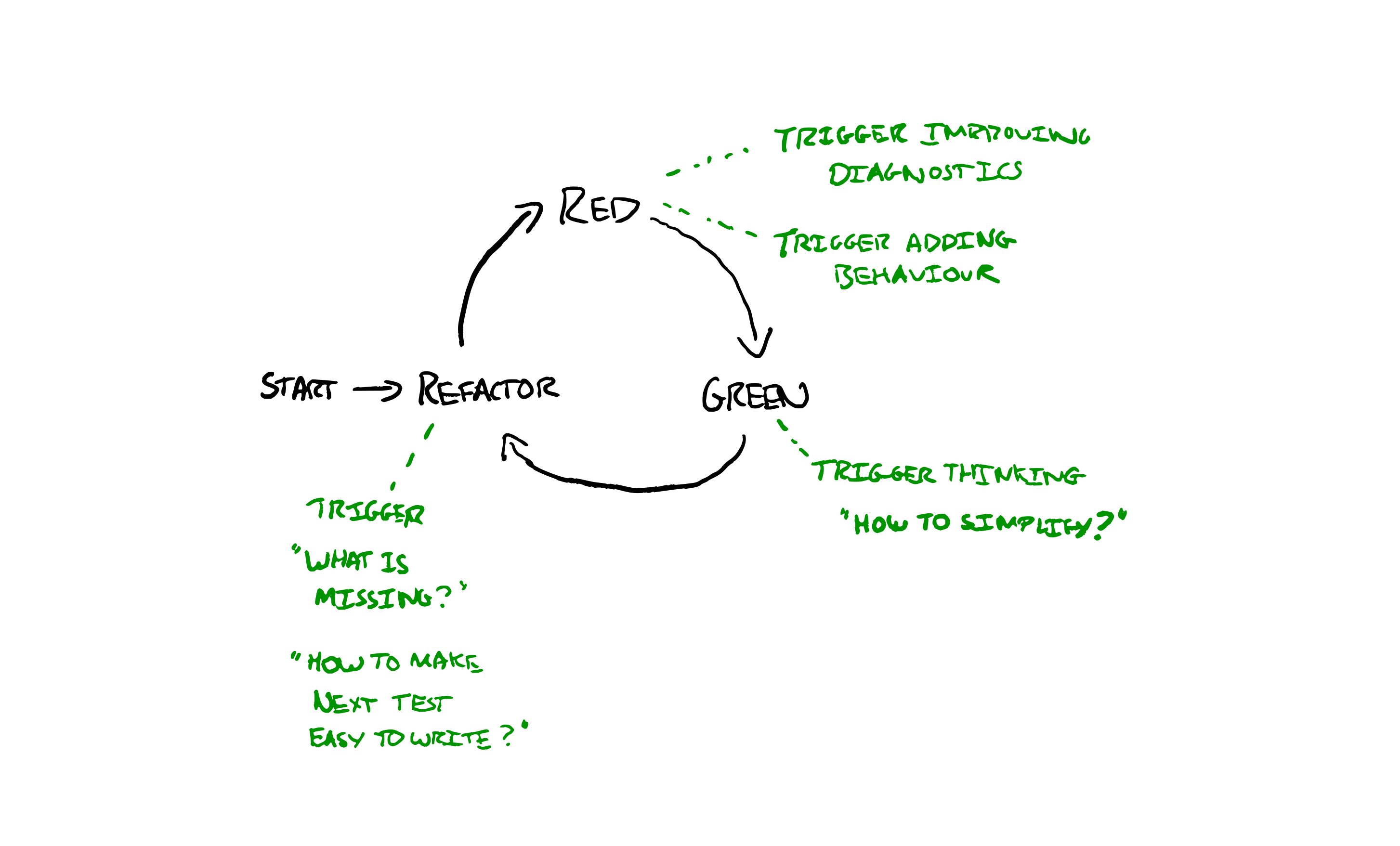
“When we write code, instead of starting to implement the feature we will write a failing test first”
“When we see a red test suite, instead of writing lots of code we will write the simplest possible code to make it pass”
“When we see a green test suite, instead of moving on to the next capability we will stop and do at least one refactoring”
Zero Tolerance of Alerts
Are you suffering from over-alerting? Do you have flickery production alerts that go off frequently and then resolve themselves without action? Use them as a trigger for a habit. Agree as a team that every time an alert fires the whole team will down tools, investigate and work together. Every time an alert happens: come up with your best idea to stop it going off again for the same reason.
If that’s too extreme you could try with a nominated person investigating. The point is to make a habit. Pre-agree expected, good, behaviour in response to a common trigger. Then there’s no need to seek permission to do the right thing, plus there’s some social obligation to do the right thing.
“When we see an alert fire, instead of waiting to see if recovers by itself we will stop and investigate how to stop it firing again”
Max Build Time
Is your build getting slower and slower? You’ve made it measurable but it’s still not helping? Create a habit that will improve it over time. e.g. Every time you see the build has got a minute slower the next task the team picks up will be making the build at least two minutes faster.
Now the onus is on someone to argue that something else is more important at the time. The default, habitual, behaviour is to respond to a trigger of a slowed build with investing time in speeding it up.
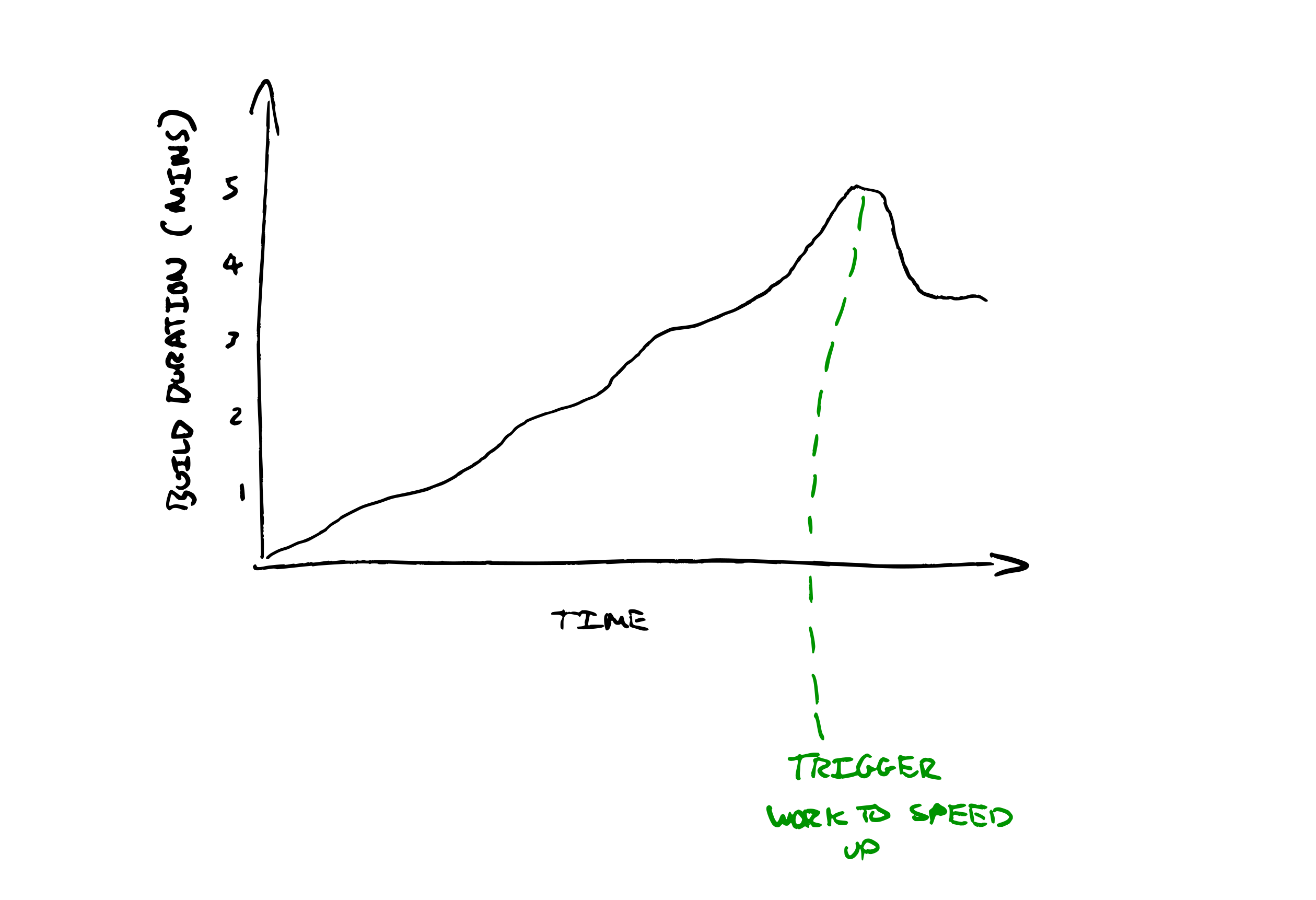
“When we see the median build time cross the next whole minute, instead of ignoring it we will prepend a task to our ‘next’ queue to reduce the build by at least 2 minutes”
Time Waste Limit
Do you feel like your team is drowning in technical debt? Maybe you’re dealing with such a mountain of technical debt. Perhaps it feels like nothing you do will make a difference? Build a habit to make it better in the most impactful areas first. e.g. Make wasting an hour understanding an area of the codebase trigger improvement. When you realise you’ve wasted an hour, update a shared team tally of hours wasted by area of code. When you go to add a tally mark and there’s already a couple of marks there, drop what you were going to do and spend the rest of the day tidying it up.
If you pre-agree to do this then the default behaviour is to make things a bit better over time. Permission seeking is needed to skip the cleanup.
“When we notice we’ve spent an hour trying to understand some complicated code , instead of pressing ahead we will record the time wasted”
“When we notice our team has wasted 5 hours in one area of the code instead of finishing our feature we will spend the rest of the day tidying up”
Spend Limits
Does your team’s work always take far longer than expected? Are you struggling to deliver a slice of value in a week? Maybe even when you think a story can be completed in a day it ends up taking two weeks? Make a habit triggered by length of time spent on a given story. Keep a tally of elapsed days. When it hits double what we expected, the team stops and has a retrospective to understand what they can learn from the surprise.
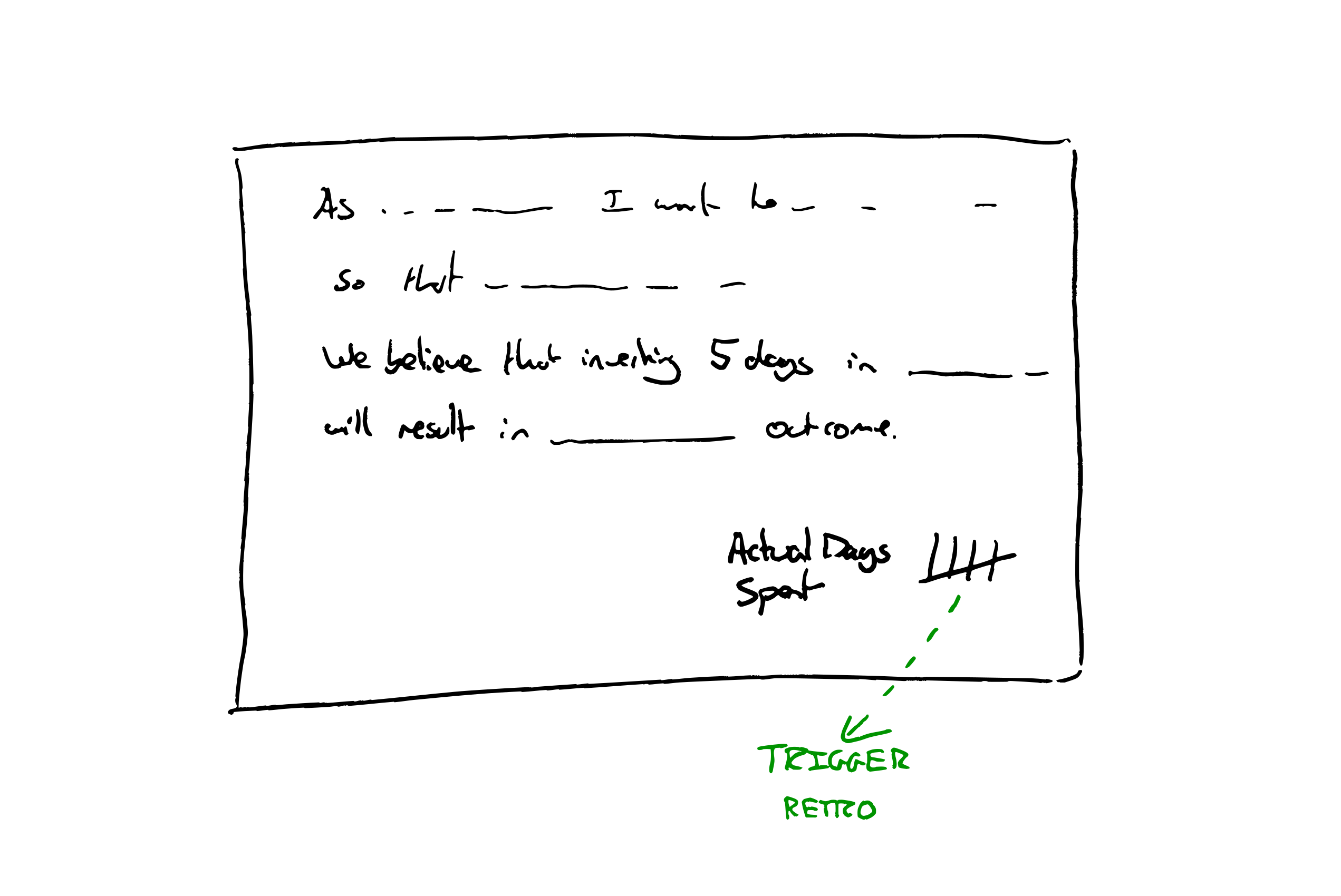
“When we have spent 5 days on one story instead of carrying on we will hold a team retrospective to understand what we can learn to help us work smaller next time”
How to help your team form a good habit
Asking your team to try to form a new habit is something anyone can do. You don’t need to be a manager.
- Look for a suitable trigger mechanism, in day to day working.
- Think of a virtuous action that could be taken upon that trigger.
- Propose an experiment of a habit to try, combining items 1+2
- Write it down, as a working agreement for the team.
“When we see a green test suite, instead of moving on to the next capability we will stop and do at least one refactoring”
- Review your working agreements next retrospective.
There’s lots of good habits that you can steal from other effective teams (such as TDD).
A team committing to try to form a habit will make a more effective experiment than one person trying to do the right thing against the flow.
Let me know how it goes. What resistance do you run into? What are your team’s most powerful habits?
The post Escape the Permission Trap with Healthy Habits appeared first on Benji's Blog.
Noodlings 26 | Redemption
openSUSE Tumbleweed – Review of the week 2021/12
Dear Tumbleweed users and hackers,
This has been a week in which we focused a little bit less on Staging, as it was SUSE HackWeek. ‘Less’ does not mean we ignored it of course. We still managed to release 4 snapshots (0318, 0319, 0320, and 0321) during this week.
The changes delivered this week included:
- transactional-updates 3.2.2
- KDE Plasma 5.21.3
- Perl 5.32.1
- GTK+ 3.24.27
- SQLite 3.35.2: fixes an issue in combination with Tracker timing out
The future, near or far, will bring those updates:
- SELinux 3.2
- GNOME 40
- MicroOS Desktop – GNOME-based
- Python 3.9 modules: besides python36-FOO and python38-FOO, we are testing to also shop python39-FOO modules; we already have the interpreter after all. Python 3.8 will remain the default for now.
- UsrMerge is gaining some traction again, thanks to Ludwig for pushing for it
- GCC 11 as the default compiler

Let's build Software Libre APM together
Alright, you learned about ActiveSupport::Notifications, InfluxDB, Grafana and influxdb-rails
in the two previous posts. Let's dive a bit deeper and look how we built the dashboards for you. So we can
study, change and improve them together.
“Individually we are one drop; but together we are an ocean.” – Ryunosoke Satoro
Welcome to your Ruby on Rails Application Monitoring 101.
- ActiveSupport::Notifications is rad! 💘
- Measure twice, cut once: App Performance Monitoring with influxdb-rails
- Let's build Software Libre APM together (this post)
The Ying and Yang of measurements
Basically there are two types of measurements we do. How often something happened and how long something took. Both types are most often complementary, interconnected and interdependent. On the performance dashboard we count for instance how many requests your application is serving.
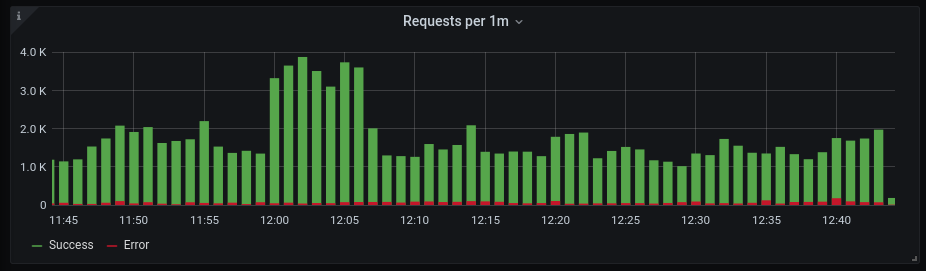
We also look at the time your application spends on doing that.
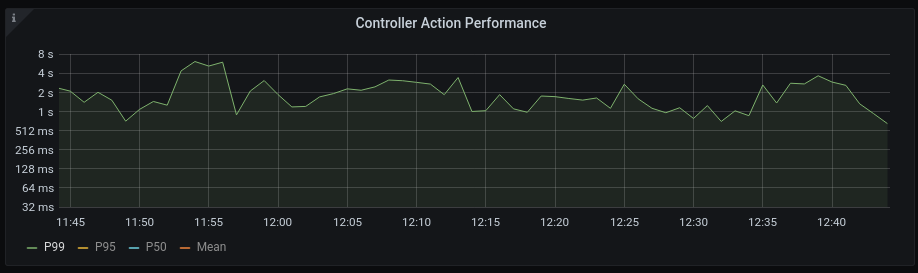
At some point the number of requests will have an influence on the time spend (oversaturation). If one of your actions is using too many resources it will have influence on the number of requests you are able to serve (overutilization). Ying and Yang.
The minions of measurements
Looking at the graphs above you see some helpers at work you should know about.
Time
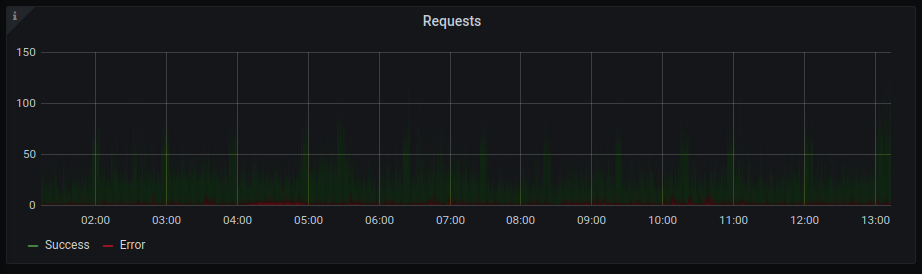
First and foremost: Time Windows. The requests are counted per minute and we look at measurements in the last hour. Time windows help to lower information density and make your measurements a bit more digestible. Look at the same measurements per second for the last 12 hours. 60 times 24 higher information density. Not so easy to interpret anymore...
Statistics
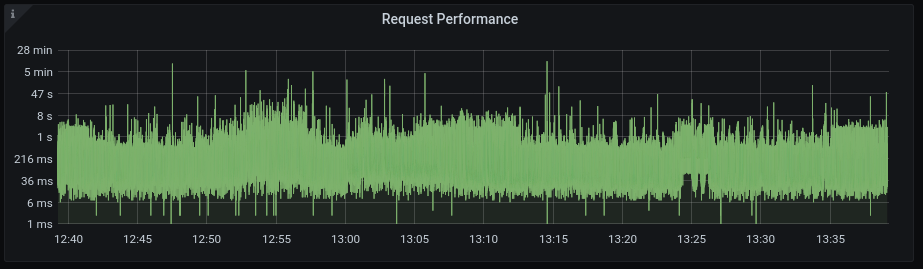
The same way time windows will make it easier for you to understand your data, some descriptive statistics will help you too. For instance calculating the maximum time 99% of requests in the last minute took. Like we did above. I won't bore you to death with the math behind this, if you're into this checkout wikipedia or something. Just remember, it makes data digestible for you. Look at the same performance data without applying statistics.
Grouping
The third helper that makes data understandable for you is grouping data. Like ActiveJobs per minute grouped by queue. That grouping might make more clear to you why the number of jobs so high. Or grouping requests per minute by HTTP Status might reveal how much stuff goes wrong.
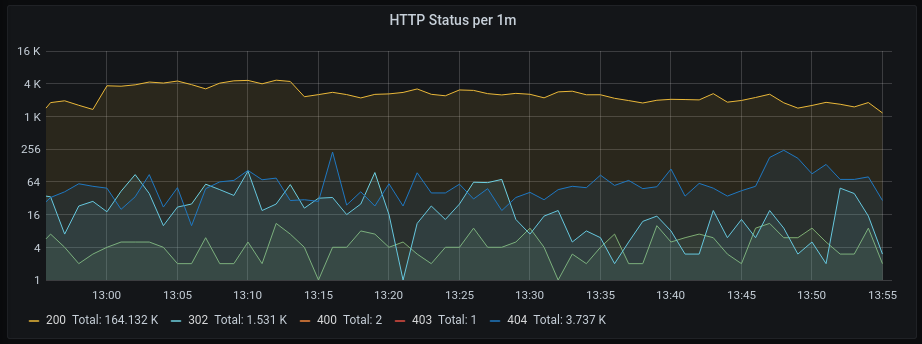
A different form of grouping is to visualize all measurements connected to a specific event, like a single request. Or all the measurements a specific controller action has fired in the last hour.
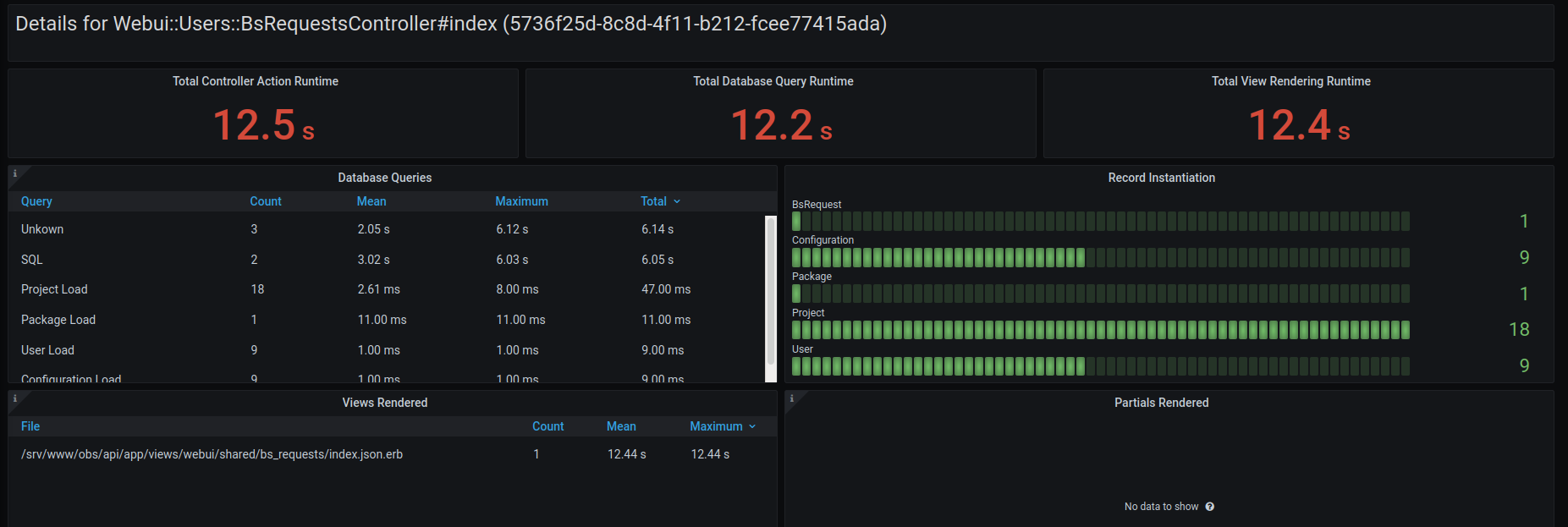
Rankings
Another thing we do on the dashboard is ranking (groups of) events by time, slow to fast. So you know where you might want to concentrate your efforts to improve performance.

Apply your knowledge, let's collaborate on Rails APM/AHM
Maybe I inspired some ideas for new features in the 101 above? I'm also sure there are many people out in the Rails community that have way more knowledge and ideas about statistics, measurements and all the tools involved than Chris and me. Let's work together, patches to the collection of dashboards (and the Ruby code) are more than welcome!
Why build, not buy?
But Henne, you say, there is already Sentry, New Relic, Datadog, Skylight and tons of other services that do this. Why build another one? Why reinvent the wheel?
Because Software Libre is an deeply evolutionary process. Software Libre, just like Evolution, experiments all the time. Many experiments find their niche to exist. Some even go global.

Coronavirus: BW CG Illustration by Yuri Samoilov
Like Linux, the largest install base of ALL operating systems on this planet. Wordpress powering an unbelievable 30% of the top 10 million websites. Mediawiki running the 5th most popular site globally. But also, more than 98% of all projects on GitHub are not seeing any development beyond the first year they were created. Just like 99% of all species that ever lived on Earth are estimated to be extinct.
We need to experiment and collaborate together. Evolution is what we do baby! 🤓 Can't run, copy, distribute, study, change and improve the software SaaS providers run. We can't scratch our itch, can't break it, learn how it works and make it better together, that's why. Let's do this!

Super Resolution Video Enhancing with AMD GPU
I’ve had a somewhat recent AMD Radeon RX 560 graphics card in my Mini-ITX PC for over a year already, and one long term interest I have would be to be able to enhance old videos. Thanks to Hackweek I could look at this as one of the things that I’ve waited to have time for. In recent years there have been approaches to use eg neural networks to do super resolution handling of photos and also videos, so that there would be more actual details and shapes than what would be possible via normal image manipulation. The only feasible way of doing those is by using GPUs, but unfortunately the way those are utilized is a bit of a mess, most of all because proprietary one vendor only CUDA is the most used one.
On the open source side, there is OpenCL in Mesa by default and Vulkan Compute, and there’s AMD’s separate open source ROCm that offers a very big platform for computing but also among else OpenCL 2.x support and a source level CUDA to portable code (including AMD support) translator called HIP. I won’t go into HIP, but I’m happy there’s at least the idea of portable code being thrown around. OpenCL standardization has been failing a bit, with the newest 3.0 trying to fix why the industry didn’t adopt 2.x properly and OpenCL 1.2 being the actual (but a bit lacking) baseline. I think the same happened a bit with OpenGL 1.x -> 2.x -> 3.x a long time ago by the way… Regardless if the portable code is OpenCL or Vulkan Compute, the open standards are now making good progress forward.
I first looked at ROCm’s SLE15SP2 installation guide - interestingly, it also installed on Tumbleweed if ignoring one dependency problem of openmp-extras. However, on my Tumbleweed machine I do not have Radeon so this was just install test. I was however surprised that even the kernel module compiled against TW’s 5.11 kernel - and if it would have not, there’s the possibility of using upstream kernel’s module instead.
Over at the Radeon machine side, I installed ROCm without problems. Regardless of that SDK, many real world applications for video enhancing are still CUDA specific so would at minimum require porting to portable code with HIP. These include projects like DAIN, DeOldify etc. However, there are also projects using OpenCL and Vulkan Compute - I’ll take video2x as an example here that supports multiple backends, some of which support OpenCL (like waifu2x-converter-cpp) or Vulkan (like realsr-ncnn-vulkan). I gave the latter a try on my Radeon as it won the CVPR NTIRE 2020 challenge on super-resolution.
I searched my video collection far enough back in time so that I could find some 720p videos, and selected one which has a crowd and details in distance. I selected 4x scaling even though that was probably a time costly mistake as even downscaling that 5120x2880 video probably wouldn’t be any better than 2x scaling to 2560x1440 and eg downscaling that to 1920x1080. I set up the realsr-ncnn-vulkan and ffmpeg paths to my compiled versions, gave the 720p video as input and fired way!
And waited. For 3.5 hours :) Noting that I should probably buy an actual highend AMD GPU, but OTOH my PC case is smallish and on the other hand the market is unbearable due to crypto mining. The end result was fairly good, even if not mind blowing. There are certainly features it handles very well, and it seems to clean up noise a bit as well while improving contrast a bit. It was clearly something that would not be possible by traditional image manipulation alone. Especially the moving video seems like higher resolution in general. Maybe the samples I’ve seen from some other projects out there have been better, then OTOH my video was a bit noisy with movement blur included so not as high quality as would be eg a static photo or a video clip tailored to show off an algorithm.
For showing the results, I upscaled a frame from the original 1280x720 clip to the 4x 5120x2880 resolution in GIMP, and then cropped a few pieces of both it and the matching frame in the enhanced clip. I downscaled them actually then to 1440p equivalent crop. Finally, I also upscaled the original frame to FullHD and downscaled the enhanced one to FullHD as well, to be more in line what could be one actual desired realistic end result - 720p to 1080p conversion while increasing detail.
The “1440p equivalent” comparison shots standard upscale vs realsr-ncnn-vulkan.


The FullHD scaling comparison - open both as full screen in new window and compare.


Measure twice, cut once: App Performance Monitoring with influxdb-rails
Now that we learned how truly magnificent ActiveSupport::Notifications is in the previous post,
let's explore a RubyGem Chris, others and me have built around this: influxdb-rails.
Together with even more awesome Software Libre, it will help you to deep dive into your Ruby on Rails application performance.
- ActiveSupport::Notifications is rad! 💘
- Measure twice, cut once: App Performance Monitoring with influxdb-rails (this post)
- Let's build Software Libre APM together
Application Performance Monitoring (APM)
I'm not sure we have to discuss this at all anymore, but here is why I think I need application performance monitoring for my Ruby on Rail apps: I'm an expert in using the software I hack. Hence I always travel the happy path, cleverly and unconsciously avoid the pitfalls, use it with forethought of the underlying architecture. Because of that, I usually think my app is fast: perceived performance.
It's not what you look at that matters, it's what you see. – Henry David Thoreau
That is why I need someone to correct that bias for me, in black and white.
Free Software APM
The good folks at Rails bring the instrumentation framework. InfluxData deliver a time series database. Grafana Labs make a dashboard builder. All we need to do, as so often, is to plug Software Libre together: SUCCE$$!
InfluxDB + Grafana == 🧨
I assume your Rails development environment is already running on 127.0.0.0:300. Getting InfluxDB and Grafana is a matter
of pulling containers these days. You can use this simple docker-compose configuration for running them locally.
# docker-compose.yml
version: "3.7"
services:
  influx:
    image: influxdb:1.7
    environment:
      - INFLUXDB_DB=rails
      - INFLUXDB_USER=root
      - INFLUXDB_USER_PASSWORD=root
      - INFLUXDB_READ_USER=grafana
      - INFLUXDB_READ_USER_PASSWORD=grafana
    volumes:
      - influxdata:/var/lib/influxdb
    ports:
      - 8086:8086
  grafana:
    image: grafana/grafana:7.4.5
    ports:
      - 4000:3000
    depends_on:
      - influx
    volumes:
      - grafanadata:/var/lib/grafana
volumes:
  influxdata:
  grafanadata:
A courageous docker-compose up will boot things and you can access Grafana at http://127.0.0.1:4000 (user: admin / password: admin).
To read data from the InfluxDB container in Grafana, leave the /datasources
InfluxDB defaults alone and configure:
URL: http://influx:8086
Database: rails
User: grafana
Password: grafana
influxdb-rails: 🪢 things together
The influxdb-rails RubyGem is the missing glue code for making your app report metrics into the InfluxDB.
Plug it into your Rails app by adding it to your bundle.
bundle add influxdb-rails
bundle exec rails generate influxdb
The next time you boot your Rails dev-env it will start to measure the performance of your app. Now comes the interesting part, interpreting this data with Grafana.
Understanding Ruby on Rails Performance
Every time you use your dev-env, influxdb-rails will write a plethora of performance data into InfluxDB.
Let's look at one of the measurements so you get an idea of what's going on. You remember the ActiveSupport::Notification
called process_action.action_controller from the previous post? Rails sends this message every time an action in
your controller has finished. It includes performance data for this action.
You should know this from somewhere: development.log! It contains the same information.
Started GET "/things" for 127.0.0.1 at 2021-03-25 15:20:14 +0100
...
Completed 200 OK in 5ms (Views: 4.1ms | ActiveRecord: 0.1ms | Allocations: 3514)
ThingsController#index took 5ms to finish overall, 4.1ms of those 5 in rendering, 0.1ms in querying the database.
You find the same data for every request you make in your InfluxDB. Head over to http://127.0.0.1:4000/explore
and let Grafana plot it for you.
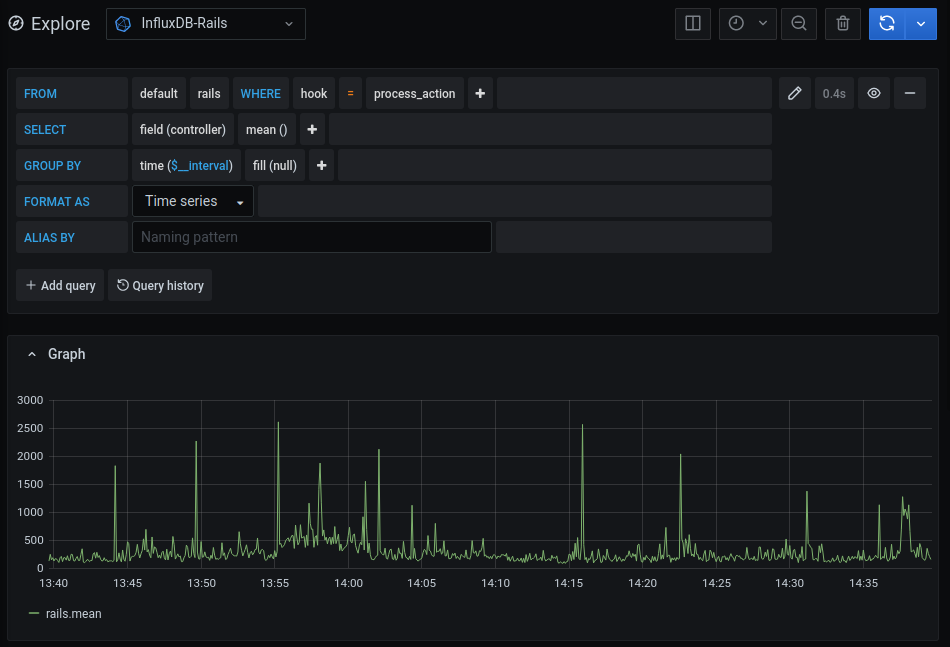
Only want to see how your views are performing? Change the field from controller to view.
Magic 🪄 But this is only one out of many different ways to look at this measurement. All of the panels below use this one
measurement and the data it brings to visualize controller actions.
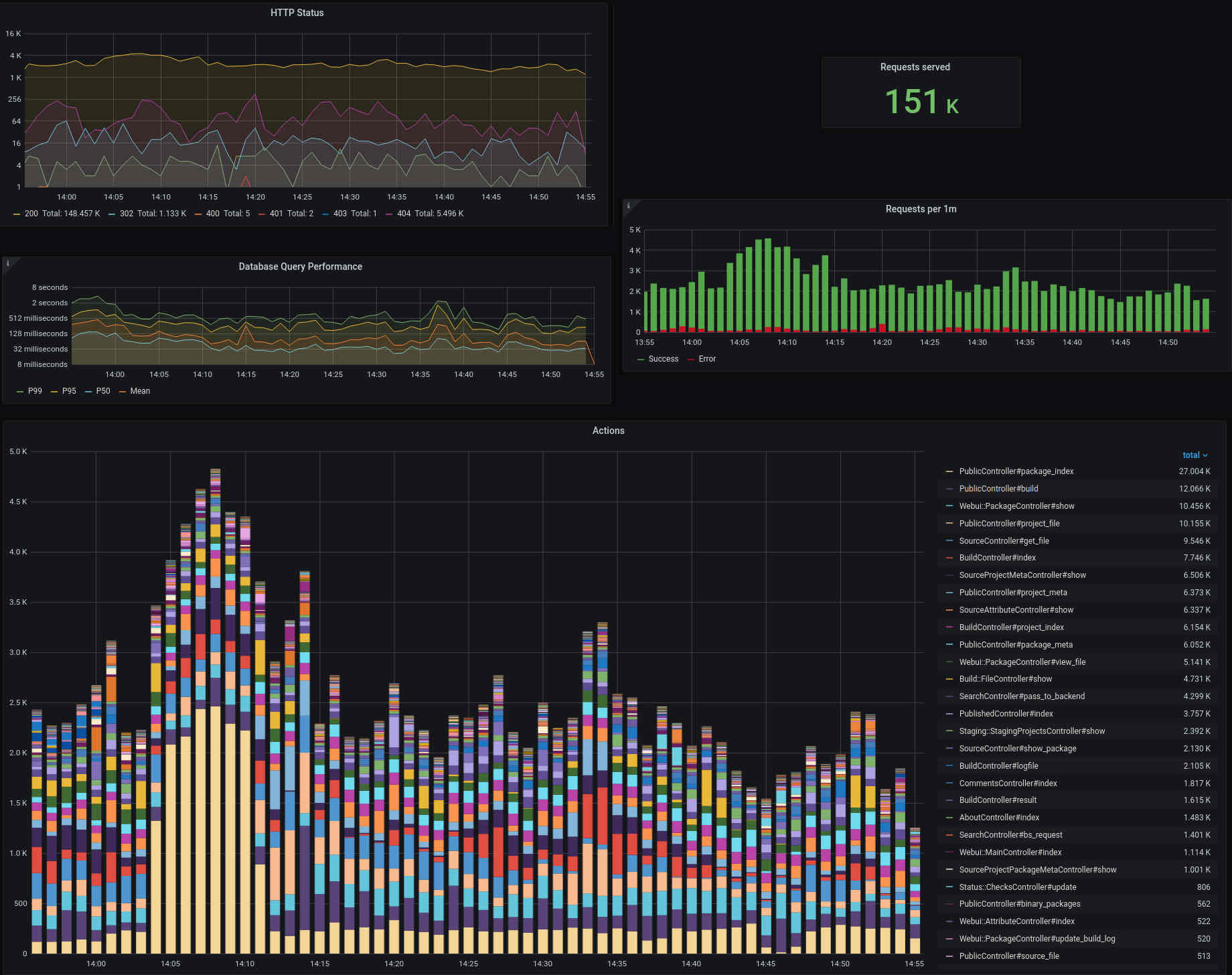
And this is only one measurement, influxdb-rails reports around a dozen.
Now I could send you off your way to learn about
ALL.
THE.
SOFTWARE.
involved, but that would be mean wouldn't it?
Ruby on Rails Dashboards
We, the Free Software community, are in this together! We collaborate on Ruby on Rails. We work together to make InfluxDB better. We cooperate to improve Grafana. Why not do the same for the dashboards to visualize Rails performance data? Let's collaborate! That is why we have build a couple of dashboards you can import. Just copy and paste the URLs into your Grafana.
- Ruby On Rails Performance Overview: Ruby On Rails Performance Overview
- Performance insights into individual requests: Ruby On Rails Performance per Request
- Performance of individual actions: Ruby On Rails Performance per Action
- HTTP Request Health: Ruby On Rails Health Overview
- ActiveJob Insights: Ruby on Rails ActiveJob Overview
- A list of the slowest requests: Ruby on Rails Slowlog by Request
- A list of the slowest actions: Ruby on Rails Slowlog by Action
- A list of the slowest queries: Ruby on Rails Slowlog by SQL
Play a little, I will tell you about all the nitty gritty details in the last post of this series: Let's build Software Libre APM together
Yakuake | Drop-down Terminal Emulator on openSUSE
ActiveSupport::Notifications is Rad!
One of the lesser known parts of Rails core is the ActiveSupport instrumentation framework.
ActiveSupport::Notifications includes all the things you need to implement pub-sub in Rails.
Pub-Sub is a software architecture where you publish (send) a message without being specific about who should
receive it. Fire and forget.
Receiving a message, and doing something with it, "just" requires you to subscribe to it. Because the publisher doesn't need to know about the subscribers (as they are decoupled), this provides nice opportunities for organization and scale.
Let's explore the joyful shenanigans of this.
- ActiveSupport::Notifications is rad! (this post)
- Measure twice, cut once: App Performance Monitoring with influxdb-rails
- Let's build Software Libre APM together
Publish & Subscribe
There is an instrumentation message emitted from ActionController that includes interesting data
about the things happening in your controller action. Let's explore this.
If you don't have a Ruby on Rails app at hand, just setup a minimal one with rails new --minimal
Add this code into an initializer
# config/initializers/instrumentation_subscriber.rb

# What happens in ActionController?
module ActionController
  class InstrumentationSubscriber < ActiveSupport::Subscriber
    attach_to :action_controller

    def process_action(message)
      Rails.logger.debug "Instrumentation #{message.name} Received!"
    end
  end
end
Boot the app (rails server), visit http://127.0.0.0:3000 and you'll
see the new log lines in your development.log. So what? What's the difference to calling Rails.logger in
an action or callback inside your controller? Why is ActiveSupport::Notifications fabulous?
ActiveSupport::Notifications Scales
First, as explained in the intro, the main advantage is that the publisher is decoupled from the subscriber. For instance,
you can have more than one subscriber listening to process_action.action_controller.
# config/initializers/slowlog_subscriber.rb

module ActionController
  class SlowlogSubscriber < ActiveSupport::Subscriber
    attach_to :action_controller

    def process_action(message)
      return if message.duration <= 10

      controller_location = [message.payload[:controller], message.payload[:action]].join("#") # -> ThingsController#something
      Rails.logger.debug "#{controller_location} was slow (#{message.duration}ms)"
    end
  end
end
You are free to organize this however you want. Decouple publisher/subscriber in different files, chronological or even in different threads.
# config/initializers/poor_mans_background_job_subscriber.rb

module ActionController
  class PMBGJSubscriber < ActiveSupport::Subscriber
    include Concurrent::Async

    attach_to :action_controller

    def process_action(message)
      async.background_job(message)
    end

    def background_job(message)
      # ...do something expensive with the message in a thread
      sleep(60)
    end
  end
end
Activesupport::Notifications Is Everywhere Today
Second, and you probably already guessed this from the example, what makes this most awesome are the ready made messages that are already published today.
Rails for instance uses ActiveSupport::Notifications to publish close to 50(!) different instrumentation events
that include data about your application. Data ranging from the HTTP status code of your requests, over which partials
were rendered, to more esoteric measurements like the byte range attempted to be read from your ActiveStorage service.
Check the instrumentation guide
for all the dirty secrets.
ActiveSupport::Notifications Is Easily Extendible
Last but not least, you can not only listen to messages others publish, you can publish messages to yourself.
ActiveSupport::Notifications.instrument "cool_thing_happened.my_app", {some: :data} do
  MyApp.do_cool_thing(true)
end
Okay, you're convinced I hope! Now what do people do with ActiveSupport::Notifications out in the world?
Application Health/Performance Monitoring
Ever wondered how your metrics get to Sentry, New Relic, Datadog or Skylight? You guessed it, via ActiveSupport::Notifications.
Now if the main work, publishing tons of messages through a pub-sub architecture, is already done by Rails, surely there are non-SaaS (a.k.a. Software Libre) options to display this data, right? Turns out there are not. While evaluating options for some of my projects (especially Open Build Service) we came across this gap and started to fill it.
How, why and where? Read on in the next part of this series: Measure twice, cut once: App Performance Monitoring with influxdb-rails