
 Member
 jimmac
Ingenuity FPV
When I previously posted about the Perseverance landing, I didn't realize NASA has actually published textured models of the lander and it's cute not-so-little maritan helicopter, Ingenuity.

Naturally I was drawn to play around with the model over the past few weeks and after posting a little Instagram test, a more elaborate Instagram Reel, I was naturally bound to theme some of my fpv flights as martian exploration. I'm glad I managed to create one before the actual Ingenuity test flight, because the strict lockdown really limits any fitting location right now.
All of the martian footage has been rendered with the realtime eevee engine, maxing out at 20 seconds per frame. The focal blur has been improved in eevee recently, but Cycles was used for all the fpv overlays for now.
(Watch "Digitone + Digitakt: Ingenuity FPV" on YouTube)
The original track was recorded at 60BPM, but sadly the footage is unbearable to watch for over 4 minutes, so I've resampled it to 90BMP to keep the legth down. It does glitch at some points, but the motivation to work on this has reached critical levels, so I'm calling it done.
Thinking in Questions with SQL
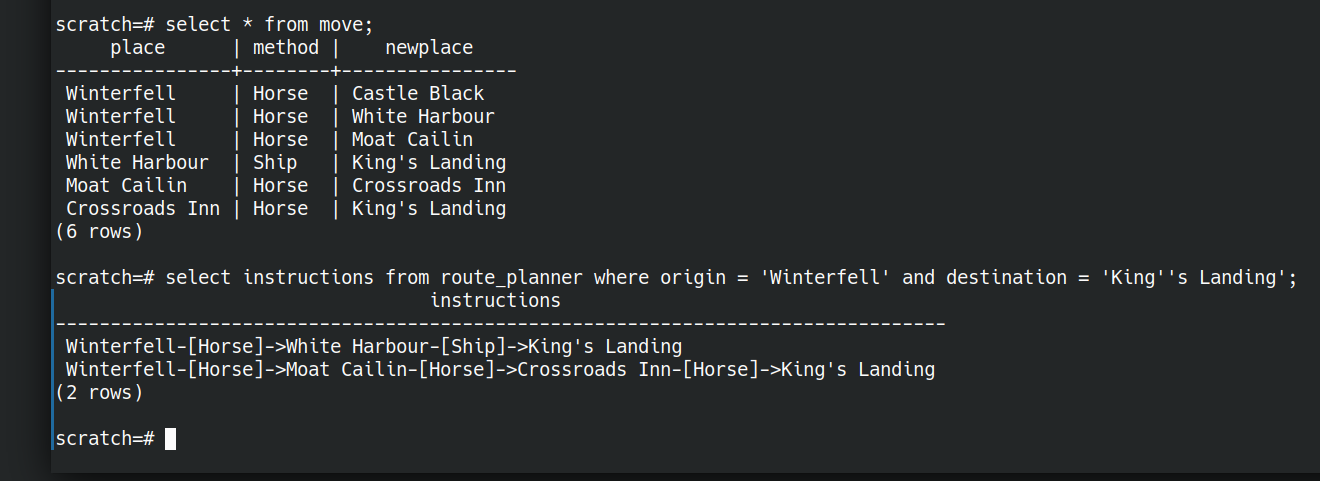
I love SQL, despite its many flaws.
Much is argued about functional programming vs object oriented. Different ways of instructing computers.
SQL is different. SQL is a language where I can ask the computer a question and it will figure out how to answer it for me.
Fluency in SQL is a very practical skill. It will make your life easier day to day. It’s not perfect, it has many flaws (like null) but it is in widespread use (unlike, say, prolog or D).
Useful in lots of contexts
As an engineer, sql databases often save me writing lots of code to transform data. They save me worrying about the best way to manage finite resources like memory. I write the question and the database (usually) figures out the most efficient algorithm to use, given the shape of the data right now, and the resources available to process it. Like magic.
SQL helps me think about data in different ways, lets me focus on the questions I want to ask of the data; independent of the best way to store and structure data.
As a manager, I often want to measure things, to know the answer to questions. SQL lets me ask lots of questions of computers directly without having to bother people. I can explore my ideas with a shorter feedback loop than if I could only pose questions to my team.
SQL is a language for expressing our questions in a way that machines can help answer them; useful in so many contexts.
It would be grand if even more things spoke SQL. Imagine you could ask questions in a shell instead of having to teach it how to transform data
Why do we avoid it?
SQL is terrific. So why is there so much effort expended in avoiding it? We learn ORM abstractions on top of it. We treat SQL databases as glorified buckets of data: chuck data in, pull data out.
Transforming data in application code gives a comforting amount of control over the process, but is often harder and slower than asking the right question of the database in the first place.
Do you see SQL as a language for storing and retrieving bits of data, or as a language for expressing questions?
Let go of control
The database can often figure out the best way of answering the question better than you.
Let’s take an identical query with three different states of data.
Here’s two simple relations with 1 attribute each. a and b. With a single tuple in each relation.
create table a(id int);
create table b(id int);
insert into a values(1);
insert into b values(1);
explain analyze select * from a natural join b;
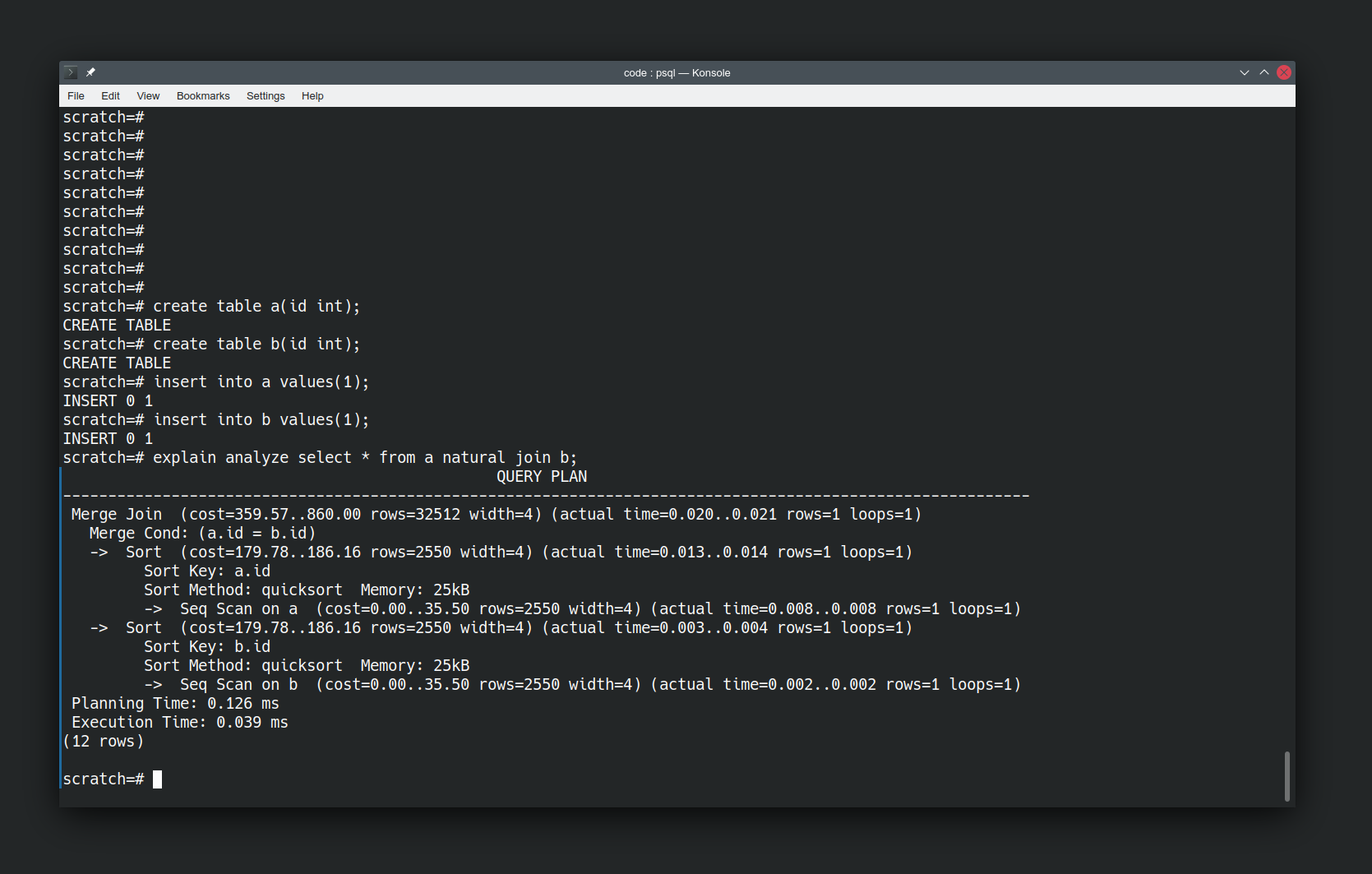
“explain analyze” is telling us how postgres is going to answer our question. The operations it will take, and how expensive they are. We haven’t told it to use quicksort, it has elected to do so.
Looking at how the database is doing things is interesting, but let’s make it more interesting by changing the data. Let’s add in a boatload more values and re-run the same query.
insert into a select * from generate_series(1,10000000);
explain analyze select * from a natural join b;
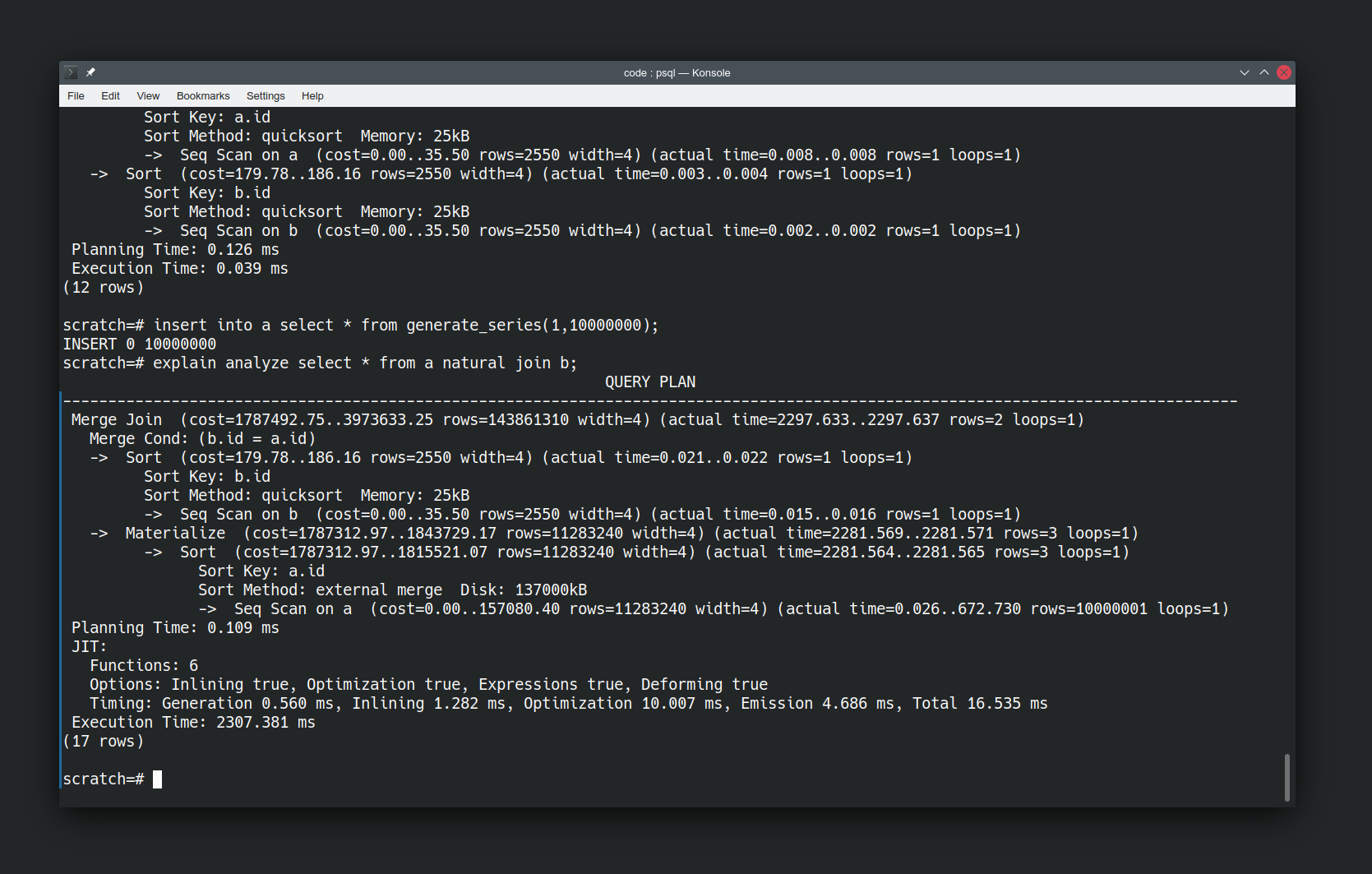
We’ve used generate_series to generate ten million tuples in relation ‘a’. Note the “Sort method” has changed to use disk because the data set is larger compared to the resources the database has available. I haven’t had to tell it to do this. I just asked the same question and it has figured out that it needs to use a different method to answer the question now that the data has changed.
But actually we’ve done the database a disservice here by running the query immediately after inserting our data. It’s not had a chance to catch up yet. Let’s give it a chance by running analyze on our relations to force an update to its knowledge of the shape of our data.
analyze a;
analyze b;
explain analyze select * from a natural join b;
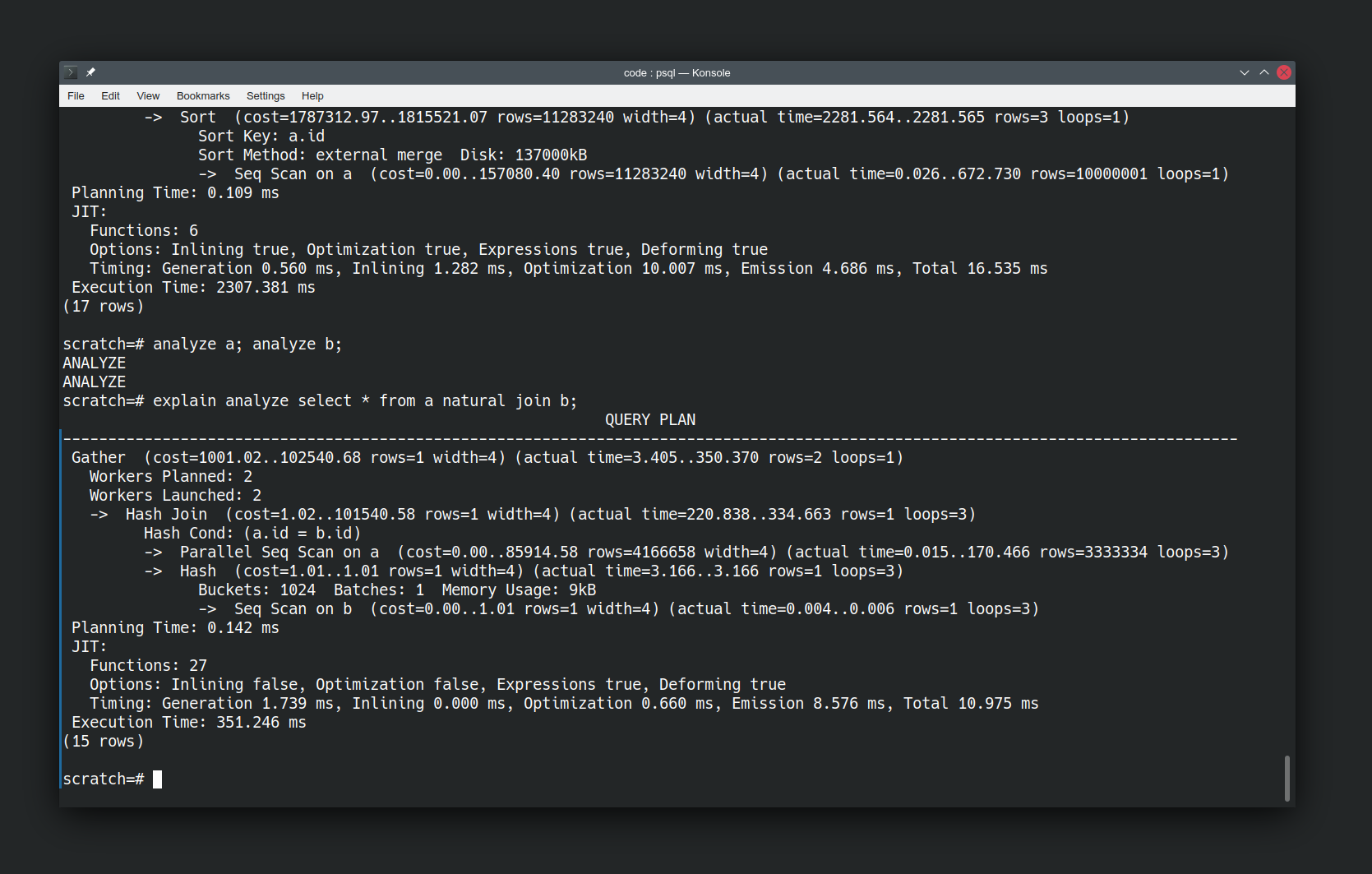
Now re-running the same query is a lot faster, and the approach has significantly changed. It’s now using a Hash Join not a Merge Join. It has also introduced parallelism to the query execution plan. It’s an order of magnitude faster. Again I haven’t had to tell the database to do this, it has figured out an easier way of answering the question now that it knows more about the data.
Asking Questions
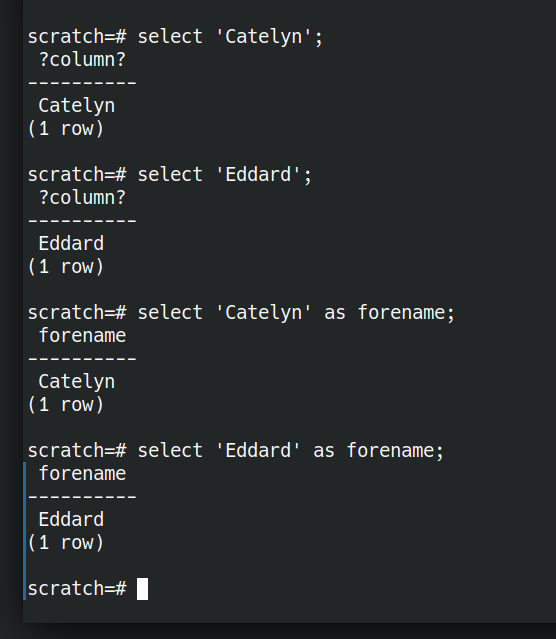
Let’s look at some of the building blocks SQL gives us for expressing questions. The simplest building block we have is asking for literal values.
SELECT 'Eddard';
SELECT 'Catelyn';
A value without a name is not very useful. Let’s rename them.
SELECT 'Eddard' AS forename;
SELECT 'Catelyn' AS forename;
What if we wanted to ask a question of multiple Starks: Eddard OR Catelyn OR Bran? That’s where UNION comes in.
select 'Eddard' as forename
UNION select 'Catelyn' AS forename
UNION SELECT 'Bran' AS forename;

We can also express things like someone leaving the family. With EXCEPT.
select 'Eddard' as forename
UNION select 'Catelyn' AS forename
UNION select 'Bran' AS forename
EXCEPT select 'Eddard' as forename;

What about people joining the family? How can we see who’s in both families. That’s where INTERSECT comes in.
(
  SELECT 'Jamie' AS forename
  UNION select 'Cersei' AS forename
  UNION select 'Sansa' AS forename
)
INTERSECT
(
  select 'Sansa' AS forename
);

It’s getting quite tedious having to type out every value in every query already.
SQL uses the metaphor “table”. We have tables of data. To me that gives connotations of spreadsheets. Postgres uses the term “relation” which I think is more helpful. Each “relation” is a collection of data which have some relation to each other. Data for which a predicate is true.
Let’s store the starks together. They are related to each other.
create table stark as
SELECT 'Sansa' as forename
UNION select 'Eddard' AS forename
UNION select 'Catelyn' AS forename
UNION select 'Bran' AS forename ;

create table lannister as
SELECT 'Jamie' AS forename
UNION select 'Cersei' AS forename
UNION select 'Sansa' AS forename;
Now we have stored relations of related data that we can ask questions of. We’ve stored the facts where “is a member of house stark” and “is a member of house lannister” are true. What if we want people who are in both houses. A relational AND. That’s where NATURAL JOIN comes in.
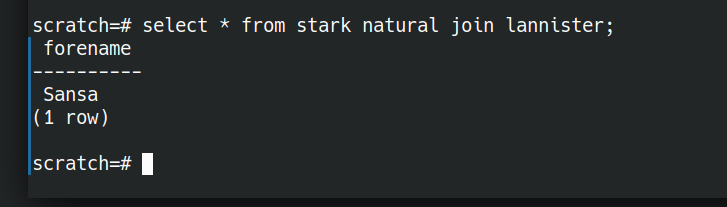
NATURAL JOIN is not quite the same as the set based and (INTERSECT above). NATURAL JOIN will work even if there are different arity tuples in the two relations we are comparing.
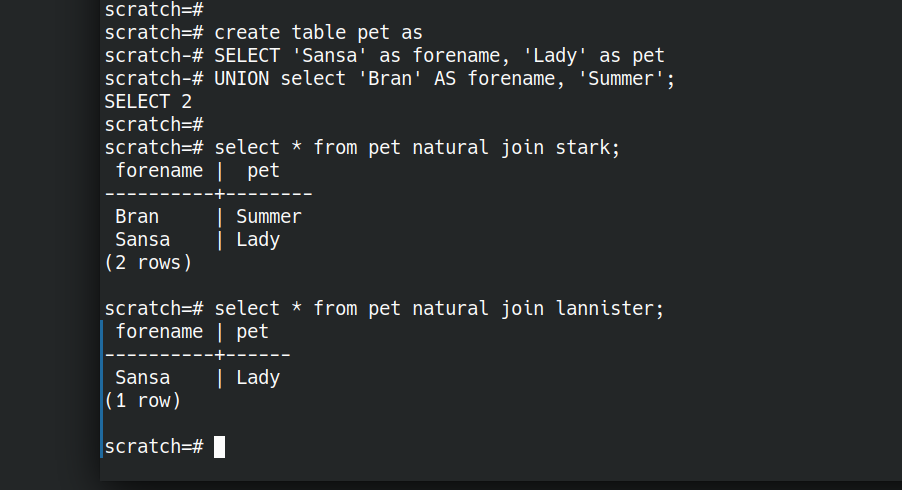
Let’s illustrate this by creating a relation pet with two attributes.
create table pet as
CREATE TABLE pet as
SELECT 'Sansa' as forename, 'Lady' as pet
UNION select 'Bran' AS forename, 'Summer' as pet;
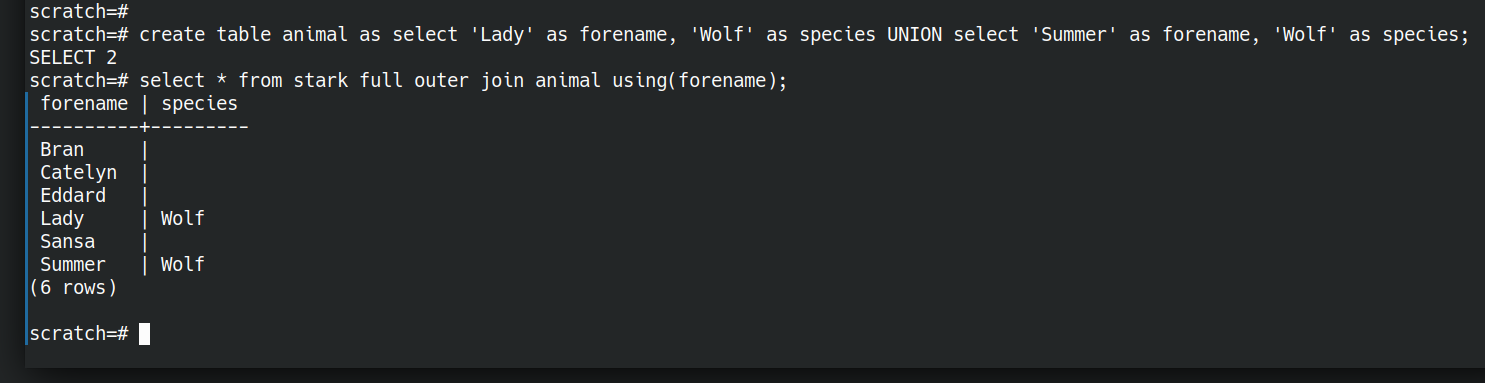
Now we have an AND, what about OR? We have a set-or above (UNION). I think the closest thing to a relational OR is a full outer join.
create table animal as select 'Lady' as forename, 'Wolf' as species UNION select 'Summer' as forename, 'Wolf' as species;
select * from stark full outer join animal using(forename);
Ok so we can ask simple questions with ands and ors. There are also equivalents of most of the relational algebra operations.
What if I want to invade King’s Landing?
What about more interesting questions? We can do those too. Let’s jump ahead a bit.
What if we’re wanting to plan an attack on Kings Landing and need to consider the routes we could take to get there. Starting from just some facts about the travel options between locations, let’s ask the database to figure out routes for us.
First the data.
create table move (place text, method text, newplace text);
insert into move(place,method,newplace) values
('Winterfell','Horse','Castle Black'),
('Winterfell','Horse','White Harbour'),
('Winterfell','Horse','Moat Cailin'),
('White Harbour','Ship','King''s Landing'),
('Moat Cailin','Horse','Crossroads Inn'),
('Crossroads Inn','Horse','King''s Landing');
Now let’s figure out a query that will let us plan routes between origin and destination as below
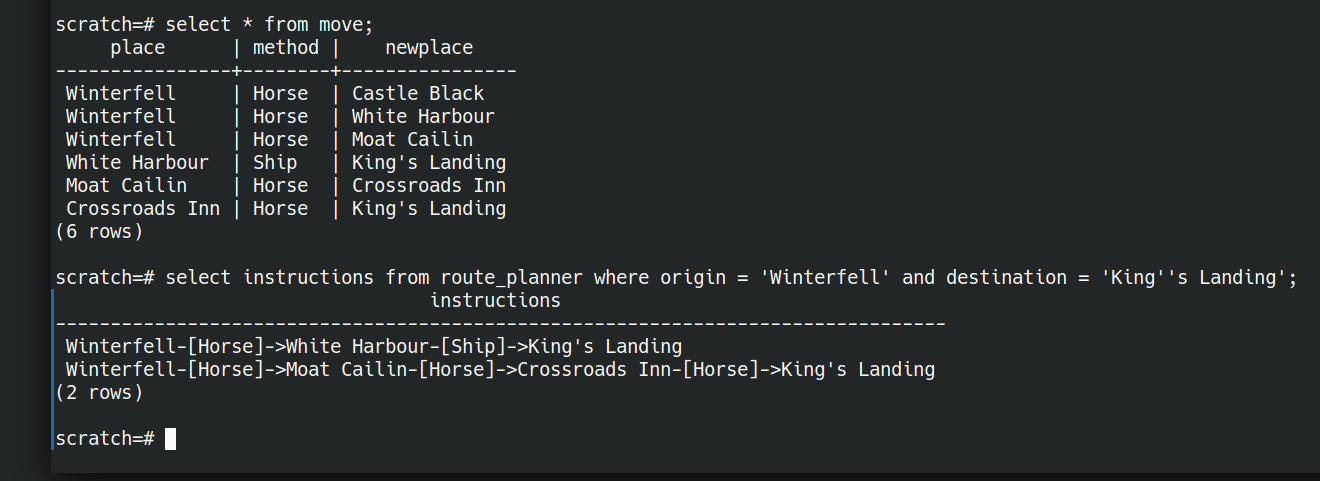
We don’t need to store any intermediate data, we can ask the question all in one go. Here “route_planner” is a view (a saved question)
create view route_planner as
with recursive route(place, newplace, method, length, path) as (
	select place, newplace, method, 1 as length, place as path from move --starting point
		union -- or
	select -- next step on journey
		route.place,
		move.newplace,
		move.method,
		route.length + 1, -- extra step on the found route
		path || '-[' || route.method || ']->' || move.place as path -- describe the route
	from move
	join route ON route.newplace = move.place -- restrict to only reachable destinations from existing route
)
SELECT
	place as origin,
	newplace as destination,
	length,
	path || '-[' || method ||  ']->' || newplace as instructions
FROM route;
I know this is a bit “rest of the owl” compared to what we were doing above. I hope it at least illustrates the extent of what is possible. (It’s based on the prolog tutorial). We have started from some facts about adjacent places and asked the database to figure out routes for us.
Let’s talk it through…
create view route_planner as
this saves the relation that’s the result of the given query with a name. We did this above with
create table lannister as
SELECT 'Jamie' AS forename
UNION select 'Cersei' AS forename
UNION select 'Sansa' AS forename;
While create table will store a static dataset, a view will re-execute the query each time we interrogate it. It’s always fresh even if the underlying facts change.
with recursive route(place, newplace, method, length, path) as (...);
This creates a named portion of the query, called a “common table expression“. You could think of it like an extract-method refactoring. We’re giving part of the query a name to make it easier to understand. This also allows us to make it recursive, so we can build answers on top of partial answers, in order to build up our route.
select place, newplace, method, 1 as length, place as path from move
This gives us all the possible starting points on our journeys. Every place we know we can make a move from.
We can think of two steps of a journey as the first step OR the second step. So we represent this OR with a UNION.
join route ON route.newplace = move.place
Once we’ve found our first and second steps, the third step is just the same—treating the second step as the starting point. “route” here is the partial journey so far, and we look for feasible connected steps.
path || '-[' || route.method || ']->' || move.place as path;
here we concatenate instructions so far through the journey. Take the path travelled so far, and append the next mode of transport and next destination.
Finally we select the completed journey from our complete route
SELECT
	place as origin,
	newplace as destination,
	length,
	path || '-[' || method ||  ']->' || newplace as instructions
FROM route;
Then we can ask the question
select instructions from route_planner
where origin = 'Winterfell'
and destination = 'King''s Landing';
and get the answer
                                 instructions
-------------------------------------------------------------------------------
Winterfell-[Horse]->White Harbour-[Ship]->King's Landing
Winterfell-[Horse]->Moat Cailin-[Horse]->Crossroads Inn-[Horse]->King's Landing
(2 rows)
Thinking in Questions
Learning SQL well can be a worthwhile investment of time. It’s a language in widespread use, across many underlying technologies.
Get the most out of it by shifting your thinking from “how can I get at my data so I can answer questions” to “How can I express my question in this language?”.
Let the database figure out how to best answer the question. It knows most about the data available and the resources at hand.
The post Thinking in Questions with SQL appeared first on Benji's Blog.

User Friendly Printer Management | openSUSE YaST
openSUSE Tumbleweed – Review of the week 2021/11
Dear Tumbleweed users and hackers,
The biggest trouble of the week was the mirror infrastructure having a hard time catching up to the full rebuild. Tumbleweed itself was, as usual, solid and has been steadily rolling. In total, there were 4 snapshots (0312, 0315, 0316, and 0317) released last week.
The main changes in those snapshots included:
- Mozilla Thunderbird 78.8.1
- Mozilla Firefox 86.0.1
- KDE Frameworks 5.80.0
- Bison 3.7.6
- grub2: boothole v2 fixes: the first iteration was blocked, as dual boot was broken. New signing certs and revocation of old certs will follow.
- PipeWire 0.3.23
- Linux kernel 5.11.6
- SQLite 3.35.0
- Systemd 246.11
The staging projects are largely unchanged, the main topics there are still:
- KDE Plasma 5.21.3
- Perl 5.32.1
- SELinux 3.2
- Python 3.9 modules: besides python36-FOO and python38-FOO, we are testing to also shop python39-FOO modules; we already have the interpreter after all. Python 3.8 will remain the default for now.
- UsrMerge is gaining some traction again, thanks to Ludwig for pushing for it
- GCC 11 as the default compiler
Noodlings 25 | Getting Feedback

Entire Rebuild of Tumbleweed Brings Enormous Update
There were few packages untouched in openSUSE’s rolling release distribution Tumbleweed this week as updates poured out of five new snapshots.
The 20210311 snapshot provided an entire rebuild of the distribution, which is something that occasionally happens.
The most recent 20210317 snapshot updated more than a half dozen packages, which included the data plotting package kplotting as the lone KDE Frameworks 5.80.0 package to update in the snapshot. A memory leak fix was made in the update of flatpak 1.10.2 and a security update in the package fixed a potential attack where a flatpak application could use custom formatted .desktop files to gain access to files on the host system. An update of systemd 246.11 fixed a void pointer arithmetic warning and moved Secure Boot logic to a new file. Other updates in the snapshot included spacenavd 0.8, python-packaging 20.9, python-scipy 1.6.1 and rtkit 0.13.
Snapshot 20210316 delivered most of the 5.80.0 Frameworks packages. Kirigami, which offers application framework components for mobile, had multiple improvements and fixes; it changed and improved the PlaceholderMessage for new Application Programming Interfaces. The Plasma Framework package ported a Plasma Style Kirigami Theme plugin to the new Kirigami API. A Flatpak manifest was also added to the Kirigami template. The snapshot brought an update of ImageMagick 7.0.11.3, which decodes HEIC images in sRGB instead of YCbCr. Mozilla Firefox 86.0.1 fixed a frequent Linux crash on the browser launch. The 5.11.6 Linux Kernel was updated in the snapshot, which had some Btrfs fixes. The kernel also enabled the headset microphone of the Acer Swift line. There was a fix for the maximum length of a password entered through a terminal with cryptsetup 2.3.5. Various fixes were made in the update of xfsprogs 5.11.0 and the Open Chinese Convert library opencc 1.1.2 added a Hong Kong Traditional Chinese conversion. A major version update of Python-hyperlink to 21.0.0 was included in the snapshot and bumped some long overdue dependencies. Other packages to update in the snapshot were gnutls 3.7.1, vim 8.2.2607 and sqlite3 3.35.0, which enhanced the .stats command to accept new arguments stmt and vmstep and causes the prepare statement statistics and only the virtual-machine step count to be shown, respectively.
Updated KDE packages appeared to be a common theme throughout the week as snapshot 20210315 provided an update of KDE Plasma 5.21.2; the Plasma Desktop update avoids using non-integer numbers as spacing and the Plasma Workspace fixed a bug that for a more graceful handling of the escape key in history view. KWin had some updates for Wayland like fixing the PrepareForSleep dbus connection and a commit that honors a NoPlugin option. A major version of rubygem-rspec-rails 5.0.0 added new fixture test support code and dropped support for Rails below 5.2. Multimedia package pipewire 0.3.23 has some critical fixes from the previous release, makes improvements in JSON parsing and encoding, and Bluetooth now supports delay adjustments. Wireshark 3.4.4 fixed one Common Vulnerabilities and Exposure that could open unsafe URLs.
Snapshot 20210312 provided some OpenPGP fixes and calendar fixes with the Mozilla Thunderbird 78.8.1 update. Data transfer package curl 7.75.0 added Hyper as a new optional HTTP backend and introduced AWS HTTP v4 Signature support. An update of btrfsprogs 5.11, which is the userspace utilities to manage btrfs filesystems, brought in a new subcommand create-control-device. The new version of bison 3.7.6 fixed the reused push parsers and table generation. The updated version of git 2.30.2 took care of a CVE that could have been fooled into running remote code during a clone. Other packages updated in the snapshot were text editor nano 5.6.1, sssd 2.4.2 and yast2 4.3.59.
Snapshot 20210311 was an entire rebuild of the Tumbleweed distribution. This snapshot also included package updates from KDE Plasma 5.21.2, but KDE Applications 20.12.3 had the most updates in in the snapshot. Video editor Kdenlive had the most enhancements in the snapshot; an enhancement included improving the handling when switching to fullscreen and there was a crash fix for group keyframe moves. Another 20.12.3 Applications update was made to the storage package Akonadi, which makes use of loose_ option prefix for the MySQL server settings. Most of the updates around the 7.1.1.2 update of LibreOffice involved translation updates. Updates to brltty, php, vim, fwupd and redis were among the several packages updated in this rebuild snapshot.
Parsing Fortigate logs and other syslog-ng 3.31 news
Version 3.31 of syslog-ng has been released recently. One of its most user-visible features is the parser for Fortigate logs, yet another networking vendor that produces log messages not conforming to syslog specifications. Parsing Fortigate logs builds upon the new no-header flag of syslog-ng combined with the key-value and date parsers. Other features include a new silent message option for the Telegram destination and automatic directory creation for disk-buffer files.
Note: as you could guess from the previous paragraph, Fortigate is not alone. Cisco also has “interesting” log messages, and a bit of extra parsing also helps with PAN-OS, even if their messages conform to syslog specifications.
Before you begin
In this blog, we check out some of the new features of syslog-ng 3.31. If you want to test them, you need to install syslog-ng 3.31 or later (I’m running a Git snapshot version on my laptop). It is available already in FreeBSD ports, but most Linux distributions carry older versions. Check the 3rd-party binaries page on the syslog-ng website if there are up-to-date 3rd-party packages for your distribution of choice: https://www.syslog-ng.com/3rd-party-binaries
Once you have syslog-ng 3.31 up and running, you are ready to test some of the new features. Let’s start with some of the smaller features and finish with the big one!
Disk buffer directory
Prior to version 3.31 of syslog-ng, you had to create a directory for disk buffer files manually before starting syslog-ng. If the directory was missing, syslog-ng stopped with an error. In my latest syslog-ng article on opensoure.com, where syslog-ng on a Raspberry Pi machine buffers sensor data until the server becomes available, I also warn you to create the directory.
Starting with version 3.31, if the directory specified in the configuration does not exist, syslog-ng creates it automatically.
Silent Telegram messages
Sending alerts to Telegram from syslog-ng has been possible for years already. But there are some situations when you want to receive all the interesting messages on your mobile without being disturbed each time a new message arrives. This is where the new disable_notification() option to the Telegram destination can come handy. If set to `True`, your mobile receives the new messages without alerting you each time.
“no-header” flag for the syslog parser
Some log messages only keep the PRI field from the syslog specification, but they lack a proper syslog header. Among others, Fortigate logs belong to these log messages. In this case, you can use the “no-header” flag on incoming log messages. This way, syslog-ng parses the PRI field, and puts the rest of the log message into $MSG. If the message is otherwise structured, you can parse it further, extract the date using the date parser, and create name-value pairs from other useful information.
Working with Fortigate logs
Here are some sample Fortigate log messages. These were used to test the new parser, and we will use them as well. You can copy and paste them from here or from /usr/share/syslog-ng/include/scl/fortigate/fortigate.conf as well:
<189>date=2021-01-15 time=12:58:59 devname="FORTI_111" devid="FG100D3G12801312" logid="0001000014" type="traffic" subtype="local" level="notice" vd="root" eventtime=1610704739683510055 tz="+0300" srcip=91.234.154.139 srcname="91.234.154.139" srcport=45295 srcintf="wan1" srcintfrole="wan" dstip=213.59.243.9 dstname="213.59.243.9" dstport=46730 dstintf="unknown0" dstintfrole="undefined" sessionid=2364413215 proto=17 action="deny" policyid=0 policytype="local-in-policy" service="udp/46730" dstcountry="Russian Federation" srccountry="Russian Federation" trandisp="noop" app="udp/46730" duration=0 sentbyte=0 rcvdbyte=0 sentpkt=0 appcat="unscanned" crscore=5 craction=262144 crlevel="low"
<189>date=2021-01-15 time=12:58:59 devname="FORTI_111" devid="FG100D3G12801312" logid="0001000014" type="traffic" subtype="local" level="notice" vd="root" eventtime=1610704739683498829 tz="+0300" srcip=91.234.154.139 srcname="91.234.154.139" srcport=45295 srcintf="wan1" srcintfrole="wan" dstip=213.59.243.9 dstname="213.59.243.9" dstport=46730 dstintf="unknown0" dstintfrole="undefined" sessionid=2364413214 proto=17 action="deny" policyid=0 policytype="local-in-policy" service="udp/46730" dstcountry="Russian Federation" srccountry="Russian Federation" trandisp="noop" app="udp/46730" duration=0 sentbyte=0 rcvdbyte=0 sentpkt=0 appcat="unscanned" crscore=5 craction=262144 crlevel="low"
<189>date=2021-01-15 time=12:58:59 devname="FORTI_111" devid="FG100D3G12801312" logid="0000000013" type="traffic" subtype="forward" level="notice" vd="root" eventtime=1610704739683525562 tz="+0300" srcip=10.9.1.26 srcname="sotina-sv" srcport=61105 srcintf="9 VLAN" srcintfrole="lan" dstip=77.88.55.66 dstname="www.yandex.ru" dstport=443 dstintf="wan1" dstintfrole="wan" sessionid=2364410752 proto=6 action="close" policyid=42 policytype="policy" poluuid="c1e5431a-d082-51e7-53e0-d3a8ab1a3ee2" service="HTTPS" dstcountry="Russian Federation" srccountry="Reserved" trandisp="snat" transip=213.59.243.9 transport=61105 appid=42899 app="Yandex" appcat="General.Interest" apprisk="elevated" applist="Application Control_User" duration=15 sentbyte=7286 rcvdbyte=1490 sentpkt=16 rcvdpkt=8 wanin=1158 wanout=6470 lanin=6470 lanout=6470 utmaction="allow" countapp=1 osname="Windows" srcswversion="7" unauthuser="sotina-sv" unauthusersource="kerberos" mastersrcmac="00:24:21:ac:fb:da" srcmac="00:24:21:ac:fb:da" srcserver=0
<189>date=2021-01-15 time=12:58:59 devname="FORTI_111" devid="FG100D3G12801312" logid="0001000014" type="traffic" subtype="local" level="notice" vd="root" eventtime=1610704739683532607 tz="+0300" srcip=94.143.50.155 srcname="94.143.50.155" srcport=56368 srcintf="wan1" srcintfrole="wan" dstip=213.59.243.9 dstname="213.59.243.9" dstport=46730 dstintf="unknown0" dstintfrole="undefined" sessionid=2364413216 proto=6 action="deny" policyid=0 policytype="local-in-policy" service="tcp/46730" dstcountry="Russian Federation" srccountry="Russian Federation" trandisp="noop" app="tcp/46730" duration=0 sentbyte=0 rcvdbyte=0 sentpkt=0 appcat="unscanned" crscore=5 craction=262144 crlevel="low"
As you can see, these lines start as any other log messages start, with a <PRI> field, but otherwise, they lack a proper syslog header. All further data is described as name-value pairs.
When we send this log to a port without Fortigate parsing enabled, the results are far from ideal. The date and time of the message will reflect the current time instead of the time encoded in the log message:
Mar 12 15:14:21 localhost date=2021-01-15 time=12:58:59 devname="FORTI_111" devid="FG100D3G12801312" logid="0001000014" type="traffic" subtype="local" level="notice" vd="root" eventtime=1610704739683510055 tz="+0300" srcip=91.234.154.139 srcname="91.234.154.139" srcport=45295 srcintf="wan1" srcintfrole="wan" dstip=213.59.243.9 dstname="213.59.243.9" dstport=46730 dstintf="unknown0" dstintfrole="undefined" sessionid=2364413215 proto=17 action="deny" policyid=0 policytype="local-in-policy" service="udp/46730" dstcountry="Russian Federation" srccountry="Russian Federation" trandisp="noop" app="udp/46730" duration=0 sentbyte=0 rcvdbyte=0 sentpkt=0 appcat="unscanned" crscore=5 craction=262144 crlevel="low"
By using the fortigate-parser(), we can extract the date from the message and also create name-value pairs from the message. This enables easier filtering (alerting), saving only specific fields to save space, or storing specific fields to an SQL or noSQL database, like Elasticsearch.
Luckily, there is no need to configure the fortigate-parser() yourself. Unless you have a high message rate, where even the smallest extra processing counts, using the default-network-drivers() of syslog-ng is easier. It parses Fortigate logs, and many other message types automatically. For this scenario and for other debugging ideas, check the Cisco parser blog at https://www.syslog-ng.com/community/b/blog/posts/parsing-cisco-logs-in-syslog-ng
The following configuration uses the default-network-drivers with a JSON-formatted destination file. This way, you can see that syslog-ng parses the logs and creates name-value pairs from them.
source s_net {
    default-network-drivers();
};
template t_jsonfile {
    template("$(format-json --scope rfc5424 --scope dot-nv-pairs
        --rekey .* --shift 1 --scope nv-pairs --key ISODATE)\n\n");
};
destination d_fromfortigate {
    file("/var/log/fromfortigate" template(t_jsonfile));
};
log {
    source(s_net);
    destination(d_fromfortigate);
};
The source is default-network-drivers() and it listens on TCP port 514. The template uses JSON formatting, includes any syslog fields and removes the leading dots from name-value pairs (by default syslog-ng parsers create names that start with a dot, but it can cause weird problems for example with Elasticsearch) before storing them. Then, apply this template to a destination file. Finally, a log statement connects the source to the destination.
Using netcat, you can send the test messages to the network source on port 514 and check the results:
czplaptop:~ # cat fortigate.txt | netcat -4 -n -N -v 127.0.0.1 514
Connection to 127.0.0.1 514 port [tcp/*] succeeded!
czplaptop:~ # cat /var/log/fromfortigate
{"fortigate":{"vd":"root","tz":"+0300","type":"traffic","trandisp":"noop","time":"12:58:59","subtype":"local","srcport":"45295","srcname":"91.234.154.139","srcip":"91.234.154.139","srcintfrole":"wan","srcintf":"wan1","srccountry":"Russian Federation","sessionid":"2364413215","service":"udp/46730","sentpkt":"0","sentbyte":"0","rcvdbyte":"0","proto":"17","policytype":"local-in-policy","policyid":"0","logid":"0001000014","level":"notice","eventtime":"1610704739683510055","duration":"0","dstport":"46730","dstname":"213.59.243.9","dstip":"213.59.243.9","dstintfrole":"undefined","dstintf":"unknown0","dstcountry":"Russian Federation","devname":"FORTI_111","devid":"FG100D3G12801312","date":"2021-01-15","crscore":"5","crlevel":"low","craction":"262144","appcat":"unscanned","app":"udp/46730","action":"deny"},"app":{"name":"fortigate"},"SOURCE":"s_net","PRIORITY":"notice","MESSAGE":"date=2021-01-15 time=12:58:59 devname=\"FORTI_111\" devid=\"FG100D3G12801312\" logid=\"0001000014\" type=\"traffic\" subtype=\"local\" level=\"notice\" vd=\"root\" eventtime=1610704739683510055 tz=\"+0300\" srcip=91.234.154.139 srcname=\"91.234.154.139\" srcport=45295 srcintf=\"wan1\" srcintfrole=\"wan\" dstip=213.59.243.9 dstname=\"213.59.243.9\" dstport=46730 dstintf=\"unknown0\" dstintfrole=\"undefined\" sessionid=2364413215 proto=17 action=\"deny\" policyid=0 policytype=\"local-in-policy\" service=\"udp/46730\" dstcountry=\"Russian Federation\" srccountry=\"Russian Federation\" trandisp=\"noop\" app=\"udp/46730\" duration=0 sentbyte=0 rcvdbyte=0 sentpkt=0 appcat=\"unscanned\" crscore=5 craction=262144 crlevel=\"low\"","ISODATE":"2021-01-15T12:58:59+01:00","HOST_FROM":"localhost","HOST":"localhost","FACILITY":"local7","DATE":"Jan 15 12:58:59"}
[…]
You can see all the name-value pairs extracted from the log messages, including a proper date as found in the log message.
What is next?
These were just my highlights from the 3.31 syslog-ng release. For the complete list of changes, check https://github.com/syslog-ng/syslog-ng/releases/tag/syslog-ng-3.31.1 where you might find other new features or bugfixes that might convince you to upgrade syslog-ng on your hosts.
If you have questions or comments related to syslog-ng, do not hesitate to contact us. You can reach us by email or even chat with us. For a list of possibilities, check our GitHub page under the “Community” section at https://github.com/syslog-ng/syslog-ng. On Twitter, I am available as @Pczanik.
Playing along with NFTables
By default, openSUSE Leap 15.x is using the firewalld firewall implementation (and the firewalld backend is using iptables under the hood).
But since a while, openSUSE also has nftables support available - but neither YaST nor other special tooling is currently configured to directly support it. But we have some machines in our infrastructure, that are neither straight forward desktop machines nor do they idle most of the time. So let’s try out how good we are at trying out and testing new things and use one of our central administrative machines: the VPN gateway, which gives all openSUSE heroes access to the internal world of the openSUSE infrastructure.
This machine is already a bit special:
- The “external” interface holds the connection to the internet
- The “private” interface is inside the openSUSE heroes private network
- We run openVPN with tun devices (one for udp and one for tcp) to allow the openSUSE heroes to connect via a personal certificate + their user credentials
- In addition, we run wireguard to connect the private networks in Provo and Nuremberg (at our Sponsors) together
- And before we forget: our VPN gateway is not only a VPN gateway: it is also used as gateway to the internet for all internal machines, allowing only ‘pre-known traffic’ destinations
All this makes the firewall setup a little bit more complicated.
BTW: naming your interfaces by giving them explicit names like “external” or “private”, like in our example, has a huge benefit, if you play along with services or firewalls. Just have a look in /etc/udev/rules.d/70-persistent-net.rules once your devices are up and rename them according to your needs (you can also use YaST for this). But remember to also check/rename the interfaces in */etc/sysconfig/network/ifcfg-** to use the same name before rebooting your machine. Otherwise your end up in a non-working network setup.
Let’s have a short look at the area we are talking about:

As you hopefully notice, none of the services on the community side is affected. There we have standard (iptables) based firewalls and use proxies to forward user requests to the right server.
On the openSUSE hero side, we exchanged the old SuSEfirewall2 based setup with a new one based on nftables.
There are a couple of reasons that influenced us in switching over to nftables:
- the old SuSEfirewall2 worked, but generated a huge iptables list on our machine in question
- using ipsets or variables with SuSEfirewall2 was doable, but not an easy task
- we ran into some problems with NAT and Masquerading using firewalld as frontend
- Salt is another interesting field:
- Salt’ing SuSEfirewall2 by deploying some files on a machine is always possible, but not really straight forward
- there is no Salt module for SuSEfirewall2 (and there will probably never be one)
- there are Salt modules for firewalld and nftables, both on nearly the same level
- nftables is integrated since a while in the kernel and should replace all the *tables modules long term. So why not jumping directly to it, as we (as admins) do not use GUI tools like YaST or firewalld-gui anyway?
So what are the major advantages?
- Sets are part of the core functionality. You can have sets of ports, interface names, and address ranges. No more ipset. No more multiport.
ip daddr { 1.1.1.1, 1.0.0.1 } tcp dport { dns, https } oifname { "external", "wg_vpn1" } accept;This means you can have very compact firewall sets to cover a lot of cases with a few rules. - No more extra rules for logging. Only turn on counter where you need it.
counter log prefix "[nftables] forward reject " reject - You can cover IPv4 and IPv6 with a single ruleset when using
table inet, but you can have per IP protocol tables as well. And sometimes even need them e.g. for postrouting.
Starting from scratch
A very basic /etc/nftables.conf would look something like this
#!/usr/sbin/nft -f

flush ruleset

# This matches IPv4 and IPv6
table inet filter {
    # chain names are up to you.
    # what part of the traffic they cover,
    # depends on the type line.
	chain input {
		type filter hook input priority 0; policy accept;
	}
	chain forward {
		type filter hook forward priority 0; policy accept;
	}
	chain output {
		type filter hook output priority 0; policy accept;
	}
}
But so far we did not stop or allow any traffic. Well actually we let everything in and out now because all chains have the policy accept.
#!/usr/sbin/nft -f

flush ruleset

table inet filter {
    chain base_checks {
        ## another set, this time for connection tracking states.
        # allow established/related connections
        ct state {established, related} accept;

        # early drop of invalid connections
        ct state invalid drop;
    }

   	chain input {
		type filter hook input priority 0; policy drop;

        # allow from loopback
        iif "lo" accept;

        jump base_checks;

        # allow icmp and igmp
        ip6 nexthdr icmpv6 icmpv6 type { echo-request, echo-reply, packet-too-big, time-exceeded, parameter-problem, destination-unreachable, packet-too-big, mld-listener-query, mld-listener-report, mld-listener-reduction, nd-router-solicit, nd-router-advert, nd-neighbor-solicit, nd-neighbor-advert, ind-neighbor-solicit, ind-neighbor-advert, mld2-listener-report } accept;
        ip protocol icmp icmp type { echo-request, echo-reply, destination-unreachable, router-solicitation, router-advertisement, time-exceeded, parameter-problem } accept;
        ip protocol igmp accept;

        # for testing reject with logging
        counter log prefix "[nftables] input reject " reject;
	}
    chain forward {
		type filter hook forward priority 0; policy accept;
	}
	chain output {
		type filter hook output priority 0; policy accept;
	}
}
You can activate the configuration with nft --file nftables.conf, but do NOT do this on a remote machine. It is also a good habit to run nft --check --file nftables.conf before actually loading the file to catch syntax errors.
So what did we change?
- most importantly we changed the policy of the chain to drop and added a reject rule at the end. So nothing gets in right now.
- We allow all traffic on the localhost interface.
- The base_checks chain handles all packets related to established connections. This makes sure that incoming packets for outgoing connections get through.
- We allowed important ICMP/IGMP packets. Again this is using a set and the type names and not some crtyptic numbers. YAY for readability.
Now if someome tries to do a ssh connect to our machine, we will see:
[nftables] input reject IN=enp1s0 OUT= MAC=52:54:00:4c:51:6c:52:54:00:73:a1:57:08:00 SRC=172.16.16.2 DST=172.16.16.30 LEN=60 TOS=0x00 PREC=0x00 TTL=64 ID=22652 DF PROTO=TCP SPT=55574 DPT=22 WINDOW=64240 RES=0x00 SYN URGP=0
and nft list ruleset will show us
counter packets 1 bytes 60 log prefix "[nftables] input reject " reject
So we are secure now. Though maybe allowing SSH back in would be nice. You know just in case. We have 2 options now. Option 1 would be to insert the following line before our reject line.
tcp dport 22 accept;
But did we mention already that we have sets and that they are great? Especially great if we need the same list of ports/ip ranges/interface names in multiple places?
We have 2 ways to define sets:
define wanted_tcp_ports {
  22,
}
Yes the trailing comma is ok. And it makes adding elements to the list easier. So we do them all the time. This will change our rule above to
tcp dport $wanted_tcp_ports accept;
If we load the config file and run nft list ruleset, we will see:
tcp dport { 22 } accept
But there is actually a slightly better way to do this:
    set wanted_tcp_ports {
        type inet_service; flags interval;
        elements = {
           ssh
        }
    }
That way our firewall rule becomes:
tcp dport @wanted_tcp_ports accept;
And if we dump our firewall with nft list ruleset afterwards it will still be shown as @wanted_tcp_ports and not have variable replaced with the value.
While this is great already, the 2nd syntax actually has one more advantage.
$ nft add element inet filter wanted_tcp_ports \{ 443 \}
Now our wanted_tcp_ports list will allow port 22 and 443. This is of course often more useful if we use it with IP addresses.
    set fail2ban_hosts {
        type ipv4_addr; flags interval;
        elements = {
           192.168.0.0/24
        }
    }
Let us append some elements to that set too.
$ nft add element inet filter fail2ban_hosts \{ 192.168.254.255, 192.168.253.0/24 \}
$ nft list ruleset
… and we get …
        set fail2ban_hosts {
                type ipv4_addr
                flags interval
                elements = { 192.168.0.0/24, 192.168.253.0/24,
                             192.168.254.255 }
        }
Now we could change fail2ban to append elements to the set instead of creating a new rule for each new machine it wants to block. Fewer rules. Faster processing.
But with reloading the firewall we dropped port 443 from the port list again. Oops. Though … if you are happy with the rules. You can just run
$ nft list ruleset > nftables.conf
When you are using all the sets instead of the variables, all your firewall rules will still look nice.
Our complete firewall looks like
table inet filter {
        set wanted_tcp_ports {
                type inet_service
                flags interval
                elements = { 22, 443 }
        }

        set fail2ban_hosts {
                type ipv4_addr
                flags interval
                elements = { 192.168.0.0/24, 192.168.253.0/24,
                             192.168.254.255 }
        }

        chain base_checks {
                ct state { established, related } accept
                ct state invalid drop
        }

        chain input {
                type filter hook input priority filter; policy drop;
                iif "lo" accept
                jump base_checks
                ip6 nexthdr ipv6-icmp icmpv6 type { destination-unreachable, packet-too-big, time-exceeded, parameter-problem, echo-request, echo-reply, mld-listener-query, mld-listener-report, mld-listener-done, nd-router-solicit, nd-router-advert, nd-neighbor-solicit, nd-neighbor-advert, ind-neighbor-solicit, ind-neighbor-advert, mld2-listener-report } accept
                ip protocol icmp icmp type { echo-reply, destination-unreachable, echo-request, router-advertisement, router-solicitation, time-exceeded, parameter-problem } accept
                ip protocol igmp accept
                tcp dport @wanted_tcp_ports accept
                counter packets 12 bytes 828 log prefix "[nftables] input reject " reject
        }

        chain forward {
                type filter hook forward priority filter; policy accept;
        }

        chain output {
                type filter hook output priority filter; policy accept;
        }
}
For more see the nftables wiki
KDE Plasma 5.21 on openSUSE Tumbleweed | Better Then Ever
Leadership Language Lessons from Star Trek

Growing up, an influential television character for me was Jean Luc Picard from Star Trek the Next Generation.
Picard was a portrayal of a different sort of leader to most. Picard didn’t order people about. He didn’t assume he knew best. He wasn’t seeking glory. In his words: “we work to better ourselves, and the rest of humanity”. The Enterprise was a vehicle for his crew to better themselves and society. What a brilliant metaphor for organisations to aspire to.
My current job title is “Director of engineering”. I kind of hate it. I don’t want to direct anybody. I represent them as part of my first team. People don’t report to me; I support people. My mission is to clarify so they can decide for themselves, and to help them build skills so they can succeed.
Director is just a word, but words matter. Language matters.
Picard was an effective leader in part due to the language he used. Here’s a few lessons we can learn from the way he talked.
“Make it So!”
Picard is probably best known for saying “make it so!”.
This catchphrase says so much about his leadership style. He doesn’t bark orders. He gives the crew the problems to solve. He listens to his crew and supports their ideas. His crew state their intent and he affirms (or not) their decisions.
I think “Make it so” is even more powerful than the more common “very well” or “do it”, which are merely agreeing with the action being proposed.
“Make it so” is instead an agreement with the outcome being proposed. The crew are still free to adjust their course of action to achieve that outcome. They won’t necessarily have to come back for approval if they have to change their plan to achieve the same outcome. They understand their commander’s intent.
And of course it’s asking for action “wishing for a thing does not make it so”
“Oh yes?”
Picard’s most common phrase was not affirming decisions, but “oh yes”. Because he was curious, he would actively listen to his crew. He sought first to understand.
It’s fitting that he says this more than make it so. Not everything learned requires action. It’s easy to come out of retrospectives with a long list of actions. I’d rather we learned something and took no actions than took action without learning anything.
“Suggestions?”
In “Cause and Effect” (The one with Captain Fraiser Crane) there’s an imminent crisis. The Enterprise is on a collision course with another ship and are unable to maneuver. What does Picard do? Resort to command and control? No; despite the urgency he asks for suggestions from the crew. Followed by a “make it so” agreement to act.
Asking for suggestions during a crisis requires enough humility to realise your crew or team is collectively smarter than you are. Picard trusts his team to come up with the best options.
He is also willing to show vulnerability, even during a crisis. His ego doesn’t get in the way.
In this episode, the crew did not automatically follow the suggestion of the most senior person in the room. The solution to the crisis is eventually found in the second suggestion, after they tried the first. They succeeded because they had diverged and discovered options first, before converging on a solution.
The crew were aware of the other options open to them, and when the first failed they acted to try another (successful) option. Crucially, they did not wait for their captain to approve it. There wasn’t time to let the captain make the decision, but they were free to try the other options because they’d been told to “make it so” not “do it”.
To achieve the best outcomes as a team, intentionally seek divergent ideas first before converging on a decision. Avoid converging too soon on an idea that sounds promising, when others in the group may have better ideas. If your first choice doesn’t work out you will be able to try the other ideas that came up.
“Nicely done!”
Picard made sure his crew knew when he thought they had done well. Even when they violated orders! He was not one to blindly follow orders himself and he praised his crew when they violated orders for good reasons.
Data’s violation of orders is met not with a reprimand but a “nicely done!”; when Data questions it Picard responds “The claim ‘I was only following orders’ has been used to justify too many tragedies in our history”
How different might the tech industry be if more people carefully considered whether doing what they’ve been told is the right or wrong thing to do?
The post Leadership Language Lessons from Star Trek appeared first on Benji's Blog.