
अगला openSUSE Asia Summit भारत में होगा
पिचले सितंबर को Bali, Indonesia के Udayana University में openSUSE Asia Summit 2019 घटित हुआ। लगातार दो दिनों तक दुनिया के कोने कोने से आए हुए इंजीनियरों, डेवलपर्स, डिजाइनरों और कइ तरह के openSUSE योगदानकर्ताओं ने मिलकर तकनीकी प्रदर्शन तथा अन्य कार्यशालाएँ आयोजित कीं।
इस सम्मेलन के द्वारा openSUSE समुदाय अपने उपयोगकर्ताओं और योगदानकर्ताओं को एक साथ लाता हें ताकि इन में openSUSE प्रोजैक्ट को लेकर बातचीत हो सके। बोर्ड के सदस्य समुदाय को प्रोजैक्ट से संबंधित जानकारी देते हैं। नए उपयोगकर्ता इस सम्मेलन से बहुत लाभ उठा सकते हैं।

सम्मेलन के समापन समारोह से पहले यह घोषित कि गइ की अगला सम्मेलन, याने कि openSUSE Asia Summit 2020, मानव रचना इंटरनेशनल इंस्टिट्यूट ऑफ़ रिसर्च एंड स्टडीस (Manav Rachna Int'l Institute of Research & Studies), फरीदाबाद, हरियाणा, भारत (Faridabab, Haryana, India) में होगा। इंस्टिट्यूट की प्रतिनिधि, शोभा त्यागी, ने विस्तार से अपना प्रस्ताव बाताया जोकी सम्मेलन के आयोजकों ने स्वीकार किया।

 Member
 DimStar
openSUSE Tumbleweed – Review of the week 2019/47
Dear Tumbleweed users and hackers,
Another week, in which openQA did block some of the snapshots – and some issues it was unfortunately not able to see. Anyway, during the week 2019/47 we have released three snapshot into the wild (1116, 1118 and 1119), containing those changes:
- Mesa 19.2.4: fixes critical rendering issues from earlier Mesa 19.2.3. As this rendering issue did not happen on all graphics adapters, openQA had no chance of spotting it
- Linux kernel 5.3.11
- KDE Plasma 5.17.3
- Subversion 1.13.0
- binutils 2.33.1
The things being worked on include:
- openssl 1.1.1d: will be part of snapshot 1121 and later)
- rpm 4.15.0: the new python dependency generator is nasty, as it adds much more dependencies that were the before (probably a good thing), exposing new build cycles
- Python 3.8
- Rust 1.39.0: break Firefox and Thunderbird so far
- Perl 5.30.1
-
libxml 2.9.10: breaksperl -XML-LibXSLT (on i586 only, invalid free() )

Highlights of YaST Development Sprints 88 and 89
The Contents
- The System Role selection dialog got usability improvements
- and we added a CustomStatusItemSelector to the widget library in the process.
- Snapper gained machine-readable output
- Storage:
- remote encrypted devices are activated properly at boot time
- random and pervasive encryption also supported in AutoYaST
- improved support for AutoYaST Guided Partitioning
A More User Friendly Role Selector Dialog
Step by step, we continue improving the user experience making use of the newly added widgets to libyui. This sprint was the turn to update the role selection dialog to use the new item selector introduced during the sprint 87. Apart from looking better as it can be seen in the screenshots below, there are two immediate improvements:
- the vertical scroll, when present, is respected after selecting a role (instead of “jumping to the beginning”), and
- the selected role (if any) will be visible when arriving at the dialog even when the list is quite long or the available space too short.
| Before | After |

What is more, updating the dialog was also useful for us to realize about some needed improvements for the widget itself, mentioned in the next section. Quite a productive change :smiley:
When one Bit is not Enough: The CustomStatusItemSelector
A few weeks ago, we wrote about the new ItemSelector widget that is finding its way into YaST user interfaces. It turned out that just a simple on/off status is not enough in some cases, so we had to extend that concept. For example, software modules may have dependencies, and we want to show the difference between one that was explicitly selected by the user and one that was auto-selected because some other software module requires it.


This kind of shook the foundations of the underlying classes; all of a sudden a bit is no longer just a bit, but it needs to be broken down into even smaller pieces. Well, we cheated; we now use integer values instead. Most of the class hierarchy still only uses 0 and 1, but the new YCustomStatusItemSelector also supports using higher numbers for application-defined purposes.
For each possible status value, the application defines the name of the icon to be displayed (for graphical UIs like the Qt UI), the text equivalent (for text mode / the NCurses UI), and an optional nextStatus which tells the widget what status to cycle to when the user changes the status of an item with a mouse click or with the keyboard. A value of -1 lets the application handle this.
So this is not a one-trick-pony that is useful only for that one use case (the software modules), but a generic tool that might find good uses in other places all over YaST as well.
Snapper and Machine-readable Output
Most likely you already know snapper, a great tool to work with your filesystem snapshots. Some third-party scripts and tools (e.g., YaST) use the snapper CLI to get some information, but generally, snapper generates an output intended to be human-readable. Sometimes that could cause some troubles in scripts checking the snapper output. Now on, snapper also offers CLI options to generate its output in a machine-readable format, i.e., CSV and JSON. Please, check this post for more information about those new options.
Fix Boot Problems with Remote Encrypted Devices
Since we adopted systemd, the management during system boot of encrypted devices on top of network-based devices like iSCSI or FCoE disks has been less than optimal. But now we are happy to announce that we have put all the pieces together to make the experience as smooth as possible.
One of the main responsibilities of systemd is sorting the actions performed during boot and setting the dependencies between them. For example, if there are encrypted devices, systemd will first ask you for the password and activate the devices to afterwards mount the file system contained in those encrypted devices. Systemd should be able to distinguish when an encrypted device is based on a network-based storage device and, thus, can only be initialized after the network is up. In some cases that detection failed (for example network block device based mounts, such as iSCSI and FCoE disks) and systemd got stuck before initializing the network waiting for the device to be available.
Recently, SLE and openSUSE Leap has incorporated support for specifying
the _netdev option in the /etc/crypttab file. With such option,
systemd will recognize the encrypted device as network-based and will
only try to activate it after setting up the network. That’s analogous
to the corresponding _netdev option in /etc/fstab that has been
already there for quite some time and that can be used to defer when a
device is mounted. For it to work properly, the _netdev option must be
present in all the relevant entries of both crypttab and fstab.
And that’s exactly what YaST will do now in openSUSE Tumbleweed and
upcoming releases of both SLE and openSUSE Leap. From now on, the
_netdev option will be added fstab for all mount points depending
(directly or indirectly) on the network. In addition, that option (and
also the noauto and nofail ones) will be propagated from fstab to
all the corresponding crypttab entries.
This should mark the end of a dark age of encrypted iSCSI and FCoE devices timing out during boot.
AutoYaST Support for Random and Pervasive Encryption
Back in October, we announced that YaST got support for new encryption methods like random or pervasive encryption. At that time, AutoYaST was out of scope because we wanted to have a stable (and tested) API first. Fortunately, the time has come and now AutoYaST supports these encryption mechanisms.
Starting in autoyast2 4.2.17, you can specify the encryption method
using a crypt_method element, as shown in the example below. Possible
values are luks1 (regular LUKS1 encryption), pervasive_luks2
(pervasive volume encryption), protected_swap (encryption with
volatile protected key), secure_swap (encryption with volatile secure
key) and random_swap (encryption with volatile random key).
<drive>
 <type config:type="symbol">CT_DISK</type>
 <use>all</use>
 <partitions config:type="list">
  <partition>
   <size>20G</size>
   <mount>/</mount>
   <filesystem config:type="symbol">ext4</filesystem>
   <crypt_method config:type="symbol">luks1</crypt_method> <!-- default method if crypt_key is defined -->
   <crypt_key>S3CR3T</crypt_key>
  </partition>
  <partition>
   <size>1G</size>
   <mount>swap</mount>
   <crypt_method config:type="symbol">random_swap</crypt_method> <!-- set encryption method -->
  </partition>
 </partitions>
</drive>
As we want AutoYaST to be as user-friendly as possible, it will try to help you if you do some mistake setting the encryption configuration as when in the screenshot below.

Finally, the old crypt_fs element is deprecated, although it stills
works for backward-compatibility reasons. Basically, it is equivalent to
setting crypt_method to luks1.
Improve Support for AutoYaST Guided Partitioning
When it comes to partitioning, we can categorize AutoYaST use cases into three different levels:
- Automatic partitioning: the user does not care about the partitioning and trusts in AutoYaST to do the right thing.
- Guided partitioning: the user would like to set some basic settings (use LVM, set an encryption password, etc.)
- Expert partitioning: the user specifies how the layout should look, although a complete definition is not required.
To some extent, it is like using the regular installer where you can skip the partitioning screen and trust in YaST, use the Guided Proposal, or define the partitioning layout through the Expert Partitioner.
The second level (Guided partitioning) was introduced in AutoYaST with the release of SUSE Linux Enteprise 15 (and Leap 15.0) but it was not documented at all. Additionally, although it was working as designed at first sight, it was far from being that useful.
This sprint with invested quite some time improving the documentation (kudos to our awesome documentation team) and the behaviour. Now, if you want to set up an LVM system without having the specify all the details, you can use the following snippet in your profile:
<general>
  <storage>
    <lvm config:type="boolean">true</lvm>
  </storage>
</general>
If you are interested in the available options, you can check the documentation draft.

Get rid of Invalid MIT-MAGIC-COOKIE-1 key error
using YaST firstboot wizard in WSL
When starting a WSL distribution for the first time, a text prompt for user name and password appears:

The code for that is partially in the Windows launcher. The Windows side actually prompts for the user name:
https://github.com/microsoft/WSL-DistroLauncher/blob/master/DistroLauncher/DistroLauncher.cpp#L44
and passes it to ‘adduser’:
https://github.com/microsoft/WSL-DistroLauncher/blob/1f8551f7e2ea22bba2e6fb02f01e7a5f7fb757f3/DistroLauncher/DistributionInfo.cpp#L14
That seems to be a Debian specific tool that also prompts for a password. We don’t have it in openSUSE. When done, the Windows part actually calls into the Linux environment again with ‘id -u’ to get the uid of the added user:
https://github.com/microsoft/WSL-DistroLauncher/blob/1f8551f7e2ea22bba2e6fb02f01e7a5f7fb757f3/DistroLauncher/DistributionInfo.cpp#L44
So in order to also prompt for the password we’d have to write a wrapper like the Debian one or implement another prompt in the launcher. Implementing such a prompt in Windows code seems boring to me. When writing a wrapper, I’d do something dialog based to make it look more fancy. There’s already jeos-firstboot that does something similar already and more. But then the WSL image doesn’t have to be really minimal, which means we have YaST!
So even though WSL doesn’t really boot as it has no systemd it would be still possible to run the YaST firstboot wizard on first start. What modules it launches is configurable via xml file. So leaving out hardware/VM specific things like network configuration it works pretty well:
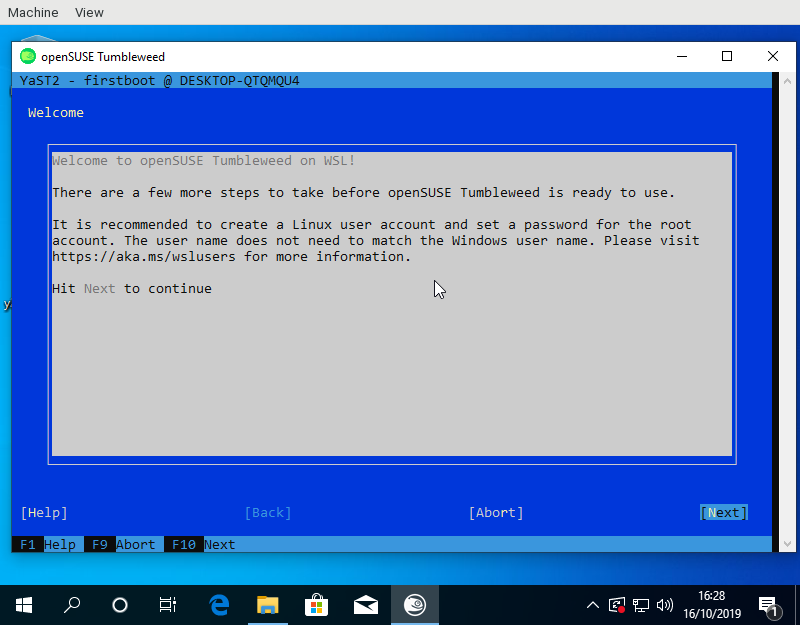
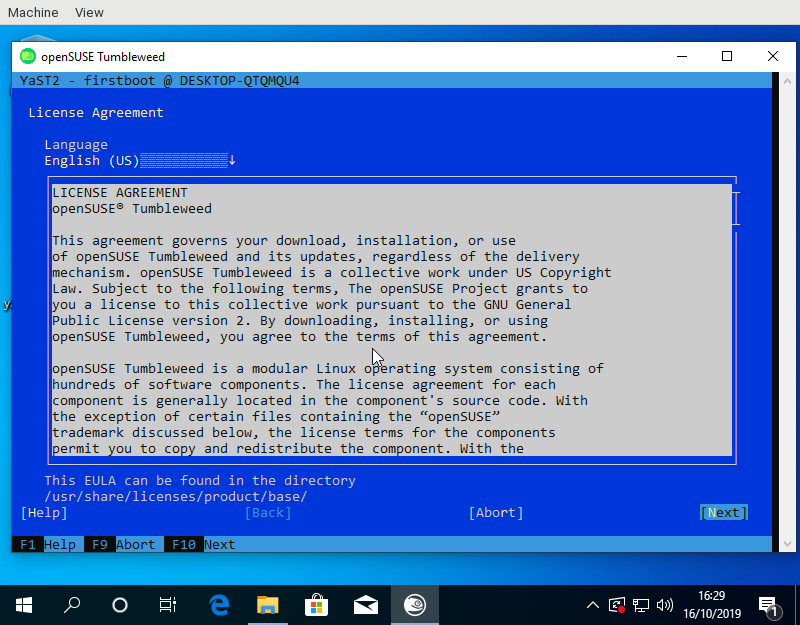
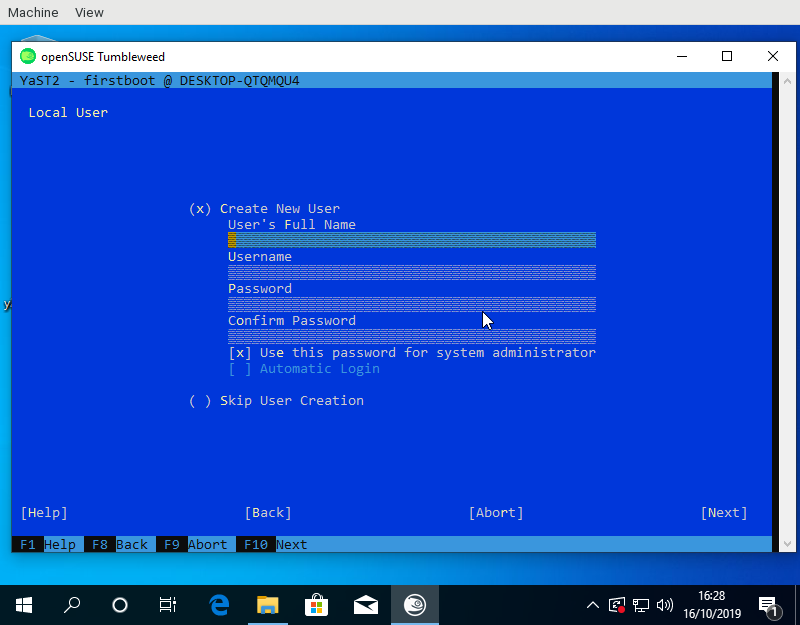
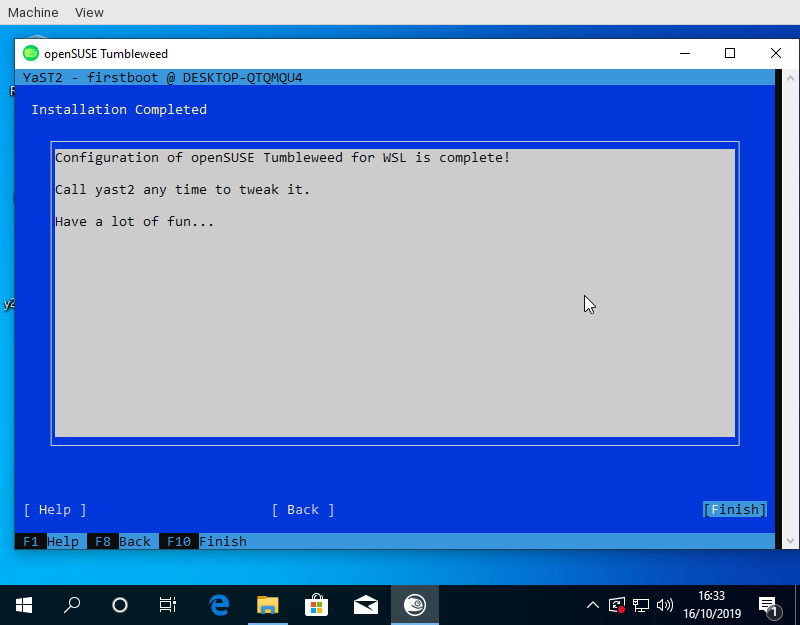
For the launcher to know the name of the created user a small YaST module was needed to write the name into /run/wsl_firstboot_uid. The launcher fetches it from there.
Using the YaST firstboot wizard also allows to use e.g. the existing registration dialogs on SLE or add other useful configuration steps. One feature I have in mind would be for example is the role selection screen to offer some pre defined package selections for WSL use cases.
Tumbleweed and Leap appx files to test this are available from download.opensuse.org. Keep in mind that one needs to import the certificates used by OBS for signing first.
Show a dialog with Kdialog (part 1)

Refactoring the Length type
CSS length values have a number and a unit, e.g. 5cm
or 6px. Sometimes the unit is a percentage, like 50%, and SVG
says that lengths with percentage units should be resolved with
respect to a certain rectangle. For example, consider this circle
element:
<circle cx="50%" cy="75%" r="4px" fill="black"/>
This means, draw a solid black circle whose center is at 50% of the width and 75% of the height of the current viewport. The circle should have a 4-pixel radius.
The process of converting that kind of units into absolute pixels for the final drawing is called normalization. In SVG, percentage units sometimes need to be normalized with respect to the current viewport (a local coordinate system), or with respect to the size of another object (e.g. when a clipping path is used to cut the current shape in half).
One detail about normalization is that it can be with respect to the horizontal dimension of the current viewport, the vertical dimension, or both. Keep this in mind: at normalization time, we need to be able to distinguish between those three modes.
The original C version
I have talked about the original C code for lengths before; the following is a small summary.
The original C code had this struct to represent lengths:
typedef struct {
    double length;
    char factor;
} RsvgLength;
The parsing code would set the factor field to a
character depending on the length's unit: 'p' for percentages, 'i'
for inches, etc., and '\0' for the default unit, which is pixels.
Along with that, the normalization code needed to know the direction (horizontal, vertical, both) to which the length in question refers. It did this by taking another character as an argument to the normalization function:
double
_rsvg_css_normalize_length (const RsvgLength * in, RsvgDrawingCtx * ctx, char dir)
{
    if (in->factor == '\0')            /* pixels, no need to normalize */
        return in->length;
    else if (in->factor == 'p') {      /* percentages; need to consider direction */
        if (dir == 'h')                                     /* horizontal */
            return in->length * ctx->vb.rect.width;
        if (dir == 'v')                                     /* vertical */
            return in->length * ctx->vb.rect.height;
        if (dir == 'o')                                     /* both */
            return in->length * rsvg_viewport_percentage (ctx->vb.rect.width,
                                                          ctx->vb.rect.height);
    } else { ... }
}
The original post talks about how I found a couple of bugs with
how the directions are identified at normalization time. The function
above expects one of 'h'/'v'/'o' for horizontal/vertical/both, and one or
two places in the code passed the wrong character.
Making the C version cleaner
Before converting that code to Rust, I removed the pesky characters and made the code use proper enums to identify a length's units.
+typedef enum {
+    LENGTH_UNIT_DEFAULT,
+    LENGTH_UNIT_PERCENT,
+    LENGTH_UNIT_FONT_EM,
+    LENGTH_UNIT_FONT_EX,
+    LENGTH_UNIT_INCH,
+    LENGTH_UNIT_RELATIVE_LARGER,
+    LENGTH_UNIT_RELATIVE_SMALLER
+} LengthUnit;
+
 typedef struct {
     double length;
-    char factor;
+    LengthUnit unit;
 } RsvgLength;
Then, do the same for the normalization function, so it will get the direction in which to normalize as an enum instead of a char.
+typedef enum {
+    LENGTH_DIR_HORIZONTAL,
+    LENGTH_DIR_VERTICAL,
+    LENGTH_DIR_BOTH
+} LengthDir;

 double
-_rsvg_css_normalize_length (const RsvgLength * in, RsvgDrawingCtx * ctx, char dir)
+_rsvg_css_normalize_length (const RsvgLength * in, RsvgDrawingCtx * ctx, LengthDir dir)
Making the C version easier to get right
While doing the last change above, I found a place in the code that used the wrong direction by mistake, probably due to a cut&paste error. Part of the problem here is that the code was specifying the direction at normalization time.
I decided to change it so that each direction value carried its own
direction since initialization, so that subsequent
code wouldn't have to worry about that. Hopefully, initializing a
width field should make it obvious that it needed
LENGTH_DIR_HORIZONTAL.
 typedef struct {
     double length;
     LengthUnit unit;
+    LengthDir dir;
 } RsvgLength;
That is, so that instead of
  /* at initialization time */
  foo.width = _rsvg_css_parse_length (str);

  ...

  /* at rendering time */
  double final_width = _rsvg_css_normalize_length (&foo.width, ctx, LENGTH_DIR_HORIZONTAL);
we would instead do this:
  /* at initialization time */
  foo.width = _rsvg_css_parse_length (str, LENGTH_DIR_HORIZONTAL);

  ...

  /* at rendering time */
  double final_width = _rsvg_css_normalize_length (&foo.width, ctx);
This made the drawing code, which deals with a lot of coordinates at the same time, a lot less noisy.
Initial port to Rust
To recap, this was the state of the structs after the initial refactoring in C:
typedef enum {
    LENGTH_UNIT_DEFAULT,
    LENGTH_UNIT_PERCENT,
    LENGTH_UNIT_FONT_EM,
    LENGTH_UNIT_FONT_EX,
    LENGTH_UNIT_INCH,
    LENGTH_UNIT_RELATIVE_LARGER,
    LENGTH_UNIT_RELATIVE_SMALLER
} LengthUnit;

typedef enum {
    LENGTH_DIR_HORIZONTAL,
    LENGTH_DIR_VERTICAL,
    LENGTH_DIR_BOTH
} LengthDir;

typedef struct {
    double length;
    LengthUnit unit;
    LengthDir dir;
} RsvgLength;
This ported to Rust in a straightforward fashion:
pub enum LengthUnit {
    Default,
    Percent,
    FontEm,
    FontEx,
    Inch,
    RelativeLarger,
    RelativeSmaller
}

pub enum LengthDir {
    Horizontal,
    Vertical,
    Both
}

pub struct RsvgLength {
    length: f64,
    unit: LengthUnit,
    dir: LengthDir
}
It got a similar constructor that took the
direction and produced an RsvgLength:
impl RsvgLength {
    pub fn parse (string: &str, dir: LengthDir) -> RsvgLength { ... }
}
(This was before using Result; remember that the original
C code did very little error checking!)
The initial Parse trait
It was at that point that it seemed convenient to introduce a Parse
trait, which all CSS value types would implement to
parse themselves from string.
However, parsing an RsvgLength also needed an extra piece of data,
the LengthDir. My initial version of the Parse trait had an
associated called Data, through which one could pass an extra piece
of data during parsing/initialization:
pub trait Parse: Sized {
    type Data;
    type Err;

    fn parse (s: &str, data: Self::Data) -> Result<Self, Self::Err>;
}
This was explicitly to be able to pass a LengthDir to the parser for
RsvgLength:
impl Parse for RsvgLength {
    type Data = LengthDir;
    type Err = AttributeError;

    fn parse (string: &str, dir: LengthDir) -> Result <RsvgLength, AttributeError> { ... }
}
This was okay for lengths, but very noisy for everything else that
didn't require an extra bit of data. In the rest of the code, the
helper type was Data = () and there was a pair of extra parentheses ()
in every place that parse() was called.
Removing the helper Data type
Introducing one type per direction
Over a year later, that () bit of data everywhere was driving me
nuts. I started refactoring the Length module to remove it.
First, I introduced three newtypes to wrap Length, and indicate
their direction at the same time:
pub struct LengthHorizontal(Length);
pub struct LengthVertical(Length);
pub struct LengthBoth(Length);
This was done with a macro because now each wrapper type
needed to know the relevant LengthDir.
Now, for example, the declaration for the <circle> element looked
like this:
pub struct NodeCircle {
    cx: Cell<LengthHorizontal>,
    cy: Cell<LengthVertical>,
    r: Cell<LengthBoth>,
}
(Ignore the Cell everywhere; we got rid of that later.)
Removing the dir field
Since now the information about the length's direction is embodied in
the LengthHorizontal/LengthVertical/LengthBoth types, this made it
possible to remove the dir field from the inner
Length struct.
 pub struct RsvgLength {
     length: f64,
     unit: LengthUnit,
-    dir: LengthDir
 }

+pub struct LengthHorizontal(Length);
+pub struct LengthVertical(Length);
+pub struct LengthBoth(Length);
+
+define_length_type!(LengthHorizontal, LengthDir::Horizontal);
+define_length_type!(LengthVertical, LengthDir::Vertical);
+define_length_type!(LengthBoth, LengthDir::Both);
Note the use of a define_length_type! macro to generate code for
those three newtypes.
Removing the Data associated type
And finally, this made it possible to remove the Data associated
type from the Parse trait.
 pub trait Parse: Sized {
-    type Data;
     type Err;

-    fn parse(parser: &mut Parser<'_, '_>, data: Self::Data) -> Result<Self, Self::Err>;
+    fn parse(parser: &mut Parser<'_, '_>) -> Result<Self, Self::Err>;
 }
The resulting mega-commit removed a bunch of stray parentheses ()
from all calls to parse(), and the code ended up a lot easier to
read.
Removing the newtypes
This was fine for a while. Recently, however, I figured out that it would be possible to embody the information for a length's direction in a different way.
But to get there, I first needed a temporary refactor.
Replacing the macro with a trait with a default implementation
Deep in the guts of length.rs, the key function that does something
different based on LengthDir is its scaling_factor method:
enum LengthDir {
    Horizontal,
    Vertical,
    Both,
}

impl LengthDir {
    fn scaling_factor(self, x: f64, y: f64) -> f64 {
        match self {
            LengthDir::Horizontal => x,
            LengthDir::Vertical => y,
            LengthDir::Both => viewport_percentage(x, y),
        }
    }
}
That method gets passed, for example, the width/height of the
current viewport for the x/y arguments. The method decides whether
to use the width, height, or a combination of both.
And of course, the interesting part of the define_length_type! macro
was to generate code for calling LengthDir::Horizontal::scaling_factor()/etc. as
appropriate depending on the LengthDir in question.
First I made a trait called Orientation with a scaling_factor
method, and three zero-sized types that implement that trait. Note
how each of these three implementations corresponds to one of the
match arms above:
pub trait Orientation {
    fn scaling_factor(x: f64, y: f64) -> f64;
}

pub struct Horizontal;
pub struct Vertical;
pub struct Both;

impl Orientation for Horizontal {
    fn scaling_factor(x: f64, _y: f64) -> f64 {
        x
    }
}

impl Orientation for Vertical {
    fn scaling_factor(_x: f64, y: f64) -> f64 {
        y
    }
}

impl Orientation for Both {
    fn scaling_factor(x: f64, y: f64) -> f64 {
        viewport_percentage(x, y)
    }
}
Now most of the contents of the define_length_type! macro can go in
the default implementation of a new trait
LengthTrait. Crucially, this trait has an
Orientation associated type, which it uses to call into the
Orientation trait:
pub trait LengthTrait: Sized {
    type Orientation: Orientation;

    ...

    fn normalize(&self, values: &ComputedValues, params: &ViewParams) -> f64 {
        match self.unit() {
            LengthUnit::Px => self.length(),

            LengthUnit::Percent => {
                self.length() *
                <Self::Orientation>::scaling_factor(params.view_box_width, params.view_box_height)
            }

            ...
    }
}
Note that the incantation is
<Self::Orientation>::scaling_factor(...) to call that method on the
associated type.
Now the define_length_type! macro is shrunk a lot, with the
interesting part being just this:
macro_rules! define_length_type {
    {$name:ident, $orient:ty} => {
        pub struct $name(Length);

        impl LengthTrait for $name {
            type Orientation = $orient;
        }
    }
}

define_length_type! { LengthHorizontal, Horizontal }
define_length_type! { LengthVertical, Vertical }
define_length_type! { LengthBoth, Both }
We moved from having three newtypes of length-with-LengthDir to three newtypes with dir-as-associated-type.
Removing the newtypes and the macro
After that temporary refactoring, we had the Orientation trait and
the three zero-sized types Horizontal, Vertical, Both.
I figured out that one can use PhantomData as a way to carry
around the type that Length needs to normalize itself, instead of
using an associated type in an extra LengthTrait. Behold!
pub struct Length<O: Orientation> {
    pub length: f64,
    pub unit: LengthUnit,
    orientation: PhantomData<O>,
}

impl<O: Orientation> Length<O> {
    pub fn normalize(&self, values: &ComputedValues, params: &ViewParams) -> f64 {
        match self.unit {
            LengthUnit::Px => self.length,

            LengthUnit::Percent => {
                self.length
                    * <O as Orientation>::scaling_factor(params.view_box_width, params.view_box_height)
            }

            ...
        }
    }
}
Now the incantation is <O as Orientation>::scaling_factor() to call
the method on the generic type; it is no longer an associated type in
a trait.
With that, users of lengths look like this; here, our <circle>
element from before:
pub struct Circle {
    cx: Length<Horizontal>,
    cy: Length<Vertical>,
    r: Length<Both>,
}
I'm very happy with the readability of all the code now. I used to
think of PhantomData as a way to deal with wrapping pointers from
C, but it turns out that it is also useful to keep a generic
type around should one need it.
The final Length struct is this:
pub struct Length<O: Orientation> {
    pub length: f64,
    pub unit: LengthUnit,
    orientation: PhantomData<O>,
}
And it only takes up as much space as its length and unit fields;
PhantomData is zero-sized after all.
(Later, we renamed Orientation to Normalize, but the code's
structure remained the same.)
Summary
Over a couple of years, librsvg's type that represents CSS lengths went from a C representation along the lines of "all data in the world is an int", to a Rust representation that uses some interesting type trickery:
-
C struct with
charfor units. -
C struct with a
LengthUnitsenum. -
C struct without an embodied direction; each place that needs to normalize needs to get the orientation right.
-
C struct with a built-in direction as an extra field, done at initialization time.
-
Same struct but in Rust.
-
An ugly but workable
Parsetrait so that the direction can be set at parse/initialization time. -
Three newtypes
LengthHorizontal,LengthVertical,LengthBothwith a common core. A cleaned-upParsetrait. A macro to generate those newtypes. -
Replace the
LengthDirenum with anOrientationtrait, and three zero-sized typesHorizontal/Vertical/Boththat implement the trait. -
Replace most of the macro with a helper trait
LengthTraitthat has anOrientationassociated type. -
Replace the helper trait with a single
Length<T: Orientation>type, which puts the orientation as a generic parameter. The macro disappears and there is a single implementation for everything.
Refactoring never ends!

Things are Looking Pod-tastic | Fall Time Blathering

Private and Air-Gap registry for openSUSE Kubic
Intro
Sometimes there are occasions where direct internet access is not possible (proxy/offline/airgapped). Even in this setups it is possible to deploy and use Kubernetes with openSUSE Kubic and a local private registry.
In this blog I will explain how to setup a local server which acts as private registry providing all the container images needed to deploy Kubernetes with openSUSE Kubic.
Installation
OS
As OS for our host serving the required services
openSUSE MicroOS is used, which needs
to be installed with the MicroOS Container Host system role.
The following additional packages are required and need to be installed:
- container-registry-systemd
- mirror-registry
- skopeo with the latest sync patches as provided in openSUSE Tumbleweed
- reg (optional, for testing and debugging)
# transactional-update pkg install mirror-registry skopeo container-registry-systemd reg
# systemctl reboot
After the reboot the tools are available and we can start with the setup of the registry.
Registry Setup
There is a script to setup a local private registry running in containers. By default, everybody can list and pull images from it, but only the admin is allowed to push new images.
# setup-container-registry
There is no default password for the admin account, which means it is necessary to set one to be able to sync the containers to this registries. The password must be a bcrypt (blowfish) hash:
# htpasswd -nB admin
Modify the password entry for the admin account and set the new hash:
# nano /etc/registry/auth_config.yml
Additional, the ACL rules can be adjusted.
Start the containers for the registry:
# systemctl start container-registry
# systemctl start registry-auth_server
Now your registry is running and should work. This can be verified with:
# reg ls localhost
Repositories for localhost
REPO                TAGS
Certificates
By default setup-container-registry will create self signed
certificates, which are valid for 1,5 year and stored in
/etc/registry/certs. They can be replaced with official certificates.
If the self signed certificates are used, the public CA certificate needs
to be installed on all machines, which should access the registry. Copy
/etc/registry/certs/ContainerRegistryCA.crt to /etc/pki/trust/anchors/
and run update-ca-certificates on every machine.
List of container images
The tool mirror-registry will be used to create a list of containers
which needs to be mirrored. It will analyse a remote registry and
create a yaml file with all containers and tags matching a regex to
sync with skopeo to a private registry.
This tool can run on any architecture, the target platform can be specified as argument. In contrast to this, skopeo needs to run on the target architecture. Else it will fail or sync the wrong container image if there are multi-architecture container images in the source repository.
All container images below registry.opensuse.org/kubic/ are required.
Additional, it could be from help to mirror all official openSUSE
container images from registry.opensuse.org/opensuse/, too.
Else utilities like toolbox will not work.
The commnd to create a list of container images is:
# mirror-registry --out kubic-full.yaml registry.opensuse.org "(^kubic|^opensuse/([^/]+)$)"
This command will mirror all builds of all versions of the required container images. But most of the time it is enough to mirror the latest build of every version:
# mirror-registry --out kubic-small.yaml --minimize registry.opensuse.org "(^kubic|^opensuse/([^/]+)$)"
kubic-small.yaml can now be further tuned. If e.g. weave is used for the POD
network, flannel and the cilium containers don’t need to be mirrored
and can be deleted from the list.
Private registry
From a host, which has access to the source registry and the internal private registry, the container images can now be synced with skopeo:
# skopeo sync --scoped --src yaml --dest docker --dest-creds admin:password kubic-small.yaml registry.local
The --scoped option will prefix the internal registry name to the
current external repository name, so the repository will be
registry.opensuse.org/... and the pull command
podman pull registry.local/registry.opensuse.org/...
to avoid clashes with the namespace of the internal registry or by
mirroring additional registries.
The result can be verified with:
# reg ls registry.local
skopeo needs recent enough patches adding the sync option. This patches
are already part of openSUSE Tumbleweed, openSUSE MicroOS and openSUSE Kubic,
but not of SUSE Linux Enterprise Server 15.
Airgapped/offline registry
If there is no host which can access both registries, the external and the internal one, the container images needs to be copied to a disk, which then needs to be transfered into the internal network.
Copy the container images to an external disk:
# skopeo sync --scoped --src yaml --dest dir kubic-small.yaml /media/external-disk
Take the external disk to the internal registry machine and import the container images:
# skopeo sync --scoped --src dir --dest docker --dest-creds admin:password /media/external-disk localhost
Verify the result:
# reg ls registry.local
Node configuration
After the private registry is running and contains all container images, cri-o and podman need to be aware of this registry and pull the images from it.
Both tools share the same configuration file for this: /etc/containers/registries.conf.
The default configuration file is using the v1 syntax, but v2 is needed. The documentation can be found here. A working configuration template, which needs to be deployed on every kubernetes node, could look like:
[[registry]]
prefix = "registry.opensuse.org/kubic"
location = "registry.local/registry.opensuse.org/kubic"
insecure = false
blocked = false

[[registry]]
prefix = "registry.opensuse.org/opensuse"
location = "registry.local/registry.opensuse.org/opensuse"
insecure = false
blocked = false
- insecure:
trueorfalse. By default TLS is required when retrieving images from a registry. If insecure is set to true, unencrypted HTTP as well as TLS connections with untrusted certificates are allowed. - blocked :
trueorfalse. If true, pulling images with matching names is forbidden.
After updating the configuration file, cri-o needs to be restarted on that node if it is running:
# systemctl status crio
* crio.service - Open Container Initiative Daemon
   Loaded: loaded (/usr/lib/systemd/system/crio.service; disabled; vendor preset: disabled)
   Active: active (running) since Sat 2019-11-02 18:09:23 UTC; 8min ago
[...]
# systemctl stop crio
# systemctl start crio
Now you can deploy kubernetes!
Configuration files
Following configuration files define the behavior of the registry and the authentication server:
- /etc/registry/config.yml - configuration file for registry
- /etc/registry/auth_config.yml - configuration file for auth server
- /etc/sysconfig/container-registry - configuration file for the two containers


Laravel homestead box get corrupted!
I keep getting this same error message when I tried to run vagrant up on my machine
$ vagrant up
Bringing machine 'homestead' up with 'virtualbox' provider...
==> homestead: Importing base box 'laravel/homestead'...
Progress: 90%
There was an error while executing `VBoxManage`, a CLI used by Vagrant
for controlling VirtualBox. The command and stderr is shown below.

Command: ["import", "/home/rnm/.vagrant.d/boxes/laravel-VAGRANTSLASH-homestead/8.2.1/virtualbox/box.ovf", "--vsys", "0", "--vmname", "ubuntu-18.04-amd64_1573673848596_76505", "--vsys", "0", "--unit", "11", "--disk", "/home/rnm/VirtualBox VMs/ubuntu-18.04-amd64_1573673848596_76505/ubuntu-18.04-amd64-disk001.vmdk"]

Stderr: 0%...10%...20%...30%...40%...50%...60%...70%...80%...90%...100%
Interpreting /home/rnm/.vagrant.d/boxes/laravel-VAGRANTSLASH-homestead/8.2.1/virtualbox/box.ovf...
OK.
0%...
Progress state: NS_ERROR_INVALID_ARG
VBoxManage: error: Appliance import failed
VBoxManage: error: Code NS_ERROR_INVALID_ARG (0x80070057) - Invalid argument value (extended info not available)
VBoxManage: error: Context: "RTEXITCODE handleImportAppliance(HandlerArg*)" at line 957 of file VBoxManageAppliance.cpp
Arghh..this is quite anoyying.. I tried executing same command again and again but no luck. I check my disk space and there is plenty.
I have no choice, I will delete ~/.vagrant.d and execute vagrant command again
$ rm -rf ~/.vagrant.d
removed '/home/rnm/.vagrant.d/insecure_private_key'
removed '/home/rnm/.vagrant.d/rgloader/loader.rb'
removed directory '/home/rnm/.vagrant.d/rgloader'
removed directory '/home/rnm/.vagrant.d/tmp'
removed directory '/home/rnm/.vagrant.d/gems/2.4.9'
removed directory '/home/rnm/.vagrant.d/gems'
removed '/home/rnm/.vagrant.d/setup_version'
removed '/home/rnm/.vagrant.d/boxes/laravel-VAGRANTSLASH-homestead/8.2.1/virtualbox/ubuntu-18.04-amd64-disk001.vmdk'
removed '/home/rnm/.vagrant.d/boxes/laravel-VAGRANTSLASH-homestead/8.2.1/virtualbox/Vagrantfile'
removed '/home/rnm/.vagrant.d/boxes/laravel-VAGRANTSLASH-homestead/8.2.1/virtualbox/box.ovf'
removed '/home/rnm/.vagrant.d/boxes/laravel-VAGRANTSLASH-homestead/8.2.1/virtualbox/metadata.json'
removed directory '/home/rnm/.vagrant.d/boxes/laravel-VAGRANTSLASH-homestead/8.2.1/virtualbox'
removed directory '/home/rnm/.vagrant.d/boxes/laravel-VAGRANTSLASH-homestead/8.2.1'
removed '/home/rnm/.vagrant.d/boxes/laravel-VAGRANTSLASH-homestead/metadata_url'
removed directory '/home/rnm/.vagrant.d/boxes/laravel-VAGRANTSLASH-homestead'
removed directory '/home/rnm/.vagrant.d/boxes'
removed '/home/rnm/.vagrant.d/data/machine-index/index.lock'
removed directory '/home/rnm/.vagrant.d/data/machine-index'
removed '/home/rnm/.vagrant.d/data/lock.dotlock.lock'
removed '/home/rnm/.vagrant.d/data/checkpoint_signature'
removed '/home/rnm/.vagrant.d/data/checkpoint_cache'
removed '/home/rnm/.vagrant.d/data/lock.machine-action-13105a2995d25174a20c9b1d206a4f8a.lock'
removed directory '/home/rnm/.vagrant.d/data'
removed directory '/home/rnm/.vagrant.d'
and when I execute vagrant, re-downloading the box then suddenly it worked!
$ vagrant up
Bringing machine 'homestead' up with 'virtualbox' provider...
==> homestead: Box 'laravel/homestead' could not be found. Attempting to find and install...
    homestead: Box Provider: virtualbox
    homestead: Box Version: >= 8.2.0
==> homestead: Loading metadata for box 'laravel/homestead'
    homestead: URL: https://vagrantcloud.com/laravel/homestead
==> homestead: Adding box 'laravel/homestead' (v8.2.1) for provider: virtualbox
    homestead: Downloading: https://vagrantcloud.com/laravel/boxes/homestead/versions/8.2.1/providers/virtualbox.box
    homestead: Download redirected to host: vagrantcloud-files-production.s3.amazonaws.com
==> homestead: Successfully added box 'laravel/homestead' (v8.2.1) for 'virtualbox'!
==> homestead: Importing base box 'laravel/homestead'...
==> homestead: Matching MAC address for NAT networking...
==> homestead: Checking if box 'laravel/homestead' version '8.2.1' is up to date...
==> homestead: Setting the name of the VM: homestead
Vagrant is currently configured to create VirtualBox synced folders with
the `SharedFoldersEnableSymlinksCreate` option enabled. If the Vagrant
guest is not trusted, you may want to disable this option. For more
information on this option, please refer to the VirtualBox manual:

  https://www.virtualbox.org/manual/ch04.html#sharedfolders

This option can be disabled globally with an environment variable:

  VAGRANT_DISABLE_VBOXSYMLINKCREATE=1

or on a per folder basis within the Vagrantfile:

  config.vm.synced_folder '/host/path', '/guest/path', SharedFoldersEnableSymlinksCreate: false
==> homestead: Clearing any previously set network interfaces...
==> homestead: Preparing network interfaces based on configuration...
    homestead: Adapter 1: nat
    homestead: Adapter 2: hostonly
==> homestead: Forwarding ports...
    homestead: 80 (guest) => 8000 (host) (adapter 1)
    homestead: 443 (guest) => 44300 (host) (adapter 1)
    homestead: 3306 (guest) => 33060 (host) (adapter 1)
    homestead: 4040 (guest) => 4040 (host) (adapter 1)
    homestead: 5432 (guest) => 54320 (host) (adapter 1)
    homestead: 8025 (guest) => 8025 (host) (adapter 1)
    homestead: 9600 (guest) => 9600 (host) (adapter 1)
    homestead: 27017 (guest) => 27017 (host) (adapter 1)
    homestead: 22 (guest) => 2222 (host) (adapter 1)
==> homestead: Running 'pre-boot' VM customizations...
==> homestead: Booting VM...
==> homestead: Waiting for machine to boot. This may take a few minutes...
    homestead: SSH address: 127.0.0.1:2222
    homestead: SSH username: vagrant
    homestead: SSH auth method: private key
    homestead: Warning: Connection reset. Retrying...
    homestead: Warning: Remote connection disconnect. Retrying...
    homestead: Warning: Remote connection disconnect. Retrying...
    homestead: Warning: Remote connection disconnect. Retrying...
    homestead: Warning: Connection reset. Retrying...
    homestead: Warning: Remote connection disconnect. Retrying...
    homestead:
    homestead: Vagrant insecure key detected. Vagrant will automatically replace
    homestead: this with a newly generated keypair for better security.
    homestead:
    homestead: Inserting generated public key within guest...
    homestead: Removing insecure key from the guest if it's present...
    homestead: Key inserted! Disconnecting and reconnecting using new SSH key...
==> homestead: Machine booted and ready!
==> homestead: Checking for guest additions in VM...
==> homestead: Setting hostname...
==> homestead: Configuring and enabling network interfaces...
==> homestead: Mounting shared folders...
    homestead: /vagrant => /home/rnm/Homestead
    homestead: /home/vagrant/project1 => /home/rnm/workplace/laravel/project1
==> homestead: Running provisioner: file...
    homestead: /home/rnm/Homestead/aliases => /tmp/bash_aliases
==> homestead: Running provisioner: shell...
    homestead: Running: inline script
==> homestead: Running provisioner: shell...
    homestead: Running: inline script
    homestead:
    homestead: ssh-rsa
==> homestead: Running provisioner: shell...
    homestead: Running: inline script
==> homestead: Running provisioner: shell...
    homestead: Running: inline script
==> homestead: Running provisioner: shell...
    homestead: Running: inline script
==> homestead: Running provisioner: shell...
    homestead: Running: inline script
    homestead: Ignoring feature: mariadb because it is set to false
==> homestead: Running provisioner: shell...
    homestead: Running: inline script
    homestead: Ignoring feature: ohmyzsh because it is set to false
==> homestead: Running provisioner: shell...
    homestead: Running: inline script
    homestead: Ignoring feature: webdriver because it is set to false
==> homestead: Running provisioner: shell...
    homestead: Running: /tmp/vagrant-shell20191114-1822-10idfmj.sh
==> homestead: Running provisioner: shell...
    homestead: Running: /tmp/vagrant-shell20191114-1822-1pewpva.sh
==> homestead: Running provisioner: shell...
    homestead: Running: script: Creating Certificate: project1.test
==> homestead: Running provisioner: shell...
    homestead: Running: script: Creating Site: project1.test
==> homestead: Running provisioner: shell...
    homestead: Running: inline script
==> homestead: Running provisioner: shell...
    homestead: Running: /tmp/vagrant-shell20191114-1822-yobfu3.sh
==> homestead: Running provisioner: shell...
    homestead: Running: script: Checking for old Schedule
==> homestead: Running provisioner: shell...
    homestead: Running: script: Clear Variables
==> homestead: Running provisioner: shell...
    homestead: Running: script: Restarting Cron
==> homestead: Running provisioner: shell...
    homestead: Running: script: Restarting Nginx
==> homestead: Running provisioner: shell...
    homestead: Running: script: Creating MySQL Database: project1
==> homestead: Running provisioner: shell...
    homestead: Running: script: Creating Postgres Database: project1
==> homestead: Running provisioner: shell...
    homestead: Running: script: Update Composer
    homestead: Updating to version 1.9.1 (stable channel).
    homestead:
    homestead: Use composer self-update --rollback to return to version 1.9.0
==> homestead: Running provisioner: shell...
    homestead: Running: /tmp/vagrant-shell20191114-1822-o4c7za.sh
==> homestead: Running provisioner: shell...
    homestead: Running: script: Update motd
==> homestead: Running provisioner: shell...
    homestead: Running: /tmp/vagrant-shell20191114-1822-13ajt5r.sh
nice!
$ vagrant global-status
id       name      provider   state   directory
--------------------------------------------------------------------------
dd946c7  homestead virtualbox running /home/rnm/Homestead

The above shows information about all known Vagrant environments
on this machine. This data is cached and may not be completely
up-to-date (use "vagrant global-status --prune" to prune invalid
entries). To interact with any of the machines, you can go to that
directory and run Vagrant, or you can use the ID directly with
Vagrant commands from any directory. For example:
"vagrant destroy 1a2b3c4d"

$ vagrant ssh
Welcome to Ubuntu 18.04.3 LTS (GNU/Linux 4.15.0-64-generic x86_64)

Thanks for using
 _                               _                 _
| |                             | |               | |
| |__   ___  _ __ ___   ___  ___| |_ ___  __ _  __| |
| '_ \ / _ \| '_ ` _ \ / _ \/ __| __/ _ \/ _` |/ _` |
| | | | (_) | | | | | |  __/\__ \ ||  __/ (_| | (_| |
|_| |_|\___/|_| |_| |_|\___||___/\__\___|\__,_|\__,_|

* Homestead v9.2.2 released
* Settler v8.2.0 released

0 packages can be updated.
0 updates are security updates.


vagrant@homestead:~$
Seems, my vagrant box was corrupted and re-download the box is the solution.