
 Member
 Futureboy
Intellivision | A New, Family Friendly, Console

How to enable PSP with Traefik
If you are reading this, it is possibly because you already know what Traefik is and you want to use it without running it as root (main proces pid 1) or any other privileged user. If security is a big consern, enabling Kubernetes PodSecurityPolicy - PSP is considered to be one of the best-practices when it comes to safety mechanisms.
To do that, we were experimenting with building a container image for Traefik that uses libcap-progs and authbind configurations. If you are curious enough, feel free to read our source-code. Last but not least, this image not officially part of openSUSE (yet) but after some testing (yes sir, we test our container images) we hope to make there.
How to use it
First off, you need a working Kubernetes cluster. If you want to follow along with this guide, you should setup a cluster by yourself.
This means either using openSUSE Kubic along with kubeadm or following the upstream Traefik instructions you can also use minikube on your machine, as it is the quickest way to get a local Kubernetes cluster setup for experimentation and development. In thend, we assume that you have kubectl binary installed in your system.
$ sudo zypper in minikube kubernetes-client
$ minikube start --vm-driver=kvm2

Starting local Kubernetes v1.13.2 cluster...
Starting VM...
Downloading Minikube ISO
 181.48 MB / 181.48 MB [============================================] 100.00% 0s
Getting VM IP address...
Moving files into cluster...
Downloading kubeadm v1.13.2
Downloading kubelet v1.13.2
Finished Downloading kubeadm v1.13.2
Finished Downloading kubelet v1.13.2
Setting up certs...
Connecting to cluster...
Setting up kubeconfig...
Stopping extra container runtimes...
Starting cluster components...
Verifying kubelet health ...
Verifying apiserver health ...
Kubectl is now configured to use the cluster.
Loading cached images from config file.

Everything looks great. Please enjoy minikube!
By now, your client and your cluster should already be configured:
$ kubectl get nodes

NAME       STATUS   ROLES    AGE    VERSION
minikube   Ready    master   103s   v1.13.2
Authorize Traefik to use your Kubernetes cluster
The new kubernetes versions are using RBAC (Role Based Access Control) that allows Kubernetes resources to communicate with its API under a controlled manner. There are two ways to set permissions to allow the Traefik resources to communicate with the k8s APIs:
- via RoleBinding (namespace specific)
- via ClusterRoleBinding (global for all namespaced)
For the shake of simplicity, we are going to use ClusterRoleBinding in order to grant permission at the cluster level and in all namespaces. The following ClusterRoleBinding allows any user or resource that is part of the ServiceAccount to use the traefik ingress controller.
---
apiVersion: v1
kind: ServiceAccount
metadata:
  name: traefik-ingress-controller
  namespace: kube-system
---
kind: ClusterRole
apiVersion: rbac.authorization.k8s.io/v1beta1
metadata:
  name: traefik-ingress-controller
rules:
  - apiGroups:     ['policy']
    resources:     ['podsecuritypolicies']
    verbs:         ['use']
    resourceNames: ['traefik-ingress-controller']
  - apiGroups:
      - ""
    resources:
      - pods
      - services
      - endpoints
      - secrets
    verbs:
      - get
      - list
      - watch
  - apiGroups:
      - extensions
    resources:
      - ingresses
    verbs:
      - get
      - list
      - watch
  - apiGroups:
      - extensions
    resources:
      - ingresses/status
    verbs:
      - update
---
kind: ClusterRoleBinding
apiVersion: rbac.authorization.k8s.io/v1beta1
metadata:
  name: traefik-ingress-controller
roleRef:
  apiGroup: rbac.authorization.k8s.io
  kind: ClusterRole
  name: traefik-ingress-controller
subjects:
- kind: ServiceAccount
  name: traefik-ingress-controller
  namespace: kube-system
$ kubectl apply -f rbac.yaml

serviceaccount/traefik-ingress-controller created
clusterrole.rbac.authorization.k8s.io/traefik-ingress-controller created
clusterrolebinding.rbac.authorization.k8s.io/traefik-ingress-controller created
Notice that part of definition of the ClusterRole is to force it to use (verb) the podsecuritypolicy.
Enable PSP
We are going to enable a PodSecurityPolicy that disallow root user to run our Traefik container:
---
apiVersion: extensions/v1beta1
kind: PodSecurityPolicy
metadata:
  name: traefik-ingress-controller
spec:
  allowedCapabilities:
    - NET_BIND_SERVICE
  privileged: false
  allowPrivilegeEscalation: true
  # Allow core volume types.
  volumes:
    - 'configMap'
    - 'secret'
  hostNetwork: false
  hostIPC: false
  hostPID: false
  runAsUser:
    # Require the container to run without root privileges.
    rule: 'MustRunAsNonRoot'
  supplementalGroups:
    rule: 'MustRunAs'
    ranges:
      # Forbid adding the root group.
      - min: 1
        max: 65535
  fsGroup:
    rule: 'MustRunAs'
    ranges:
      # Forbid adding the root group.
      - min: 1
        max: 65535
  readOnlyRootFilesystem: false
  seLinux:
    rule: 'RunAsAny'
  hostPorts:
    - max: 65535
      min: 1
$ kubectl apply -f podsecuritypolicy.yaml

podsecuritypolicy.extensions/traefik-ingress-controller created
You can verify that is loaded by typing:
$ kubectl get psp
NAME                         PRIV    CAPS               SELINUX    RUNASUSER          FSGROUP     SUPGROUP    READONLYROOTFS   VOLUMES
traefik-ingress-controller   false   NET_BIND_SERVICE   RunAsAny   MustRunAsNonRoot   MustRunAs   MustRunAs   false            configMap,secret
Deploy our experimental Traefik image
I am going to deploy Traefik as a deployment kind using NodePort.
kind: Deployment
apiVersion: extensions/v1beta1
metadata:
  name: traefik-ingress-controller
  namespace: kube-system
  labels:
    k8s-app: traefik-ingress-lb
spec:
  replicas: 1
  selector:
    matchLabels:
      k8s-app: traefik-ingress-lb
  template:
    metadata:
      labels:
        k8s-app: traefik-ingress-lb
        name: traefik-ingress-lb
    spec:
      serviceAccountName: traefik-ingress-controller
      terminationGracePeriodSeconds: 60
      containers:
      - image: registry.opensuse.org/devel/kubic/containers/container/kubic/traefik:1.7
        name: traefik-ingress-lb
        ports:
        - name: http
          containerPort: 80
        - name: admin
          containerPort: 8080
        args:
        - --api
        - --kubernetes
        - --logLevel=INFO
        securityContext:
          capabilities:
              drop:
              - ALL
              add:
              - NET_BIND_SERVICE
          runAsUser: 38
As you can see our Traefik image is using authbind and setcap to enable a normal user (with 38 uid) to open ports lower than 1024.
$ kubectl apply -f deployment.yaml

deployment.extensions/traefik-ingress-controller created
To verify that is up and running, list your pods at kube-system namespace:
kubectl -n kube-system get pods | grep traefik

traefik-ingress-controller-87cbbbfb7-stlzm   1/1     Running   0          41s
In addition, you can also query for the deployments:
$ kubectl -n kube-system get deployments

NAME                         READY   UP-TO-DATE   AVAILABLE   AGE
coredns                      2/2     2            2           106m
traefik-ingress-controller   1/1     1            1           27m
To verify that Traefik is running as normal user (name should be traefik with UID 38):
traefikpod=$(kubectl -n kube-system get pods | grep traefik | awk '{ print $1 }')
kubectl -n kube-system exec -it $traefikpod -- whoami && id

traefik
uid=1000(tux) gid=100(users) groups=100(users),469(docker),472(libvirt),474(qemu),475(kvm),1003(osc)
So far we do not have a service to access this. It is just a Pod, which is part of the deployment.
$ kubectl -n kube-system expose deployment traefik-ingress-controller --target-port=80 --type=NodePort

service/traefik-ingress-controller exposed
You can verify this by quering for services under the kube-system namespace:
$ kubectl get svc -n kube-system

NAME                         TYPE        CLUSTER-IP      EXTERNAL-IP   PORT(S)                       AGE
kube-dns                     ClusterIP   10.96.0.10      <none>        53/UDP,53/TCP                 107m
traefik-ingress-controller   NodePort    10.105.27.208   <none>        80:31308/TCP,8080:30815/TCP   2s
We see that the traefik-ingress-controller service is becoming available on every node at
port 31308 – the port number will be different in your cluster. So the external IP is the IP of any node of our cluster.
You should now be able to access Traefik on port 80 of your Minikube cluster by requesting for port 31308:
$ curl $(minikube ip):31308

404 page not found
Note: We expect to see a 404 response here as we haven’t yet given Traefik any configuration.
The last step would be to create a Service and an Ingress that will expose the Traefik Web UI. From now on you can actually use the official Traefik documentation:
kubectl apply -f https://raw.githubusercontent.com/containous/traefik/master/examples/k8s/ui.yaml
Now lets setup an entry in our /etc/hosts file to route traefik-ui.minikube to our cluster.
In production you would want to set up real DNS entries. You can get the IP address of your minikube instance by running minikube ip:
echo "$(minikube ip) traefik-ui.minikube" | sudo tee -a /etc/hosts
We should now be able to visit traefik-ui.minikube:<NODEPORT> in the browser and view the Traefik web UI.
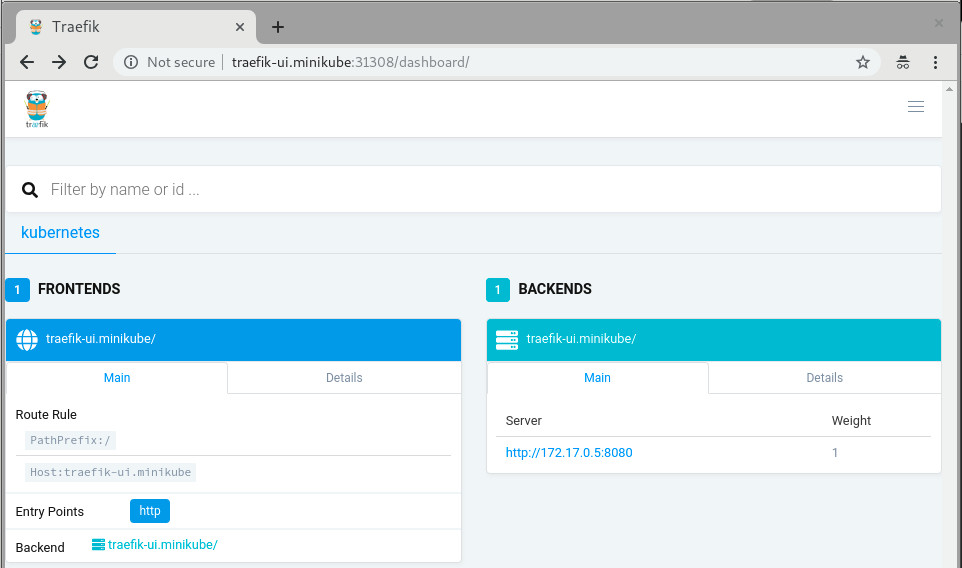
Now, you should be able to continue reading the official traefik documentation and do all the cool stuff but with better security.
More fun?
In case you are using a full-blown kubernetes cluster using Kubic (meaning: have more than one nodes available at your disposal), feel free to setup a LoadBalancer at your hypervisor in which your hosting your Kubic virtual-machines:
sudo zypper in nginx

cat /etc/nginx/nginx.conf

load_module '/usr/lib64/nginx/modules/ngx_stream_module.so';
events {
     worker_connections  1024;
}

stream {
     upstream stream_backend {
         # server <IP_ADDRESS_OF_KUBIC_NODE>:<TRAEFIK_NODEPORT>;
         server worker-0.kubic-init.suse.net:31380;
         server worker-1.kubic-init.suse.net:31380;
         server worker-2.kubic-init.suse.net:31380;
     }

   server {
     listen ultron.suse.de:80;
     proxy_pass stream_backend;
   }
}
And then start the load balancer: sudo systemctl start nginx.
This means that anyone that visits my machine (that is ultron.suse.de in this example) will be redirected to one of my kubernetes nodes at nodeport (31380).
Have fun

Librsvg's GObject boilerplate is in Rust now
The other day I wrote about how most of librsvg's library code is in Rust now.
Today I finished porting the GObject boilerplate for the main
RsvgHandle object into Rust. This means that the C code no longer
calls things like g_type_register_static(), nor implements
rsvg_handle_class_init() and such; all those are in Rust now. How
is this done?
The life-changing magic of glib::subclass
Sebastian Dröge has been working for many months on refining utilities to make it possible to subclass GObjects in Rust, with little or no unsafe code. This subclass module is now part of glib-rs, the Rust bindings to GLib.
Librsvg now uses the subclassing functionality in glib-rs, which takes care of some things automatically:
- Registering your GObject types at runtime.
- Creating safe traits on which you can implement
class_init,instance_init,set_property,get_property, and all the usual GObject paraphernalia.
Check this out:
use glib::subclass::prelude::*;

impl ObjectSubclass for Handle {
    const NAME: &'static str = "RsvgHandle";

    type ParentType = glib::Object;

    type Instance = RsvgHandle;
    type Class = RsvgHandleClass;

    glib_object_subclass!();

    fn class_init(klass: &mut RsvgHandleClass) {
        klass.install_properties(&PROPERTIES);
    }

    fn new() -> Self {
        Handle::new()
    }
}
In the impl line, Handle is librsvg's internals object — what used
to be RsvgHandlePrivate in the C code.
The following lines say this:
-
const NAME: &'static str = "RsvgHandle";- the name of the type, for GType's perusal. -
type ParentType = glib::Object;- Parent class. -
type Instance,type Class- Structs with#[repr(C)], equivalent to GObject's class and instance structs. -
glib_object_subclass!();- All the boilerplate happens here automatically. -
fn class_init- Should be familiar to anyone who implements GObjects!
And then, a couple of the property declarations:
static PROPERTIES: [subclass::Property; 11] = [
    subclass::Property("flags", |name| {
        ParamSpec::flags(
            name,
            "Flags",
            "Loading flags",
            HandleFlags::static_type(),
            0,
            ParamFlags::READWRITE | ParamFlags::CONSTRUCT_ONLY,
        )
    }),
    subclass::Property("dpi-x", |name| {
        ParamSpec::double(
            name,
            "Horizontal DPI",
            "Horizontal resolution in dots per inch",
            0.0,
            f64::MAX,
            0.0,
            ParamFlags::READWRITE | ParamFlags::CONSTRUCT,
        )
    }),
    // ... etcetera
];
This is quite similar to the way C code usually registers properties for new GObject subclasses.
The moment at which a new GObject subclass gets registered against the
GType system is in the foo_get_type() call. This is the C code in
librsvg for that:
extern GType rsvg_handle_rust_get_type (void);

GType
rsvg_handle_get_type (void)
{
    return rsvg_handle_rust_get_type ();
}
And the Rust function that actually implements this:
#[no_mangle]
pub unsafe extern "C" fn rsvg_handle_rust_get_type() -> glib_sys::GType {
    Handle::get_type().to_glib()
}
Here, Handle::get_type() gets implemented automatically by
Sebastian's subclass traits. It gets things like the type name and
the parent class from the impl ObjectSubclass for Handle we saw
above, and calls g_type_register_static() internally.
I can confirm now that implementing GObjects in Rust in this way, and exposing them to C, really works and is actually quite pleasant to do. You can look at librsvg's Rust code for GObject here.
Further work
There is some auto-generated C code to register librsvg's error enum and a flags type against GType; I'll move those to Rust over the next few days.
Then, I think I'll try to actually remove all of the library's entry points from the C code and implement them in Rust. Right now each C function is really just a single call to a Rust function, so this should be trivial-ish to do.
I'm waiting for a glib-rs release, the first one that will have the
glib::subclass code in it, before merging all of the above into
librsvg's master branch.
A new Rust API for librsvg?
Finally, this got me thinking about what to do about the Rust bindings
to librsvg itself. The rsvg crate uses the gtk-rs
machinery to generate the binding: it reads the GObject
Introspection data from Rsvg.gir and generates a Rust binding
for it.
However, the resulting API is mostly identical to the C API. There is
an rsvg::Handle with the same methods as the ones from C's
RsvgHandle... and that API is not particularly Rusty.
At some point I had an unfinished branch to merge rsvg-rs into
librsvg. The intention was that librsvg's build procedure
would first build librsvg.so itself, then generate Rsvg.gir as
usual, and then generate rsvg-rs from that. But I got tired of
fucking with Autotools, and didn't finish integrating the projects.
Rsvg-rs is an okay Rust API for using librsvg. It still works
perfectly well from the standalone crate. However, now
that all the functionality of librsvg is in Rust, I would like to take
this opportunity to experiment with a better API for loading and
rendering SVGs from Rust. This may make it more clear how to refactor
the toplevel of the library. Maybe the librsvg project can provide
its own Rust crate for public consumption, in addition to the usual
librsvg.so and Rsvg.gir which need to remain with a stable API and
ABI.

WORA-WNLF
- Xamarin (the company) was bought by Microsoft and, at the same time, Xamarin (the product) was open sourced.
- Xamarin.Forms is opensource now (TBH not sure if it was proprietary before, or it was always opensource).
- Xamarin.Forms started supporting macOS and Windows UWP.
- Xamarin.Forms 3.0 included support for GTK and WPF.

The Big App Icon Redesign
The Revolution is Coming
As you may have heard, GNOME 3.32 is going to come with a radical new icon style and new guidelines for app developers. This post aims to give some background on why this was needed, our goals with the initiative, and our exciting plans for the future.
The Problem
Our current icon style dates back all the way to the early 00s and the original Tango. One of the foundational ideas behind Tango was that each icon is drawn at multiple sizes, in order to look pixel-perfect in every context. This means that if you want to make an app icon you're not drawing one, but up to 7 separate icons (symbolic, 16px, 22px, 24px, 32px, 48px, and 512px).


- Many of the sizes aren't being used anywhere in the OS, and haven't been for the better part of a decade. Since we use either large sizes or symbolics in most contexts, the pixel-hinted small sizes are rarely seen by anyone.
- Only a handful of people have the skills to draw icons in this style, and it can take weeks to do a single app icon. This means that iterating on the style is very hard, which is one of the reasons why our icon style has been stagnant for years.
- Very few third-party apps are following the guidelines. Our icons are simply too hard to draw for mere mortals, and as a result even the best third-party GNOME apps often have bad icons.
- We (GNOME Designers) don't have the bandwidth to keep up with icon requests from developers, let alone update or evolve the style overall.
- The wider industry has moved on from the detailed icon styles of the 2000s, which gives new users the impression that our software is outdated.
- Cross-platform apps tend to ship with very simple, flat icons these days. The contrast between these icons and our super detailed ones can be quite jarring.


A New Beginning
One of the major project-wide goals GNOME over the past years has been empowering app developers. A big reason for this initiative is that we realized that the current style is holding us back as an ecosystem. Just as Builder is about providing a seamless development workflow, and Flatpak is about enabling direct distribution, this initiative is about making good icons more attainable for more apps.
So, what would a system designed from the ground up to empower app developers/designers to make good icons look like?
The first step is having clearer guidelines and more constraints. The old style was all about eyeballing it and doing what feels right. That's fine for veteran designers used to the style, but makes it inaccessible to newcomers. The new style comes with a grid, a set of recommended base shapes, and a new color palette. We have also updated the section on app icons in the HIG with a lot more detailed information on how to design the icons.


The style is very geometric, making it easy to reuse and adapt elements from other icons. We're also removing baked-in drop shadows in favour of drawing them automatically from the icon's alpha channel in GTK/Shell depending on the rendering context. In most cases 3rd party icons don't come with baked in shadows and this makes icons easier to draw and ensures consistent shadows.
Another cornerstone of this initiative is reducing the number of icons to be drawn: From now on, you only need one full color icon and a monochrome symbolic icon.
The color icon is optimized for 64px (with a nominal size of 128px for historical reasons), but the simple geometric style without 1px strokes means that it also looks good larger and smaller.

This means the workflow changes from drawing 6 icons to just one (plus one symbolic icon). It also simplifies the way icons are shipped in apps. Instead of a a half dozen rendered PNGs, we can now ship a single color SVG (and a symbolic SVG). Thanks to the simple style most icons are only around 15kB.

Welcome to the Future
Having this single source of truth makes it orders of magnitude easier to iterate on different metaphors for individual icons, update the style as a whole, and a number of other exciting things we're working towards.


We've also been working on improving design tooling as part of this initiative. Icon Preview, a new app by Zander Brown, is designed to make the icon design workflow smoother and faster. It allows you to quickly get started from a template, preview an icon in various contexts as you're designing it, and then finally optimizing and exporting the SVG to use in apps. The latter part is not quite ready yet, but the app already works great for the former two use cases.

Let's Make Beautiful App Icons!
If you're a graphics designer and wish to bring consistency to the world of application icons, familiarize yourselves with the style, grab Icon Preview, Inkscape and instead of patching up poor icons downstream with icon themes, please come join us make beautiful upstream application icons!
Kubic is now a certified Kubernetes distribution
The openSUSE Kubic team is proud to announce that as of yesterday, our Kubic distribution has become a Certified Kubernetes Distribution! Notably, it is the first open source Kubernetes distribution to be certified using the CRI-O container runtime!
What is Kubernetes Certification?
Container technologies in general, and Kubernetes in particular, are becoming increasingly common and widely adopted by enthusiasts, developers, and companies across the globe. A large ecosystem of software and solutions is evolving around these technologies. More and more developers are thinking “Cloud Native” and producing their software in containers first, often targeting Kubernetes as their intended platform for orchestrating those containers. And put bluntly, they want their software to work.
But Kubernetes isn’t like some other software with this sort of broad adoption. Even though it’s being used in scenarios large and small, from small developer labs to large production infrastructure systems, Kubernetes is still a fast-moving project, with new versions appearing very often and a support lifespan shorter than other similar projects. This presents real challenges for people who want to download, deploy and run Kubernetes clusters and know they can run the things they want on top of it.
When you consider the fast moving codebase and the diverse range of solutions providing or integrating with Kubernetes, that is a lot of moving parts provided by a lot of people. That can feel risky to some people, and lead to doubt that something built for Kubernetes today might not work tomorrow.
Thankfully, this a problem the Cloud Native Computing Foundation (CNCF) is tackling. The CNCF helps to build a community around open source container software, and established the Kubernetes Software Conformance Certification to further that goal. Certified Kubernetes solutions are validated by the CNCF. They check that versions, APIs, and such are all correct, present, and working as expected so users and developers can be assured their Kubernetes-based solutions will work with ease, now and into the future.
Why Certify Kubic?
The openSUSE Project has a long history of tackling the problem of distributing fast-moving software.
Tumbleweed and Kubic are simultaneously both two of the fastest and most stable rolling release distributions available.
With the Open Build Service and openQA we have an established pipeline that guarantees we only release software when it is built and tested both collectively and reproducibly.
Our experience with btrfs and snapper means that even in the event of an unwanted (or heaven forbid, broken) change to a system, users can immediately rollback to a system state that works the way they want it to.
With Transactional Updates, we ensure that no change ever happens to a running system. This futher guarantees that any rollback can return a system to a clean state in a single atomic operation.
In Kubic, we leverage all of this to build an excellent container operating system, providing users with the latest versions of exciting new tools like Podman, CRI-O, Buildah, and (of course) Kubernetes.
We’re keeping up with all of those fast moving upstream projects, often releasing our packages within days or sometimes even hours of an upstream release.
But we’re careful not to put users at risk, releasing Kubic in sync with the larger openSUSE Tumbleweed distribution, sharing the same test and release pipeline, so we can be sure if either distribution makes changes that breaks the other, neither ships anything to users.
So we’ve solved all the problems with fast moving software, so why certify? 😉
Well, as much as it pains me to write this, no matter how great we are with code review, building, testing and releasing we’re never going to catch everything. Even if we did, at the end of the day, all we can really say is “we do awesome stuff, trust us”
And when you consider how we work in openSUSE, things can seem even more complicated to newcomers.
We’re not like other open source projects with a corporate backer holding the reigns and tightly controlling what we do.
openSUSE is a truly open source community project where anyone and everyone can contribute, taking what we’re doing in Kubic, and directly changing it to fit what they want to see.
These contributions are on an equal playing field, with SUSE and other Sponsors of openSUSE having to contribute in just the same way as any other community member.
And we want more contributions. We will keep Kubic open and welcoming to whatever crazy (or smart, or crazy-smart) ideas you might have for our container distribution.
But we also want everyone else to know that whatever we end up doing, people can rely on Kubic to get stuff done.
By certifying Kubic with the CNCF, there is now an impartial third party who has looked over what we do, checked what we’re distributing, checked our documentation, and conferred to us their seal of approval.
So, to everyone who has contributed to Kubic so far and made this possible, THANK YOU.
To all of the upstream projects without whom Kubic wouldn’t have anything to distribute and get certified, THANK YOU and see you soon on your issue trackers and pull request queues.
And to anyone and everyone else, THANK YOU, and we hope you have a lot of fun downloading, using, and hopefully contributing back our window into the container world.

Weblate 3.4
Weblate 3.4 has been released today. The most visible new feature are guided translation component setup or performance improvements, but there are several other improvements as well.
Full list of changes:
- Added support for XLIFF placeholders.
- Celery can now utilize multiple task queues.
- Added support for renaming and moving projects and components.
- Include chars counts in reports.
- Added guided adding of translation components with automatic detection of translation files.
- Customizable merge commit messages for Git.
- Added visual indication of component alerts in navigation.
- Improved performance of loading translation files.
- New addon to squash commits prior to push.
- Improved displaying of translation changes.
- Changed default merge style to rebase and made that configurable.
- Better handle private use subtags in language code.
- Improved performance of fulltext index updates.
- Extended file upload API to support more parameters.
If you are upgrading from older version, please follow our upgrading instructions.
You can find more information about Weblate on https://weblate.org, the code is hosted on Github. If you are curious how it looks, you can try it out on demo server. Weblate is also being used on https://hosted.weblate.org/ as official translating service for phpMyAdmin, OsmAnd, Turris, FreedomBox, Weblate itself and many other projects.
Should you be looking for hosting of translations for your project, I'm happy to host them for you or help with setting it up on your infrastructure.
Further development of Weblate would not be possible without people providing donations, thanks to everybody who have helped so far! The roadmap for next release is just being prepared, you can influence this by expressing support for individual issues either by comments or by providing bounty for them.
IPFire | Open Source, Linux based, Firewall, Install and Configuration

Open Build Service- Contributing on a project
Here at SUSE we heavily use Open Build Service, and often while collaborating on a project (In my case, openQA) one has to add a new package as a dependency from time to time, or has to do a backport for an older SLE or openSUSE Leap release
It boils down to the following steps, in this case I wanted to change the project to build against SUSE:SLE-12-SPX:Update instead of SUSE:SLE-12-SPX:GM which is a build target that will get the updates while the GM doesn’t, all this, because I wanted to add openvswitch to the project, so that we could use new features in our openQA deployments.
To do this, after setting up the obs account, it boils down to:
1- Branch your project 2- Link your packages 2- Modify the project metadata if needed 3- Modify the project config if errors related to multiple choices appear (PostgreSQL will be there for sure!) 4- Grab a cup of coffee/tea/water and do some reading while waiting for the build
# Branch the project
osc branch devel:openQA:SLE-12

# Link the new package
osc linkpac openSUSE:Factory  openvswitch
# More and more packages will say that their dependencies cannot be resolved, this is
# you might spend some time here adding bunch of dependencies :)
osc linkpac openSUSE:Factory  dpdk devel:openQA:SLE-12
osc linkpac openSUSE:Factory  python-six devel:openQA:SLE-12
By this point you might get error messages on the webUI stating that:
$a_package: have choice for $conflicting_package needed by $a_package: $options
As an example, it might happen that you see postgres-server there, having
postgres96-server and postgres94-server as $options, you’ve got to choose
your destiny!.
When you find this, it’s time to edit the project configuration:
# Since
osc meta prjconf devel:openQA:SLE-12 -e
# An editor will open and you will be able to change stuff
# Remember that you need write permissions on the project!
...
Prefer: postgresql96-devel
Prefer: postgresql96-server
Prefer: python-dateutil
...
Modify the project metadata to use :Updates instead of :GM, and change architectures if you need to do so.
# same as before: An editor will open, and you will be able to edit stuff
 osc meta prjconf devel:openQA:SLE-12 -e
  <repository name="SLE_12_SP4">
    <path project="SUSE:SLE-12-SP4:Update" repository="standard"/>
     <arch>x86_64</arch>
    <arch>aarch64</arch>
    <arch>ppc64le</arch>
  </repository>
After this, a project rebuild will take place, sit down and give some more reading :)
About Perl and mismatched binaries
The horror
You happen to update your system (In my case, I use Tumbleweed or Gentoo) and there’s new version of Perl, at some point there’s the realization that you’re using local::lib, and the pain unfolds: A shell is started, and you find a dreaded:
Cwd.c: loadable library and perl binaries are mismatched (got handshake key 0xdb00080, needed 0xdb80080)
Which means: that the module (Cwd in this case) is not compatible (Because it’s an XS module) with your current version of perl, installed on your system: Likely it was compiled for a previous version, leadin to those binaries mismatching
Don’t panic!
In the past, I used to reinstall my full local::lib directory, however after hanging out and asking few questions on #toolchain on irc.perl.org, I got to write (or rather hack, an ugly hack) a
quick perl script to walk the local::lib packages that were installed already, only looking at the specified
directory… it worked well, gave me the list of what I needed so I could reinstall later, however Grinnz pointed me to his perl-migrate-modules script, to which after chatting a bit,
he added the from switch, which allows people to reinstall all the modules that were present in an old local::lib directory:
The light
# Migrate modules from an old (inactive) local::lib directory
$ perl-migrate-modules --from ~/perl5-old/lib/perl5 /usr/bin/perl
Hope you find it useful :)