Member
 Futureboy
Umix OS | Review from an openSUSE User
My Platform for the 2018-2019 openSUSE Board Election
Sony Vaio VPCEB23FM E-Series Laptop with openSUSE Leap
LinuxMint 19.1 | Review from an openSUSE User

Backtrace from a core dump with GDB: pitfalls
At work I mostly program in Ruby, but our system (YaST) has a C/C++ part
too. So I get to debug C crashes infrequently enough to forget some
tricks. Here I write them down for the next time.
- Contents and tl;dr
- $
ulimit -c unlimitedso that a core dump is saved - $
sudo coredumpctl dump -o coreso that it is saved to a file - $
gdb -c coreis wrong,gdb program coreis right - (gdb)
info sh mylib - (gdb) select a stack frame before querying variables or macros
- $
CFLAGS="-g3 ..."for debugging macros
- (Un)helpful crash dump
When Ruby crashes, it produces a very verbose dump of information. It is not
much helpful in our case:
$ rake run[fail]
/sbin/yast2 src/clients/fail.rb
/usr/lib64/ruby/vendor_ruby/2.5.0/yast/yast.rb:204: [BUG] Segmentation fault at 0x0000000000000008
ruby 2.5.0p0 (2017-12-25 revision 61468) [x86_64-linux-gnu]

-- Control frame information -----------------------------------------------
c:0011 p:---- s:0066 e:000065 CFUNC  :call_yast_function
c:0010 p:0061 s:0058 e:000057 BLOCK  /usr/lib64/ruby/vendor_ruby/2.5.0/yast/yast.rb:204 [FINISH]
c:0009 p:0023 s:0054 e:000053 METHOD /local/home-mvidner/svn/yast/samba-server/src/clients/fail.rb:5
[...]
c:0002 p:0489 s:0011 E:000c18 EVAL   /usr/lib/YaST2/bin/y2start:58 [FINISH]
c:0001 p:0000 s:0003 E:001300 (none) [FINISH]

-- Ruby level backtrace information ----------------------------------------
/usr/lib/YaST2/bin/y2start:58:in `<main>'
/usr/lib64/ruby/vendor_ruby/2.5.0/yast/wfm.rb:195:in `CallFunction'
[...]
/usr/lib64/ruby/vendor_ruby/2.5.0/yast/yast.rb:204:in `call_yast_function'

-- Machine register context ------------------------------------------------
 RIP: 0x00007fa423bf9677 RBP: 0x00007fff30f5ff20 RSP: 0x00007fff30f5fe10
[...]
 R14: 0x00007fff30f5ff48 R15: 0x00007fff30f5fe10 EFL: 0x0000000000010202

-- C level backtrace information -------------------------------------------
/usr/lib64/libruby2.5.so.2.5(rb_print_backtrace+0x15) [0x7fa428543f15]
/usr/lib64/libruby2.5.so.2.5(0x1c814c) [0x7fa42854414c]
/usr/lib64/libruby2.5.so.2.5(0x93e44) [0x7fa42840fe44]
/usr/lib64/libruby2.5.so.2.5(0x158eb2) [0x7fa4284d4eb2]
/lib64/libc.so.6(0x7fa427ff8160) [0x7fa427ff8160]
/usr/lib64/YaST2/plugin/libpy2lang0_ruby.so(_ZN5YRuby9callInnerENSt7__cxx1112basic_stringIcSt11char_traitsIcESaIcEEES5_7YCPList8constPtrI4TypeS8_E+0x4c7) [0x7fa423bf9677]
[...]
/usr/bin/ruby.ruby2.5(_start+0x2a) [0x40086a]

-- Other runtime information -----------------------------------------------

* Loaded script: /usr/lib/YaST2/bin/y2start

* Loaded features:

    0 enumerator.so
    1 thread.rb
    2 rational.so
    3 complex.so
    4 /usr/lib64/ruby/2.5.0/x86_64-linux-gnu/enc/encdb.so
[...]
   87 /usr/lib64/ruby/vendor_ruby/2.5.0/yast/y2start_helpers.rb
   88 /local/home-mvidner/svn/yast/samba-server/src/modules/Fail.rb

* Process memory map:

00400000-00401000 r-xp 00000000 08:01 7766                               /usr/bin/ruby.ruby2.5
[...]
7fa42363b000-7fa42365c000 r--s 00000000 08:01 6998                       /usr/lib64/YaST2/plugin/libpy2lang_ruby.so
[...]
7fa428a5f000-7fa428a60000 rw-p 00026000 08:01 1310795                    /lib64/ld-2.26.so
7fa428a60000-7fa428a61000 rw-p 00000000 00:00 0
7fff30767000-7fff30f66000 rw-p 00000000 00:00 0                          [stack]
7fff30ff1000-7fff30ff4000 r--p 00000000 00:00 0                          [vvar]
7fff30ff4000-7fff30ff6000 r-xp 00000000 00:00 0                          [vdso]
ffffffffff600000-ffffffffff601000 r-xp 00000000 00:00 0                  [vsyscall]

[NOTE]
You may have encountered a bug in the Ruby interpreter or extension libraries.
Bug reports are welcome.
For details: http://www.ruby-lang.org/bugreport.html

/sbin/yast2: line 455: 25102 Aborted (core dumped) $ybindir/y2start $module "$@" "$SELECTED_GUI" $Y2_GEOMETRY $Y2UI_ARGS- "(core dumped)" is lying
It means to say: Per /usr/lib/sysctl.d/50-coredump.conf the core has been sent
to /usr/lib/systemd/systemd-coredump which obeyed "ulimit -c 0" and did not
save it.
So let's
- use the
ulimit -c unlimitedcommand (bash shell builtin, actually) - Let it crash again
sudo coredumpctl dump -o core
Also note that without the dump subcommand, the core dump will be deleted
after a day. (Why?)
(To avoid systemd-coredump, you can use
sudo /usr/sbin/sysctl kernel.core_pattern="core.%p"; thanks lslezak)
-
gdb -c coreis not useful without the executable
When we do that, the backtrace is very unhelpful:
(gdb) bt
#0  0x00007eff7d0140e0 in ?? ()
#1  0x0000000000000400 in ?? ()
#2  0xffffffffffffffff in ?? ()
#3  0xffffffffffffffff in ?? ()
#4  0xffffffffffffffff in ?? ()
#5  0xffffffffffffffff in ?? ()
#6  0xffffffffffffffff in ?? ()
#7  0xffffffffffffffff in ?? ()
#8  0xffffffffffffffff in ?? ()
#9  0xffffffffffffffff in ?? ()
#10 0xffffffffffffffff in ?? ()
#11 0xffffffffffffffff in ?? ()
#12 0xffffffffffffffff in ?? ()
#13 0xffffffffffffffff in ?? ()
#14 0x0000000000000000 in ?? ()
For some reason, gdb will not load the executable file even though it is named
in the core file. Do it by hand:
gdb program core
$ gdb /usr/bin/ruby.ruby2.5 core

[... lots of text that we'll get back to in the next section ...]
(gdb) bt
#0  0x00007eff7d0140e0 in __GI_raise (sig=sig@entry=6) at ../sysdeps/unix/sysv/linux/raise.c:51
#1  0x00007eff7d01579f in __GI_abort () at abort.c:100
#2  0x00007eff7d42be51 in die () at error.c:552
#3  0x00007eff7d42be51 in rb_bug_context (ctx=ctx@entry=0xcebac0, fmt=fmt@entry=0x7eff7d5925c4 "Segmentation fault at %p") at error.c:582
#4  0x00007eff7d4f0eb2 in sigsegv (sig=11, info=0xcebbf0, ctx=0xcebac0) at signal.c:928
#5  0x00007eff7d014160 in <signal handler called> () at /lib64/libc.so.6
#6  0x00007eff78c15677 in YRuby::callInner(std::__cxx11::basic_string<char, std::char_traits<char>, std::allocator<char> >, std::__cxx11::basic_string<char, std::char_traits<char>, std::allocator<char> >, YCPList, constPtr<Type, Type>) () at /usr/lib64/YaST2/plugin/libpy2lang_ruby.so
#7  0x00007eff78c19d80 in Y2RubyFunction::evaluateCall() () at /usr/lib64/YaST2/plugin/libpy2lang_ruby.so
Note that the frames 0 to 4 show the source code locations (file name and line
number) as well as the argument names and values. It's because gdb has found
the debugging information for glibc and the Ruby library:
(gdb) info sh libc
From                To                  Syms Read   Shared Object Library
0x00007eff7cffe770  0x00007eff7d14365c  Yes         /lib64/libc.so.6
0x00007eff7c981cd0  0x00007eff7c9895e8  Yes         /lib64/libcrypt.so.1
0x00007eff73c256f0  0x00007eff73c27007  Yes (*)     /usr/lib64/libcap.so.2
0x00007eff6972ca10  0x00007eff69731b65  Yes         /usr/lib64/qt5/plugins/platforminputcontexts/libcomposeplatforminputcontextplugin.so
(*): Shared library is missing debugging information.
(gdb) info sh ruby
From                To                  Syms Read   Shared Object Library
0x00007eff7d3c73c0  0x00007eff7d566ea8  Yes         /usr/lib64/libruby2.5.so.2.5
0x00007eff7c433850  0x00007eff7c4344c0  Yes (*)     /usr/lib64/ruby/2.5.0/x86_64-linux-gnu/enc/encdb.so
[...]
0x00007eff7b9ec2c0  0x00007eff7b9f4cb0  Yes (*)     /usr/lib64/ruby/vendor_ruby/2.5.0/x86_64-linux-gnu/yastx.so
0x00007eff78c0fc00  0x00007eff78c1e740  Yes (*)     /usr/lib64/YaST2/plugin/libpy2lang_ruby.so
0x00007eff789f82a0  0x00007eff78a001a5  Yes (*)     /usr/lib64/ruby/vendor_ruby/2.5.0/x86_64-linux-gnu/yast/builtinx.so
(*): Shared library is missing debugging information.
info sh is short for info sharedlibrary. If you omit the library name filter, the
length of the list will easily obscure the "(*)" footnote.
- Add debuginfo
On openSUSE (and SUSE Linux Enterprise), the debugging symbols are in separate
RPM packages:
zypper in yast2-ruby-bindings-debug{info,source}Or take the hint from the gdb message that we omitted in the previous section:
Missing separate debuginfo for /usr/lib64/YaST2/plugin/libpy2lang_ruby.so
Try: zypper install -C "debuginfo(build-id)=8c6a1d943255c6f935e029140e75b49b1b7c22fb"
After restarting gdb:
(gdb) bt
[...]
#5  0x00007eff7d014160 in <signal handler called> () at /lib64/libc.so.6
#6  0x00007eff78c15677 in rb_array_len (a=8) at /usr/include/ruby-2.5.0/ruby/ruby.h:2057
#7  0x00007eff78c15677 in YRuby::callInner(std::__cxx11::basic_string<char, std::char_traits<char>, std::allocator<char> >, std::__cxx11::basic_string<char, std::char_traits<char>, std::allocator<char> >, YCPList, constPtr<Type, Type>) (this=this@entry=0xfefcc0, module_name=..., function=..., argList=..., wanted_result_type=...) at /usr/src/debug/yast2-ruby-bindings-4.0.6-lp150.1.1.x86_64/src/binary/YRuby.cc:220
[...]
In frame #6, rb_array_len (a=8), is the a argument equal to nil?
Let's check:
(gdb) p Qnil
No symbol "Qnil" in current context.
That's misleading! Although Qnil is defined in a header, and you've been
taught to prefer static const int to macros because of macros being
"global", they are in fact not as much global as for gdb to see them now. We
have to select a frame to have a context of a compilation unit.
(gdb) f 6
#6  rb_array_len (a=8) at /usr/include/ruby-2.5.0/ruby/ruby.h:2057
2057        return (RBASIC(a)->flags & RARRAY_EMBED_FLAG) ?
(gdb) p Qnil
No symbol "Qnil" in current context.
WTF?! Well, having debugging information loaded is not enough, the debuginfo
must have an elevated level that includes the macros.
- Debuginfo with macros
Instead of the -g flag to gcc, I had to specify -g3 in CFLAGS and
rebuild and reinstall. After that, finally:
(gdb) f 6
#6  rb_array_len (a=8) at /usr/include/ruby-2.5.0/ruby/ruby.h:2057
2057        return (RBASIC(a)->flags & RARRAY_EMBED_FLAG) ?
(gdb) p Qnil
$1 = 8
(gdb) f 7
#7  YRuby::callInner (this=this@entry=0xfefcc0, module_name=..., function=..., argList=..., wanted_result_type=...) at /usr/src/debug/yast2-ruby-bindings-4.0.6-lp150.1.1.x86_64/src/binary/YRuby.cc:220
220         VALUE backtrace = RARRAY_LEN(trace)>0 ? rb_ary_entry(trace, 0) : rb_str_new2("Unknown");
So a = 8 and Qnil is 8, so we have confirmed that the trace array being
nil is causing the crash.
(For the record, this is bsc#1119690.)

Librsvg is almost rustified now
Since a few days ago, librsvg's library implementation is almost 100% Rust code. Paolo Borelli's and Carlos Martín Nieto's latest commits made it possible.
What does "almost 100% Rust code" mean here?
-
The C code no longer has struct fields that refer to the library's real work. The only field in
RsvgHandlePrivateis an opaque pointer to a Rust-side structure. All the rest of the library's data lives in Rust structs. -
The public API is implemented in C, but it is just stubs that immediately call into Rust functions. For example:
gboolean
rsvg_handle_render_cairo_sub (RsvgHandle * handle, cairo_t * cr, const char *id)
{
    g_return_val_if_fail (RSVG_IS_HANDLE (handle), FALSE);
    g_return_val_if_fail (cr != NULL, FALSE);

    return rsvg_handle_rust_render_cairo_sub (handle, cr, id);
}
-
The GObject boilerplate and supporting code is still in C:
rsvg_handle_class_initandset_propertyand friends. -
All the high-level tests are still done in C.
-
The gdk-pixbuf loader for SVG files is done in C.
Someone posted a chart on Reddit about the rustification of librsvg, comparing lines of code in each language vs. time.
Rustifying the remaining C code
There is only a handful of very small functions from the public API still implemented in C, and I am converting them one by one to Rust. These are just helper functions built on top of other public API that does the real work.
Converting the gdk-pixbuf loader to Rust seems like writing a little glue code for the loadable module; the actual loading is just a couple of calls to librsvg's API.
Rsvg-rs in rsvg?
Converting the tests to Rust... ideally this would use the rsvg-rs bindings; for example, it is what I already use for rsvg-bench, a benchmarking program for librsvg.
I have an unfinished branch to merge the rsvg-rs repository into librsvg's own repository. This is because...
- Librsvg builds its library,
librsvg.so - Gobject-introspection runs on
librsvg.soand the source code, and produceslibrsvg.gir - Rsvg-rs's build system calls gir on
librsvg.girto generate the Rust binding's code.
As you can imagine, doing all of this with Autotools is... rather convoluted. It gives me a lot of anxiety to think that there is also an unfinished branch to port the build system to Meson, where probably doing the .so→.gir→rs chain would be easier, but who knows. Help in this area is much appreciated!
An alternative?
Rustified tests could, of course, call the C API of librsvg by hand,
in unsafe code. This may not be idiomatic, but sounds like it could
be done relatively quickly.
Future work
There are two options to get rid of all the C code in the library, and just leave C header files for public consumption:
-
Do the GObject implementation in Rust, using Sebastian Dröge's work from GStreamer to do this easily.
-
Work on making gnome-class powerful enough to implement the librsvg API directly, and in an ABI-compatible fashion to what there is right now.
The second case will probably build upon the first one, since one of my plans for gnome-class is to make it generate code that uses Sebastian's, instead of generating all the GObject boilerplate by hand.
KDE Connect CLI | A gift to Future Self

Beautiful GitHub labels with Terraform
On GitHub there are the GitHub issues, and they have become quite powerful over time. Just recently GitHub added the capability to show related issues, pin issues to repositories and to move them between repositories.
One important tool to manage issues on GitHub are labels, those nicely colored badges you can add to issues to get a better overview, to filter lists and queries, or to build further automation such as the presentation of good first issues to people new to the project.

If you have a lot of labels it tends to become a bit of effort to manage them well, especially if you want to keep colors consistent and descriptions up to date. It becomes even more effort when you try to do so across different repositories. We have all seen the psychedelic potpourri of colorful labels which tends to happen when you use labels generously.
Last year I saw Mitchell Hashimoto's excellent talk about anything as code at the Open Source Datacenter Conference in Berlin. He showed there how to use Terraform to manage infrastructure as code beyond the typical management of computing infrastructure such as servers or networks. He showed how to use it for more administrative tasks such as managing teams on GitHub.
This is a great approach because it replaces clicking around in a user interface by a more programming-like approach of maintaining configurations, preferably version controlled, and applying the same rules on them as on code. So you can do pull requests, review changes, have the history of what happened in git, run tests and other automation easily, etc.
The GitHub provider for Terraform also handles labels so I thought I would give it a try to manage labels as code. Directly doing this in the Terraform configuration is possible but it's a bit cumbersome and limited in what you can do with the data in this format. So I decided to put the data into a good old YAML file and writing a bit of Python code to deal with it.
The result is beautiful-labels, a small tool to manage GitHub labels from a YAML description via Terraform. It scans your repository for existing labels and their data, creates a YAML description from it, and then provides you the tools to turn it into a Terraform configuration.
Terraform is great in handling the state of things in the cloud, it takes care of operating the API in an effective way, figuring out what needs to be updated, and gives the user control, for example by providing a dry run which tells what would change without applying the changes yet. This is all quite convenient and powerful.
One thing beautiful-labels is supposed to make easy is the management of label colors. In addition to the convenience of managing them in YAML instead of having to use the UI, it also adds the option to generate an overview of the labels as SVG, nicely grouped in categories. This helps in grouping things together using colors and generally can augment documentation about how you intend labels to be used.

The tool is in an early state but it works. I use it to manage the labels in the inqlude repository on GitHub.
You could add another step of automation by letting CI run Terraform on commits to the YAML file. Maybe something to try for the future. As managing labels is not something you usually do on a daily basis, some manual step might also be good enough.
One caveat with labels is that GitHub uses the name of the label as identifier. That usually works great but can be a bit tricky when changing the name of a label. For this case I recommend to do it in the GitHub UI for now.
There are some other approaches how to do this kind of stuff. One of them is labeler which is a nice tool written in Go to manage labels from a YAML description. It directly operates the GitHub API. The advantage is that it's self-contained but it lacks the power of Terraform in terms of state management. Another is Zach Dunn's post "How we organize GitHub issue: A simple styleguide for tagging" which introduces the notion of color-coded categories.
It's wonderful when pieces come together, such as the GitHub API, Terraform, YAML, git, and people writing open source code around that. They result in a way to beautifully manage labels without having to put in too much effort.
If you have feedback or input please don't hesitate to drop me a line. I would be happy if beautiful-labels would be useful for you as well. Let me know how it goes. :-)
Ultimate 64 | A New Commodore 64 main board

The worst ANSI art renderer, except for all the others

Chafa (github) started out as a small piece of supporting code for an obscure personal project I may announce at some indefinite point in the future. Then I decided to release it as a tongue-in-cheek thing for the VT100 anniversary last year, and, well… it gathered a bit of steam.
Chafa 1.0
Since I'm not one to leave well enough alone, I packaged it up over the holidays for the 1.0 release. It brings a pile of improvements, e.g. new symbol ranges like ASCII and Braille, better image preprocessing and a new --fill option for halftone/dithering. It's also, like, real fast now, and the build is much less brittle.
Big thanks to everyone who contributed to this release: Adam Borowski, Felix Yan, Lajos Papp, Mo Zhou, Ricardo Arguello, Robert-André Mauchin, @dcb314 and @medusacle.
You'll find packages out there for Arch, Debian, Fedora, Gentoo and Ubuntu now; check your repositories. Extra big thanks to the package maintainers.
As the post title implies, I think Chafa is now the least bad tool in this tiny but tradition-rich niche. So what's so not-quite-terrible about it?
Only the best for your aixterm
If you've been around text terminals for a while, you'll know what this means:

Up until fairly recently, the most colorful terminal applications would operate within the confines of some variant of the above palette, and many still do. It's a nice and distinct (not to mention cheerful) set of colors, but it's not a great match for most image material you'll come across, which makes legible Chafa output a challenge. And that is precisely why I had to try (here with a nice woodblock print):

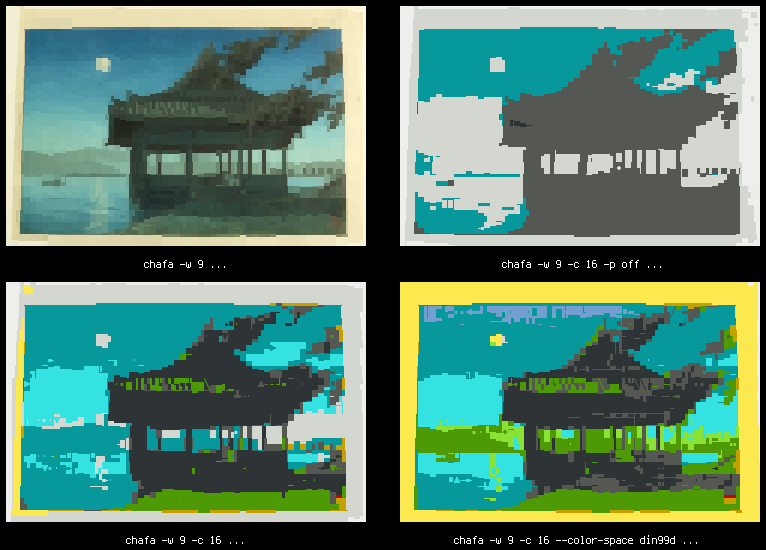
The top left image is the best reproduction you can get with Chafa using a modern 24-bit color terminal emulator (in this case, GNOME Terminal) at 60 characters wide. At top right is the 16-color mapping you get without applying any tricks; this is pretty close to the mark given the muted moonlight colors of the input image, but it doesn't make good use of our palette, nor does it convey the essence of the scene very well. Blue sky, rolling hills, green grass. A shady waterfront pavilion. Given our limitations, the output will look nothing like the original anyway, so we're better off trying to capture the gist of it.
We do this simply by cranking up the contrast and saturation to levels where our cheerful old palette can do a decent job (bottom left). Chafa no longer relies on ImageMagick for this, so it's available in the library API, and integer-only math makes it performant enough to run in real time on animations and video (more on this in a later post, perhaps).
It gets even better if you do color assignment in DIN99d space (bottom right), but that's way slow, so you have to explicitly enable it.
No ANSI? No problem
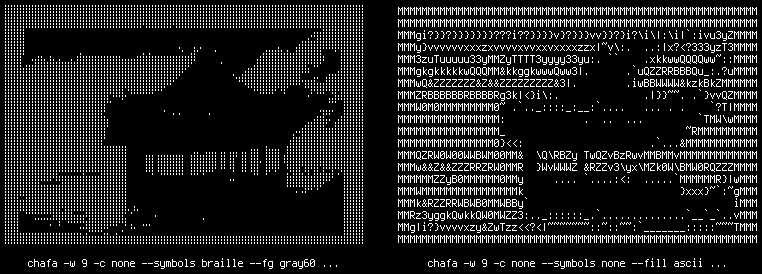
You can generate varied output without any color codes at all. The above examples also demonstrate use of the --fg option, which, along with --bg, exists to tell Chafa what your terminal's default colors look like so it can target those, but is equally useful for tweaking monochrome output thresholds.
So if for some reason your terminal can't handle ANSI or you still have one of those warm & fuzzy monochrome tubes sitting around, we've got you covered. Or break out your civil rights-era dot-matrix printer and make some precision banners to hang in your lab!