
 Member
 bmwiedemann
How to build OS images without kiwi
kiwi has long been the one standard way of building images in openSUSE, but even though there exist extensive writings on how to use it, for many it is still an arcane thing better left to the Great Magicians.
Thus, I started to use a simpler alternative image building method, named altimagebuild when I built our first working Raspberry Pi images in 2013 and now I re-used that to build x86_64 VM images at
https://build.opensuse.org/package/show/home:bmwiedemann/altimagebuild
after I found out that it even works in OBS, including publishing the result to our mirror infrastructure.
It is still in rpm format because of how it is produced, so you have to use unrpm to get to the image file.
This method uses 3 parts.
- a .spec file that lists packages to be pulled into the image
- a mkrootfs.sh that converts the build system into the future root filesystem you want
- a mkimage.sh that converts the rootfs into a filesystem image
The good thing about it is that you do not need specialized external tools, because everything is hard-coded in the scripts.
And the bad thing about it is that everything is hard-coded in the scripts, so it is hard to share general improvements over a wider range of images.
In the current version, it builds cloud-enabled partitionless images (which is nice for VMs because you can just use resize2fs to get a larger filesystem and if you later want to access your VM’s data from outside, you simply use mount -o loop)
But it can build anything you want.
To make your own build, do osc checkout home:bmwiedemann/altimagebuild && cd $_ && osc build openSUSE_Leap_42.2
So what images would you want to build?

Fix for "moto g always booting into recovery"
After all was done, it finally did no longer boot anywhere but into recovery -- no matter which recovery I flashed. It was still possible to boot into fastboot mode (Volume down + Power button), then select "normal system boot", but that's certainly not a good user experience on every power-on.
Additionally, the "charge battery when powered off" image was no longer working: plugging in power would also boot into recovery.
Some googling finally lead me to a xda-developers forum post which has the solution: there is a raw partition in the flash, which apparently stores the default boot option for the boot loader, just wiping this partition will restore the default boot order.
So when booted into recovery (must have adb enabled), just run
adb shell \
dd if=/dev/zero \
of=/dev/block/platform/msm_sdcc.1/by-name/miscfrom your computer (adb installed and USB cable connected, of course).
This should fix booting (it did for me).
openSUSE on ownCloud
It is Christmas time and I have got cookie cutters by openSUSE and ownCloud. What can you create as a happy Working Student at ownCloud and an openSUSE Contributor?
Normally you deploy ownCloud on openSUSE. But do you know the idiom „to be in seventh heaven“ (auf Wolke 7 schweben)?
I want to show you openSUSE Leap 42.2 on ownCloud 9.
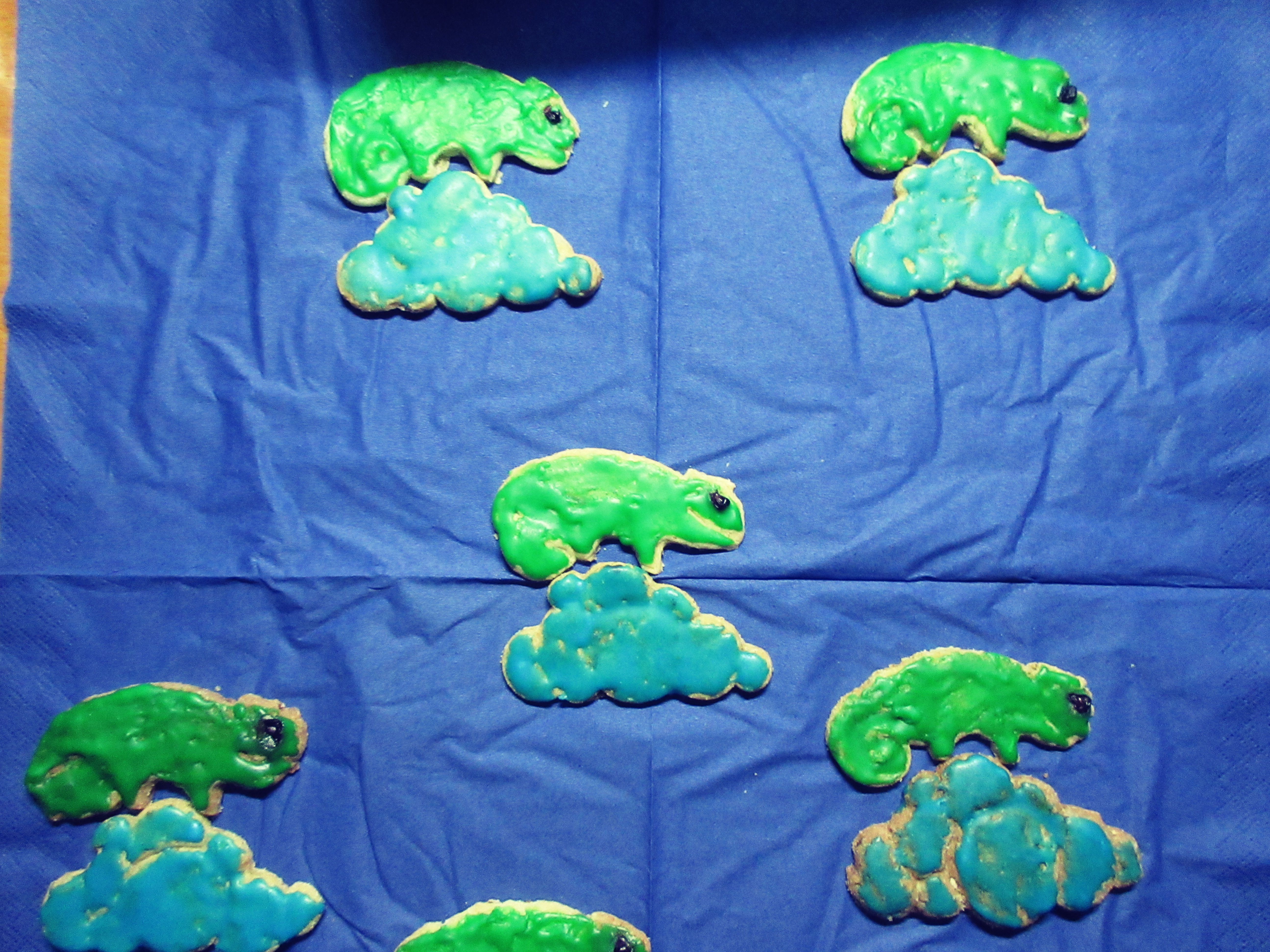
9.1 is the latest release, and 7 not up to date and insecure for the openSUSE chameleon. The second reason is that the chameleon has got a perfect place on the cloud.
You can watch the success in both projects!
I wish you all a merry christmas and a lot of fun with your cookie cutters!
Killing the redundancy with automation
In the past three weeks, the openSUSE community KDE team has been pretty busy to package the latest release of Applications from KDE, 16.12. It was a pretty large task, due to the number of programs involved, and the fact that several monolithic projects were split (in particular KDE PIM). This post goes through what we did, and how we improved our packaging workflow.
Some prerequisites
In openSUSE speak, packages are developed in “projects”, which are separate repositories maintained on the OBS. Projects whose packages will end up in the distro, that is where they are being developed to land in the distribution, are called devel projects. The KDE team uses a number of these to package and test:
- KDE:Qt for currently-released Qt versions
- KDE:Frameworks5 for Frameworks and Plasma packages
- KDE:Applications for the KDE Applications packages
- KDE:Extra for additional software not part of the above categories
The last three have also an Unstable equivalent (KDE:Unstable:XXX) where packages built straight off git master are made, and used in the Argon and Krypton live images.
A new development approach
With the release of Leap 42.2, we also needed a way to keep only Long Term Support packages in a place were could test and adjust fixes for Leap (which, having a frozen base, will not easily accept version upgrades), so we created an additional repository with the LTS suffix to track Plasma 5.8 versions (and KF 5.26, which is what Leap ships).
As you can see, the number of repositories was starting to get large, and we’re still a very low number team, with everyone contributing their spare time to this task. Therefore, a new approach was proposed, prototyped by Hrvoje “shumski” Senjan and spearheaded by Fabian Vogt during the Leap development cycle.
The idea was to use only one repository as an authoritative source of spec files (for those not in the know, spec files are files needed to build RPM packages, and describe the structure of the package, it sources, whether it should be split in sub-packages, and so on), only do changes there and then sync back the changes to the other repositories.
In this case, KDE:Frameworks5 was used as source. All changes were then synced to both the LTS repository and to the Unstable variant with some simple scripting and the use of the osc command, which allows interacting with the OBS from the CLI. This significantly reduced divergences between packages and eased maintenance.
Enter Applications 16.12
When we started packaging Applications, we faced a number of problems that involved the existence of kdelibs 4.x applications that were now obsoleted by KF5 based versions (see Okular, but not only that). Additionally, there were a major number of splits, meaning that we had to track and adjust packaging to keep in mind that what used to be there wasn’t around anymore.
We had already a source that kept track of these changes: the KDE:Unstable:Applications repository, which followed git master. A major problem was that its development had gone in a different direction than the original KDE:Applications, meaning that there was a significant divergence in the two.
Initially we set up a test project and tried to figure out how to lay out a migration path for the existing packages. It didn’t work too well by hand: too many changes, too many packages to keep track of. That is when Raymond Wooninck had the idea to automate the whole process and change the development workflow of Applications packaging.
The new workflow worked as such:
- The authoritative source of changes is the Unstable repository, because that’s where the changes end up first, before release
- On beta release time, packages would be copied from Unstable to the stable repository, dropping any patches present that were upstreamed
- openSUSE specific patches (integration, build system, etc.) would stay in both repositories
- upstream patches (patches already committed but not part of a release) would only stay in the stable repository
In order to ensure that this would be done automatically, Raymond created a repository and wrote scripts to do both the Unstable->stable transition and to automate packaging of new minor releases. Once we switched to this workflow, adjustments were much easier, and we were able to finish the job, at least: yesterday (as of writing) the new Applications release was checked in Tumbleweed.
This new workflow requires some discipline (to avoid “ad hoc” solutions) but dramatically reduces the maintenance required, and allows us to track changes in the packages “incrementally” as they happen during a release cycle. At the same time, this guarantees that all the openSUSE packaging policies are followed also in the Unstable project (which was more lax, due to the fact that it would never end up in the distro).
Final icing on the cake
The last bit was to ensure timely updates of all the Unstable project hierarchy avoiding to watch git commits like hawks. I took up the challenges and wrote a script, which, coupled with a repository mapping file would cache the latest “seen” (past 24h) git revision of the KDE repositories, and trigger updates only if something changed (using git ls-remote to avoid hitting the KDE servers too hard).
I put this on a cron job which runs every day at 20 UTC+1, meaning that even the updates are now fully automated. Of course I have to check every now and then for added dependencies and build faiures, but the workload is definitely less than before.
Final wrap up
A handful of tools and some quick thinking can make a massive collection of software manageable by a small bunch of people. At the same time, there’s always need for more helping hands! Should you want to help in openSUSE packaging, drop by in the #opensuse-kde IRC channel on Freenode.

Wednesday: Release Party in Berlin!

Web Application Hosting with Heroku
I know Ruby but have little experience with web apps. If you're like me then this article could be useful.
I needed a way to browse API documentation of multiple related code repositories. (Yes, it's YaST).
I made a tool for that in the form of a web application. This was really easy with the Sinatra framework.
First I ran it locally on my machine for myself. Then I ran it on a machine in the company network for team mates to use. It was a VM that I repurposed from a previous experiment. Then Pepa said it would be nice to have it publicly accessible. How hard could that be?
I had heard that Heroku makes that sort of thing easy, and it turned to be true!
It's free. A low profile app, that only needs to run occasionally, fits into their Free service plan. It sleeps after 30 minutes and takes 10 seconds to wake up.
Easy to sign up. Enter your e-mail, pick a password. No other details required.
Easy app creation: pick the region (US or EU). Optionally pick a name (I got salty-waters-71436 for my demo app).
-
Easy to set up the tooling. Well, they install the
curl | bashway. Over https. And then the downloaded code downloads some more.If you want to start small, the setup by hand is easy too, now download required:
touch ~/.netrc
chmod 600 ~/.netrc
echo "machine git.heroku.com login YOUR_EMAIL password ffffffff-ffff-ffff-ffff-ffffffffffff" >> ~/.netrc
Where the hex string is your API Key (Top-right Person icon > Account Setings > scroll down)
Now let's write a trivial web app.
- Make a git repo.
-
Make a two-line Sinatra app.
require "sinatra"
get "/" { "Hello, world!" }
-
Add a two-line Gemfile declaration; add also Gemfile.lock to Git.
source "https://rubygems.org"
gem "sinatra", "~> 1.4.0"
-
Add a oneliner Procfile.
web: bundle exec ./timeserver(This was new to me. It's not needed locally but needed for Heroku, and anyway useful once you outgrow oneliners. Use
foreman startto use it) -
Use your app name as the remote repo name. Push to deploy (or set up automatic deployment):
git remote add heroku https://git.heroku.com/salty-waters-71436.git
git push heroku
That's it! See the app in action: https://salty-waters-71436.herokuapp.com/?q=1_500_000_000.
To see my actual app, instead of the trivial demo built for this blog post, go to http://apitalism.herokuapp.com/.

Raspberry based Private Cloud?
Here is something that might be a little outdated already, but I hope it still adds some interesting thoughts. The rainy Sunday afternoon today finally gives the opportunity to write this little blog.
Recently an ownCloud fork was coming up with a little shiny box with one harddisk, that can be complemented with a Rapsberry Pi and their software, promoting that as your private cloud.
While I like the idea of building a private cloud for everybody (I started to work on ownCloud because of that idea back in the days), I do not think that this example of gear is a good solution for private cloud.
In fact I believe that throwing this kind of implementations on the table is especially unfortunate because if we come up with too many not optimal proposals, we waste the willingness of users to try it. This idea should not target geeks who might be willing to try ideas on and on. The idea of the private cloud needs to target at every computer user who wants to store data safely, but does not want to care about longer than ever necessary. And with them I fear we only have very little chances, if one at all, to introduce them to a private cloud solution before they go back to something that simply works.
Here are some points why I think solutions like the proposed one are not good enough:
Hardware
That is nothing new: The hardware of the Raspberry Pi was not designed for this kind of usecases. It is simply too weak to drive ownCloud, which is an PHP app plus database server that has some requirements on the servers power. Even with PHP7, which is faster, and the latest revisions of the mini computer, it might look ok in the beginning, but after all the neccessary bells and whistles were added to the installation and data run in, it will turn out that the CPU power is simply not enough. Similar weaknesses are also true for the networking capabilities for example.
A user that finds that out after a couple of weeks after she worked with the system will remain angry and probably go (back) to solutions that we do not fancy.
One Disk Setup
The solution comes as one disk setup: How secure can data be that is on one single hardisk? A seriously engineered solution should at least recommend a way to store the data more securely and/or backup, like on an at homes NAS for example. That can be done, but requires manual work and might require more network capabilities and CPU power.
Advanced Networking
Last, but for me the most important point: Having such a box in the private network requires to drill a whole in the firewall, to allow port forwarding. I know, that is nothing unusual for experienced people, and in theory little problem.
But for people who are not so interested, that means they need to click in the interface of their router on a button that they do not understand what it does, and maybe even insert data by following an documentation that they have to believe. (That is not very much different from downloading a script from somewhere letting it do the changes which I would not recommend as well). Doing mistakes here could potentially have a huge impact for the network behind the router, without that the person who did it even has an understanding for.
Also DynDNS is needed: That is also not a big problem in theory and for geeks, but in practice it is nothing easily done.
With a good solution for private cloud, it should not be necessary to ask for that kind of setups.
Where to go from here?
There should be better ways to solve this problems with ownCloud, and I am sure ownCloud is the right tool to solve that problem. I will share some thought experiments that we were doing some time back to foster discussion on how we can use the Raspberry Pi with ownCloud (because it is a very attractive piece of hardware) and solve the problems.
This will be subject of an upcoming blog here, please stay tuned.

AMD/ATI Catalyst fglrx rpms, end of an era!
Long time not talking about fglrx rpm, mostly because they’ve got no update since last December 2015.
Short Summary
In a word as hundred, fglrx is now a dead horse!

We had the hope of getting it working for Leap 42.2 in October, but except freezing kernel and xorg, you will not get what you would expect: a stable xorg session
Say goodbye fglrx!, repeat after me, goodbye fglrx.
If you are locked down and forced for any reasons to use fglrx with your gpu, and are still using 42.1, then don’t upgrade to 42.2, without a plan B
It has no more support from AMD upstream, and that’s it!, if someone want to break its computer, it’s still possible to pick the last files and try it by yourself, but the repository will never contain it for 42.2 (see below how-to)
That’s said, I’m not still sure, to keep for a long time the repository, I’ve been managing since 6 years now.
A bit of history
In 2010, when we were working hard to get 11.1 out, the news that no supported ATI (at that time) will be available for end-users, as we have for nvidia gpu
I didn’t check back the irc log, but we were a few, that would like to have this still available, by pure commodity. Especially that I’ve just exchanged a non working gpu by my new hd5750.
I remember the first chaotic steps, how to build that, and create repeating builds, what about the license? Did we have the right to offer a pre-build rpm etc. I spent some time fixing all of this stuff.
And start the build on real hardware. Hey afterward kvm was really in infancy stage.
Release after release amd/ati and openSUSE, the driver was build, on hardware for each supported distribution. When beginning of 2013 Sebastian Siebert, who got some direct contacts with AMD, release
his own script, we collaborate to have the possibility to build on virtual machines, which allow me to simplify the build process, as having on kvm for each openSUSE release supported.
Afterward, AMD start to split fglrx with the fglrx for HD5xx and above, and fglrx-legacy. So 2 drivers to maintain, but as always with proprietary software, the legacy version became rapidly obsolete,
and non usable. Not that bad, in the meantime the AMD effort on the free and open source radeon driver, quickly overcome the performance of legacy.
Still from 2013, to 2016 I’ve been able to propose ready to use rpm for several version of openSUSE’s distributions. I think the repository serve quite well end users, and I never got big flames.
I can’t avoid to mention the openSUSE powered server and sponsored by Ioda-Net Sàrl that has serve this objective so well during that time frame.
Future of the repository
Now that fglrx is becoming obsolete, I think seriously about why the repository online should stay online.
At openSUSE project level, we still have 13.1, 13.2, 42.1 and 42.2 that are mostly active. 13.1 is already almost out of the game of evergreen,
13.2 will follow soon, and I don’t know yet the exact plan for 42.1, but it will certainly go out of maintenance in less than a year.
If you feel or have the need of the repository, please express that in the comments below.
Wait there’s amd-gpu-pro, no?
Yeap there’s a closed driver, called amd-gpu-pro, available, for newer cards. But there’s two things that bring me out of the game, first I don’t have those newer gpu,
and don’t have the need to replace my hd5750 for the moment. The second and certainly the most important, those drivers are only available for Ubuntu or at least in .deb format.
I will certainly not help proprietary crap, if I don’t have a solid base to work with, and a bit of help from their side. I wish good luck to those who want to try those drivers,
I’ve got a look inside, and got a blame face.
For crazy, and those who don’t love their computer
So you want to loose your time? you can! I’ve kept in raw-src directory all the script used to build the driver.
They differ a bit compared to Sebastian Siebert last version in the sense of making Leap 422 as a possible target.
If you dig a bit around, you should be able to build them, but you’re alone on that way, you’ve been warned!
I’m not against a republished version, if someone find a way to make them working, just drop me a message.
That’s all for this journey, Have Fun! 

openSUSE project presentation at school, Nov 24th, 2016

On November 16th there was the release of openSUSE Leap 42.2. On November 24th, I had the opportunity to present openSUSE Project at school.
I was asked to make an introduction to FLOSS in general and more specific about openSUSE Project. The school was for middle aged people, for persons who quited school to work and conftibute financially to their families. There were 3 classes that they taught something computer related. It was a great opportunity for them to learn what FLOSS is and what makes openSUSE great Linux distro.
I busted the myth that "Linux is hard because you have to be a hacker, it's terminal operated" I showed them how to install openSUSE Leap step by step (pictures) and also how to use GNOME (pictures). I mentioned our tools to make a very stable distro and finally I showed them that it's not only a distro but there are people (the communtity) that take care of the software.

There were plenty of questions about linux software alternatives, how to install, if they can replace Ubuntu/Windows with openSUSE and what is perfect suit for specific systems. Each student took a DVD with stikers and a card with Greek community information. Professors will organize an install fest for their lab and/or laptops of their students.
I would like to thank Douglas DeMaio for managing to send me DVDs and stickers and Alexandros Mouhtsis that managed with his professors to organize this presentation. Finally, I would like to thank Dimitrios Katsikas for taking pictures.


There's same post at lizards.

umoci: a New Tool for OCI Images
Very recently, I've been working on implementing the required tooling for creating and modifying Open Container Initiative images without needing any external components. The tool I've written is called umoci and is probably one of the more exciting things I've worked on in the past couple of months. In particular, the applications of umoci when it comes to SUSE tooling like the Open Build Service or KIWI is what really makes it exciting.