
 Member
 benJIman
The unsung upsides of staying put
This week will be my last at Unruly; I’ll be moving on just shy of nine years from when I joined a very different company at the start of an enthralling journey.
Unruly’s grown from around a dozen people when I joined to hundreds, with the tech team growing proportionally. Team growth driven by needs arising from commercial success with revenue growth, investment, being acquired, and continued success today.
A constant over the past few years has been change. We had continued success partly because we successfully adapted products to rapidly changing commercial contexts. Success in turn instigated change that required more adaptation.
It’s been a privilege to be part of a company that was successful, affording me with many opportunities and remaining interesting for nine years; I’d like to think I’ve played some small part in making it so.
It’s almost a meme in tech that one “should” move on to a new organisation every 2 years to be successful and learn. Those who stick in the same place for longer are sometimes even judged as lacking ambition or being content with not learning new things. “Do they have 9 years of experience or one year of experience 9 times?” people quip.
There are, however, benefits of staying at the same company for an extended period of time that don’t get talked about a great deal.
Witness Tech Lifecycle
A cliched reaction when reading code is “who [what idiot] wrote this?”. It’s easy to blame problems on the previous administration. However, to do so is to miss a learning opportunity. If we followed Norm Kerth’s prime directive:
“Regardless of what we discover, we understand and truly believe that everyone did the best job they could, given what they knew at the time, their skills and abilities, the resources available, and the situation at hand.”
We could see code or systems that surprise us as an opportunity to understand what the context was that led people to build things in this way. Yes, perhaps they did not have the skill to see your “obviously better” solution. On the other hand maybe they had no idea that what they were building would be used for its current application. Maybe they had cost, or technological constraints that are now invisible to you.
Understanding the history of our software and systems can help us shape them into the future, avoid past mistakes, and improve our understanding of the domain at the current point in time.
It has been particularly interesting to see first hand how things play out with tech over an extended period of time, such as
- How early design decisions enable or limit longevity
- TDDed codebases supporting substantial change safely for many years
- Hot new hyped tech becoming tech nobody wants to touch
- Tech being used for drastically different purposes to what it was built for
- Code that is habitable and is “lived-in” out of necessity remaining easily maintainable for many years
- Highly reliable and valuable systems suffering from operational-underload. Having little need to change they fade from memory to the point that no-one knows how to make a change when it’s needed.
- Seeing the industry change rate outpace the rate at which software can be refactored.
Sticking around at the same place for a while makes it possible to observe all this happening. Even if you haven’t had the luxury of being a witness to the history, it’s an interesting exercise to dig through artifacts such as code, systems, documents, as well as speaking to those who were there to understand how things got to where they are today.
Witness Lifecycle of Practices
It’s been interesting to observe the cycle of teams trying new things to work more effectively. It often goes something like
- Frustration with the ineffectiveness of an aspect of how the team is working
- Experiment proposed
- Adoption of new working practice
- Cargo culted as “how we work”
- The original intent is forgotten
- The practice changes as people copy what they observe imperfectly
- Context changes
- The practice is no longer helpful; we keep doing it anyway out of habit
- Repeat
It seems to be relatively easy to communicate traditions and rituals through time—the things that we do that can be observed by new colleagues.
It appears much harder to retain organisational memory of the intent behind practices. This can lead to practices being continued after they stop being useful, or being twisted into a semblance of the original practice that doesn’t achieve the same benefits.
This happens on trivial things e.g. a team found they were recording meetings just because other teams were doing so, even though no-one was listening to their recordings.
It also happens in more dangerous contexts—we observed our practice of continuous deployment drifting from a safe, tight feedback loop to a fire and forget strategy of hope. Newcomers had observed regular, confident deploys, but missed the checking and responding part of the feedback loops.
Even well documented XP practices are not immune to this: the practice of continuous integration becoming synonymous with tooling and then used to support isolation rather than integration. TDD becoming synonymous with writing tests first rather than a feedback loop—creating resistance to refactoring rather than enabling it.
Various things help teams pick up on these sort of problems and adapt, but it takes longer to recognise there’s a problem when intent has been forgotten.
Our teams have regular retrospectives with facilitators from other teams. We’ve encouraged blogging & speaking about the way we work, both internally and externally. We even have a team of coaches who work to help teams continuously improve.
None of these are sufficient. I think where we’ve been most effective at retaining both practices and understanding of intent is where there’s a clear narrative that can be retold to new people in the team. e.g. tales of wins originating from Gold Cards (20% time), help people to understand why they’re valuable.
Sticking in the same place for a while gives the luxury of remembering the original intent behind working practices. Even if you’re new to a team it’s worth questioning things the team is doing, rather than assuming there’s a good reason; try to understand the intent and see if it’s still achieving that today. Fresh eyes are valuable too.
Observe Teams Grow
Seeing the same organisation at different stages of growth is quite interesting. Observing practices that worked at one scale ceasing to be effective.
It’s easy to look at things that work at other organisations and assume that they’ll work where you are as well. However, it’s enlightening to see things that used to work in your own organisation cease to work because the context has changed.
Take deployment strategies: when all your users are within earshot you can maybe just shout that there’s going to be an outage and see if anyone objects. At a larger scale, zero-downtime deployments become important. When risk is higher, things like canary deploys and blue-green deployments become necessary (if you want to continue to deliver continuously).
Take communication: if the team is small and co-located perhaps everyone can know what’s going on through osmosis. As the team grows, more deliberate communication is needed to keep people informed. As scale increases, more and more effort is needed to distil meaning from the noise of information.
Safely Explore Different Roles
Sticking in one place for a while affords one the luxury of not having to learn a new tech stack, domain, and culture. There’s of course plenty to learn just to keep up with the pace of change within the same tech stack and domain, but enough remains constant to create space for other learning.
For me it created space to learn leadership skills, change management skills, people management skills, coaching skills, facilitation skills and more.
In a supportive organisation it may even be possible to try out different sorts of roles without risking being out of a job if it doesn’t work out. Charity Majors’ post on the engineer manager pendulum really resonates with me. I’ve enjoyed the the opportunity to switch between very different roles within product development over the past few years. Others have even switched between BizDev, Adops, Product, Data and Development roles.
The last few years
I’ve been privileged to work for a supportive company that has provided me with opportunities without hopping around. I’ve had the honour of working with many brilliant people from whom I’ve learnt a great deal.
In the last nine years I’ve made many mistakes, and lived to correct them. I’ve helped build products that failed, and helped turn them into a success. I’ve hurt people, and been forgiven. I’ve created conflicts, and resolved them. I’ve seen code become legacy, and salvaged it. I’ve caused outages, and recovered from them.
I’m not suggesting that everyone should stick at the same place for a long time, just that it can be fulfilling if you find yourself in a place as great as Unruly.
The post The unsung upsides of staying put appeared first on Benji's Blog.
Integration Testing Browser Extensions with Jest
This post has been migrated to my new blog that you can find here:
https://pureooze.com/blog/posts/2018-08-16-integration-testing-browser-extensions-with-jest/
Previously I wrote about how I became the maintainer of Saka, an open source browser extension that allows users to search through and load open tabs, browsing history and bookmarks. I talked about how I came up with a solution for unit testing the extension to give me confidence with code changes. I also mentioned that there were issues with integration testing that I ran into which made it difficult to test components that relied on browser APIs.
Today I am happy to report that I have found a way to perform integration testing on extensions and want to share it with you in this post. But before we go down that particular rabbit hole lets first discuss integration testing and why it is useful for validating software.
The Testing Trophy

Kent C. Dodds has written about something he calls the ‘Testing Trophy’. If you have heard of the testing pyramid before this is a similar concept — it’s a visualization of how you should prioritize the different types of testing in applications. The title of Kent’s post says it all:
Write tests. Not too many. Mostly integration.
Why does he say this? Kent notes the problem with unit tests is that they only prove individual units work as expected— they do not prove that the units can work together as a whole. Integration testing on the other hand proves that all the components in our project can actually work together as expected.
To read the rest of this post it can be found on my new blog here:
https://pureooze.com/blog/posts/2018-08-16-integration-testing-browser-extensions-with-jest/
Integration Testing Browser Extensions with Jest was originally published in Information & Technology on Medium, where people are continuing the conversation by highlighting and responding to this story.
Introducing openSUSE to Vocational High School Students
Friday, August 10. I got info from my boss that our company invited to give a workshop presentation about Linux in one of the colleges in Bekasi. STMIK Bani Saleh Bekasi.
STMIK Bani Saleh Bekasi is the campus where I studying. Indeed, my campus has a relationship with our company. They are hosting their web and system in our company and we are a consultant for their infrastructure. So they invite our company to give a presentation about Linux and open a booth to showing our product.
But the workshop will be held on the next day. What the hell, it’s really unexpectedly. I think. The problem is we have to create a presentation just on one night.
The main aim of this workshop is how to utilize VPN remote to
But, I’m an openSUSE user and openSUSE contributor on Indonesia. So,
They agree. So, I bring openSUSE and Open Source software for my workshop. I didn’t bring a technical workshop. I will tell a story to the audience how we can have a lot of fun using Open Source Software.
So, I explain to them How we can travel around the world because of Open Source Software. How we can get friends around the world because of it. And i focused the Open Source Software to openSUSE.


Our company booth, showing our product, book.


First, I introducing about openSUSE. How we can contribute to openSUSE, telling about openSUSE community and the summit, and many more.

I just have a short time to present it. So,
But, We have a lot of fun at the workshop. Although it’s a Debian workshop. Because the world is not separate from what distro that we use.
The post Introducing openSUSE to Vocational High School Students appeared first on dhenandi.com.
Dual head? Dual Seat! Two Users at One Computer at the Same Time!
Dual Head or Multi Monitor
If you have two monitors attached to your computer then the setup is called dual head, the generic term for any number of monitors is multi-monitor.
This setup useful if a single monitor is not enough for you to see all needed windows at once. But in this setup both monitors can be used only one person at the same time.
Dual Seat or Multi Seat
If you have two monitors what about attaching one more keyboard and mouse and “split” the computer and have independent sessions for each user? That setup is called dual seat or multi seat in general.
Linux is a multi user systems from the very beginning, but normally these users either work remotely or they simply share one seat and need to cooperate who will use the computer when.
Hardware
For this multi seat solution you need a separate graphics adapter for each seat. Fortunately to save some money you can combine discrete graphics cards with an integrated one.
If you use an integrated card you might need to enable the multi graphics support in BIOS because usually when a discrete graphics card is found the integrated one is automatically disabled.
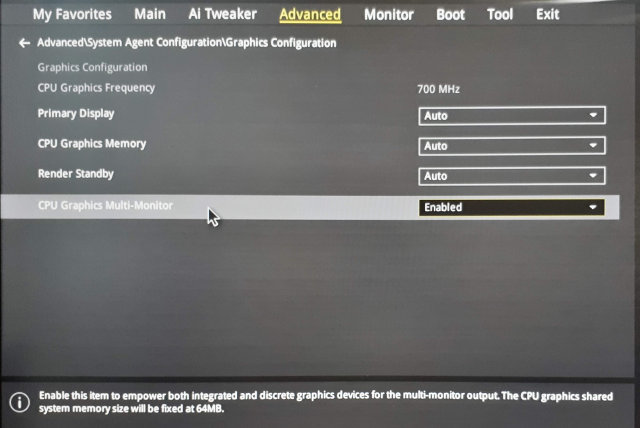
:information_source: This option is vendor dependant, check your mainboard manual.
Linux
I wanted to configure a multi seat in the past, but it was really complicated. I would have to tweak the X.org config manually and there were lots of hacks to make it work.
But actually it turned out that using a modern Linux distribution like openSUSE Leap 15.0 makes this very easy!
Using the loginctl Tool
As in almost all modern Linux distributions also in the openSUSE Leap 15.0 the console is managed by the systemd login manager. To interact with it from the command line you can use a tool called loginctl.
It can handle sessions, seats and users. Let’s see which seats are defined by default:
# loginctl list-seats
SEAT
seat0

1 seats listed.
Now we can list all hardware devices assigned to the default seat:
# loginctl seat-status seat0
seat0
	Sessions: *2
	 Devices:
		  ├─/sys/devices/LNXSYSTM:00/LNXPWRBN:00/input/input5
		  │ input:input5 "Power Button"
		  ├─/sys/device…LNXSYSTM:00/LNXSYBUS:00/PNP0C0C:00/input/input4
		  │ input:input4 "Power Button"
		  ├─/sys/devices/pci0000:00/0000:00:01.3/0000:02:00.0/usb1
		  │ usb:usb1
		  ├─/sys/devices/pci0000:00/0000:00:01.3/0000:02:00.0/usb2
		  │ usb:usb2
		  ├─/sys/device…2:00.1/ata2/host1/target1:0:0/1:0:0:0/block/sr0
		  │ block:sr0
		  ├─/sys/device…ata2/host1/target1:0:0/1:0:0:0/scsi_generic/sg1
		  │ scsi_generic:sg1
		  ├─/sys/device…1.3/0000:02:00.2/0000:03:04.0/0000:05:00.0/usb4
		  │ usb:usb4
		  ├─/sys/devices/pci0000:00/0000:00:03.1/0000:09:00.0/drm/card0
		  │ [MASTER] drm:card0
		  │ ├─/sys/device…000:00:03.1/0000:09:00.0/drm/card0/card0-DP-1
		  │ │ [MASTER] drm:card0-DP-1
		  │ ├─/sys/device…:00:03.1/0000:09:00.0/drm/card0/card0-DVI-D-1
		  │ │ [MASTER] drm:card0-DVI-D-1
		  │ └─/sys/device…00:03.1/0000:09:00.0/drm/card0/card0-HDMI-A-1
		  │   [MASTER] drm:card0-HDMI-A-1
		  ├─/sys/device…000:00/0000:00:03.1/0000:09:00.0/drm/renderD128
		  │ drm:renderD128
		  ├─/sys/device…i0000:00/0000:00:03.1/0000:09:00.0/graphics/fb0
		  │ [MASTER] graphics:fb0 "amdgpudrmfb"
...
The list will be very likely long as it contains all devices present in the system. Obviously all devices are currently assigned to this single seat.
Creating a New Seat
Each seat needs a master (main) device. In the list you should see the graphics card
devices marked with the [MASTER] tag.
Adding Output Device
Each graphics card should have two devices, drm:card<number> and graphics:fb<number>.
To create a new seat simply move these two master devices to the new seat. Use the
loginctl attach seat <path> command, copy and paste the full device path from the
previous list command:
# loginctl attach seat1 /sys/devices/pci0000:00/0000:00:03.2/0000:0a:00.0/graphics/fb1
# loginctl attach seat1 /sys/devices/pci0000:00/0000:00:03.2/0000:0a:00.0/drm/renderD129
You can check that the new seat is defined properly and contains the specified devices:
# loginctl seat-status seat1
seat1
        Sessions: *1
         Devices:
                  ├─/sys/devices/pci0000:00/0000:00:03.2/0000:0a:00.0/drm/card1
                  │ [MASTER] drm:card1
                  │ ├─/sys/device…000:00:03.2/0000:0a:00.0/drm/card1/card1-DP-2
                  │ │ [MASTER] drm:card1-DP-2
                  │ ├─/sys/device…:00:03.2/0000:0a:00.0/drm/card1/card1-DVI-D-2
                  │ │ [MASTER] drm:card1-DVI-D-2
                  │ └─/sys/device…00:03.2/0000:0a:00.0/drm/card1/card1-HDMI-A-2
                  │   [MASTER] drm:card1-HDMI-A-2
                  ├─/sys/device…000:00/0000:00:03.2/0000:0a:00.0/drm/renderD129
                  │ drm:renderD129
                  └─/sys/device…i0000:00/0000:00:03.2/0000:0a:00.0/graphics/fb1
                    [MASTER] graphics:fb1 "amdgpudrmfb"
Now I’d suggest rebooting the system. After reboot you should see the login screen on the both monitors. (BTW I’m using the default KDE SDDM login manager, I do not know if the other login managers support multi seat…)
Adding Input Devices
Now we need to assign also the input devices - a keyboard and a mouse. Find the keyboard
and the mouse devices in the loginctl seat-status seat0 output and move them to the
other seat with the loginctl attach seat1 <path> command.
It is easy if you use different keyboard and mouse models for each seat. If you use
the same models then you cannot easily distinguish between the devices. In that case
I suggest using the simple trial-and-error approach, just move a device to the other
seat and test if it is routed to the correct monitor. If not then simply move it back to
seat0 and move the other device to seat1. You do not need to reboot, you can
test it immediately.
:information_source: Multimedia keyboards might have several devices, do not forget to move them all.
And That’s it!
And that’s it! Now monitor should behave as an independent login screen with separate mouse and keyboard devices. Enjoy! :smile:
The Data Persistence
The configuration is persistent, the attached devices are remembered and automatically set after reboot. You do not need to reassign the devices after each reboot.
The Drawback
There is one drawback of enabling the multi seat feature - the multi head setup does not work anymore.
To make it work back you would have to reconnect the monitors back to the same card and move the assigned devices back to the original seat. That’s quite annoying but you could possibly automate the monitor connection by an automatic HDMI switch if you use HDMI (or DVI) for connecting the monitors and some scripting…
The Use Case: Minecraft! :video_game:
With this approach you can avoid arguing who will play Minecraft. Since now you can run two Minecraft instances in separate sessions at once! :tada:
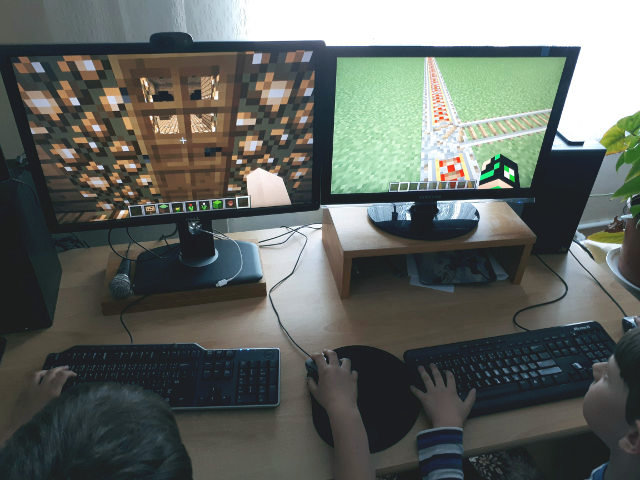
It’s not obvious from the picture, but there is only one computer below the table!
zypper-upgraderepo-plugin is here
zypper-upgraderepo-plugin adds to zypper the ability to check the repository URLs either for the current version or the next release, and upgrade them all at once in order to upgrade the whole system from command line.
This tool started as a personal project when a day I was in the need to upgrade my distro quicker than using a traditional ISO image, Zypper was the right tool but I got a little stuck when I had to handle repositories: some of them were not yet upgraded, others changed slightly in the URL path.
Who knows how to Bash the problem is not exactly a nightmare, and so I did until I needed to make a step further.
The result is zypper-upgraderepo Ruby gem which can be integrated as a zypper plugin just installing the zypper-upgraderepo-plugin package.
Installing zypper-upgraderepo-plugin
Installing zypper-upgraderepo-plugin is as easy as:
- Adding my repo:
sudo zypper ar https://download.opensuse.org/repositories/home:/FabioMux/openSUSE_Leap_42.3/home:FabioMux.repo - Install the package:
sudo zypper in zypper-upgraderepo-plugin
How to use it
Sometime we want to know the status of current repositories, the command zypper ref does a similar job but it is primarily intended to update the repository’s data and that slow down a bit the whole process.
Instead we can type:
$ zypper upgraderepo --check-current
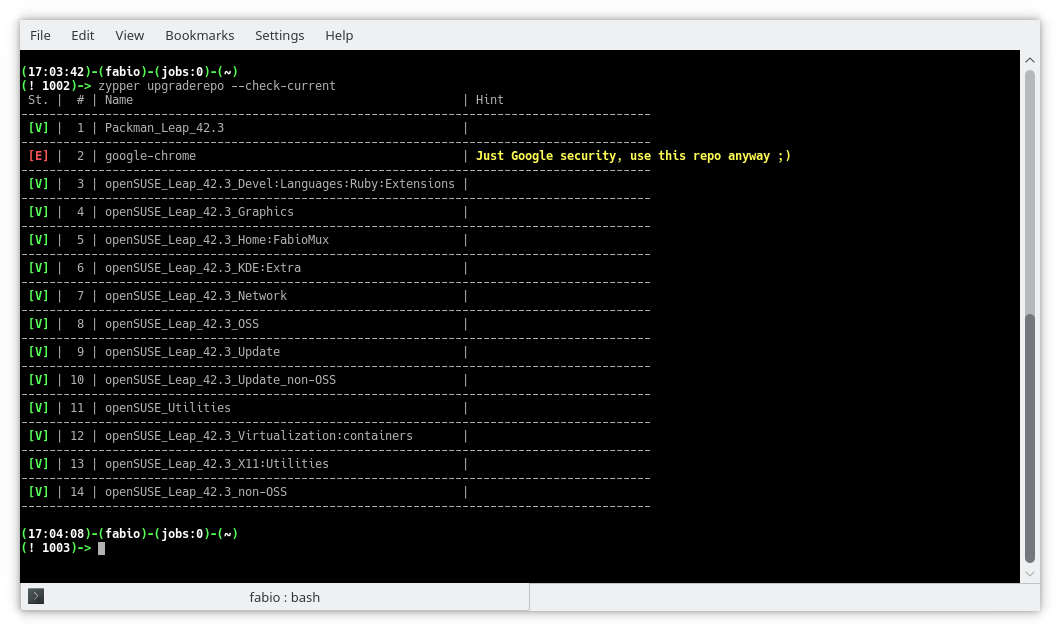
To know whether or not all the available repositories are upgrade-ready:
$ zypper upgraderepo --check-next
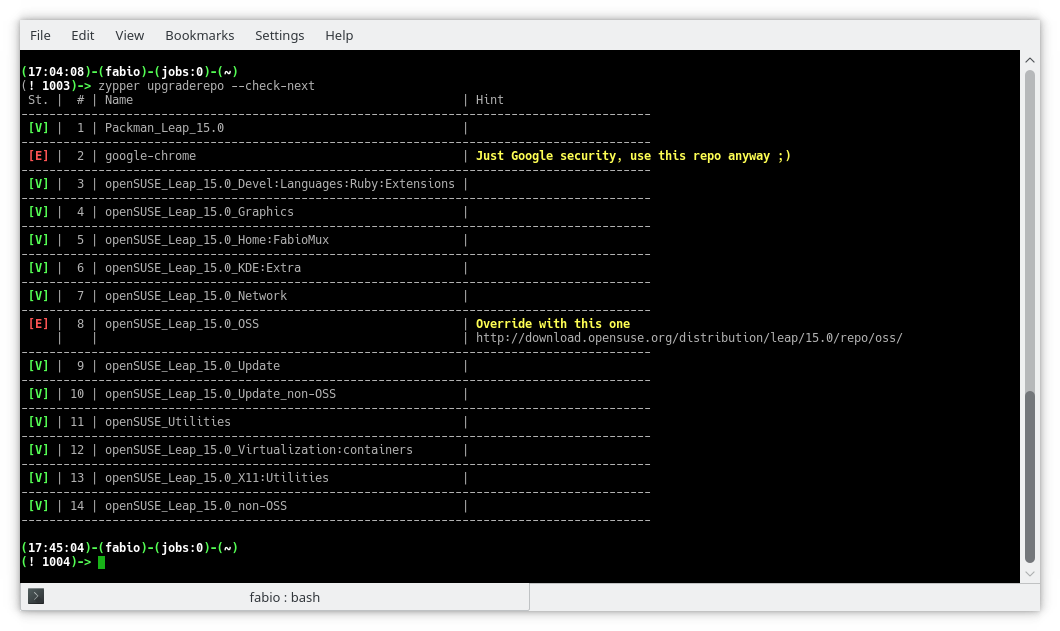
As you can see from the example above all the enabled repositories are ready to upgrade except for the OSS repo which has a slightly different URL.
# The URL used in the openSUSE Leap 42.3

http://download.opensuse.org/distribution/leap/42.3/repo/oss/suse/

# The suggested one for openSUSE Leap 15.0

http://download.opensuse.org/distribution/leap/15.0/repo/oss/
Let’s try again overriding the URL without make any real change:
$ zypper upgraderepo --check-next \

--override-url 8,http://download.opensuse.org/distribution/leap/15.0/repo/oss/
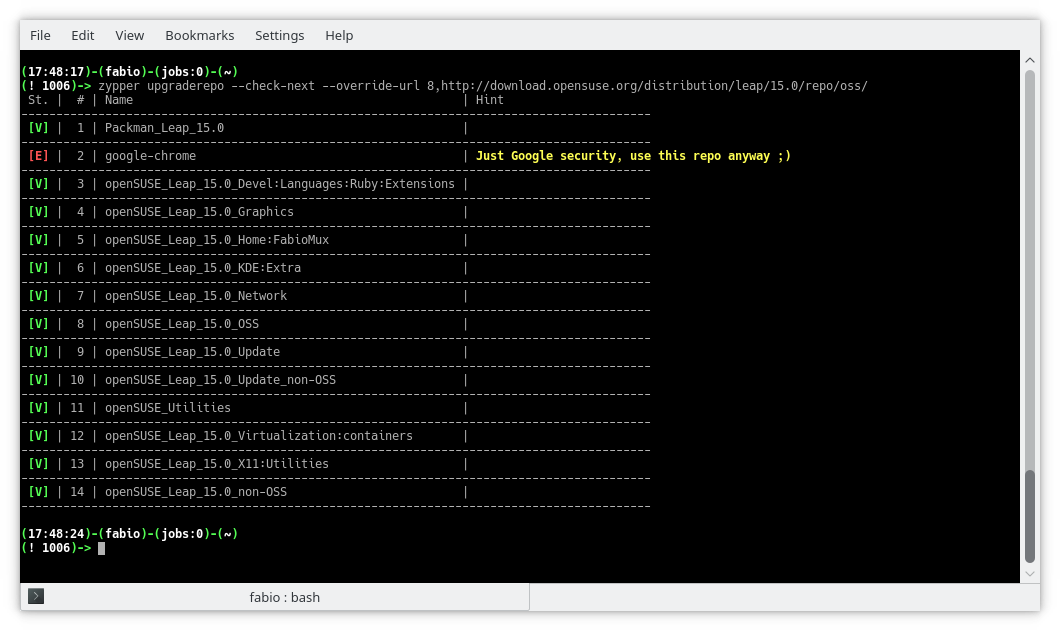
Once everything is ok, and after performed a backup including all the repositories, it’s time to upgrade all the repository at once:
$ sudo zypper upgraderepo --upgrade \

--override-url 8,http://download.opensuse.org/distribution/leap/15.0/repo/oss/
Conclusions
That’s all with the basic commands, more information is available in the wiki page of zypper-upgraderepo gem where all the commands are intended with the only use of the gem, but installing the plugin they are also available as zypper subcommands like shown above, also a man page is available as
$ zypper help upgraderepo

Privacy-friendly Wizard House Quiz
You also do not want to read the lengthy privacy policy https://www.pottermore.com/about/privacy and create an account, just to know your Wizard House Quiz? Here you have a privacy-friendly alternative.
Find your Wizard House
Click the button at your favourite time to learn your Wizard house!
Wizard House names may be protected under some legal acts in some countries.
No personal data from this quiz is stored or transferred.
Automated Decision Making
The following formular is employed to determine your house:
this.house = this.houses[Math.floor(Math.random()*this.houses.length)]
Source Code
<div id="app">
  <form style="border: 1px solid black; padding: 5px">
    <div class="form-group row">
      <label for="staticEmail" class="col-sm-5 col-form-label">Favourite Time:</label>
      <div class="col-sm-7">
        <button v-on:click="setHouse($event)" class="btn btn-primary btn-sm" id="staticEmail">Now!</button>
      </div>
    </div>
    <div class="form-group row">
      <label for="inputPassword" class="col-sm-5 col-form-label">Your Wizard House:</label>
      <div class="col-sm-7" id="inputPassword">
        {{ house }}
      </div>
    </div>
  </form>
</div>

<script>
  var app5 = new Vue({
  el: '#app',
  data: {
    house: '',
    houses: [
      `Slytherin`,
      `Hufflepuff`,
      `Ravenclaw`,
      `Griffondor`,
    ]
  },
  methods: {
    setHouse: function (event) {
      this.house = this.houses[Math.floor(Math.random()*this.houses.length)];
      event.preventDefault();
    }
  }
  })
</script>

Logging from Rust in librsvg
Over in this issue we are discussing how to add debug logging for librsvg.
A popular way to add logging to Rust code is to use the log crate. This lets you sprinkle simple messages in your code:
error!("something bad happened: {}", foo);
debug!("a debug message");
However, the log create is just a facade, and by default the messages do not get emitted anywhere. The calling code has to set up a logger. Crates like env_logger let one set up a logger, during program initialization, that gets configured through an environment variable.
And this is a problem for librsvg: we are not the program's
initialization! Librsvg is a library; it doesn't have a main()
function. And since most of the calling code is not Rust, we can't
assume that they can call code that can initialize the logging
framework.
Why not use glib's logging stuff?
Currently this is a bit clunky to use from Rust, since glib's structured logging functions are not bound yet in glib-rs. Maybe it would be good to bind them and get this over with.
What user experience do we want?
In the past, what has worked well for me to do logging from libraries is to allow the user to set an environment variable to control the logging, or to drop a log configuration file in their $HOME. The former works well when the user is in control of running the program that will print the logs; the latter is useful when the user is not directly in control, like for gnome-shell, which gets launched through a lot of magic during session startup.
For librsvg, it's probably enough to just use an environment
variable. Set RSVG_LOG=parse_errors, run your program, and get
useful output. Push button, receive bacon.
Other options in Rust?
There is a slog crate which looks promising. Instead of using context-less macros which depend on a single global logger, it provides logging macros to which you pass a logger object.
For librsvg, this means that the basic RsvgHandle could create its
own logger, based on an environment variable or whatever, and pass it
around to all its child functions for when they need to log something.
Slog supports structured logging, and seems to have some fancy output modes. We'll see.
Pretty big side-effect
Dolphin and openQA and other assorted bits
Part of this post is about openQA, openSUSE’s automated tool which tests a number of different scenarios, from installation to the behavior of the different desktop environments, plus testing the freshest code from KDE git. Recently, thanks to KDE team member Fabian Vogt, there has been important progress when testing KDE software.
Testing the Dolphin file manager
Those who use KDE software, either in Plasma or in other desktop environments have at least heard of Dolphin, the powerful file manager part of KDE Applications (by the way, have you checked out the recent beta yet?). A couple of weeks ago, in the #opensuse-kde channel, Fabian mentioned the possibility of writing new openQA tests: although there are many tests already, the desktop ones are all but comprehensive given the many possible scenarios. After some discussion back and forth, the consensus was to test Dolphin as it’s a very commonly used in many everyday tasks.
The second part was thinking up what to test. Again, the idea was to focus on common tasks: navigating and creating folders, creating and removing files, and adding elements to Places (the quick-access bar on the left). The first idea also contemplated testing drag-and-drop, but unfortunately such actions aren’t yet supported by openQA, so they were put in the backlog. With these goals in mind, Fabian created a series of tests. This is what being tested:
- Launching dolphin and creating a folder
- Navigating in the folder and creating a text file via context menu (“Create New…”)
- Test navigation via the breadcrumb
- Adding the newly-added folder via Places and ensuring it shows up in other applications
- Remove the folder and the added place
You can see the latest results of the tests for Krypton on openQA. Of course, this does not apply to only the latest unstable code: it is also working for the main distributions.
What does this mean, in practice? openQA is flexible enough to allow even complex tests with multiple operations in succession, and these tests are very useful in catching bugs early, as it has already happened in the past. That doesn’t mean you should be complacent: keep filing those bugs, either to the distro for packaging issues, or to KDE for issues related to the software.
New Krypton links
A small but welcome addition to the Krypton live images is that now the latest build is automatically symlinked to a fixed name (openSUSE_Krypton.$arch.iso, where $arch is either i686 or x86_64. This allows now to link the images directly whenever required: before this change any direct link would break due to the ISO changing name at every rebuild. Doing the same for Argon is on the horizon, but requires some more work before it will happen.
KDE Applications 18.08 beta enters KDE:Applications
As manual testing is still important, the openSUSE KDE:Applications repository now contains the KDE Applications 18.08 beta. If you’re willing to help test the beta, please download the package and file bugs for issues you encounter. In case you’re just using the repository as an add-on, you might want to hold off updating until the final release is out.
Speaking of final release… there might some slight delays in getting it to the distribution this time: part of the KDE team (Antonio, Fabian) is attending Akademy, while others (yours truly) will be away enjoying their hard-earned (?) vacation. In this case, please exercise patience and keep your pitchforks away. ;)

Lunar Eclipse Blood Moon

Tonight, I spent some time on the balkony with my SLR, a glass of Shiraz and the most significant lunar eclipse of the century.