
OSC interactive review
Requests are one of the staples for collaboration in the OBS. You can review via the webui or with OSC.
WebUI
Lets take the request listing for openSUSE:Factory. Your normal workflow will probably end up as
- middle mouse click on the little magnifying glass icon on the right.
- review the request in a new tab
- close the new tab
- go back step 1
My issues with the WebUI
- no advancing to the next request in my current list.
- I have to manually unfold/fold many diff chunks for a proper review.
- In the latest version of the WebUI: “We truncated the diff of some files because they were too big. If you want to see the full diff for every file, click here.” But even then I have to unfold every change myself again.
OSC - The normal way
- one terminal:
osc rq list -t submit -s new openSUSE:Factory - 2nd terminal:
osc rq show -d ID- the ID is taken from the first listing. - 2nd or in worst case 3rd terminal:
osc rq youraction ID - go back to step 2
My issues
- all manually copy pasting of IDs
OSC interactive mode
My config:

 Member
 federico1
Quick and dirty checklist to update syn 0.11.x to syn 0.12
Today I ported gnome-class from version 0.11 of the syn crate to
version 0.12. syn is a somewhat esoteric crate that you use to
parse Rust code... from a stream of tokens... from within the
implementation of a procedural macro. Gnome-class implements a
mini-language inside your own Rust code, and so it needs to parse
Rust!
The API of syn has changed a lot, which is kind of a pain in the
ass — but the new API seems on the road to stabilization, and is nicer
indeed.
Here is a quick list of things I had to change in gnome-class to
upgrade its version of syn.
There is no extern crate synom anymore. You can use syn::synom now.
extern crate synom; -> use syn::synom;
SynomBuffer is now TokenBuffer:
synom::SynomBuffer -> syn::buffer:TokenBuffer
PResult, the result of Synom::parse(), now has the tuple's
arguments reversed:
- pub type PResult<'a, O> = Result<(Cursor<'a>, O), ParseError>;
+ pub type PResult<'a, O> = Result<(O, Cursor<'a>), ParseError>;

// therefore:

impl Synom for MyThing { ... }

let x = MyThing::parse(...).unwrap().1;   ->  let x = MyThing::parse(...).unwrap().0;
The language tokens like synom::tokens::Amp, and keywords like
synom::tokens::Type, are easier to use now. There is a Token!
macro which you can use in type definitions, instead of having to
remember the particular name of each token type:
synom::tokens::Amp  ->  Token!(&)

synom::tokens::For  ->  Token!(for)
And for the corresponding values when matching:
syn!(tokens::Colon)  ->  punct!(:)

syn!(tokens::Type)   ->  keyword!(type)
And to instantiate them for quoting/spanning:
-     tokens::Comma::default().to_tokens(tokens);
+     Token!(,)([Span::def_site()]).to_tokens(tokens);
(OK, that one wasn't nicer after all.)
To the get string for an Ident:
ident.sym.as_str() -> ident.as_ref()
There is no Delimited anymore; instead there is a Punctuated
struct. My diff has this:
-  inputs: parens!(call!(Delimited::<MyThing, tokens::Comma>::parse_terminated)) >>
+  inputs: parens!(syn!(Punctuated<MyThing, Token!(,)>)) >>
There is no syn::Mutability anymore; now it's an Option<token>, so
basically
syn::Mutability -> Option<Token![mut]>
which I guess lets you refer to the span of the original mut token
if you need.
Some things changed names:
TypeTup { tys, .. }  ->  TypeTuple { elems, .. }

PatIdent {                          ->  PatIdent {
    mode: BindingMode(Mutability)           by_ref: Option<Token!(ref)>,
                                            mutability: Option<Token![mut]>,
    ident: Ident,                           ident: Ident,
    subpat: ...,                            subpat: Option<(Token![@], Box<Pat>)>,
    at_token: ...,                      }
}

TypeParen.ty  ->  TypeParen.elem   (and others like this, too)
(I don't know everything that changed names; gnome-class doesn't use all the syn types yet; these are just the ones I've run into.)
This new syn is much better at acknowledging the fine points of
macro hygiene. The examples directory is particularly instructive;
it shows how to properly span generated code vs. original code, so
compiler error messages are nice. I need to write something about
macro hygiene at some point.
Everything is Better in Slow Motion
Powerslidin’ Sunday from jimmac on Vimeo.
Superb weather over the weekend, despite the thermometer dipping below 10°C.
Announcing Tumbleweed snapshot review site
Adapted from announcement to opensuse-factory mailing list:
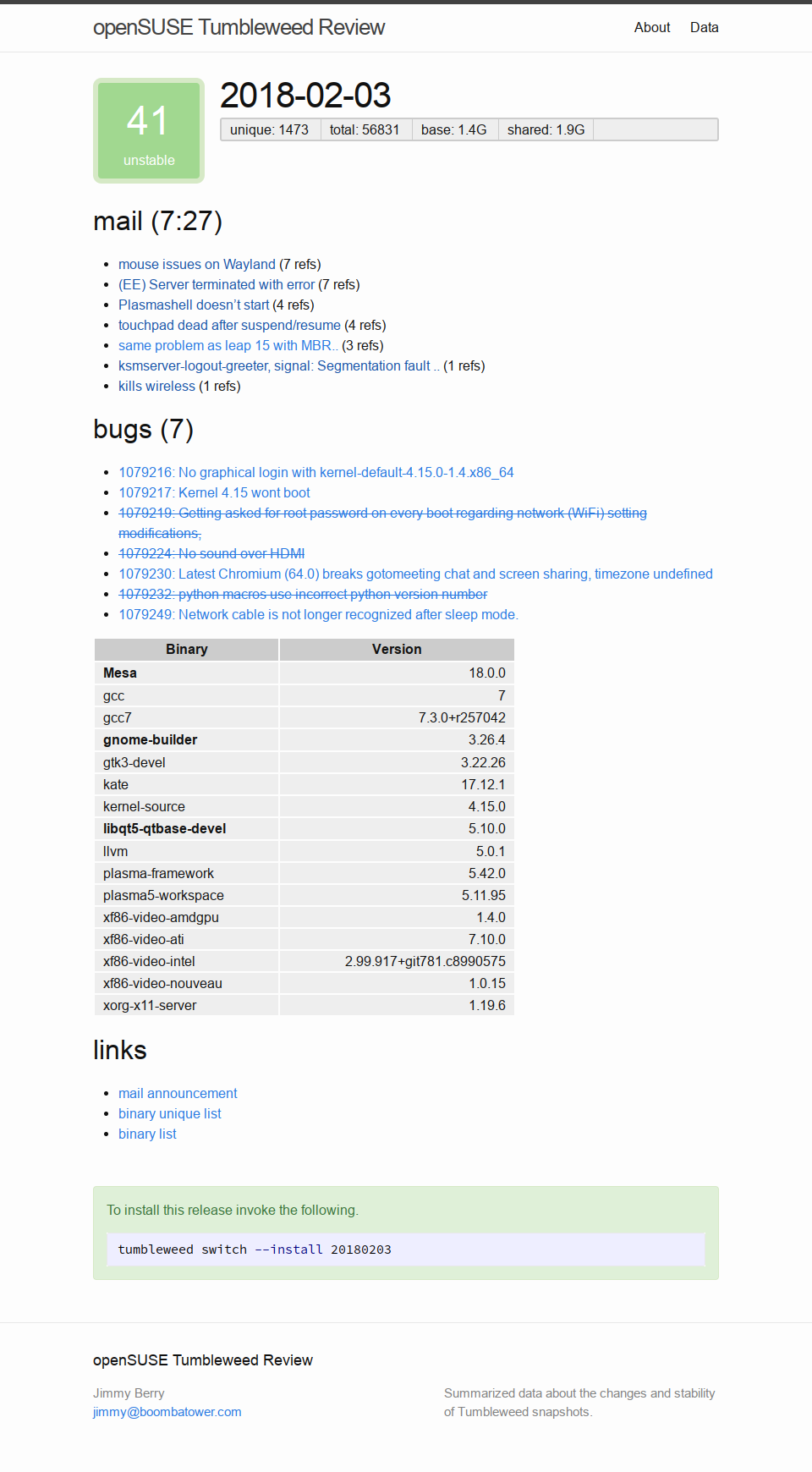
Following up on my prior announcement of Tumbleweed Snapshots, introducing a snapshot review site. By utilizing a variety of sources of feedback pertaining to snapshots a stability score is estimated. The goal is to err on the side of caution and to allow users to avoid troublesome releases. Obviously, there are many enthusiasts who enjoy encountering issues and working to resolve them, but others are looking for a relatively stable experience.
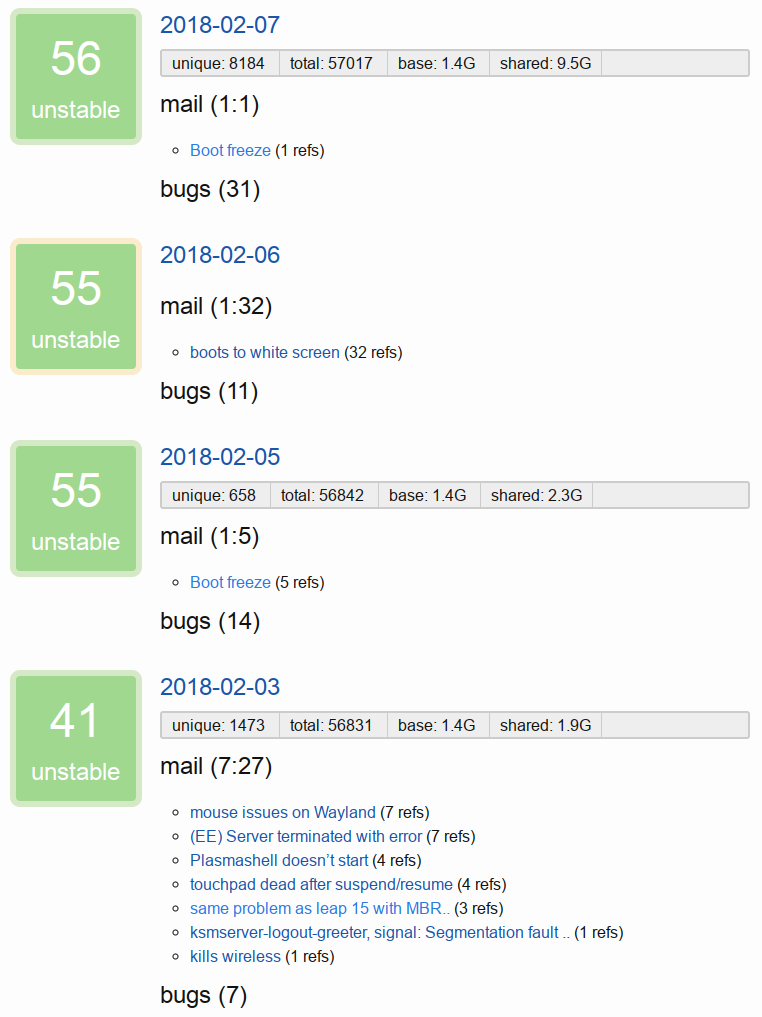
Releases with a low score will continue to impact future release scores with a gradual trail-off. Given that issues generally are not fixed immediately in the next release this assumes the next few releases may still be affected. If the issue persists and is severe it will likely be mentioned again in the mailing list and the score again reduced.
Major system components that are either release candidates or low minor releases are also considered to be risky. For example, recent Mesa release candidates caused white/black screens for many users which is not-trivial to recover from for less-technical users. Such issues come around from time to time since openQA will not catch everything.
Release stability is considered to be pending for the first week after release to allow time for reports to surface. This of course depends on enthusiasts who update often, encounter, and report problems.
The scoring is likely to be tweaked over time to reflect observations. It may also make sense to add a manual override feature to aid scoring when something critical is encountered.
Integrating the scoring data into the tumbleweed-cli would allow users to pick a minimum stability level or score and only update to those releases. Such a mechanism can be vital for systems run by family members, servers, or the wave of gamers looking for the latest OSS graphics stack.
For more details see the code behind the site. Currently, you can see the very low scores for the releases laden with shader cache issues and those therafter. This is the first iteration of the site so nothing too fancy and the score is fairly basic.
The site also provides a machine readable (YAML) version of the data.
As a side-node, Tumbleweed Snapshots are limited to 50 snapshots due to a hosting restriction, but that should generally be over two months worth.
Hopefully others find this useful, enjoy!
Librsvg's continuous integration pipeline
Jordan Petridis has been kicking ass by overhauling librsvg's continous integration (CI) pipeline. Take a look at this beauty:

On every push, we run the Test stage. This is a quick compilation
on a Fedora container that runs "make check" and ensures that the
test suite passes.
We have a Lint stage which can be run manually. This runs cargo
clippy to get Rust lints (check the style of Rust idioms), and cargo
fmt to check indentation and code style and such.
We have a Distro_test stage which I think will be scheduled weekly, using Gitlab's Schedules feature, to check that the tests pass on three major Linux distros. Recently we had trouble with different rendering due to differences in Freetype versions, which broke the tests (ahem, likely because I hadn't updated my Freetype in a while and distros were already using a newer one); these distro tests are intended to catch that.
Finally, we have a Rustc_test stage. The various crates that librsvg depends on have different minimum versions for the Rust compiler. These tests are intended to show when updating a dependency changes the minimum Rust version on which librsvg would compile. We don't have a policy yet for "how far from $newest" we should always work on, and it would be good to get input from distros on this. I think these Rust tests will be scheduled weekly as well.
Jordan has been experimenting with the pipeline's stages and the
distro-specific idiosyncrasies for each build. This pipeline depends
on some custom-built container images that already have
librsvg's dependencies installed. These images are built weekly in
gitlab.com, so every week gitlab.gnome.org gets fresh images for
librsvg's CI pipelines. Once image registries are enabled in
gitlab.gnome.org, we should be able to regenerate the container
images locally without depending on an external service.
With the pre-built images, and caching of Rust artifacts, Jordan was able to reduce the time for the "test on every commit" builds from around 20 minutes, to little under 4 minutes in the current iteration. This will get even faster if the builds start using ccache and parallel builds from GNU make.
Currently we have a problem in that tests are failing on 32-bit builds, and haven't had a chance to investigate the root cause. Hopefully we can add 32-bit jobs to the CI pipeline to catch this breakage as soon as possible.
Having all these container images built for the CI infrastructure also means that it will be easy for people to set up a development environment for librsvg, even though we have better instructions now thanks to Jordan. I haven't investigated setting up a Flatpak-based environment; this would be nice to have as well.
2018w07-08: drop list considers update repos, Leap repo-checker ignores i586, metrics.o.o weekly ingest, and more
package lists generator drop list considers update repos
Following up on the addition of a drop list generator the code now considers update repositories. The released repositories, oss and non-oss, are merged with their update counterparts. This provides a more accurate drop list that should provide for a cleaner post-upgrade system. For an idea of the impact take a look at the diff on OBS after the change was deployed.
There is an ongoing discussion regarding where to store the solv files since they cannot be re-created for releases that are out of support and removed from download.opensuse.org.
Leap 15.0 repo-checker no longer reviews i586
The repo-checker was changed to only review the x86_64 repo, which includes imported i586 pacakges, rather than reviewing both repos in their entirety. Unlike Tumbleweed, Leap does not target i586 as an installable arch, but rather just for providing -32bit packages. Devel packages receiving repo-checker comments regarding i586 dependency chains should desist.
metrics.o.o weekly data ingest enabled
In lieu of OBS providing control over request order via API the data ingest process has been configured to run weekly, instead of daily. The service timer has been enabled and should ingest data regularly.
Tumbleweed snapshot review site
Extensive work was completed towards providing a site for reviewing Tumbleweed snapshot stability by aggregating data from a variety of sources. The goal is to provide insight into the stability trends of Tumbleweed and aid in avoiding troublesome snapshots when desired. More details to be forthcoming.
last year
factory-auto bot was corrected to properly warn when issue references were removed as the diff was backwards and to allow for self-submission for the purpose of reverting a package to a prior version of self.
The osc-staging plugin was enhanced to provide link in staging comment to project dashboard to aid in discovery and some ever important documentation corrections.
The ReviewBot base was significantly refactored to avoid duplication and over complexity in subsequent bots.
- #684: ReviewBot: refactor leaper comment from log functionality.
-
#685: ReviewBot: use
super().check_source_submission()in subclasses. -
#692: ReviewBot: extract
__class__.__name__as default forself.bot_name. - #693: ReviewBot & leaper: provide deduplicate method for leaper comment (and other fixes)
In another attempt to aid in feature discovery the leaper bot was changed to let request submitters know when the request would have been automatically generated. On a similar note the staging unselect command was tweaked to print a message suggesting use of new ignore psuedo-sate.
Significant work was done towards providing completely automated staging strategies via the addition of --non-interactive, --merge, --try-strategies, and --strategies options. The prototype was run against Leap 42.3 and scrutinized to hone the strategies. A related tool was prototyped for triggering flaky package rebuilds in staging projects.
For SUSE Hackweek 15 I worked on what eventually turned into metrics.opensuse.org. The focus was on selecting the appropriate tools and determining what to use as the data source. After the OBS team denied request to get read access of data dumps of request related tables I settled on ingesting the data (over 800MB of XML) via the API.
RFC: Integrating rsvg-rs into librsvg
I have started an RFC to integrate rsvg-rs into librsvg.
rsvg-rs is the Rust binding to librsvg. Like the gtk-rs bindings,
it gets generated from a pre-built GIR file.
It would be nice for librsvg to provide the Rust binding by itself, so
that librsvg's own internal tools can be implemented in Rust —
currently all the tests are done in C, as are the rsvg-convert(1) and
rsvg-view-3(1) programs.
There are some implications for how rsvg-rs would get built then.
For librsvg's internal consumption, the binding can be built from the
Rsvg-2.0.gir file that gets built out of the main librsvg.so. But
for public consumption of rsvg-rs, when it is being used as a normal
crate and built by Cargo, that Rsvg-2.0.gir needs to be already
built and available: it wouldn't be appropriate for Cargo to build
librsvg and the .gir file itself.
If this sort of thing interests you, take a look at the RFC!
OpenStack Summit Vancouver '18: Vote for Speakers
 The next OpenStack Summit takes place again in Vancouver (BC, Canada), May 21-25, 2018. The "Vote for Presentations" period started. All proposals are up for community votes. The deadline for your vote is will end February 25 at 11:59pm PST (February 26th at 8:59am CET)
I've submitted two talks this time:
Rust things I miss in C
Librsvg feels like it is reaching a tipping point, where suddenly it seems like it would be easier to just port some major parts from C to Rust than to just add accessors for them. Also, more and more of the meat of the library is in Rust now.
I'm switching back and forth a lot between C and Rust these days, and C feels very, very primitive these days.
A sort of elegy to C
I fell in love with the C language about 24 years ago. I learned the basics of it by reading a Spanish translation of The C Programming Language by K&R second edition. I had been using Turbo Pascal before in a reasonably low-level fashion, with pointers and manual memory allocation, and C felt refreshing and empowering.
K&R is a great book for its style of writing and its conciseness of
programming. This little book even taught you how to implement a
simple malloc()/free(), which was completely enlightening. Even
low-level constructs that seemed part of the language could be
implemented in the language itself!
I got good at C over the following years. It is a small language, with a small standard library. It was probably the perfect language to implement Unix kernels in 20,000 lines of code or so.
The GIMP and GTK+ taught me how to do fancy object orientation in C. GNOME taught me how to maintain large-scale software in C. 20,000 lines of C code started to seem like a project one could more or less fully understand in a few weeks.
But our code bases are not that small anymore. Our software now has huge expectations on the features that are available in the language's standard library.
Some good experiences with C
Reading the POV-Ray code source code for the first time and learning how to do object orientation and inheritance in C.
Reading the GTK+ source code and learning a C style that was legible, maintainable, and clean.
Reading SIOD's source code, then the early Guile sources, and seeing how a Scheme interpreter can be written in C.
Writing the initial versions of Eye of Gnome and fine-tuning the microtile rendering.
Some bad experiences with C
In the Evolution team, when everything was crashing. We had to buy a Solaris machine just to be able to buy Purify; there was no Valgrind back then.
Debugging gnome-vfs threading deadlocks.
Debugging Mesa and getting nowhere.
Taking over the intial versions of Nautilus-share and seeing that it
never free()d anything.
Trying to refactor code where I had no idea about the memory management strategy.
Trying to turn code into a library when it is full of global variables
and no functions are static.
But anyway — let's get on with things in Rust I miss in C.
Automatic resource management
One of the first blog posts I read about Rust was "Rust means never having to close a socket". Rust borrows C++'s ideas about Resource Acquisition Is Initialization (RAII), Smart Pointers, adds in the single-ownership principle for values, and gives you automatic, deterministic resource management in a very neat package.
-
Automatic: you don't
free()by hand. Memory gets deallocated, files get closed, mutexes get unlocked when they go out of scope. If you are wrapping an external resource, you just implement the Drop trait and that's basically it. The wrapped resource feels like part of the language since you don't have to babysit its lifetime by hand. -
Deterministic: resources get created (memory allocated, initialized, files opened, etc.), and they get destroyed when they go out of scope. There is no garbage collection: things really get terminated when you close a brace. You start to see your program's data lifetimes as a tree of function calls.
After forgetting to free/close/destroy C objects all the time, or worse, figuring out where code that I didn't write forgot to do those things (or did them twice, incorrectly)... I don't want to do it again.
Generics
Vec<T> really is a vector of whose elements are the size of T.
It's not an array of pointers to individually allocated objects. It
gets compiled specifically to code that can only handle objects of
type T.
After writing many janky macros in C to do similar things... I don't want to do it again.
Traits are not just interfaces
Rust is not a Java-like object-oriented language. Instead it
has traits, which at first seem like Java interfaces — an easy way to
do dynamic dispatch, so that if an object implements Drawable then
you can assume it has a draw() method.
However, traits are more powerful than that.
Associated types
Traits can have associated types. As an example, Rust
provies the Iterator trait which you can implement:
pub trait Iterator {
    type Item;
    fn next(&mut self) -> Option<Self::Item>;
}
This means that whenever you implement Iterator for some iterable
object, you also have to specify an Item type for the things that
will be produced. If you call next() and there are more elements,
you'll get back a Some(YourElementType). When your iterator runs
out of items, it will return None.
Associated types can refer to other traits.
For example, in Rust, you can use for loops on anything that
implements the IntoIterator trait:
pub trait IntoIterator {
    /// The type of the elements being iterated over.
    type Item;

    /// Which kind of iterator are we turning this into?
    type IntoIter: Iterator<Item=Self::Item>;

    fn into_iter(self) -> Self::IntoIter;
}
When implementing this trait, you must provide both the type of the
Item which your iterator will produce, and IntoIter, the actual
type that implements Iterator and that holds your iterator's state.
This way you can build webs of types that refer to each other. You can have a trait that says, "I can do foo and bar, but only if you give me a type that can do this and that".
Slices
I already posted about the lack of string slices in C and how this is a pain in the ass once you get used to having them.
Modern tooling for dependency management
Instead of
- Having to invoke
pkg-configby hand or with Autotools macros - Wrangling include paths for header files...
- ... and library files.
- And basically depending on the user to ensure that the correct versions of libraries are installed,
You write a Cargo.toml file which lists the names and versions of
your dependencies. These get downloaded from a well-known location,
or from elsewhere if you specify.
You don't have to fight dependencies. It just works when you cargo build.
Tests
C makes it very hard to have unit tests for several reasons:
-
Internal functions are often
static. This means they can't be called outside of the source file that defined them. A test program either has to#includethe source file where the static functions live, or use#ifdefs to remove thestatics only during testing. -
You have to write Makefile-related hackery to link the test program to only part of your code's dependencies, or to only part of the rest of your code.
-
You have to pick a testing framework. You have to register tests against the testing framework. You have to learn the testing framework.
In Rust you write
#[test]
fn test_that_foo_works() {
    assert!(foo() == expected_result);
}
anywhere in your program or library, and when you type cargo test,
IT JUST FUCKING WORKS. That code only gets linked into the
test binary. You don't have to compile anything twice by hand, or
write Makefile hackery, or figure out how to extract internal
functions for testing.
This is a very killer feature for me.
Documentation, with tests
Rust generates documentation from comments in Markdown syntax. Code in the docs gets run as tests. You can illustrate how a function is used and test it at the same time:
/// Multiples the specified number by two
///
/// ```
/// assert_eq!(multiply_by_two(5), 10);
/// ```
fn multiply_by_two(x: i32) -> i32 {
    x * 2
}
Your example code gets run as tests to ensure that your documentation stays up to date with the actual code.
Update 2018/Feb/23: QuietMisdreavus has posted how rustdoc turns doctests into runnable code internally. This is high-grade magic and thoroughly interesting.
Hygienic macros
Rust has hygienic macros that avoid all of C's problems with things in
macros that inadvertently shadow identifiers in the code. You don't
need to write macros where every symbol has to be in parentheses for
max(5 + 3, 4) to work correctly.
No automatic coercions
All the bugs in C that result from inadvertently converting an int
to a short or char or whatever — Rust doesn't do them. You have
to explicitly convert.
No integer overflow
Enough said.
Generally, no undefined behavior in safe Rust
In Rust, it is considered a bug in the language if something written
in "safe Rust" (what you would be allowed to write outside unsafe {}
blocks) results in undefined behavior. You can shift-right a negative
integer and it will do exactly what you expect.
Pattern matching
You know how gcc warns you if you switch() on an enum but don't
handle all values? That's like a little baby.
Rust has pattern matching in various places. It can do that
trick for enums inside a match() expression. It can do
destructuring so you can return multiple values from a function:
impl f64 {
    pub fn sin_cos(self) -> (f64, f64);
}

let angle: f64 = 42.0;
let (sin_angle, cos_angle) = angle.sin_cos();
You can match() on strings. YOU CAN MATCH ON FUCKING STRINGS.
let color = "green";

match color {
    "red"   => println!("it's red"),
    "green" => println!("it's green"),
    _       => println!("it's something else"),
}
You know how this is illegible?
my_func(true, false, false)
How about this instead, with pattern matching on function arguments:
pub struct Fubarize(pub bool);
pub struct Frobnify(pub bool);
pub struct Bazificate(pub bool);

fn my_func(Fubarize(fub): Fubarize,
           Frobnify(frob): Frobnify,
           Bazificate(baz): Bazificate) {
    if fub {
        ...;
    }

    if frob && baz {
        ...;
    }
}

...

my_func(Fubarize(true), Frobnify(false), Bazificate(true));
Standard, useful error handling
I've talked at length about this. No more returning a boolean with no extra explanation for an error, no ignoring errors inadvertently, no exception handling with nonlocal jumps.
#[derive(Debug)]
If you write a new type (say, a struct with a ton of fields), you can
#[derive(Debug)] and Rust will know how to automatically print that
type's contents for debug output. You no longer have to write a
special function that you must call in gdb by hand just to examine a
custom type.
Closures
No more passing function pointers and a user_data by hand.
Conclusion
I haven't done the "fearless concurrency" bit yet, where the compiler is able to prevent data races in threaded code. I imagine it being a game-changer for people who write concurrent code on an everyday basis.
C is an old language with primitive constructs and primitive tooling. It was a good language for small uniprocessor Unix kernels that ran in trusted, academic environments. It's no longer a good language for the software of today.
Rust is not easy to learn, but I think it is completely worth it. It's hard because it demands a lot from your understanding of the code you want to write. I think it's one of those languages that make you a better programmer and that let you tackle more ambitious problems.
Students from Indonesia, openSUSE participates in GSoC!
openSUSE participates again in Google Summer of Code (GSoC), a program that awards stipends to university students who contribute to real-world open source projects during three months in summer. :sunny: With this article, I will provide my experience as a former GSoC student and mentor, give you more details about the program and try to encourage Indonesian students to get involved in openSUSE development through GSoC.
Why open source and openSUSE?
First of all, you may wonder why you should want to get involved in open source development. Everybody has their own reasons, but for me there are three main ones:
- I have fun: The most important reason is that it is fun. At openSUSE, we have great conferences, geekos everywhere, geeko cookies,… and the most important part: we have fun when working!
- I learn a lot: In most of the projects, every single line of code is reviewed. That means not only that the code quality is better, but also that every time you write something wrong or that can be improved, someone will tell you. In open source, we think that making mistakes is perfectly fine. That people correct you is the best way to learn.
- People: I have the chance to work with really skilled people all around the world, who are interested in the same things as me.


Why GSoC?
Starting is always difficult, but you don’t have to do it alone! In openSUSE, you will always find people to help you, and with GSoC this is even easier. The best feature of the program is that you will always have at least one mentor (most likely two) who will lead you through it. In addition, you will work in a project used in real word by many users and all your code will be released under an open source license, so everybody can access, use, change and share it. Last, you will receive a stipend, 2400 dollars in Indonesia.
Projects
At openSUSE, you can find projects written in Ruby on Rails, Perl, Ruby, HTML/JavaScript, C/C++ and much more. This year you can work during GSoC in some of the most central and biggest projects in openSUSE: OpenBuildService, openQA and YaST. They will for sure be challenging projects to work in, but don’t get scared, as that means that you will learn a lot from it too. And remember that your mentors and other openSUSE contributors will be there to help you!
But we also have simpler projects such as Trollolo, where any computer science university student could get started with Ruby. The desire to learn is much more important than the previous experience and knowledge.
You can find all the projects and more information in our mentoring page: http://101.opensuse.org. And if the projects at openSUSE doesn’t match your expectations, you can check other organizations: https://summerofcode.withgoogle.com/organizations. You should look for a project that you consider interesting and that will allow you to learn as much as possible.
Let’s do it!
When I travelled to openSUSE Asia in October, I had the chance to speak with some members of the Indonesian community and I found out that we have a huge community of openSUSE users in Indonesia. And a big part of this community are university students of Computer Science. However, those students don’t get involved in the development of openSUSE. I also heard many times during the conference that students in Indonesia and in Asia in general are shy and that they find the open source development scary. I hope that with this blog post I can achieve that Indonesian students lose their fear and encourage them to get involved in openSUSE development.
The GSoC application period starts on March 12th, but you can already take a look at the organizations and projects and find the best one for you. Approaching the people in the project is also important, as you will be working with them for three months. We recommend to make at least one contribution to the project you want to apply for as that will help you to find out if this is the right project for you and to write a good proposal, but you do not need to send a lot of pull requests.
And if you have doubts do not hesitate to contact us. You can tweet us at @opensusementors, write in our mailing list (opensuse-project@opensuse.org) or directly contact the mentors. We are looking forward to hear from you, so don’t be shy! :green_heart:
About me
My name is Ana María Martínez and I started with openSUSE as a GSoC student. Since then I keep contributing in open source projects inside and outside openSUSE. I am currently working at SUSE in the Open Build Service Frontend Team and I am a mentor for openSUSE at GSoC. You can find me in Github(@Ana06) and contact me by email, Twitter (@anamma_06), IRC (@Ana06) and by writting a comment in this blog post. :wink: