
 Stallmanu
My Experience With Medium
It’s been about 3 months now since I switched over to Medium from Wordpress. Now that I have had a chance to experience it a bit I think I can provide a comparison between Medium and Wordpress.
Pros
- Simple, easy to use interface, almost never have to drill down menus looking for options
- Super easy to use editor, its basically blank and you only see what you write until you want to insert something, save or publish your post
- “Reads” statistics, this lets you see how many people that visit a specific post actually bother to scroll down or read it. It’s a useful way to determine if you are doing a good job of capturing the readers interest

- Medium doesn’t do the stupid “” replacement with html character codes that Wordpress performs in code tags. This was one of the reasons I decided to leave Wordpress, the ability to disable the “feature” required paying
- Publications allow you to easily setup a system where members can submit posts that are displayed on a shared page
- Draft comments can be left by members of your publication and those you share the draft link with, allowing you to get feedback on stories before making them public
- Comments can leave tags on your article, allowing readers to easily reference sections that they are addressing


- Great embedding support, I found it very easy to embed and format things into posts. Pictures, Twitter, Videos, its all pretty nice and easy
- Lack of plugins, strangely a good thing. One of the biggest detractors of Wordpress is the terrible nature of plugin developers (and users) to never address security issues. It’s extremely common for Wordpress sites to get breached due to insecure/not updated plugins
Cons
- Lack of syntax highlighting is super annoying on Medium. I have not looked for alternatives to the default code boxes but they are not that useful. Wordpress provided some great features in its code tags.
- Cannot really mess around with the blog theme, while the default looks fine it leaves something to be desired. I actually really liked the theme from my Wordpress blog as it was simple to navigate and just showed you the content you wanted to see.
- Medium definitely does not give you as much control of the blog as Wordpress did, however this wasn't as big as a con as it may seem. Most of the time I never used any of the fancy admin features Wordpress provided (mainly because you need to pay to use them)
- Does not seem to have as much help available online as Wordpress does, makes it tricky at times when I want to do something fancy and cannot determine if Medium actually supports the feature
- Medium does not allow you to leave notes for readers which can be frustrating when you don’t want to sidetrack the main content of the blog post
Overall I think I am happy with using Medium over Wordpress. It feels more slick to me and the editor is really easy to use. While some of the issues above do leave me wanting for the functionality I had in Wordpress, I think that Medium provides an overall better experience for writing.
My Experience With Medium was originally published in Information & Technology on Medium, where people are continuing the conversation by highlighting and responding to this story.

VMware Workstation / gcc 5.x / Linux; Error: Failed to get gcc info
Download my script here and run it after each time your kernel changes of course.
Let me know how your experience is with this or you would like to see some additions or adjustments.
Attack On Krebs
Brian Krebs is a well-known and respected reporter who covers many different topics in the security industry, often involving data breaches and ATM skimmers. However, Krebs has always been unpopular among the financial and cyber criminals of the world given his uncanny ability to uncover the dirt on how they perform their criminal operations. He is also the author of the NYT Best Seller Spam Nation, a book detailing the operations of cyber criminals who use spam emails to make money as well as their wars with competing spammers. Check out this video below for a great talk by Krebs regarding his book.
Over the past week, Kreb’s website, KrebsOnSecurity was under a remarkably severe DDoS attack. Attacks at this scale have never really been seen before (read further below for details). As a result it’s important that the security industry develop some method to provide protection to journalists like Krebs against attacks that in the past would have been classified as a nation state capability.
What Is A DDoS Attack?
If you are not familiar with the term, DDoS stands for Distributed Denial of Service attack. The idea behind the attack is simple, but to understand it you need to have a basic understanding of computer networks. This is a simplified explanation but it should get the following point across.
When two computers want to communicate on the internet, they send each other messages called “packets”. These packets contain all the information needed to allow communication between the two systems. When a computer receives a packet, it must allocate some CPU and network processing time to determine the contents of the packet. Normally the computer performs these tasks so fast that they are not noticed by the user.

When a website is hosted on a server, it needs to be able to respond to multiple visitors quickly and efficiently. As such, servers are given a very high ceiling in bandwidth so they can scale to a very large amount of requests. Think of bandwidth as a pipeline, the bigger it is the more data can flow from one end to the other, but ultimately there is a finite limit (the size of the pipe).

A DDoS attack preys on this property and attempts to fill, or use up, the server’s available bandwidth. When this happens, the server is unable to respond to legitimate visitors and the website ends up appearing as offline. These attacks can be devastating for websites because they are difficult to stop and can be launched simultaneously from all over the world. Often times, the senders of these DDoS attacks are compromised computers or smart devices which are being controlled from some centralized Command & Control infrastructure operated by the actual attacker.
The Internet Of Shit
This is one of the reasons why IoT (Internet of Things) is such a stupid idea. These devices are basically never updated and even when they are shipped to users, they are buggy and have lots of security issues. IoT is basically a free distributed infrastructure being built for DDoS attackers.

Katie Moussouris on Twitter
This is #IoT in a nutshell https://t.co/F9oU4og3yc
Kevin Beaumont on Twitter
The Internet of Things
Back To Krebs
The attacks against Krebs started after he revealed the operations of vDOS a botnet for hire company run by two Israeli teenagers. It is alleged that they made over $600, 000 in two years by offering their DDoS service to take down websites.
Two weeks after the article was published, a DDoS attack at an unprecedented scale was launched against KrebsOnSecurity. It is reported by ArsTechnica that the site was sent over 620 Gigabits of data per second. It should be noted that this is one of, if not the, largest attacks to ever take place on the internet! Initially Akamai, a popular CDN (content delivery network), was able to shield Krebs from the attacks but after a few hours, around 4PM that day they notified Krebs that they would not be able to continue supporting his site and he had two hours before they stopped shielding his website. Krebs opted to shut down the site while attempting to work out a solution for this attack. For the sake of brevity I don’t want to go over the rest of the details of the attack as it is already covered in the ArsTechnica article. If you are interested in more details about the attack, I suggest you read it as well as these two posts by Krebs.
What Does This Attack Mean For Journalists?
The dystopian cyberpunk future is here.
In the Future, Hackers Will Build Zombie Armies from Internet-Connected Toasters
The scary thing about this attack is that a journalist had his website shut down by someone who didn’t like the content. What is even more concerning is it means there are single actors out there that can carry out attacks which a few years ago would have been considered the realm of powerful governments. This all means that journalists will need to take even more precautions when determining how they want to share their content. It’s clear that not even a powerful CDN like Akamai can protect them from determined attackers.
Now, more than ever, journalists need to be given protection from the growing threats of internet warfare. If we want to continue to be able to exercise our rights of free speech then we need to develop products and practices that can be used to mitigate these targeted attacks.
What are these specific products or practices? I am not sure of any silver bullet solution, as DDoS attacks are difficult to deal with. The only way (I know of) to determine if a packet was sent by an adversary is to perform some analysis on it, which means having to spend time checking its contents. If an attack is large enough, this becomes difficult to perform at scale and causes a huge increase in costs. Krebs solved this issue by registering for Google’s Project Shield, which is Google’s attempt to protect journalists from DDoS attacks. It remains to be seen if the site will stay up for the coming weeks but projects like this are definitely a good thing.
Ultimately, one thing is clear to me: while attacks at this scale are rare right now, they will likely become much more common in the coming years. As a result it is imperative that we find some definite way to protect websites and journalists from these attacks.
Attack On Krebs was originally published in Information & Technology on Medium, where people are continuing the conversation by highlighting and responding to this story.
Audio fun
Notice!
 Member
Enabling scroll wheel emulation for the Logitech Trackman Marble on Fedora Linux 24
Update: this solution does no longer work on later versions of Fedora that switched to Wayland instead of X.org by default. If you don’t want to switch back to X.org and you’re using the GNOME desktop environment, you can enable scroll wheel emulation as outlined here.
I’ve been struggling with this for quite some time now, but I finally figured out how to enable scroll wheel emulation for the Logitech Trackman Marble on Fedora Linux 24.
Previously (when I was using Ubuntu Linux), I had a small shell script that defined the required xinput properties. However, this did not work on Fedora, as they use the new libinput framework.
With the change to the libinput subsystem, you can now enable this behavior by creating a file /etc/X11/xorg.conf.d/10-libinput.conf with the following content:
Section "InputClass"
 Identifier "Marble Mouse"
 MatchProduct "Logitech USB Trackball"
 Driver "libinput"
 Option "ScrollMethod" "button"
 Option "ScrollButton" "8"
 EndSection
Magically, this function got enabled as soon as I saved the file, without even having to restart X! I’m impressed.

More Hiring: Qt Hacker!
ownCloud is even more hiring. In my last post I wrote that we need PHP developers, a security engineer and a system administrator. For all positions we got interesting inquiries already. That’s great, but should not hinder you from sending your CV in case you are still interested. We have multiple positions!
But there is even more opportunity: Additionally we are looking for an ownCloud Desktop Client developer. That would be somebody fluid in C++ and Qt who likes to pick up responsibility for our desktop client together with the other guys on the team. Shifted responsibilities have created this space, and it is your chance to jump into the desktop sync topic which makes ownCloud really unique.
The role includes working with the team to plan and roll out releases, coordinate with the server- and mobile client colleagues, nail out future developments, engage with community hackers and help with difficult support cases. And last but not least there is hacking fun on remarkable nice Qt based C++ code of our desktop client, together with high profile C++ hackers to learn from.
It is an ideal opportunity for a carer type of personality, to whom it is not enough to sit in the basement and only hack, but also to talk to people, organize, and become visible. Having a Qt- and/or KDE background is a great benefit. You would work from where you feel comfortable with as ownCloud is a distributed company.
The ownCloud Client is a very successful part of the ownCloud platform, it has millions of installations out there, and is released under GPL.
If you want to do something that matters, here you are! Send your CV today and do not forget to mention your github account :-)
Security getting hard/impossible on recent systems
fcam-dev now gets autofocus on 4.7 kernel
Editing a Screencast in Gimp
Editing Screencast
In this older post I described how to record a screencast in Linux.
However, you will very likely need to do some post processing with the recording, like removing the unneeded parts at the beginnig or the end, cropping the image or adding an empty frame at the end so it is obvious when the animation restarts.
And for that we can use Gimp editor which is usually pre-installed in the major Linux distributions.
Gimp
Gimp is designed for editing static images but with some workarounds it can edit
animations as well. Simply open your *.gif animation file created in the
recording session
in Gimp.
Every frame in the animation is loaded as a separate image layer. This looks a bit strange at first sight but I guess this was the only way how to add animation support into a static image editor.
The animation is played from the bottom layer to the top.
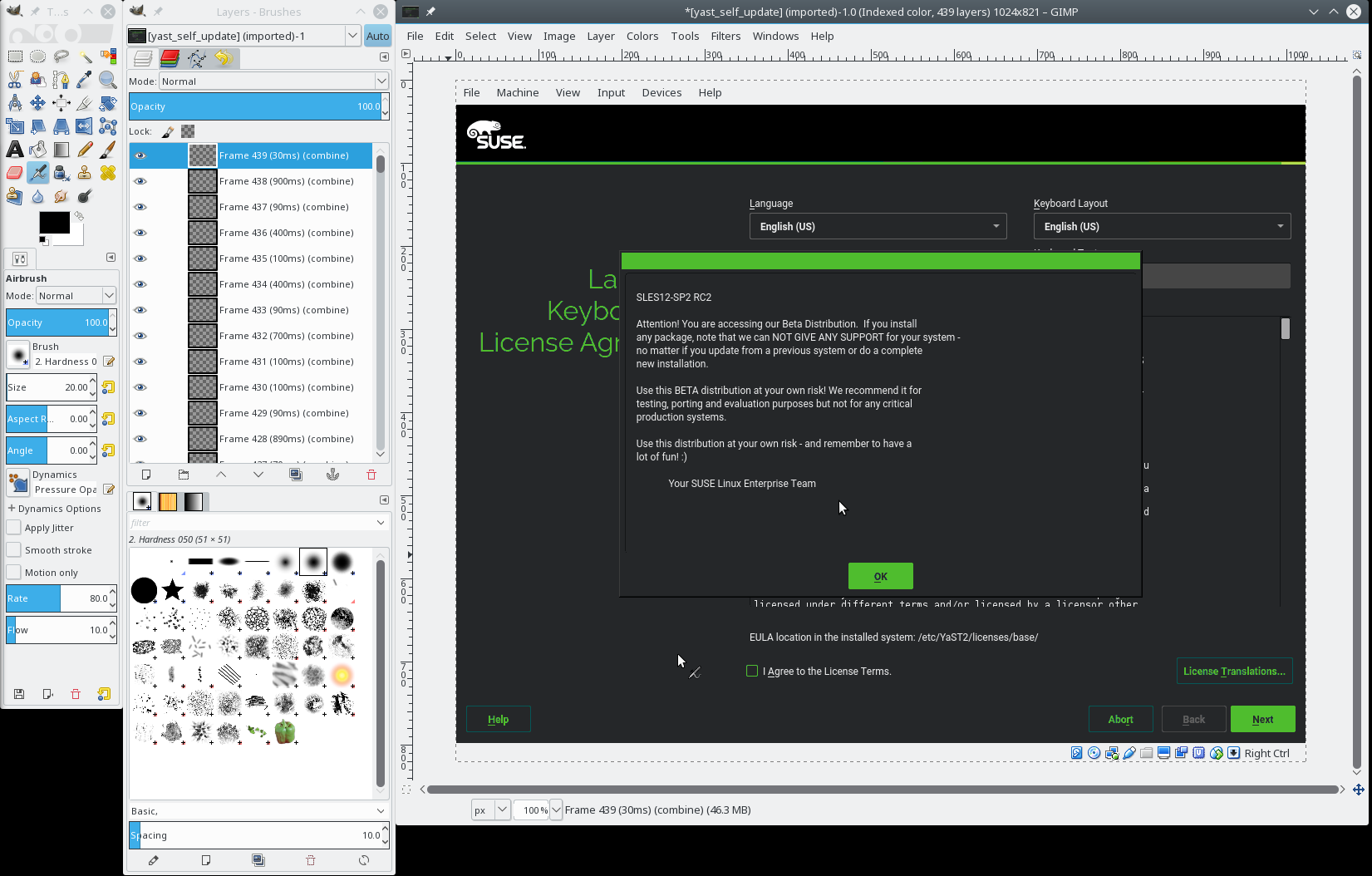
The Initial Step
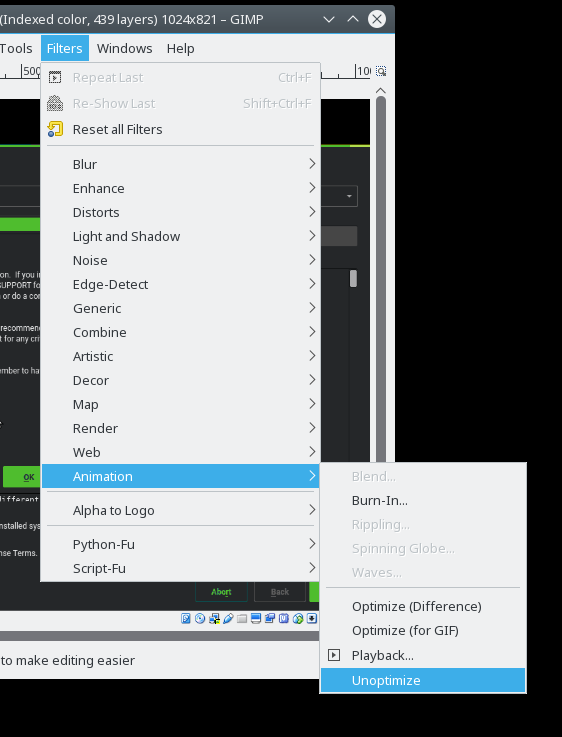
The very first step you should do after opening the animation image is to unoptimize it. To store the animation efficiently the GIF files usually store only the changes between the frames. Usually only very small part of the image changes and it does not make sense to repeat the unchanges parts in every frame and wasting space.
However, this makes editing more difficult as each frame (layer) only contains the changes, you cannot see what will be actually displayed on the screen and editing is almost impossible.
Fortunately Gimp can expand the diff frames to full images, simply use the Filters ➞ Animation ➞ Unoptimize menu. It will create a new image with full frames, you can close the original image now.
Displaying Separate Frames
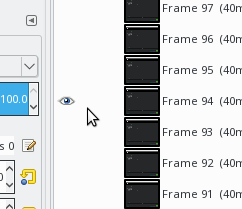
As already mentioned, each frame is loaded into a separate layer. If you want to see a frame you need to select only that frame otherwise the later frames (the layers above) will cover it.
Press Shift and click the eye icon in the layer window to display only that
frame.
Cutting the Animation
If you need to remove some frames at the begining or the end then simply remove the not needed layers from the image.
Select the layer and press the trash bin icon in the left bottom corner in the layer .
Changing the Timing
As you have probably already noticed the layer names contain special tags at
the end like (180ms)(replace). These tags specify the animation properties of
the frame.
The first value in the parenthesis defines how long is this frame displayed before displaying the next frame. The second value defines how the frame should be displayed.
Cropping the Image Area
If you need to crop the image area e.g. because you recorded a bit larger area you can simply select the area with the rectangle selection tool and use Image ➞ Crop to Selection to crop all layers.
Adding Empty Frame
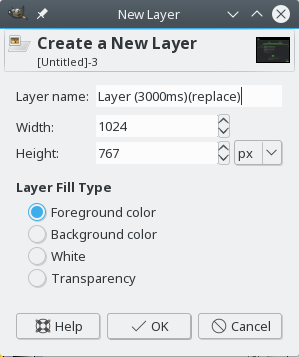
Select the top layer and select New Layer from the mouse context menu (right-click) or press the button in the left bottom corner of the layer window.
Do not forget to include the animation properties at the end of the layer name.
Preview
You can preview the current state using Filters ➞ Animation ➞ Playback menu. Exporting the final animation is not trivial so you should check the final animation before exporting it.
Exporting the Final Animation
At first you need to optimize the animation again. Use Filters ➞ Animation ➞ Optimize (GIF) menu to remove the repeating parts of images. This is basically the opposite process to the initial unoptimize step.
Then we can finally export the animation to a GIF file. Use File ➞
Export as … menu item, then write the target file name. Do not forget
to set the .gif suffix.
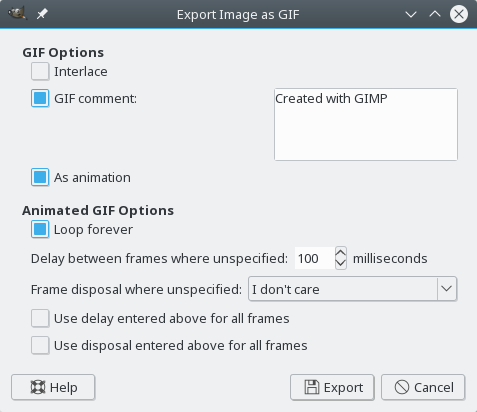
The most important step here is check the As animation option which is by default unchecked. Then press Export and that’s it!
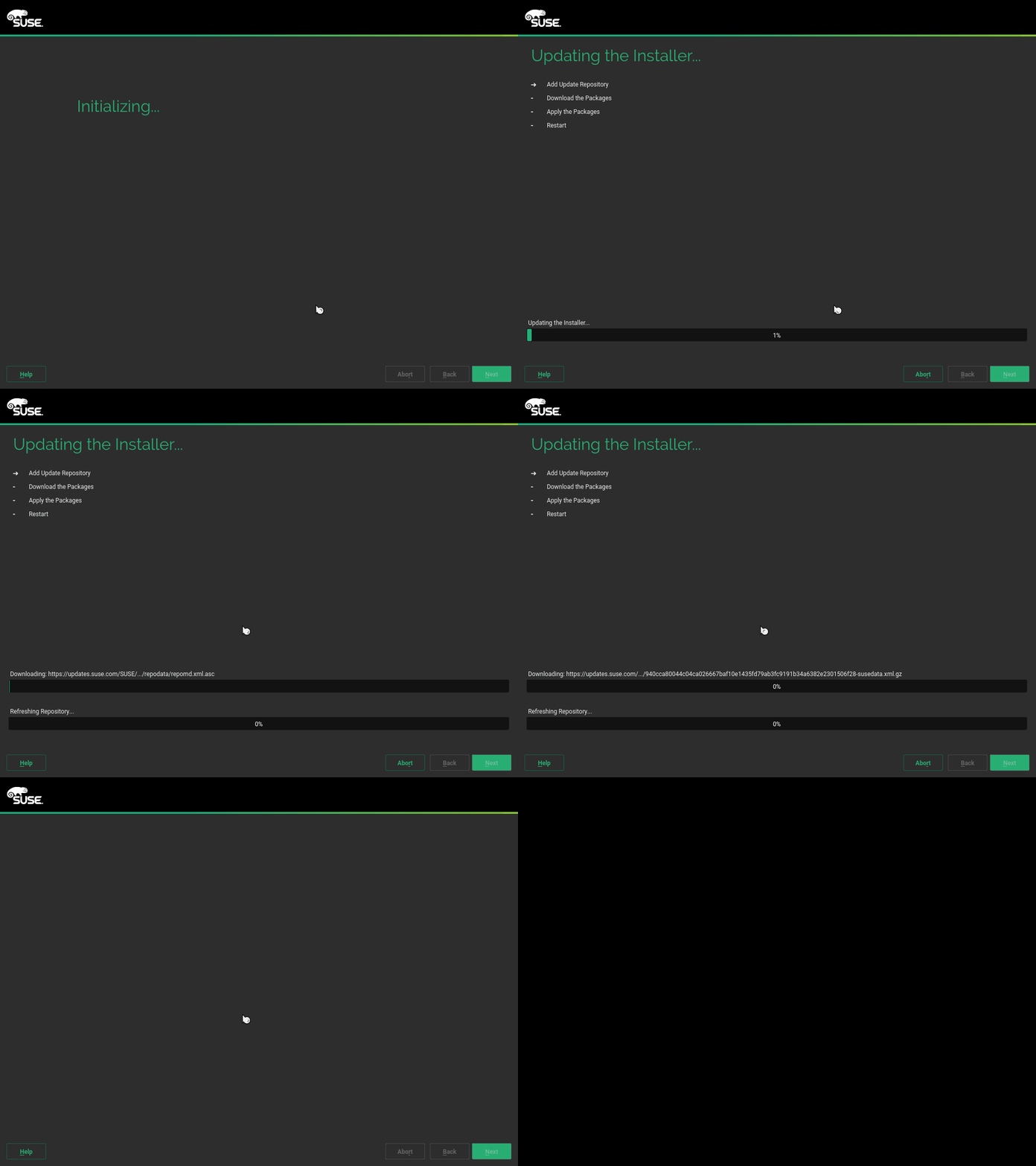
The result could look like this:
Final Words
At the very end check the file size before uploading to web. The animation should be rather small, usually less than 500kB. Do not use several megabytes large files, that is probably too much (esp. for mobile devices).

4.9 == Next Lts Kernel
As I briefly mentioned a few weeks ago on my G+ page, the plan is for the 4.9 Linux kernel release to be the next “Long Term Supported” (LTS) kernel.
Last year, at the Linux Kernel Summit, we discussed just how to pick the LTS kernel. Many years ago, we tried to let everyone know ahead of time what the kernel version would be, but that caused a lot of problems as people threw crud in there that really wasn’t ready to be merged, just to make it easier for their “day job”. That was many years ago, and people insist they aren’t going to do this again, so let’s see what happens.