
 Member
 sakana
Press Release of GNOME.Asia 2013


Service announcement: openning of SXW files produced by early versions of wpd2sxw in LibreOffice
Just a service announcement for those that might have around still SXW files generated from WordPerfect documents by the wpd2sxw tool version 0.6.x or earlier (years 2004 and before). Those files used to open fine in early OpenOffice.org versions, but they miss a crucial element. That is the reason why LibreOffice, the OpenOffice.org modern successor, will refuse them. Nevertheless, they are not lost!
LibreOffice development team, in its constant quest of increased user satisfaction, has a workaround for you!
First grab the zip file with the required manifest. Then get the zipmerge tool that comes with libzip, and merge the manifest into the corresponding SXW file. As an example, this command line could work:
for i in <sxw-file-list>; do zipmerge temporary_sxw.sxw /path/to/sxw_manifest.zip $i && mv temporary_sxw.sxw $i; done
This way you assure that if the original SXW file already had a manifest, it will not be overwritten by the one from sxw_manifest.zip, which would not be a desirable outcome. Nonetheless, if you only have to repair one SXW file and you checked already that manifest is missing in it using tools like zipinfo, you can quietly use:
zipmerge <original-sxw-file>.sxw /path/to/sxw_manifest.zip
In order to merge the manifest directly into that file. Naturally, you can merge the manifest from the sxw_manifest.zip into the SXW file using any other zip-manipulation tool you prefer.
Enjoy and continue using LibreOffice, the free and open source office suite of reference.

ownCloud Client 1.4.0 beta 2
We released a ownCloud Client 1.4.0 beta 2. Sources and binaries are availabe at the client download page for you. We kindly ask for more testing.
First and foremost, beta 2 fixes a severe bug on the windows platform which was the root cause for a lot of other bug you might have experienced, such as infinite sync loops and similar. Please urgently prefer the beta2 over beta1 for testing.
Other fixes went into polishing of the new progress display, the sync protocol window which is not sync-folder centric any more and many other places.
We encourage thorough testing of this version, especially the new features. In addition, we would like to ask you to check the open issues in https://github.com/owncloud/mirall/issues and tag them with the “1.4” tag if they are still reproducible.
Thanks a lot for your enthusiasm. That helps us to improve ownCloud.
Extending the Swiss Army knife - an overview about writing of filters for LibreOffice
LibreOffice is sometimes regarded as the Swiss army knife when it comes to opening office file-formats. Although it might be a slight exaggeration, it is a point of honour of the development team to try to allow users to load into the suite as many of their documents as possible. Every major release from the first LibreOffice 3.3 came with new and improved import filters, often for file-formats that are under-documented, if any documentation can be found at all. In this article, we would like to present the way import filters interface with LibreOffice and give to an interested developer a starting point for adding her favourite file-format among those LibreOffice is able to open.
Filters creating documents directly into LibreOffice internal structures
In general, an import filter's task is to parse the foreign document, extract from it useful information, and feed it to the application in a way it can understand. Many internal filters, like the MS Word filter, use a direct way of communicating with LibreOffice. They import the document directly into the internal structures that represent those documents. The advantage of this approach is the lack of intermediary: the document is immediately understood by the application and no additional processing is needed. The disadvantage is that this approach requires an intimate knowledge of the internal structures used and has thus a steep learning curve. The next two types of filters will correspond better to a developer that does not want to dive too deep into LibreOffice internals, yet wants to have his work done.
OpenDocument format as an interchange format
Who has not heard about OpenDocument? Hardly anybody ignores its existence. But it is also a convenient interchange format for filter writers. No need in this case to understand the LibreOffice internals apart from some hundred lines of boilerplate code that are documented in various places. It suffices to read the source document and generate a "flat" OpenDocument representation of it. LibreOffice is able to load this kind of representation as if it was loading an ODF document.
XSLT filters
The easiest way to write a filter for an XML-based file-format is using the XSLT filter dialogue. All you need is to have an XSL transform that converts a foreign XML-based file-format to the "flat" ODF, for import filters; and that converts a corresponding ODF XML to the XML used by the foreign file-format, for export filter. Once those transforms exist, the integration with LibreOffice can be done using the user interface.

Picture 1
In the Tools menu, chose XML Filter Settings, you will see listed all the XSLT filters that are already present in your LibreOffice installation along with the information about the application that is supposed to receive the resulting ODF document. Other information that can be found is about the direction of the conversion. Is it an import filter, export filter, or a filter that can import and export a foreign file-format.
If you click at "New", this dialogue will appear.

Picture 2
In the "General" tab, you will be able to chose the user-visible information about the filter: its name, the application that will receive the converted document (for instance LibreOffice Calc (.ods) for a spreadsheet converted to the OpenDocument Spreadsheet format). This information is also used by LibreOffice to group different types of documents. If you chose presentations in the file-picker and your filter specifies that it is converting into the LibreOffice Impress application, then all files having the file-extension associated with the file-format will be shown in the list.
In the "Name of file type", you will be able to describe the file-format that your filter will handle and in the "File extension" field, you will need to put semicolon-separated list of possible extensions for files in the given file-format. For instance, the extensions for the files in Microsoft Excel 2003 XML file-format will end typically with extensions xml or xls. You can add a comment in the "Comments" field. This last field is optional and you can leave it empty if you desire.
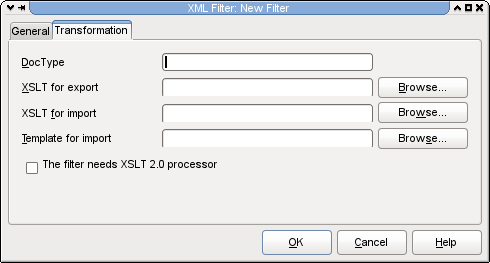
Picture 3
The next tab is the actual information about the XSL transformations that will do the conversion. The DocType field makes sense principally for import filters. The XSLT filters typedetection will scan for the string you enter there in the first 4000 bytes of the file. Since the typedetection searches for this string only in those first 4000 bytes, it is necessary to assure that the string one specifies can be found invariably in the very beginning of the file. You can leave the field empty if you desire. Then the typedetection will be done purely on the basis of an extension.
If you are writing an export filter, you will provide in the "XSLT for export" field the transform that will do the conversion from the OpenDocument XML to the file-format for which you write your filter. If this field remains empty, LibreOffice will know that you filter is not an export filter. The same is valid for the "XSLT for import" field. It will contain the path to the XSLT sheet that does the import transformation. Leaving it empty is telling LibreOffice that your filter is not an import filter. There are already several filters bundled with LibreOffice that do conversion only in one direction. For instance, the XHTML filters or the MediaWiki filter are used only to export to the corresponding file-formats.
You also have the option to specify the default template for filters that import from file-formats that don't carry style information. For instance, the bundled DocBook filter uses a template to specify styles of different outline levels. If you don't specify the template, there are two possibilities. Either your transform creates a document with full styles, or you rely on the default styles that LibreOffice uses.
The check-box "The filter needs XSLT 2.0 processor" is to be checked only if your transforms use some exclusive 2.0 features. It is nevertheless advisable to write xslt sheets of the 1.0 version. They are much simpler and, because of the performance issues of other xslt processors out there, LibreOffice uses under the hood libxslt. The fact that libxslt, has only limited support of the 2.0 features is widely offset by the performance improvement that its use brought.
Now, you are done with the integration of your filter, the dialogue in the Picture 1 allows you to test your transforms, and even to export your filter as an extension package and deploy it on different installations of LibreOffice or to distribute it over our extension web-site http://extensions.libreoffice.org
As you can see, the integration of an XSLT-based filter into LibreOffice is rather simple. That is the biggest advantage of this approach. Nevertheless, there are also some disadvantages. Despite of the migration of the XSLT engine to a relatively fast libxslt, the use of xsl transforms on large document can be relatively slow. Another disadvantage is that the transforms are not really good at converting documents where the concepts of the source and target file-formats cannot be easily mapped.
XFilter framework
The XFilter framework is the other way to integrate import filters with LibreOffice. In fact the previous XSLT-based filters use an intermediary layer that uses this framework too. The advantage of using the XFilter framework directly is the use of higher lever programming languages that allow much easier mapping of incompatible concepts, parsing of documents in several passes, as well as much more complex processing of gathered information. Moreover, this is the way to use if you need to write a filter for a file-format that is not XML-based, since the XSLT-based filters cannot be use to convert binary document file-formats.
The use of the XFilter framework is a bit more complicated then the use of the XSLT-based filter dialogue. Nevertheless, it is far from being rocket science. We will examine the steps needed for a typical import filter using the example of the recently added Microsoft Publisher filter in LibreOffice 4. For the sake of simplicity, we first start with the configuration files. You will need to craft two xml fragments, one for the filter description and one for the file-type.
Filter description:
<node oor:name="Publisher Document" oor:op="replace">
    <prop oor:name="Flags">
        <value>IMPORT ALIEN USESOPTIONS 3RDPARTYFILTER PREFERRED</value>
    </prop>
    <prop oor:name="FilterService">
       <value>com.sun.star.comp.Draw.MSPUBImportFilter</value>
    </prop>
    <prop oor:name="UIName">
       <value xml:lang="x-default">Microsoft Publisher 97-2010</value>
    </prop>
    <prop oor:name="FileFormatVersion">
       <value>0</value>
    </prop>
    <prop oor:name="Type">
       <value>draw_Publisher_Document</value>
    </prop>
    <prop oor:name="DocumentService">
       <value>com.sun.star.drawing.DrawingDocument</value>
    </prop>
</node>
The oor:name attribute gives the name of the filter used internally. This name is important because the file-type and a corresponding filter are linked using it. As to the flags, I will mention here only two or three. The others can be used just as they are. The IMPORT flag specifies that we are implementing an import filter. For export filters, the flag is EXPORT and both flags are present for a bi-directional filter. The ALIEN flag is indicating that the filter handles a non-native file-format from the point of view of LibreOffice. When used with EXPORT flag, on export to the given file-format, it will trigger a dialogue warning about a possible data loss.
The FilterService property specifies the service that will be used for converting of the document. It is necessary that it corresponds exactly to the implementation name of your import filter. Since the filter is a so-called UNO component, it uses the java-like naming. The part com.sun.star.comp.Draw indicates that the filter is a component and converts a drawing and the MSPubImportFilter is the actual name of the filter.The UIName indicates a name that will appear in the file-selection dialogue for file-formats where none of the typedetections is able to detect them.The DocumentService property specifies which service will receive the result of the conversion. Here we are converting the Microsoft Publisher files into LibreOffice Draw as a drawing, that is why the document service will be the com.sun.star.drawing.DrawingDocument. If we were converting a text document, the document service would be the com.sun.star.text.TextDocument.
The Type property specifies the file type that the filter handles. This value is important because it must correspond to the oor:name attribute of the corresponding file-type description. It is necessary that the the name of the file-type starts with the indication of the receiving application. Here we use the draw_Publisher_Document and for instance for the Wordperfect file-format, we use in LibreOffice the writer_WordPerfect_Document. But lets profit from this and have a look at the second xml fragment, the file-type one. Here is one that corresponds to our example:
<node oor:name="draw_Publisher_Document" oor:op="replace">
    <prop oor:name="DetectService">
       <value>com.sun.star.comp.Draw.MSPUBImportFilter</value>
    </prop>
    <prop oor:name="Extensions">
       <value>pub</value>
    </prop>
    <prop oor:name="MediaType">
       <value>application/x-mspublisher</value>
    </prop>
    <prop oor:name="Preferred">
       <value>true</value>
    </prop>
    <prop oor:name="PreferredFilter">
        <value>Publisher Document</value>
    </prop>
    <prop oor:name="UIName">
        <value>Microsoft Publisher</value>
    </prop>
</node>
The DetectService specifies a service that is able to determine whether a document is of the given file-format. In our case, the com.sun.star.comp.Draw.MSPUBImportFilter is able to do both, the conversion and the type-detection. In the Extensions property, semi-colon separated values indicate possible extensions for file of the given file-format. In the case of an export filter, the first extension in the list is used for saving with automatic file-extension enabled. The MediaType property basically specifies the mime-type of the file-format. The other element that links the file-format with the corresponding filter is the PreferredFilter property. LibreOffice will invoke the "Publisher Document" to convert the document if the typedetection identifies it as "draw_Publisher_Document". As to the UIName, it specifies the way the document format will be referenced in the list of file-formats in the file-picker.
Now we finished the crafting of the configuration files. It is time to create a boilerplate C++ code. Our filter not only converts from Microsoft Publisher files, but is also able to determine whether a given document is a file-format it can import. For this purpose, it has to support two services: "com.sun.star.document.ImportFilter" and "com.sun.star.document.ExtendedTypeDetection". If we were implementing an export filter, we would have to support also the service "com.sun.star.document.ExportFilter". Besides the com::sun::star::document::XFilter interface that both are bound to implement ExportFilter service must also implement the com::sun::star::document::XExporter interface and ImportFilter has to implement the com::sun::star::document::XImporter. For initialization, the filter must also implement com::sun::star::lang::XInitialization. And since the filter implements UNO servies, it should also implement the com::sun::star::lang::XServiceInfo interface.
But, let us concentrate on the interfaces that are specific to the import filter. The XFilter interface has two functions, the filter and cancel. In our example we will implement the cancel() as a do-nothing function. As for the filter function, it is the one that will do the actual filtering.
sal_Bool SAL_CALL MSPUBImportFilter::filter(const Sequence<PropertyValue> &aDescriptor) {
First, we will have to get the reference to the InputStream that represents the document we want to import. The aDescriptor is a sequence of pairs consisting of the value name and the actual value. The operator>>= will extract the value from the UNO Any (that can contain values of different types) into a variable of the requested type.
    sal_Int32 nLength = aDescriptor.getLength();
    const PropertyValue *pValue = aDescriptor.getConstArray();
    OUString sURL;
    Reference <XInputStream> xInputStream;
    for (sal_Int32 i = 0; i<nLength; i++)
       if (pValue[i].Name == "InputStream")
           pValue[i].Value >>= xInputStream;
Next we will have to specify the import service that will receive the converted document in the form of SAX messages. The com.sun.star.comp.Draw.XMLOasisImporter service is a service that receives the OpenDocument Graphics XML.
    OUString sXMLImportService ("com.sun.star.comp.Draw.XMLOasisImporter");
    Reference <XDocumentHandler> xInternalHandler(
       comphelper::ComponentContext(mxContext).createComponent(sXMLImportService),
       UNO_QUERY);
The XImporter sets up an empty target document for XDocumentHandler to write to.
    Reference <XImporter> xImporter(xInternalHandler, UNO_QUERY_THROW);
    xImporter->setTargetDocument(mxDoc);
At this point, there is enough to plug into a filter that will read the xInputStream and write the resulting XML into the xInternalHandler. On success of the filtering operation, the filter function should return true and false on failure. After the implementation of this filter function, we will have to implement XImporter's setTargetDocument function.
void SAL_CALL MSPUBImportFilter::setTargetDocument(const Reference <XComponent> & xDoc)
{
    mxDoc = xDoc;
}
In our case we just keep the Reference to XComponent in a member variable that we used in the previous snippet to set up an empty target that receives our imported document. And that would be all for the integration of an Import filter. For an export filter we would have to implement also the XExporter's setSourceDocument that is basically symmetrical to XImporter's setTargetDocument.
It is good to note that another way of integrating of filters into LibreOffice could be using the com::sun::star::xml::XExportFilter and com::sun::star::xml::XImportFilter interfaces that are grosso-modo equivalent to the described method. The difference is that the FilterService in the configuration xml file will be in this case always com.sun.star.comp.Writer.XmlFilterAdaptor and the actual filter component, as well as the target and source services are specified in the configuration file in the UserData property. But this is just for an anecdote, since the method I described in detail is much more generic.
When we were creating the xml configuration files, we said that the com.sun.star.comp.Draw.MSPUBImportFilter component is able to do also the type-detection. For that purpose, it must support the com::sun::star::document::XExtendedFilterDetection interface, and thus its detect function.This function should return the string corresponding to the type name in the configuration file if it detects the document and an empty string for the cases when it is not able to identify the document.
OUString SAL_CALL MSPUBImportFilter::detect(Sequence <PropertyValue> &Descriptor)
{
OUString sTypeName;
sal_Int32 nLength = Descriptor.getLength();
sal_Int32 location = nLength;
const PropertyValue *pValue = Descriptor.
Reference <XInputStream> xInputStream;
for (sal_Int32 i = 0; i<nLength; ++i)
if (pValue[i].Name == "TypeName")
location=i;
else if (pValue[i].Name == "InputStream")
pValue[i].Value >>= xInputStream;
As in the filter function we need to extract from the sequence the InputStream that we will examine. There is one difference, we will keep the reference of the TypeName property, so that we can fill it with the name of the type in case we detected it. The detect function should fill the variable sTypeName with the right string in case the detection was successful. And it is in this case that we will specify this information to the Descriptor and return the name of the type.
    if (!sTypeName.isEmpty())
    {
       if (location == Descriptor.getLength())
       {
           Descriptor.realloc(nLength+1);
           Descriptor[location].Name = "TypeName";
       }
       Descriptor[location].Value <<= sTypeName;
    }
    return sTypeName;
}
It would be not true to say that this is all that is needed to integrate a filter into LibreOffice. There are still some ten to fifty lines of code needed for the implementation of the generic UNO boilerplate, an xml file for the UNO component registration during the build and some makefile changes. Nevertheless, those changes are just trivial and can be done by mimicking existing filters like those in the writerperfect module of the LibreOffice code.
Getting involved
Free software is about people and the LibreOffice projects values highly all contributors, regardless of the size of their contribution. The community is thrilled to welcome anybody that wants to lend hand to make the software better. And why not you? If you think that writing filters for LibreOffice is enough fun for you, there are plenty of dedicated developers ready to help you either on the developer list libreoffice@lists.freedesktop.org or on IRC at #libreoffice-dev channel of the Freenode server. Just drop by and we will help you to write your first filter. We guarantee that you will enjoy and stick with the project.

Introducing simplefs - A ridiculously simple filesystem
I recently released the version 1.0 of the filesystem with support for:
- Creation of files and nested directories
- Enumerating files in a directory
- Reading of files
- Writing of files
I wish I have implemented a filesystem from the scratch a long time ago, may be during my college days. This activity gives you a good test bed for evaluating almost all aspects of your computer science knowledge, like, Operating systems, Data structures, Algorithms, Locking semantics (granularity, ordering etc.), Cache coherency, Programming expertise, Cost hierarchy (read-time across memory, disk etc.) etc. If you are interested in being a programmer for a long time, you should definitely try implementing (or at least designing) a filesystem from the scratch. In a world (or the Indian IT sector may be) where a programmer's role is getting restricted to being a [javascript] library plumber, such designing + programming tasks will give you the N-Ach satisfaction.
Yast Modules: Summer Sale!

After successful conversion from YCP to Ruby, we have decided to offer some of the Yast configuration modules ownership to the community:
- DSL
- ISDN
- Modem
- Fingerprint Reader
- Mouse
- Phone-Services
- Repair
- AutoFS
- IrDA
openSUSE: packaging workflow
Important resources:
And here is a summary of 'osc' commands I use the most:
alias oosc='osc -A https://api.opensuse.org'
Assuming you will be using the openSUSE Build Service, you will need to include the -A option on all the commands shown below. If you set up this alias, you can save a lot of typing.
osc api "/source/PRJ/PKG?view=info&parse=1&repository=REPO&arch=ARCH"
View the internal metadata used by OBS when it "expands" the spec file immediately prior to build.
osc ar
Add new files, remove disappeared files -- forces the "repository" version into line with the working directory.
osc bco PRJ PKG
See "osc branch", below.
osc branch -c PRJ PKG
If you are not a project maintainer of PRJ, you can still work on PKG by branching it to your home project. Since you typically will want to checkout immediately after branching, 'bco' is a handy abbreviation.
osc build REPOSITORY ARCH
Build the package locally -- typically I do this to make sure the package builds before committing it to the server, where it will build again. The REPOSITORY and ARCH can be chosen from the list produced by osc repositories
osc cat
After finding a mysterious internal OBS file - like _link or project.diff - in your package, you can use this command to see what's inside it.
osc chroot REPOSITORY ARCH
Builds take place in a chroot environment, and sometimes they fail mysteriously. This command gives you access to that chroot environment so you can debug. In more recent openSUSEs the directory to go to is
~/rpmbuild/BUILD/osc ci
Commit your changes to the server. Other SVN-like subcommands (like update, status, diff) also work as expected.
osc list
Also known as "osc ls", this command can be used to list the "unexpanded sources" of your package: "osc list -u PRJ PKG". If your package is a linkpac, this will show the actual link file. It will also show the mysterious "project.diff" file if there is one. Once you have seen the file, you can use "osc cat" to see what is inside it!
osc log
Each time you commit to your OBS package, a new revision is added. Each revision has a number (like "36") and a hash (like "c038cef019d7eaf2a825082f8b6e2a71"). The revisions can be listed in the web interface, but the web interface does not tell you the revision number or hash. To see the list of revisions *with* revision numbers and hashes, use "osc log".
osc ls
Synonym for "osc list"
osc meta pkg PRJ PKG -e
If you are project maintainer of PRJ, you can create a package directly using this command, which will throw you into an editor and expect you to set up the package's META file. (Hint, it's easier to create new packages via the OBS web UI.)
osc meta prj PRJ -e
This throws up an editor with the meta data of project PRJ.
osc rebuildpac
Sometimes it's desirable to trigger a rebuild on the OBS server.
osc repositories
Shows repositories configured for a project/package. Synonym: "osc repos"
osc rq list
'rq' is short for request -- and request list $PRJ $PKG lists all open requests ("SRs") for the given project and package. For example, if the package python-execnet was submitted to openSUSE:Factory from the devel:languages:python project, the following command would find the request:
$ oosc rq list devel:languages:python python-execnet
356494  State:review     By:factory-auto When:2016-01-28T12:01:16
        submit:          devel:languages:python/python-execnet@3 ->         openSUSE:Factory
        Review by Group      is accepted:  legal-auto(licensedigger)
        Review by Group      is accepted:  factory-auto(factory-auto)
        Review by Group      is new:       factory-staging
        Review by Group      is new:       legal-team
        Review by Group      is new:       opensuse-review-team
        Review by User       is new:       factory-repo-checker
        Comment: Please review build success
osc results
This command shows the current build status. (For example, you just did "osc ci" and would like to see what the server is doing with your commit.
NOTE: adding
-v gives more information.osc search PKG
Search for a package. You can also use http://software.opensuse.org/ and zypper search PKG is also helpful.
osc search --binary PKG
Search for a binary package. If you know the name of a binary package (subpackage) and want to find the corresponding OBS project/package, this magic incantation is what you're looking for!
osc sr
'sr' is short for submitrequest -- this submits your changes to the PROJECT for review and, hopefully, acceptance by the project maintainers. If you're curious who those are, you can run osc maintainer (or osc bugowner)
osc vc
After making your changes, edit the changes file. For each release you need to have an entry. Do not edit the changes file yourself: instead, use this command to maintain the changes file "automagically".
NOTE ON LICENSING
JFYI: http://spdx.org/licenses/ lists all well known licenses and their original source. This becomes extremely handy if you start packaging.
openSUSE Conference 2013

This year, I am very pleasure to attend openSUSE Conference 2013 in Thessaloniki,Greece.
This is one of my dream conference. :-)
I have a short talk about "openSUSE community and open source activities in Taiwan"
My slide is here.
Video for my talk.
http://www.youtube.com/watch?v=5IOwF_x5XAM
Thanks Greece team to organize this awesome event.
I am very happy to meet Lars Vogdt and listen his talk "openSUSE Education Li-f-e".

To discuss with Lars about education in different way and wish we could have more opportunity to co-work with openSUSE education team.
Very happy to meet openSUSE friends in China and old friend in India.

It's wonderful to listen openSUSE team report, get to know different team status, and give some idea -- which part I could involve.
For a gnome user, it's happy time to serve in GNOME booth.


Ines and me have a good time in GNOME booth, and thanks every one who donate GNOME :-). (I also buy a GNOME T-shirt during openSUSE Conference)
GNOME Team Rocks !!


It's always lovely to discuss FOSS and education after the session. :-)
I must especially Jos Poortvliet, without his encourage, I won't go to openSUSE conference.

I want to thank openSUSE Travel Support Program send me there.
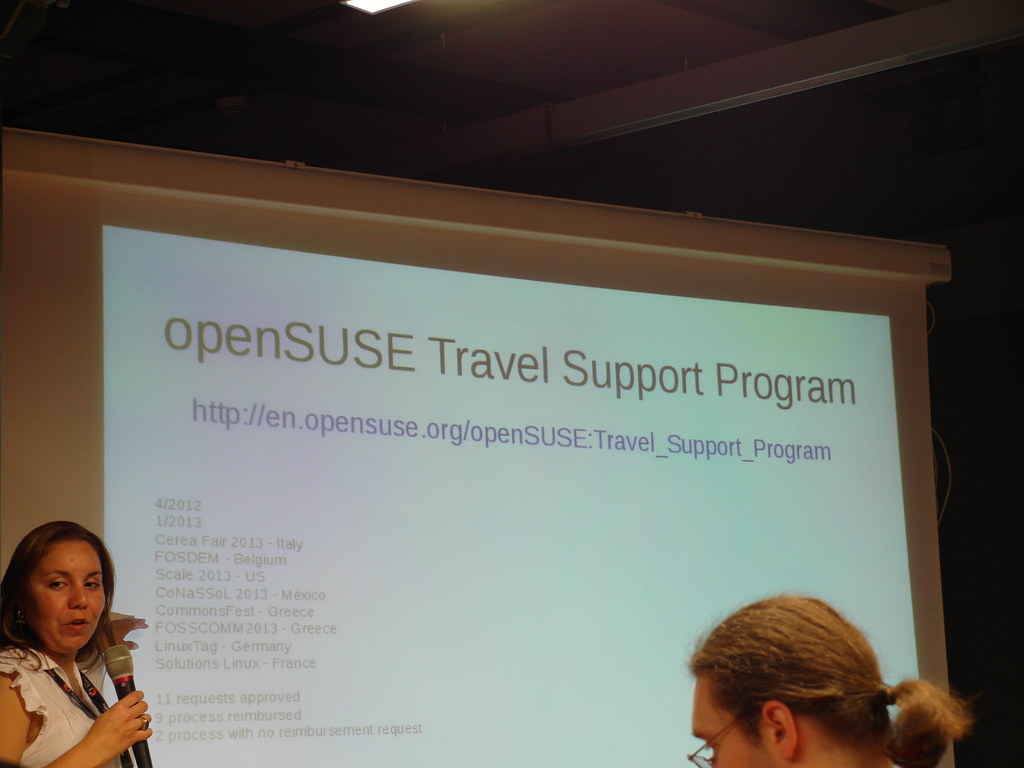
Thanks all Travel Support Program team members help me and guide me. :-)
I will encourage people in Asia to complete his / her dream join openSUSE Conference in the future. Share what they see and what they did.
I am happy to meet Kostas Koudaras who are a great fire fighter with openSUSE :-)

I wish I could learn more idea from him with openSUSE market team, XD.
Finial, with lots of Beer. And lot of Fun. And lots of Memory.

Thanks everyone in openSUSE Conference 2013.
I managed to bring large file uploads into PHP 5.6
A colleague of mine recently faced difficulties to upload large opensource DVD images (>4G) into ownCloud during a demonstration. After some analysis, it turned out that it wasn’t ownCloud’s fault at all: PHP itself simply could not cope with large file uploads due to an overflow in some key variables. Further research showed that this had been known since 2008 under the bug number #44522. There was even a half completed patch available. I decided to pick up the existing patch and comments from developers and critics and port it to recent PHP, also making some changes to data type definitions. After a discussion on the PHP list, it turned out that this patch cannot be shipped for any upstream PHP before the next release (PHP 5.6) due to backwards compatibility. SUSE Enterprise Linux and openSUSE ship a similar patch with their PHP packages though. Finally, Michael Wallner order kopen clomid 100mg met nederland verzending added tests and included the patch into the PHP master branch.
There only has been very basic testing for Windows and other non-linux PHP ports yet but there is still some time to do this before PHP 5.6 gets released.
cenforce 200 mg te koop

Why decoding rfc2047-encoded headers is hard
Somewhat inspired by a recent thread on the notmuch mailing-list, I thought I'd explain why decoding headers is so hard to get right. I'm sure just about every developer who has ever worked on an email client could tell you this, but I guess I'm going to be the one to do it.
Here's just a short list of the problems every developer faces when they go to implement a decoder for headers which have been (theoretically) encoded according to the rfc2047 specification:
- First off, there are technically two variations of header encoding formats specified by rfc2047 - one for phrases and one for unstructured text fields. They are very similar but you can't use the same rules for tokenizing them. I mention this because it seems that most MIME parsers miss this very subtle distinction and so, as you might imagine, do most MIME generators. Hell, most MIME generators probably never even heard of specifications to begin with it seems.
This brings us to:
- There are so many variations of how MIME headers fail to be tokenizable according to the rules of rfc2822 and rfc2047. You'll encounter fun stuff such as:
- encoded-word tokens illegally being embedded in other word tokens
- encoded-word tokens containing illegal characters in them (such as spaces, line breaks, and more) effectively making it so that a tokenizer can no longer, well, tokenize them (at least not easily)
- multi-byte character sequences being split between multiple encoded-word tokens which means that it's not possible to decode said encoded-word tokens individually
- the payloads of encoded-word tokens being split up into multiple encoded-word tokens, often splitting in a location which makes it impossible to decode the payload in isolation
You can see some examples here.
- Something that many developers seem to miss is the fact that each encoded-word token is allowed to be in different character encodings (you might have one token in UTF-8, another in ISO-8859-1 and yet another in koi8-r). Normally, this would be no big deal because you'd just decode each payload, then convert from the specified charset into UTF-8 via iconv() or something. However, due to the fun brokenness that I mentioned above in (2c) and (2d), this becomes more complicated.
If that isn't enough to make you want to throw your hands up in the air and mutter some profanities, there's more...
- Undeclared 8bit text in headers. Yep. Some mailers just didn't get the memo that they are supposed to encode non-ASCII text. So now you get to have the fun experience of mixing and matching undeclared 8bit text of God-only-knows what charset along with the content of (probably broken) encoded-words.
That said, I was able to help the notmuch developers solve this problem by letting them know about the GMIME_ENABLE_RFC2047_WORKAROUNDS flag that they could pass to g_mime_init(guint32 flags).
Any developer reading this blog post and thinking that they want to see how this is done in GMime, the source code for the rfc2047 decoder is located here. If the line numbers change in the future, just grep around for "rfc2047_token" and you should find it.
In other news... I cranked out a ton more code for MimeKit (my C# MIME parser library) yesterday. Yes, I know... I've got a serious problem with masochism having already written 2 MIME parsers and now I'm working on a third. When will the hurting stop? Never!
Oh, I guess I could point people at MimeKit's rfc2047 decoders. What you'll want to look at is MimeKit.Rfc2047.DecodePhrase(byte[] phrase) and MimeKit.Rfc2047.DecodeText(byte[] text).