
Smolt
More in his blog .

 Member
 michl
michlopenFATE feature 306967, KDE default
There are pretty many pros and cons and even more people with their opinion about the feature. I’d like to summarize what has been said in the discussion in the feature itself and during yesterday’s openSUSE project meeting. Unfortunately the only sure thing is whatever decision is taken – it will be wrong for some. This is why, at this time, we have no default – because openSUSE has strong GNOME and KDE implementations, we offer them side-by-side as equals. And we made 2 years ago on opensuse-project the decision that we stay with “no default” desktop.
So what do we have so far?
- a feature request from one of the KDE e.V. board members
- the feature asks to make KDE default. Reason for that, is to make openSUSE more simple for newbies and to make openSUSE the best KDE distribution around
- Through the discussion in the feature I’d translate that feature into put the radio button as default to KDE on the desktop selection screen during installation instead of today’s status where everybody needs to make a choice between
- the highest rated feature in openFATE until today
- a majority of people supporting this feature (currently approx. 90% pro, 1% neutral, 9% against)
What I clearly see as pro is:
- listening to our KDE community we may gain more KDE contributors. But don’t forget this feature is also about making openSUSE an outstanding KDE distribution. And for that just voting for a feature is not enough. For becoming an outstanding KDE distribution we need you to contribute
- we simplify the installation by one click for 2/3 of our users, according to question no. 11 in our last openSUSE survey made in 11.0 time frame
- the GNOME users keep status quo and need to set the radio button as before
What I clearly see as con is:
- our pretty active GNOME community won’t be very happy about it
- our strength is to support choice and two major desktops
- with the CD you always get a default desktop
What might stay doubtful?
- Would changing a radio button really drive lots of users and contributors to us?
- Would already KDE as a default make us to an outstanding KDE distribution?
- Does openSUSE need a default desktop?
What I suggest?
Due to upcoming feature freeze for openSUSE 11.2 we have now only the possibility to default the radio button to KDE. But this is IMO more a diplomatic solution which doesn’t help much anybody. We should give the feature one or two more weeks to evolve and need to do the decision for openSUSE 11.2 by mid of August.
Some other observations I have with respect about this feature:
- inviting people through blogs, web pages, mailing lists or twitter to vote has potential to set the credibility of the voting system at risk as people not involved with openSUSE or not using openSUSE express their thoughts
- the feature shows the success of opening up the openSUSE project. Few years ago decisions were made by Novell and nowadays decisions are challenged by our community.
- I’m pretty happy about the way the discussion is handled (impartial, no bashing etc.)
May wisdom be with us – and may we get in openSUSE the best GNOME and the best KDE desktops!
Building with MSBuild/XBuild in MonoDevelop
The integration right now is simple because all it does is to launch the xbuild command in a separate process. That's not the best way of doing it, but the most straightforward. A more optimal option is to use the MSBuild API to load the project and launch the build. That's my next step, but there are some issues with it.
The main problem is that MonoDevelop now supports multiple target runtimes and frameworks. Multiple frameworks are not a problem because MSBuild already has support for that, but it doesn't have support for multiple runtimes.
Multiple runtimes means that for example when running MD on Windows, I can select either Mono or MS.NET as target runtime, and MD will build the project using the selected runtime. Each runtime has its own GAC and set of installed packages, even its own MSBuild version, so I can't use the MSBuild API to load and build the project. The only option in this case is to launch in an external process.
There is however and additional and more hard to fix problem. To get the list of assemblies referenced by a project (for example to do code completion), MonoDevelop right now just enumerates the reference elements defined in the project. When using MSBuild that's not fully correct anymore, since custom targets and tasks may inject references which are not explicitly set in the project. So the only way of getting the real list of references is by loading the MSBuild project and evaluating it, and that won't work when targeting a runtime other that then one running MD.
Anyway, this basic support we have now is good enough for many projects. I'll go step by step.
Hackweek
It was hackweek in Novell last week. I decided to make a Taobao extension in OpenOffice.org to facilitate Taobao users manager their transaction data including what they bough and what they sold. So that it could attract more people to use OpenOffice.org for it is reported that Taobao has over 100 million users in China. :-)
Firstly, I need to learn the Taobao Open Platform(TOP) which provides API to manager the business in Taobao. I wrote some example to learn how to use these API to get the transaction data of the user's bough and sold.
Secondly, I also need to spend some time learn how to make an extension in Java. And I found some examples to see how to make a custom menu and dialog in Openoffice.org SDK.
Finally, I got a prototype that could import the transaction data from Taobao into Spreadsheet.
When "Taobao"->"Buy" is click, your bough data is imported in the spreadsheet.
Actully, this is just a demo, not a final version. I will improve this extension and upstream the codes and binary extension into Google project oootaobao.
Improved mirror selection for India
Recently, it became evident that users in India don’t get good mirrors. This was solved by configuring a few German and US mirrors to serve users from India.
Courtesy of Adrian Reber from Esslingen University of Applied Sciences, there is an illustrative screenshot that visualizes the efficacy of this. The world map shows accesses to their openSUSE mirror by country (live view). In openSUSE’s MirrorBrain configuration, this mirror is set up to receive German, Danish, Polish, and Indian requests.
The background is that India has bad connectivity to neighbouring countries, but good connection to German and US mirrors. Therefore, now a few German and US mirrors are configured to serve India. The screenshot below demonstrates this for the mirror of the Esslingen University of Applied Sciences:

world map showing client distribution of accesses to an openSUSE mirror in Germany
The world map clearly shows how the mirror gets nearly exclusively German requests, as well as those from India. The same happens for some other German and some US mirrors.
Note that if a mirror in India should become available (would be nice!), it would automatically be preferred, and the other mirrors become fallback mirrors.
While it is not new that we do this, the screenshot of Adrian’s analysis illustrates the issue very nicely. We have similar configuration for a number of countries, where a mirror selection purely based on countries and regions wouldn’t work. For this kind of tuning, we depend on user input.
Hints about how to improve serving our downloads are always appreciated. Please write to admin at opensuse dot org with input in this regard. Thanks!
Hackweek IV: Novell Bugzilla access from command line
During a last Hackweek I decided to work on some tool which will helps users with submitting a new bug. My idea is to create something like reportbug from Debian, but targeted to SUSE. So the first step was find the way how to communicate with a bugzilla (especially to bugzilla.novell.com – bnc). Fortunately I found several libraries, which should be used for it:
- perl-SUSE-BugzillaClient
- pybugz
- python-bugzilla
perl-SUSE-BugzillaClient is written by Thomas Schmidt especially for bnc, so it is able to login using iChain. It also provides few functions for bugzilla communication, but unfortunately only for querying. Pybugz is written by Alastair Tse for Gentoo development in Python. But it is not able to login through iChain and I did not extended it for bnc, because it uses a plain GET/POST communication with parsing of HTML using regexes.
The reason why I have used the python-bugzilla written by Will Woods from RedHat is simple. It uses XMLRPC API, which bugzilla provides. And it’s also written with a flexibility in mind, so writing of another type of Bugzilla was easy. Just some subclassing and reimplementing of few methods and voila, the NovellBugzilla type is here. Because it uses iChain, it was necessary to reimplement login/logout methods – I spend a lot of time to understand how it works. Osc uses a HTTP authentication, which should be supported too, but even if it works with api.opensuse.org, it did not work with bnc. So I used a Firefox and LiveHTTP headers extension to track a communication and implemented the login according it.
The useful advantage of Novell bugzilla is that I extended a method readconfig, which reads a config file. Novell Bugzilla can read the username/password from ~/.oscrc, so you don’t need to have a same password in another config file, if you use osc.
So on the end those few lines of Python code
import bugzilla

bnc = bugzilla.NovellBugzilla(url="https://bugzilla.novell.com", user="mvyskocil", password="XXXXX")
kwargs = {
    'product': 'openSUSE 11.2',
    'severity': 'Normal',
    'cc': [],
    'rep_platform': 'x86-64',
    'component': 'Java',
    'summary': '[Java:packages/ant]: Cannot find a Java virtual machine',
    'version': 'unspecified',
    'assigned_to': 'mvyskocil@novell.com',
    'op_sys': 'Linux',
    'description': 'This is a testing bug report\n'
    }
bug = bnc.createbug(**kwargs)
print bug.bug_id
Have created this bug#525549. Even if Python is readable for regular programmers, the **kwargs should be expressed. It maps the dictionary to named function arguments (called keyword arguments – kwargs – in a Python world), so both calls in following snippet are equivalent.
d = {'name' : 'value')
call(**d)
call(name='value')
The python-bugzilla comes also with a simple command line tool called bugzilla, so this tool should be used also from shell scripts. It is sometimes little bit raw. For example listing of all products returns an output as a Python dictionary
bugzilla --bztype NovellBugzilla --user mvyskocil --password xxxxxx info -p
...
{'description': 'openSUSE 11.1', 'internals': {'disallownew': 0, 'classification_id': 7340, 'name': 'openSUSE 11.1',
'votestoconfirm': 0, 'milestone_required': 0, 'id': 651, 'votesperuser': 20, 'maxvotesperbug': 5, 'defaultmilestone': '---',
'milestoneurl': '', 'description': 'openSUSE 11.1'}, 'name': 'openSUSE 11.1', 'id': 651}
{'description': 'openSUSE 11.2', 'internals': {'disallownew': 0, 'classification_id': 7340, 'name': 'openSUSE 11.2',
'votestoconfirm': 0, 'milestone_required': 0, 'id': 755, 'votesperuser': 20, 'maxvotesperbug': 5, 'defaultmilestone': '---',
'milestoneurl': '', 'description': 'openSUSE 11.2'}, 'name': 'openSUSE 11.2', 'id': 755}
...
which might be hard to parse in other language. But it provides a lot of functionality, so for other informations about usage, please use man bugzilla.

More on Smolt
-
Bug 525324- [home:cgoncalves:playground] the Privacy Policy window has not scrollbar
-
Bug 525322- [home:cgoncalves:playground] smolt does not display special chars
Q: So, what's really new?!
A:
- Smolt KDE4 popup made by Thomas Goettlicher:
-
Qt.ToolButtonTextBesideIcon (the text appears beside the icon) is now default per Nuno Pinheiro's suggestion:

- Window size auto-adjusting:

As you can also see BNC#525322is indeed fixed.

The notification will be shown automatically upon KDE startup (X-KDE-autostart-phase=2)


I'm preparing a Smolt RPM update to submit to openSUSE Factory to get included in time for openSUSE 11.2, though you can try it already by using my home:cgoncalves:playground repository:
openSUSE 11.1:
# zypper ar http://download.opensuse.org/repositories/home:/cgoncalves:/playground/openSUSE_11.1/ home:cgoncalves:playgroundopenSUSE Factory:
# zypper ar http://download.opensuse.org/repositories/home:/cgoncalves:/playground/openSUSE_Factory/ home:cgoncalves:playground# zypper ref home:cgoncalves:playground
# zypper in smolt-snapshot smolt-popup
As always, please give us feedback!
Fresh & Fruity
Available today as part of the SUSE Appliance Program is SUSE Studio 1.0 based on the image creator technology called kiwi. When creating an appliance with SUSE Studio you also have the possibility to export the appliance description to your local computer and use the kiwi backend directly to understand more about image creation and deployment
A professional linux distribution should be able to work as an appliance which is an ll-in-one solution including the application and the operating system. A basic appliance to start with is the JeOS – Just Enough Operating System. kiwi provides these as examples in the kiwi-templates package. To create your first SUSE 11.1 appliance just type:
kiwi --build suse-11.1-JeOS -d /destination/path
The primary image type of a JeOS template is a virtual disk which you can run in a virtual machine like QEmu, KVM, Vmware, VirtualBox, etc… To do this with qemu just call:
qemu /destination/path/LimeJeOS-openSUSE-11.1.i686-1.11.1.vmdk
and here you go with your first appliance. You want to know more about kiwi, just take a look at the wiki here:
or read the full system documentation as PDF here:
Remember to have fun 

kaveau: easy and integrated backups solution for KDE
During the last week I had the possibility to work on anything I wanted, Novell’s hackweek is so cool :)
I decided to dedicate myself to an idea that has been obsessing me since a long time. Last December my brand new hard disk suddenly died, making impossible to recover anything. Fortunately I had just synchronized the most important documents between my workstation and my laptop, so I didn’t lose anything important. This incident make me realize that I should perform backups regularly and I immediately started looking for a good solution.
Personally I think that doing backups is pretty boring so I wanted something damned easy to setup and use. Something that once configured runs in the background and does the dirty job without bothering you. Let’s face the truth: I wanted Apple’s Time Machine for KDE.
After some searches I realized that nothing was fitting my requirements and I decided to create something new: kaveau.
What is kaveau?
Kaveau is a backup program that makes backup easy for the average user.
As you will see while coding/planning kaveau I made some assumptions and so only few things are configurable. I really think that sometimes “less is more”.
What does kaveau?
Current features:
- it performs backups to an external storage device: I don’t think it will ever store backup data on a remote host. If you want to do that just use some good project like Backup pc.
- it backs up the complete home directory of the user: storage is cheap and average users (like me) keep everything inside their home directory ( but it’s possible to exclude some directories from the backup).
- it performs incremental backups.
- the backup data are neither compressed nor stored in fancy formats: in this way you can plug your external disk into another machine and access your data without additional work.
- backups are performed automatically every hour (of course only if your external disk is plugged).
- notification messages are shown if your backup is older that a week. More enhancements are coming…
What technologies does it use?
Backups are performed using rdiff-backup because it’s damned easy to use, well tested (it’s used also in production environments) and packaged by all distributions.
The awesome solid library is used for interacting with the external disks is super easy.
Status of kaveau
I have been working on kaveau just for five days, so there’s still a lot of work to do.
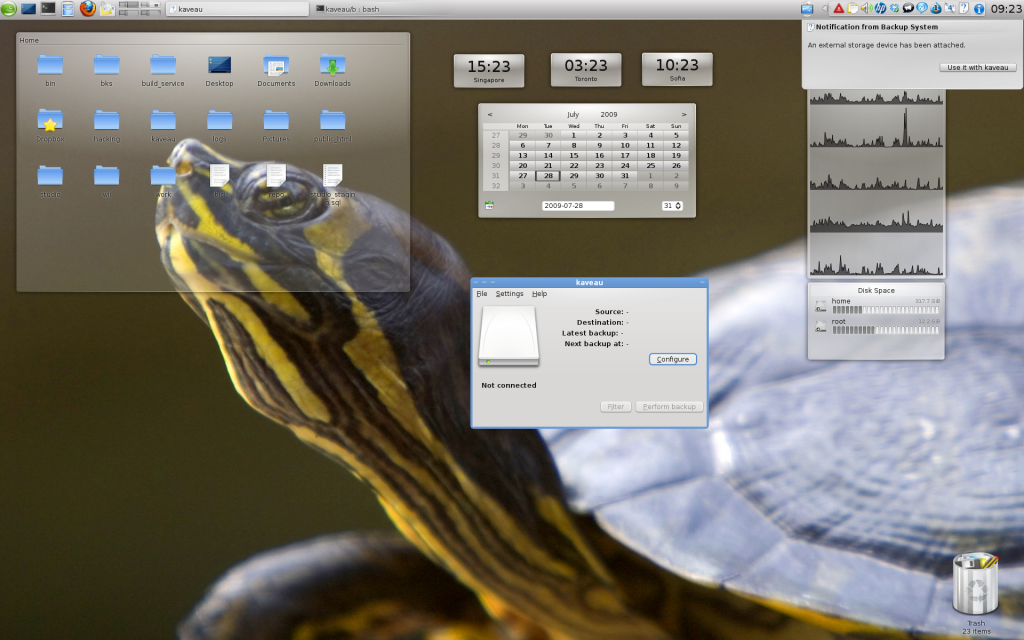
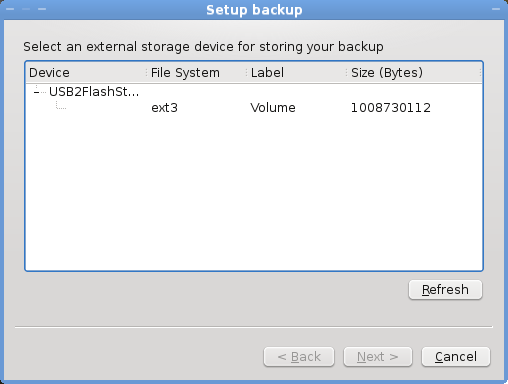
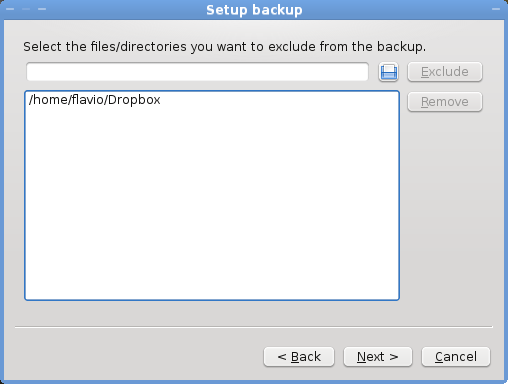
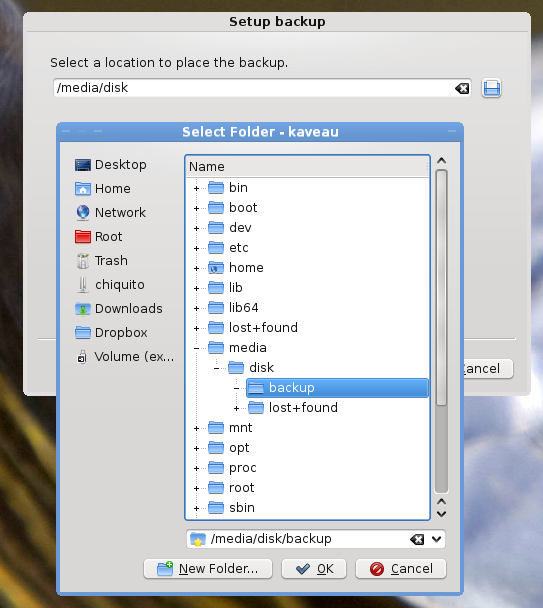
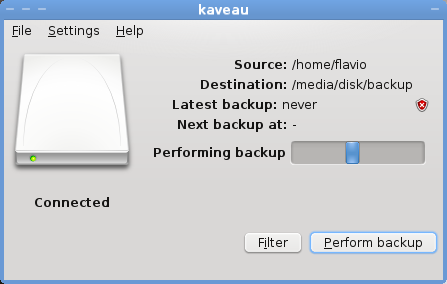
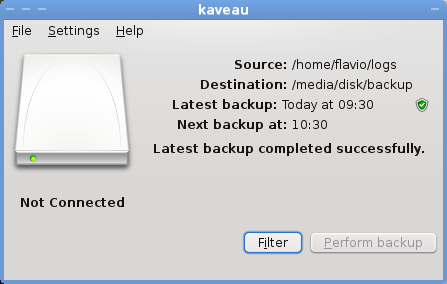
A screenshot tour will give you the right idea of its status.
First run - external storage device attached
####Backup wizard - page 1
####Backup wizard - page 2
####Backup wizard - final page
####Backup operation in progress
####Backup completed
Right now the code is available on this git repository but I don’t recommend you to try it (unless you want to find and fix bugs ;) ).
I would really appreciate:
- feedback about the user interface (right now it looks too much like Time Machine).
- icons: it would be great to have a desktop icon and some system tray icons (contact me for more details).
- new code, bug fixes, code reviews, hints,…
ullae-veliyae: Live graphs for I/O, CPU...
RPM can be found here: http://download.opensuse.org/repositories/home://nikanth/openSUSE_11.1/noarch/