
 libv
libvOpenSuSE 11.1 and a recent scanner
So, today, a Canon Canoscan LiDE 110 arrived from amazon (plus a basic samsung laser), and i have just succeeded in getting it to work with openSuSE 11.1, albeit in a very unscientific way. Here is how.
Sane is divided in front and backends. openSuSE 11.1 requires just an updated backend.
For the LiDE 110, only very recent sane (git from halfway december 2010) supports the LiDE 110 and 210, so grab the git repo.
Then, grab a recent openSuSE sane-backends package, for instance from here. Get yourself the src.rpm, and install it.
A crude way of getting something our specfile can work with is to tar -jc up the sane-backends git repo, and to move that to /usr/src/packages/SOURCES
Then edit the specfile, make sure to bump the "Version" and/or "Release" directives. Then have the "Source0" directive is pointing to the correct tarball, and make sure that the line with "%setup" is pointing to the right %{name}-... directory.
If you are as lucky as i was today, the existing patches, which are mostly about integration, will apply rather cleanly, and rpmbuild will succeed.
Install the created files (you probably won't need -devel), and you should now be able configure your scanner using yast. If yast complains about hal, then run rchal restart.
Now scanimage -L should be happy, and then you're all set.
Happy scanning!

 Member
Back in Italy, back to work
Well, it’s just a small announce… I was in Yemen for some time, around 16 days, for work. I wasn’t able to answer emails and work for openSUSE, and I’m really sorry for that. But I just went back Yesterday and tomorrow I’ll start to work again.
My first goal is to package XBMC that recently released a new version.. so… STAY TUNED!
Have a lot of fun, Andrea
openSUSE project “Evergreen”
Following up on my previous blogpost I would like to give a small update on what happened so far about a longer supported (open)SUSE release.
We had a longer discussion on the mailing list if an openSLES (a’la CentOS) or “openSUSE LTS” would be the better or easier solution. There are pros and cons for both while the required infrastructure differs a lot. I’m not diving into details here though. While I would find a SLES clone appealing I’m not in the position to drive such an effort. I also do not think that having both makes sense and therefore I decided to go on with the other approach for now trying to extend the lifetime of an existing openSUSE release.
People in the community came up with the project name Evergreen and I think that matches what we try to build pretty well. I proposed to give the whole effort a trial with openSUSE 11.1 which went unsupported with the new year. At the moment we still have organizational and technical issues and most likely won’t be able to utilize all the update features (deltarpms, zypp patches) but still we will try to deliver updates from a certain update repository. Because of the holiday season we couldn’t figure out the details yet but hopefully will get it sorted out in time. Stay tuned for further detailed information here and on the mailing lists.
Please note that this effort is in experimental state still and didn’t attract that many contributors yet unfortunately. So at the moment it’s still unclear if we will be able to deliver as we would like to.
If you are interested in this project feel free to join our (current) project list.
Kokoa and Friends Meeting (KyA2010)
The first Kokoa and Friends meeting took place the 20th of December at the Computing and Electrical Department of ESPOL.
This meeting supported by the openSUSE community, gathered people from different levels of the Kokoa community and the ESPOL university. From students that are just getting interested in using FLOSS (a.k.a. newbies), students who are “candidates” to join the Kokoa community, the current “active” members and the experienced “senior” members.
In this event different topics were discussed covering FLOSS usage in the academia and the industry. Stories of success and guidelines were shared with people interested in going forward in the world of FLOSS.
Special thanks to Cristina Guerrero, Nervo Verdezoto, Marisol Villacrés, and from Jarflex, Adonis Figueroa and Jessica Zuñiga the speakers of this meeting and specially to Arturo Tumbaco, who helped me with the logistics to make this event possible.
Here some pictures about the meeting.



Our early Christmas present: Jonas

On Dec. 13 our son Jonas was born. He and his mother are doing well. We are all happy that he is with us now.
Easy scripting actions with susestudio alias new rubygem studio_api
Hi,
Now I work for SLMS ( Suse Lifecycle Management Server ) project. It cooperate with SuSE studio and use its API. I get idea that more people could benefit from easy access to studio API from ruby so I extract functionality and improve behavior, documentation and testing and now there is new rubygem studio_api.
Why you should use this gem?
- ActiveResource Behavior
- Actively maintained ( and will be due to SLMS support )
- Tightly developed with guys from studio team
- Well documented with yard
- Good test coverage
I think then a lot of glory words is better to show example. It is example based on example from documentation.
Example goal is simple. Create new appliance in studio, add own cool rpm and build appliance with it. It can be useful to test your new version of software in stable environment and have automatic appliance in which you can test it.
  require 'rubygems'
  require 'studio_api'

  # Fill up Studio credentials (user name, API key, API URL)
  # See https://susestudio.com/user/show_api_key if you are using SUSE Studio online
  connection = StudioApi::Connection.new('user', 'pwd', 'https://susestudio.com/api/v1/user')
  # Setup the connection for all ActiveResource based class
  StudioApi::Util.configure_studio_connection connection

  # Find template with KDE4 for SLE11SP1
  templates = StudioApi::TemplateSet.find(:all).find {|s| s.name == "default" }.template
  template = templates.find { |t| t.name == "SLED 11 SP1, KDE 4 desktop" }
  # clone template to new appliance
  appliance = StudioApi::Appliance.clone template.appliance_id, :name => "New cool appliance", :arch => "i686"
  puts "Created appliance #{appliance.inspect}"

  #add own rpm built agains SLED11_SP1
  File.open("/home/jreidinger/rpms/cool_rpm-1.0-1.60.noarch.rpm","r") do |f|
    StudioApi::Rpm.upload f, "SLED11_SP1"
  end
  # and choose it in appliance ( and of course add repository with own rpms)
  appliance.add_user_repository
  appliance.add_package "cool_rpm", :version => "1.0-1.60"
  #check if appliance is OK, like dependency problems with new rpm
  if appliance.status.state != "ok"
    raise "appliance is not OK - #{appliance.status.issues.inspect}"
  end

  build = StudioApi::RunningBuild.new(:appliance_id => appliance.id, :image_type => "xen")
  build.save
  build.reload
  while build.state != "finished"
    puts "building (#{build.state}) - #{build.percent}%"
    sleep 5
    build.reload
  end

  final_build = StudioApi::Build.find build.id
  puts "Appliance to download: #{final_build.download_url}"
So I hope that you like interface how I design it. Of course I welcome any suggestion how to improve it. You can use comments here, novell bugzilla or issues on github.
How to install it:
- In opensuse: 1-click for 11.3 and 1-click for factory
- alternative possible everywhere is to use
gem install studio_api
At the end few useful links if you are interested:
repository on github
yard documentation
gem at rubygems.org
Thanks for attention and I welcome any comments

network-autoconfig: Find a connected eth interface and create an ifcfg for it
network-autoconfig helps setting up machines with multiple network interfaces. At the first boot, all available Ethernet interfaces are cycled until one is successfully configured with DHCP.
I have submitted it to openSUSE:Factory now. Enjoy it in the upcoming openSUSE 11.4!
It is referenced as Feature#311012. You are welcome to improve it on Gitorious.
Easy use of WebYaST for OpenSuSE 11.3
Have you ever tried WebYaST ? No ? Then it is time for. 
We have noticed that WebYaST is not really known in the OpenSuSE community. One reason for is that WebYaST is not really user friendly regarding the installation.
So we have investigate here some effort. Lets see….
Installation
The simplest way is the one-click installation which is already installed on your OpenSuSE 11.3.
Just use a web browser (like firefox) with the url:
http://download.opensuse.org/repositories/YaST:/Web/openSUSE_11.3/webyast.ymp
The browser will ask you to start the installation via the one-click installation. Start the installation and go through the installation workflow.
Starting and managing WebYaST
WebYaST is a web application which runs on two http servers on your system. For starting and managing these servers Thomas Goettlicher has written a nice Qt-applet which can be started e.g. in KDE:
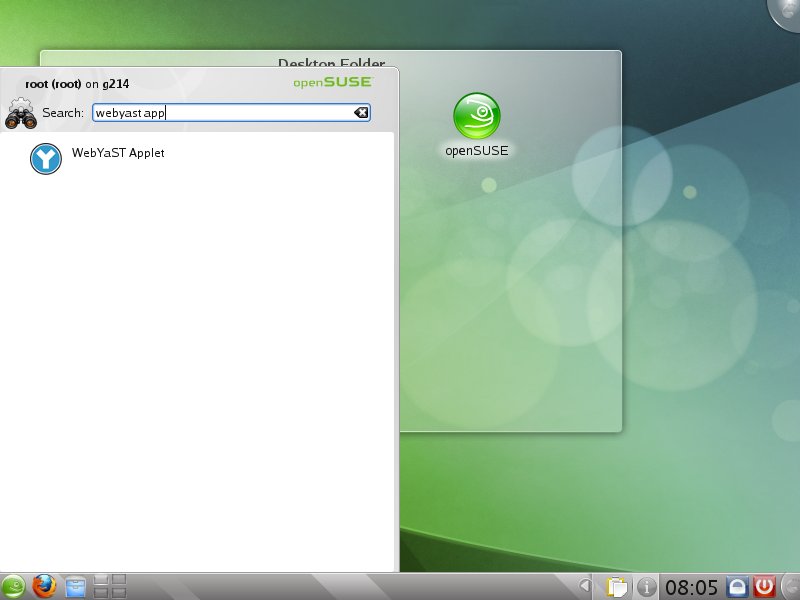
After starting the WebYaST applet the WebYaST icon appears on the right edge of the frame :
 WebYaST is disabled
 WebYaST enabled
With the right mouse click you can manage WebYaST:
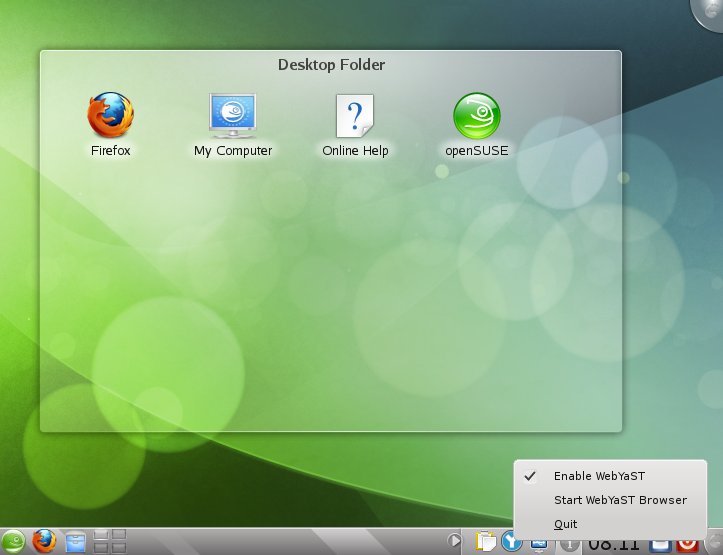
With this applet you can start WebYaST in your browser too. After accepting the GPG-key please login with your “root” account.
And that’s WebYaST:
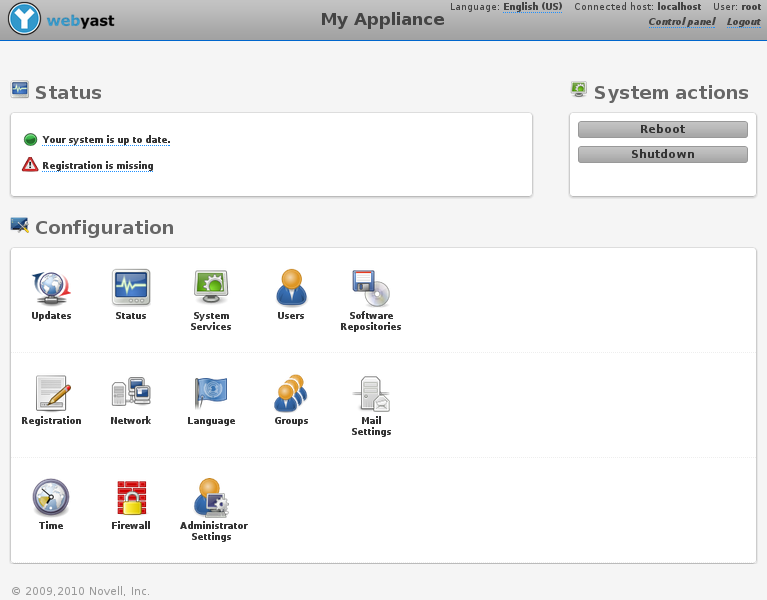
That’s all.
(Yes, I know that sentence is written almost in every post here. Even in posts where problems just starting after the sentence has been read. :-))
But I think that should be really all. If not, please use bugzilla and blame us !
Have fun !
(Yes, I know that’s the second sentence which should be in every blog :-))

Using GPG-Agent with opensuse 11.3 and zsh
 I’m a supporter of mail encryption since I started using free software.
At least, I sign all my own mails, with the exception of mails to people,
who don’t know what an *.asc file is and might not open my mail for this reason.
I’m a supporter of mail encryption since I started using free software.
At least, I sign all my own mails, with the exception of mails to people,
who don’t know what an *.asc file is and might not open my mail for this reason.
By the way, my public gpg key fingerprint is:
F6A9 332D AA28 625E 59A8 F758 7BF6 0F4A 861B C3A3
I’m also involved in the CAcert project. If you want to get “assurced”, don’t hesitate to contact me, if you are in Berlin.
There is just one problem. If you want to sign all your mails, you have to type your hopefully long passphrase at least once[^1] for every single mail. If you get some encrypted mails from your friends, you have to type your passphrase for viewing mails, too. That’s not so nice. So were the gpg-agent invented, which task is to cache your passphrase for a given time, but it didn’t work for me - until today.
I followed the tutorial from the opensuse SDB with
no success. Please note, that you might need to change the
pinetry-qt to pinetry-qt4.
The solution, which works for me, was to copy the mentioned
line to ~/.zprofile instead of .xinitrc, as I am using the
awesome zsh.

How we use our power
I had a side project the last two weeks: Make the build service more fun to use.
No matter how much fun you have creating packages, if they don’t build, there is little point in using a Service that has Build in its name, no? So one of the major goals of the service is actually to help those that want to build packages as good as possible. But there is a problem:
Let me quote from the landing page of build.opensuse.org: “The openSUSE Build Service hosts 16,414 projects, with 107,691 packages, in 26,259 repositories and is used by 25,967 confirmed users.”. That are quite some high numbers – especially in the relation to the ~25 servers we have for actually building.
If you look at the build statistics of the last month (and this is just i586, x86_64 has around the same), you notice that there is not much purple in the “Busy workers / Idle workers” graphic:
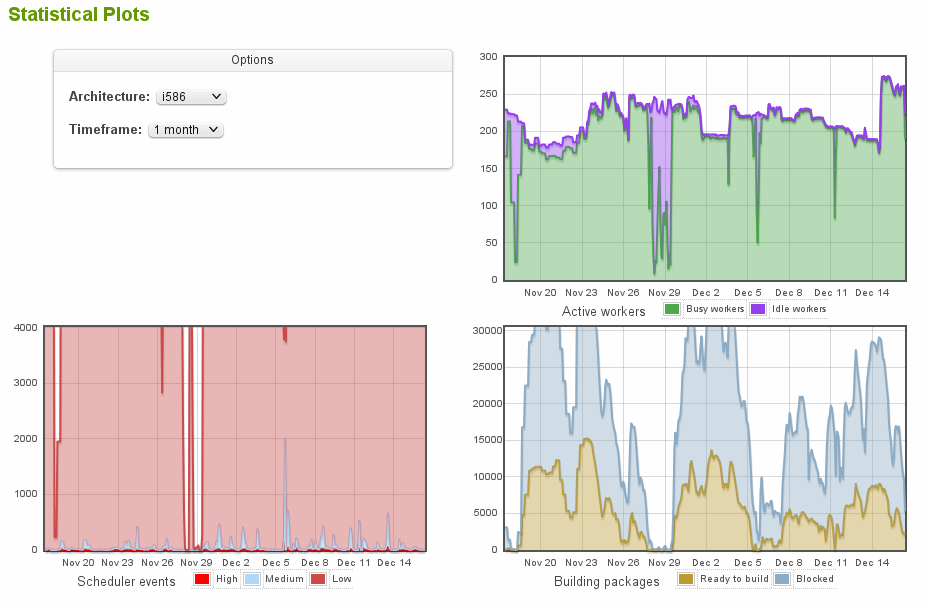
Every 2nd weekend or so we have some pause where the servers actually idle around, the rest of the time they are usually under full load and it’s not exceptional that we have over 20,000 build jobs for said 25 servers at the same time. So if Sue comes wants to build her packages at that time, she competes with quite some other packages and she gets frustrated to still see “scheduled” when she goes away. So we use some algorithms in the so called dispatcher to distribute the power to the right packages.
Over years of its existence the dispatcher used the algorithm I would dub “Randomness with exceptions” – it would if the job’s filename matches a regexp and if so, preferred it, otherwise picked a random job. Such algorithms create some fairness if you have 28.000 users all active at the same time, because there is usually not a really good balance between those.
But with 2.0 this changed: we got load and priorities. A script of mine parses the logs of download.opensuse.org and counts how many users are for the repositories. From that I calculate priorities, so that repositories of interest to people get more build power than others. E.g. KDE:Release:45 for 11.3 is downloaded 65 more often than for 11.1, so the 11.3 packages should see more attention. For that the build service calculates how many workers were busy for the repositories and then allows a factor to lower that load while picking the next repository to build for. This is much more complex than “pick a random one”, but it lead to faster return times for those projects that see actual downloads (and new projects as they have no load registered). To give some fun for those actually working on their packages, we also lower the registered load if we see commits.
But there was one problem left: with so many projects registered you also have quite some that aren’t interesting at all. They are not downloaded and very often not even their maintainers care, e.g. for some testing subproject they created in 2009 and then forgot about it. But those repositories build against the often changing openSUSE:Factory and see rebuilds because of that. Those repositories had a very low load because they have few packages, so they are often preferred over projects that have a lot of packages.
To free up more power to recent changes, we now experimented with various ways. It turned out to be useful to look at the relation between since last source change in the project and time since the jobs are “scheduled”. From this we calculate a staleness penalty – when the job is freshly scheduled, it’s basically one chance for a worker for 2 months since the last commit to the project. But this chance rises quickly, the penalty gets smaller the longer the job is in scheduled. Even those projects that have no source commits are valid “customers” and deserve to be rebuild against the latest gcc from openSUSE:Factory.
So what does this mean to you as user of the OpenSUSE Build Service?
- Don’t add repositories unless you really plan to use it. I know that clicking the checkbox to also add all SLE versions is easily done, but remember this is build power and disk space on various mirrors you’ll be using
- If you really care for your project, it’s a good idea to fix build failures from time to time. You’ll get more build power in return
- If you plan to do a larger update of some package in your project and want to test the resulting packages building against it, it’s a good idea to disable all other repositories while you do so. The fewer build jobs you create, the lower is your load, the higher are your chances to get more build power
- Make your repository popular by telling the world about it. More users means more build power
- And last but not least: don’t get frustrated, remember there are almost 26000 other users