
Introducing Libstorage
Libstorage is a C++ library for managing Linux storage devices. So far it was developed as part of YaST but since a few weeks it is an independent project.
Here is a code example creating a 1GB partition on /dev/sdb.
  Environment env(false);
  StorageInterface* s = createStorageInterface(env);

  string name;

  // Create 1GB partition on /dev/sdb and format it with Ext4.
  s->createPartitionAny("/dev/sdb", 1048576, name);
  s->changeFormatVolume(name, true, EXT4);

  // Set mount-point to "/home" and fstab option to "relatime".
  s->changeMountPoint(name, "/home");
  s->changeFstabOptions(name, "relatime");

  // Set filesystem label to "HOME" and mount filesystem by label.
  s->changeLabelVolume(name, "HOME");
  s->changeMountBy(name, MOUNTBY_LABEL);

  // Commit the change to the system. This will create the partition,
  // format and mount it and update /etc/fstab.
  s->commit();

  destroyStorageInterface(s);
Besides of hard-disks libstorage handles RAID, LVM, NFS, various filesystems and encryption. Swig generated Python bindings are also provided. Libstorage has no dependencies on YaST, neither for building nor runtime. We hope libstorage will also be useful for other projects.
More information is available in the openSUSE Wiki, including a list of useful features people would love to see implemented in the near future.
Comments are as always welcome.
 Member
 lnussel
Firewall Zone Switcher
So you got that shiny new Netbook, installed Linux on it and carry
it along everywhere you go. The default enabled Firewall blocks
incoming traffic so you feel safe when connecting to that anonymous
WiFi network at your favorite fastfood restaurant. Unfortunately the
very same Firewall becomes quite annoying at home where it prevents
your system from discovering printers or blocks ssh.
You have the choice of either opening the ports permanently,
exposing your system in hostile networks, or having to use sudo to
enable or disable the Firewall. Well, not anymore with Firewall Zone
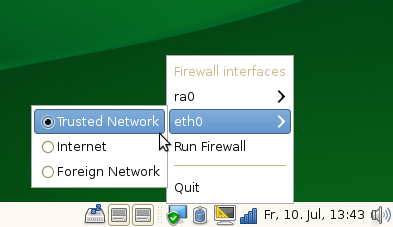
Switcher! With that little applet you can now switch the zone of
your network interface to ‘internal’ with only two mouse clicks when
you are at home. In an untrusted Network you just set the zone to
‘external’. And if you need some custom configuration you could set
the zone ‘dmz’ to have some open some ports or create a custom zone.
Firewall Zone Switcher is *not* meant to be some kind of ‘Personal
Firewall’ that confuses the user with all kinds of low level stuff.
It’s neither a Firewall configuration tool. That job is still left
to Admin tools like YaST. Firewall Zone Switcher settings are
temporary and are reset to the system defaults on reboot.
Firewall Zone Switcher consist of a DBus service and a system
tray applet. Both are written in python currently to have proof of
concept program quickly. Packages are available from the openSUSE
build service. You also need to update SuSEfirewall2 from that
repo. Source code repo is available at gitorious.
Keep in mind that the app as well as the patch to SuSEfirewall2 are just proof
of concept ie experimental so there will be bugs. Feedback welcome nevertheless

OpenSUSE 11.1 and Plesk 9.2.1 update
After more than three years of using Suse 9.3 with Plesk 8.1 on one of my VPS, I decided that it is time to update to OpenSUSE 11.1 with Plesk 9.2.1 control panel. The update process went very well, here are the steps involved:
1. create a full backup of your vps (databases, websites, accounts,
emails, ...). I have used "tar" command for that.
2. in plesk 8.1 control panel, do a complete backup (you need plesk
backup module to be installed), or if you prefer the command line you
can use the following command:
# /usr/local/psa/bin/pleskbackup all
Since version 9.x, the structure of Parallels Plesk Panel backup has been changed. Plesk backup created with Plesk Backup Manager is not just one file but a number of files and directories under backups directory /var/lib/psa/dumps. So, you will need to convert your backup file created in plesk 8.1 to be compatible with plesk 9.x. It's a very simple process, see step 3.
3. convert the created backup file to be compatible with plesk 9.x
# /usr/local/psa/bin/pre9-backup-convert -v convert -d /var/lib/psa/dumps/
where /var/lib/psa/dumps/ is backups directory on the server with Parallels Plesk Panel 9
4. restore the backup files to use them with plesk 9.x. It can be done using the web interface, Home -> Backup Manager -> Server Repository, click the backup name to enter the backup details page and select the required restoration options and click Restore to start the restoration process.
If you would like to use command line to restore your domains, clients, server configuration, ... then you can use the following command:
# /usr/local/psa/bin/pleskrestore --restore /var/lib/psa/dumps/ -level server -verbose -debug
You can restore only clients or domains, for more options see:
# /usr/local/psa/bin/pleskrestore --help
Note: I had a small problem and I found that it is not possible to have a client with the same name as your name in Plesk Admin Profile. Maybe it is stupid, but I had some errors and only after I changed the name in Admin Profile (in Plesk control panel) to be different, I could restore without any problem everything.
I think that's all what I did, from what I remember. If something is missing I am sure you can find a lot of useful stuff using our friend google.
Other useful stuff:
1. Plesk 9.x support as well postfix, so if you want to change from qmail to postfix, try that:
# /usr/local/psa/bin/autoinstaller --select-release-current --install-component postfix
if you are not happy, you can switch back to qmail:
# /usr/local/psa/bin/autoinstaller --select-release-current --install-component qmail.
If you are not sure if you are using qmail or postfix there are many ways to find that, one is to look in Plesk Control Panel on the Services management page {Home -> Services Management} if you have SMTP Server (Postfix) or SMTP Server (QMail)
If you decide you want to switch back, simply, do it, the emails are not lost, don't worry.
2. Replace Horde webmail with AtMail
One of the many new features of Plesk 9, is the option to choose a different webmail client. The default webmail client Horde can be replaced if you are looking for something a bit lighter, AtMail. You need to install from Plesk Control Panel, both webmail clients, and to switch between them:
- Log into Plesk.
- Chose the domain which you want to use another webmail, enter on “Mail Accounts” page
- Click the “Mail Settings” icon
- Switch the “WebMail” to “AtMail (default is Horde)
- Click “OK”
If you decide you want to switch back, simply reverse the procedure, the emails are not lost, don't worry.
That's all.
References:
http://kb.parallels.com/en/5819
http://kb.parallels.com/en/5801
http://kb.parallels.com/en/952
http://kb.parallels.com/en/5969
http://kb.parallels.com/en/5864
Atomic git
A solution could be to have the git repository inside another git repository. For example, have the linux-2.6.git repo inside another git repo, say git-o-git. When you do a pull in linux-2.6.git, and if it succeeds do a `git commit -a` in the outer git-o-git. If it fails for some reason, one can go back to previous version of linux-2.6.git repo by doing a `git clean -d -f` and `git checkout -f` in the outer git-o-git.
It should be possible to add wrapper scripts to `git` and do this auto magically. May be it could be called as git WC, as it is built on top of git porcelain, which is built on top of git plumbing commands. ;-)
Has anyone tried this already?
GIT pull mishap and git clean
Updating ce8a742..faf80d6
error: git checkout-index: unable to write file drivers/usb/gadget/s3c-hsotg.c
error: git checkout-index: unable to write file drivers/usb/gadget/u_audio.c
error: git checkout-index: unable to write file drivers/usb/gadget/u_audio.h
Freed some disk space and re-ran the `git-pull`. But it failed saying
$ git pull
Updating ce8a742..faf80d6
error: Untracked working tree file 'Documentation/ABI/testing/sysfs-bus-pci-devices-cciss' would be overwritten by merge.
Some of the files were created by the previous pull, but they are considered untracked files as the previous pull failed. `git pull -f` didnt help as git was reluctant to delete my untracked files.
Deleting huge list of files one by one was a pain. I was thinking of doing a git status to get the list of untracked files and deleting them. But Jony rescued me by telling me about `git clean` which can delete all the untracked files!
But I would really like to see a way to pull/checkout and over-write the untracked files, so that other untracked files, which will not be over-written, need not be deleted. Is there a way to do it?
GDB Scripting : A short article for a internal magazine
I wrote a small article for a internal magazine and few of my friends wanted me to post it to this blog.
This is for people who are new to GDB and still exploring itz features. So if you’ve used GDB for more than few weeks please ignore and skip 
GDB – Scripting
A good majority of novice programmers tend to use printf functions to trace function calls and to printout the debug data. This forces you to change the code and compile again and again. To eliminate these superfluous tasks from your day-to-day work, use GDB. The GDB has facilities for scripting and helps in saving plenty of your time.
Tracing Function Calls
If you want to know whether a function is called or not, create a break point and write a simple script.
<code>
#Set the breakpoint
(gdb) b mapi_sync
Breakpoint 1 at 0x7fffd75f36e2: file camel-mapi-folder.c, line 741
#Tell GDB what to do when the breakpoint is reached
(gdb) commands
Type commands for when breakpoint 1 is hit, one per line.
End with a line saying just “end”.
> continue
> end
(gdb)
</code>
continue – Come out of break and continue
end – terminate command list
Run the program now. The GDB prints the function name when the breakpoint is hit and automatically continues running the program.
Breakpoint 1, mapi_sync (folder=0xc9c1a0, expunge=0, ex=0xf3a0c0) at camel-mapi-folder.c:741
741 CamelMapiStore *mapi_store = CAMEL_MAPI_STORE (folder->parent_store);
Using the GDB Scripts for Analyzing the Data
Suppose that you have a singly-linked list that has strings in it. At some point, you might want to know the contents of the list. To do this, use the GDB scripting instead of adding the debug statements in your code.
<code>
#Example for gslist traversal.
define p_gslist_str
set $list = ($arg0)
while ((GSList *)$list->next != 0)
p (char *)(GSList *)$list->data
set $list = (GSList *)$list->next
end
end
document p_gslist_str
p_gslist_str <list>: Dumps the strings in a GSList
end
</code>
Add the above snippet into a file and load it into the GDB as follows:
<code>
(gdb) source /home/jjohnny/scripts/gdb/gslist.gdb
</code>
Now, anywhere you want to take a look in the GSList, simply break and
<code>
(gdb) p_gslist_str server_uid_list
$17 = 0x7fffd81101b0 “7666BC1E000000015870BD1E00000001”
$18 = 0x7fffd810e330 “7666BC1E000000015970BD1E00000001”
$19 = 0x7fffd810cbe0 “7666BC1E000000015C70BD1E00000001”
</code>
Simple scripts thus can save you a lot of time from adding or removing the debugging statements from your code. Now go ahead and create a suite of scripts to aid the library you are writing.
More cool developer tricks later. Have fun !
— End —
Thanks to Radhika for editing the article.
Btw when is Archer branch (Python scripting) getting into GDB ? I’ve been using it a bit .
GDB
– Scripting
On wlan and browser authenticated internet
Nowadays more and more organisations will use an intercepting proxy to give you access to internet. Last week I had the pleasure to use again such a system. To use is an exaggeration as my opensuse 11.1 box with kde4.3 rc1 connected to the wireless network (network manager) but refused to give me access to the authentication page in the browser.
I did all the decent tests that my brain and time allowed me. Checked the ip, checked gateway and checked dns. They seemed ok.
To make frustration even bigger I was able to connect to th very same network with a kde4.3 beta1.
openSUSE 11.1 on PS3
Woohoo ! After a long delays and issues (in the last few days) I’ve managed to install openSUSE 11.1 in my PS3. Running a full blown desktop is very sluggish. Reminds me of my first computer (amdk6 500mhz). Some screenies :

Now onto get the Cell SDK running … Synergetic Processing Elements (SPE) here i come !
Update
Two main goals fulfilled:
- Met and talked to the Redhat security folks, who I had never met before in RL. All the Opensource security guys cooperate and work together friendly, it was nice meeting them.
- Hold another talk on Wine in front of a full hall again. Should have shown demos perhaps. Thanks for listening! me in front and the audience. Also on Flickr (follow stream right).
Otherwise lots of work and business as usual, just more of it ... tiring.
Also saw my newborn niece for the first time 2 weeks ago while visiting parents. And yummy strawberry pie.
Otherwise I rewrote the libgphoto2 object handling on the trainride and committed it. It allows greater flexibility in dynamic loading of the objectinformation from the cameras, on-demand loading, and features binary search. Still not happy with some of the datastructures.

See you in Gran Canaria!
- Brad set up a Snowy mailing list, and a Snowy product in GNOME bugzilla.
- Og Maciel has begun work on a virtual appliance for Snowy, and in the process of doing so has helped to unearth some bugs (our first mailing list activity). Thanks Og!
- Ryan Paul of Ars Technica fame as written a great article about the current state of Snowy.
- Rodrigo Moya and Stuart Langridge have continued to help us refine our REST API, as they work on implementing it for Ubuntu One. Stuart contributed patches to upgrade our authentication from HTTP basic to OAuth, and I finally pushed it upstream, along with corresponding support in Tomboy (based on some handy dandy code from Bojan Rajkovic). I am really grateful for their help!
- We have our first localization! Thanks to Viatcheslav Ivanov for diving in.
- The Midgard project has implemented our REST API as well, and intends to add support to Conboy (Tomboy ported to C on Maemo) as well.