
 Member
 FunkyPenguin
Goblin - Then, Now & the Future

Some LinuxTag 2010 impressions
LinuxTag 2010 has ended, openSUSE had a booth in the community area and we had a number talks. We also released OBS 2.0 on LinuxTag. You know this of course already, but here are some impressions.
openSUSE booth was very well visited. Various workshops and activities created several times actually a big swarm around it. Many people were interessted about OBS in special and I hope we won some more OBS users and developers.
Hennes and mine talk about “how to escape the free software hell” was provocant enough to get quite some people into our room directly after the keynote. I hope we were able to show off the coolness of OBS there.
Read the comments in the picture gallery for some background information.
Aversion to change is normal
The only problem with aversion to change is that it sometimes stands in the way to achieve better efficiency and preserve energy. Someone with better overview of particular process finds procedure that increases efficiency (preserve energy), but we have to put some effort (energy) to learn it. With aversion to change in the action we will resist learning and keep lower efficiency. Good is that this prevents easy change in the opposite direction, to lower efficiency, as at least some of affected will analyze procedure and reject bad one. Bad is that we will use more energy every moment of our life.
Nobody will tell you that he is not for a progress, but everyone will rationalize why the change is not good and should be postponed, or completely avoided. I would put all individual reasons in two categories:
- nitpicking on side effects of a new method, that will be presented as key obstacles that have to be removed before method can be applied, and
- incompatibility with workarounds for deficiencies in the old one, which will be presented as unacceptable regressions in efficiency, and the reason to reject idea altogether until that is solved.
Life is like a road, when you see obstacle try to avoid it, but also check another route, and compare results. Use what is better. It is that simple and it is no different with anything else.
Hackweek V

I had been toying with the idea that, to split a file on my hard-disk, I have to read and write to a new file and then truncate the old file. But isn't it lots of unnecessary I/O. I already have all the data on disk. I should be able to change the meta-data alone and mark the file contents after some length as a different file.
So during this hackweek, I implemented 2 system calls on Linux, sys_split and sys_join. And added support for these calls to the FAT file-system. http://lkml.org/lkml/2010/6/9/200 With this patch one can split a file into 2 or join 2 files without doing much I/O!
Why FAT?
Normally creating a new file and then truncating a file approach, needs temporary free space as well. I once had a need to split files when there was no free space available. On advanced filesystems, sparse-file support(i.e., files with holes) helped. But FAT does not support sparse files. Also I wanted these to work on thumb drives which are mostly formatted as FAT32.
SLE11 SP1 release
This Hackweek was scheduled to follow the release of SLE11 SP1. And all the Bangalore employees, who worked for SLE11 SP1 were given a portable 160 hard-drive as a gift in the middle of hackweek. The transcend disk has a one-touch back up button, which works to sync selected folders, using a proprietary software available only on Windows. No support in Linux or Mac.
gnireenignE one-touch button

I thought, if the button press could be detected, I could use it to unmount the disk! So I set out to reverse engineer it. Usbmon + KVM + windows XP. Got the usbmon traces. I was expecting to see a simple Interrupt endpoint. But it was a bulk end-point only interface. And the software was continuously polling to get the button status. It was quite interesting to decipher the USBS and USBC's, but the SCSI/ATAPI payload had an unknown command DFh. And I assumed that by sending the command, if a button had been pressed in between, I would get a different value. And was trying hard for hours. But failed. Then took few more traces using Windows. Tried hard. When I almost gave up, I found couple of return bytes slightly different! Voila. The return value is different, only if the button is held down during the command. Now, I have a script to sync/unmount with a one-touch button! If you have this device, you can modify the script to do what ever you want it to do. Let your creativity flow freely.
Wiki: change postponed
Well, we (contributors) are stretched all over the place, and there is still a lot to do, but keeping wiki hidden on side will not bring more contributors either. New date according to Rupert's post on the opensuse-wiki@opensuse.org mail list is July 12th.
Wiki editing is not a big fun in the beginning, there is more then a few things to learn about to be able to play with, but on the other hand if you don't need fancy formating, then you can start almost instantly. Learn how to start article, then few formatting tips, like mark titles, and you are good to go.
Title in the MediaWiki is title quoted with equal signs, like == Title ==, add more = and title is smaller.
You also have to know wiki editor requires to write from the beginning of the line. Any (white) space on the begin will convert your writing in a preformatted text written in a fixed font, so there is no way to indent first line of paragraph without dirty tricks, not even for a single space.
Also, learn to use preview button, it will make you look good in the eyes of the wiki maintenance people that hate recent changes page filled with changes that are not actually changes, but someone that uses save button all the time.
There is of course more, but to correct typo, grammar or spelling, you have to know even lesser. Correcting typos is one of the ways to help, and if you ask me, just as important as being able to create fancy layout, because there is no layout that will make an article with typos look good.

LinuxTag slides
As the documentation of RAnsrID is basically non-existent ATM, this is rather important for potential users...
Not today Josephine
RAnsrID - git repository published, demo on LinuxTag 2010
git clone git://gitorious.org/ransrid/ransrid.git
Unfortunately, there is little (read: no) documentation available yet; that will change after LinuxTag. Upto then the only doc is the heavily commented source code. Grab it, study it, enhance it, send a patch
 - that's the open source way.
For LinuxTag I have another goodie - I will be traveling with four USB disks and give a short live demo of what the system is already capable of. Live add and removal of disks isn't working yet, but reading, writing, validation, and rebuilding is.
Note that nbd used to freeze machines during writes if client and server were running on the same machine. Since kernel 2.6.26 there is a patch included that ought to fix this issue, but there were some (inconclusive?) discussions about this patch beforehand. Using xen for the client seems to work around this issue as well, though.
Hackweek 5 – LXDE
Hi,
as hackweek continue I want to present my contribution for this year event. My plan is to support our the youngest supported desktop environment LXDE. So I contact our LXDE guy Andrea Florio and he ask lxde developers. Then we communicate directly and I found as the most intersting idea to replace gnome gvfs which is needed to have usable gio interface in glib ( geek-deserialization: allow easy access remote systems, zip archives in file manager like it is part of filesystem). Motivation for replacement is quite big gvfs dependency and system resource requirements. It choose it because I can learn something new, can return to programming in C from Ruby on Rails which is used for webyast and last not least I think it is usable also for another lightweight environment xfce4.
Code can be located in pcman git repository. Idea of implementation is quite simple. Don’t use daemons and special code to handle different backends. Instead use fuse and its already written fs based on fuse. As first I start with ftps and its sshfs implementation. Code for single fs is simple and short. Today I finish first working proof of concept of gvfs extension and its gfile extension. It can query and copy file on gvfs as you can see in file gfusevfs.c where is testing program. Main problem which I still see is that fs is not umounted so it takes some sources, but umount it after file operation can lead to annoying behavior like passing password on each file operation.
I welcome any comments and ideas about this project.
Hacking for Freedom
Hi developers!
These are first hours of hackweek. A lot of people in Novell and in the community are starting to work on different projects. What can I give for free software in this week? Sure, my favorite project is NetworkManagement.

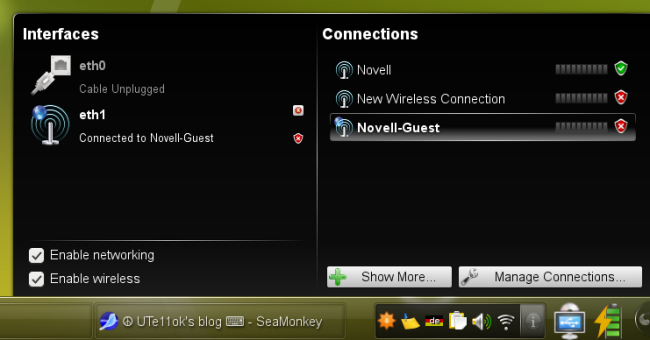
As you can see, NetworkManagement don’t work well. For example, it can’t see WiFi connection and don’t show wired connetcion. Yes, right now we have one bug with module “networkmanagement”.
This module must be loaded after start NetworkManagement, but this is not happening 
If you check it, you will see:
anaumov@pizza:~/plasma/networkmanagement> qdbus --system org.freedesktop.NetworkManagerUserSettings
Service 'org.freedesktop.NetworkManagerUserSettings' does not exist.
Why it’s happening? Problem is in connection between plasmoid and deamon NM (via DBus).
anaumov@pizza:~/plasma/networkmanagement> qdbus org.kde.kded /kded loadModule networkmanagement
true
anaumov@pizza:~/plasma/networkmanagement> qdbus --system org.freedesktop.NetworkManagerUserSettings
/
/org
/org/freedesktop
/org/freedesktop/NetworkManagerSettings
/org/freedesktop/NetworkManagerSettings/0
/org/freedesktop/NetworkManagerSettings/1
/org/freedesktop/NetworkManagerSettings/2
/org/freedesktop/NetworkManagerSettings/3
/org/freedesktop/NetworkManagerSettings/4
/org/freedesktop/NetworkManagerSettings/5
/org/freedesktop/NetworkManagerSettings/6
/org/freedesktop/NetworkManagerSettings/7
/org/freedesktop/NetworkManagerSettings/8
anaumov@pizza:~/plasma/networkmanagement>
So, now we can see WiFi interface:
And WiFi interface can see WiFi connections:
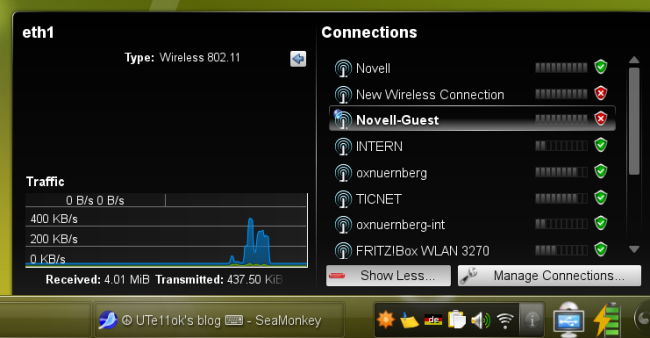
Good, but this works not automaticly. It’s first what I want to hack on this week.
And what do you want to do on this week? 