
 Member
 llunak
Package KDE applications easily for multiple distributions
KDE Project:
Those that were at either CampKDE or FOSDEM might already know, so for those this is a status update, for the rest: I've been working on a tool that makes it quite easy to create packages in the openSUSE build service, which despite the name can create binary packages also for other distributions than openSUSE. If you've ever gotten a mail asking for a binary package of your application or help with a compile problem, this could make your life easier.
For example, imagine Joe Developer, who has written his KFoo application, uploaded it to http://kde-apps.org and is now watching what happens. But, alas, instead of thanks and praise, what often happens is that the first comment is something like "I get this compile error, can you help?" or "Are there packages for Kubuntu?".
It may be quite easy for Joe to see that the compile error is caused by libbar-devel not being installed, but how is he to know what the package is called in other distributions? The same way, how is he to provide binary packages for distributions he does not use? And that's far from all things that can go wrong in such case - Joe may be running KDE workspace 4.4, but somebody may be still on 4.3, where the application would nicely compile and run, if only one #ifdef would be added to the right place. But will Joe really downgrade his installation just in order to fix that, and again each time he does a release of KFoo? And then maybe somebody else will try to compile it on openSUSE Factory, which already uses GCC 4.5, and will get compile errors because the latest compiler is more strict than previous versions and rejects invalid code that however compiles just fine on Joe's computer. And so on and on.
Joe, of course, is a smart guy (after all, he's written this great KFoo app that everybody wants to run if only they could compile it :) ). He can get the idea to use VirtualBox and install other distros he could care about, and test in all of them. The question is how long he'd be really willing to do that, since it certainly sounds like a lot of fun (and lot of disk space, and work). And that still means that all those potentional users would have to compile KFoo from source.
Maybe distributions would eventually include KFoo, but there's this tricky loop 'nobody uses it' -> 'why should a distro include it' -> 'no distro ships it' -> 'nobody uses it'. Maybe Joe gets lucky, maybe he does not.
Sometimes other people may provide binary packages for the distribution they use, so if somebody likes KFoo enough (and knows how to do it), Joe may find a comment on kde-apps.org pointing to this package and can add it to the list of packages to download. Except this may and also may not work, depending on how well those packagers keep up. Having a binary package of KFoo-0.3 when the latest source tarball is KFoo-1.5 is probably worse than no binary package at all.
So Joe can go back to the VirtualBox installations and try to package KFoo for all those distributions. But Joe is a developer, not a packager, so first of all he'd have to learn how to actually do that (e.g. creating a .deb is quite different from .rpm, and even .rpm packages for different distros are not created exactly the same way). Worse, he is a developer, and, honestly, developers just love packaging, especially for multiple distributions, riiiiiight?
Now here comes the openSUSE build service (OBS), which as already said is not only used for creating the openSUSE distribution, but also provides the ability to create repositories providing additional software, also for non-openSUSE distributions. That almost looks like the solution for all the above problems, doesn't it? No need to install the distributions and do the builds locally, the OBS itself will do the building. New packages would be available very soon after updating the sources in the OBS. And kde-apps.org has even direct OBS support, so packages can have direct download links there.
There's still the problem of actually having to know how to do the packaging, but that is exactly what kde-obs-generator should help with. KDE applications in general happen to be simple to build, and thus quite simple to package (in fact, compared to some other pieces of software, KDE apps happen to be remarkably simple to package :) ). So a lot of that could be automated. In the best case, creating a KDE package in the OBS can be now a couple of clicks in the web interface, few osc commands (osc is the CLI tool for OBS) and running kde-obs-generator in the directory with the source tarball. I've already tested the tool with some packagers and they even started using it for real, because even for experienced people it saves work.
I still consider the tool to be experimental and work in progress, but it's already pretty usable. Currently it can handle Plasma themes, KDM themes, KPlash themes, wallpapers and generic KDE/Qt CMake-based builds. It tries to automatically figure out all the needed build dependencies (which however means the list of mappings from cmake to package names for all supported distributions needs to be extended as necessary). Also kde-obs-generator itself is packaged using kde-obs-generator. The biggest thing I've built so far is the whole of kdeutils, that's of course not how something like kdeutils should be packaged, but that shows it can handle quite a lot.
So, in case you'd like your application to reach more of its posible users, you'd like to ease your testing, or you're just curious, the documentation is in the openSUSE wiki. I'd especially like to point out the tutorial, which is really step by step and includes also things like how to create an account for the OBS, so maybe even a monkey could now create a package (well, assuming it can read and write and is pretty bright for a monkey ;) - this still cannot be as simple as just hitting Enter repeatedly). If there are any questions or a problem, see the feedback section (mail the opensuse-kde mailing list, or just ping me (llunak) in #opensuse-kde on Freenode).
PS: I'd appreciate if people using other distributions could edit the wiki page on how to actually install the binary packages in some easier way than going to http://download.opensuse.org, navigating to the right .rpm/.deb file and clicking on it. It's pretty easy with openSUSE so I assume there must be something simpler on other distributions too, but I can't find it.

http://software.opensuse.org/stage
Part of our “umbrella” milestone, Pavol and Robert ported software.opensuse.org to the Bento theme. To get more feedback for it, I now deployed it as http://software.opensuse.org/stage.
Please note two things:
- it also includes a new feature from the Education project: a link to openSUSE derivates
- the language box is experimental and we kind of decided already to kill it again
On top of that of course: the Bento theme is not yet finished – it’s only a stage deployment to get feedback.
Have fun!

Banshee Metrics
Interesting Stats
They are primarily getting Banshee through the Ubuntu PPA, with a moderate number building from source or using other distributions — including 20 OS X users.
| 383 | Ubuntu |
| 33 | source-tarball |
| 27 | openSUSE/SLED |
| 22 | git-checkout |
| 20 | OS X |
| 16 | Gentoo |
They are using Banshee in 36 locales, across 30 languages. Keep in mind the Preference to opt-in is (so far) only translated into 9 languages.
| 223 | en-US |
| 51 | en-GB |
| 41 | de-DE |
| 35 | unknown |
| 21 | ru-RU |
| 18 | it-IT |
| 14 | fr-FR |
| 12 | en-CA |
| 11 | en-AU |
| 11 | es-ES |
| 9 | pl-PL |
| 8 | pt-BR |
| 6 | es-CL |
| 5 | es-MX |
| 5 | nl-NL |
| 5 | sv-SE |
I'm still working on better ways to analyze the data and extract actionable information. I plan to have distribution graphs and such soon. In the meantime, I've posted some more stats here. As we get more submissions, add more data points, and get better analysis, we will be able to identify options nobody uses and optimize Banshee for real-world users.

New KDE Four Live Images
New KDE Four Live CDs with KDE 4.4.1, and much more are up.

They were built with openSUSE Build Service's KDE:Medias project and SUSE Studio and consist of openSUSE 11.2 plus all updates, KDE 4.4.1, upstream branding, Nepomuk enabled and Strigi disabled (because it's a Live CD).
They can be used as Live USB sticks too, see these instructions if you don't know how to dd a file to a device.
You can also install to disk and use it as a normal distribution using the installer on the desktop. Once installed, the first update will pull in all the packages that are normally on an openSUSE KDE install that do not fit on a single CD.

openSUSE & Google Summer of Code 2010
The wonderful Vincent has already sent the initial call for participation, so who’s up for it then?
OK I’ll take it that there are several hands raised in the audience (I reckon I’m being overly cautious, I’m sure there are loads of hands up but as I don’t have my glasses on I can only see the first two rows). So what do we need from our lovely community to help make GSoC 2010 a success?
* We need some admins for openSUSE in GSoC 2010. This mainly involves making sure that we do everything we need to participate in GSoC; making sure students feel comfortable in the project, and push our contributors a bit to publish ideas and mentor students. Basically the GoTo contact points.
* We need people to maintain the GSoC 2010 wiki page. I have already started the GSoC 2010 page on the wiki, yes it is pretty much a copy/paste of last years but it gets the ball rolling 
* We need people to start thinking about ideas that students could work on. If you have a good idea, why not put it in openFATE and put it on the wiki too (with a link to the openFate entry)? That way we can utilise the voting feature of openFate and gauge how much the community would appreciate the student’s hard work.
So there’s nothing stopping you from joining in, so get to it! Oh and if you’re looking for a way to contribute to openSUSE but aren’t a coder this is a great way to get your feet wet with the community 
Tokamak4
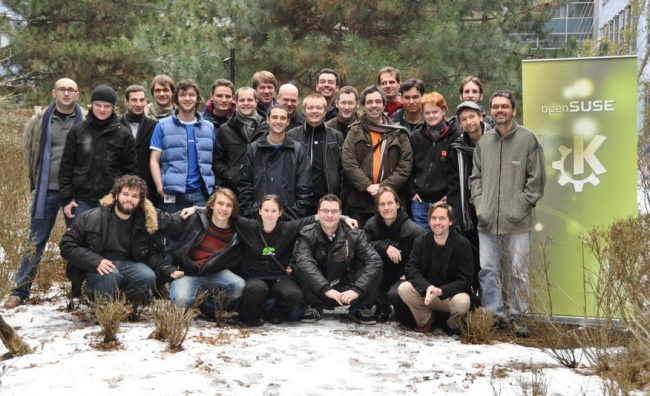
 On this week the leading KDE developers met together again. This time it was held in Nürnberg, in the openSUSE premises and was kindly made possible by Novell and KDE e.V.
26 hackers, who make KDE better.
For me it was first time, where I met hackers not for drinking a cup of beer, but for working, for hacking, for learning… and I think in this time I got much more fun.
We started at 9-10 am and finished it at 1-2 am. Yes, these two days we hacked like crazy. I’m not so good in KDE, I mean – I’m just trainee in SUSE/Novell, but in these two days I took a lot of information about KDE (arhitecture), Solid, Plasma, methods of project’s buildings (cmake), etc.
I have uploaded photos. You can find these here.
I have worked before on KNetworkManager. It was just a couple of patches (Qt/KDE3 based), and KNM has another aspects of integration with hardware as we have now in KDE4. In KDE4 we have SOLID, and this makes more easy to asking for such things like, for example, wired connection or to find hidden SSID wi-fi…
Yes, my current project is Network Management plasma applet.
With Sebastian Kügler and Will Stephenson, we worked together on functionality to easily connect to wired, wireless and mobile broadband networks and also to VPNs. As I said, I don’t did so much, but I started working on support for connection. Maybe next month I will be able to show that I did.
I would like to thank everyone with whom I spent those 2 days. Especially Will, who always supports and helps me to become a KDE developer.

X.org Board of Directors transparency
During this year's elections a number of questions came up about several issues, partly regarding the financial situation of the foundation, partly about how the board members communicate with each other and the regular members. It basically all boiled down to the number one perceived issue with the X.org board:
It's transparency. Or rather the lack thereof.
It's generally accepted, that even some of the actions required by the By-Laws (like meeting minutes) have been somewhat neglected. As a result of the discussions, Eric Anholt has now published the irclogs on members.x.org, thanks for that! Also the irc channel for the regular board meetings (#xf-bod on irc.oftc.net) has probably not been advertised enough since its opening to the public. It is also safe to assume that this hasn't been done by intention, but just by lack of time - the daily schedule of most open source people is extremely cluttered (geez, when did I last blog?!?).
I want to promise that I will try my very best to push for transparency as much as possible, maybe starting by taking/polishing minutes after the next (my first) irc meeting.
I'm quite exited about the days to come
 .
.And that is a good thing, because I'm pretty sure it will be - say - a little bit less thrilling after a while... as with all good things
 .
.
Banshee 1.5.4
Banshee 1.5.4 is out, with cool new features and lots of fixes! This is our fifth release in preparation for our big 1.6 release at the end of March.
Banshee Community ExtensionsWe have made a 1.5.4 release of Banshee Community Extensions as well. This includes the Alarm Clock, Lyrics, and Mirage extensions, and several others.
Mirage Similarity EngineThe Mirage extension has been modified heavily, dropping the old “Automatic Playlist Generator” in favor in integration into the playback controller – adding shuffle-by-similar, and into the Play Queue Auto DJ – adding fill-by-similar. Mirage calculates the acoustical similarity between two songs.
 Play Queue Auto DJ, fill by similar
Under Preferences, you can choose to "Improve Banshee by sending anonymous usage data" back to the Banshee developers. This collects information on what version you're running, what OS, library size, slow SQL queries, and a whitelisted subset of your preferences. This information will help us choose better defaults and see what parts of Banshee are used most and can be improved.

- Wikipedia context pane extension enabled by default
- Add support for Nokia N900 phones
- Coverart for unicode artist/albums now supported
- Dropped glade-sharp dep; GNOME 3.0 ready
- Add columns showing track sample rate and bits per sample
- Option to sort an artist's albums by year, not title
- Fixes to GIO backend
- Many crash/startup fixes for OS X build
- Fix several memory leaks
As always, check the release notes for more detailed information, screenshots, and download links. Thanks to everybody who made this release happen!
Loading executables as MonoDevelop projects

openGarrobito 0.1.9, openSUSE multimedia!
OpenGarrobito, is the fruit of the philosophy of free software, because source code is shared, you can create fancy layouts at ease, and are applicable to our needs as I am passionate about the multimedia computer, and worked in a distribution based on my beloved openSUSE and resulted openGarrobito.
For the realization of this release, I am taking a very useful tool that works in the cloud, called susestudio, which compile multiple multimedia programs that are used in Linux, because in the ordinary distributions that are distributed on the Internet and groups that distribute Linux users, do not incorporate multimedia codecs and many multimedia programs, due to licensing issues, I gave myself the task of compiling them into a single distribution and make it public.
But that is exactly what we can do with openGarrobito:
1. Play our mp3 with amarok
2. See our movies with VLC
3. Shingles and DVDs with DeVeDe k9cpy
4. Convert Video devede
5. Edit images with gimp
6. Edit sound with audacity
7. Edit Video KDEN-live
8. Perform our jobs college or office with OpenOffice
9. Browse the Internet safely with Konqueror or Firefox and Google Chrome.
10. Organize our photos with Digikam or if you prefer using Picasa
And now, in this release you can play your favorite games like Nexuiz or openarena.
Countless numbers of applications we can give to this distribution, which is constantly evolving, is currently running under the latest version of openSUSE’s 11.2, and default desktop is KDE SC 4.4.
You openGarrobito has the latest security updates, and all the software on this date until 11 February. I hope you will enjoy it this distribution
Link for download: http://sourceforge.net/projects/opengarrobito/
Link of my blog: http://decks.260mb.com/