
Planet News Roundup
This is a roundup of articles from the openSUSE community listed on planet.opensuse.org.
The community blog feed aggregator lists the featured highlights below from Feb. 27 to March 5.
Blogs this week highlight the openSUSE Board Election 2025 and Tumbleweed’s February monthly review to sound-reactive LED projects and whether data has weight. Blogs also highlight installing Fedora on the HP Z2 Mini, syslog-ng 4.11.0 packaging status, Obsidian for note-taking, the second Plasma 6.6 bugfix update, KDE Express podcast episodes, Linux Saloon discussions, and open-source playable world generation.
Here is a summary and links for each post:
Episode 70 of KDE Express: Plasma 6.6.1 and the United Nations
The KDE Blog highlights episode 70 of KDE Express with coverage Plasma 6.6.1 updates including Spectacle’s OCR capabilities, accessibility enhancements like grayscale filters and pointer tracking, KDE Connect modernization proposals, and new options for saving global themes and configuring WiFi via QR codes.
New Version Tracking through API and Automatic Labeling
The OBS Blog announces enhancements for a Foster Collaboration beta program as well as new features for package version management along with new status labels. These enhancements add a notification filter for version alerts and display last-synced timestamps to help developers monitor packages at a glance.
KDE Express Episode 69: Trinity Reloaded with Full Plasma
The KDE Blog presents episode 69 of KDE Express, covering the SonicDE fork of KDE Plasma for legacy X11 support, CachyOS adopting Plasma Login Manager, KDE Connect fixes for Bluetooth logging and more.
Data Has Weight But Only on SSDs | Blathering
The CubicleNate Blog explores a lighthearted science exploration rather than practical finding as he dives into the curious concept that data has mass on solid-state drives. Since SSDs store data by trapping electrons in floating gates via quantum tunneling, writing data adds electrons with measurable (though femtogram-scale) mass; this is in contrast with HDDs which merely rearrange existing magnetic polarity without gaining weight. A lighthearted science exploration rather than a practical finding.
New toy: Installing Fedora Linux on the HP Z2 Mini
Peter Czánik’s Blog continues the HP Z2 Mini series with a smooth Fedora installation on the AMD Ryzen AI Max+ PRO 395-powered workstation. Despite Fedora not being listed on the HP data sheet, the graphical installer worked without issue and GNOME’s consistent cross-distro interface made the system immediately familiar. Steam and Need for Speed ran flawlessly, and initial AI acceleration configuration via Copr packages successfully detected the RyzenAI NPU5.
Sound-reactive Sideboard
Sebas’ Blog documents a living room IKEA sideboard turned into a sound-reactive LED centerpiece using an ESP32-based controller running the open-source WLED firmware. The setup uses WS2812B LED strips behind frosted plexi glass doors, processes audio via FFT on one core while rendering up to 200 FPS of LED effects on the other, all under 10W. The project also solved amplifier overheating with HomeAssistant-automated fan control and features a walnut wood finish.
Syslog-ng 4.11.0 Packaging Status
Peter Czánik’s Blog provides an overview of the packaging status for syslog-ng 4.11.0 across various operating systems and tracks which distributions have already made the release available as easy-to-install packages for users who prefer not to compile from source.
Second Plasma 6.6 update
The KDE Blog reports the second bugfix update for Plasma 6.6, delivered two weeks after the initial release. The post recaps Plasma 6.6’s flagship features including the new Plasma Keyboard for touch devices, OCR text extraction in Spectacle, the Plasma Setup wizard, per-application volume control via hover, emoji skin tone selection, QR code Wi-Fi scanning and more.
Compilation from the Free Software Foundation newsletter - March 2026
Victorhck compiles and translates the March 2026 FSF newsletter into Spanish as it highlights the FSF’s 40th anniversary. Highlights include the FSF’s opposition to Google’s mandatory developer verification proposal that threatens F-Droid, coverage of Americans destroying Flock surveillance cameras, and a report on Microsoft confirming it will provide BitLocker recovery keys to authorities under valid legal orders.
Episode 68 of KDE Express: esLibre2026 dixit editor. Editorial design with free software
The KDE Blog presents episode 68 of the KDE Express podcast, covering editorial design with free software and previewing the esLibre2026 event.
Tumbleweed Monthly Update - February 2026
The openSUSE News site publishes the February monthly review covering 17 snapshots. Major highlights include the arrival of Plasma 6.6 with its new on-screen keyboard and Spectacle OCR, KDE Frameworks 6.23.0 with LeakSanitizer memory safety fixes, Linux kernel 6.19.3 with a new listns() system call, GRUB2 2.14 strengthening boot workflows for immutable systems like MicroOS, Mesa 26.0.1 fixing gaming regressions and more.
Obsidian | The Quest for the Perfect Note-Taking Application
The CubicleNate Blog reviews Obsidian as a replacement for TiddlyWiki, praising its markdown-based local-first approach, extensive plugin ecosystem, cross-platform availability via Flatpak and AppImage, and seamless synchronization through Syncthing. While not an open source project, Obsidian is free to use and offers the combination of OneNote’s ease, TiddlyWiki’s power, and standard markdown formatting that the author had been seeking.
Voting Is Now Open for the openSUSE Board Election 2025
The openSUSE News site announces voting has opened for two Board seats for the openSUSE Board Election. Four candidates are on the ballot. Voting runs until March 8 with results announced March 9. All openSUSE Members received ballot links by email.
KDE Express Episode 67: Plasma in Virtual Reality Mode
The KDE Blog presents episode 67 of the KDE Express podcast and covers what’s new with KDE Plasma 6.6 (beta at the time) and highlights a winner of the “car of the year” uses KWin under the engine.
LingBot-World: Open-source “playable” world generation.
Alessandro’s Blog covers LingBot-World, the first high-capacity fully open-source interactive world model. Unlike passive video generation tools, LingBot-World lets users control a camera through AI-generated scenes in real time using W, A, S, and D keys. It achieves 16 FPS with emergent spatial memory that maintains object consistency even after 60 seconds off-screen. The project releases both source code and full model weights.
Linux Saloon 190 | News Flight Night

The CubicleNate Blog highlights episode 190 of Linux Saloon. The news flight night covered Bazzite tripling its user base in 8 months as gamers seek Windows alternatives, F-Droid’s open letter opposing Google’s mandatory developer verification, and broader discussions about changes to the Android ecosystem.
Linux Saloon 189 | Early Edition
The CubicleNate Blog highlights the return of Linux Saloon’s Early Edition monthly format. Discussion topics included the EU OS proposal for a standardized Linux desktop with Windows migration focus using KDE Plasma, Wayland and desktop environments for modern gaming featuring Bazzite and Nobara, and participants’ recent tech activities including seeking VMware alternatives.
The power of saying “No”
Victorhck reflects on the power of saying “No” in the context of free software and community participation. You may find wisdom in No.
Vietnamese lunar calendar and more rounded highlights – This week in Plasma
The KDE Blog covers the weekly “This Week in Plasma” update, which highlights Vietnamese lunar calendar support and more rounded highlight styles. The blog also covers performance improvements.
openSUSE Tumbleweed Weekly Review – Week 9 of 2026
Victorhck and dimstar report on the snapshots delivered in week 9. The review highlights updates including Linux kernel 6.19.3, PipeWire 1.6.0, Mozilla Firefox 148.0, Mesa 26.0.1, Poppler 26.02.0, QEMU 10.2.1, and DNF 5.4.0. It also covers the progress on the switch to systemd-boot as the default bootloader on UEFI systems to align with Tumbleweed to MicroOS.
My desk Plasma February 2026
The KDE Blog shares thoughts on the Plasma desktop setup, running on a Slimbook Kymera with KDE Neon.. The setup includes functional elements like a moon phase widget, system tray, virtual desktop selector, and a Valencian-language clock, all designed to create a dark yet highly organized workspace.
View more blogs or learn to publish your own on planet.opensuse.org.

New Version Tracking through API and Automatic Labeling

 Member
 Futureboy
Data Has Weight But Only on SSDs | Blathering

New toy: Installing Fedora Linux on the HP Z2 Mini
The data sheet of my new AI-focused mini workstation from HP does not mention Fedora, but I could install it just fine. I expected this though, because when I asked around about Linux support and hardware AI acceleration for AMD Ryzen 39X chips, all responses came from Fedora users… :-)
Installing Fedora on the HP Z2 Mini was a smooth experience, even though I hadn’t used the graphical installer for ages. I installed the Fedora server variant during Covid, and I’m upgrading it ever since. Still, using the graphical installer was easy, so Fedora was up and running in no time.
Rebooting Fedora is not always fun, though. This box has two SSDs in it. In most cases, booting is OK, but sometimes the numbering of SSDs seems to be reversed. When this happens, booting gets stuck in an infinite loop, but a simple reboot solves the problem.
I guess I’m getting older, but I appreciate that GNOME looks exactly the same as on any other Linux distro, except Ubuntu. Everything in GNOME works from muscle memory, just as in most applications. Of course, under the hood, Linux distros are different: they have different package managers, repositories, backgrounds and application defaults. However, for a simple user, there is no need to learn the desktop from scratch, just because their friend installed another Linux distro for them…
Also, while I’m not a gamer, when I saw during installation that Steam was available, I gave it a try as well. It worked flawlessly. I do not follow the current Windows situation, but when I installed Need for Speed a few years ago, I had to go through many steps and install the game twice due to a failed attempt to make it work. Today, installing and starting NFS was a simple next-next-finish experience, so I could start the latest reincarnation of my favorite childhood game without any problems.
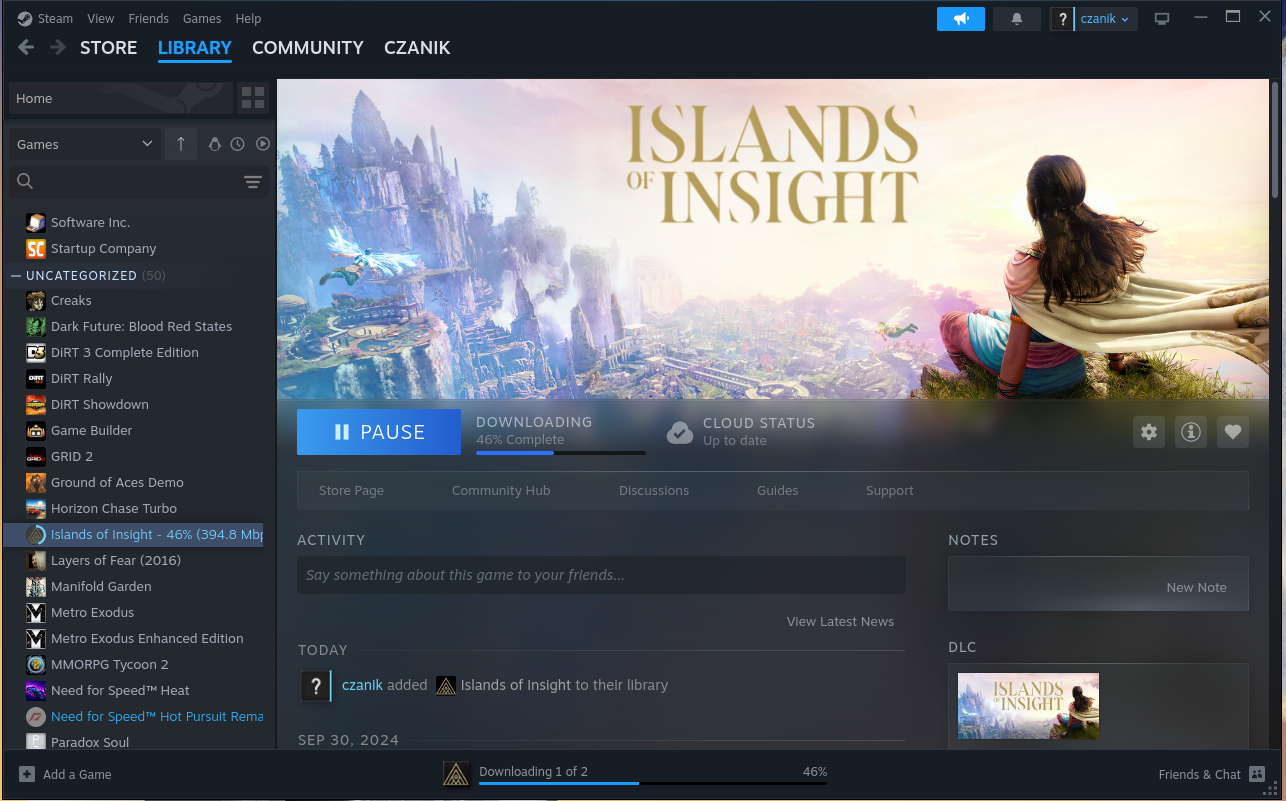
Steam on Fedora :-)

Need for Speed
I did a few steps to configure accelerated AI on the machine. I installed a few extra packages from Copr and they found something, after I worked around a couple minor problems:
root@fedora:~# /usr/xrt/bin/xrt-smi examine
System Configuration
  OS Name              : Linux
  Release              : 6.18.13-200.fc43.x86_64
  Machine              : x86_64
  CPU Cores            : 32
  Memory               : 96311 MB
  Distribution         : Fedora Linux 43 (Workstation Edition)
  GLIBC                : 2.42
  Model                : HP Z2 Mini G1a Workstation Desktop PC
  BIOS Vendor          : HP
  BIOS Version         : X53 Ver. 01.05.02

XRT
  Version              : 2.19.0
  Branch               :
  Hash                 :
  Hash Date            : 2025-04-25 00:00:00
  virtio-pci           : unknown, unknown
  amdxdna              : unknown, unknown
  NPU Firmware Version : 1.0.0.166

Device(s) Present
|BDF             |Name          |
|----------------|--------------|
|[0000:c6:00.1]  |RyzenAI-npu5  |
More in-depth AI testing will follow later, once I also installed FreeBSD on the box.
This blog is part of a longer series about my adventures with my new HP Z2 Mini and AI. You can reach me to discuss this blog on one of the contacts listed in the upper right corner. You can read the rest of the blogs under the toy tag.

Sound-reactive Sideboard

A project that I had planned for quite some time came to fruition last year, now I finally found time to document the result. My livingroom sideboard looked messy and kind of boring while not blending in anymore with the updated style of my living room. I wanted to turn it into a striking centerpiece of the room.
The plan was to install a sound-reactive lighting system. I wanted the light effects to be detailed and not disturbed by ambient sound in the living room, i.e. it sound not react to people’s voices, just the music playing.
My living room sideboard is an off-the-shelf product from IKEA that I bought many years ago. It didn’t have doors installed, but I was delighted that I could still buy matching doors with windows in them.
To realize the light effects, I’ve installed frosted plexi glass inside the windows.
Getting technical…
To control the LEDs, I’m using an ESP32-based LED controller with a line-in module and an ADC (analog-digital converter). After some experimenting, I’ve found this board to work well. I’ve connected 6 WS2812B LED strips to 3 pins and installed them with an aluminium profile into the doors. The frosted windows and profiles diffuse the light nicely so you can’t make out individual LEDs really.
On the software side, I’m using a sound-reactive port of the WLED project. WLED is Free and Open Source software, of course. Though its user interface can be a little unwieldy, it’s also very powerful and integrates nicely with homeassistant, so it can be controlled automatically.

The ESP32, being a rather powerful dual-core microcontroller, can process the incoming audio signal on one core (using fast-fourier transformation) and compute complex LED effects on the other core. Rendering up to 200 frames per second to 2 times 210 LEDs is no problem while power consumption of just the controller stays well under 1W. Pretty impressive! Depending on the LED effects (number of LEDs lit up at a given time and their colors), the whole thing hardly ever reaches 10W of power consumption.

Another functional goal of this project was to solve cooling issues of my amplifier once and for all. The amp would run really hot and shut off after playing at higher volume for some time. I installed a bunch of 12cm fans which suck air through the amplifier and blow it out on the backside. Both amp and and fans are connected to smartplugs. I turned to my homeassistant and set up an automation which turns the fans on whenever the amp’s power consumption reaches a certain level. This works really nicely, since the fans never spin at lower volumes (when you could hear them through the music) and keep everything cool and running stable at higher volume when it’s necessary — without human interaction.

Walnut finish
The outer shell of the sideboard is made of walnut wooden panels with an oil and varnish finish, thanks to my friend Joris. The oil gives it a darker look and accentuates the grain, matching the speaker system. The matte varnish finish (Skylt, highly recommended for its durability and natural look) allows me to sleep well even if people put their drinks on it.

I love it when a plan comes together!
I’m really happy with the result. While I had thought it out for a long time already, it’s always a lot more impressive when you see the final result in action.
The WLED firmware allows me to create interesting light effects. I can run the 3 doors as one, but also easily split them up into segments so each door panel renders its own effect. WLED has ca. 200 different LED effects, many of them react to sound. Each effect can be combined with one of 50 color palettes, some of the palettes are sound-reactive in their own right leading to a very dynamic display.
One cool feature is that the processed sound data can be broadcast across the network (over UDP) and received by other WLED controllers, so I can have multiple LED displays in the house, each rendering their own effect to the music, creating a more immersive experience.
Syslog-ng 4.11.0 packaging status
Committed users compile syslog-ng for themselves from source. However, most of us wait until a software is available as an easy-to-install package for our operating system of choice. In this blog post, you will see an overview on the available packages for syslog-ng 4.11.0.
Read more at https://www.syslog-ng.com/community/b/blog/posts/syslog-ng-4-11-0-packaging-status

syslog-ng logo
Tumbleweed Monthly Update - February 2026
Software package updates during the second month of 2026 for openSUSE Tumbleweed have been consistent totalling 17 snapshots in the 28 days of the month.
Tumbleweed saw the arrival of Plasma 6.6 with a new on-screen keyboard, text recognition in Spectacle, and a Setup wizard for cleaner device handovers, while KDE Frameworks 6.23.0 focused heavily on memory safety with LeakSanitizer fixes across multiple libraries. The Linux kernel moved to 6.19.3 and brought a new listns() system call, expanded hardware support, and made numerous filesystem and driver fixes. GRUB2 2.14 landed to strengthen the boot workflows for immutable systems like MicroOS. Mesa 26.0.1 fixed regressions in popular games, btrfsprogs now enables block-group-tree by default for faster mount times, and systemd resolved a logind session-tracking regression.
As always, be sure to roll back using snapper if any issues arise.
For more details on the change logs for the month, visit the openSUSE Factory mailing list.
New Features and Enhancements
Plasma 6.6: This release is dedicated to Björn Balazs who was a passionate contributor and will be missed. The release has a new on-screen Plasma Keyboard, designed for touch and accessibility, and Spectacle now includes text recognition. The new Plasma Setup wizard decouples user account creation from OS installation and enables cleaner device handovers for vendors, refurbishers, or personal use. Workflow improvements were made for the hover-to-open in the Windows List widget, the Alt+double-click to open file properties directly from the desktop and more. Other highlights include virtual desktops limited to the primary screen, optional auto brightness with ambient light sensors, a new connect to Wi-Fi by scanning a QR code with your camera and more.
KDE Frameworks 6.23.0: A major focus for this release was memory safety as with LeakSanitizer (LSAN) as it addressed numerous memory leaks fixes in libraries like KTextEditor, KIO, KWindowSystem, and others. KIO gains a “Run Executable” action, better drop handling from Places View, and refined preview and metadata logic. The KImageFormats adds support for legacy formats like CD-i IFF images and Atari ST VDAT. Kirigami refines UI behavior and holiday data for Japan, Slovenia, Nepal, and the Philippines were updated in **KHolidays.
freerdp 3.22.0: This version overhauls the SDL client and introduces a WINPR_ATTR_NODISCARD macro to catch misuse of API calls. It addresses several critical vulnerabilities and hardens error handling across channels like Smartcard, RDP Sound, and video redirection. Server-side Kerberos authentication is more robust, and several NULL pointer checks prevent crashes during logon or gateway negotiation.
cryptsetup 2.8.4: This update fixes critical issues in disk encryption management that affect usability and correctness. It corrects device size reporting for drives using sector sizes larger than 512 bytes to ensure accurate status output, and fixes integrity device resizing in bitmap mode, which previously failed due to incorrect journal settings. These fixes are essential for users relying on LUKS or integrity protection.
Qt 6.10.2: This update resolves numerous issues affecting desktop, mobile, and embedded platforms. It fixes crashes in WebEngine, touch input problems on Android and WebAssembly, and rendering glitches in Qt Quick Controls and SVG. The core libraries were, which improves internationalization and image handling. Developers also benefit from better CMake support, SBOM generation for supply chain transparency, and fixes for QML tooling, accessibility, and deployment.
dnsmasq 2.92: Updates for this software package now correctly validates or safely bypasses validation for “overlay” domains without a global DNS chain of trust, while also fixing critical edge cases with DNAME records and RFC-1918 reverse lookups. DHCP functionality is enhanced with new leasequery support (sponsored by JAXPORT), better REBIND behavior matching DHCPv4, and a new --dhcp-split-relay option for non-routable networks. TFTP gains windowsize and timeout options per RFC standards, and several race conditions and caching bugs—including MAC address tagging in TCP mode—are resolved.
python-packaging 26.0: The update for core utilities for Python packages adds support for PEP 751 (pylock files) and PEP 794 (import name metadata) to enable better tooling for modern Python workflows. Version and specifier handling has more correct prerelease logic, safer comparisons, and support for pattern matching and __replace__. Performance is enhanced with canonicalize_name and the release also improves correctness in license expression parsing, marker evaluation, and subclassing, while adding full type annotations and Python 3.14 compatibility.
KDE Gear 25.12.2: This update provides fixes for plasma users. Dolphin resolves crashes in header dragging and ensures context menu plugins reload on config changes, while Kdenlive stabilizes audio thumbnails, fixes monitor display glitches, and improves clip dragging and effect handling. KDE Connect enhances security with packet size limits and restores MDNS discovery. NeoChat addresses timeline rendering and crash issues around long reactions and pinned messages. Kitinerary adds support for SNCF TER barcodes and adapts to Poppler 26.02 and ZXing 3.0 API changes. KAlarm fixes hangs related to time zone recurrence calculations.
AppStream 1.1.2: This cross-distribution software package adds basic bash completion for the appstreamcli tool, improves validation by catching more cases of empty but present component properties, and updates internal build practices for better symbol visibility and translation handling. The CLI now prefers pkgcli over the legacy pkcon when available, aligning with modern package management trends. A test compatibility fix ensures stability with newer versions of libfyaml, while a temporary patch maintains support for older distributions.
Totem 43.2+git402.b8d8108e0: GNOME’s default video player reverts the app name back to Totem, updates metadata to reflect current capabilities, and switches from deprecated appdata to the standard metainfo format. The build system is overhauled; it now uses AppStream instead of appstream-glib, adopts Libpeas 2, and migrates to libsoup 3 in Flatpak builds. Legacy features like easy codec installation are removed as they’re no longer supported upstream, and outdated YouTube API keys were purged.
Poppler 26.01.0 and 26.02.0: The 26.02.0 update refines the Signature checking and increases its reliability when validating signed documents. Rendering of PDFs using the CalGray color space is improved and crash fixes for malformed documents were made. With the 26.01.0 update, uers benefit from better digital signature compatibility, improved handling of annotation icons, and additional blending modes that enhance rendering accuracy—especially in edge cases. Tools like pdfinfo now expose alternative text in structured output, and Qt applications gain improved reading order control for extracted text.
Key Package Updates
Linux kernel 6.18.9 to 6.19.3:: The Linux kernel 6.19 brings enhanced hardware support and introduces a new listns() system call for namespace enumeration and more. The 6.19.3 update patches the QLA2xxx SCSI driver to prevent a double-free crash. The f2fs filesystem receives significant attention, with fixes for use-after-free conditions, out-of-bounds sysfs access, swapfile block mapping errors, checkpoint flag inconsistencies, and improved support for non-4KB block sizes. USB serial support is expanded, and on the graphics side, Intel i915 ALPM display fixes are included. Architecture-specific improvements include a KASAN rework for LoongArch systems and a display graph correction for ARM64 MediaTek MT8183 devices. The 6.19.2 update resolves multiple use-after-free vulnerabilities in XFS, EROFS, and HFS, prevents crashes in SMB client/server due to credit management bugs, and hardens Bluetooth and Wi-Fi drivers with new device IDs and memory safety fixes. Prior to the 6.19.3 fix, QLA2xxx SCSI driver gained better error recovery for tape devices and avoided crashes during module unload. The crypto subsystems (IAA, Octeon, Virtio) are patched for out-of-bounds access and race conditions. A reverted change in the driver core restores expected device-matching behavior.
iproute2 6.19: This update brings new networking capabilities relevant to Tumbleweed users. The devlink subsystem gains support for burst period configuration on health reporters and 64-bit parameters, improving network device diagnostics and flexibility. The generic netlink utility (genl) now supports JSON output to make it easier to script and parse network configuration data. MPTCP introduces laminar endpoint support, refining multipath TCP connection handling. Finally, iplink_can adds initial support CAN XL (Controller Area Network Extended Length) for high-speed automotive and industrial networks.
GRUB2 2.14: This update adds Boot Loader Specification (BLS) and Unified Kernel Image support, which enables a more standardized Linux boot workflows especially for immutable systems like MicroOS. Security is strengthened with TPM2 key protector support, Argon2 KDF, NX protection on EFI, and Appended Signature Secure Boot for PowerPC. New filesystem capabilities include EROFS, LVM integrity/cache volumes, and the ability to store GRUB’s environment block inside Btrfs headers. The release also fixes a sporadic boot failure in BLS setups and extends date handling beyond the year 2038.
systemd 258.3: This update resolves a logind regression that broke session tracking, improves isolation behavior by correctly preserving triggered units only when their dependencies are active, and enhances Btrfs support with nodatacow subvolume handling. The release removes outdated workarounds, drops legacy System V init compatibility, and refines PAM integration to avoid conflicts with network user directories like SSSD. Security-related Polkit actions are now properly validated, and soft-reboot reliability is improved with explicit TTY switching.
btrfsprogs 6.19: This update brings a notable default change where mkfs.btrfs now enables the block-group-tree feature by default, which speeds up mount times on large filesystems. Users needing backward compatibility with older kernels can disable it with -O ^bgt. Filesystem creation is also faster thanks to optimized initial device discard ordering. The btrfs check tool gains new repair capabilities and has a fix for DUP profile on mixed zoned devices to ensure correct write pointer tracking. On the experimental side, initial support for a remap tree (a new logical-to-logical mapping layer expected when Linux kernel 7.0 is introduced.
Mesa 26.0.1: This first minor release resolves regressions in popular games like Genshin Impact, Tekken 8, Civilization VII, and Killer7. Vulkan drivers see improvements with RADV fixes and GPU hangs. Compiler and NIR infrastructure fixes prevent crashes and miscompilations while Asahi, PanVK, and Turnip receive stability patches.
GVFS 1.58.1: This update improves reliability and resource usage in GNOME’s virtual filesystem layer. It fixes the track duration for the last audio CD track on certain media, resolves build failures when Google integration is disabled, and patches some memory leaks that could affect long-running file operations.
Python 3.13.12: This release patches multiple critical vulnerabilities that could lead to header injection, cookie smuggling, or arbitrary code execution. The update blocks control characters in http.cookies, wsgiref.headers, and data:. It hardens email header serialization against unsafe folding. Beyond security, it fixes crashes in ctypes, tkinter, pickle, and multiprocessing, which includes a forkserver regression that broke sys.argv.
UPower 1.91.1: This update improves the prevention of crashes from NULL GError handling, and correcting invalid ACPI-reported battery capacity values. It enhances battery calibration logic by skipping critical power actions during recalibration. The capacity_level and luminosity properties are now deprecated. Additionally, battery history tracking now includes voltage data that enables better diagnostics and power analytics.
libsoup 3.6.6: This update resolves numerous CVEs, addresses issues across WebSocket handling, header parsing, and multipart processing. Key fixes include an out-of-bounds read in WebSocket frame processing, a heap-use-after-free from double-finishing queue items, and a crash in digest authentication. The release also sanitizes Content-Disposition filenames, validates URIs more strictly, and ensures headers from untrusted sources are always checked—closing avenues for smuggling or injection attacks. Numerous memory leaks and a potential deadlock during initialization are resolved and improve stability for applications like GNOME Software, WebKitGTK, and REST clients.
Security Updates
freerdp 3.22.0:
-
CVE-2026-24682: A fix for a heap-buffer-overflow could let a remote RDP server crash the client or corrupt memory.
-
CVE-2026-24683: This fixes input event handling that may allow a malicious RDP server to crash the client or execute code.
-
CVE-2026-24676: A fix that could let a malicious server crash or compromise the client.
-
CVE-2026-24677: This fixes a heap buffer overflow path that could allow a malicious server to crash or corrupt a client.
-
CVE-2026-24678: This fixes a CVE that could allow a malicious server to crash or exploit the client.
-
CVE-2026-24684: Fixes an exploit that could lead to a hostile RDP server crash or compromise the client.
-
CVE-2026-24679: Fixes a heap buffer overflow that could lead to a server potentially crashing or exploiting the client.
-
CVE-2026-24681: Fixes a USB bulk transfer code that may crash the server or compromise the client.
-
CVE-2026-24675: Fixes an exploit that could lead to a hostile RDP server crash or compromise the client.
-
CVE-2026-24491: Fixes an exploit that could lead to a hostile RDP server crash or compromise the client.
-
CVE-2026-24680: Fixes a pointer update function, enabling a malicious server to crash or corrupt the client.
python-pip 26.0.1:
- CVE-2025-14576: A vulnerability may incorrectly treat keychain credentials as valid even when they should not be accepted, which could risk disclosure or misuse of stored credentials.
-
CVE-2026-22795: Fixes a NULL pointer dereference that could potentially leading to a denial of service.
-
CVE-2025-69420: Fixes a type confusion vulnerability that causes a NULL pointer dereference and potentially leads to denial of service.
-
CVE-2025-69421: Fixes a function when processing a malformed PKCS#12 file that could potentially lead to a crash.
-
CVE-2025-69419: An out-of-bounds write is fixed that could potentially compromise data integrity or cause a crash.
-
CVE-2025-66199: A resource exhaustion vulnerability that may have allowed for excessive memory allocation and potentially led to denial of service.
-
CVE-2025-68160: Fixes an out-of-bounds write potentially causing memory corruption or a crash.
-
CVE-2025-69418: A flaw was fixed for inputs that could leave trailing bytes unencrypted and unauthenticated on hardware-accelerated platforms.
-
CVE-2025-15469: Fixes a flaw that could have left trailing data unauthenticated.
-
CVE-2025-15467: A critical stack buffer overflow was fixed in which parsing could enable pre-authentication remote code execution.
-
CVE-2025-11187: Fixes a stack buffer overflow or crash.
-
CVE-2025-15468: Fixes a NULL pointer that could potentially cause a denial of service.
-
CVE-2025-9230: A patch was added fixing an out-of-bounds read and write that could compromise encryption and potentially lead to denial of service or code execution.
-
CVE-2025-9231: Fixes a timing side-channel that could potentially allow remote recovery of the private key.
-
CVE-2025-9232: Fixes an out-of-bounds read for IPv6 address potentially causing a crash.
-
CVE-2025-11468: This fixes a header-injection flaw in Python’s email header folding logic.
-
CVE-2026-0672: This fixes a header injection vulnerability.
-
CVE-2026-0865: A Python HTTP header injection flaw was fixed that could lead to inappropriately HTTP responses.
-
CVE-2025-15366: This fixes a command-injection issue where newline-containing user commands can inject additional commands into an IMAP session.
-
CVE-2025-15282: An HTTP response splitting vulnerability was fixed that could allow injecting headers into responses.
-
CVE-2025-15367: Fixes a POP3 command injection flaw that can be interpreted as extra commands by the server.
-
CVE-2025-12781: Fixes a base64 decoding anomaly where the
b64decode()functions may accept certain characters regardless of expected alphabet settings and this could potentially cause data integrity issues.
- CVE-2026-26158: Fixes a vulnerability that can be triggered by a malicious guest and potentially allows memory corruption or a crash in the host process.
libsoup 3.0:
-
CVE-2025-32049: Fixes a flaw with WebSocket handling where accepting very large WebSocket messages can trigger excessive memory allocation and lead to a denial-of-service crash.
-
CVE-2026-2443: Fixes an out-of-bounds read vulnerability that could have potentially exposed portions of server memory beyond the intended response.
-
CVE-2026-2369: Fixes a memory-handling issue that could have caused an application-level denial of service.
-
CVE-2026-1536: Fixes a header injection flaw that can lead to HTTP header injection or response splitting.
-
CVE-2026-1761: This fixes a stack-based buffer overflow that may lead to memory corruption or crashes when parsing crafted responses.
expat 2.7.4:
-
CVE-2025-68615: This fixes a buffer overflow causing the daemon to crash.
-
CVE-2024-47191: This fixes a flaw that could allow for enabling a privileged file overwrite and potential escalation if improperly configured.
qemu:
- CVE-2026-0665: A fix that could have lead to a malicious guest causing out-of-bounds memory access in the host.
net‑snmp 5.9.5.2:
- CVE-2025-68615: Fixes a buffer overflow from crafted SNMP packets that can crash the service.
oath‑toolkit 2.6.14:
- CVE-2024-47191: This fixes a flaw that may have allowed for the enabling of a privileged file overwrite and lead to a potential escalation if improperly configured.
Users are advised to update to the latest versions to mitigate these vulnerabilities.
Conclusion
This was a security-heavy month for Tumbleweed as major fixes landed across OpenSSL, FreeRDP, libsoup, and Python. Beyond security, the KDE stack received meaningful change with Plasma 6.6 and Frameworks 6.23.0, the kernel jumped to 6.19 expanded hardware and filesystem capabilities, and GRUB2 2.14 modernized the boot process. Tumbleweed users are well-served by keeping their systems up to date this month.
Slowroll Arrivals
Please note that these updates also apply to Slowroll and arrive between an average of 5 to 10 days after being released in Tumbleweed snapshot. This monthly approach has been consistent for many months, ensuring stability and timely enhancements for users. Updated packages for Slowroll are regularly published in emails on openSUSE Factory mailing list.
Contributing to openSUSE Tumbleweed
Stay updated with the latest snapshots by subscribing to the openSUSE Factory mailing list. For those Tumbleweed users who want to contribute or want to engage with detailed technological discussions, subscribe to the openSUSE Factory mailing list . The openSUSE team encourages users to continue participating through bug reports, feature suggestions and discussions.
Your contributions and feedback make openSUSE Tumbleweed better with every update. Whether reporting bugs, suggesting features, or participating in community discussions, your involvement is highly valued.
Obsidian | The Quest for the Perfect Note-Taking Application
Voting Is Now Open for the openSUSE Board Election 2025
Voting for the 2025 openSUSE Board election starts today.
All openSUSE Members have the right to vote and should have received their personal ballot link by email yesterday. Please check your inbox (and your spam folder, just in case) and take a few minutes to cast your vote.
This year we are electing two Board seats, currently held by Simon Lees and Shawn W Dunn. Both Simon and Shawn have stepped forward and are seeking re-election. Joining them on the ballot are Ihno Krumreich and Soc Virnyl Estela.
Voting is open from March 1 until March 8, and we plan to announce the results on March 9.
Full details about the election process can be found here.
Although voting is taking place in 2026, this is officially the 2025 openSUSE Board Election due to a delayed start of the election cycle.
Meet the Candidates
Four members of our community have stepped forward to stand for election this year.
From left to right on the top picture: Shawn W Dunn, Simon Lees, Soc Virnyl Estela, Ihno Krumreich.

In addition to their individual platforms, Luboš Kocman asked all candidates two questions:
1. What is your opinion on the new governance proposal initiated by Jeff Mahoney, and how can the project help ensure the success of the proposed committees?
2. Do you plan to attend openSUSE Conference 2026 in person?
Below is a short overview of each candidate, along with links to their platforms and responses.
Ihno Krumreich (bigiron)
Ihno was nominated by Sarah Julia Kriesch, who described him as a knowledgeable and trusted member of the openSUSE community and part of the openSUSE zSystems Team. She highlighted his openness, experience, and ability to act as a bridge between SUSE and the broader openSUSE community.
The nomination can be read here.
Ihno recently retired after 25 years at SUSE, where he worked for more than 22 years as Project Manager for SUSE Linux Enterprise Server (SLES) for System z. His long experience with enterprise Linux and large-scale development brings deep historical and organizational insight to the project.
The questions addressed to Ihno can be found here.
Shawn W Dunn (sfalken)
Shawn has served on the openSUSE Board since 2024 and is seeking re-election.
In his candidacy announcement, he outlined several ongoing efforts he would like to continue supporting, including governance discussions, moderation policy alignment, questions about the project’s legal status, and representing the community during the transition to a git-based packaging and maintenance workflow.
More about Shawn and his background can be found here.
His responses to the governance and oSC2026 questions can be found here.
Simon Lees (simotek)
Simon has been part of the openSUSE community for more than 15 years and has served multiple terms on the Board. He is also running for re-election.
Simon has expressed strong support for the governance proposal, describing it as an important step toward empowering committees and enabling more contributors to take initiative. He emphasized the importance of trust in newly formed groups and clearer contribution pathways for community members.
His full platform is available here.
His responses to the governance and conference questions can be found here.
Soc Virnyl Estela (uncomfyhalomacro)
Soc, also known as uncomfyhalomacro, is a self-taught developer who began contributing to open source in 2019. He holds a degree in Biology (Major in Microbiology) and contributes to openSUSE as a packager and developer.
He maintains obs-service-cargo and roast, tools that help automate Rust software packaging in the openSUSE Build Service.
Soc views the governance proposal as an opportunity to diversify leadership and distribute responsibilities through new committees. He describes governance as something that evolves through change and experimentation.
His platform can be found here.
His responses to the governance and conference questions can be found here.
If you are an openSUSE Member, please participate and cast your vote before March 8.
If you are an active openSUSE member and haven’t received email with subject openSUSE 2025 Board Election please reach out to Election officials.
Serving on the Board is not an easy task. It requires commitment, thoughtful decision-making, and a steady hand during times of change. We truly appreciate the courage and dedication of all candidates who stepped forward, and we wish them the very best.
Lubos Kocman on behalf
of The Board Election Committee
election-officials@lists.opensuse.org