
 Member
 coolo
cooloAbout Patterns versus Packages
Just a quick note to everyone using factory and wonder what patterns-openSUSE-kde4_basis is all about: our patterns install packages now.
To explain this change, I need to get a bit back in history: In openSUSE 11.0 we did a change that is still significant: we do no longer install patterns. In older releases, when you installed a “KDE Desktop” or a “GNOME Desktop”, yast would save that information as “pattern”. Patterns are basically groups of packages, but they can also depend on other patterns. They have a clear semantic when you install: “KDE Desktop” -> kdebase4-workspace, kdelibs4, amarok, …. Some describe them as “Macros for packages”. But there is still no clear semantic on removing a pattern as this relation between “KDE Desktop” and amarok is only in one direction. If you remove “KDE Desktop”, it’s not clear if you want to remove amarok too or if if should stay on your LXDE. So we decided to go away from installing patterns to make this clear: There is no way to remove a pattern as it’s never installed. It’s only “satisfied”, meaning a pattern can express that it’s not satisfied without amarok installed. So if you decide to remove amarok, the pattern will be left unsatisfied (appears as not installed).
As I said: openSUSE 11.0 and 11.1 do this and there are little problems associated with it. But now that we support “zypper dup”, it came clear that you will not get the same “KDE Desktop” on 11.2 if you do an update or an installation. This is kind of okay, but not how it should be: most users see a distribution upgrade as an installation without the need to start from scratch. The reason for this difference is that there is no information left that you have a “KDE Desktop” after you changed repositories (patterns only appear in the repository, not in the system). Now assume the 11.2 “KDE Desktop” needs dolphin too, otherwise you get only an ugly gray square (not true, but we assume it). The solver will see amarok and update it to the newest version, but as it doesn’t see a “KDE Desktop”, it won’t install dolphin.
So for openSUSE 11.2 I changed the patterns to generate packages with cryptic names to install along with the pattern. So if you install “KDE Desktop” on 11.2, it will install amarok, dolphin and patterns-openSUSE-kde4_basis. If you do zypper dup on openSUSE 11.3 (or factory in january) the solver will see patterns-openSUSE-kde4_basis and know the new requires of the new version and install e.g. choqok.
That doesn’t solve the 11.1->11.2 update case, but after updating to 11.2, you can reselect the patterns you want and you can be sure they will stay from now on. And perhaps we do an online update for 11.0 and 11.1 that will add patterns packages to the most prominent use case: the desktops.

openSUSE Ambassadors…numbers?
Alright. Just out of curiosity, I felt like finding out what the numbers show for South America compared to other regions in the Ambassadors Program of openSUSE.
As a reminder, the goals of the Ambassador Program are:
- Act as an evangelist for openSUSE to the public.
- Mentor new users and contributors.
- Support openSUSE at local events.
- Promote use of openSUSE and contributions to the openSUSE Project.
- Have a lot of fun!.
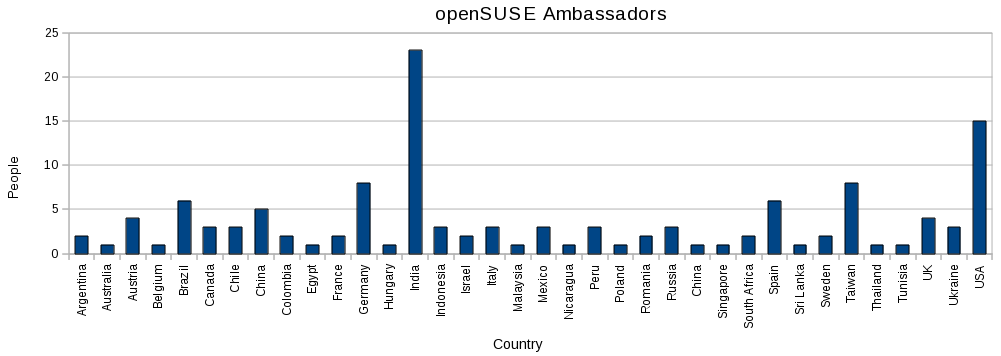
So, checking out the Ambassadors List, I got for South America:
- Brazil = 6.
- Chile = 3.
- Peru = 3.
- Argentina = 2.
- Colombia = 2.
Brazil is doing great here, doubling any other country’s Ambassadors number in the region. No doubt it’s not just users who are pushing Open Source out there but also their government and enterprises (example:Fisl), and I am glad openSUSE is a real choice for them. Compared to Europe, I believe statistical numbers are still OK for us  since the truth is that openSUSE is just ranked in the top five of the most popular Linux flavours in Chile, maybe it’s the same in other South America countries. So, Ambassadors for Europe (some countries only):
- Germany = 8.
- Spain = 6.
- Austria = 4.
- Italy = 3.
- France = 2.
As for North America, we have got:
- USA = 15.
- Canada = 3.
- Mexico = 3.
I even did a “quick and dirt” chart with OpenOffice’s Calc so you can have a graphical idea of our numbers around the world:
For more information, please, visit the openSUSE Ambassadors section.
Have a lot of fun!.

Tomboy Hits 1.0


It's been just over five years since Alex Graveley made the first commit to Tomboy CVS, unleashing a brilliantly simple note-taking application for people who just wanted to Get Stuff Done.


Tomboy Back In The Day (click for Alex's blog post)
Three years ago (right after I joined the project), Tomboy became a part of GNOME 2.16. It was about this time that Boyd Timothy joined the fun and became a co-maintainer with Alex. Much of the polish in Tomboy and many of the features you take for granted such as notebooks, synchronization, and bulleted lists appeared during his stewardship. After helping with sync, I was "promoted" to co-maintainer, too.
After Boyd and Calvin Gaisford (of Giver and Tasque fame) left to start their own company last year, I was left as the sole maintainer. I'm trying to do my part to build on the legacy left by Alex and Boyd. Fortunately for me, Tomboy seems to attract cool people like Chris Scobell, Stefan Schweizer, Benjamin Podszun, and dozens of others who have contributed major features and fixes.
One of the funny little things that tends to come up at Tomboy planning meetings is the version number. Tomboy's been around for five years now, and really it's been a pretty solid app for the majority of that history, especially once it became part of the GNOME desktop. So why is it versioned like some alpha product?
 Tomboy in your dock (click for full-screen shot)
Tomboy runs on every major operating system, is used by 50 kabillion people every day [citation needed], and even if we have more grand plans, Tomboy today really does help people Get Stuff Done.
So we're calling our new stable release 1.0, the first release of the 1.0.x stable series. The next big stable release will be 1.2, etc etc. I hope this arbitrary change will instill a sense of confidence in users, and maybe even get people thinking about what "Tomboy 2.0" might mean.
Here's what's new in Tomboy 1.0 since the 0.14.x stable releases:
-
WebSync add-in lets you synchronize your notes with the upcoming Tomboy Online web service, your own server running Snowy, or any other server implementing the new Tomboy Web REST API, which will soon include Ubuntu One and Midgard. Big thanks to Rodrigo Moya and Stuart Langridge from Canonical for their help on this.
-
NoteDirectoryWatcher add-in from Michael Fletcher (disabled by default) finally lets you edit your note files outside of Tomboy safely, even while it's running, opening the door for all sorts of ad-hoc sync solutions if you don't want to use a server.
- Underline add-in from Mark Wakim (disabled by default).
- Faster start-up.
-
UI improvements in note searching.
- More keyboard shortcuts.
- Loads of bug fixes.
- Updated documentation (a complete revamp is on the way for the GNOME 2.30 cycle).
- Notes and other files migrated to new standard directories.
I'm really excited about this release, because to me it represents a foundation. A lot of cruft has been cleaned up. Tomboy is leaner and meaner. Note and configuration files have moved to standard locations, making backups and upgrades better. Accessing those note files is now a less scary proposition. This is a good foundation on which we can build Tomboy's future.
With that in mind, here are some features I would love to tackle for Tomboy 1.2 if we can:
-
Automatic synchronization.
- More work on Snowy, Tomboy Online, and social features integrated right into Tomboy.
- Note sharing via Telepathy, and maybe even collaborative editing.
- A new innovative workflow for managing simple task lists (with integration points for EDS or Tasque wherever it makes sense).
- Customizable, themeable, simplified note UI.
- Rethinking notebooks and search.
- Better gnome-shell integration.
- Better Tomboy experience on Mac OS X.
- Additional memory and performance enhancements.
- Your ideas and patches!
Personally, I'm really inspired by GNOME 2.28's "Made to Share" slogan, so I expect that will be a running theme in Tomboy 1.2.
I'll make sure to announce when we pick a date and time for our roadmap planning meeting, which is when we will choose what features we really want to focus on this cycle.
You may have read that we now have an official PPA for Ubuntu users. This is all thanks to Alan Pope and Jorge Castro. Since the announcement of the PPA a few other people have joined the tomboy-packagers team so I'm looking forward to being able to provide instant gratification to Ubuntu users on any distro since Jaunty, whether they want the latest stable or the latest development release.
In openSUSE land, the GNOME team is working on a specific organization for repositories like this, but I have the packages ready in my home project, so if you want Tomboy 1.0.0 for openSUSE 11.1 or later (including SLED 11), you can get them here for now:

This post brought to you by the Tomboy Blogposter add-in.
Remote-Learner unveils
A little over two months ago, one of Moodles best partners announced the release of a suite of products called ELIS http://www.eschoolnews.com/tech-solutions/all-press-releases/index.cfm?i=60118 The products and principles of this organization seem oddly familiar. They support open source for schools, so does the openSUSE for Education project. They support a lower more reasonable TCO for Education Technology, so does the openSUSE for Education project. They really do a great job of supporting these ideals, so does the team from the openSUSE for Education. Thanks to both efforts open source Education Technology is becoming vastly superior choice.
.NET/Mono Code Camp: Registration is open
The agenda has also been published. It includes talks about Mono, MonoDevelop, mocking frameworks running on Mono, iPhone development (with MonoTouch), Moonlight, .NET to Linux portability, Mono.Addins and other stuff.


Fixes by pack of 12
 Important things first, just know that Ruben is no longer AWOL. He's even back to hacking mode, and working, together with Tigger, at adding image metadata support for images to taglib-sharp.
Now to the futile, I just released F-Spot 0.6.1.3 a few minutes ago. The main purpose of it was to fix the slideshow mode on gtk+ 2.18 (which we did) and as I was at releasing, I applied some pending patches from bugzilla, wrote some myself, and backported translations from master.
The change in the importing code is worth noticing. It no longer imports the files first to memory before writing them to disk. It's quite helpful now that most cameras can create video files bigger enough to fill your machine memory in less than a few minutes (at high bitrate, on HD resolution). It's only available if you have libgphoto2 >= 2.4 and doesn't work with the directory driver (used for memory cards e.g.). Marcus is working on a fix in gphoto2, so stay tuned.
If you ask about the screensaver, it still doesn't work with gtk+ 2.18 but works fine with gtk+ master, and will still work just fine with gtk+ 2.18.1 when it goes out.
That's it. Download it, build it, package it, enjoy it!

I'm too sexy for men's T-shirt
(obviously, this item is so popular that by now, it is available in America's shop only, being sold out from Europe's one for quite some time already).
Surprisingly, so did root.cz, the most popular Czech Linux and open-source e-zine:

(those folks went even further and offered those cute penguin motives also on ladies thongs, check out their shop :))
Unfortunately, this year's openSUSE conference organizing team either assumed that all the conference participants will be male, or (more likely) deliberately chose not to take female minority into account. Ladies tees were sadly not among the conference swag. So I said no, thanks, I already have a shelf full of Linux/opensource/tech conference T-shirts I can hardly wear, because they simply do not fit (those of you who happened to meet me at the conference know that I look drowned even in men's S size ;-) ). I see no point in handing them to friends/relatives either, after all, it was me, not them, who participated at the event, right?
It is a tiny little detail (compared to e.g. lack of wi-fi connection at the conference site), you may say, and you're actually right. But often it is a tiny little detail that can make you feel welcome and accepted in the community (and absence of which, on the contrary, can contribute to the feeling of being marginalized and invisible minority).
I don't believe this is all about money (and saving some cents on T-shirt print run). Some fraction of the T-shirt pool can well be a ladies model, those do not cost more. I also don't believe that majority of ladies tees would be left after the conference as participating ladies simply did not match organizing team estimate when it comes to the sizes. Come on, two years ago really cute ladies tees were handed out on SUSE Labs conference (even though only up to 5 of the participants were female) and they were gone in the first two days. Reason? Hackers simply took them home for their wives/girlfriends.
Imho, this is more about the least common denominator, minimalized effort and that sort of things. But - even if conference swag is just a cherry on the top of the cake, it can speak volumes. About how much you care about your community and how much you value users as individuals.
To conclude, instead of repeating obvious and anything that has been already said, read more on topic
- on Kathy Sierra's blog and
- on geekfeminism wiki
Evolution 2.28.0 released!!
Evolution team is happy and proud to announce the evolution 2.28.0 release. To give an overview of what the release provides,
• Google calendar will be available through Caldav interface by default
• Configurable date formats
• Selecting local ICal files as calendar sources
• Support for unmatched vfolder and creating vfolder using vfolders is added back.
• GroupWise conversation threading
• GroupWise meeting retract/resend
• Tons of bug fixes
As many would know already, we branched evolution early in order to get rid of bonobo. Am happy to see this from mbarnes!
We have already started working on the tasks identified for the 2.30. Here is the summary of those tasks,
• Bonobo less Evolution
• EDS DBus port
• Exchange MAPI Improvements
• Mailer async operations (with IMAPX)
• GNOME 3.0 Cleanup
• Migrate go-evolution wiki contents to lgo and gnome.org/projects/evolution
• Quick steps for writing evolution plugins
• Disk summary regressions on vfolder
If you would like to get involved in any of the above work or have some new ideas, we would be happy to guide. We need more people getting involved in Evolution development!
Some screen shots of the new features added,

Configurable date formats

Allow Local Ical files to be added as calendar sources
This is a special release for myself and mbarnes as we have taken the responsibility of maintainer-ship from this release.
Thanks to all the users, testers, developers, translators, bug masters, distributors and everyone involved in the project.

openSUSE Conference, Day 1
I'm just back in from the first day the openSUSE conference. The day started badly when I woke up in a cold sweat dreaming that OpenOffice ate my presentation (again), but it was still there when I resumed my laptop and so I biked the 5km into the Berufsförderungswerk Nuernberg, the technical college where the conference is a guest. A good number of people were in for Lenz Grimmer's keynote on virtual development teamwork, which was a relief, then I sat in for a bit of the openSUSE Weekly News talk by Sascha Manns. Running a news magazine is an important and demanding part of a project's internal and external communications and I'm grateful that Sascha and team put in the effort, and hope they get more contributors. Then I earwigged at the back of the GNOME team meeting, while Andy Wafaa demoed me the SUSE Goblin image. It's impressively polished and will give the Plasma netbook interface a tough act to follow.
Over lunch I mingled with openSUSE users and developers old and new, and a good number of KDE people including Frank, Alexandra, Danimo and Frederik who had made the journey to Nuernberg. We had a cross-desktop meeting afterwards to figure out how to improve the general openSUSE desktop experience. Following the recent decision to set a desktop choice in openSUSE, I feared there might be some tension, but it was all very amicable and constructive. I had to leave early to give my talk, 'The Future of openSUSE KDE', moved forward from the weekend. OpenOffice behaved, nothing crashed, and I gave my manifesto for producing the best desktop distribution with exemplary cooperation with upstream projects. And interspersed it with previews from openSUSE 11.2, so nobody fell asleep. KNetworkManager4 drew the most questions, and even managed to detect Danimo's phone on hotplug, something I'd never tested.
Finally we had a BoF session led by Cornelius to plan a KDE Showcase image for use at shows and by reviewers, which has a lot of potential, if also to be a lot of work.
Tonight we're unwinding at Joe's Bar, a refactoring of the Novell/SUSE office as a den of iniquity, hosted by our Community Manager, Joe 'Zonker' Brockmeier. Don't speak too loudly to me in the morning...
News from the F-Spotters

Some news, in no particular order:
F-Spot 0.6.1.2 was released a couple of minutes ago. It fixes db upgrade for the people who went in holidays in the far future. Now F-Spot can update a db with photos taken (or reported to be) after 2038. It also fixes a crash while running on gtk+ 2.14.
The LiveWebGallery extension is now merged into the main tree, and installable, from the Manage Extension dialog, on any F-spot > 0.6. The extension crashing on gtk+2.14 is part of the past too.
Ruben is MIA. Last time we heard from him, he was "in a park near a pond near a museum".
A new extension, allowing finer control over the BlackAndWhite conversion process is coming soon. It leverages the expensive CPU you paid big bucks for via Mono.Simd. Mandatory screenshot:

That's it for today.