
 notlocalhorst
openSUSE spokesperson/lizard/evangelist/coordinator
I probably could make here the longest title just naming everything we have so far as designation for the job 
So what is it about?
We want to have an official program to support local communities better. We already have some strong supporters which are doing an awesome job, now we need more of them. You might think of fedora ambassador or Ubuntu LoCo, but for a unique project like openSUSE we also should have a unique name. But of course it’s not all about the name, i posted yesterday a draft with more details and some open questions. We think that this program will help the project, and the people who are doing the job (without a name right now ), a lot.
Join the discussion at openSUSE-marketing!
Enlightenment LiveCD
Ladies and Gents!
Glad to announce the update of unofficial Enlightenment LiveCD based on OpenSUSE-11.0.
Download page
‘Welcome’ notes (PDF)
Please visit the download page to see the details and try the mirror provided by Yandex.ru – a leading Russian internet and technology company. We’ve got this mirror in September’08 because our server was loaded ‘over the top’. Please, read the Welcome.pdf before you pop the disk into the PC/Qemu/etc.
Here’s some download statistics data excluding the mirror and excluding the torrents:
| Month | Monthly Totals KBytes | Average shipped Qty of images |
| Jul 2008 | 2226994785 | 3625 |
| Aug 2008 | 1067698466 | 1655 |
| Sep 2008 | 33425784636 | 47884 |
| Total | 36720477887 | 53164 |
The data is slightly rounded/diminished, but tiny 50k from a single server is the result no one expected. Thank you very much!
All components of this LiveCD are available for the ordinary openSUSE Users. Some of our improvements/modifications are outlined in the ‘Welcome.pdf’. We’re cooking now the simple package to make the Enlightenment LiveCD with a ‘single click’. Anyone could install that package, read instructions, add the drivers/packages/components we had missed and “pull the trigger”. It means that you can add there the beloved NVIDIA drivers, remove OpenOffice, add more themes, wallpapers, games etc.
The brief changelog comparing to the old ‘release’:
- create_xconf service is modified and used instead of ‘traditional’ xdm to launch the GUI. If you decide to install the system to the disk – create_xconf will also help you there. A simple check of your video card/cards is added and ‘Sax2’ will be started on boot if your saved hardware configuration is altered (should we check the Monitor+Video Card configuration? should we modify the xdm service for better compatibility/integration?).
- fonts are displayed with 96.0 ‘standard’ DPI despite on selected/chosen screen resolutions. It’s easy to change this value if 66.0 DPI or 130.0 DPI is your favorite Xft setup but… 96.0 is the value which is used mostly .
- Enlightenment OBS repositories for openSUSE 10.2-11.0/Factory are updated to the current state. E-svn snapshot date is 20080924.
- custom kernel from Jan Engelhardt repository replaced the default one. Thanks!
- OpenOffice suite now uses the default/selected gtk-2.0 theme to display interface elements.
- Tk package is removed and aria2c lost the tk gui. BitTorrent client is added. Anyway aria2c is best when used in CLI.
- English thesaurus is removed from OpenOffice suite along with OpenOffice-Base. Sorry for the inconvenience caused.
- 23Oz theme for E17 and ETK is updated. Glowing scrollbars and sliders – useless feature but looks nice.
- sources of ATI fglrx drivers (without precompiled kernel module) are added, instruction for those who is not happy with radeon/ati opensource drivers are on the page 4 of Welcome.pdf
- several .desktop files are improved (thanks to the Ariszló)
- option to select the default login manager on first boot (‘Entrance‘ or ‘gdm‘) is added (though only ‘entrance’ works here).
- a lot of components are added to provide better support of various equipment ‘out-from-the-box’ (like webcams, eeepc and so on)
- other miscellaneous fixes and updates…
We will be glad to receive your feedback.
Acknowledgments:
Enlightenment Development Team and Enlightenment Community
OpenSUSE Build Service Team
OpenSUSE KIWI Team (schaefi, cyberorg, pzb, cgoncalves – THANKS!)
Stalwart, thanks for the hosting!
Packman Team
Novell
Jan Engelhardt
and all the others, who helped to make it (Engineers, Developers, Users, Maintainers…)
Thanks!
Regards,
SOAD team
How many Lizards does it takes…
… to change a flat tire?
The answer: 3
It’s been a while since the 3 oS Members from Nicaragua were planning to take a picture together, but for time, job and other complications we have been unable to do it.
But yesterday, caused perhaps for a bug in our kernels, the 3 of us gathered together outside Alex’s ex-office, after retrieving some promotional material from Novell at Alex’s place.
We started to talk about one of the Projects for Nicaragua and forgot completely about the picture. Moments laters and got into my car and DANG!, noticed the flat tire. Alex and Decks came and helped me to empty my car’s trunk when I noticed my camera. A bell rang inside my head and CLICK! A picture came out.
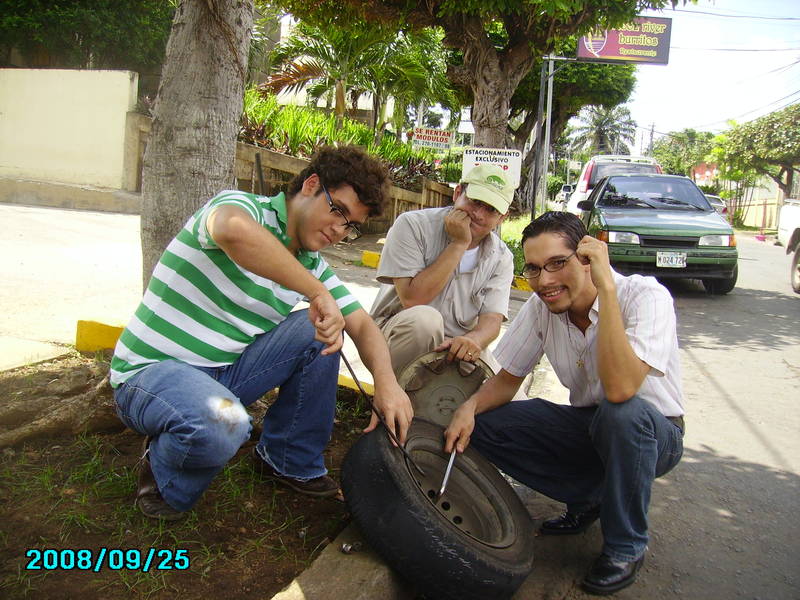
Not exactly the situation and posse we were thinking about… but it worked. :p
OpenSuSE Nicaragua in SFD 2008
On Sept. 20th, the Free Software Community in Nicaragua celebrated the “Software Freedom Day” at the “Universidad Centroamerica, UCA” Campus. The Nicaraguan OpenSuSE Community was there, supporting the event and promoting our favorite Linux Distribution.


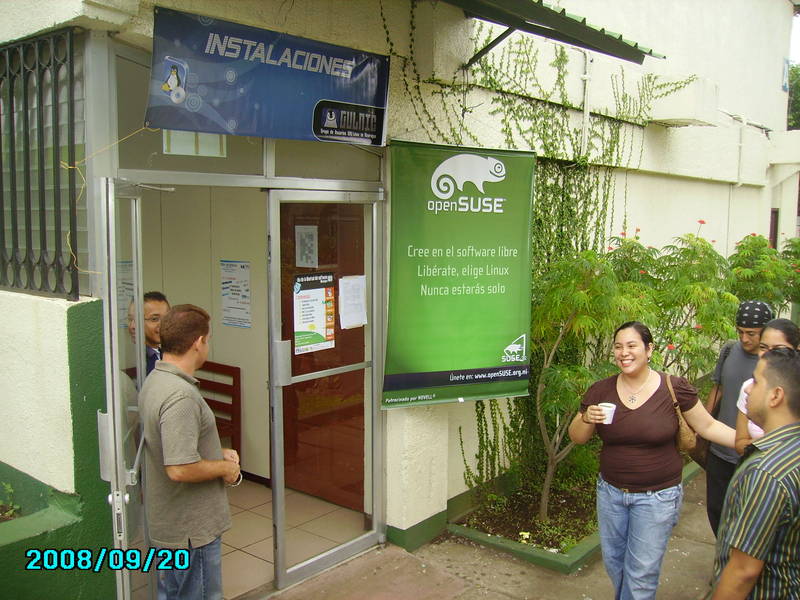
As a Member of the Nicaraguan OpenSuSE community and the Nicaraguan Amateur Astronomy Group, I’ve set up a small stand running Stellarium in my oS.11 Laptop.


After that, I conducted a small workshop for people interested in learning Stellarium.


That was a big day!
Software Management as a Service
A couple of days ago I finished my thesis with the topic mentioned above.
It describes the currently used package formats and software management systems within the Linux as also the proprietary world of Microsoft respectively Apple plus the possibilities to reduce those systems and tools to a common denominator.
The prototype of this service, which emerged within the scope of the thesis, consists of the following three parts:
- PackageKit, which acts as broker between CIM and the local software management system
- CIM, which provides the standardized data model and communication and a
- Web-UI, which is more or less only a proof of concept
As the Common Information Model (CIM) is a widespread and well used standard (even Microsoft occupies it with its WMI stuff), its models are used for a common data structure as also for the operating system independent communication.
For implementing a usable service, classes (data structures) for Package, Update and Repository was needed.
These classes are based, out of compatibility reasons, on the already existing WMI implementation of Microsoft. Hence, it is possible with one and the same client to list packages (products in Microsoft speech) and Updates of Linux as also Windows computers.
To connect this CIM-classes to the local software management system it was necessary to develop so called CIM-providers.
The implemented providers communicate with PackageKit and not with the available software management systems (like ZYpp in case of openSUSE) itself. This is beneficial as there is no need anymore to develop a provider for every single software management system. As soon as there is a backend for PackageKit of the specific software management system this service is automatically usable.
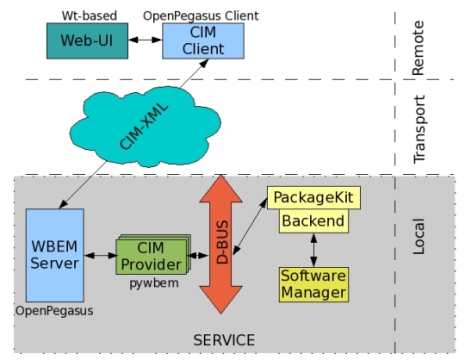
The prototype of the service is fully usable to list, install and remove packages and patches as also to list, disable and enable repositories for all Linux distributions provided by PackageKit.
So, if you are interested and the thesis is accepted and marked (hopefully good) by my examiners, let me know and you’ll get a copy of it (90 pages, english).
What should happen happen if I transplant a brain?
I’m currently involved in a discussion on factory about what should happen if I replace the graphics card, or when I move the hard disk from one machine to another one, with different hardware.
I wished SUSE did handle such transplants gracefully, maybe for the same reason I do not wish my 2CV back:
My first car was a Citroën 2CV.
On some summer day I did a very long autobahn trip with it and the engine got real hot as it was air cooled. When I finally had arrived in my home town late at night, I rolled down a long hill using the engine brake and at the end of hill at a red light I stopped the car — and oops: so did the engine…
No way I could get it working again 8( None of the normal 2CV tricks worked, playing with the choke or
anything.
So I called the ADAC (AAA in germany, for those abroad), and back in the days that meant going and finding a phone box and all, in the middle of the night.
And when the guy finally arrived, the car just simply started.
I was explained to better not use the engine brake after long trips, or to carefully play with the gas when I really stopped: because somehow, don’t ask me for details, in these circumstances the spark plugs could become ‘wet’, and after they had ‘dried’ again, all was just fine.
Was I really too dumb to use my car?
No.
The car had a construction problem. Any ADAC ‘angel’ knew it.
Common sense.
I, however didn’t. How should I? And for the first time ever, on this day at 2:30 in the morning I really, really hated this nice little car whose sound I still love.
Same goes for Linux and hardware support. With every single kernel update on 11.0 I had to re-tweak my wireless — and I even didn’t modify the hardware!
Now what happens if you take a working Linux install and replace some of the hardware, like the graphics card? Or even worse, you take the hard disk of the system and put it into another chassis, like I had to do with my laptop recently?
After such a brain transplant, the the brain needs to accommodate to the new environment. It needs to probe where it is now. It needs to be able to access the hard disk, interact with the user, connect to the network again.
However SUSE’s not really prepared for that yet: the initrd has the drivers it was created with last time, and that’s the ones needed for the hardware config at that time. Hopefully the disk is accessible with what you have there… Even if the kernel can access the disk, maybe some key drivers for the new hardware aren’t installed on the disk, like graphics, or network.
Obviously you can’t make it work under all circumstances, the point is: As of today, it won’t even work under many straightforward circumstances. So you want to change hardware? Better know exactly what you’re doing and don’t expect much help from what’s on your disk.
This brings me back to where I started this blog:
The factory thread had started with a plain vanilla feature comparison and soon got into a strong discussion whether or not Linux should handle brain transplants and hardware replacements gracefully at all, in a way that works for the simple minded, straightforward Linux user, in contrast to him who knows his ways around run level 3 and sax2 to reanimate X.
And I believe choking on a wet spark plug isn’t cool any more. Linux should just diagnose and repair itself, or at least tell clearly how to proceede.
Not only because this would make mass deployment and fast installation a real charm, with a single image to boot and run on many different hardware configurations.
But also because people just do transplant computer parts and brains these days, and they want their Linux to survive that with a smile :).
 Member
Fog
Fall has come to Nuernberg, evident by this mornings fog.
I was on the SUSE Labs Conference in the Czech Republic for a week, and on the SUSE.cz organized social event before... First time climbing up a tree with safety (and then jumping down from it in the end). :)
I will be flying to WineConf 2008 in Minneapolis/St. Paul over the next weekend, lets see what weather they have over there.
Work continues as usual. Life too.
Opensuse-Nicaragua in Software Freedom Day
in the community of opensuse-Nicaragua, we have organized together with NI-LUG (Linux user group for Nicaragua) the Software freedom day, an event in which we celebrate the freedoms of free software, and we know the alternative to free we have the unique program, in which case I am proud to say that in the area of facilities were installed 17 machines with 11.0 opensuse already acada a promoDVD them a gift, like all people asking q arrived on opensuse, they were promoDVD a gift.
There was an area of sales of T-shirts, where we make shirts for sale along with the shirts and gave a promoDVD.
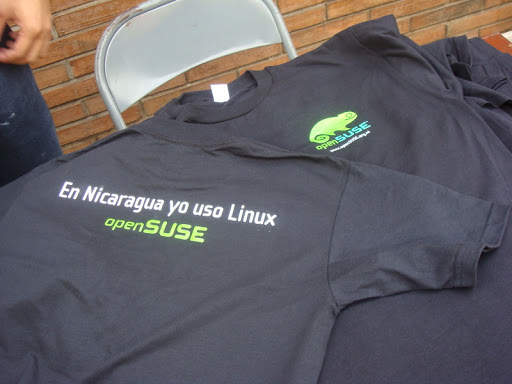

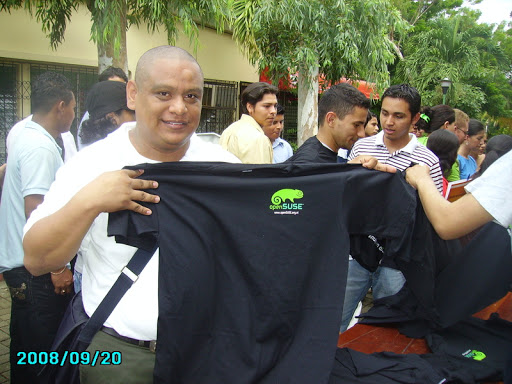
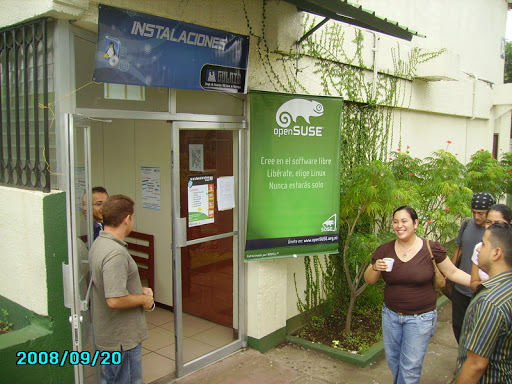
Software Freedom Day was a success!
Introductions
I recently became an openSUSE member and good manners dictate that I introduce myself.
My name is Johan Kotze and I work as a pre-sales engineer for Novell. I live in Paarl, South Africa – a beautiful town in the Cape winelands. I am married and have a 5 year old daugther (yes she does have her daddy wrapped around her little finger )
Like all geeks I like to play with new stuff, so my primary contribution to openSUSE is to try out all the new releases and file bug reports. I run openSUSE on all of my machines at work and at home and spread the word whenever I can.
My other interests include programming (pascal and C#) and bird watching (the feathered kind) and traveling. I’ll gladly give advice to anyone wanting travel info on Souther Africa.
I am currently running openSUSE 11 with KDE 4.1 on my primary laptop (a Lenovo T61p). It took me a while to figure out that you to have to click on the little kidney thing in the right corner before you can move plasmoids around on the taskbar.
I will try (no promises) to blog about my experiences with openSUSE and other open source software.
My switch from Windows to Linux
In March 2006 I lost my patience with Microsoft Windows XP Prof. which I’d bought together with a hardware upgrade on my older computer. I had allready been using StarOffice 5.2/OpenOffice for letters and spreadsheets for 6 years and Firefox had been my preferred webbrowser for some years after 5 to 6 months using Netscape Navigator.
At that time I had only heard a little about Linux, and when I googled I only found sites advertising installation CD’s. Not really what i needed.
One day though I saw an article from an experience from a company, who had switched over to SuSE Linux 10.0. The result was, that the majority of emploiees in that particular company hardly noticed any difference from what they were used to. And some even thought it to be easier. Encouraging article that woke up my curiousity – I wanted to learn more.
Several searches later I had learned about the danish Linux forums and I discovered the danish guide written and maintained by Martin Schlander (cb400f). The guide described how to download and burn .iso images etc. Five (5) CD’s was it, which made me wonder, whatever that were all about. Never the less I downloaded, burned, and backed up my files on my computer. Through my 12 years Windows experience I had learned to allways partition my harddisk and keep important files on the D:-drive.
I were ready to jump into it.
What a surprise. I were used to spend an entire day installing first the OS with a couple of reboots. Then install drivers – reboots – programmes – reboots same-old-story-etc. etc. It were all don in only 40 minutes including upgrades through my wireless router. All my hardware (except from my webcam) worked out-of-the-box. Installing files needed for mp3-files and to be able to watch DVD’s etc. was described in the guide.
Deeply impressed I were ready to learn more. Not only about Linux but also about the community. I subscribed to some forums and newsletters and started my voyage into a totally different world.
To be continued…