
 Member
 IonutVan
Acronis 10 Personal for FREE
Acronis is giving away for download copies of Acronis True Image 10 Personal Edition because a new version is out. That means you get whole disk image backups from a friendly interface. You may use free utility to clone your hard drive but it may not have many features as compared to paid hard drive cloning utility like Acronis True Image which is a commercial disk cloning utility and costs around \$50 per license. Download Acronis True Image 10 Personal Edition for Free with Serial Key:
- Go acronis.co.uk website (http://www.acronis.co.uk/mag/ati10pe)
- Fill up the form by entering your name and email address
- You will receive an email, so, click on Confirmation Link in your inbox
Once you have confirmed your email, you will receive a serial number of Acronis True Image 10 Personal Edition in your inbox and you can download the software from your account on Acronis website.
Now, you have a good piece of software :)
Combining pdf files in Linux/Unix
Just to show a few examples how to combine pdf files. Let us assume we have three pdf files and now we need to combine them:
- gs -dNOPAUSE -sDEVICE=pdfwrite -sOUTPUTFILE=finalcombinedpdf.pdf -dBATCH 1.pdf 2.pdf 3.pdf
- joinpdf myfinalFile.pdf file1.pdf file2.pdf file3.pdf
- pdfmeld file1.pdf, file2.pdf, file3.pdf resultcombinedfile.pdf
Some of the other tools available for merging PDF files include pfdtk, Multivalent, and pdcat.
* Ghostscript - A popular tool for
viewing Postscript and PDF documents
* joinPDF - A simple, yet
effective, PDF merging tool
* pdfmeld - A powerful tool
for combining PDF files
Hey Planet SUSE!!
This is my first post there, I'm a member of the GNOME Team trying to do the best i know, in my free time, to improve the GNOME Desktop.
I don't work for Novell i'm just having some fun contributing for GNOME.
Some things about me here.
Linking Buildservice packages with exact revisions
During the “cleanup” of the HP-Education repository, I used a very interesting feature of the openSUSE Build Service: linking against revisions.
Sometimes, you want to patch a package from another repository to build with special features enabled or disabled. The Build Service allows you to link the package from this other repository (and avoid wasting space by duplicating the sources) and add your patches.
Now think about a patch against a special version of a package – and you know that you don’t want a package with a newer version in your repository for a foreseeable time. But if you use the plain link command of the Build Service, the linked package in your repository will get updated if the original package in the original project is updated.
Luckily, the buildservice allows you to link against a “frozen” state of a package: it’s source-revision. People already knowing any revision control systems like Subversion also know that the revision of a source is increased each time, a new change is submitted. And that’s what we need now: link against a special revision of the package from the other repository and apply our patch against it. The webclient currently doesn’t support such special features, but with osc it’s very easy.
First, check the needed revision in the original project:
cd Education/MultiplicationStation

osc info
Project name: Education

Package name: MultiplicationStation

Path: /home/data/SVN/Education/MultiplicationStation

API URL: https://api.opensuse.org

Source URL: https://api.opensuse.org/source/Education/MultiplicationStation

srcmd5: 484c329659d613e3bbdd515a1a8d1099

Revision: 10

Link info: None
Now create a link with this (or any further) revision to your new project:
osc linkpac -r 10 Education MultiplicationStation isv:hp:education
..and in the resulting “_link” file in your new project, you’ll find:
<link project="Education" package="MultiplicationStation" rev="10">

<patches>

<!-- <apply name="patch" /> -->

<!-- <topadd>%define build_with_feature_x 1</topadd> -->

</patches>

</link>
So your linked package will always use the source revision 10 of the original project. Let’s start applying patches…

OSF Status Report #2
In January 2009, the openSUSE forums achieved the highest user activity ever since the launch in June 2008. The user activity measures the number of individual visits and is therefore an indicator for the vitality of the openSUSE forums.
Up to the 31st of January 2009, we achieved a membership of 21.322 (+2.550) members, 21.073 (+2.929) threads and 122.695 (+17.492) posts. The number in brackets shows the increase of the corresponding measurement compared to the last snapshot taken on the 31st of December 2008. Most users ever online still was 7.771 on the 2nd of December 2008.
The following diagram shows the monthly development of new user registrations, user activity, new threads and new posts since the launch in June 2008. We experienced 15.104 individual visits to the openSUSE forums in January 2009, which is an increase of 14% compared to December 2008 and is even 25% above average.

Kudos to our Top5 posters during January 2009
- caf4926 – 575
- ken_yap – 455
- oldcpu – 439
- Malcolm – 405
- Axeia – 405
Thanks as usual for making the openSUSE forums a worthwhile place to be.
Any comments about the OSF status reports are much appreciated by the openSUSE forums team.
openSUSE-GNOME Team Meeting Today (Timeshift) – 05 FEB 2009 2200 UTC
Please join us for the GNOME Team meeting in #openSUSE-GNOME on
irc.freenode.net.
The current agenda can be found here:
http://en.opensuse.org/GNOME/Meetings/20090205
For time conversions, please see:
http://www.timeanddate.com/worldclock/fixedtime.html?day=22&month=1&year=2009&hour=22&min=0&sec=0&p1=0
Thanks!
Thats how I roll: Installing Ruby on Rails on openSUSE
There’s been some discussion about Rails on openSUSE recently, so I thought I’d add to my Ruby articles with a Rails installation guide.
Getting started with Rails on openSUSE is a breeze. In this particular article, I’ll quickly outline installation and startup of Rails on openSUSE 11.1. You’ll need to install Ruby, ruby-sqlite, and ruby gems. I’ve detailed these in my previous articles on ruby.
This is far easier than you might expect, so lets get started…
Use ruby gems to install Rails:
sudo gem install rails
That’s it! After some work, Rails should be all installed and ready to go. You can test it out by creating a new project:
rails foobar
And running the server script, then visit http://localhost:3000 in your web browser to verify that all is well:
cd foobar && ruby script/server
Note that this installation will use sqlite3 as it’s database by default if you’ve been following my other tutorials. There’s information about getting Rails to work with MySQL (and other databases/platforms) over at the Rails Wiki: http://wiki.rubyonrails.org/rails/pages/HowtosInstallation
openSUSE Packaging Day *running*
Vincent mentioned us (me, Magnus and Suman) but he is also doing an excelent working reviewing packages and upstreaming lot's of old patches.
After today (if everything went as expected) i'm going to make a SUSE Studio image so you can boot it as a livecd and VMware appliance. So you can test GNOME 2.25.90 on your desktop.
Come join us at #opensuse-gnome @ irc.freenode.net
PS: You can even get there and just say "Hi" or "How GNOME is cool!"
status update and FOSDEM
GPhoto hacking wise not much work done.
Oh, and I bought a Nikon D90 (to upgrade the D70s) and a 50mm/1.8 lens (for better photos). Hopefully better photos will happen. :)
I will be on FOSDEM 2009 on the weekend, hold a talk on Wine and hang around the openSUSE booth. If you have cameras able to remote control drop by for debugging :)
Application Icons in the Package Selector
Desktop files contain a lot of information about KDE/Gnome/X11 applications (e.g. names, icons).
Displaying this data in the package selector allows to provide a more detailed package description. The user can easily see which applications are included in an installed package.
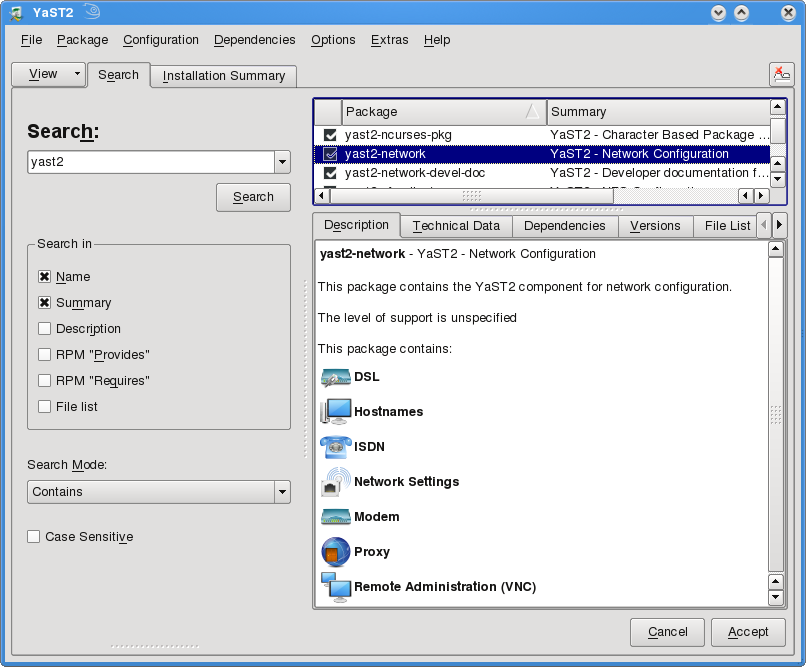
Running these applications via mouse click is technically possible, but unfortunately security concerns don’t allow it. Please let me know if you have an idea how to solve this issue.