
 Member
 _Marcus_
libgphoto2 2.4.4 released!
So get it while it is hot. :)
- Improved Canon and Nikon remote capture, lots more to configure.
- Lots of bugfixes in the ptp driver.
- Faster startup in the ptp driver (but not as fast as it should be able to get).
And last but not least, translation updated, so you can say:
"Фотоаппарат не обнаружен" or "无法检测到任何相机" or "Impossible de détecter aucun appareil" or "Konnte keine Kamera finden", which hopefully all mean something like "Could not detect any camera".
And after 1 hour of uploading and updating news sites, I go to bed now. :)
Novell Teaming on SLES
As per the request of Andrew Wafaa, I thought I’d set up a quick guide to how I got teaming running on SLES. The documentation for Teaming on the administrative end was relatively sparse, but the installation guide was sufficient for most purposes.
Read on to learn more about Teaming and SLES…
Documentation
Most of the Teaming documentation can be found here: http://www.novell.com/documentation/team_plus_conf/
Prerequisites
- SLES (our server platform)
- OES2 (not entirely important, but it knocks out a lot of the pre-reqs and gives you LDAP support if you have eDirectory running)
- Teaming Licenses (a “starter pack” of 20 free licenses is available, contact your Novell vendor for more information)
- I’m assuming you’re running the setup from a Linux box, but this isn’t 100% necessary
Preparing your installation
There are a few things you need to do before getting started. First being to install mysql:
# zypper in mysql mysql-client mysql-shared perl-DBD-mysql perl-DBI perl-Data-ShowTable libmysqlclient-devel
# chkconfig –add mysql
# /etc/init.d/mysql start
# mysql_secure_installation
Next, you’ll need to edit your /etc/my.cnf to change the default character set support. Add the following lines to /etcmy.cnf:
[mysqld]
character_set_server = utf8
[client]
default_character_set = utf8
Additionally, you’ll need to increase your open file limits in /etc/security/limits.conf:
- hard nofile 65535
- soft nofile 4096
Installation
I like to run everything from a single location, so to kick things off, I created the directory ‘/incoming’. Once there, you’ll need to download your copy of Teaming and extract it into this directory.
Once you’ve gotten everything extracted, download your license file and copy it to the same directory, but make sure that you rename it to “license-key.xml”. The Teaming installer will complain to no end if it’s unable to find this exact file in the install root.
Next, you’ll need to make the installer executable:
# cd /incoming && chmod 755 installer-liferay.linux
Now it’s time to run the installer. The installer comes as a GUI package, but can be run via a text interface as well. If you’re ssh’ing into your server to set up Teaming, you’ll want to forward X to allow the GUI to open (ssh -X -C user@server.com). Otherwise, use the ‘-console’ knob to initiate the text based installer.
# ./installer-liferay.linux
-or-
# ./installer-liferay.linux -console
I recommend choosing advanced options for install as it allows for greater flexibility in options. Once you’ve followed through the installation steps (note, I installed mine copy into /opt/icecore), liferay/Teaming should be successfully installed. Now you’ll need to start the server:
# /opt/icecore/liferay-portal-tomcat-5.5-jdk5-4.3.0/bin/icecore start
To ensure that Teaming starts on boot, issue the following commands:
# cp /opt/icecore/liferay-portal-tomcat-5.5-jdk5-4.3.0/bin/icecore /etc/init.d
# chkconfig –add icecore
After that, you should be able to start, stop, and restart ‘icecore’ using the /etc/init.d/icecore script.
At this point, Teaming should be up and running. To access it and get started, open your browser and navigate to http://yourserver.com:8080 and log in as user admin with the password ‘admin’ (no quotes).
Once logged in, you’ll need to pull the administrative modules down to your view by selecting the ‘Add Content’ option in the upper right hand corner. I like to use the shotgun method and add all of the administrative modules for my admin user.
So there you have it, a fresh Teaming install. Enjoy!
Re: The Gtk+ File Chooser Dialog on openSUSE 11.1
It seems the fix already went to updates (btw i recommend enabling 11.1-test updates) because the openSUSE people is taking a long time to get updates pushed from developers, who already fixed lots of bugs.
So grab the fixed packages from federico home.
Voi lá!
Brasero 0.9.1 Released!!
Main highlight is the new libbrasero-media which results from the splitting brasero
Some more work was done to make brasero work with other apps like totem, rhythmbox and sound-juicer
Nautilus extension was updated (new hint, uses libbrasero-media).
+ some unreported bugs fixed
Reported bugs fixed:
#566721 – Wrong LDFLAGS introduced into BRASERO_*_LIBS
#567582 – Fails to burn a DVD iso
#561451 – Cannot burn CDs with brasero
#564748 – Brasero fails to burn DVDs
Updated translations:
* es.po: Jorge Gonzalez <jorgegonz@svn.gnome.org>
* fi.po: Ilkka Tuohela <hile@iki.fi>
* de.po: Mario Blättermann <mariobl@svn.gnome.org>
* ca.po: Updated Catalan translation by Joan Duran.
* fr.po: Claude Paroz <claude@2xlibre.net>
* zh_CN.po: 甘露(Gan Lu) <rhythm.gan@gmail.com>
* nb.po: Kjartan Maraas <kmaraas@gnome.org>
* sv.po: Daniel Nylander <po@danielnylander.se>
* it.po: Updated Italian translation by Milo Casagrande.
* pt_BR.po: Updated Brazilian Portuguese translation. Contributed by César Veiga.
* hu.po: Gabor Kelemen <kelemeng@gnome.hu>.
* da.po: Updated Danish translation by Mads Lundby
Thanks to all the people who contributed to this release through patches, translations, advices, artwork, bug reports.
Homepage: http://www.gnome.org/projects/brasero
Please report bugs to: http://bugzilla.gnome.org/browse.cgi?product=brasero
Mailing List for User and Developer discussion: brasero-list@gnome.org
Svn Repository: http://svn.gnome.org/viewcvs/brasero/
Thanks to all the people who contributed to this release through patches, translation, advices, artwork, bug reports.
PS: For the next release, since Brasero got accepted on Gnome Desktop platform for 2.26, Brasero versioning will be like other GNOME modules.
I'll blog about the inclusion later.
Graph of Storage Devices
With openSUSE 11.1 on the road we developers can use some time for new ideas. One idea on my mind for month was to show the dependencies of storage devices in a graph. Using graphviz and QGraphicsScene a first version was running within few days.
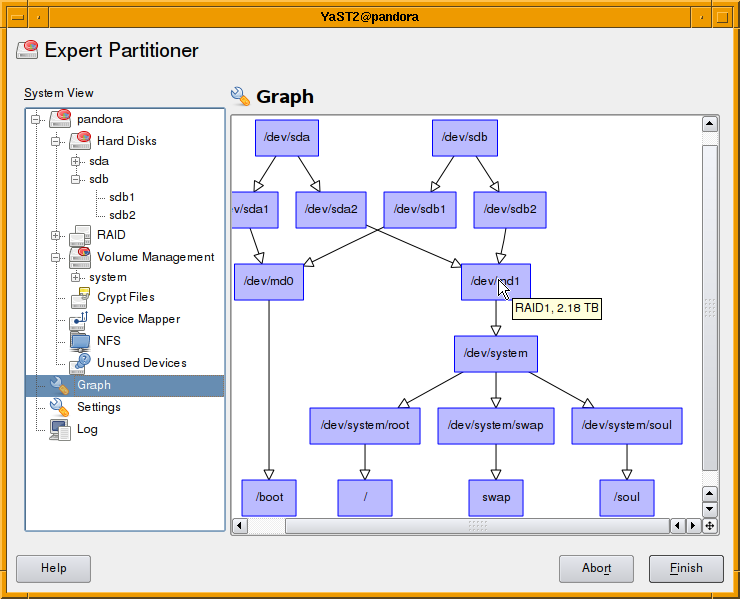
It’s far from finished. Some items still missing are:
- Use different shapes and colors for different devices types.
- Some basic user-interaction.
Will be available in Factory within the next weeks. Further improvements are welcome.
Modding the openSUSE flashlight

The boxed version of openSUSE 11.1 comes bundled with a LED-flashlight. Nice black and sturdy aluminum, Modern design with 9 white LEDs, no old-fashioned bulb that would produce more heat than illumination. Not flimsy, not heavy, just practical and quite bright. Batteries included. Exactly what I like.
But alas, this high-tech-toy is not perfect. The LEDs produce a strange unnatural light, which makes people look really sick. It gives a bluish-greenish tint to everything. This I don’t like. Okay, it is state of the art with regard to white LEDs, so this is no real reason to complain. Still, it leaves room for improvement.
Let us adjust the color of the light, so that objects look more natural. This posting explains you how to do it in 3 easy (or 4 not so easy) steps.
1 Disassembly
Unscrew the flashlight at the front end. Looking into the cap, you see a
printed circuit board (PCB) tucked down by a metal sheet ring.
I used a pair of good and pointed pliers to bite a notch in the ring to make it collapse. Then it can be pulled out easily. The PCB follows.
2 Reverse engineering
(This is the not so easy step. You can skip it. Step 3 will tell you right away
what you need.)
Inspecting the PCB, I find no resistors there, all LEDs are in parallel and are directly connect to the switch and battery pack. The battery pack provides 3×1.5 = 4.5 Volts — this is a bit too much for any LEDs. Blue and white ones have higheer voltages than other colors, but no datasheet I find for reference goes beyond 3.1V for white or 3.4V for blue. An Ohmmeter tells us, that the push-button switch at the back is only a switch, no resistors there. To see
what is really going on, we remove one of the LEDs, and solder a short length of thin two-wire cable in its place.
We also solder a 1cm piece of flexible wire onto one of the outer pads of the PCB to make contact with the housing. With this, we can reassemble the flashlight without metal ring and front glass, pulling the wires through the now vacant opening in the reflector.
Switching on, we can measure 3.5V at the wires. So all the LEDs in parallel are strong enough to pull down the voltage to an almost sane value, exploiting the internal resistance of those cheap AAA cells. Good.
I test one of my own white LEDs at the wires. It draws 35mA, which is above the nominal 20mA, but it seems to survive. Good. It is definitly brighter than the original LED, which only drew 18mA. Mine also has a larger viewing angle.
With this information, we can estimate that the original LEDs are rated ca. 2000-3000mcd, 3.3V, 15mA, and have ca. 12° viewing angle.
Now let us try to mix a more natural white.
A true white light radiates throughout the entire color spectrum. The human eye can adapt quite well to variations here. Covering a wide spectrum is important. Covering it evenly and without gaps is not.
For judging color quality, I collected a few photos, paintings, magazines, books and several other colorful objects and a white sheet of paper on my desk. You may use different objects. The idea is to compare colors under several lighting conditions. First we study colors in daylight, then with artificial light, and finally with an old fashioned flashlight (with a light bulb).
Now we test our flashlight and several different LEDs. We hold each LED in
parallel to the flashlight, and illuminate the objects and the piece of paper. Covering the exta LED with a finger is a fast way to see what kind of difference we may get.
The original impression was blue-ish. So let us start with yellow, the complementary color of blue.
First, we solder a yellow LED 10000mcd with an estimated 100 Ohm resistor to the wires. In my case it was not much effect. Doing some math, we find that we can risk a 47 Ohm resistor. Better, but red objects are still much to dark.
Next we test a red LED 12000mcd with 47 Ohm. Its viewing angle is wider and
the red was too strong for me. Back to 100 Ohm. Colors are quite good, but everything has a pink-ish touch, when compared to artificial light.
Finally, we try an orange LED 8000mcd with 47 Ohm. that looks quite good to me. Your results may vary, depending on the exact type of LEDs you are using.
This LED has a nominal voltage of 2.0V and current of 20mA, so the nominal resistor value should be (3.5V-2.0V)*0.020mA = 75 Ohm. Okay, It survived with 45 Ohms already, so we can try to lower the value a bit more (if we have one to spare). Let us try 30 Ohm for 5 minutes.
It survives and does not get too hot. The colors are quite nice, although the beam has an orange halo due to the wider viewing angle of the new LED.
We can cure this by replacing one (or a few) of the other LEDs with stronger white LEDs with the same 20° viewing angle as the orange LED has.
I also noted that shadows had green and orange edges, as I was holding my orange LED next to the white LEDs. To avoid these colorful shadows, we should place the orange LED in the center of the others. To reduce the halo, we apply at least one new white LED.
Now we have a plan.
3 Modding
Goal:
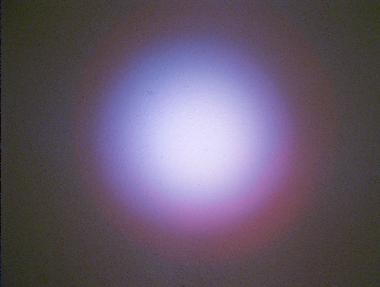
Have blue counteracted by sufficient orange. We may not get a perfectly balanced white but that does not matter.
Material:
- One orange LED 4000-8000mcd, 20° viewing angle. 600-610nm, 2.0V (e.g. Art Nr. 15601 or 13601 from www.leds.de)
- A small 30 Ohm resistor, smd-version if you dare.
- Optionally one (or more) white LED(s) ca 7000mcd, 20° viewing angle, 3.1V (e.g. Art Nr. 15005 from www.leds.de)
All in all ca. 0.50 EUR. (Or ca. 2 EUR if you want to replace all white LEDs too.)
Procedure:
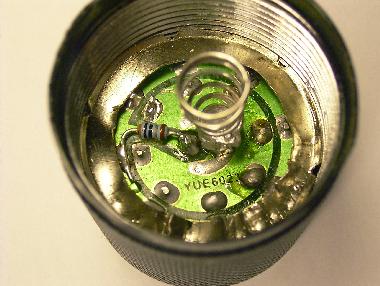
- Remove the spring from the center pin by heating it with a soldering iron.
- Remove the center LED by heating both pins.
- Use a pointed knive to cut a gap into the circuit path leading from edge to center. Do not cut into your fingers. (Yes they are softer than the copper, but still, don’t do that.)
- Solder the 30 Ohm resistor across the gap. (Again, solder the copper, not your fingers, even if they have cuts by now.)
- Replace the center LED with the orange LED. The flat side (shorter wire) faces towards the resistor.
- Optionally replace some of the other LEDs bright white LEDs. The flat side
(shorter wire) faces outwards. - Solder the spring back in place, make sure it does not touch the other center LED pin, where the resistor is.
4 Re-Assembly
Take out the plastic glass from the cap, clean it. Put it back.
Fit the plastic reflector over the LEDs, this assembly into the cap.
Bring the metal ring back into shape. Maybe repair the ring by soldering.
Ideally, it snaps into the threading and can be screwed downwards.
If not, push it down onto the PCB using a screwdriver.
The ring should hold the PCB tight, we need good electrical contact
between the PCB and the housing.
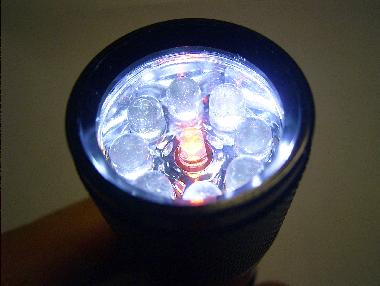
Test your flashlight.
Was it worth it?
Saturday evening
What I want to mention is however that on the way back there were 3 young men sitting beside me in the bus who wanted me to take along into the nightlife of Nuernberg ... Age around 20ish. To places like Schmelztiegel and WON (World of Nightlive, a disco), both having visitors of average age of 18 or less ... Well guys, sorry to disappoint you, but I am not just tired from the day, I also am nearly double this age. (It is a bit sad though, since I would enjoy saturday nightlive occasionly ... but ... well.)
Work heavy week as usual, notably we brainstormed enhancements for the GPG key import dialog when adding new repositories to YaST2. It is difficult to secure and it is difficult to make it right, so that users can do good choices (and not just click "OK" to every question). We did not find an all dancing and singing solution, but hopefully some improvements can be done.
Wine 1.1.13 released, some more GPHOTO Nikon property additions and fixes done.
About memory ownership in SWIG and Python
About libyui and libyui-bindings
libyui-bindings provides SWIG based bindings for Ruby, Python and Perl to access libyui functionality. libyui is the YaST user interface library, allowing to write dialogs in a generic way so they can be displayed in text (ncurses) or graphical (Qt) environments.Reference counting
The core of the problem is libyui relying on YaST data structures. These data structures implement reference counting, so one doesn't have to release allocated memory explicitly. That all fine, as long as you use YaST's YCP programming language to code dialogs. But coding YCP is not necessarily something a lot of developers are looking forward to.Thats where libyui-bindings enter stage and remove the YCP restriction. I've blogged about it ealier and Jan-Simon was especially active in providing lot of Python examples.
Competing on memory ownership
Now Python is a nice scripting language but has the bad habit of doing reference counting itself. This makes coding Python extensions in C quite awkward and clashes with libyui. Speaking of bad habits, libyui also has one - claiming ownership of memory passed as pointers to some functions.Fun starts when freeing memory. libyui and Python enter a nasty fight which Linux ends with a SIGSEGV. Jan-Simon reported this as a bug and provided a nice test case.
Swig typemaps
After some googling and reading the SWIG documentation a couple of times, SWIGs DISOWN typemap was the solution. Documentation for this is sparse and well hidden within the Chicken language chapter. Grrr.SWIG typemaps apply to function parameters and match the parameter type and name. One cannot specify per-function typemaps, only per-parameter. Fixing the bug required libyui to explicitly name parameters claiming ownership of memory. All such parameters within the libyui API are now ending with _disown.
Solving the case
Applying the typemap is done using the %apply directive:
%apply SWIGTYPE *DISOWN { YItem *item_disown };
%apply SWIGTYPE *DISOWN { YEvent *event_disown };
%apply SWIGTYPE *DISOWN { YTableCell *cell_disown };
%apply SWIGTYPE *DISOWN { YWidgetID *newId_disown };
%apply SWIGTYPE *DISOWN { YTableHeader *header_disown };
%apply SWIGTYPE *DISOWN { YTableHeader *header_disown };
%apply SWIGTYPE *DISOWN { YWidget *parent_disown };
Now Python gives up ownership for structures passed through a _disown parameter to libyui and all libyui Python examples run without coredumps. Case closed.
KDE Four Live 1.1.96
KDE Project:
A new version of the KDE Four Live CD with KDE 4.2 RC 1 packages is up. </twitter>

Community Content Required
At the launch of 11.0 there were several little projects started by the community these projects were actually really helpful and we would like to think contributed to the uptake and success of the 11.0 release. Now I will admit that I can’t substantiate this with any hard (or soft) facts, but none the less that’s our gut feeling 
So what are the projects in question? Well they are: Helping Hands, openSUSE-Tutiorials and openSUSE TV. Funny I can hear some people moaning and groaning that these are GNOME Team projects, WRONG!! These projects have indeed been started by members of the GNOME Team, but they are for the whole distribution and project. I know suseROCKs has tried in the past to try and get some contributions from other teams, so don’t blame the GNOME Team for the content blame yourselves.
Actually on second thought, drop the whole blame game thing. A better solution is to start a fresh and keep up the momentum. I am basically asking members of the openSUSE Community (that means ALL of you!) to step up and take the wild Geeko by the reigns and help teach all those non-believers that it really is easy to use, has some brilliant features (easily found and hidden), and generally a great distro and project to use and be involved in.
So if we take each item in turn:
1) Helping Hands: HH (as we affectionately call it) is aimed at giving an insight into certain aspects of the distro that a user may come across or wish to use. In the past we have had sessions on Inkscape, Evolution, Banshee, general GNOME usage and other applications. We are hoping to have one on packaging RPMs and using the Build Service in the not so distant future. We would love to see members of the KDE community enlighten us (yes some of the GNOME users are scared of things that begin with K) about things that are going on in there, I know there are loads of great things I’m just really knowledgeable in them or even know 25% of them. We would also like members of XFCE and any other desktop environment that’s out there to do the same. You can focus on a specific application, a suite of applications or anything that will be helpful to users. If possible get someone from upstream join in, it makes things much more interesting and actually opens eyes on both sides of the fence as to what is going on. If you are interested (why wouldn’t you be?) and are willing to help out (you know you want to) then please let wither myself (FunkyPenguin) or suseROCKs know on IRC, we hang out in most of the openSUSE channels.
2) openSUSE-Tutiorials: oS-T is aimed at being a repository of insights, tips & tricks etc on applications and other things with the distro. Why not just use the Wiki? Well in a nutshell there are times when the Wiki just isn’t suited, and this way topics can be easily grouped so are ultimately easily searchable. Not only by the big search engines, but also by any user who visits the site. Content is moderated prior to being published, and before you start screaming of a conspiracy to silence the truth it is actually to try and ensure that those items published are actually of good quality and will genuinely be of use. For more info on publishing something for oS-T then please ask either decriptor or suseROCKs on IRC (again they loiter in most channels).
3) openSUSE TV: oS TV is aimed at providing a medium to show all the wonderous videos that we have on and about openSUSE. These don’t have to be any of the official videos that are done at conferences but can also include screencasts, interviews and almost any other form of video that we have about openSUSE (both distro and project). The channel is part of the blip.tv service and as such is aimed at all platforms, not just Linux. We want to try and grow our user base and community which means looking at the competing Operating Systems. I am hoping to do a series of interviews at the upcoming FOSDEM show similar to those that I did in Nurenberg for Hack Week III; I have pencilled in the title of “Face to Face @ FOSDEM’09”. So if you’re going to be at the event (try and make it if you can because it is really a great event), and you have a specific topic you’d like to speak about then let me know. I would love to get more content on there, screencast would be great as would videos from LUG meetings where openSUSE is used/showcased etc. Remember oS TV is about the community, for the community, by the community. So your input is needed!
There is no reason why you can’t do an item on all three of the above and have them linked. For an example you could do a HH item on the KDE desktop (general first look etc), you could also do a screencast of that item and have the screencast posted to oS TV and to finish it up you could have an oS-T article on tuning your desktop to get the best out of it. If you feel that any of these are wrong/bad/need improving/$COMMENT then please keep those comments to yourself!! In all seriousness, they can only improve with your help so please let us know all and any feedback that you may have. Most importantly, please join in