
 Member
 rhorstkoetter
openSUSE forums has reached 20K members
The openSUSE forums has reached another key milestone. After hitting the 10K members in September 2008, we now did it again – Member 20.000 registered yesterday at 20:37 UTC.
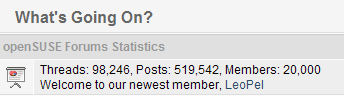
Congratulations to the openSUSE forums team!
If you haven’t signed up for the forums yet, please do so. Sharing your knowledge with other openSUSE users at the openSUSE forums is a great way to contribute to the openSUSE community in a non-developing capacity.

One of the most unknown, yet most useful feature of MonoDevelop is the Go to File dialog.
Some weeks ago I did several performance improvements, and introduced support for acronym matching. The filtering algorithm tries to find the best match, not only by searching substrings, but also by splitting the search string in several parts and trying to match them through all the words that compose the string being checked. This is an example:

When filtering files, the algorithm tries to match the file name, and if it fails, then it tries to match the whole file path. This allows filtering by directory. Following the example, if I type 'xml/ccomdata', it will fill find results under the MonoDevelop.XmlEditor.Completion directory. When there are several files with the same name, the list shows the parent directory name next to the file (inside brackets), so you can decide which one is the good one. Besides filtering, the dialog automatically highlights what it considers the best match.
After several weeks of use, I'm very happy about how the matching algorithm is working. Most of the time it manages to highlight the file I'm looking for by just typing 3 or 4 letters.
BTW, the same dialog supports searching by type name, using the same algorithm. In this case the shortcut is Control+Shift+T.

GreenIT: Power Consumption and -Optimization of PCs
"GreenIT: Power Consumption and -Optimization of PCs"
In the middle of last year, I participated in a seminar called "GreenIT" at university. The result was a 17 paged whitepaper called "GreenIT: Power Consumption and -Optimization of PCs". It took quite some time to finish this up, so it would be a waste of time if I would not publish it. A shortened table of contents looks like this:
- Introduction
- ACPI
- System as a Whole
- System Components
- Software Policies
- Conclusion
Please note: If you are only interested in how things are implemented in Linux, this might not be that interesting for you. It does not include any specific operating system details. It's rather general, although of a technical nature, and thus can be applied to any operating system out there.
If you are lazy of reading through the whole document, you might consider having a look at the corresponding presentation slides. However, you need to be able to speak, or at least to read, the German language for the slides to be useful for you.
Cute Harmony: Qt goes LGPL
KDE Project:
Thanks Nokia! It will be really interesting how this will impact the Qt and KDE communities, desktop, embedded, mobile, cross-desktop collaboration. Looking forward to a friendly competition on technical merits only. :-)
Report from Fourth Annual Management Developers Conference
This is the annual get together of people involved and interested in systems management technologies and standards as defined by the Distributed Management Task Force (DMTF).
The DMTF is an industry organization defining systems management standards such as the Common Information Model (CIM) or Web Services for Management (WS-Management).
For my employer, these standards play an important role as they're part of the Novell/Microsoft technical collaboration agreement about interoperable systems management.
Compared to last year, attendance to the conference was very low. I guess only about a third of last years attendance numbers were reached. This decline was mostly attributed to slashed travel budgets due to the tough economy. However, hallway conversations also hinted towards lack of scope of the conference, trying to be everything for everyone. A split into research, development and deployment topics is probably needed.
Presentations during the three days of the conference are divided into three parallel tracks. These were
- the DMTF industry initiatives (http://www.dmtf.org/initiatives)
like- SMI (storage management)
- CDM (diagnostic)
- CMDB (configuration database)
- Virtualization
- SMASH (server hardware)
- DASH (desktop hardware)
- CIM core technology
- Web Services for Management
- Developers
Sadly, the presentation slides (mostly PDF) are only available to attendees (authorization needed).
Being busy with my own slides, I wasn't able to attend as many presentations as I wanted. But I still made it to the following presentations of the first day:
Python CIM providers
Writing CIM instrumentation has a long history of being complicated and needing C or C++. Bart Whiteley of Novell presented pywbem, showing how to write CIM providers in a modern scripting language. Pywbem also comes with a provider generator, spitting out a Python skeleton provider from the definition of its CIM classes.Multi-Tenant CIMOM, Fact or Fiction
There are a couple of CIM object managers (CIMOMs) available, mostly as open-source. However, CIM providers are mostly CIMOM-specific and can't be easily ported. With the Common Manageablity Programming Interface (CMPI), a standard ABI for CIM providers is established. Still configuration information required to install a provider is different from CIMOM to CIMOM.This presentation showed typical obstacles in writing portable providers and gave rules and recommendations to make a provider cimom-agnostic.
cmpi-bindings - Compiler Free Provider Development
This was the first of my own presentations. Cmpi-bindings serves a similar purpose like pywbem, freeing CIM provider developers from the need for C or C++.cmpi-bindings uses SWIG to generate bindings between the Common Manageablity Programming Interface (CMPI, the ABI between a CIMOM and a CIM provider) and a scripting language. Currently supported are Python, Ruby and Perl. Any other SWIG supported language can be added fairly easily. cmpi-bindings use SWIG in an innovative way, allowing to call into the scripting language from the CIMOM. This effectively reverses the typical flow of control for SWIG, which is calling a C or C++ library from a scripting language.
Testing with PyWBEM
Automated testing of CIM providers is often neglegted and developers use plain CIM browsers to explore their code.Tim Potter showed various ways for testing providers with the help of Python and pywbem. Most interesting was learning about Twisted, a Python networking framework for asynchronous programming. This stuff makes your brain hurt and the O'Reilly book title illustration is worth a thousand words ;-)

On day 2, I had the opportunity to attend Microsofts 'Strategic Architect Forum' in San Francisco. So I skipped the mandevcon presentations for that day. I'll blog later about the Microsoft conference.
The last day had a complete track on WS-Management.
It started with a generic introduction by Josh Cohen from Microsoft. Josh is leading the WS-Management work group within the DMTF and the driving force behind Microsofts adaption of an open standard for systems management. Too bad his presentation isn't available online.
Openwsman swig bindings
Anas Nashif, of AutoYaST fame, showed the Openwsman swig bindings Openwsman is an open source implementation of the WS-Management protocol, used e.g. by Microsoft Windows for remote systems management.These bindings allow for easy ws-management client programming using one's favorite programming language. Fully supported currently are Python, Ruby and Java (yuck!).
Scripting openwsman server plugins
WS-Managment is a generic protocol for resource management. Each resource is identified by a universal resource identifier (URI), which onsists of a namespace and a resource part. The openwsman server maps namespaces to plugins and lets the plugin handle the specific resource implementation.Openwsman includes default plugins for the generic Identify operation and for CIM operations (WS-CIM). Writing plugins in C is easy, using a scripting language makes it even easier.
My presentation shows how the problem was approached and describes the implementation. It is in an alpha state currently and needs some more work to become fully functional. This will also require some changes in the openwsman plugin API to fully support plugins.
The code is part of the openwsman svn repository and available here.
ActiveWSMAN
One thing that bothers me when coding against the openwsman client API is the amount of protocol knowledge needed. Doing a simple enumeration call requires one to know about the enumerate, pull and release protocol functions. Not to mention keeping track of the context.Having enjoyed the ActiveRecord pattern as implemented in Ruby On Rails, I collected some thoughts around using this for WS-Management client programming.
The presentation shows a concept on how to make a developers life much easier. It focuses on resources and their semantics, completely hiding the internals of the ws-management protocol.
A proof-of-concept implementation based on ActiveRecord exists and I itend to complete it in the next couple of weeks.

openSUSE 11.1 KDE3 - torrents and final thanks
- openSUSE 11.1 KDE3 Live CD: i686 (md5, sha1), x86_64 (md5, sha1)
- openSUSE 11.1 KDE3 Live USB: i686 (md5, sha1), x86_64 (md5, sha1) (instructions)
Thanks to...
- ... Benjamin Weber, Masim Sugianto, Andre Duffeck and Magnus Boman for have mirrored openSUSE 11.1 KDE3 Live CDs and USBs.
- ... Marcus Rueckert for have created torrents, and Andreas Jaeger (you know why ;-) )
- ... Stephan Kulow for the useful tips given on how to create the ISOs.
- ... Stephan Binner for patches, suggestions, and feedback.
- ... Joe Brockmeier for the release announcement.
- ... you (!) for the time spent reading this crap of blog :-P
Finalizing, even though I strongly encourage users to upgrade to KDE 4 not only for how awesome it is (KDE 4.1.3 on openSUSE 11.1 is solid as rock!), but also because KDE 3 will be officially unsupported and thus not included on openSUSE 11.2 and later versions, I would like to hear what's in users mind about a possibility of having KDE 3 and openSUSE 11.1+ KDE3 Live CDs maintained and released by the community - any volunteers?
(Yes, I use KDE 4 and hell not stepping back to KDE 3! heh)
The G(C)ritter
I was really lucky in Dublin then on my walk to the lighthouse. There was sun and almost no wind at all.
The River Shannon

The Fjord


Dublin Bay


Bay with Lighthouse

The Lighthouse

Lighthouse Walk

A Seagull on the Salty Beach

openSUSE Build Service KDE:KDE4:* Repository Changes, Step 2
KDE Project:
A follow-up to the previous post, the KDE:KDE4:Factory:Desktop repositories now contain KDE 4.2 development snapshot (4.1.87) packages. This is also the repository that will contain KDE 4.2 RC1, KDE 4.2 and the first bug fix releases of KDE 4.2 in near future.
If you have been using the KDE:KDE4:UNSTABLE:* repositories for the last weeks you likely want to change them to KDE:KDE4:Factory:* + corresponding KDE:KDE4:Community repository NOW!
The next packages that will appear in the KDE:KDE4:UNSTABLE:* repositories will be snapshots from trunk representing very early KDE 4.3 development.
January things
Just the cold feet suck.
Relaxed a lot between the holidays, spent new years eve at colleagues with yummy food and relaxed chatting, watched various of 25c3 talks, but did not visit Berlin.
At work since 5th of January again, with the 6th being a public holiday here.
On the 6th we ventured to Pottenstein, where they hold a catholic procession through town ... and burn hundreds of fires around the valley... The latter is the reason for the large number of visitors :) Took and uploaded some pictures (go right in the photostream).
Pretty cold there, nice fires, but well .. i like easter fires more :)
Wine 1.1.12 packages published, lots of security updates released as usual.
Relaxation mostly gone after 4 days of work. :/
openSUSE 11.1 KDE3 - urgent mirroring (updated)
Since the release announcement of the Unofficial KDE 3.5 Live CD for openSUSE 11.1 the server where the ISOs are hosted at has been running out of bandwidth due to the huge amount of requests for downloading those files, and since the server also host other important client accounts, the sysadmin offered me two choices:
- disable the account
- get mirrors around
My apologies for any inconvenience caused...
P.S.: I didn't expected all this traffic around the ISOs... the openSUSE 11.0 KDE3 Live CDs didn't get that many attention. Well, it's a good sign though ;-)