
 Member
 Beineri
Pointer: Unofficial KDE 3.5 Live CD for openSUSE 11.1
KDE Project:
openSUSE 11.1 Live CDs and USB images featuring KDE 3.5 are now available for download. openSUSE News has the full story.

Unofficial KDE 3.5 Live CD for openSUSE 11.1
Want classic KDE on openSUSE, without the full DVD download? Carlos Goncalves has you covered. openSUSE 11.1 Live CDs and USB images featuring KDE 3.5 are now available for download.
Created by openSUSE community member Carlos Goncalves, the KDE 3.5 Live CD and USB images contain openSUSE 11.1 plus several key updates.
In addition to KDE 3.5, the Live CD offers OpenOffice.org 3.0, Smolt, Amarok 1.4.10, KDEPIM3, Firefox 3.0.4, K3b, and many other useful applications. You can see the entire package list here: package-lists-openSUSE
And, of course, openSUSE has the current KDE releases covered as well. You can download the official openSUSE 11.1 KDE4 Live CDs based on KDE 4.1.3, or if you want to follow KDE development, Stephan Binner has created a KDE Four Live CD featuring KDE 4.2 Beta 2.
Note that the KDE 3.5 live CD is an "unofficial" release. Even though it's not a formal release, we're excited by the work Carlos has put into supporting KDE 3.5 and showing what can be done with the build service. Want to create your own Live CD featuring openSUSE? See Carlos Build Service Live CD project on creating a Live CD here: home:cgoncalves:LiveCD, and Masim's "How to Make openSUSE 11.1 KDE 3.5 LiveCD or LiveDVD" article.Download
openSUSE 11.1 KDE3 Live CD and USB are available for i686 and x86_64 architectures:
- openSUSE 11.1 KDE3 Live CD: i686 (md5, sha1), x86_64 (md5, sha1)
- openSUSE 11.1 KDE3 Live USB: i686 (md5, sha1), x86_64 (md5, sha1) (instructions)
If you want to report any bug found use Novell's Bugzilla for better tracking. Feedback can be sent via email, IRC and comment in here.
A huge thanks to Stephan 'Beineri' Binner, Stephan 'coolo' Kulow, and Joe 'Zonker' Brockmeier for their assistance and effort!
We hope that the openSUSE community will find it useful and have a lot of fun with KDE 3.5!
 Want classic KDE on openSUSE, without the full DVD download? Carlos Goncalves has you covered. openSUSE 11.1 Live CDs and USB images featuring KDE 3.5 are now available for download.
 openSUSE 11.1 KDE3 Live CD and USB are available for i686 and x86_64 architectures:
Mirrors administrators around the world, I think I will need your help! Please mirror these files and let me know the URL so I can point people out to your mirrors instead ;-)
Webpin search in YaST for openSUSE 11.1
This is just a short reminder that in openSUSE 11.1, it is possible to search online for packages in YaST as described in this blog (thanks to Lukas and Bubli for making this reality!).
In short, just type on command line:
/sbin/yast2 webpin_package_search
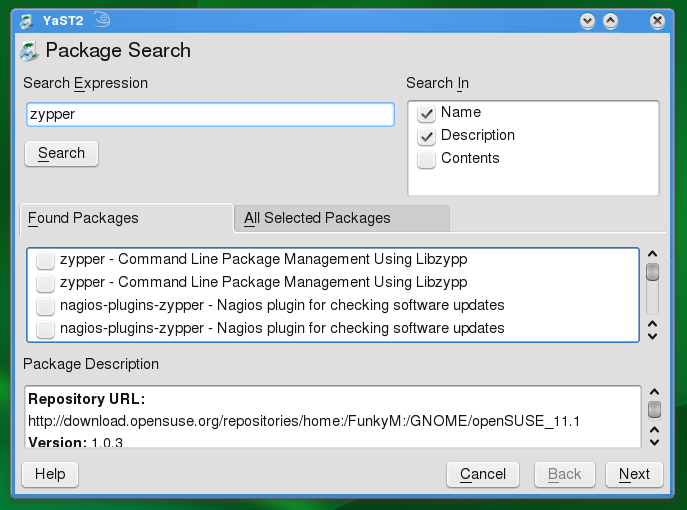
and you will get this UI for an online search and install of packages:
Enjoy!
Kernel Of The Day Build Service Projects
People interested in openSUSE and kernel development probably know about the existence of the Kernel Of The Day (KOTD). This is the latest and greatest code from the internal kernel source repository that is build once a day and synced out to ftp.suse.com. The intention of the KOTD is to ease the testing and running of development snapshots that likely become the next maintenance update.
Some people might have noticed the Kernel: projects that produce a quite heavy load on the build farm. These are KOTD projects that are mirrored to the openSUSE Build Service every night around 4pm CET if there are changes in the internal source repositories.
Currently the following KOTD projects exist:
- Kernel:HEAD is the KOTD of openSUSE:Factory
- Kernel:SL111_BRANCH is the KOTD of openSUSE 11.1
- Kernel:SL110_BRANCH is the KOTD of openSUSE 11.0
- Kernel:SL103_BRANCH is the KOTD of openSUSE 10.3
Additionally there are two projects that are related to upstream kernel development:
- Kernel:Vanilla includes the latest sources from Linus Torvalds’ linux-2.6 GIT tree
- Kernel:linux-next includes the latest sources from Stephen Rothwell’s linux-next GIT tree
With the help of the openSUSE Build Service running the KOTD became even more convenient since the project repository can be added to zypper. Besides that it is now very easy to build external kernel modules (KMP) matching the KOTD.
Integration of YaST Server Modules to YaST System Services
Today, I’ve played a bit with an idea to allow starting of YaST Server module from the YaST System Services module.
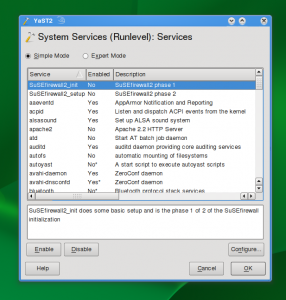
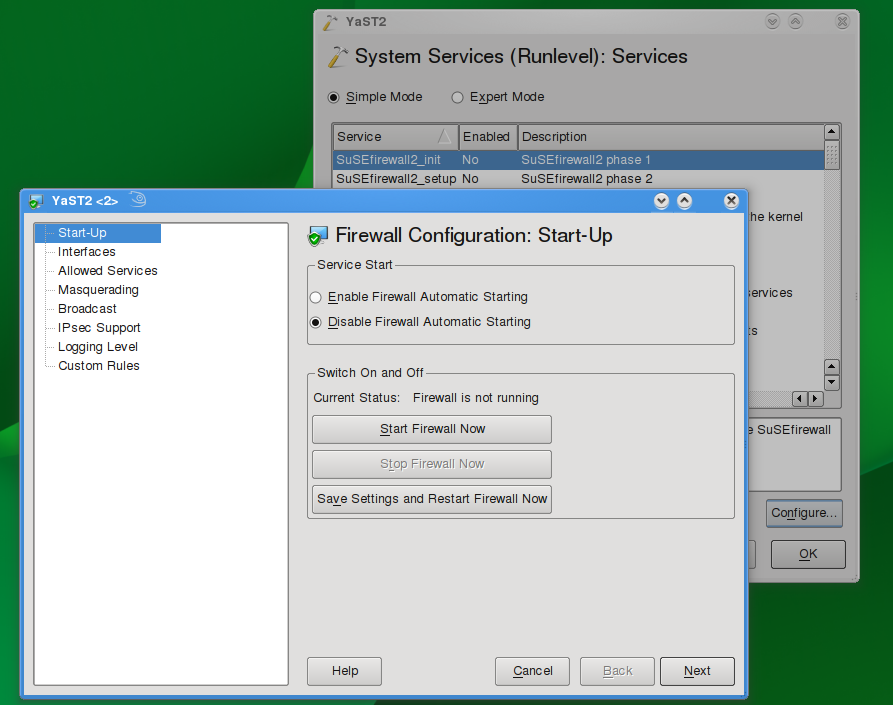
The only visible difference is the additional “Configure…’ button at the bottom of the dialog. This button would be active only if there is a YaST module associated with the entry. After clicking it, the respective YaST module would be started:
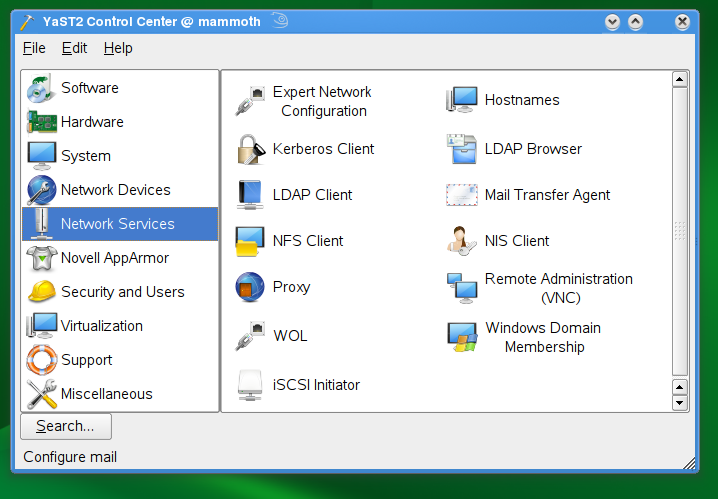
With this simple principle, the YaST control center ‘Network Services’ section would be reduced to:
And all those YaST modules would be available from ‘System’ section:
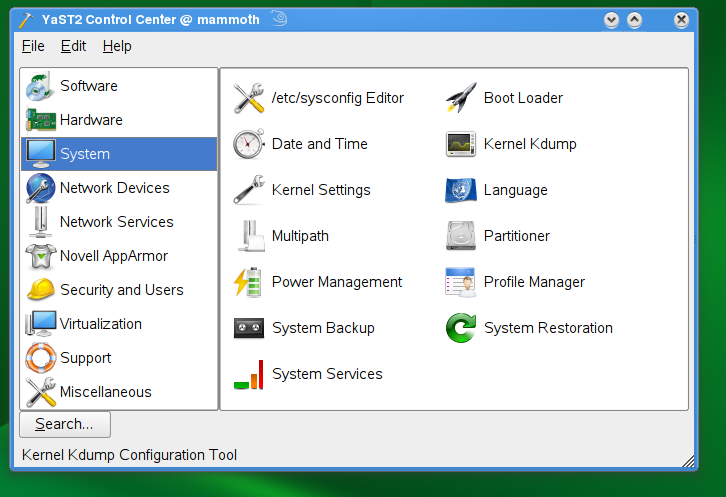
This approach could be used even further. You can see that the ‘Network Services’ section contents do not really match the section name anymore. In fact, most of the items could be moved to other modules as well. E.g. introducing a module for authentication/authorization, which would cover Kerberos client, LDAP client, etc. The NFS client is in fact a part of the new Disk Partitioning module already. So, the section could vaporize completely.
However, there are drawbacks. The biggest one I see is a ‘starting point’ problem. Just imagine you want to have a Apache2 running in your system. Until now, the YaST HTTP module is installed and can be used to bootstrap your configuration – it will install the packages and help to set up the basics. But with the new approach, the apache2 package is not installed, therefore System Services module would not see the apache2 service (init script) and does not show it at all! I’m not sure how to address this. Maybe the best would be to attach the YaST module to apache2 package or HTTP server pattern and the Software Management module would become such starting point. Would it be better? I don’t know.
Then, there is an issue of a quick access – if you are moderately experienced user, you know what you are looking for and you start a proper module right away. But to figure out what is the configuration starting point if it’s hidden in another module, that might be a blocker.
I’m sure there are more problems. Anyway, I find the idea quite useful for reducing the number of YaST modules. What do you think?
Brasero 0.9.0 release and new year news
I'm proud to announce the Brasero 0.9.0 release, i've build openSUSE 11.1 packages on my build service home, Mandriva also updated on cooker and i'm sure the other distros will follow as well.
The other good news is that after Brasero proposal for inclusion on GNOME 2.26, Brasero will follow some of the tips said by another fellow developers and it's going to be split into a library. This means we will have language bindings and support for another applications. The action is on trunk now.
Release notes for 0.9.0:
Updated dependencies:
GTK+ 2.14
no more libgnomeui dependency
New features:
New option not to replace symlinks by their targets
Many small and big improvement when brasero is spawned from an application plugi
n
Improved session handling
Bugs fixed:
Many fixes (to be backported in a 0.8.5 release) for video project
See ChangeLog for other ones
New translations:
latvian: Raivis Dejus <orvils@gmail.com>
Updated translations:
et.po: Translation updated by Mattias Põldaru
sv.po: Daniel Nylander <po@danielnylander.se>
de.po: Mario Blättermann <mariobl@svn.gnome.org>
es.po: Jorge Gonzalez <jorgegonz@svn.gnome.org>
hu.po: Gabor Kelemen <kelemeng@gnome.hu>
zh_CN.po: 甘露(Gan Lu) <rhythm.gan@gmail.com>
sr.po, sr@latin.po: Updated Serbian Translation (by Miloš Popović).
da.po: Kenneth Nielsen <k.nielsen81@gmail.com>
sl.po: Matej Urbančič <mateju@svn.gnome.org>
Thanks to all the people who contributed to this release through patches, transl
ations, advices, artwork, bug reports.
Homepage: http://www.gnome.org/projects/brasero
Please report bugs to: http://bugzilla.gnome.org/browse.cgi?product=brasero
Mailing List for User and Developer discussion: brasero-list@gnome.org
Svn Repository: http://svn.gnome.org/viewcvs/brasero/
Thanks to all the people who contributed to this release through patches, transl
ation, advices, artwork, bug reports.
First openSUSE KDE Team Meeting 2009
KDE Project:
Tomorrow most people will be back from the holiday season, time to start again with the biweekly IRC meetings of the openSUSE KDE Team. This time we will look back to last year or rather to the openSUSE 11.1 release shortly before Christmas and the biggest reported problems. And also, despite the schedule discussion not being finished yet, we will start to collect and discuss ideas for openSUSE 11.2.

OSF Status Report #1
7 months have been passing by since the launch of the official openSUSE forums back in June. Since then a lot has been done by both the membership and the forums team to make this a big gain for the whole openSUSE community. From now on we are going to provide status reports on a monthly basis to represent the progress we make. As this is the first issue of status reports, we’d like to provide some long-term openSUSE forums statistics along the statistics for December 2008.
Up to the 31st of December 2008, we achieved a membership of 18.772 members, 18.144 threads and 105.203 posts, which is quite a lot considering that we started with an empty database due to some technical issues we had during the merge of the three independent parties that initially joined forces. Most users ever online was 7.771 – including guests – on the 2nd of December 2008.
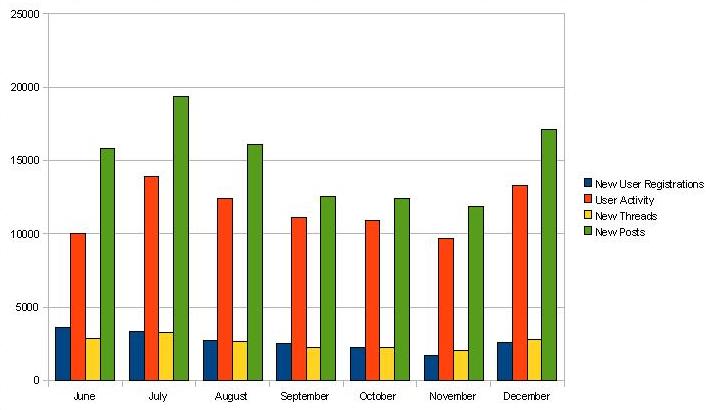
The following diagram shows the monthly development of new user registrations, user activity, new threads and new posts since the launch in June. The user activity measures the number of individual visits to the openSUSE forums. We started strong with the release of openSUSE 11.0, then the traffic has been slowly declining followed by another peak with the release of openSUSE 11.1.
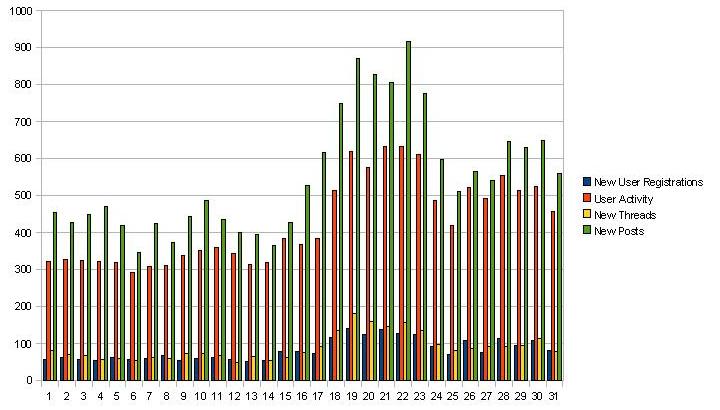
The next diagram outlines the daily statistics of the same measurements for December 2008. As you can see, the release date of openSUSE 11.1 – the 18th of December – had a significant impact on all presented measurements.
Kudos to our Top5 posters during the last 7 months…
- oldcpu – 4.558
- caf4926 – 3.643
- kgroneman – 2.536
- ken_yap – 2.375
- swerdna – 2.355
…and to our Top5 posters during December 2008.
- caf4926 – 795
- oldcpu – 658
- mingus725 – 449
- ken_yap – 441
- BenderBendingRodriguez – 284
Thanks a million for making the openSUSE forums useful.
We’d like to take the opportunity to thank the whole openSUSE community for their participation – without your great support during the last 7 months the success of the openSUSE forums would never be possible. The openSUSE forums are accessible through the website and the NNTP gateway. If you’re interested in the latter possibility, be sure to read my former article about NNTP access to the openSUSE forums.
As of the issue #49 of the openSUSE Weekly Newsletter, we present hot topics and asserted threads at a dedicated openSUSE forums section to the openSUSE community. If you are a frequent forums visitor and you’d like to contribute to this openSUSE forums section, you are very welcome to join the Newsletter Team. If you’re interested, please contact me – rhorstkoetter/at/opensuse.org – for further information.
Happy New Year from the whole openSUSE forums team!
Why I use Linux.
"""
I use openSUSE and Linux because it allows me to use my computers the
way I want. I have some almost new hardware and some really old
stuff. I'm typing this on a Thinkpad laptop with a P3/1Ghz and 256mB
RAM while I have 4 ssh sessions into my server running 2 movie
re-encodes and doing file maintenance in the other 2. I've got 2
directories on my server mounted on this and 1 directory on this
laptop mounted on the server to copy files with. If I was using MacOS
or Windows I'd barely be able to do anything.
""" - Larry Stotler
Thank you Larry for converting my thoughts into such simple but expressive words.
There have been mixed reviews for OpenSuSE 11.1, some lauding it while others panning it for a disaster almost as bad as the 10.1 release mostly surrounding KDE-4 desktop choice. The desktop environment is so much a part of a distro nowadays that normal users do not usually make the distinction between what is the distro and what is the desktop environment. For them, KDE or OpenSuSE they are both the same. For me I applaud the OpenSuSE team for taking a brave new step ahead! KDE-4 has it's faults no doubt but as usual I put my total trust in the OpenSource community to mold into something better than the current 3.5.x. I will still look forward to keeping OpenSuSE as my main working distro.
Finally to all the readers of this blog. Merry belated Christmas and a Happy Profitable new year ahead!
opensuse 11.1 and python 2.6
Something else too, kde-4.1 which used to be pretty clunky and unusable in 11.0 has been improved and after a while of getting used to it, I am beginning to think it's pretty good.
Well, when the lizard gives you lemon make lemonade I guess ... time to revisit ktorrent. I just hope everything else is intact.