
Installation: Resizing Windows before proposing Linux partitions
While “selling” openSUSE to a friend of mine, I tried to explain him all the steps of the installation and all the configuration options which I had changed. He was not any geek and it was his first time seeing Linux.
While most of the installation did not need much explanations, I definitely spent most of the time on partitioning. Not that initial proposal was not fine, unless one has special requirements, but there is one elementar input, which even newbies may want to set: How to split disk between Windows and Linux. The installation proposal works just fine, but if one needs to keep more or less space for Windows than proposed and does not have any skills, he is doomed – and so would have been he.
There is a graphical dialog for resizing of the windows partition, but, sadly, there is no way to resize Windows and propose Linux partitions in the remaining disk space – which is something that would help new users a lot, they can say “I want 30% of my disk for Windows and the rest for Linux”.
Inserting additional dialog before proposing disk configuration was not that hard as I was afraid of — and, even more surprisingly, it also works in combination with LVM (see the images).
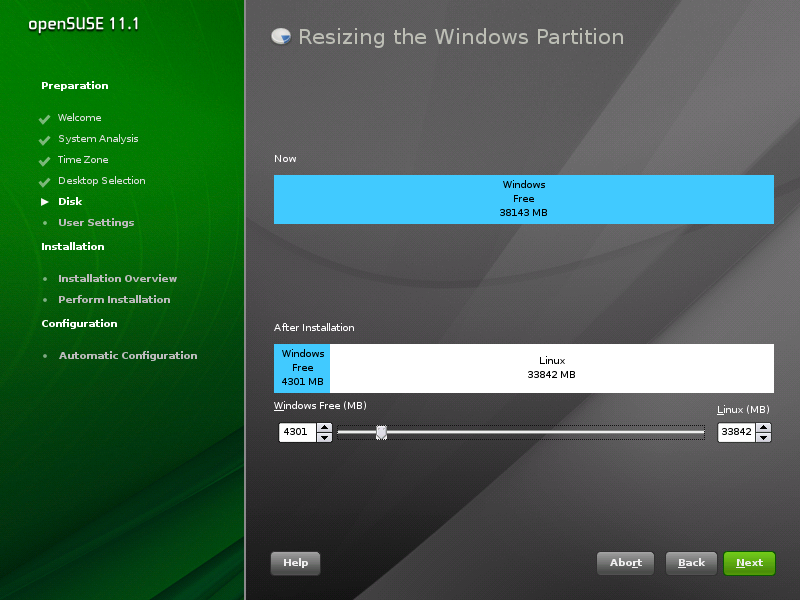
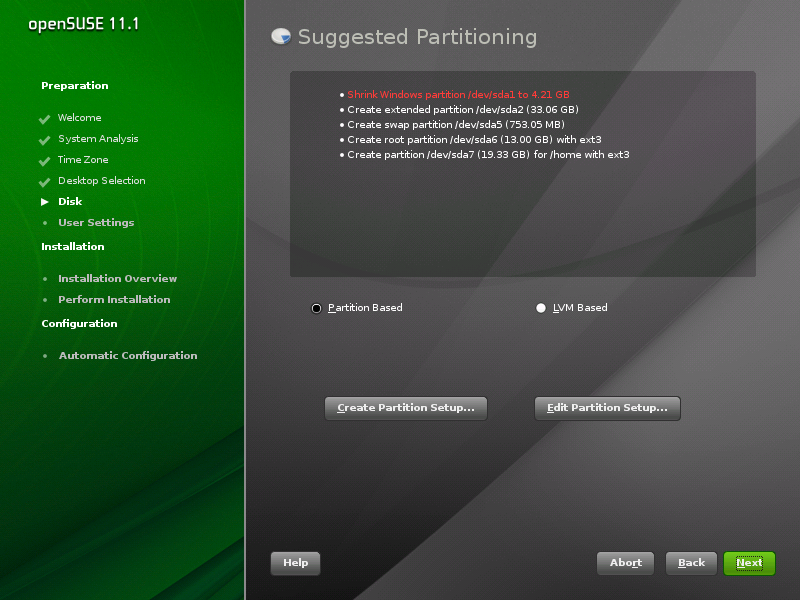
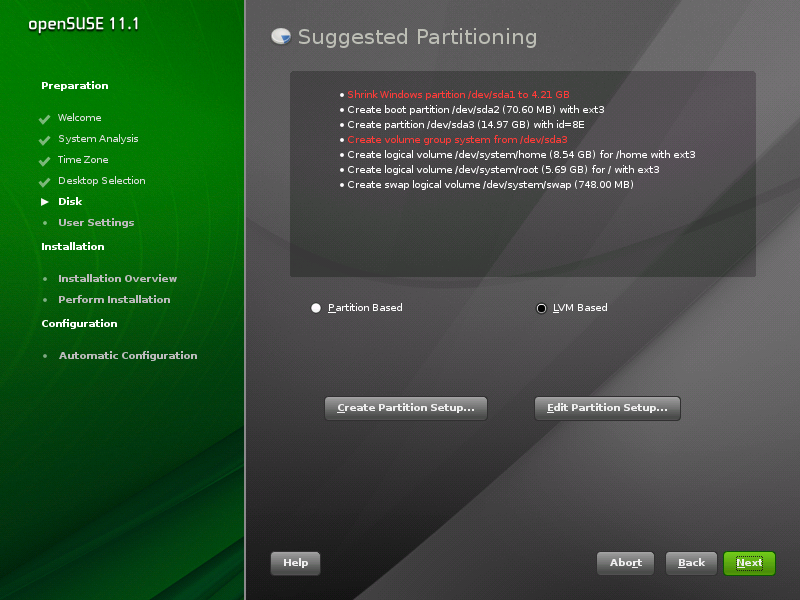
You can see it with 11.2 Milestone 2, where it is not enabled by default; to enable it, boot with start_shell=1 on kernel command line and uncomment the
<module>
<label>Disk</label>
<name>resize_dialog</name>
<enable_back>yes</enable_back>
<enable_next>yes</enable_next>
</module>
part of /control.xml.
What do you think of it? Is it worth it? Any ideas for improvement?

 Member
 slowhand
Busy Mode On!
The project that I act as a project manager is development of 3 crisis center/emergency operation center in 3 provinces in Indonesia. I should prepare our engineer to install asterisk, heartbeat and working with programmer to prepare some GIS and database software for the center. Sound interesting.
In the second project, I join with some experts in education to prepare a design of e-learning system for education quality enhancement for elementary and junior-high schools in one province in Indonesia.
In the last project I should help a team of programmer to prepare the infrastructure for customize service for a new GSM handset type that will be launched in Indonesia at the Q3 of this year.
Maybe you will not see many articles in this blog or in my other blog for the next couple of months. I promise to use my free time to write anything and hope I can put in in my blog later on.
Have a lot of fun!
Report on F-Spot loading times

before: (on 0.5.0.3, averaged loading times on the first 10 items of my collection)
Loading image took 1.292241s
after: (current master, averaged on the same 10 items)
Loading image took 0.518812s
[UPDATE] Yes, that's on a dual core machine (Intel(R) Core(TM)2 Duo CPU L7500 @ 1.60GHz).
On KDE4.3
We are almost one month far away from the kde4.3 release. Yesterday the 4.3 rc1 was tagged and due to excellent work of our colleagues in OBS we have it already.
Personally, I would have liked it to go a little bit further away in terms of usability, we will speak about that later. This release will mark the break with 3.5. I see no real reason for not using kde 4.3. All the functionality that people were crying after from 3.5 is finally up and running (a lot of time better) in KDE 4.3.
What more would you like then, people may ask.
I would like to be able to give a kde4 desktop to a secretary to use and to a teenager who is into Web2.0.
- a features consistent kontact, a kalendar that actually can be used in a real life environment, avoiding silly design inconsistencies like you can spell check your popup notes but you cannot do it for your notebooks entries.
- a kopete that actually supports video/audio features of protocols.
- a rock solid kblogger may help.
- a way to synchronize mobile devices.
and the last
- adding more work on making existing features working perfect rather than adding new ones.
Alin
Установка CakePHP в OpenSuse v 11.1
SUSE Out Your Tweets!
Thanks to Raul Libório from the openSUSE Marketing Team, you can trick out your Twitter background with your openSUSE Project affiliation (member, ambassador, user). Check out the openSUSE Social Network marketing page to get yours (look under “Sidebars for Twitter”.
You can add the logo itself, or use a program like The GIMP or Inkscape to add the logo to your current background (much like mine, below)

How to NOT replace your HTPC
Finally, there is a neat BluRay player LG BD 370 that plays Matroska container as well, which is the de-facto standard for fansubbed Animes nowadays. And it is reasonably cheap (<200€).
So I bought one and stress-tested it this weekend. Long story short, I'm unsure yet whether I will return it to the store or not. Because it doesn't exactly play everything - and yet I still somewhat like it
 .
.Positive things first:
- Fast bootup - the system is ready in something like 10 seconds.
- Good BluRay performance - I don't have too many BluRays yet, but the ones I tested worked decently. It is the fastest BluRay player I have seen so far - but I still hate the BluRay engineers for choosing java as the menu language.
- Does play and upconvert DVDs.
- Does do 1080p@24 (untested), no issues at all with HDCP handshake, even on output device change and resolution switching with a cheap 15m HDMI cable.
- Very good user interface - I miss buttons for 10s instant forward/backward skipping, otherwise it's clean, neat, and easy to use.
- Never crashed on the approx. 50 disks I tested.
- Trivial and fast firmware update over ethernet.
- YouTube client - about the most useless feature IMHO.
- No decoding artifacts, unless it had warned you that this might be possible.
- Very good and accurate format description.
- Able to switch between >2 audio streams and subtitles on the fly.
- Does play matroska, avi, mp4, mov, mpg containers without problems. I have a single avi that doesn't play, but it's probably broken.
- Does play most(!) subtitles, including embedded ass and external srt files.
- Does play ac3, dts, mp3, aac audio streams.
- Does play most(!) h264, some(!)divx, all xvid video streams.
The last points already indicates the major issues:
- Has a hard limit of 720x576 for DX50 fourcc - this is unbelievable ridiculous, as XVID works without limits, and both are actually the same format.
- h264 is only supported upto level 4.1 - many fansubs use level 5.0 or higher, in order to use more reference frames. The player warns if the level is higher than 4.1, but if less then 9 reference frames are used at 720p (limit at level 4.1), it will play fine. Unfortunately, this isn't the case for half the fansubs I have.
- Newlines in subtitles are rendered as '\n'. Luckily, they almost break lines early enough when they are too long (few characters missing).
- Some subtitles aren't rendering, not sure why.
- Doesn't play m2p, ogm containers.
- Doesn't decode ogg vorbis.
- As with all commercial players I know so far: Doesn't allow to fix A/V synchronization. I have a DVD with audio lagging 500ms behind video (Ghost in the Shell, early pressing), and one with one audio stream being too early, and one too late (Fucking Åmål). Fansubs sometimes lag audio by up to +/-300ms, dunno why.
- There is a region-free patch for DVD, but only few tests of it can be found on the net. Don't know whether this works for all firmware versions, but somehow I doubt so.
- Switches 50fps - 60fps all the time (system menus are running at 50fps only - probably European model issue only). With the long HDMI switching times this is getting on your nerves.
- Doesn't use embedded fonts in ass subtitles.
- Doesn't decode flac.
- dts recoding would be a nice feature for aac audio, but doesn't work at all (tested on sp/dif only). Either I get pcm(!) two channel, or dts mono(!) without(!) sound.
- Doesn't detect VCD and SVCD.
- Does do 1080p@24 only on DVD and BluRay. Don't care too much, my projector doesn't accept 24fps, but is very good at inverse telecine. So I don't notice that.
I also noticed too late that the BD 370 doesn't only support no UPNP - but also no playback of files via SMB, NFS, or any other network means, just YouTube. Sigh. But well, the BD 390 will be available in Europe shortly as well, and that should include UPNP. Because of this I haven't even started to test audio file playback.
So I have a lot of issues with quite a number of disks I tested. And cannot use it neither for local network playback nor for Apple movie trailers. Still I'm unsure whether to return it or not, because the disks it plays it plays almost perfectly, with a nice user experience. At least I will have to keep my HTPC in addition to it for now.
Sigh.
Информация по изменениям...
New MonoDevelop installer for Windows
- Performance of the text editor greatly improved, thanks to a new text rendering logic cooked by Mike Krüeger.
- The debugger is now more reliable, it properly handles enum values, and it now has an 'immediate' console.
- The NUnit add-in now works.
- Version Control now has a new Create Patch command, thanks to Levi Bard.
- A new C# formatter, with support for per-project/solution formatting options.
- MD now logs debug and error output to a file located in your AppData/MonoDevelop/log.txt, so if you get a crash or something you may find some info there.
- Many other bug fixes.
Netbeans?
En estos días que he estado bastante ocupado programando en java, me he dado cuenta de que me molesta mucho la gran cantidad de recursos que llega utilizar netbeans.
Creo que lo he estado utilizando no por que sea el mejor ni algo por el estilo , si no por el acostumbramiento que tengo con el. Pensando en que la mayor parte del tiempo he usado ese ide y no me he dado el tiempo de utilizar otro ide(Eclipse), que por comentarios seria mejor que netbeans.
Asi que si alguien me quiere recomendar alguna alternativa a netbeans no me enojaría 