
Tomboy Bug Squashing Day: Tuesday June 16th

Some of our beautiful Tomboy contributors have organized a bug and test day on June 16th, 2009. It is officially scheduled for 8AM-5PM PST (3PM-Midnight UTC), but I expect people will be around before and after. :-)
We're going to be focusing on UNCONFIRMED and NEEDSINFO bugs, outstanding patches, and stuff targeted for the current cycle.
If you want to work on patches, that's great, but anybody can help regardless of their background and abilities. Just show up and we'll help you get started contributing by squashing some bugs!
Check out our wiki page for all the details.
If you're starving for Snowy updates, you might want to join our mailing list. I'll be writing more soon about a lot of the exciting happenings with Tomboy's best friend on the web.
This post brought to you by the Tomboy Blogposter add-in.

 Member
 jniq
jniqConfigure Your Zypper
zypper.conf in my previous post? Yes, Zypper now (since 1.2.0) reads configuration file from /etc/zypp/zypper.conf and from your $HOME/.zypper.conf. It does not have too much to offer right now, appart from the colors, but the point is now we can easily add new ones there, whenever there's a need.If there is Zypper option that you write too often, it should have it's configuration file counterpart as well, so that it saves you typing. I actually have a list of few, collected over time from users, so i'll be adding them soon. You'll always find the latest list of supported config options here, so stay tuned (and let us know if you need something that's not there yet).
So which value will be used after all, the one from the config file, or the one passed via command line? Here is the override priority order, highest to lowest.
- command line options
- options from
$HOME/.zypper.conf - options from
/etc/zypp/zypper.conf - and the lowest priority have the ones from
zypp.conf, so that you can override libzypp's settings in zypper, if zypper allows it.
You can use an alternative config file via
--config custom/zypper.conf global option. If you do, the other config files (item 2 and 3 above) will be ignored.todo: Add command for manipulating the configuration files as an alternative to manual editing. The command would list available options with current values and descriptions and would allow to set new values, or restore the defaults.
Colors in Zypper
My last post was about colors in terminal applications, so i'll start with colors in zypper. There is new
[color] section in zypper.conf (oh, i should have started with zypper.conf.. nevermind :O), where you can enable or disable colorization of the output, tell zypper whether you use dark or light terminal background, and, finally, select your own color for each kind of output, if you don't like the defaults.By default, zypper will print progress messages from ongoing operation in white, finished stuff in grey, result in white, errors in red (surprise :O), and apart from this general stuff there are some special things highlighted, like the package counts in the installation summary. More is yet to come (but i don't want to overcolorify it, of course).

Here are the config options. Those who do not want to wait for the new package to reach Factory can get it from zypp::Head OBS repo.
So, play around, enjoy, and let me know what you think.
openSUSE-EDU
Almost three years ago now I was given the privilege of creating a sub project of the openSUSE linux project. That project is known as “openSUSE-EDU” aka opensuse-education. The idea I had was to gather open source software that was specific to education environments and use the many talents of the openSUSE community and it’s full time staff to optimize the software for openSUSE. My first Teammate and mentor into the world of Linux Projects was, Lars Vodgt. Lars is one of the original SuSE linux team and a co-founder of the “openshoolserver” a project that spun off from SuSE just before the Novell buy out , and is today a very useful and powerful tool for educators in Europe. He is wonderful leader, teacher and guide. He seems to handle almost every detail of the project like it is just a minor addition to his daily work, although we all know that the list of software titles and daily updates are far from trivial.
My first concern was in the area of LTSP and the desktop applications that would be used with it, many schools in the US were already utilizing the efforts of ” K12LTSP”, a specialized version of LTSP (Linux Terminal Server Project), to reduce the cost of classroom computing. I wanted a SuSE linux version of LTSP because I dreamed of having a ubiquitous login process to my Novell network and SuSE \ openSUSE were the only Linux distributions ever to carry the Novell Client for Linx. Somehow, somewhere, someone brought “Cyberorg” aka Jigish Gohil to the project. Cyberorg has taken us from my simple directions to install ltsp 4.2 as an add on, to having completely integrated, award winning packages that include the GSOC work “easy-ltsp” ( http://en.opensuse.org/LTSP) . Cyberog is now a leader in LTSP innovation and openSUSE’s Kiwi operating system image creation utility, with which he has created several ground breaking Live disks for educators (http://en.opensuse.org/Education/live)
My second concern, and where I spend most of my time, lay in the administrative tools available to schools that could drastically reduce licensing overhead. With the help of Lars’s and others, the repository now includes several administrative and curriculum enhancing titles such as Moodle, ClaSS, openBiblio, Koha and openSIS. openSIS is personal to me as I have been working the idea of a free and open sourced student information system \ Academic ERP (http://en.opensuse.org/Education_ERP) since the very beginning, and I am it’s Project Manager. With these tools it is my hope that we can build a service community that will help educators everywhere build and utilize a modern WEB 2.0 site that not only enhances school management but engages the student bodies to their full potential with communication and collaboration tools native to their technology experience.
Over the last 3 years, much has been accomplished by the many contributors to openSUSE-edu, this year seems to be highlighted by new members who are bringing us the most complete Sugar desktop outside the OLPC project (http://en.opensuse.org/Sugar). The Sugar desktop for those who don’t know is an invaluable resource to elementary school computer integration programs, it uses iconic metaphors to simplify navigation while providing a multitude of challenging and useful programs.
I hope that you will join and contribute with us towards these goals by visiting http://en.opensuse.org/Education and subscribing to our mailing list at http://en.opensuse.org/Education/Communicating#Mailing_Lists

Completely Off Topic
| Sometimes you have to got a little nuts and free your mind (TM) by doing something extraordinary - for instance driving a super sportscar like the Audi R8 over the alps for 4 days, accelerating uphill, cutting corners. Fits perfectly with six-course gourmet menus and lots of wine in the evenings. Guess what I just did. |

Now back to doing something useful like fixing bugs in OpenSUSE...
openSUSE@ARM/GSoC: weekly status
openSUSE@ARM/GSoC: weekly status
The topic of this week was to speed up the build. As I mentioned last week, the
prototype in Base:build:arm is compiling in an emulated environment and thus is
quite slow.
I prepared a cross-toolchain from the sources of binutils, gcc44 and glibc from
openSUSE:Factory. Now its time to integrate this into the build process.
This will improve the performace of the compilation itself. But other areas
in the build process can also be improved, just think of the bash.
Some patches for the Build Service were also commited to svn.
In progress / todo:
* prepare / submit fixes for rpm
* more work on cross-toolchain

Updating OpenSUSE 11.0 to 11.1
But after I solved the dependences OpenSUSE 11.1 work really great.
Netbeans 6.5 is going to Factory
As you might know, the netbeans package was a part of openSUSE, but for some historical reason, it was a monolithic package in non-oss repository. Last weeks I have worked on import 29 new packages to Factory, which allows us to build netbeans from source and include it to regular free repository. Fortunately thanks for hard work of guys from jpackage project it was easy to adapt their spec files for SUSE and push them into the Factory.
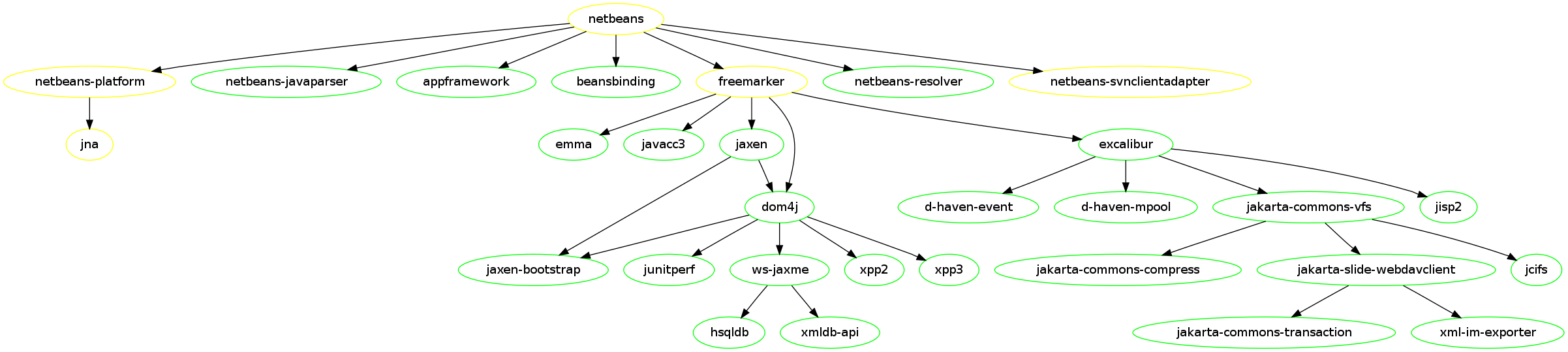
Majority of those packages was reviewed and included into Factory during last weeks, but five (including netbeans) itself are currently in review process, so they would be available later. Following graph shows netbeans and it’s build dependencies. Green color means – package is in Factory, yellow means package is in review process.
In a meanwhile the netbeans for openSUSE Factory and 11.1 is available in Java:packages BuildService repository, so feel free to install and test it.
MonoDevelop installer for Windows
- Fixed the GTK# designer add-in. It is now fully working.
- Implemented a new backend for the Subversion add-in. I tried using the add-in we have for Linux, but the libraries I could find for Win32 have some differences in the API and the bindings doesn't work. I finally decided to refactor a bit the SVN add-in to support different backends, and implemented a new one based on SharpSvn. So the SVN add-in is also fully working.
- Added support for debugging, based on the debugger that comes with .NET. This is still work in progress, although most of features already work: stepping, breakpoints, inspecting variables with drill down and evaluation of expressions.
- Support for .NET 4.0. This new version can now be selected in the project properties.
- Improved the look of the main window. Reduced some spacing, improved the rendering of the tabs when docking several pads together, and other cosmetic fixes.
- Improved the performance of the text editor. It now feels more responsive.
- ... and many other fixes.


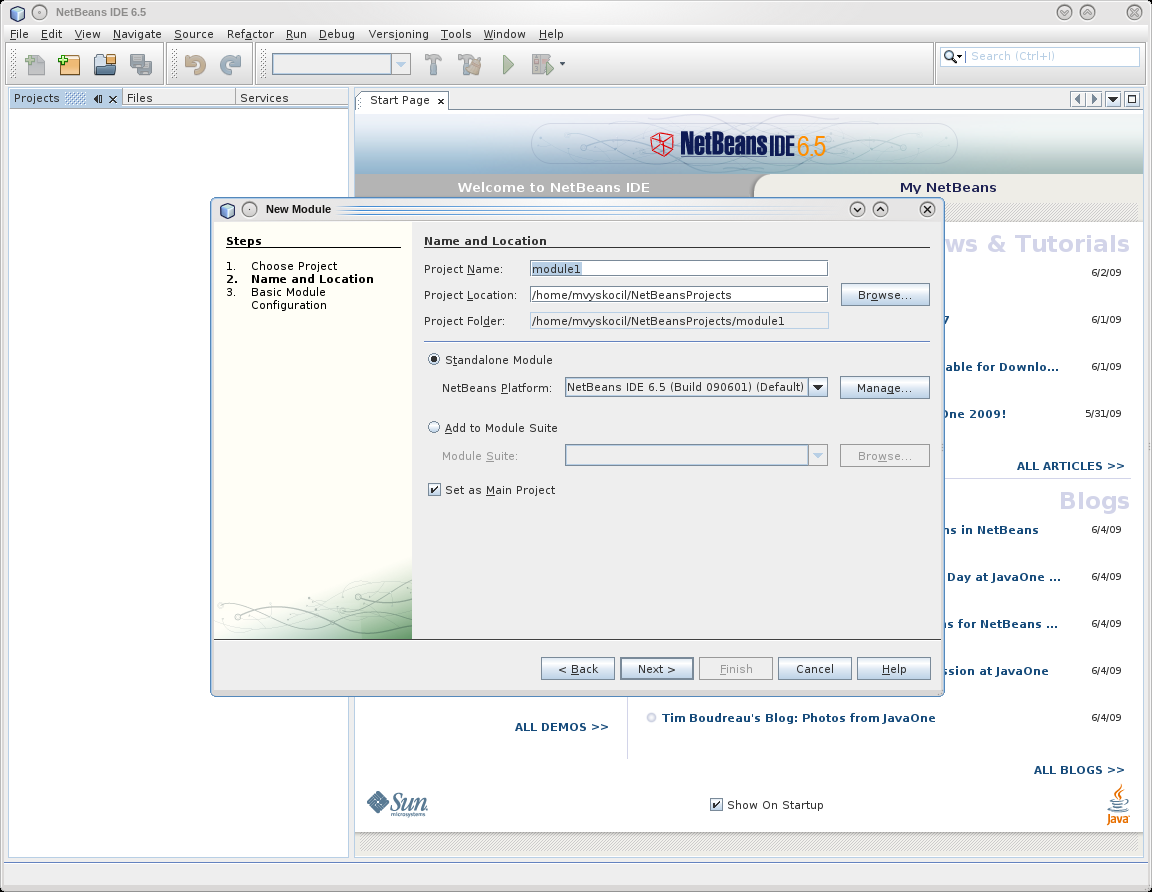
Now, here is what you've been waiting for: a MonoDevelop installer for Windows. You can get it from the Windows Preview page in the MD site. Read carefully the instructions in that page. You'll have to install the latest GTK# package, also linked in that page. Also, beware that this is a preview built from trunk, so you can expect to find stability issues. In any case, bug reports are always welcome. Enjoy!
Sending Proxy Settings via DHCP
It’s a bit “overdressed” for my little homenet, but playing around with DHCP, DNS and YaST is always interesting….
My DHCP Server at home is configured to use LDAP – and I’ve done the configuration via YaST. Now I read in some M$ pages, that it’s possible to tell the Clients via DHCP (and Apache) to use my Proxy server automatically. (Yes, my wife still needs Win** for her schoolwork.)
First, I had to figure out how I can insert two “non standard” options into the LDAP configuration of the DHCP server. I called “yast2 dhcp-server” (thanks for the tab completion, btw!), marked the “Global Options” entry and clicked on “Edit” (not Add!). On the next page, click on “Add” to add a new Option. Just delete the first available entry “allow” and replace it with the full line as you would write it in dhcpd.conf. In my case, this is
option wpad code 252 = text;
and
option wpad “http://myserver/proxy.pac\n”;
(dunno if the “\n” is really needed). That’s the trick. Have a look at /var/log/messages in a separate terminal when you finish the yast2 dhcp-server module to catch possible errors.
Now all what’s left is a running apache server on “myserver” delivering the “proxy.pac” file to your users. The file content is well known – and google would find hundreds of examples for you.