
"Vaani", new project started
The package structure is--
1. sourcemorph.nlp.vaani -- for this project
2. sourcemorph.nlp.shabd -- for nl text to bash command ("shabd" means word in Hindi)
3. sourcemorph.nlp.swar -- for speech to nl text ("swar" roughly means voice in Hindi).
 Member
 _Marcus_
10 years
I had some sarcastic and depressing comments here, but I deleted them.
(Just for the record ... I like my job and I don't intend to stop doing it.)

It's all about synchronization
Who could have imagined at that time, that 3 years later I would not only be working for Novell, but also be able to contribute to it at normal work hours! Yes, this is ITO, and our team spent a week hacking on other projects. In my case, I worked with the awesome guys Stephen Shaw and Mario Carrión. We managed to create an iFolder appliance for the server based on openSUSE 11.1, very easy to install thanks to SUSE Studio and to a new OBS repository where we packaged a preview of Mono 2.4.2 and some fixes needed to make it work.
We even created some demos! (Sorry for the quality of the sound, we had some problems when recording them)
The first one: setting up the appliance.
The second one: creating a user and using the Linux iFolder client.
Now, the next two videos are intended to show the second part of our work on that innovation week: new features.
The third one: automatic/immediate local detection of changes, server side trash can.
The fourth one: automatic/immediate remote synchronization of changes.
How cool is that? Unfortunately, the patches still need work and cleanup (help welcome!), but I plan to do it soon and/or on next hack week.
Before coming back to hacking on iFolder, I wanted to finish some stuff am working on for Banshee, which is also about synchronization! Look at this bug for more details. Yes! bidirectional Rating synchronization, not only from Banshee to the iPod but from the iPod to Banshee. The patch is working fine for me, be sure to give it a go and provide some feedback. Thanks!
Another thing I have on my TODO list is integrate some old mono-based GPL ed2k library into monsoon, now that it's getting MonoAddins support! (Lately there's been many people asking me for the source code.) And now that I talk about monotorrent, how cool would be to make iFolder work with this awesome library??
PS: Hello PlanetSUSE! First post. Hola Planeta GnomeHispano ;)
UPDATE Jun-08-2009: It seems someone wants to resurrect the lphant kernel as well, but using WPF! (WTF?): http://sourceforge.net/projects/hathi/.
openSUSE@ARM/GSoC: weekly status
Hi everyone!
This week was exciting – we deployed a first prototype of a minimal ARM environment on build.opensuse.org in the repository Base:build:arm. It’s a set of packages which is capable of bootstrapping itself and still in an early stage as it’s using full emulation. Next station: speed-up !
I submitted also some patches for inclusion into the openSUSE Build Service. One of these patches will help us to a address an issue with rpmbuild when doing builds for the ARM architecture.
In progress / todo:
* tools for speed-up
* submission of needed patches to factory
* cross-compiler integration
openSUSE 11.2 M2 (Gnome)
Well, today I downloaded the Gnome Live CD first, and had no luck at all. That was no fun watching the busy cursor over and over again after selecting the Live CD option from the Menu so I decided to get the DVD just to see if things went different (actually not the only reason for), and sure they were. First, I installed the KDE Desktop, not a deal through the install process. Then came the first log in and all well. Of course I chose the Ext4 file system and I can tell it feels faster than our good old Ext3 ;).
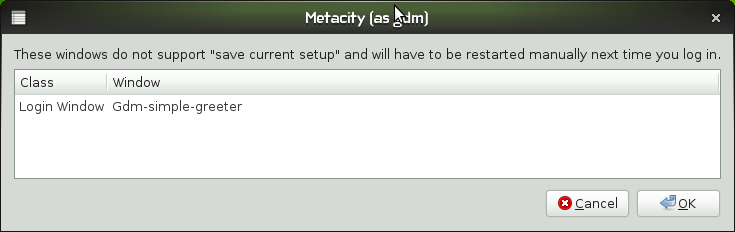
Then it was time for Gnome. As usual, default install took longer than KDE’s. One thing I removed from the software was Desktop Effects, since I started to believe that that could cause the problem with the Live CD Media. So on through the install process, it went down really well. Then at first log in I got alerted over GDM and Metacity. I got this:
By default, the Slab Menu Icon looks like this when Main Panel’s Size is 24 pixels:

Looks like your computer is not your computer, right? Well, I just resized Main Panel up to 26 pixels so it looks like better:

I must admit that I like the default theme. Absolutely new, darkish, professional. First time I feel comfortable “out of the box”. One feature that is not workig 100% is the System Monitor. At this time I cannot switch between tabs. The rest of the system is pretty running smoothly to me. Here you have a screenshot of my desktop:


-fomit-all-instructions
Now that milestone2 is almost done, we get into the next round and we decided (basically during coffee break) to try something and change the compile flags for our i586 distribution (which is still the major one for openSUSE). If there aren’t major problems coming up with it, the next milestone will be compiled with -fomit-frame-pointer -mtune=generic instead of the old -march=i586 -mtune=i586.
It will feel around 20% faster, I’m sure 
On unrelated news: I’m away for a very long Pentecost weekend. If there are issues with Factory, I won’t be able to fix them. See you in June!

Tomboy 0.15.1 Release Brings New Online Note Synchronization Preview
 "Red Westie", Copyright Ellery Armstrong, Milk Teeth Photography, Used With Permission
On Monday we released Tomboy 0.15.1, the latest development release on the road to 1.0. It features a lot of the same fixes from 0.14.2, and some other improvements:
- Preview of new Web Synchronization add-in
- Work around problems on Windows caused by having multiple GTK+ applications modify PATH
- Search for phrases by surrounding them with quotes, save the width of the Notebook pane, and other improvements to the search UI
- Better HIG compliance in synchronization UIs
-
All the same fixes from 0.14.2
- And much more!
I'd like to talk to you a little bit about this "Web Synchronization" add-in. From a feature perspective, the biggest problem with Tomboy has been how difficult it is to synchronize your notes between multiple computers, and to share your notes with your friends and colleagues. We have note synchronization but it's hard to set up unless you have your own server. You can share notes with Giver, but that has its limitations as well. And how do you view your notes when you're on a device without a Tomboy notes client?
A long time ago I blogged about how great a free "Tomboy Online" web service would be as a fix for these issues, but I never had the time to follow up on it. Until now.
 Snowy, Your Tomboy Notes Online
Meet Snowy. Snowy is a project started by Brad Taylor to bring your Tomboy notes online. It's "Tomboy's best friend on the web", as Brad says. Here is what you can expect from Snowy in the coming weeks and months:
- "Tomboy Online" - a free hosted service (running Snowy), where anybody can create an account for securely synchronizing their notes.
- Fine-grained privacy settings to let you mark your notes as public, private, or shared with specific friends.
- Edit your notes directly in your browser!
 Editing notes in Snowy
Brad started Snowy in his spare time, and recently our team at Novell had a Hackweek at our disposal. So last week, Brad and I decided to really get this project off the ground. It is still an extremely new project, but we feel it's far enough along to solicit feedback and contributions from the community. Some basic facts about the project:
-
Snowy is AGPL-licensed. I firmly believe that our community needs to step up and start offering competitive AGPL web services. If we want to stay relevant, that is!
-
Snowy is developed in Python on the Django web framework. Most people who expressed an interest in working on this were most familiar with Python for web apps.
-
Snowy is developed in GNOME git. If you watch the commits list, you've no doubt seen the recent activity.
- Snowy is easy to deploy on your personal server. If you don't want to trust Tomboy Online with your notes, you can still use Snowy to give yourself web access to your notes, or just to provide a more convenient way to synchronize.
Snowy is brand new! I hope in the screenshots you see the potential, but I'm sure you also see how much room there is for improvement.
What works:
- Tomboy<->Snowy note synchronization
- Online note-viewing
- User registration
- Database administration and other fancy Django stuff
 Logging in to Snowy
Where we need help:
- Authentication review, OAuth
- HTML/CSS/JS to prettify everything
- Design and implement all that cool note-sharing stuff
- Little features like copying a friend's note into your collection, or downloading/emailing/printing any note straight from your browser
- Security audit
- Your ideas!
You may be wondering how Snowy and Tomboy communicate for synchronization. I will talk about this more in a future post, but we have designed a REST API for web synchronization. This API is easy to consume from the client end, and easy to implement on the server end. This means we should have no trouble adding sync capabilities to Tomdroid and other Tomboy note clients. It also means that if you don't like Snowy, you can create your own web service that implements the same API, and still use the same web synchronization add-in included in Tomboy.
We still have a lot of work to do to make synchronizing and sharing your Tomboy notes effortless and fun! Outside of Snowy, here are some things we'd like help working on:
-
Automatic background synchronization in Tomboy
- Web synchronization support in Tomdroid
- More features in the web synchronization add-in, like:
- One click to get from your Tomboy note to its Snowy page
- Control your sharing preferences for a note without opening your browser
- Easy access to friends' notes
- One click to get from your Tomboy note to its Snowy page
By the way, if you plan on using Tomboy 0.14.x for a long time, you'll be able to use the Web Synchronization add-in, too! When we launch Tomboy Online, downloads will be available for 0.14.x users on all platforms.
Stay tuned for more updates, and a demo server for everybody to play with!
This post brought to you by the Tomboy Blogposter add-in.
Tagging (not parsing)..
Here are the results of a POS Tagger (Claws), however since it is propreitary I will not be using this (alternatives are Open NLP Tools, Stanford University POS Tagger, Language Tool).
1.Play all songs by coldplay from album viva la vida and all songs by death cab for cutie (by Prateek Maheshwari)
Play_VV0 all_DB songs_NN2 by_II coldplay_NN1 from_II album_NN1 viva_NN1 la_FU
vida_NN1 and_CC all_DB songs_NN2 by_II death_NN1 cab_NN1 for_IF cutie_NN1
2. Find an application that edits photos. (by Prateek Maheshwari)
Find_VV0 an_AT1 application_NN1 that_CST edits_VVZ photos_NN2 ._.
3. Open bits mail. (by Nunna Jaikish)
Open_JJ bits_NN2 mail_NN1 ._.
4. Find TODO.txt in Home (by Brad Taylor)
Find_VV0 TODO.txt_NP1 in_II Home_NN1
5. Open this website related to the Indian history from the browsing history. (by me).
Open_VV0 this_DD1 website_NN1 related_VVN to_II the_AT Indian_JJ history_NN1
from_II the_AT browsing_NN1 history_NN1 ._.
The tagging is not completely accurate, as the "Open" in example 3 is incorrectly tagged as JJ ("adjective") instead of VV.
However, a few observations from the above examples-
1. The application that the user is trying to mention can be reasonably ascertained from the verbs.
2. The arguments for that command can be mined from the nouns or noun phrases (again reasonably).
Project Name?
Some of the few I had thought over were--
1. Vaani (hindi, meaning "Voice")
2. Shrimp (pointless albeit cool)
3. Psittacula (scientific name for parrot :P )
4. Voice-do (suggested by Stephen, my mentor)
Can anyone suggest a better one?
openSUSE Half-Day @ UNAN, June 12

Incoming event @ Nicaragua