
 Member
 baltolkien
¡Aprende a usar GNU/Linux! Taller práctico – nueva charla organizada por GNU/Linux València – Copy
Organizada por la asociación sin ánimo de lucro GNU/Linux València os invito a participar en la charla ¡Aprende a usar GNU/Linux! Taller práctico – nueva charla organizada por GNU/Linux València que se celebrará hoy 25 de julio a las 18:30 horas. Ven y aprende como proteger tu intimidad.
¡Aprende a usar GNU/Linux! Taller práctico – nueva charla organizada por GNU/Linux València
Me complace presentaros un nuevo evento de la Asociación sin Ánimo de Lucro GNU/Linux València que siguen sus actividades este 2025 con una jornada de concienciación y liberación.
En palabras de los organizadores:
Aquest Juliol, dona el salt! 🐧
Cóm s’actualitza, cóm instal·lar programes, configurar el firewall… ¿Quins són els teus dubtes? Apunta’ls i porta-los al taller explicatiu i pràctic que començarà a les 18:30. Allí ensenyarem les funcionalitats més bàsiques de GNU/Linux, i respondrem els vostres dubtes.
¡No li tingues més por a GNU/Linux! Voràs que és molt més fàcil del que pareix, e inclús amb molt més de sentit que els sistemes privatius.
Un aprenentatge col·laboratiu súper interessant, on per fi podràs alliberar-te de estar anclat a la «filosofía» de Windows o Mac.
Però abans… ¡instal·la GNU/Linux! 🔌
Si encara no tens GNU/Linux al teu ordinador, pots vindre una estona abans, ja que a partir de les 17:00, podràs vindre a:
- Instal·lar GNU/Linux al teu ordinador. 🔧 (Important: cal fer còpia de seguretat 💾)
- Aprendre a bloquejar anuncis al teu mòbil. 🛡️
- Descobrir i instal·lar aplicacions lliures, conéixer-ne els avantatges i eliminar les que ja no voldràs. 🔄
- Descobrir xarxes socials i mitjans de comunicació lliures i federats 🌐
- Resoldre dubtes, problemes o necessitats al teu sistema GNU/Linux. 🐧
Encara que ja tingues GNU/Linux instal·lat, agrairem moltíssim si t’apropes a ajudar-nos a ajudar a la gent, i aportar el teu coneiximent. ❤️
Fes clic ací per obtindre més informació sobre el esdeveniment de les 17:00.
¡Recorda-ho! 🧠
📅 Divendres 25 de Juliol de 2025
🎟️ ¡Entrada lliure!
📍 Edifici Las Naves (Carrer Joan Verdeguer, 16, 46024, València)
🕔 17:00 Taller d’instal·lació/ajuda GNU/Linux
🕡 18:30 Taller pràctic: aprén a usar GNU/Linux!
Ens veiem molt prompte! ❤️ No oblides seguir-nos.
¡Este julio, da el salto! 🐧
Cómo se actualiza, cómo instalar programas, configurar el cortafuegos… ¿Cuáles son tus dudas? Apúntalas y tráelas al taller explicativo y práctico que comenzará a las 18:30. Allí enseñaremos las funcionalidades más básicas de GNU/Linux y responderemos a vuestras dudas.
¡No le tengas más miedo a GNU/Linux! Verás que es mucho más fácil de lo que parece, e incluso tiene mucho más sentido que los sistemas privativos.
Un aprendizaje colaborativo superinteresante, donde por fin podrás liberarte de estar anclado a la «filosofía» de Windows o Mac.
Pero antes… ¡instala GNU/Linux! 🔌
Si aún no tienes GNU/Linux en tu ordenador, puedes venir un rato antes, ya que a partir de las 17:00 podrás venir a:
- Instalar GNU/Linux en tu ordenador. 🔧 (Importante: es necesario hacer una copia de seguridad 💾).
- Aprender a bloquear anuncios en tu móvil. 🛡️
- Descubrir e instalar aplicaciones libres, conocer sus ventajas y eliminar las que ya no querrás. 🔄
- Descubrir redes sociales y medios de comunicación libres y federados. 🌐
- Resolver dudas, problemas o necesidades con tu sistema GNU/Linux. 🐧
Aunque ya tengas GNU/Linux instalado, agradeceremos muchísimo si te acercas a ayudarnos a ayudar a la gente y a aportar tu conocimiento. ❤️
Haz clic aquí para obtener más información sobre el evento de las 17:00.
¡Recuérdalo! 🧠
📅 Viernes, 25 de julio de 2025
🎟️ ¡Entrada libre!
📍 Edificio Las Naves (Carrer de Joan Verdeguer, 16, 46024, València)
🕔 17:00 Taller de instalación/ayuda GNU/Linux
🕡 18:30 Taller práctico: ¡aprende a usar GNU/Linux!
¡Nos vemos muy pronto! ❤️ No olvides seguirnos.

Más información: GNU/Linux València
¡Únete a GNU/Linux València!

Aprovecho para recordar que desde hace unos meses, los chicos de GNU/Linux Valencia ya tienen su menú propio en el blog, con lo que seguir sus eventos en esta humilde bitácora será más fácil que nunca, y así podréis comprobar su alto nivel de actividades que realizan que destacan por su variedad.
Y que además, GNU/Linux València creció y se ha convertió en asociación. Así que si buscas una forma de colaborar con el Software Libre, esta asociación puede ser tu sitio. ¡Te esperamos!
La entrada ¡Aprende a usar GNU/Linux! Taller práctico – nueva charla organizada por GNU/Linux València – Copy se publicó primero en KDE Blog.
#openSUSE Tumbleweed revisión de la semana 37 de 2025
Tumbleweed es una distribución de GNU/Linux «Rolling Release» o de actualización contínua. Aquí puedes estar al tanto de las últimas novedades.

openSUSE Tumbleweed es la versión «rolling release» o de actualización continua de la distribución de GNU/Linux openSUSE.
Hagamos un repaso a las novedades que han llegado hasta los repositorios esta semana.
Y recuerda que puedes estar al tanto de las nuevas publicaciones de snapshots en esta web:
El anuncio original lo puedes leer en el blog de Dominique Leuenberger, publicado bajo licencia CC-by-sa, en este este enlace:
De nuevo una semana más, se repite la cifra de 5 snapshots publicadas (0904, 0905, 0908, 0909, y 0910), que incluyó la actualización a Mesa 25.2 y una posterior actualización a la 25.2.2 por un error, a pesar de que se reportó el problema al proyecto no hubo ninguna reacción al reporte.
Las actualizaciones más destacadas de esta semana:
- Mesa 25.2.2
- cnf 0.9.0
- GCC 15.2.0
- Linux kernel 6.16.5
- mariadb 11.8.3
- gpg 2.5.12
Y para próximas snapshots, ya se están preparando las siguientes actualizaciones:
- KDE Gear 25.08.1
- KDE Plasma 6.4.5
- Linux kernel 6.16.6
- systemd 257.9
- cmake 4.1.0
- LLVM 21
- cURL 8.16.0
Si quieres estar a la última con software actualizado y probado utiliza openSUSE Tumbleweed la opción rolling release de la distribución de GNU/Linux openSUSE.
Mantente actualizado y ya sabes: Have a lot of fun!!
Enlaces de interés
- ¿Por qué deberías utilizar openSUSE Tumbleweed?
- zypper dup en Tumbleweed hace todo el trabajo al actualizar
- ¿Cual es el mejor comando para actualizar Tumbleweed?
- ¿Qué es el test openQA?
- http://download.opensuse.org/tumbleweed/iso/
- https://es.opensuse.org/Portal:Tumbleweed
——————————–
Tumbleweed – Review of the week 2025/37
Dear Tumbleweed users and hackers,
This week, we were finally able to deliver on the promise of Mesa 25.2. Although it was a bit surprising to us, version 25.2.2 has eliminated the crash, despite the reported bug not receiving any reaction from upstream. Likely the same error was observed in different scenarios as well, which resulted in a fix. Of course, that was not all that changed this week: a total of 5 snapshots (0904, 0905, 0908, 0909, and 0910) could be released, bringing you these changes:
- Mesa 25.2.2
- A bunch of kernel firmware updates
- cnf 0.9.0
- GCC 15.2.0
- Linux kernel 6.16.5
- mariadb 11.8.3
- gpg 2.5.12
That’s almost everything I listed last week under the planned, future changes. Almost. As Tumbleweed rolls, this means new items are appearing in the list now. Currently, we are working on these updates:
- KDE Gear 25.08.1
- KDE Plasma 6.4.5
- Linux kernel 6.16.6
- systemd 257.9
- cmake 4.1.0
- LLVM 21
- cURL 8.16.0: issues collected in https://bugzilla.opensuse.org/show_bug.cgi?id=1249448

Planet News Roundup
This is a roundup of articles from the openSUSE community listed on planet.opensuse.org.
The below featured highlights listed on the community’s blog feed aggregator are from September 6 to today. The most recent blogs involve updates around KDE Akademy, widget for Plasma, immutable KDE options like Kalpa, openVINO, openSUSE’s transition to a git workflow and much more.
Here is a summary and links for each post:
Twenty-seventh audio from Podcast Linux
Baltolkien highlighted the 27th episode of Podcast Linux, where Juan Febles reviewed the Slimbook One desktop device. Despite the podcast project being on hiatus, the blog continues to promote these valuable Spanish-language Linux discussions.
Cursor Eyes Widget – Visual Plasmoids for Plasma 6.21
KDE Blog introduces a playful widget for Plasma 6.21 that tracks your cursor with animated eyes. This small but fun addition adds another layer of desktop personalization for Plasma users.
A First Look at KDE Linux – The Official KDE Distro
Víctorhck gives an overview of KDE Linux, the newly announced official distribution from KDE. The blog discusses its goals, features, and the potential it holds for the wider Linux ecosystem.
Fixing Firmware Update Issues on Framework Laptop 13
CubicleNate shares practical solutions for addressing firmware update problems on Framework laptops. The post provides troubleshooting steps and insights useful to Framework owners.
Fifth Update of Plasma 6.4
The KDE Blog outlines the fifth maintenance update to Plasma 6.4, detailing bug fixes and refinements that continue to improve the desktop experience.
Project Halfway There with Git Adoption
openSUSE News reports on the community’s progress in migrating infrastructure and workflows to Git. The post highlights achievements so far and what remains to be done in this key transition.
NPM Alert – Compromised Packages with Billions of Downloads
Assunto Nerd warns about a major security issue in the JavaScript ecosystem where heavily downloaded NPM packages were found compromised. The article urges vigilance among developers.
OpenVINO 2025.3.0 Now Natively Available on openSUSE
Innovators for openSUSE announce the availability of Intel’s OpenVINO toolkit 2025.3.0 natively on openSUSE. This enhances AI and machine learning workflows with official support on the distribution.
KDE Express Podcast – Episode 52
Episode 52 of KDE Express covers the “back to school” period along with news from the KDE world. The podcast continues its role in informing and entertaining KDE followers.
Could KDE Neon’s Days Be Numbered?
Víctorhck speculates on the possible decline of KDE Neon in light of KDE Linux’s arrival. The post reflects on what this change could mean for users and developers.
Moga Neon Cursors for Your PC
KDE Blog showcases a new cursor theme inspired by Moga Neon, offering bright and colorful visuals to further personalize the KDE desktop.
KDE Linux – The New Official Immutable GNU/Linux Distro
Víctorhck dives into KDE Linux, KDE’s official immutable distribution. The article explains its positioning, potential impact, and why this marks an important milestone for KDE.
More App Permission Settings – Pre-Akademy Plasma Update
Just before Akademy, KDE Blog highlights continued progress on app permission settings in Plasma. The post shows how Plasma is strengthening user control and privacy.
View more blogs or learn to publish your own on planet.opensuse.org.
Vigesimoctavo audio de Podcast Linux – «Especial Aniversario» (Podcast Linux #28)
Aunque el proyecto Podcast Linux está parado esto no significa que no tenga cabida en el blog y, mientras pueda, seguiré promocionándolo con la esperanza de que reviva, como cierto pájaro mitológico. Y he pensado hacerlo de una forma sencilla para mi y creo que benificiosa para todos, creando poco a poco un índice de todas sus emisiones, de forma que podamos encontrar en este blog una alternativa a su magnífica obra. Así que bienvenidos al vigesimoctavo audio de Podcast Linux – «Especial Aniversario» donde Juan celebraba su efeméride.
Vigesimoctavo audio de Podcast Linux – «Especial Aniversario» (Podcast Linux #28)
Como los lectores del blog sabrán hace un tiempo Podcast Linux cerró sus emisiones por motivos que solo incumben a su creador. Desde el blog no quiero dejar que su recuerdo se desvanezca así que seguiré publicitando sus audios ya que su calidad no debe caer en el olvido.
Hace un tiempo decidí empezar por el principio, mostrando su primer audio, el cual no promocioné en su día y a lo tonto ya llevamos 28 episodios repasados.
De esta forma continuo con su vigesimoctavo audio de esta serie presentado en el blog, que en palabras de Juan:
Muy buenas linuxero y bienvenido a este episodio 28 especial Aniversario. Mi nombre es Juan Febles y hoy quiero compartir contigo y con muchos compañeros del podcasting este primer año de vida de Podcast Linux.
Este va a ser un episodio tipo Linux Express sin un guión elaborado, aunque tengo algo apuntado. Viene de deformación profesional.
Entre todos los comentarios hasta el 5 de julio, vamos a sortear 5 pegatinas cortesía de Slimbook. Sólo tienes que dejarlo en avpodcast.net/podcastlinux/aniversario
Más información: Podcast Linux
Sigue a Podcast Linux
Aprovecho para animaros a seguir Podcast Linux en algunos de los canales de comunicación que tiene:
- Twitter: https://twitter.com/podcastlinux
- Mastodon: https://mastodon.social/@podcastlinux/
- Correo: podcastlinux@disroot.org
- Web: https://podcastlinux.com/
- Telegram: https://t.me/podcastlinux
- Telegram Juan Febles: https://t.me/juanfebles
- Youtube: https://www.youtube.com/PodcastLinux
- Feed Podcast Linux: https://podcastlinux.com/feed
- Feed Linux Express (Audios Telegram): https://podcastlinux.com/Linux-Express/feed
La entrada Vigesimoctavo audio de Podcast Linux – «Especial Aniversario» (Podcast Linux #28) se publicó primero en KDE Blog.
Cursor Eyes, widget visual – Plasmoides para Plasma 6 (21)
Tras un parón debido al salto de Qt5/KF5 a Qt6/KF6 que realizó la Comunidad KDE hace ya más de un año decidí retomar esta sección aunque renombrándola ya que en ella solo hablaré de Plasmoides para Plasma 6. De esta forma os presento Cursor Eyes, un plasmoide que retoma un efecto visual clásico, el x-eyes. Con este serán ya 21 los widgets para plasma 6 presentado en el blog.
Cursor Eyes, widget visual – Plasmoides para Plasma 6 (21)
Como he comentado en otras ocasiones, de plasmoides tenemos de todo tipo funcionales, de configuración, de comportamiento, de decoración o, como no podía ser de otra forma, de información sobre nuestro sistema como puede ser el uso de disco duro, o de memoria RAM, la temperatura o la carga de uso de nuestras CPUs.
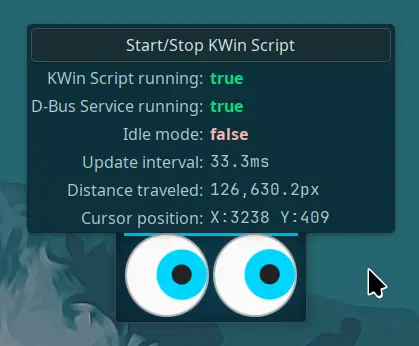
Así que espero que le deis la bienvenida a Cursor Eyes, un plasmoide de Luis Bocanegra que nos permite tener unos ojos en nuestro escritorio que sigue el movimiento del ratón, con lo que lo tenemos localizado en cualquier momento con un simple golpe de vista.
Este plasmoide ya estuvo de vuelta en el 2008 cuando lo anuncié, en una mísera entrada de dos párrafos, su regreso en KDE 4.2 y, en mi opinión, tiene su utilidad ya que no siempre es sencillo localizar el puntero del ratón, sin olvidar que es una ayuda visual para determinadas personas.
Según dice su creador está inspirado en xeyes,geyes,xfce4-eyes y derivados. Entre sus características principales destacan:
- Círculos QML con colores personalizables.
- Estilos de otros complementos populares de Rolling Eyes.
- Imágenes personalizadas.
- Totalmente personalizable, desde los tamaños hasta la cantidad de ojos y el espacio entre ellos.
- Compatibilidad con paneles verticales.
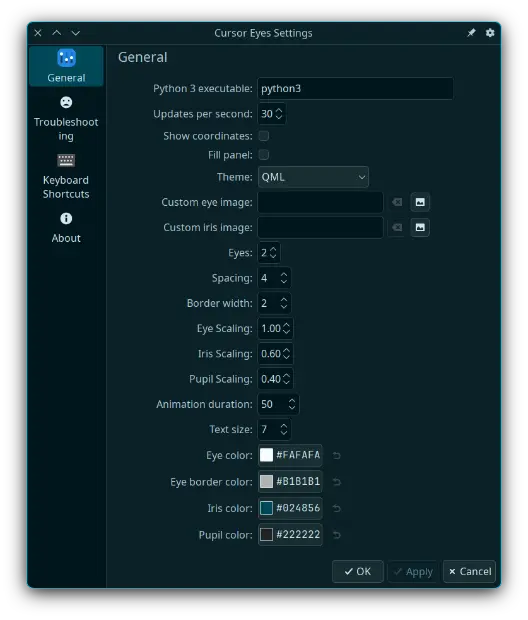
Las opciones de configuración son amplias, como podemos ver en la imagen inferior:
Y como siempre digo, si os gusta el plasmoide podéis «pagarlo» de muchas formas en la página de KDE Store, que estoy seguro que el desarrollador lo agradecerá: puntúale positivamente, hazle un comentario en la página o realiza una donación. Ayudar al desarrollo del Software Libre también se hace simplemente dando las gracias, ayuda mucho más de lo que os podéis imaginar, recordad la campaña I love Free Software Day de la Free Software Foundation donde se nos recordaba esta forma tan sencilla de colaborar con el gran proyecto del Software Libre y que en el blog dedicamos un artículo.
Más información: KDE Store
¿Qué son los plasmoides?
Para los no iniciados en el blog, quizás la palabra plasmoide le suene un poco rara pero no es mas que el nombre que reciben los widgets para el escritorio Plasma de KDE.
En otras palabras, los plasmoides no son más que pequeñas aplicaciones que puestas sobre el escritorio o sobre una de las barras de tareas del mismo aumentan las funcionalidades del mismo o simplemente lo decoran.
La entrada Cursor Eyes, widget visual – Plasmoides para Plasma 6 (21) se publicó primero en KDE Blog.
Un primer vistazo a KDE Linux la distro oficial de #KDE
Veamos el proceso de instalación y echemos un primer vistazo a la nueva distribución inmutable oficial de la comunidad KDE

Hace unos días compartía en el blog la noticia sobre la publicación de la versión Alfa de KDE Linux, la nueva distribución de GNU/Linux oficial de la comunidad KDE.
Pero vale más una imagen que mil palabras. Así que aunque mis mil palabras creo que son válidas para leer las novedades de este nuevo proyecto, nada como ver ese nuevo proyecto en acción en un vídeo.
Y para compartir por aquí cómo se ve esa nueva distro inmutable oficial de KDE, me permito compartir el vídeo que ha grabado Ernesto Acosta para su canal de YouTube System Inside.
En el vídeo en cuestión, Ernesto instala en una máquina virtual con Qemu la imagen de la nueva KDE Linux y podremos ver cómo es el proceso y el resultado final, que para ser una Alfa tiene muy buena pinta.
Ernesto comparte sus opiniones en su vídeo, recalcando que aunque las inmutables y los gestores de paquetes Flatpack, como Discover, no casan con su filosofía de GNU/Linux (tampoco con la mía, aunque en mi caso más por desconocimiento que por una opinión fundada en la experiencia) sí reconoce que puede ser una muy buena opción la escogida por la comunidad de KDE.
En el vídeo de Ernesto, también vemos cómo actualizar el sistema y un pequeño repaso a las novedades que contiene frente a la versión de Plasma en Arch que utiliza Ernesto en su equipo.
Me pareció un buen vídeo, con buena calidad de vídeo y audio y realizado por alguien con suficientes tablas en esto de GNU/Linux como para escuchar su opinión. Muchas gracias por esa revisión.
Aquí tenéis el vídeo de Ernesto Acosta para su canal System Inside (ya sabéis, dadle a me gusta y esas cosas).

Fixing Firmware Update Issues on Framework Laptop 13
Quinta actualización de Plasma 6.4
Me alegra compartir con todos vosotros la quinta actualización de Plasma 6.4, iniciando así una serie de revisión de software que le dotará de más estabilidad, mejores traducción y resolución de errores. Estas actualizaciones son 100% recomendables y casi obligatorias para cualquier usuario ya que lo único que hacen es mejorar la versión sin comprometer sus funcionalidades.
Quinta actualización de Plasma 6.4
No existe Software creado por la humanidad que no contenga errores. Es un hecho incontestable y cuya única solución son las actualizaciones. Es por ello que en el ciclo de desarrollo del software creado por la Comunidad KDE se incluye siempre las fechas de las mismas siguiendo una especie de serie de Fibonacci.
La Comunidad KDE ha publicado la quinta actualización de Plasma 6.4, una versión que viene a subsanar los errores más graves de esta nueva versión del escritorio
Así que me congratula en presentar que hoy martes 9 de septiembre de 2025, casi dos meses después de liberar el código de Plasma 6.4 la Comunidad KDE presenta la quinta actualización de errores.

Más información: KDE
Las novedades generales de Plasma 6.4
Aprovecho para realizar un listado de las novedades generales de Plasma 6.4:
- Mejoras en el widget Bluetooth: Identifica más tipos de dispositivos y muestra nombres reales durante el emparejamiento.
- Coherencia visual: Los widgets de Diccionario y Navegador Web ahora usan iconos simbólicos para un aspecto más uniforme.
- Navegación mejorada por teclado: Optimización de la navegación y selección mediante teclado en menús y widgets.
- Modernización de KMenuEdit: Interfaz renovada y simplificada para editar el menú de aplicaciones.
- Mejoras en accesibilidad: El widget Calculadora anuncia resultados a lectores de pantalla y se mejora la navegación accesible.
- Gestión avanzada de paneles y monitores: Mejoras en la disposición y comportamiento de pantallas y paneles.
- Mejoras de rendimiento: Optimización de la suavidad del cursor y reducción del uso innecesario de CPU en el Monitor del Sistema.
- Mejoras en el widget Fifteen Puzzle: Se han realizado ajustes funcionales y visuales en este widget de juego clásico, ofreciendo una experiencia más fluida y atractiva.
- Actualización de Discover: El centro de software ahora muestra información más clara sobre el estado de las actualizaciones y mejora la gestión de aplicaciones Flatpak y Snap.
- Nuevas opciones en la configuración del sistema: Se han añadido controles más detallados para la personalización de temas y efectos visuales, facilitando la adaptación del entorno a las preferencias del usuario.
- Notificaciones mejoradas: El sistema de notificaciones es ahora más fiable y permite una mejor gestión de mensajes persistentes y temporales.
- Soporte ampliado para pantallas táctiles: Plasma 6.4 mejora la respuesta y precisión en dispositivos con pantalla táctil, optimizando gestos y controles táctiles.
- Optimización de Wayland: Se han corregido errores y mejorado la estabilidad y el rendimiento bajo el servidor gráfico Wayland, acercándolo a la paridad con X11.
- Mejoras en la gestión de energía: Nuevas opciones y mayor eficiencia en la gestión del consumo energético, especialmente en portátiles, para prolongar la autonomía y reducir el uso de recursos.
La entrada Quinta actualización de Plasma 6.4 se publicó primero en KDE Blog.
Project Halfway there with Git Workflow Adoption
Leap 16 now accepts contributions exclusively via the new git workflow. This shift reflects a broader trend: many development projects in the Open Build Service have already adopted Git, and new ones are being onboarded daily.
Tumbleweed has not yet switched to the new Git workflow. The openSUSE release team is evaluating the new staging to ensure it can scale effectively as we need to make sure that pre-intergration acceptance testing remains effective to handle up to 1,500 submissions a week.
Leap 16.0 is near the end of its development. Since there are few submissions expected per week until its release, simplified pre-integration workflow is less of a concern as that of Tumbleweed’s weekly submissions. We wanted to avoid having two different systems for managing sources in Leap 16 and to ensure git adoption in its first release.
The transition to Git should be completed by the end of the year. Once scaling concerns are addressed, Tumbleweed is expected to fully adopt Git as well. Developers can reach out to the factory mailing list if they have any questions.
This blog is meant to help contributors understand the shift to a Git-based workflow in both Leap and Tumbleweed, so they can align their packaging practices and people are encouraged to read the Documentation on the Git Packaging Workflow.